
If you've started shopping for a virtual data room, you've probably noticed that most articles either oversell features or write like they're describing enterprise software to a Fortune 500 procurement team. This one doesn't. It covers what a virtual data room actually is, what it looks like in practice, real examples of when you'd use one, the top 10 providers with honest descriptions, and a breakdown of free options.
In this guide
- What is a virtual data room?
- Virtual data room use cases
- Free virtual data room examples
- What to look for in a VDR
- Top 10 virtual data room providers
- Quick comparison table
- FAQ
What is a virtual data room?
A virtual data room (VDR) is a secure online space where you store and share confidential documents with a specific group of people - investors, lawyers, buyers, or auditors. Think of it as a private folder, but with controls that a shared Google Drive link can never give you.
With a VDR, you decide who can see which files. You can require someone to sign an NDA before they even open the door. You can see exactly who opened what, which pages they read, how long they spent on each section, and when they came back. You can watermark every document with the viewer's name so there's no confusion if something leaks. And when the deal is done or falls through, you can revoke access instantly.
Google Drive and Dropbox don't do any of that. They're for collaboration. A VDR is for controlled disclosure under high stakes.

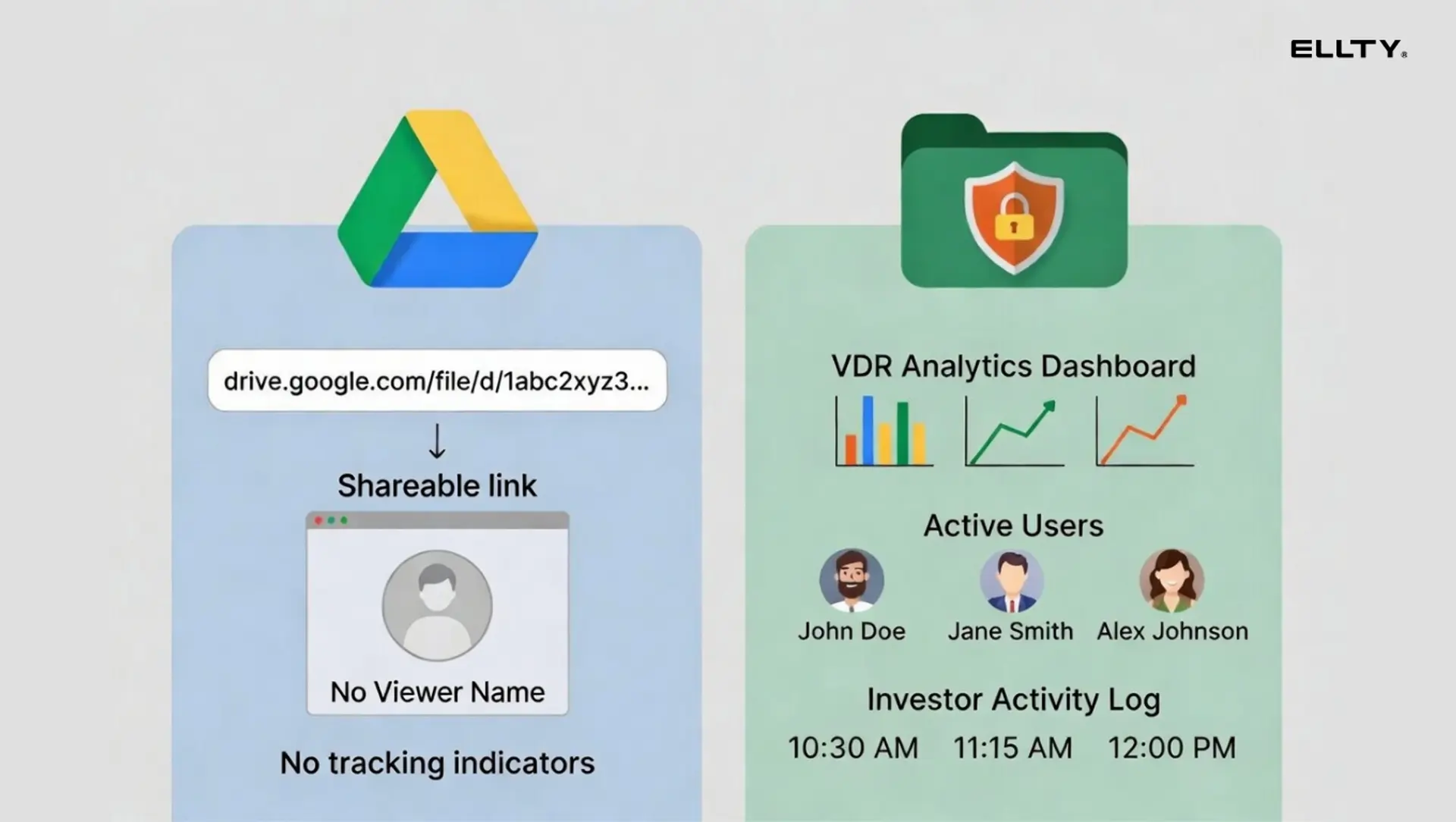
Quick definition: A virtual data room is a secure online repository for sharing sensitive documents during transactions - fundraising, M&A, legal due diligence, audits, or IPO prep. It adds access controls, audit trails, analytics, watermarking, and NDA gating on top of basic file storage.
How did we get here? A quick history
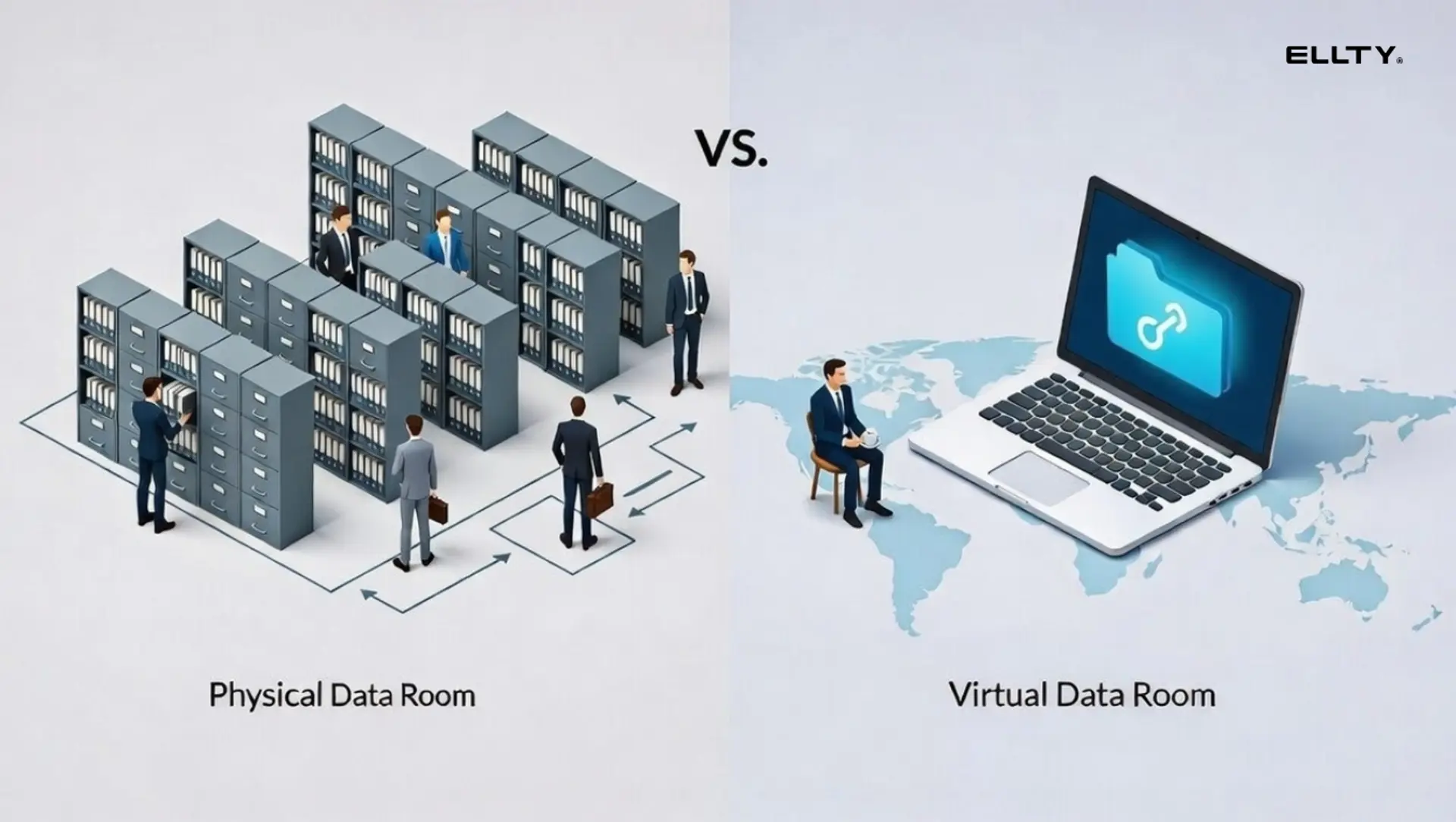
Before digital data rooms existed, due diligence happened in literal rooms. A seller would rent an office, print thousands of documents, and fly potential buyers in to review them under supervision. This was expensive, slow, and only practical for very large deals. Digital VDRs arrived in the late 1990s and early 2000s - companies like Intralinks were among the first to offer secure online alternatives. Over the next two decades, the market split into two tiers: expensive enterprise platforms for billion-dollar M&A deals, and simpler, more affordable tools for startup use cases and smaller transactions. Today you can set up a data room in under an hour without a sales call, which is a very different world from where this started.
Virtual data room use cases
Example 1 - startup fundraising data room
You're a Series A founder. You've had some good early conversations with a few VC firms and one of them wants to do a deeper look before issuing a term sheet. You set up a data room with the following folder structure:
- Company overview - exec summary, pitch deck, one-pager
- Financials - P&L, balance sheet, cash flow projections, cap table
- Legal - incorporation docs, shareholder agreements, IP assignments
- Product - roadmap, current metrics, technical architecture (limited access)
- Team - org chart, bios, key employment agreements
- Market - competitive analysis, market sizing, customer case studies
You set granular permissions so the partner gets access to everything, their associates get access to financials and legal but not the technical architecture, and outside legal counsel gets only the legal folder. You turn on NDA gating so nobody enters without accepting the agreement. Dynamic watermarking applies automatically to every document. You share a trackable link with each party separately so you can see exactly who is engaging and how much time they're spending on your financials versus your product section. You use that data to guide your follow-up calls.
Example 2 - M&A due diligence data room
You're selling your company or at least exploring it. An acquirer's team (partners, lawyers, accountants) needs access to everything that matters. You organize the room around the buyer's expected diligence scope:
- Corporate structure - entity docs, board resolutions, minute books
- Financial statements - audited accounts, management accounts, tax filings
- Contracts - customer agreements, vendor contracts, leases
- Intellectual property - patents, trademarks, software licenses
- HR - employment contracts, option pool, benefits
- Regulatory - licenses, compliance records, any ongoing disputes
- Data and privacy - privacy policy, data processing agreements, breach history
In an M&A context, you're often dealing with 200 to 500+ documents. You'll want audit logs showing every access event in case the deal gets litigious. You'll also want a Q&A module where buyers can ask questions inside the data room rather than via email chains. Enterprise VDR platforms like Intralinks or Datasite are built specifically for this scale.
Example 3 - pitch deck sharing with analytics
This is a lighter use case. You're still in early conversations, nothing formal yet. You just want to send your deck to 10 viewers and know who's actually reading it. You don't need a full data room for this. You need a trackable link that shows you page-level analytics - who viewed it, which slides they spent the most time on, when they came back for a second look, and whether they forwarded it. This is where a tool like Ellty free tier is the right fit. You upload the deck, create a trackable link, and share it. You get real-time notifications and full view analytics. No per-user fees, no setup complexity.
Example 4 - IPO preparation
A company preparing for an IPO uses a VDR to share documents with underwriters, legal teams, and auditors across multiple geographies. The document volume is high, access controls need to be precise, and the audit trail needs to hold up to regulatory scrutiny. This is the most demanding VDR use case, and it's where enterprise platforms earn their higher price tags.
Example 5 - board and investor reporting
Some teams use lightweight data rooms as an ongoing investor communication layer. Board materials, quarterly updates, cap table snapshots - all in one place, with controlled access per person. You can update documents in real time without resending emails with attachments. Investors always see the latest version. You see which materials they've actually read before the board meeting.
Example 6 - real estate deal room
You're a commercial property developer closing a deal on a large asset such as an office building, a retail complex, or a multi-family residential block. The buyer, their lender, legal teams on both sides, and property surveyors all need to review documents before the deal closes.
You organize the room around what every party needs to check:
- Title and ownership - title deeds, land registry documents, ownership history
- Financials - rental income history, operating costs, outstanding mortgages
- Tenancy - current lease agreements, rent rolls, tenant correspondence
- Planning and permits - planning approvals, building certificates, zoning documents
- Surveys and inspections - structural reports, environmental assessments, floor plans
- Legal - purchase agreement drafts, warranties, indemnities
Real estate deals often stall because documents are scattered across email threads and shared drives. A VDR keeps everything in one place with a clear audit trail. You can see exactly when the buyer's solicitor opened the title documents, which matters when you're trying to keep the deal on a tight timeline. You set expiry dates on links so access automatically cuts off once the deal closes or falls through.
Example 7 - legal dispute and litigation support
Your company is involved in a lawsuit or trying to avoid one. Outside counsel needs access to a large volume of internal documents: contracts, emails, financial records, board minutes. You can't just forward everything over email. The documents are sensitive, access needs to be logged, and you may need to prove later exactly who saw what and when.
You set up a room structured around the case:
- Core documents - the contracts or agreements at the center of the dispute
- Correspondence - relevant email threads, letters, notices
- Financial records - invoices, payment history, any disputed transactions
- Internal records - board minutes, internal memos, policy documents
- Expert reports - any third-party assessments or valuations
- Filings - court documents, responses, motions
The audit log is the most important feature here. Every access event is timestamped and recorded. If opposing counsel later questions whether certain documents were shared properly, you have a clean, verifiable record. You can also restrict what individual parties can do like view only, no downloading, or no printing, which matters a lot when documents are under legal privilege.


Free virtual data room examples
Yes, free options exist. But it depends on what you call "free" and what you need it to do.
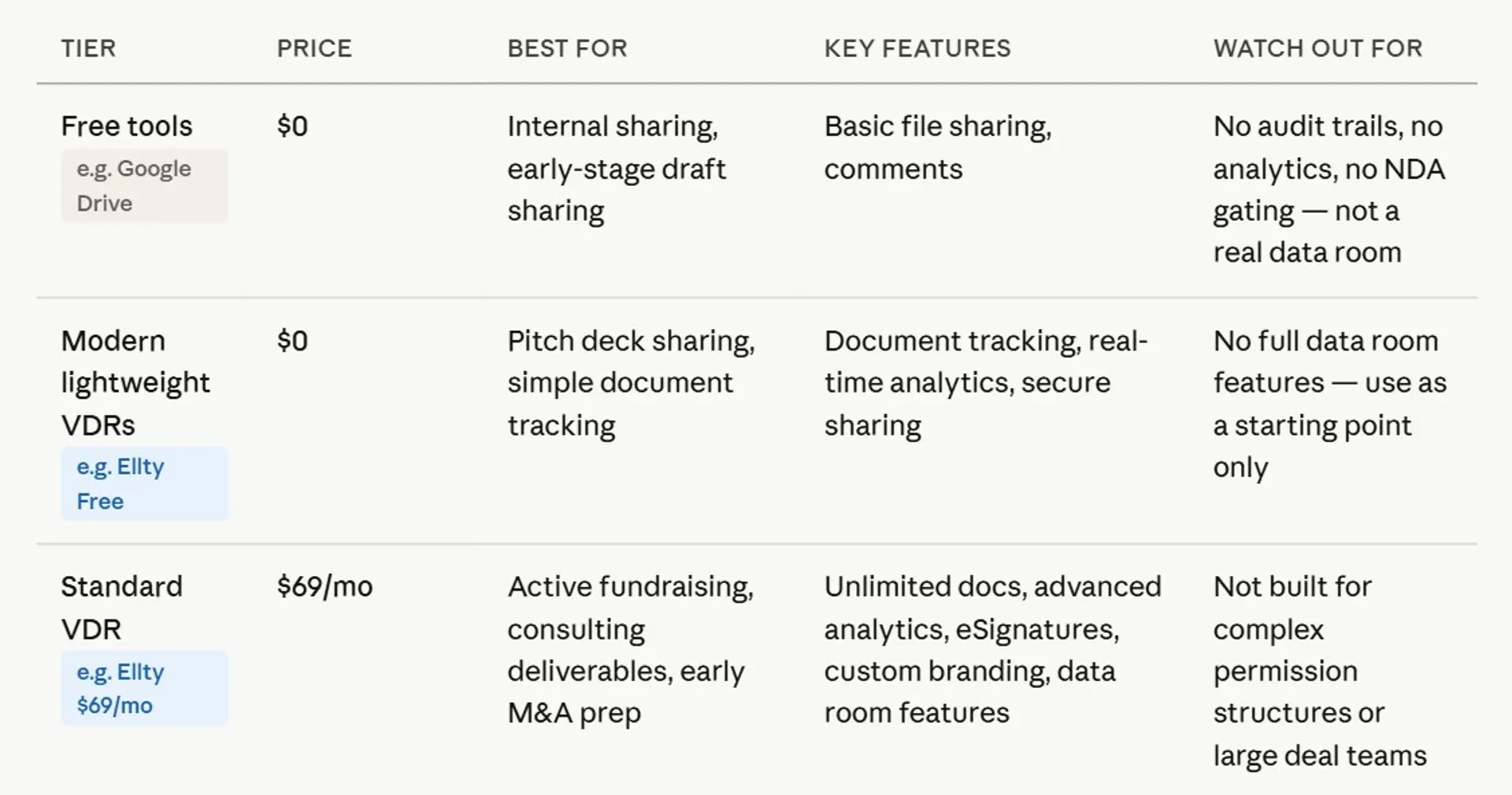
Most free tiers give you basic secure sharing and document analytics. They don't include NDA gating, granular permissions, watermarking, or audit logs. Those features cost money regardless of who you're buying from. That's not a criticism - it's just honest.
Here's what free looks like in practice across different tools:
Ellty free plan

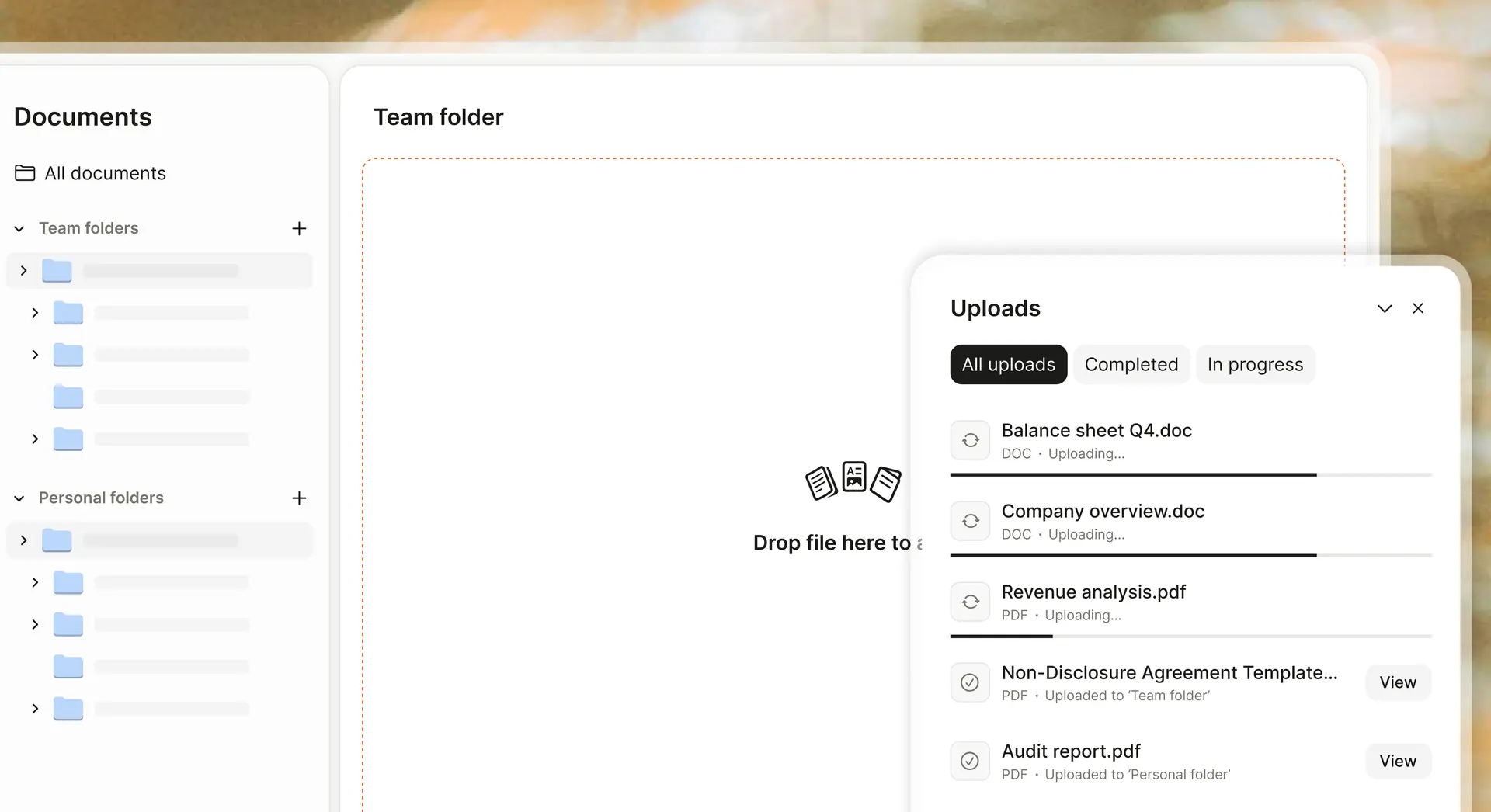
Document tracking, real-time analytics, and secure sharing - permanently free. This covers the pitch deck distribution use case well. You upload a document, create a trackable link, and see who viewed it, when, and for how long, broken down by page. You won't get NDA gating or granular folder permissions on the free tier. Those are on the $149/month Data Room plan. But for early-stage teams just getting into lighter use cases, the free tier does the job.
Ansarada free-until-live model
Ansarada lets you build and prepare a data room for free, and you only start paying when you officially "launch" it, meaning when you open it to external parties. This is useful if you want to organize your documents in advance without paying until you're actually in an active process.
Google Drive as a makeshift free VDR
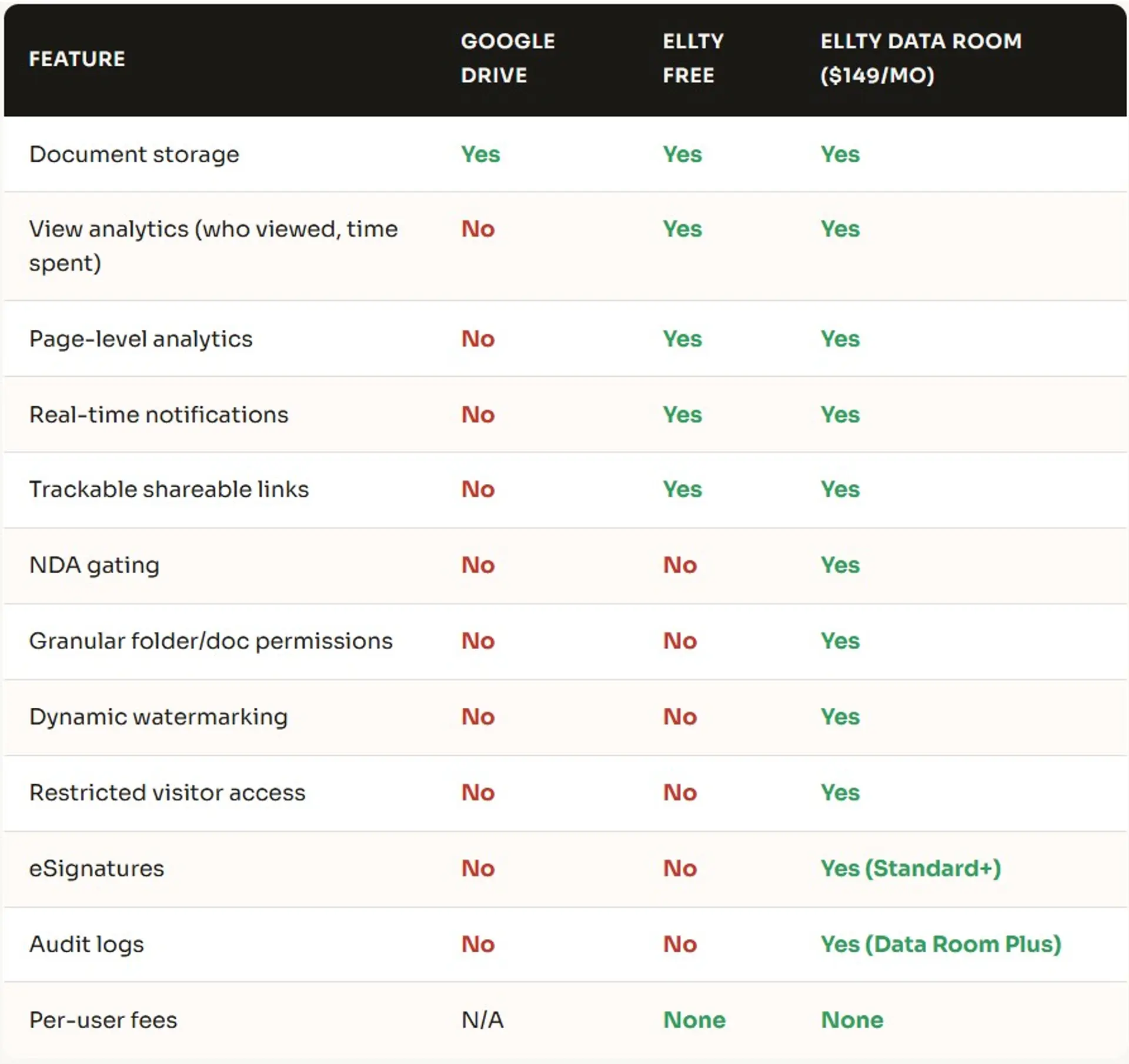
Some businesses use Google Drive or Dropbox for this and call it a data room. It's free, it works for basic file organization, and everyone knows how to use it. The honest downside: no view analytics, no NDA gating, no watermarking, no way to revoke a link after someone's already copied the files, and no per-document permissions. If your process is casual, sharing a deck with a friend who's an angel, Google Drive is fine. If you're in a formal process with a VC or a strategic buyer, it's not a serious tool for the job.

What to look for in a virtual data room
Not every VDR is built for the same use case. Before you pick one, you need to be honest about what your actual process requires. Here's what actually matters.
NDA gating
A viewer is required to accept a non-disclosure agreement before they can access any documents in the room. It's legally binding and timestamped. If you're sharing anything sensitive with an external party like financials, contracts, or customer data, this is non-negotiable. Most free tiers don't include it. It's on Ellty $149/month Data Room plan and above.
Granular permissions
The ability to control access at the document or folder level, not just the room level. Visitor A gets the full room. Visitor B's lawyer only gets the legal folder. You set this per person or per group. Without granular permissions, you're either oversharing or managing multiple rooms - both of which are annoying.
Document analytics
Who viewed which document, which pages they spent the most time on, and when they came back. Page-level analytics are particularly useful during serious deals - if a visitor spent 18 minutes on your financial projections and skipped your market section, you know what to address in the next call. Real-time notifications tell you when someone enters the room so you can follow up at the right moment.
Dynamic watermarking
Every document gets automatically watermarked with the viewer's name, email, and timestamp. If a document leaks, you know who had it. This is both a deterrent and a practical attribution tool. Standard on Ellty Data Room plan.
Audit logs
A complete, tamper-resistant record of every action inside the room - who accessed what, when, and what they did with it. Required for M&A and any process where compliance or legal accountability matters. On Ellty this is included in the Data Room Plus plan at $349/month.
Revoke access
When a deal falls through, or when you're done with a particular recipient, you need to be able to cut off access immediately. In a good VDR, this is one click. With Google Drive, revoking folder access doesn't undo anything they might have downloaded or screenshot already.
Pricing transparency
Enterprise platforms like Intralinks, Datasite and Ansarada don't publish pricing, you have to go through a sales process to get a number. That's a meaningful friction point if you're a business owner who just wants to know what you're paying before you get on a call. Look for tools that publish their pricing clearly and don't charge per user. Per-user pricing gets expensive fast, five visitors plus their lawyers and associates can easily add up to 15-20 users.
Top 10 virtual data room providers
There are dozens of VDR providers. Most lists either rank them randomly or have obvious commercial bias. This one groups them by who they're actually built for and describes what you get without the marketing language.
Ellty
Best for: anyone who needs to share sensitive documents in a controlled, trackable way

Ellty is a secure document sharing, pitch deck analytics, and virtual data room platform built for all kinds of businesses. It's not trying to compete with Intralinks on enterprise M&A - it's trying to help companies share documents securely, track viewer engagement, and move faster on deals without a sales call or a month of setup. You upload your documents, organize them into a data room, set permissions, enable NDA gating, and share a trackable link - all in the same day.
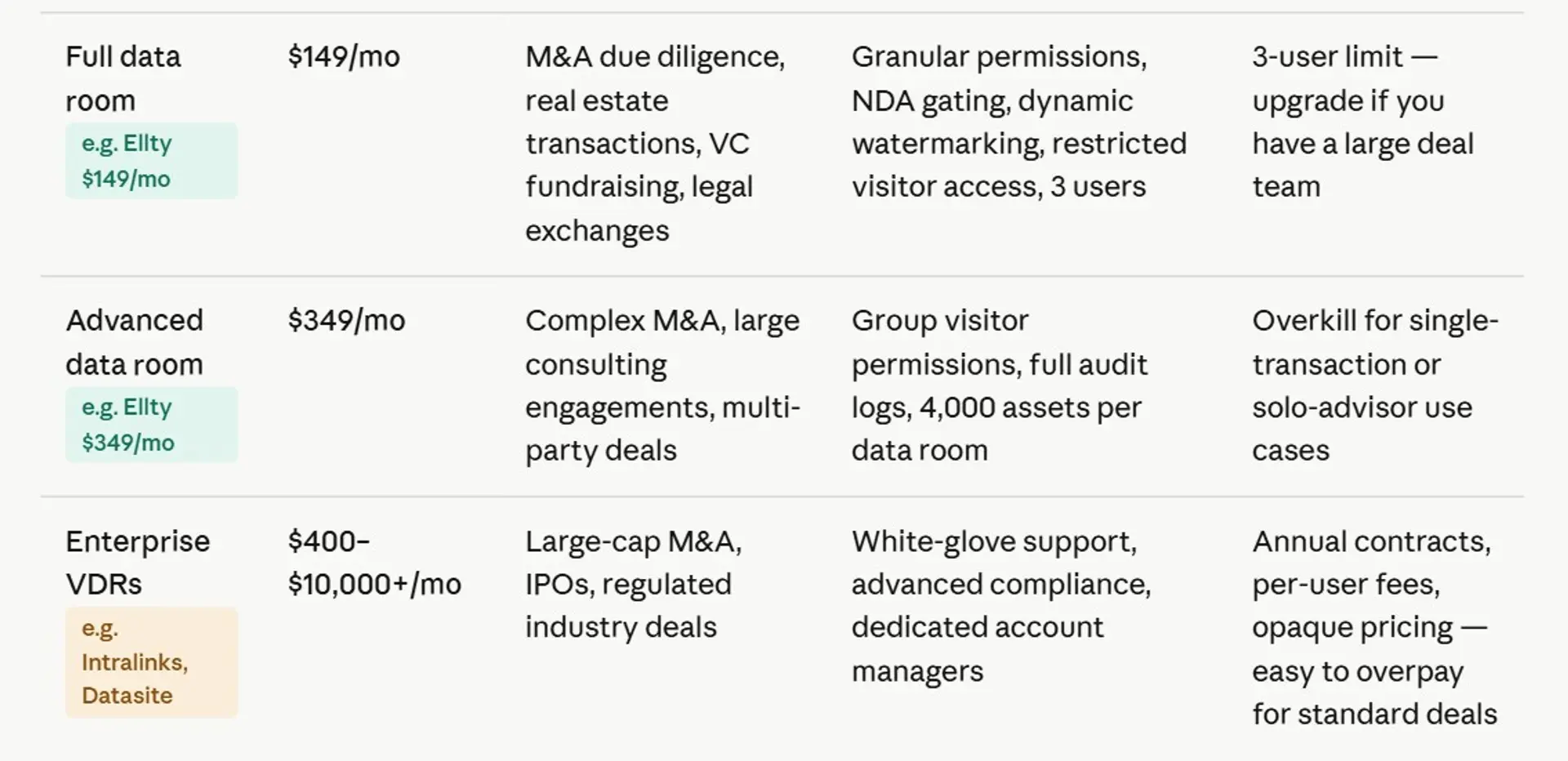
The free plan covers document tracking, real-time analytics, and secure sharing - enough for early-stage pitch deck distribution. The Standard plan at $69/month adds unlimited documents, advanced analytics, eSignatures, custom branding, and data room features. The Data Room plan at $149/month is built for formal due diligence - granular permissions, NDA gating, dynamic watermarking, and restricted visitor access with 3 users included. Data Room Plus at $349/month adds group visitor permissions, audit logs, and up to 4,000 assets per room. No per-user fees at any tier, which keeps the math simple when five VC firms each send two to four people.
Where Ellty stands out against legacy platforms is the pricing model. There are no per-user charges, no per-page fees, and no custom quotes that take weeks to negotiate. You pick a plan, get set up quickly, and know exactly what you're paying — whether you're sharing documents with 3 people or 30. For anyone who needs a professional data room without an enterprise contract, Ellty is the place to start.
iDeals
Best for: mid-market M&A and secure multi-party due diligence


iDeals is one of the most widely recommended virtual data rooms for mid-market transactions. It has a cleaner interface than the legacy enterprise platforms and is often cited for strong customer support. Features include granular permissions down to the user and document level, full-text search with OCR, drag-and-drop bulk upload, watermarking, and audit trail reporting. They offer a free trial and publish entry-level pricing - though Business and Enterprise tiers require a sales conversation. Their entry plan starts around $460/month, which prices them out of the early-stage startup market but makes them a solid option for Series B-plus processes and acquisition due diligence where you need multi-party workflows and enterprise security. Some users have reported significant price increases at renewal time, so it's worth clarifying terms before signing up for an annual contract.
Datasite
Best for: large-scale M&A, investment banking, enterprise deals

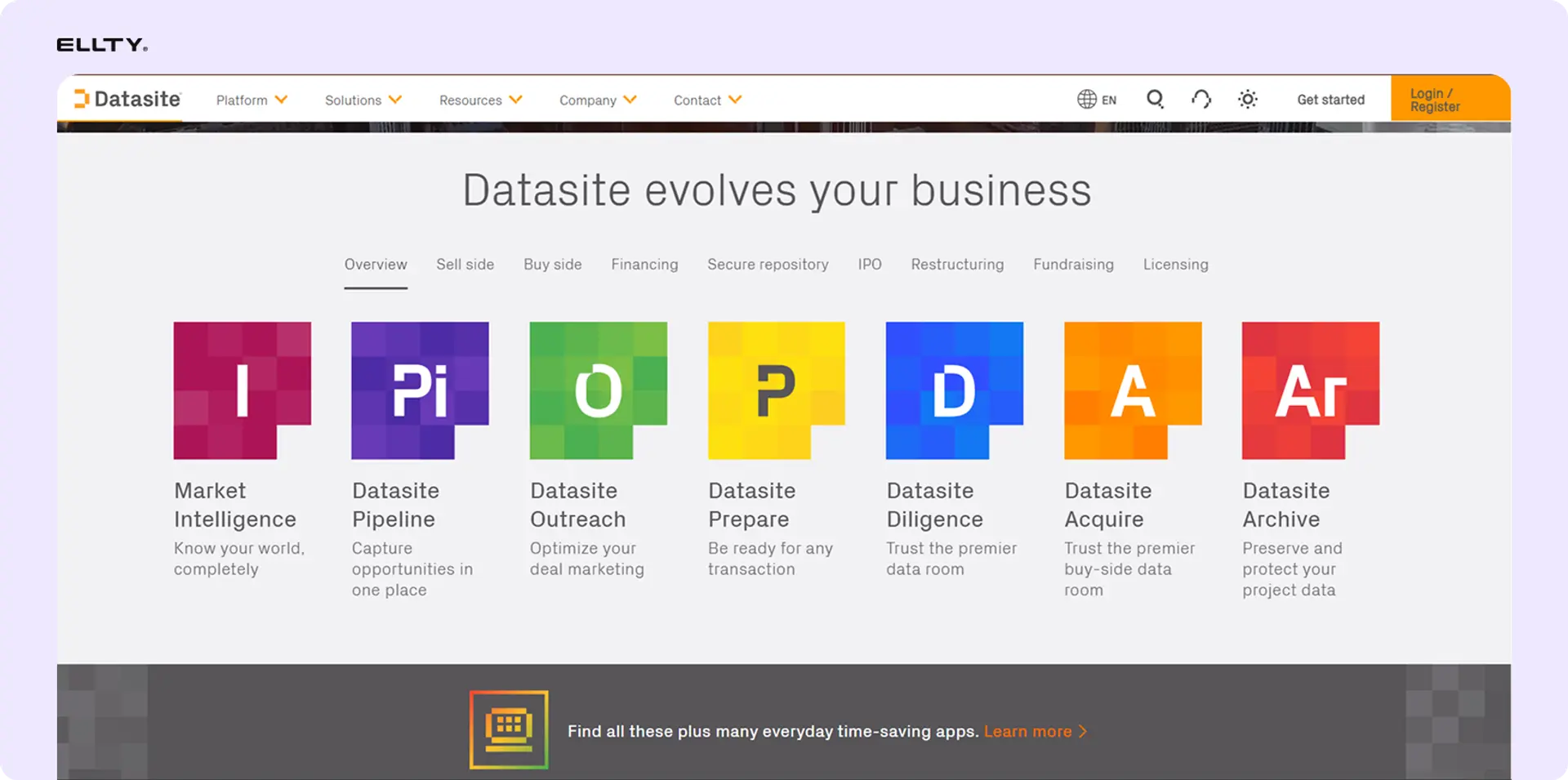
Datasite (formerly Merrill Corporation) is the platform you'll hear about when someone is running a serious institutional M&A process. Goldman Sachs, Blackstone, and Johnson & Johnson use it. The feature set is deep - AI-assisted redaction, automated document categorization, full-text multilingual search, structured Q&A workflows, visual analytics dashboards, ISO 27001 and SOC 2 compliance. It's built for processes where you're managing hundreds of bidders, thousands of documents, and multiple concurrent workstreams. Pricing is not published and requires going through their sales team - typical costs can reach $7,000 for 10,000 pages and well above that for complex deals.
Intralinks
Best for: global cross-border M&A, capital markets, compliance-heavy deals

Intralinks is one of the original virtual data room providers, established in the late 1990s. It's particularly strong in global banking, dealmaking, and capital markets - Credit Suisse, Stanley Black & Decker, and other large multinationals use it. The platform includes AI-powered document redaction of sensitive PII, detailed activity tracking, advanced Q&A workflows, dynamic indexing, ISO 27701 certification for data privacy, and 24/7 multilingual support. Some users note the interface is less intuitive than newer platforms. Pricing is quote-based - around $7,500 for 10,000 pages as a reference point - and typically takes a week or more to get access. Enterprise platform, enterprise pricing, enterprise process.
Firmex
Best for: mid-market corporate M&A, legal, government, repeat transactions


Firmex is a reliable, compliance-focused VDR used across legal, government, corporate, and investment banking contexts. Companies like Canada Post and Bruce Power use it. It offers six levels of granular access controls, built-in redaction, watermarking, single sign-on, and a Q&A workflow for managing large volumes of due diligence questions. It handles complex deals well and has a strong track record in industries like mining and energy. The tradeoff is that it doesn't publish pricing - you need to request a quote - and some users report that the feature set doesn't match the cost for shorter-term or smaller transactions. There's a two-week free trial. ISO 27001, SOC 2, and HIPAA compliant for regulated industries.
Ansarada
Best for: M&A, capital raises, AI-powered document management


Ansarada is a deal-focused VDR with AI-powered features that automate document organization and reporting. It splits users into buy-side and sell-side categories, which creates a more structured workflow for formal M&A processes. Features include four levels of granular access controls, built-in redaction, remote wipe, Google Drive and Dropbox integration, AI document sorting, and a dedicated project management tool called Deal Workflow. The free-until-live pricing model is genuinely useful - you can build and prepare your room without paying until you're ready to go live. Paid plans require a quote. Worth considering for founders who want AI-assisted document organization and expect to run a formal process.
SecureDocs
Best for: simple, flat-rate pricing, quick setup for smaller deals

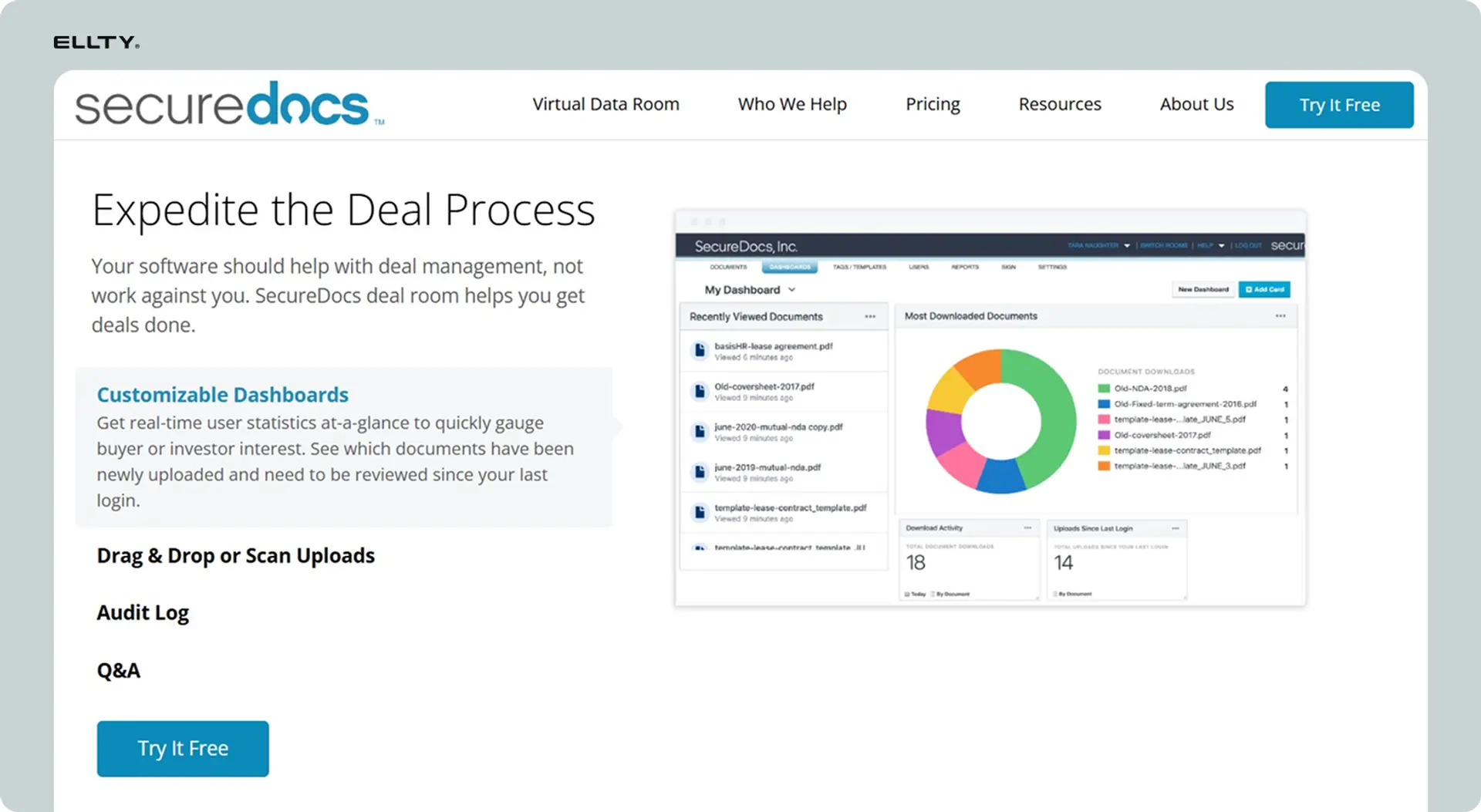
SecureDocs is owned by Onit and is often mentioned as one of the simpler enterprise-adjacent VDR options. Setup takes roughly 10 minutes according to their documentation. It offers customizable dashboards, advanced search, audit log reporting, a Q&A workflow, watermarking, four levels of granular permissions, multifactor authentication, and auto time-out for inactive sessions. The flat-rate pricing - around $250/month - is one of the clearer pricing structures in the enterprise VDR category. Used for M&A, fundraising, strategic partnerships, and IPOs. It doesn't have the AI features or workflow depth of Datasite, but it works well for teams that want enterprise-level security without enterprise-level complexity.
Digify
Best for: Series A/B fundraising, simple M&A, document security


Digify launched in 2013 as a document security platform and later expanded into virtual data rooms. It works well for teams in the Series A to Series B range who need structured document sharing with a defined group of reviewers. Features include granular permissions, activity tracking, watermarking, NDA agreements, and download restrictions. The per-user pricing model becomes a disadvantage when you're dealing with multiple investor teams - costs escalate as you add users. It's less suited for very large document sets or complex enterprise M&A with heavy permission requirements. The interface is clean and the setup is relatively fast. A reasonable option for mid-stage fundraising if you don't mind the per-user cost structure.
CapLinked
Best for: asset sales, real estate, price-sensitive teams
CapLinked is a secure electronic data room used primarily for asset sales, real estate transactions, and fundraising. It's often cited as a more affordable option compared to legacy enterprise platforms, with tiered pricing designed for smaller deal teams. Core features cover document sharing, permission controls, activity tracking, and watermarking. It doesn't have the depth of Intralinks or Datasite, but for straightforward transactions that don't need enterprise workflow tools, it covers the basics without requiring a sales conversation to get started. Worth comparing if you're price-sensitive and your deal is relatively contained in scope.
DealRoom
Best for: M&A project management, multi-workstream deal coordination


DealRoom sits at the intersection of virtual data room and M&A project management. It's built for deal teams that need to coordinate multiple workstreams - not just store and share documents, but manage tasks, track deal progress, and run due diligence checklists. It's used by private equity firms and corporate development teams that run multiple concurrent deals and need portfolio-level visibility. The data room functionality is solid and includes standard security and permissions features. If your main need is document storage and analytics, DealRoom adds more complexity than you need. If you're a PE firm managing several deals simultaneously, the project management layer is genuinely useful.


Quick comparison: top VDR providers at a glance


FAQ
What is a virtual data room used for?
A virtual data room is used to securely share confidential documents with external parties during high-stakes processes. The most common use cases are startup fundraising (sharing financials and decks with investors), M&A due diligence (sharing company records with buyers), IPO preparation, legal due diligence, and ongoing investor reporting. The defining features are access controls, document analytics, NDA gating, watermarking, and audit logs - none of which you get with regular file-sharing tools.
What is the best virtual data room for startups?
For most startup founders at seed to Series C, Ellty covers the core needs - NDA gating, granular permissions, dynamic watermarking, real-time analytics, and trackable links - without per-user fees or a required sales call. The Data Room plan starts at $149/month. For Series C and above, or for companies running a formal M&A process, iDeals or SecureDocs are worth evaluating. Enterprise platforms like Datasite or Intralinks are generally overkill for early-stage fundraising and priced accordingly.
Is there a free virtual data room?
Yes. Ellty free plan includes document tracking, real-time analytics, and secure sharing - enough for early-stage pitch deck distribution. Ansarada offers a free-until-live model where you build your room for free and pay only when you open it to external reviewers. Most free tiers don't include NDA gating, granular permissions, or watermarking. Those features are on paid tiers. Google Drive is technically free and works for basic file sharing, but it doesn't offer view analytics, NDA gating, watermarking, or meaningful access controls.
How much does a virtual data room cost?
It ranges from free to over $200,000 per year, depending on who the platform is built for. For modern tools with published pricing, Ellty starts at $0 free, $69/month Standard, $149/month Data Room, and $349/month Data Room Plus - all with no per-user fees. Mid-market platforms like iDeals start around $460/month. Enterprise platforms like Datasite and Intralinks charge per page volume or custom rates that can reach $7,000+ for 10,000 pages. If a provider doesn't publish pricing, expect it to be higher than you'd like.
How long does it take to set up a virtual data room?
With modern platforms like Ellty, you can set up a functional data room in a few hours - upload documents, organize folders, configure permissions, enable NDA gating, and share a trackable link the same day. With enterprise platforms like Datasite or Intralinks, getting access alone can take days of back-and-forth with a sales team. Setup then takes longer because the configuration is more complex. For a formal deal or due diligence process, give yourself a week to build a clean, well-organized room from scratch.
What is the difference between a virtual data room and Google Drive?
The functional difference comes down to control and visibility. Google Drive lets you share folders and set basic view or edit permissions. That's it. A virtual data room adds: analytics showing who viewed which document and for how long, NDA gating before anyone can access the room, dynamic watermarking on every document with viewer details, granular permissions at the folder and document level, audit logs of every action in the room, and the ability to revoke access instantly. For casual collaboration on internal documents, Google Drive is fine. For sharing sensitive documents with external parties in a formal process, the control gap matters.
Which VDR has the best analytics?
For analytics, Ellty provides page-level view data, time-spent-per-section, viewer identity, real-time notifications when someone enters the room, and per-link tracking so you know which viewer is actually engaging and which isn't. For enterprise M&A analytics - bidder scoring, deal-level dashboards, multi-party engagement tracking - Ansarada's AI-powered analytics and Datasite's automated dashboards are more sophisticated. The right choice depends on what you're using analytics for. If you want to know which slides a visitor is spending time on, Ellty page-level analytics cover it well.
Do I need a virtual data room for a seed round?
Not necessarily, but you probably need something better than a Google Drive link. For very early conversations before formal due diligence starts, trackable pitch deck sharing with analytics is usually enough. You want to know if investors are actually reading your deck, which pages they're spending time on, and whether they're coming back. Ellty free plan covers this. Once an investor asks for a deeper look at financials, legal, cap table, you're in due diligence territory and a proper data room with NDA gating and permissions makes sense.
What security features should a virtual data room have?
The baseline for any serious VDR is: encrypted storage and transit, multi-factor authentication, granular access controls, dynamic watermarking, NDA gating, and the ability to revoke access instantly. For formal due diligence, you also want audit logs and download restrictions. For enterprise processes with regulatory requirements, look for ISO 27001 and SOC 2 compliance certifications, data residency options, and HIPAA compliance where relevant. Most platforms cover the first list. Enterprise certifications are primarily relevant at the Firmex, iDeals, Datasite, and Intralinks level.
Author

Anika Tabassum Nionta is a Content Manager at Ellty, where she writes about secure document sharing, virtual data rooms, M&A, due diligence, fundraising, and sales enablement. With over 6 years of writing experience, she helps professionals understand how to share confidential documents securely, track engagement, and manage deals more effectively. Anika holds both a BA and MA in English from Dhaka University. Outside of work, she enjoys reading, exploring new cafes in Dhaka, and connecting with entrepreneurs and dealmakers in her community.

