
You're sharing confidential documents with someone who matters. A potential buyer, an investor, a client, a counterparty. You send them a link. They open a folder with 47 files dumped in no particular order, half of them named "final_v3_ACTUAL_final."
They never respond.
It's not always about the documents themselves. A disorganized data room signals something bigger that the person on the other side isn't ready, isn't detail-oriented, or isn't taking the process seriously. In a deal context, that impression is hard to recover from.
This guide covers everything: what goes in a data room, how to structure it properly, when different setups make sense, and which tools are actually worth using. Whether you're preparing for a fundraise, an acquisition, a client engagement, or any process where documents need to be shared professionally — this is what you need to know.
No fluff. No generic advice. Let's get into it.
Ready to set up a proper data room? Build your first data room in under 30 minutes.
What we'll cover
- What is a data room
- What documents go in a data room
- How to structure your data room folder
- Data room index template
- Organizing for different scenarios (fundraising, M&A, due diligence)
- How to create a data room in Google Drive
- FAQ
What is a data room?
A data room is a secure, organized place where you store and share important documents with the people who need them - investors, buyers, partners, lawyers, or clients.
Think of it as your complete document hub. Financial records, legal agreements, contracts, property files, reports, cap tables - all in one place, with full control over who sees what.
Historically, data rooms were actual physical rooms where lawyers and bankers reviewed confidential paperwork. Today they're virtual - you share a secure link, set permissions, and track exactly who viewed what and when.

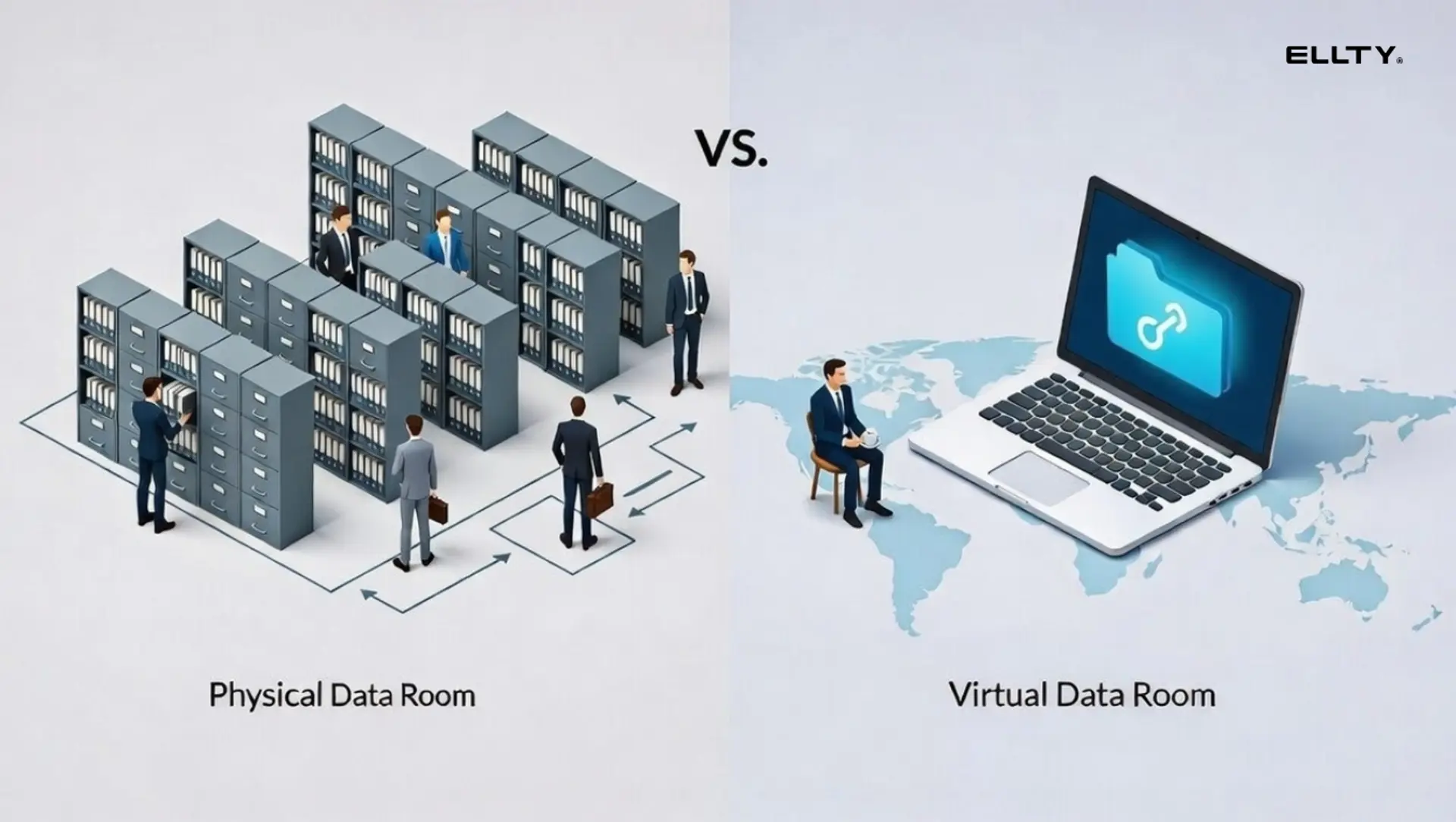
The term gets used loosely across industries. Sometimes it means a full secure platform with NDA gating and watermarking. Sometimes people just use a shared Google Drive folder. But what actually matters is that your documents are organized, access is controlled, and nothing important is missing.
Quick definition: A virtual data room (VDR) is a cloud-based platform built specifically for secure document sharing. Unlike regular cloud storage, it comes with access controls, audit trails, and analytics built right in.
Who needs one?
Data rooms aren't just for startups and VCs. Anyone who shares sensitive documents with outside parties needs one:
- Startups & investors — fundraising rounds from seed to Series B and beyond
- M&A teams — buying, selling, or merging a business
- Consultants & agencies — sharing reports, proposals, and deliverables with clients
- Real estate professionals — due diligence on property deals, leases, and transactions
- Legal & compliance teams — audits, regulatory reviews, and contract management
- Boards & executives — secure document sharing at the leadership level
- Strategic partnerships — any deal that requires financial or legal disclosure
If you're sharing a handful of files with people you trust completely, a Google Drive folder might work. But the moment you need to track access, control permissions, protect sensitive information, or look professional in front of a client or counterparty - you need something purpose-built.
That's exactly what Ellty is made for.
What documents go in a data room?
This is where most people get it wrong. They either share too little and the other side keeps asking for more, or they dump everything in with no structure, and people give up trying to find what they need.
Here's what a complete data room typically looks like, broken down by category. You won't always need everything on this list, it depends on your industry and what the deal requires.
1. Company overview
- Pitch deck or company presentation
- Executive summary or one-pager
- Business description and model overview
- Product or service roadmap
- Press coverage and media mentions
2. Financial documents
- Historical financials (P&L, balance sheet, cash flow) — 2 to 3 years if available
- Revenue breakdown by month or quarter
- Financial projections (3 to 5 year model)
- Current actuals vs. budget
- Cap table, fully diluted (startups)
- Previous funding round details (startups)
- Burn rate and runway (startups)
- Rent rolls and income statements (real estate)
- Deal-level financial summaries (M&A)
3. Legal documents
- Certificate of incorporation and company bylaws
- Shareholder or partnership agreements
- Option pool and equity documentation (startups)
- Convertible notes or SAFEs (startups)
- Board resolutions and meeting minutes
- NDAs with key partners or clients
- Title documents and zoning records (real estate)
- Material contracts and existing liabilities (M&A)
4. Team and people
- Org chart
- Founder or leadership bios
- Key employee contracts and offer letters
- Advisor agreements
- Equity grants and vesting schedules
5. Product, service, or asset overview
- Product demo or walkthrough video
- Technical architecture (software companies)
- IP documentation - patents, trademarks, copyrights
- Security certifications (SOC 2, ISO 27001 if applicable)
- Property inspection reports and surveys (real estate)
- Asset inventory or condition reports (M&A, real estate)
6. Customers and commercial activity
- Customer list (with permission, or anonymized)
- Sample contracts, MSAs, or service agreements
- Key case studies or testimonials
- Sales pipeline overview
- Marketing and go-to-market strategy
7. Market and competitive landscape
- Market size analysis
- Competitive overview
- Industry research or analyst reports
You don't need all of this on day one. A startup raising a seed round will share a much slimmer version - pitch deck, financials, cap table, and legal formation docs. A real estate deal might only need property records, financials, and title documents. An M&A transaction will go deeper across almost every category.
The point isn't to share everything. It's to share the right things, clearly organized, so the other side can do their job without coming back to you every five minutes.
How to structure your data room folder
Folder structure matters more than most people realize. The person on the other side - whether that's an investor, a buyer, or a client - is probably reviewing multiple deals or projects at the same time. If they can't find what they're looking for in under 30 seconds, they'll either ask you for it (annoying for everyone) or just move on.

A clean, logical structure signals that you're organized and serious. A messy one signals the opposite.
Naming conventions that actually help
- Number your folders to force order —
01_Company_Overview,02_Financials,03_Legalso folders appear in the right sequence, not alphabetically - Put dates in file names where it matters —
Financial_Model_Q1_2025.xlsxis clear;financials_final.xlsxtells you nothing - Be specific, not vague —
Pitch_Deck_April_2025.pdfbeatsdeck.pdfevery time - No spaces in file names — use underscores instead. Spaces cause issues with some platforms and just look messy
- Version your files — add
_v1,_v2, or a date so there's never confusion about which version is current
Common mistakes to avoid
- One big flat folder with no subfolders — nobody wants to scroll through 40 files to find one document
- Leaving old versions next to current ones — if you've updated something, archive the old version or delete it. Don't make people guess which is current
- Inconsistent naming across files — pick a convention and stick to it throughout
- Not flagging what's missing — if a document isn't ready yet, add a placeholder note like
03_Audit_Report_COMING_SOON.txt. It shows you know what's needed and are working on it - Sharing the link before the room is actually ready — first impressions matter. Send it once it's complete, not as a work in progress
A well-structured data room doesn't just make things easier for the other side. It makes you look like someone worth doing business with.


Data room index template
A data room index is a master list of every document in your room, with a brief description and status. Think of it as a table of contents. It helps recipients navigate quickly and signals that you're organized.
Here's a simple version you can adapt:

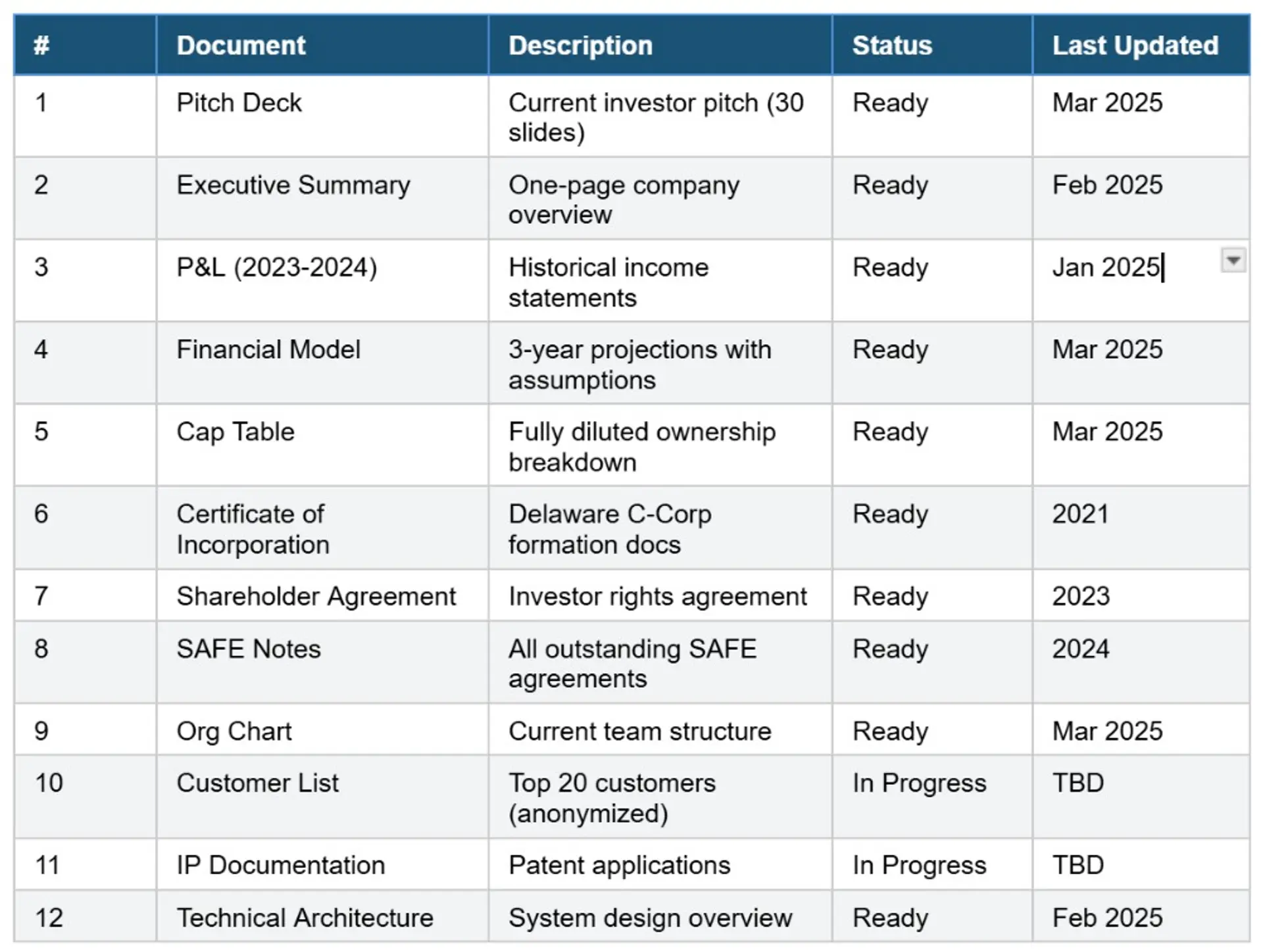
Put this index as a pinned document or the first thing people see when they enter your data room. Update it every time you add or change something.
Use Ellty to build your indexed data room in minutes. Upload documents, organize by folder, and share a trackable link. Start free.
Organizing for different scenarios
Not every data room is the same. What you share and how you organize it depends on the deal, the industry, and who's on the other side.
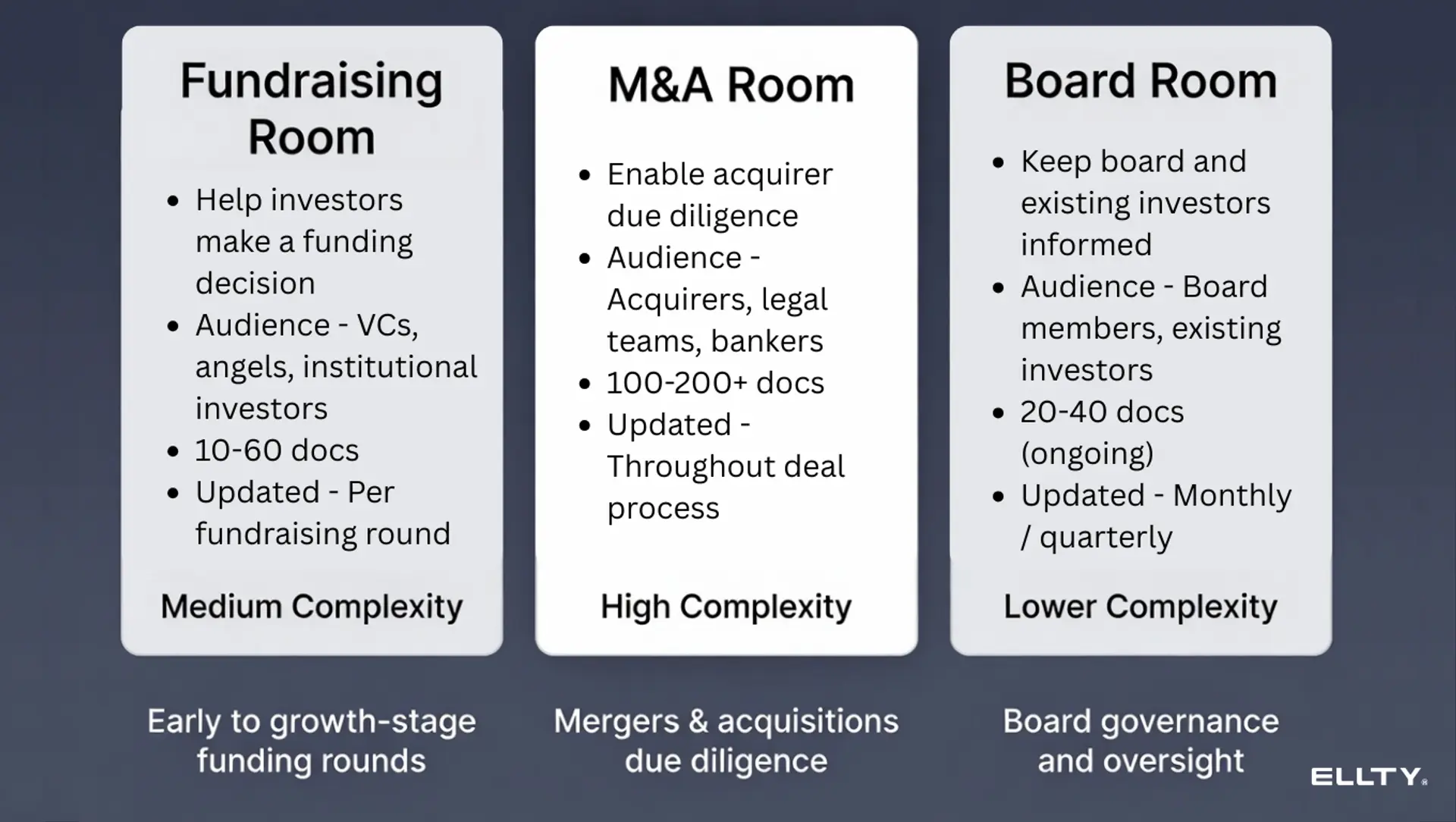
Fundraising (seed to Series B)
Your goal here is simple - help investors make a decision without overwhelming them.
At seed stage, keep it lean:
- Pitch deck
- Financial model with assumptions
- Cap table
- Formation docs (certificate of incorporation, SAFEs or convertible notes)
- Founder bios
- Early traction data
At Series A and beyond, add:
- Full financial history (2 to 3 years)
- Customer contracts and references
- Key employee contracts
- Board minutes
- IP documentation
- Detailed competitive and market analysis
M&A due diligence
M&A is thorough. Acquirers will ask for things you didn't even know you had. The structure is similar to a fundraising room but goes much deeper.
Key additions for M&A:
- All customer contracts in full (not anonymized)
- Vendor and supplier agreements
- Employment contracts for all key staff
- Real estate leases or office agreements
- Outstanding litigation or legal disputes
- Insurance policies
- Complete tax returns (3 to 5 years)
- All software licenses
In an M&A deal, you'll typically be working with one specific acquirer under NDA. Access controls and audit trails are critical here - you need to know exactly who viewed what and when.
Board and investor reporting
Some companies maintain an ongoing data room just for their board and existing investors. This is separate from the fundraising room and gets updated regularly. It typically contains:
- Monthly and quarterly financial updates
- Board decks and minutes
- Operational metrics and KPI dashboards
- Audit reports
This type of room benefits most from a tool that lets you update documents without changing the link. You don't want to send a new link every time the monthly report changes.
Real estate transactions
Whether you're buying, selling, or leasing a property, a data room keeps all the paperwork in one place and makes due diligence faster for everyone involved.
Typical documents include:
- Title deeds and ownership records
- Property inspection and survey reports
- Rent rolls and lease agreements
- Income and expense statements
- Zoning certificates and permits
- Environmental reports
- Insurance documents
- Photos and floor plans
Real estate deals often involve multiple parties - buyers, sellers, agents, lawyers, and lenders - all needing access to different documents. Permission controls matter a lot here.
Consulting and client delivery
Consultants and agencies use data rooms to share deliverables, reports, and sensitive client work professionally - instead of emailing attachments back and forth.
A typical consulting data room might include:
- Project proposals and scopes of work
- Research and analysis reports
- Presentation decks and final deliverables
- Invoices and engagement letters
- Supporting data and source files
The big benefit here is control. You can see who's opened what, set expiry dates on access, and make sure the client always has the latest version - not a stale attachment from three weeks ago.
Legal and compliance
Law firms, compliance teams, and finance departments use data rooms to manage sensitive document reviews, regulatory submissions, and audits.
Common contents:
- Regulatory filings and correspondence
- Audit reports and responses
- Internal policies and procedures
- Signed agreements and contracts
- Evidence and case documentation
In legal contexts, the audit trail is often as important as the documents themselves. Having a record of who accessed what, and when, can matter a great deal.
Partnerships and vendor agreements
Any time two businesses are exploring a deal - a distribution partnership, a licensing agreement, a joint venture - one side needs to share confidential information before anything is signed.
A partnership data room typically includes:
- Company overview and financials
- Product or service documentation
- Reference customers or case studies
- Draft term sheets or LOIs
- Relevant legal agreements
A data room makes this process cleaner and more professional than emailing PDFs, and gives you control over what the other side can actually see and download.
The right structure for your data room isn't universal, it depends on who you're sharing with and what they need to make a decision. But the goal is always the same: make it easy for the right people to find the right information, fast.
How to create a data room in Google Drive
Google Drive isn't a real data room platform. But plenty of teams use it, especially early-stage. Here's how to make it work as well as possible.
Step-by-step setup
- Create a new shared drive (not a regular folder) - this gives you better permission controls.
- Build your folder structure using the format above (numbered folders, clear names).
- Upload all documents and double-check each file opens correctly.
- Set sharing permissions to 'Viewer' by default - don't give editor access unless needed.
- Create a master index doc at the top of the folder explaining what's in each section.
- Share the link only with specific people (not 'anyone with the link') for sensitive docs.
Google Drive limitations you should know


Google Drive works for simple cases. If you're raising from angels or sharing early drafts, it's fine. The moment you need to know who viewed what, or you want to restrict downloads, you'll hit a wall.
Data room providers: what to look for
Not all virtual data room software is built the same. Enterprise platforms like Intralinks or Merrill Datasite are built for large M&A deals with hundreds of documents and dozens of legal and financial reviewers. They're expensive, slow to set up, and overkill for a Series A.
Here's what to actually evaluate:


Where Ellty fits: Ellty offers virtual data room features - granular permissions, NDA gating, dynamic watermarking, audit logs, and real-time view notifications - without per-user pricing. The Data Room plan ($149/month) includes 3 users. If you're sharing pitch decks and need a secure place for due diligence docs, it's worth looking at before committing to an enterprise VDR.
See how Ellty compares for your specific stage. Start a free account and explore data room features at ellty.com - no sales call required.
Free data rooms
Free data room usually means one of three things: a free tier on a paid platform, Google Drive, or Notion. Here's what you actually get:
Ellty free plan
Ellty free plan includes document tracking, real-time analytics, and secure sharing. It's genuinely useful for tracking pitch deck views - you'll see who opened it, which pages they spent time on, and when they stopped reading.
The data room features (granular permissions, NDA gating, watermarking) are on paid plans starting at $69/month, and for the Data Room tier, it's $149/month.
Google Drive (free)
Free, familiar, and good enough for early-stage. No view analytics. No notifications. Anyone with the link can potentially share it further if you set it to 'anyone with link.'
Notion (free to $8/month)
Good for organizing internal information. Not designed for secure external sharing. No audit trails. Not a real data room - don't use it as one for serious fundraising.
If you're pre-seed raising from friends and family: Google Drive is fine. If you're doing your first institutional round: start with Ellty free plan for secure file sharing, documents tracking and upgrade to data room features when you're in active due diligence.
Document management best practices
Building the room is step one. Keeping it accurate and usable is the part most businesses ignore.
Version control
Never let multiple versions of the same document exist in the same folder. When you update a file, replace it and update the date in the filename. Remove old versions or archive them in a subfolder called '_Archive.'
Access management
Create separate access tiers:
- Tier 1: Public-facing (pitch deck, executive summary) - share early
- Tier 2: Qualified investors (financials, product detail) - share after first call
- Tier 3: Serious due diligence (legal, contracts, full team info) - share after NDA
Using a platform that supports granular permissions means you can share one link and control exactly what each person sees without managing multiple separate folders.
Keeping it current
- Review the data room monthly
- Update financials every time you close your books
- Replace the pitch deck whenever you make significant changes
- Check all links and file permissions before sharing with a new recipient
Using analytics to improve
If your data room platform shows view analytics, use them. If a viewer spent 45 seconds on your financial model and 8 minutes on your team page, that tells you something. Follow up accordingly.
Ellty shows which pages of each document were viewed, how long each section was viewed, and sends you a real-time notification when someone opens your documents. That data changes how you follow up.


How Ellty works for data room setup


Ellty is built for teams who need to share documents professionally without spending weeks setting up an enterprise VDR. Here's what the product actually does:
Pitch deck sharing and analytics (free plan)
- Upload pitch decks and create shareable, trackable links
- See who viewed your deck, which pages, and how long they spent
- Get real-time notifications when someone opens your document
- Create multiple links for different investors - revoke access anytime
- Password protection and link expiration
- 10 GB storage per user
Standard plan ($69/month)
Everything in Free, plus:
- Full virtual data room with folder organization
- eSignatures - create, send, and collect natively
- Advanced analytics dashboard and visitor export
- Access controls (password protection, email verification, link expiration)
- Custom branding and branded custom subdomain
- Import from Google Drive, Dropbox, OneDrive, and Box
- Unlimited visitors and documents
- Priority email support
- 50 GB storage per user
Data Room plan ($149/month)
- Organize documents into folders with the structure above
- Set granular permissions - control who sees which folders
- NDA gating - require viewers to sign before accessing
- Dynamic watermarking - viewer's email appears on every page
- Restricted visitor access - block downloads or printing
- 3 users included
Data Room Plus ($349/month)
- Group visitor permissions - manage access by investor firm or role
- Full audit logs - complete record of all activity
- Up to 4,000 assets per data room
What Ellty doesn't do (being honest)
- It's not built for multi-party M&A with dozens of bidders and legal teams
- It doesn't have a built-in Q&A workflow for complex due diligence processes
- It's not the right fit if you need deep compliance features for regulated industries
FAQ
What is the structure of a data room folder?
A data room is typically organized into 6-8 top-level folders: Company Overview, Financials, Legal, Team, Product/Technology, Customers/GTM, and Market/Competitive. Each folder contains relevant documents with clear, dated file names. Use numbers to force folder order (01_, 02_, etc.) so it reads logically rather than alphabetically.
What documents are in a data room?
Core documents include: pitch deck, financial model and historical P&L, cap table, certificate of incorporation, shareholder agreements, SAFE notes or convertible notes, org chart, customer contracts, IP documentation, board minutes, and competitive analysis. The exact list depends on your stage - a pre-seed company needs far fewer documents than a Series B or M&A target.
How do I organize documents in a data room?
Use numbered folders to control order. Name files clearly with dates and version numbers. Create a master index document at the top of the room. Tier your documents by sensitivity and set access permissions accordingly. Review and update the room monthly. Remove outdated versions - only keep the current file in each category.
How do I create a data room in Google Drive?
Create a new shared drive (not a regular folder), build numbered subfolders, set default permissions to Viewer, and share with specific individuals rather than using 'anyone with link.' The main limitations are no view analytics, no per-page tracking, and limited access control. It works for early-stage simple cases but isn't a replacement for a proper virtual data room.
What is a data room index template?
A data room index is a master list of every document in your room with a description and status (Ready, In Progress, Not Applicable). It acts as a table of contents so investors can see what's included and navigate quickly. Put it as the first document in your room. Update it every time you add or change a document.
How is a data room different from a document management system?
A document management system (DMS) is typically an internal tool for organizing company files - version control, collaboration, workflows. A virtual data room is designed for external sharing during due diligence - it focuses on access controls, audit trails, NDA gating, and analytics. Some overlap exists, but they serve different purposes. You probably need both: a DMS for internal operations and a VDR for external sharing.
When should I set up a data room?
Scrambling to put together a data room after a client shows interest is a red flag. Set it up before you start sending pitch decks. At minimum, have your pitch deck, financial model, and basic legal docs ready before your first outreach.
How many documents should be in a data room?
Pre-seed: 10-20 documents. Series A: 40-60 documents. Series B and beyond: 60-100+ documents. M&A: 100-200+ documents. More is not always better. A smaller, complete, well-organized data room is more impressive than a large, chaotic one. Focus on quality and accessibility over quantity.


Ready to build your data room the right way? Start free on Ellty - set up in under 30 minutes, see exactly who views your documents, and go into every client meeting prepared.
The bottom line: a well-organized data room doesn't guarantee you'll close a round. But a disorganized one can absolutely lose you one. Take the time to set it up properly. It's one of the few things you can control.
Author

Anika Tabassum Nionta is a Content Manager at Ellty, where she writes about secure document sharing, virtual data rooms, M&A, due diligence, fundraising, and sales enablement. With over 6 years of writing experience, she helps professionals understand how to share confidential documents securely, track engagement, and manage deals more effectively. Anika holds both a BA and MA in English from Dhaka University. Outside of work, she enjoys reading, exploring new cafes in Dhaka, and connecting with entrepreneurs and dealmakers in her community.

