
If your data room is hard to navigate, people won't tell you. They'll just quietly move on.
When someone enters your virtual data room whether they're a buyer, lender, auditor, legal counsel, or investor, the first thing they look for is structure. Not your most important document. Not your summary. Structure. If they can't figure out where things are within the first 30 seconds, you've already made a bad first impression.
A data room index fixes that. It's the table of contents for your VDR. It shows visitors what's inside, where to find it, and how everything is organized. The difference between a data room that feels professional and one that feels rushed usually comes down to this one thing.
This guide covers what a data room index is, why it matters, how to build one, and what a solid folder structure looks like across different use cases. There's a full template at the end you can use directly.
What is a data room index?
A data room index, sometimes called a data room index list, is a numbered or categorized map of every document in your virtual data room. Think of it as a navigation layer. It sits at the top level of your data room and tells visitors exactly which folder contains what.
This isn't a new idea. In traditional due diligence, lawyers used to hand over physical binders with numbered tabs. The index was always the first page. A VDR index works the same way, it's just digital, searchable, and easier to update.
The index does two things at once. For the person reviewing your room, it makes navigation fast and frictionless. For you, building it forces you to think carefully about what you're actually sharing, in what order, and whether anything is missing, which is its own form of preparation.
Key concept
A data room index is not the same as a folder structure. The folder structure is the actual organization of files in your VDR. The index is the document that describes and numbers that structure, a standalone reference that visitors can consult without clicking through every folder.
What is the purpose of data indexing?
The purpose of indexing is simple: reduce friction.
Due diligence, in any context, is already slow and document-heavy. A reviewer going through hundreds of files across dozens of folders doesn't want to hunt for a specific document. They want to go straight to it because the index already told them where it lives.
A well-indexed data room also sends a clear signal about how seriously you take the process. It shows that you've thought about the reviewer's experience, that you're organized under scrutiny, and that you respect their time. In any high-stakes transaction or review process, those signals matter more than most people realize.
From an operational standpoint, indexing also makes your own life easier. When a reviewer asks for a specific document, you can point them to an index number rather than digging through emails. When multiple parties are reviewing at the same time, which is common in M&A, legal matters, or multi-party financing deals, everyone is working from the same map.
There's a useful parallel here: just like a website's structure helps people and search engines find information, a data room index helps reviewers navigate your documents. The logic is the same, clear structure creates findability.


Benefits of an Effective Index
- Speed: Accelerates the due diligence process by facilitating document discovery.
- Organization: Helps to quickly structure large volumes of data.
- Transparency: Increases clarity and improves the efficiency of user navigation.
- Security: Facilitates secure access control, limiting access to confidential data.
Data room structure: how to organize your VDR
There's no single correct structure for a data room. But there are conventions that experienced reviewers recognize and deviating from them isn't necessarily a problem, as long as the result isn't confusing. Whatever structure you choose, apply it consistently throughout.
Most reviewers expect documents organized by category. The categories you use will depend on your use case, a real estate transaction looks different from a corporate M&A deal, which looks different from a compliance audit. But the underlying principle is the same: organize by topic, not by date or upload order, and number everything clearly.
Here's what a standard top-level folder structure looks like for a general-purpose VDR:
Top-level folder structure
01 – Overview and Summary
- 01.1 – Executive summary or deal overview
- 01.2 – Key transaction or project documents
- 01.3 – Background and history
- 01.4 – Strategic rationale or objectives
02 – Financial Information
- 02.1 – Financial statements (income statement, balance sheet, cash flow)
- 02.2 – Financial projections or forecasts
- 02.3 – Ownership or equity structure
- 02.4 – Revenue breakdown and key financial metrics
- 02.5 – Funding or financing history
03 – Legal Documents
- 03.1 – Entity formation and registration documents
- 03.2 – Ownership and shareholder agreements
- 03.3 – Board or governance resolutions
- 03.4 – Intellectual property, patents, and assignments
- 03.5 – Key employment or contractor agreements
- 03.6 – NDAs and confidentiality agreements
- 03.7 – Regulatory filings and licenses
04 – Operations
- 04.1 – Organizational structure and key personnel
- 04.2 – Operational processes and procedures
- 04.3 – Key vendor, supplier, or partner agreements
- 04.4 – Technology and systems overview
- 04.5 – Insurance policies
05 – Contracts and Commercial Agreements
- 05.1 – Customer or client contracts (sample or anonymized)
- 05.2 – Active agreements and commitments
- 05.3 – Pipeline or backlog overview
- 05.4 – Pricing and commercial terms
06 – Compliance and Risk
- 06.1 – Regulatory compliance records
- 06.2 – Data privacy and security policies
- 06.3 – Environmental, health, and safety documentation
- 06.4 – Outstanding litigation or disputes
- 06.5 – Risk register or known liabilities
07 – Assets and Property
- 07.1 – Asset register or inventory
- 07.2 – Property documents (titles, leases, appraisals)
- 07.3 – Equipment and infrastructure records
08 – People and HR
- 08.1 – Organizational chart
- 08.2 – Key employee profiles or bios
- 08.3 – Employment policies and handbooks
- 08.4 – Benefits and compensation summaries
09 – Historical and Reference Materials
- 09.1 – Previous reports or audits
- 09.2 – Board meeting minutes
- 09.3 – Prior transaction or deal records
- 09.4 – Correspondence relevant to the transaction
This structure is a starting point. Your actual data room may need more folders, fewer folders, or different category names depending on what kind of deal or process you're running. A real estate transaction might weight section 07 heavily. A compliance audit might expand section 06 significantly. A business acquisition might need all nine sections fully populated.
The principle stays the same regardless: number everything, name each file and folder clearly, and keep the depth consistent. A reviewer should be able to look at your index and immediately understand what's in your data room, before they open a single document.



Data room index template
Below is a data room index template you can adapt directly. This version is formatted as a document you'd upload at the top of your VDR. The index number corresponds to the folder or document location in your room.


Keep your index document in sync with your actual folder structure. If you add a document, update the index. If something isn't ready yet, mark it as "pending" rather than removing it, that way reviewers know it exists and isn't missing.
How to index a data room: a step-by-step process
Here's the exact process for building a data room index from scratch. It works whether you're using Ellty, another VDR platform, or just getting organized before you start uploading.
1. Start with a document inventory.
Before you touch your VDR, list every document you have and every document you'll need. A spreadsheet works fine. Group them loosely by category - legal, financial, product, team. This is your raw material.
2. Define your folder structure.
Based on the inventory, decide on your top-level categories (typically 6-10) and subfolders within each. Use the template in this guide as a starting point and trim what doesn't apply to your stage.
3. Number everything.
Use two-level numbering: 01, 02, 03 for top-level folders; 01.1, 01.2 for subfolders. This creates a stable reference system so you can say "see section 03.4" and it means something.
4. Create your index document.
Build a clean PDF or spreadsheet that lists every section and document by index number. Include a "status" column (ready, pending, not applicable) so reviewers know if anything is missing on purpose.
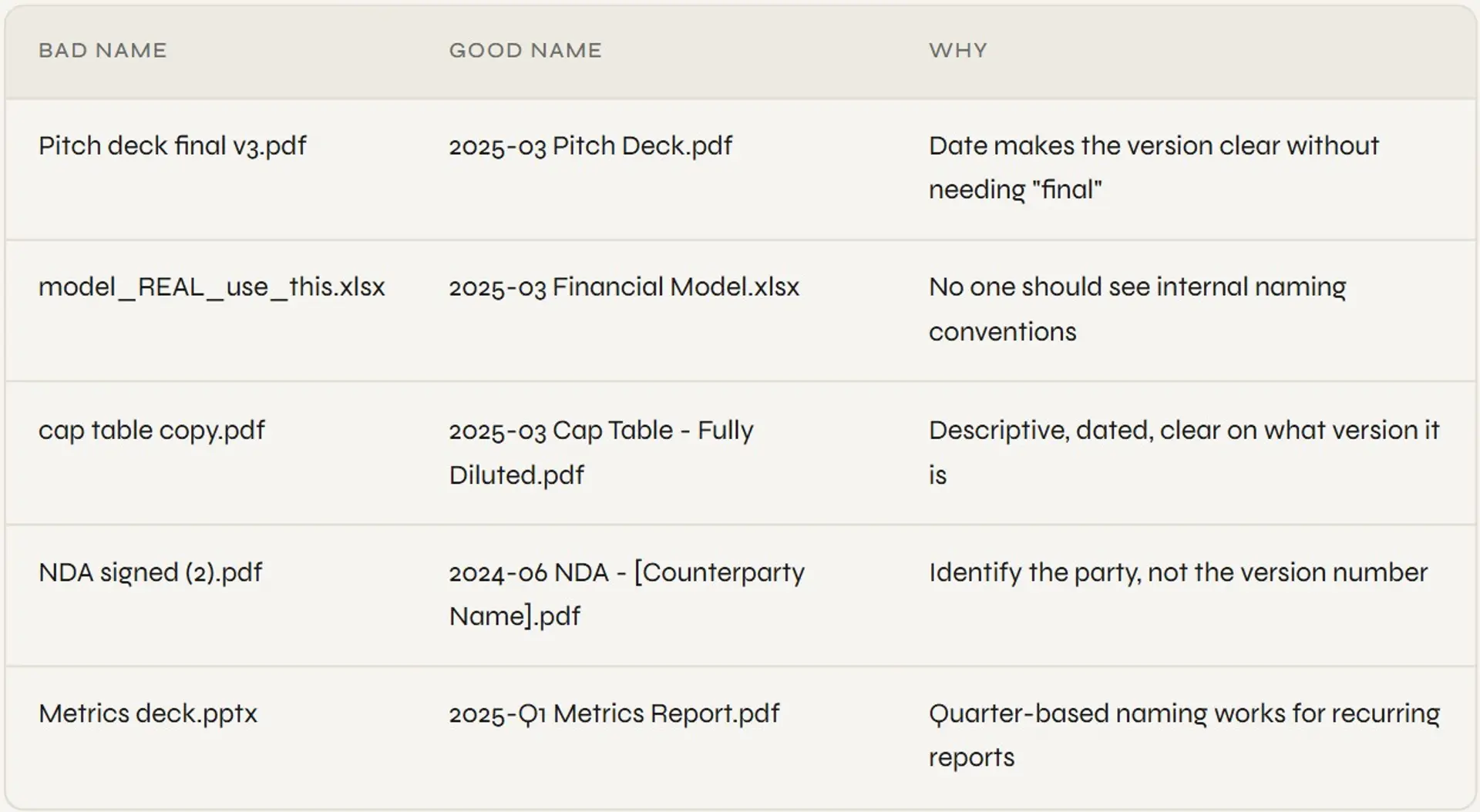
5. Standardize file names.
Every file should follow a naming convention: [Index number] - [Document name] - [Date or version]. For example: "02.5 - Cap table - March 2025.xlsx". Never rely on dates from file metadata.
6. Upload to your VDR and match the structure.
Create folders in your VDR that mirror the index exactly. Upload the index document at the top level, it should be the first thing a visitor sees when they enter the room.
7. Set permissions before sharing.
Decide what each viewer group (lead investor, LP, advisor, acquirer) should see. Set permissions at the folder level. Don't give everyone access to everything by default.
8. Test as a guest user.
Create a test access link with limited permissions and walk through the room yourself. Check that the index matches the actual folder structure, that permissions are working, and that the room looks clean from the outside.
Common mistake
Don't build your index after you've uploaded everything. Build it first. If you upload 80 documents and then try to create an index, you'll find inconsistencies you have to fix. The index is a planning tool as much as a navigation tool, use it that way.
How Ellty handles data room indexing and structure


Ellty lets you upload documents and organize them into a folder structure that serves as your functional index. You can create numbered folder hierarchies, set granular permissions per folder or document, and control what each visitor group sees.
For pitch deck sharing before you open a full room, Ellty tracking links let you see exactly which pages a visitor spent time on and when they accessed the document. That's useful context before a follow-up call. Real-time notifications tell you when someone opens your deck, so you can follow up at the right moment.
When you're ready for formal due diligence, the Data Room plan ($149/month) adds NDA gating so visitors must agree to terms before entering, dynamic watermarking on documents, and restricted visitor access. Data Room Plus ($349/month) adds group permissions for managing multiple outside parties, full audit logs of every action in the room, and capacity for up to 4,000 assets - suitable for larger due diligence processes.
Ellty is a secure document sharing and analytics platform with full data room functionality, built for anyone who needs to share sensitive documents in a controlled, trackable way. Whether you're raising a funding round, closing a property deal, running a consulting engagement, or managing an acquisition, Ellty gives you the core tools that matter: access controls, real-time activity tracking, NDA gating, and a clean audit trail.
One limitation to be aware of: Ellty doesn’t automatically generate an index document from your folder structure. That still needs to be created separately.


Best practices for maintaining a data room index
Setting up a data room index is only half the job. The other half is keeping it accurate over time.
As documents get updated, new people get access, and the underlying deal or process evolves, an index that was clean at the start can quickly become unreliable. An outdated or poorly maintained index creates confusion, slows down reviewers, and in some cases, creates real security risks like sensitive files sitting in the wrong folder, or former users still having access they shouldn't.
Here are five practices that keep your data room index in good shape:
1. Schedule regular folder audits
Set a recurring review: monthly or quarterly works for most situations to go through the data room structure. Check that files are in the right folders, that naming is consistent, and that nothing sensitive has ended up somewhere it shouldn't be. Think of it like a routine check-up. The more consistently you do it, the less time each audit takes.
2. Clear out outdated and duplicate files
Old versions and duplicate documents don't just take up space, they create confusion. A reviewer who opens a folder and finds three versions of the same contract doesn't know which one is current. Keep only the latest version of each document, and remove anything that's no longer relevant. Most VDR platforms include version history tools, so you can track what changed and when without losing the record.
3. Review user permissions every few months
People join and leave organizations, roles change, and deal teams shift. A reviewer who needed full access six months ago might not need it today. Go through your user permissions every three to six months, remove access for anyone who no longer needs it, and make sure each active user can only see what's appropriate for their role. This is especially important in sensitive transactions where confidentiality matters.
4. Keep naming conventions consistent across teams
If different people are uploading documents in different ways. Some using dates, some using abbreviations, some using full names. The index becomes hard to read fast. Agree on a naming format early and stick to it. This is a small thing that makes a big difference when a reviewer is working under time pressure and needs to find something quickly.
5. Back up your data room regularly
Virtual data rooms are cloud-based, which makes them reliable, but that's not a reason to skip backups. Scheduled backups protect against accidental deletions, unwanted edits, or platform issues. Combined with version control, they give you a safety net and a clear record of how your data room has changed over time.
Data room index vs. folder list - what's the difference?
These two terms get used interchangeably, but they're not the same thing.
A folder list is exactly what it sounds like - a list of folders and files. It shows you what exists, but it doesn't tell you much else. There's no hierarchy beyond basic nesting, no metadata, no access controls tied to specific locations, and no audit trail.
A data room index is something more structured. It's a framework that not only shows what documents exist, but also organizes them by category, controls who can see what, makes documents searchable by metadata and keywords, and keeps a log of who accessed or changed what and when.
For simple internal storage, a folder list might be enough. But for any process involving external reviewers, sensitive documents, or multiple parties - due diligence, compliance, transactions, legal matters - a properly structured data room index is what keeps everything organized, secure, and easy to navigate.
Frequently asked questions
What is a data room index?
A data room index is a numbered list of all documents and folders in a virtual data room. It acts as a table of contents - a reference document that tells reviewers what's in the room, where to find it, and how the information is categorized. It's typically uploaded as a standalone PDF or spreadsheet at the top level of the data room and mirrors the folder structure below it.
What is the data room index list?
The data room index list is the actual enumeration of every section and document in your virtual data room, usually formatted as a spreadsheet or table. Each row represents one document or folder, identified by an index number, a descriptive name, the file format, and sometimes a status note (ready, pending, not applicable). It's the master reference for everyone using the room.
What is the purpose of data indexing?
The purpose of data indexing in a data room is to reduce the time and friction involved in finding information during due diligence. It provides a stable, numbered reference system that both parties can use in conversation ("see section 03.4"), signals organizational professionalism, and helps you manage what's been shared with whom. It also forces you to audit your own document completeness before reviewers do it for you.
What is the best data room structure?
The best data room structure follows a consistent top-level categorical organization: company overview, financials, legal, product, market, team, commercial, and operations. Folders and subfolders should be numbered (01, 01.1, 01.2) and named with plain, descriptive titles. The depth should stay at two or three levels maximum - deeper structures get confusing fast. What matters most is that an investor can navigate from the index to the document they want in under 30 seconds.
How do I index a data room?
Start with a document inventory before you upload anything. Define your folder structure based on that inventory. Number all folders using a two-level system (01, 01.1). Standardize your file naming convention. Build a separate index document listing every section and file by number. Upload everything to your VDR, create matching folders, and place the index document at the top. Test the room as a guest before granting anyone else access.
What is a data room used for in fundraising?
In fundraising, a data room is used to share confidential company documents with investors in a controlled, auditable environment. It's typically opened after initial interest from an investor - first as a lightweight room for early diligence, then as a full room post-term sheet. It lets you track who viewed what, control access by investor group, and revoke access when needed. It's also a credibility signal: a well-organized data room tells investors you're prepared.
Do I need a separate index document or is the folder structure enough?
A well-numbered folder structure is sufficient as your functional index. A separate index document becomes more valuable when you have a large number of documents, when multiple parties are reviewing simultaneously, or when you want to share a printable reference before granting room access. If you have more than 50 documents, build the separate index document, it's worth the 20 minutes.
Can I use Ellty to build a data room index?
Yes - you can use Ellty to upload documents and organize them into a numbered folder hierarchy that functions as your navigational index. Ellty data room plan ($149/month) supports granular permissions, NDA gating, dynamic watermarking, and view analytics per document. You'll build the index document itself separately (a PDF or spreadsheet), but Ellty folder structure becomes the navigation layer investors use once they're inside the room.
Author

Anika Tabassum Nionta is a Content Manager at Ellty, where she writes about secure document sharing, virtual data rooms, M&A, due diligence, fundraising, and sales enablement. With over 6 years of writing experience, she helps professionals understand how to share confidential documents securely, track engagement, and manage deals more effectively. Anika holds both a BA and MA in English from Dhaka University. Outside of work, she enjoys reading, exploring new cafes in Dhaka, and connecting with entrepreneurs and dealmakers in her community.

