
If you've ever sent your pitch deck over email and then wondered who forwarded it, whether they opened it, and which slide made them stop reading - this guide is for you.
Most early-stage companies rely on email to share documents with investors, partners, lawyers, and advisors. It works. Until it doesn't.
A virtual data room (VDR) isn't some expensive enterprise tool reserved for M&A lawyers. It's a document sharing environment with access controls, analytics, and security features - things email simply wasn't designed for.
This guide covers what a virtual data room is, how it compares to email, when you actually need one, and what your options look like today.


What is a virtual data room?
A virtual data room is a secure online space where you store and share confidential documents with specific people. Think of it as a controlled environment for document exchange - the opposite of dropping files into an email thread and hoping for the best.
Originally, data rooms were physical spaces. During M&A deals, lawyers and bankers would gather in a room to review paper documents. The digital version replaced that process. Today, the term covers a broad range of tools - from enterprise-grade platforms used in billion-dollar deals to lightweight tools teams use to share pitch decks with external parties.
At a minimum, a virtual data room lets you:
- Upload and organize documents in one place
- Control exactly who can access what
- Track viewer activity - who opened what, for how long, which pages they read
- Set expiration dates and revoke access at any time
- Get notified when someone views your documents
The more advanced platforms add features like NDA gating (visitors must sign before viewing), dynamic watermarking, audit logs, and granular permission controls per user or group.
A data room isn't just file storage. It's a controlled environment with visibility into what happens after you share.
How email falls short
Email was built for communication, not document management. It works fine for quick file sharing - attaching a PDF, sending a deck to one trusted party. But as soon as your deal gets serious, email starts to create problems.
The core issues with email for document sharing
- No access control after sending - once it's in someone's inbox, you can't take it back
- No visibility - you don't know if they opened it, which slides they spent time on, or if they forwarded it to five people
- Version chaos - send multiple versions and you lose track of which recipient has which file
- No audit trail - if a legal dispute comes up, email threads are a mess to reconstruct
- No expiration - old links and attachments stay live indefinitely
- Security gaps - attachments can be forwarded, downloaded, and shared without your knowledge
None of this is email's fault. It's doing what it was designed to do. The problem is using it as a document management and access control system, which it isn't.

Virtual data room vs email: the real difference
Here's a direct comparison across the dimensions that matter most for teams sharing sensitive documents.


Is Dropbox a virtual data room?
Technically, no. Dropbox is a cloud storage and file-sharing tool. It wasn't built with due diligence or secure deal-making in mind. But some teams use it as a makeshift data room, especially early on.
Here's where Dropbox falls short as a VDR:
- No per-document access analytics or page-level viewer tracking
- No NDA gating - you can't require an NDA before someone views a folder
- Limited audit logs - you don't get a full activity record per viewer
- No dynamic watermarking
- Links can be forwarded and accessed by anyone who has them unless you configure link settings carefully
Dropbox is fine for internal team file storage or sharing non-sensitive documents. It's not the right tool when you need to know exactly what investors are reading, when, and for how long.
Similar tools like Google Drive fall into the same category. Useful for collaboration. Not designed for controlled due diligence.
5 Virtual Data Rooms to Replace Email PDF Sharing
1. Ellty


Ellty is the simplest way for teams to stop sending PDFs over email and start sharing documents in a way that's secure, trackable, and professional. Instead of attaching files to an email and losing all visibility the moment you hit send, Ellty lets you share a controlled link where you can see exactly who opened it, how long they spent on it, and whether they passed it along.
For teams sharing sensitive documents - contracts, financial reports, proposals, client deliverables - Ellty adds NDA gating, access controls, and dynamic watermarking so your files don't end up somewhere they shouldn't. eSignatures are built in, custom branding keeps things professional, and the audit trail covers every interaction from first open to final sign-off.
Pricing is flat with no per-user fees. The free plan handles basic tracking and secure sharing. Standard is $69/month, Data Room is $149/month, and Data Room Plus is $349/month - all with no surprise charges as your team grows.


2. DocSend

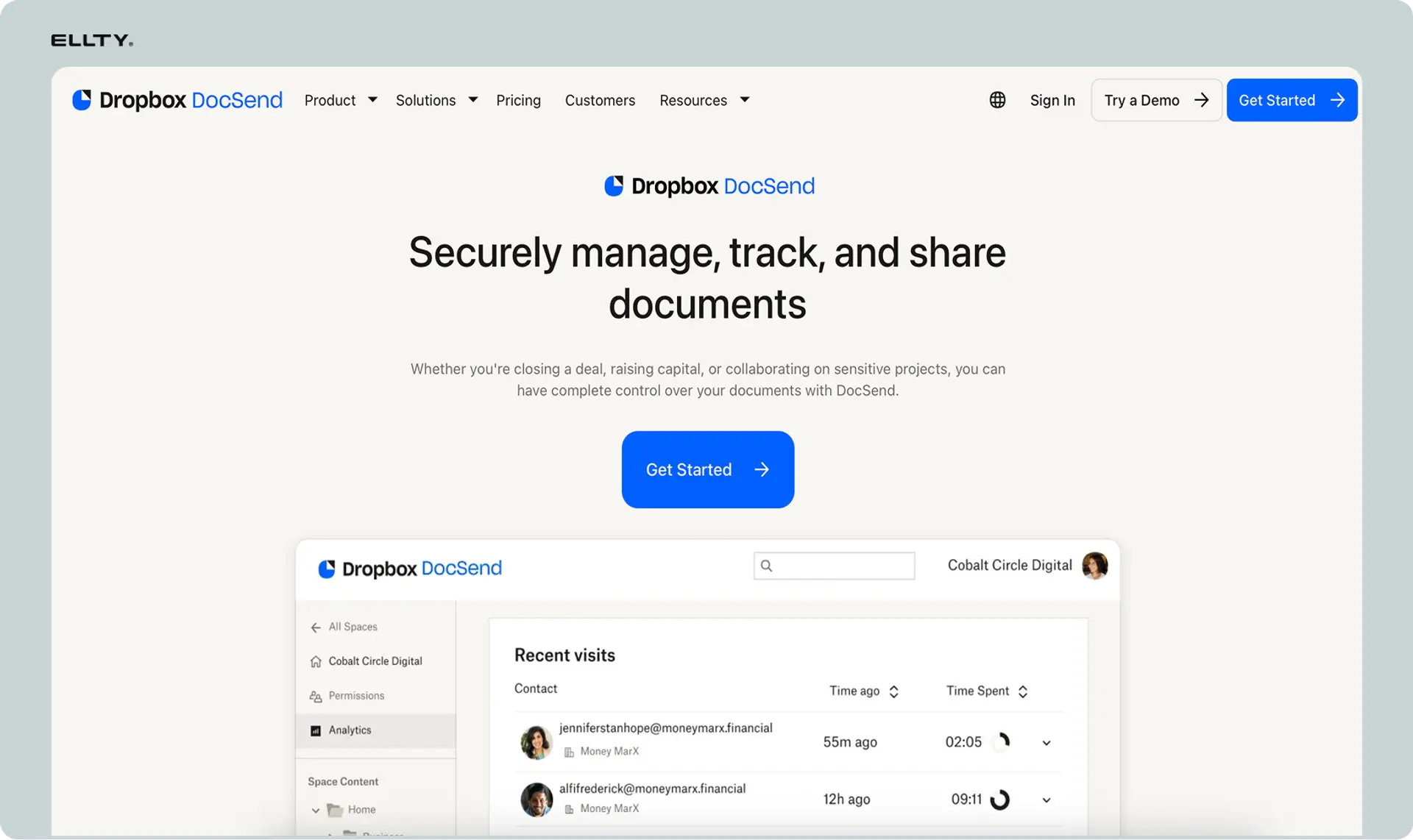
DocSend is a document sharing and analytics platform designed specifically to replace the habit of emailing PDFs. When you share a document through DocSend, you get a trackable link instead of an attachment and from that point on, you can see who opened it, how much time they spent on each page, and whether the link was forwarded to someone outside your intended audience.
It works well for sales teams, fundraising decks, proposals, and any document where knowing buyer or client engagement matters. You can set passwords, require email verification, or disable access at any time without asking for the file back. DocSend does not offer the depth of a full virtual data room, there's no granular group permissions or formal due diligence workflow. But for teams that primarily need visibility and control over individual documents, it's a clean and affordable solution. Pricing starts at around $15 per month.
3. Digify


Digify sits between a lightweight file-sharing tool and a proper data room, making it a natural upgrade for teams that have outgrown email attachments but don't need full enterprise VDR infrastructure. It focuses heavily on document security - you can set documents to expire automatically, restrict downloading and printing, and apply watermarks without any technical setup.
For teams sharing sensitive files with external parties - clients, investors, partners, or buyers - Digify gives you control over what happens to a document after it leaves your hands. Real-time tracking shows when a file was opened and how long the recipient spent with it. Bulk sharing is supported, so you can send the same protected document to multiple recipients and track each one individually. The interface is clean and easy to learn, and pricing is accessible with no per-user fees on most plans. A good fit for small to mid-sized teams that need document security without complexity.
4. Notion + Granola (with controlled sharing)

This isn't a single product, but a workflow combination that many modern teams use to replace email PDF chains entirely. Notion serves as a living document hub where proposals, reports, and briefs are built and updated in real time, while controlled sharing links replace static PDF attachments. Recipients always see the latest version, eliminating the back-and-forth of "which version is current."
For teams already working inside Notion, this approach removes the step of exporting to PDF altogether. Page-level permissions let you share specific content with specific people without exposing your entire workspace. The limitation is that Notion is not a dedicated VDR - there's no NDA gating, no detailed per-recipient analytics, and no formal audit trail. It works best for internal collaboration and lower-stakes external sharing rather than formal deal processes. Pricing starts free, with paid plans from $10 per user per month.
5. Google Drive with Workspace Controls
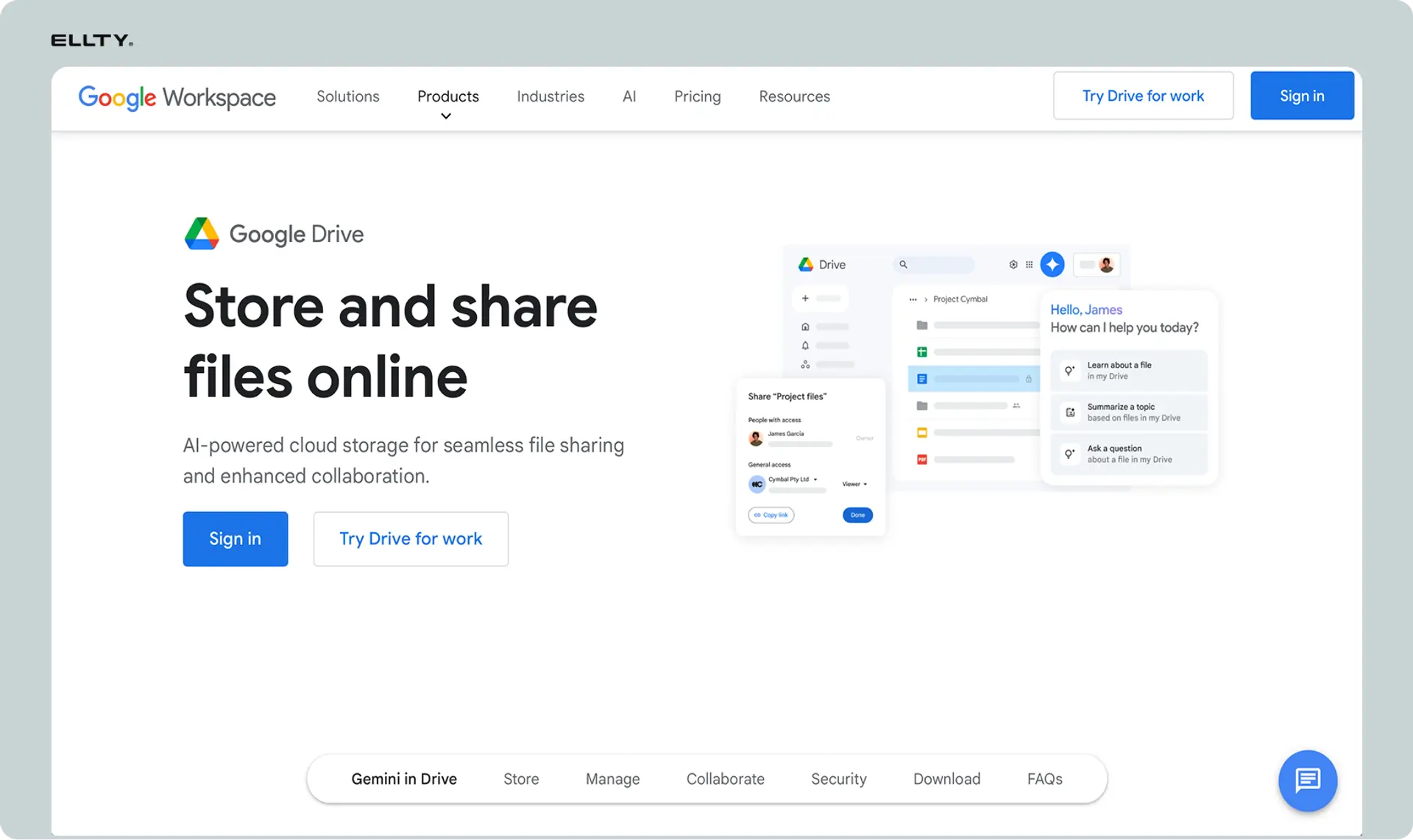
Google Drive is the default document sharing tool for millions of teams, and with proper Workspace admin controls it can replace a surprising amount of casual PDF emailing. Shared drives, viewer-only permissions, link expiry settings, and download restrictions give teams a baseline level of control over who can access documents and what they can do with them.
Activity dashboards show when files were viewed, and comment threads keep feedback in one place rather than scattered across email chains. For teams already in the Google ecosystem, the adoption barrier is essentially zero. The honest limitation is that Google Drive is not built for sensitive or formal document sharing - there's no NDA gating, no watermarking, no per-recipient tracking, and no audit trail in the way a proper VDR provides. It works well for everyday internal and low-stakes external sharing, but teams handling confidential files or running any kind of formal review process will quickly find its limits. Pricing is included in Google Workspace from $6 per user per month.
Virtual data room providers: what's out there
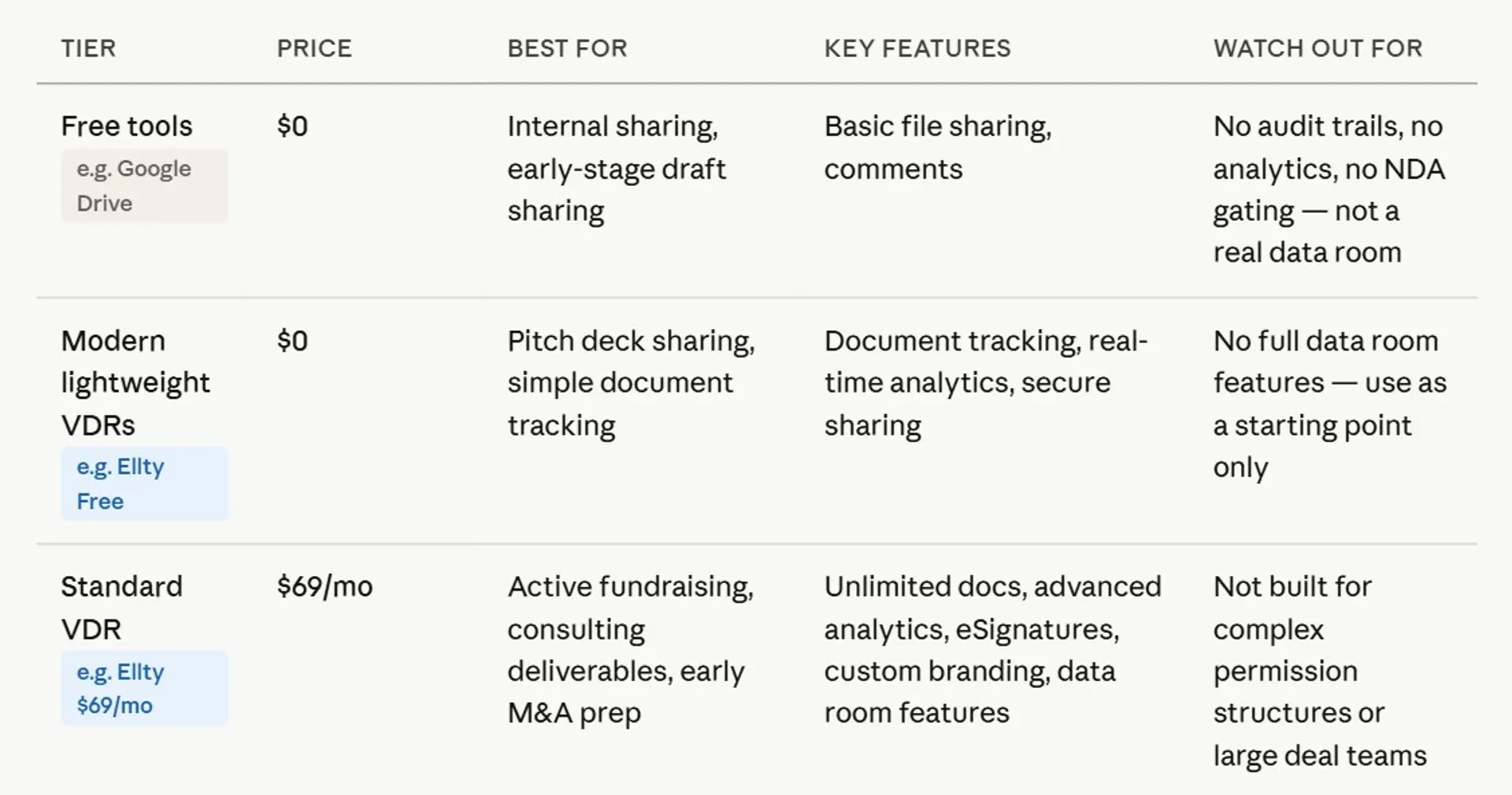
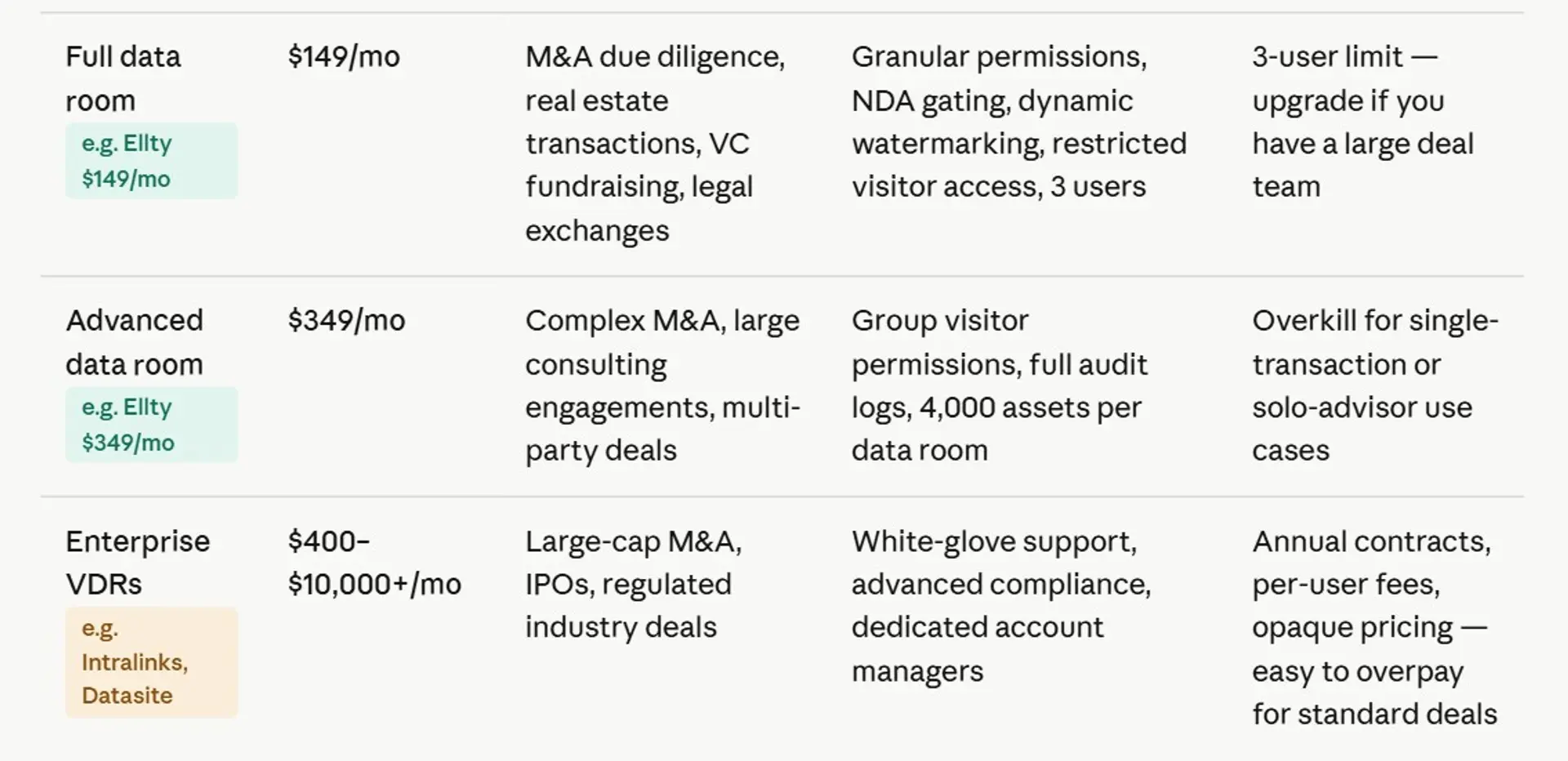
The virtual data room market has two very distinct segments: enterprise platforms and founder-friendly tools. They serve different use cases at very different price points.
Enterprise VDR platforms
These are used for large M&A deals, IPO processes, and complex legal transactions. Think Intralinks, Datasite, Ansarada, and Firmex. They're feature-rich, highly secure, and expensive - often thousands of dollars per month plus per-page or per-user fees.
If you're a pre-seed or Series A founder, you almost certainly don't need one of these. They're designed for transactions involving multiple law firms, hundreds of users, and millions of documents.
Founder-focused and mid-market tools
This is where most businesses should look. Tools in this category include DocSend (now Dropbox DocSend), Notion (with limitations), Pitch, and Ellty.


Virtual data room workflow: what it looks like in practice
Here's how a virtual data room workflow typically looks:
Step 1: set up your data room
You create a data room and organize folders: pitch deck, financials, legal, team, product. You upload documents to each folder. This takes an hour or two if your documents are already prepared.
Step 2: create access links
Instead of emailing attachments, you create trackable links. You can create different links for different investor groups - some get access to pitch materials only, others get full due diligence access.
Step 3: share links with tracking on
You send the link instead of the file. The visitor clicks it, signs an NDA if you've required one, and enters the data room.
Step 4: monitor activity
You get notified when they open documents. You can see which pages they spent time on, what they downloaded, and when they came back for a second look. This is genuinely useful signal - a viewer who spent 12 minutes on your financial model is in a different conversation than one who spent 45 seconds on your deck.
Step 5: update and revoke as needed
If a deal falls through or you update your financials, you update the document in one place. All viewers see the updated version instantly. If someone you no longer want to have access tries to open the link, they can't.
In Ellty, this entire setup - from account creation to sharing a trackable link - takes less than 10 minutes for a basic pitch deck share.
When to use email vs when to use a virtual data room
Not every document share needs a data room. Here's a practical framework.
Stick with email when:
- Sharing general non-sensitive files with people you trust
- One-off document exchange with no need for tracking
- Quick internal team file sharing
- The recipient specifically asks for an email attachment
Use a virtual data room when:
- Sharing your pitch deck with investors for the first time
- Starting a formal due diligence process
- Sharing financial projections, cap tables, or legal documents
- You need to know if and when someone has reviewed what you sent
- Multiple investors, lawyers, or advisors need access to the same set of documents
- You want to revoke access or update documents without sending new versions
FAQ
What is a virtual data room?
A virtual data room is a secure online environment for sharing and storing sensitive documents with controlled access. It provides features like viewer tracking, access revocation, NDA gating, and audit logs - designed for due diligence, fundraising, and secure document exchange.
Is Dropbox a virtual data room?
No. Dropbox is a cloud storage and file-sharing tool. It lacks key VDR features like per-page analytics, NDA gating, dynamic watermarking, and full audit logs. Some founders use it as a basic shared folder, but it's not designed for due diligence or secure external document sharing.
What's the difference between a virtual data room and email?
Email sends documents as attachments with no control or visibility after sending. A virtual data room gives you access control, viewer analytics, real-time notifications, document versioning, and the ability to revoke access at any time. Email is fine for casual sharing. A VDR is designed for sensitive documents sharing safely where visibility and control matter.
Do I need a virtual data room for fundraising?
Not always - early conversations and cold outreach can happen over email. But once investors are serious and asking for due diligence materials, a data room makes your process look professional and gives you visibility into investor engagement. It's also a security practice: you control access to your cap table and financials, not your inbox.
Are there free virtual data rooms?
Yes. Ellty offers a free plan with document tracking, real-time analytics, and secure sharing - no time limit. Google Drive and Dropbox can work as basic free options for less sensitive sharing, though they lack analytics. For full data room features like NDA gating and audit logs, you'll need a paid plan on any platform.
What is a Google data room?
There's no official Google product called a data room. Some founders use Google Drive folders with restricted sharing as a makeshift VDR. It works at a basic level but lacks analytics, NDA gating, real-time notifications, and the access control depth of a purpose-built tool.
What documents go in an investor data room?
Typically: pitch deck, financial statements and projections, cap table, incorporation documents, key customer contracts, IP documentation, team bios and employment agreements, product roadmap, and prior funding documents. What you include depends on the stage of the deal and what the investor asks for.
How long does it take to set up a virtual data room?
For a simple pitch deck share with tracking, you can be live in under 10 minutes on most modern tools. A full due diligence data room with organized folders and permission controls takes longer - typically a few hours, depending on how many documents you need to organize and upload.
What's the difference between email and video conferencing?
Email is asynchronous - you send files or messages and the recipient reads them in their own time. Video conferencing is synchronous real-time communication. Neither is a document management tool. A virtual data room handles document sharing separately from both, with access control and analytics that email and video conferencing don't provide.


Final thoughts
Email is fine. It's just not enough when you're sharing sensitive documents and need to know what happens after you hit send.
A virtual data room gives you that visibility and control. Whether you're sharing your first pitch deck or running a full due diligence process, the right tool is one that matches your actual needs - not the most expensive enterprise platform, and not just a Dropbox folder with a shared link.
Start simple. Get visibility. Upgrade when you need more.
Author

Anika Tabassum Nionta is a Content Manager at Ellty, where she writes about secure document sharing, virtual data rooms, M&A, due diligence, fundraising, and sales enablement. With over 6 years of writing experience, she helps professionals understand how to share confidential documents securely, track engagement, and manage deals more effectively. Anika holds both a BA and MA in English from Dhaka University. Outside of work, she enjoys reading, exploring new cafes in Dhaka, and connecting with entrepreneurs and dealmakers in her community.

