
A practical guide for sharing data room links the right way from setting up access to controlling exactly who sees what and when.
You're in the middle of an important process - a deal, a review, an audit, a partnership discussion. Someone asks for access to your documents. You pull together a folder, share a link, and move on hoping for the best.
That approach works until it doesn't. Links get forwarded. Former collaborators still have access months later. You have no idea who actually opened your documents, or for how long. When the process ends, you can't even revoke access cleanly.
This guide covers how to share a data room link the right way with proper access controls, tracking, and security. So you always know what's happening with your documents.
What is a data room link, exactly?
A data room link is a URL that gives someone access to a secure, organized collection of documents. Unlike a standard file-sharing link, a data room link comes with access controls, tracking, and permission settings built in.
When you share a data room link securely, you're not just handing someone a URL. You're controlling:
- Who can open it
- What they can do with the contents (view, download, print)
- How long they have access
- What you can see about their activity
That's a very different thing from a shared Google Drive folder.
A well-set-up data room link lets you grant access in seconds and revoke it just as fast without any back-and-forth with IT or manually removing someone from a folder.
How to create a data room
Setting up a data room doesn't have to take days. With a modern tool, you can have a functional, secure room live in under an hour, if your documents are ready to upload.
Here's the basic process:
1. Choose your platform
Pick a tool built for secure document sharing, not a general cloud storage service. More on this below.
2. Create a new data room
Name it clearly and in a way that makes sense for your use case. For a legal review, something like "Johnson LLC - Contract Review 2025" works. For sensitive deals, use a codename if confidentiality is needed at the project level.
3. Organize your folder structure
Group documents logically based on your process. Common categories vary by use case, a corporate transaction might use Financials, Legal, Compliance, and HR; a real estate deal might use Property Documents, Title Records, and Inspection Reports. Keep the structure clean and intuitive so reviewers can find what they need quickly.
4. Upload your documents
Upload PDFs, spreadsheets, and presentations. Most platforms accept bulk uploads. Label files clearly. "Q3 2025 Revenue Report" is far more useful than "financials_final_v3".
5. Set permissions
Decide who gets access to what. Not everyone reviewing your data room needs to see everything. Segment access based on role, seniority, or the stage of the process.
6. Enable security features
Turn on NDA gating, watermarking, and download restrictions as needed. More on each of these below.
7. Generate your share link
Create a trackable link. Many platforms let you create separate links for different recipients or groups. So you can track engagement individually and revoke access per person without affecting others.


How to create a share link
Once your data room is set up, creating a share link is the easy part. Here's how it typically works across most platforms:
You go to your data room settings, find the "sharing" or "invite" section, and either add viewers by email or generate a link. The link option is usually faster if you're sharing with multiple people at once.
With a platform like Ellty, you can generate a shareable link directly from your data room, and that link will be tied to analytics. So you see who clicked it, when, and for how long. You can also create separate links for separate recipients if you want to track engagement by visitor.
A few things worth configuring before you send the link:
- Set an expiry date if you don't want the link to live forever
- Require email verification to see who's actually opening it
- Enable NDA acceptance before access is granted
- Turn off download permissions for sensitive materials
Don't just copy-paste the link and send it. Take 90 seconds to configure these settings. It matters more than you think.
How to share a data room link via email
Most teams share their data room link over email. It's simple and direct. But how you frame that email and how the link is set up, makes a real difference.
Here's what a clean data room invite email looks like:
Example email
Hi [Name],
Here's access to our data room for the Series A process:
[Link]
You'll be asked to verify your email and agree to an NDA before accessing the documents. Everything is organized by category - financials, legal, product, team. Let me know if you'd like anything else added.
Best,
[Your name]
Keep it short. The other parties don't need a paragraph of context about why you're sharing a data room, they know why. Just give them the link and tell them what to expect (email verification, NDA, etc.) so they're not caught off guard.
One more thing: don't send the link in a group email unless you want everyone to have the same access level. If you're sharing with multiple parties in parallel, send individual emails with individual links. This way you can track each party's engagement separately.
What makes a data room link secure?
Not all share links are equal. A link from Google Drive and a link from a purpose-built virtual data room look similar on the surface. But they're very different under the hood.
Here are the security features that actually matter:


You don't necessarily need all of these features for every situation. A pitch deck share doesn't need watermarking. A full due diligence process probably does. Use what fits the sensitivity level of what you're sharing.
Can I use Google Drive for a data room?
Yes. And plenty of teams do, especially at the earliest stages. But it comes with real trade-offs you should understand before you decide.

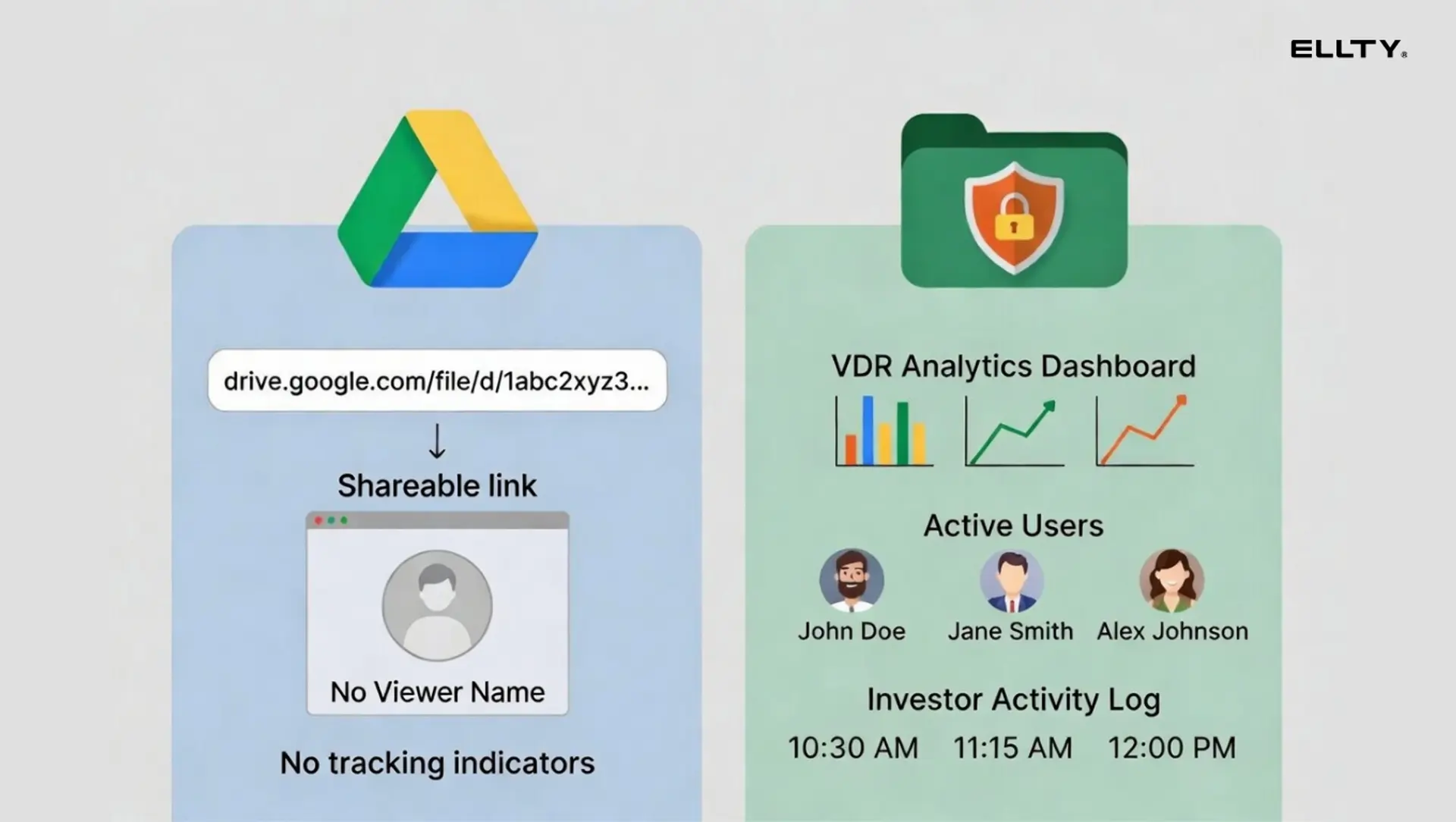
Google Drive works fine for sharing marketing materials or internal collaboration. It falls short the moment you care about any of the following:
- Knowing who actually looked at your documents
- Preventing someone from downloading and sharing your financials
- Creating a legal record that someone agreed to an NDA
- Revoking access cleanly and knowing it actually worked
If you're doing a seed round with three angels you personally know, Google Drive might be fine. If you're in active diligence with serious deals, it's probably not the right tool.
One thing Google Drive doesn't tell you: whether the "view" counted because a partner opened it or because an associate accidentally clicked the link. A virtual data room gives you the context a raw access log doesn't.
Affordable data room providers worth knowing
The virtual data room market has two tiers that sit very far apart. The enterprise tier VDRs such as Intralinks, Datasite, Donnelley, is built for large, complex transactions with strict compliance requirements and dedicated legal teams. Pricing typically runs $1,000–$5,000+ per month, and you usually need to go through a sales process before getting access.
For most organizations running a straightforward document sharing process, whether that's a business acquisition, a legal review, a board audit, or a partnership deal, that level of complexity and cost isn't necessary. More affordable options exist that cover the core features most teams actually need.

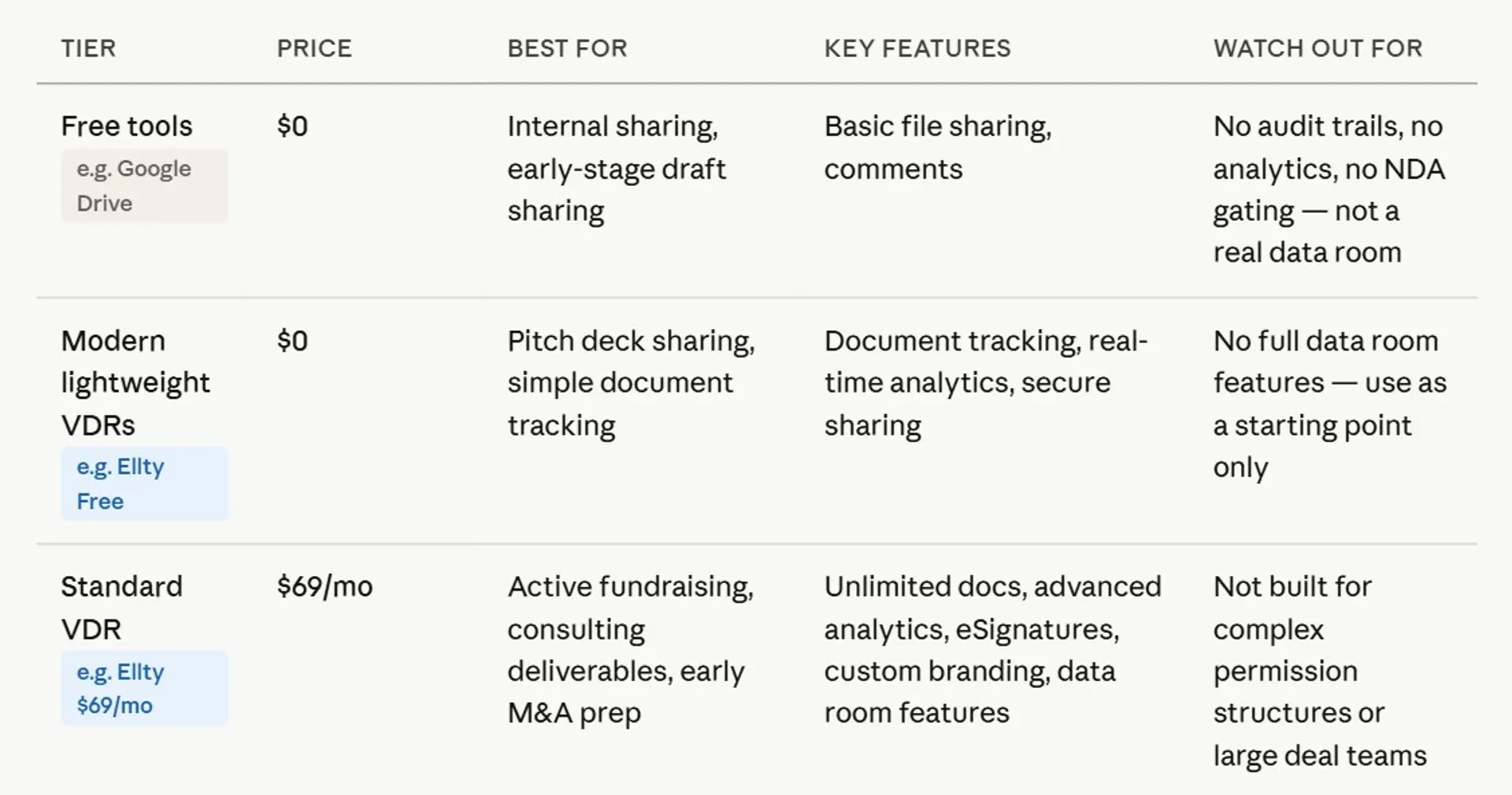

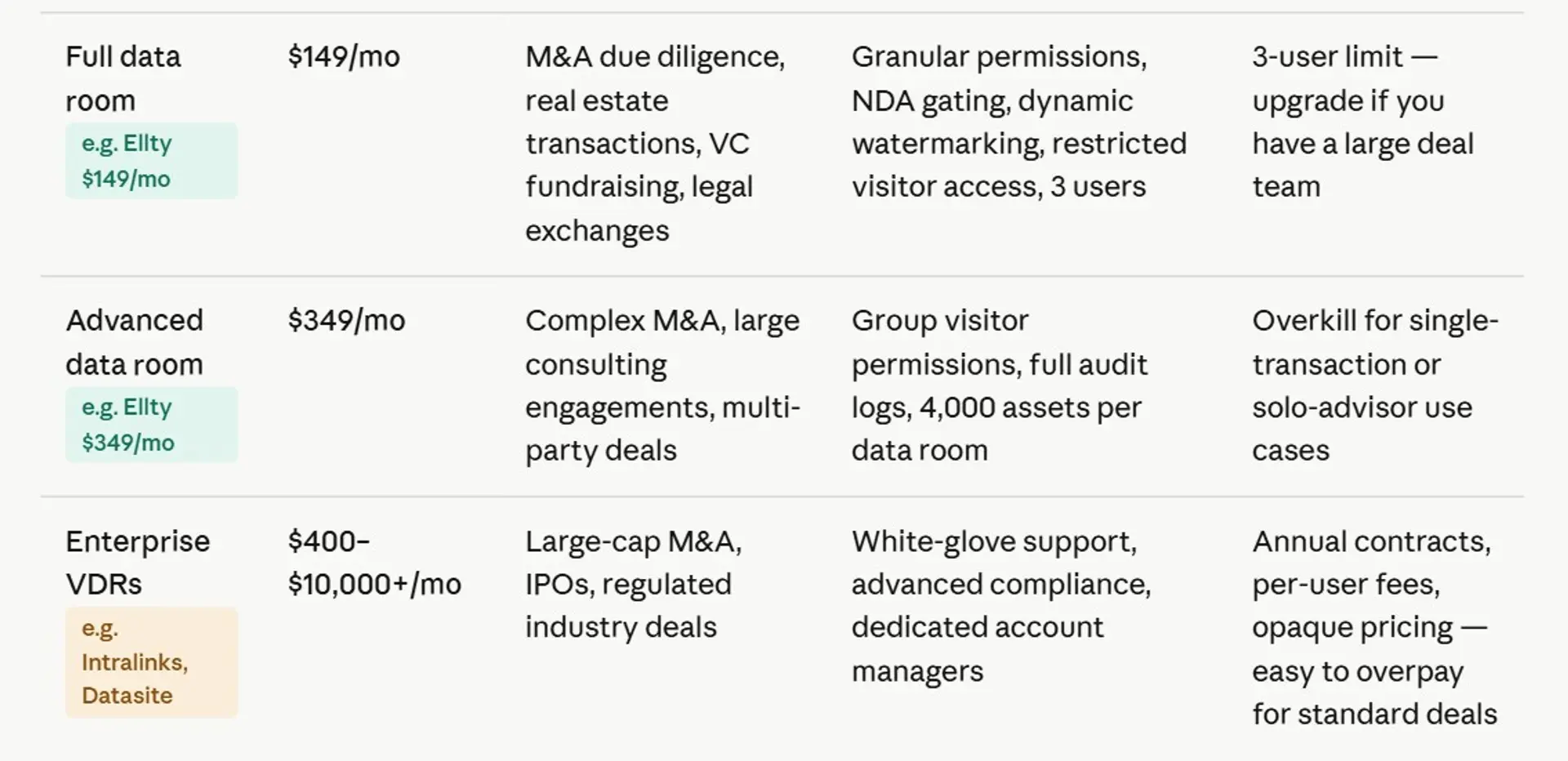
One pricing model worth paying attention to is per-user pricing. Depending on the process, a single external party might send multiple reviewers, a lead contact, a legal representative, a financial analyst. Multiply that across several parties involved in the same process, and your user count grows quickly. At $50 per user per month, that adds up fast before anything has even been signed.
Ellty offers data room features without per-user pricing, which keeps costs predictable as more people need access. The Data Room plan is $149/month for up to three admin users, with no additional charges per viewer.
What Ellty offers and who it's for


Ellty is built for secure sharing, document tracking, and controlled access without the complexity of enterprise platforms or the limitations of basic cloud storage. Here's what each plan actually includes:

Where Ellty works well: when you need to share documents with multiple stakeholders at once, monitor engagement without per-viewer fees, and get everything set up quickly without a lengthy onboarding process.
Where it's not the right fit: large, multi-party transactions involving high document volumes, competitive bidding processes, or strict technical requirements like ISO 27001 certification or built-in Q&A workflows. Platforms like Intralinks and Datasite are purpose-built for those environments.
For structured sharing processes that don't require enterprise-grade infrastructure, Ellty covers the features that matter at a flat monthly cost with no demos or sales calls required to get started.


How to share a data room link - security checklist
Before you send that link, run through this. It takes five minutes and saves real problems later.


Not every item applies to every situation. Sharing your pitch deck with a warm intro? You might skip NDA gating. Sharing your full cap table and IP assignments with a lead party in active diligence? Check everything.
How to read your data room analytics
Once your link is live, the analytics are where you start making smarter decisions about your raise.
Here's what to pay attention to:
Time spent per document tells you what visitors actually care about. If someone spent 18 minutes on your financial model and two seconds on the team page, they're deep in the numbers. That's the conversation to have on the follow-up call.
Pages viewed inside a document reveals which sections got attention. If three out of four viewers skipped your market size slides but dwelled on customer case studies, that's useful signal for updating your pitch deck.
Return visits matter. A viewer who opens your data room three times in a week is much more engaged than one who opened it once. Real-time notifications let you follow up while you're top of mind.
No activity after a week usually means one of two things: they're not interested, or your link didn't work. Both are worth checking. A quick "just following up - did the link come through?" email often surfaces a soft no early, which saves everyone time.

Common mistakes people make with data room links
These come up across industries. Most are easy to avoid once you know what to look for.
Sharing everything upfront is the most common one. You don't need to give full access to every document from the very first interaction. Share a summary or overview first. Provide deeper access when it's specifically requested. Keeping some materials behind a request step also gives you a clearer picture of who is genuinely engaged.
Using the same link for everyone makes your tracking data meaningless. If you create one generic link and share it with multiple parties, you can't tell who's active and who isn't. Create separate links per recipient or use email-gated access so your engagement data is actually useful.
Forgetting to revoke access when a process ends is a real operational risk. When a deal closes, a review wraps up, or a relationship ends, access should end with it. A proper data room lets you do this in one click. Unmanaged shared folders make it far messier.
Uploading disorganized documents signals something about how your organization operates. If someone opens your data room and finds files named "final_FINAL_v4_USE_THIS.pdf," that's a problem. Take time to organize and label files clearly before sharing. It's worth the effort.
Not checking analytics after sharing is a missed opportunity. If your data room has been accessible for two weeks and several parties haven't opened it once, that's a signal worth acting on, whether that means following up or redirecting your attention. Don't wait passively for responses that may not come.
Frequently asked questions
How do I create a share link for a data room?
In most virtual data room platforms, you go to your data room settings, find the sharing or invite section, and generate a link. In Ellty, you can create a trackable link directly from your data room - and you can create separate links for different recipients to track engagement individually. Before sharing, configure email verification, NDA gating, and permission settings.
How do I share a data room link via email?
Keep the email short. Include the link, tell them what to expect (email verification, NDA if applicable), and mention what's inside. Don't send the same link to multiple parties in a group email if you want individual tracking. Send separate emails with separate links instead.
Can I use Google Drive as a data room?
Technically, yes. But Google Drive doesn't give you view analytics, NDA gating, watermarking, or meaningful download controls. If you're sharing sensitive financial documents with viewers, those missing features become real gaps. Google Drive works fine for internal collaboration or sharing non-sensitive materials.
What is NDA gating and do I need it?
NDA gating requires visitors to digitally sign a non-disclosure agreement before accessing your data room. The signature is timestamped and logged. For early conversations or pitch deck sharing, you probably don't need it. For full due diligence where you're sharing financials, cap tables, IP assignments, and contracts,NDA gating creates a legal record that confidentiality was agreed to. It's a standard expectation in any serious deal process.
What does dynamic watermarking do?
Dynamic watermarking stamps every page of a document with the viewer's email address and sometimes their IP. If a document gets shared outside the data room, you can trace exactly who sent it. It's a deterrent as much as a detection tool, most people won't share a document with their name written across every page.
How much does a virtual data room cost?
Pricing varies widely. Enterprise providers like Intralinks and Datasite can run $1,000-$5,000+ per month. Mid-tier tools like iDeals start around $460/month. For most businesses, flat-rate tools are a better fit. Ellty offers a free plan for basic document tracking and secure sharing. The Data Room plan, which includes NDA gating, watermarking, and granular permissions, is $149/month with no per-user fees. The Data Room Plus plan at $349/month adds group permissions and audit logs.
What's the difference between a pitch deck and a data room?
A pitch deck is a short visual presentation you share early to generate viewer interest. A data room is the comprehensive document package you share during active diligence - financials, legal docs, cap table, contracts, and so on. You share the pitch deck first, then provide data room access once a viewer expresses serious interest.
How do I revoke data room access?
In a proper virtual data room, revoking access is a single action - you remove the viewer or disable their link, and access ends immediately. This is one of the practical advantages over Google Drive, where "removing" someone from a shared folder doesn't guarantee they didn't already download or screenshot what they needed. Set link expiry dates from the start for any time-limited process.
Are affordable data room providers actually secure?
Yes - provided you're checking for the right things. Look for encrypted storage, access controls, and a clear privacy policy about how your data is handled. For most contexts, the core security features you need are the same whether you're paying $149/month or $1,500/month. The enterprise platforms are priced higher because of compliance certifications (ISO 27001, SOC 2), dedicated support, and features built for complex M&A, not because the basic security is meaningfully better.


Author

Anika Tabassum Nionta is a Content Manager at Ellty, where she writes about secure document sharing, virtual data rooms, M&A, due diligence, fundraising, and sales enablement. With over 6 years of writing experience, she helps professionals understand how to share confidential documents securely, track engagement, and manage deals more effectively. Anika holds both a BA and MA in English from Dhaka University. Outside of work, she enjoys reading, exploring new cafes in Dhaka, and connecting with entrepreneurs and dealmakers in her community.

