
You need to share confidential documents. It shouldn't be this hard.
You're knee-deep in a deal - maybe it's a fundraising round, an acquisition, a real estate transaction, or a client audit. Someone on the other side asks for your documents. You say "I'll send them over today" and then you spend two days scrambling to pull everything together, figure out where to upload it, and share it without firing off a sketchy zip file over email.
It doesn't have to be that way.
A proper data room takes less than an hour to set up if you know what you're doing. This guide walks you through everything - what a data room is, what goes in it, how to structure it, what tools to use, and how to share it so you always know who's looking at what.


What is a data room?

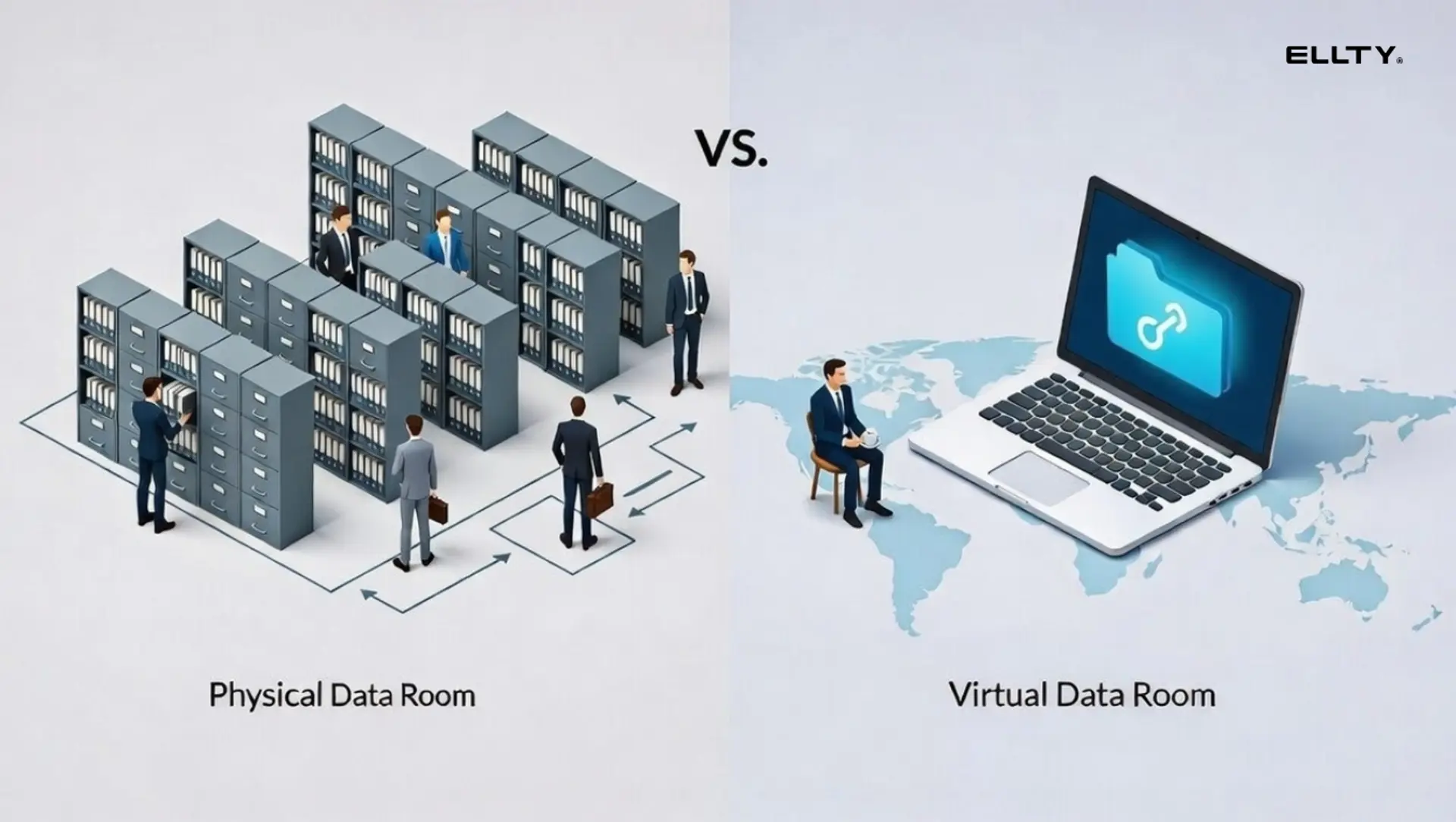
A data room is a secure, organized space where you store and share confidential documents with the people who need to see them - investors, buyers, clients, lawyers, or partners.
Traditionally, these were physical rooms with locked filing cabinets. Now they're virtual - software that lets you upload documents, control who sees what, and track every interaction.
People use data rooms across a wide range of situations:
- M&A deals - buyers and their lawyers need to review financials, contracts, and legal docs before a deal closes
- Fundraising - investors want to see your cap table, financials, and legal structure during due diligence
- Real estate transactions - property documents, title deeds, and agreements need to be shared securely with multiple parties
- Consulting and client work - sharing sensitive deliverables, reports, or proposals without losing control of them
- Legal audits - giving auditors or regulators access to exactly what they need, nothing more
- Board-level document sharing - keeping sensitive internal documents in one place, accessible only to the right people
- Partnership negotiations - sharing confidential terms and agreements with potential partners
If you can't present your documents in a clean and organized way, whoever's on the receiving end notices. It signals disorganization. It slows things down. It can kill deals.
How do virtual data rooms work?
A virtual data room works like a secure, permission-controlled folder in the cloud, but with a lot more built on top.
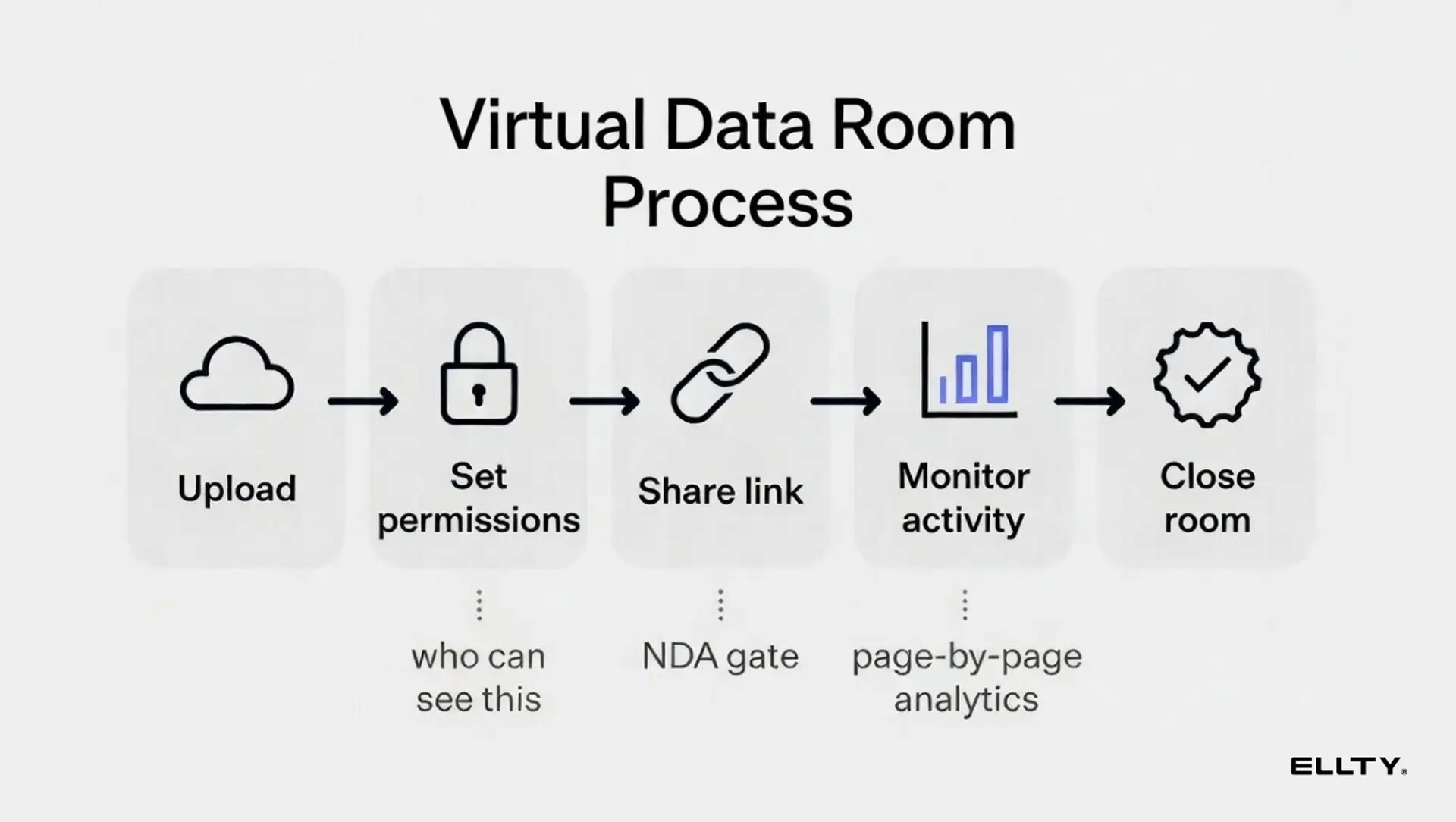
Here's the basic flow:
- You upload your documents to the platform
- You organize them into folders
- You invite specific people with specific access levels
- They log in, review documents, and can download or comment - depending on what you allow
- You get a full log of exactly who viewed what, when, and for how long
The "virtual" part just means it's online instead of a locked room. The "data room" part means it has the security and access controls that a basic Google Drive folder simply doesn't.
Most virtual data room software also includes:
- Audit logs - a record of every action taken inside the room
- NDA gating - viewers sign an NDA before they can access anything
- Watermarking - documents stay traceable even if they're leaked
- Document-level permissions - not everyone needs to see everything
- Expiry links - access automatically revokes after a set time
This is exactly what Ellty is built for. Whether you're closing an acquisition, onboarding a new investor, sharing a proposal with a client, or running a real estate deal - Ellty gives you a clean, secure place to share documents and stay in control of who sees what, at every step.
When do you need a data room?
The biggest mistake people make is waiting until someone asks for it. By then, you're already behind.
You don't build a data room when the request comes in. You build it in advance, so when the moment arrives, you're ready.
You need a data room when:
- You're actively fundraising - seed, Series A, or beyond
- An investor has moved into due diligence
- You're in acquisition or merger conversations
- A strategic partner, large client, or vendor is doing a formal review of your business
- You're preparing for a secondary transaction
- You're onboarding a new board member or advisor who needs access to key documents
- You're managing a real estate deal that involves multiple parties and sensitive paperwork
- You're a consultant or agency sharing confidential deliverables with a client
Even if none of these apply right now, a basic data room is still worth having. It forces you to get organized, spot gaps in your documentation, and have everything ready when things move fast. And they always move faster than you expect. You don't want to be the bottleneck.
What goes in a data room?


This is where most people get stuck. They know they need a data room but aren't sure what to put in it.
The honest answer: it depends on your situation. An M&A deal needs different documents than a real estate transaction or a consulting engagement. But the principle is the same across all of them - include what's relevant, keep it organized, and don't pad it with documents that don't belong there. The people reviewing your room will notice.
Here's a practical breakdown by category.
(Note: if you're early-stage or just getting started, you won't have everything listed here. That's completely fine. Include what exists, flag what's in progress, and move on.)
How to create a data room in Google Drive and why it has limits
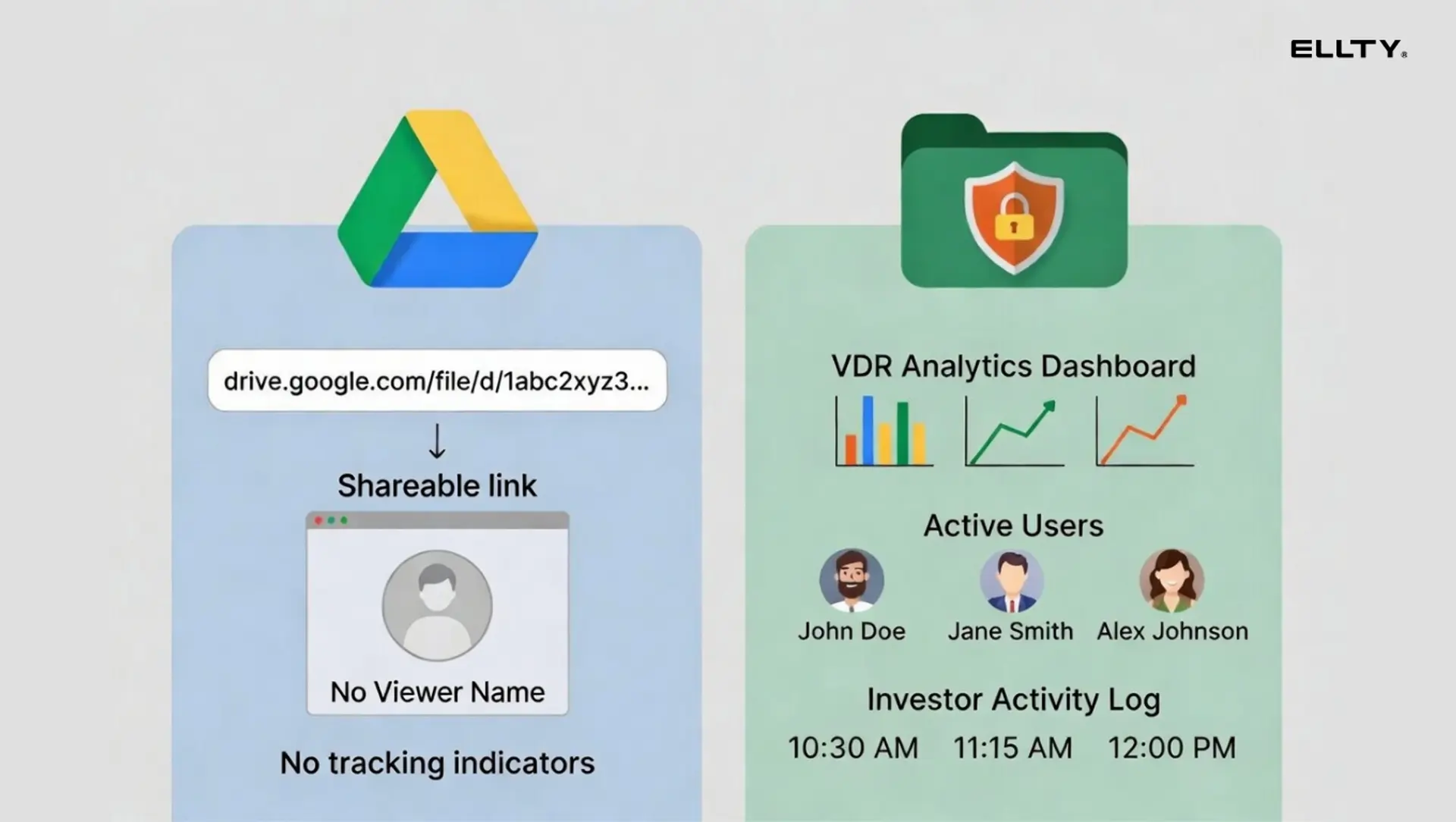
Google Drive is free, most people already use it, and it works well enough as a starting point. If you need something set up today and don't want to evaluate software, here's how to do it properly.
Setting up a Google Drive data room:
- Create a new Shared Drive - not a regular folder. Shared drives have better permission controls
- Name it clearly: "Your Company - Data Room - [Year]" or "[Project Name] - Due Diligence"
- Build your top-level folder structure based on the categories relevant to your situation
- Upload documents into the right folders
- Set sharing to Restricted at the drive level
- Invite specific people by email, only the people who actually need access
- Set each person to Viewer by default, unless they need to edit
What Google Drive doesn't give you:
- Document analytics - you won't know who opened what or when
- NDA gating before someone can view anything
- Watermarking on sensitive documents
- Page-level view tracking
- Real-time alerts when someone accesses the room
- Audit logs of every action taken
- Link expiry - you can't auto-revoke access after a set date
Google Drive is a solid tool for sharing files. It's not built for managing a formal document review process. You have no visibility into how engaged the other side actually is, and when you're in the middle of a deal, that visibility matters.
That's where a dedicated solution like Ellty comes in.


How to set up a virtual data room in under an hour
Here's the actual step-by-step process. This assumes you already have your documents or at least most of them.
Step 1: Pick your platform (5 minutes)
For simple sharing and tracking, Ellty gets you started for free and handles the core use case - uploading documents, creating trackable links, and seeing who viewed what. If you need NDA gating and granular permissions, the Data Room plan ($149/month) adds that.


Step 2: Create your data room (5 minutes)

Log in to your chosen platform. Create a new data room and name it clearly. Include your company name and the purpose - for example, "Acme Inc - Series A Due Diligence - 2026."
Step 3: Build your folder structure (10 minutes)

Before uploading anything, create your folders first. Use the categories from the table above as your starting structure. Don't go more than two levels deep - a flat, clear structure is easier to navigate than a deeply nested one.
A clean top-level structure looks like this:
- 01 - Company overview
- 02 - Financials
- 03 - Legal
- 04 - Team
- 05 - Product
- 06 - Customers and metrics
- 07 - Partnerships and contracts
- 08 - IP and technology
Numbering folders forces them to stay in order instead of alphabetizing into something confusing.
Step 4: Upload your documents (20 minutes)
Upload documents into the correct folders. Name files clearly and consistently. "P&L_2024_Q4_Final.pdf" is better than "final version 3 (use this one).pdf."
Don't upload draft documents. If a document isn't ready, put a placeholder note in the folder or just leave it empty. Uploading messy, incomplete, or contradictory documents is worse than not having them.
If you're using Ellty, you can upload pitch decks, PDFs, and other sensitive documents. The platform tracks how long each page is viewed, so you can see exactly which sections visitors spend time on and which they skip.
Start a free Ellty account and have your first document uploaded in under two minutes. No credit card required to see who's viewing your materials.
Step 5: Set permissions (10 minutes)
Decide who gets access to what. Not every visitor needs to see your full employee compensation details or your most sensitive contracts at the first stage of conversation.
A practical approach is to create permission tiers:
- Level 1 (initial interest): Company overview, financials summary, team info, product docs
- Level 2 (deeper diligence): Full legal, contracts, detailed cap table, customer data
- Level 3 (final stage): Everything, including sensitive employment and IP docs
With Ellty Data Room plan, you can set granular permissions at the folder and document level. The Data Room Plus plan adds group visitor permissions, which makes managing multiple viewers at different stages much easier.
Step 6: Set up NDA gating and watermarks (5 minutes)
If you're sharing sensitive financial or legal documents, turn on NDA gating. This requires anyone accessing the room to accept an NDA before they can view anything.
Dynamic watermarking adds the viewer's name and email to every page automatically. If a document leaks, you know exactly who it came from. Both features are available on Ellty Data Room plan.
Step 7: Create and share your link (5 minutes)
Generate a trackable link to the data room. Send it to your viewers directly rather than adding them as individual users if you want a cleaner experience.
With Ellty, every link is trackable. You'll get a real-time notification when someone opens the room, and you can see exactly which documents they viewed and for how long.
Total time: under an hour if your documents are ready. If you're gathering documents from scratch, add time for that - but the setup itself is fast.
Virtual data room providers and pricing tiers: an honest overview
There are a lot of data room tools on the market. They range from free consumer-grade tools to enterprise software that costs thousands of dollars per month. Here's a practical breakdown.

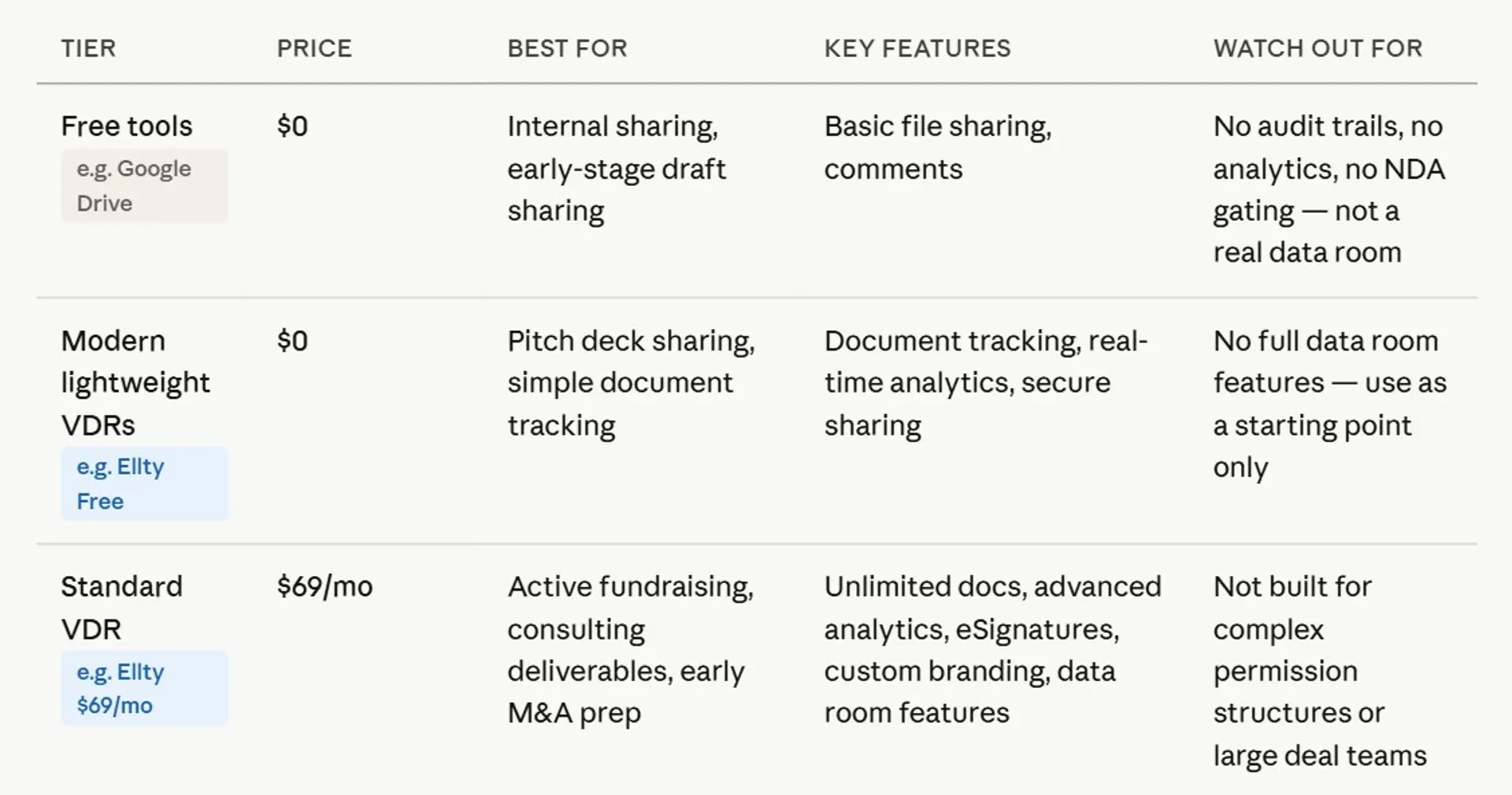

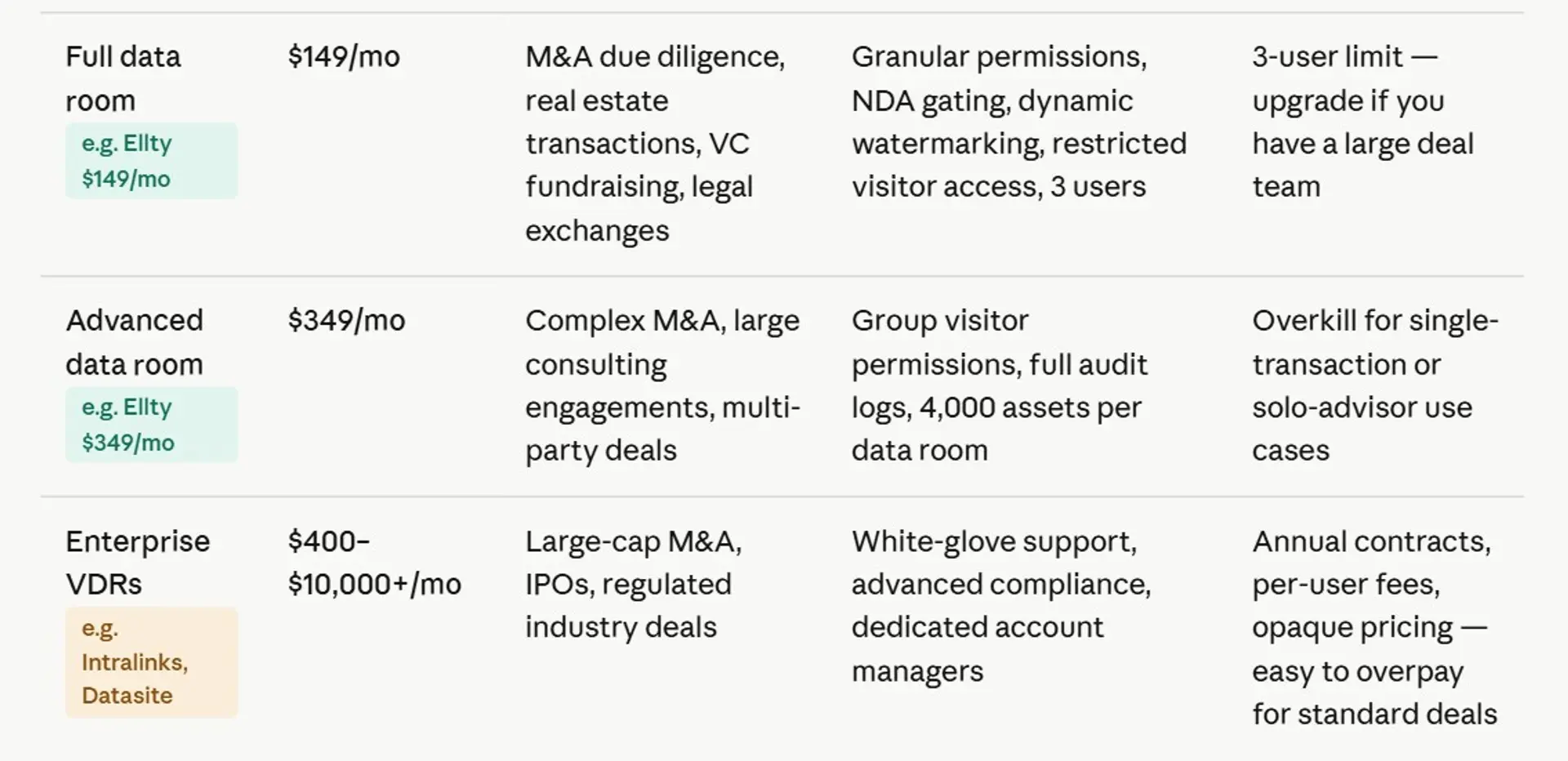
Most businesses don't need enterprise data room software. It's expensive, often priced per user (which adds up quickly), and has more features than you'll ever use.
Ellty is built for secure sharing, investor analytics, and data room features without per-user pricing. Whether you're raising a funding round, closing a property deal, running a consulting engagement, or managing an acquisition, Ellty gives you the core tools that matter: access controls, real-time activity tracking, NDA gating, and a clean audit trail.
Data room best practices

Setting up a data room is one thing. Making it work in your favor is another. These are the habits that separate a data room that moves deals forward from one that creates unnecessary friction.
Keep it current. An outdated financial report or a pitch deck from two years ago sends the wrong signal. Before you share access with anyone new - whether it's an investor, a buyer, or a client - do a quick sweep and make sure everything is up to date.
Name your files consistently. Pick a naming format and stick to it across every document. Something like CompanyName_DocumentType_Date.pdf works well. Keep it simple, keep it uniform, and avoid spaces in filenames. It sounds small, but messy filenames make the whole room feel disorganized.
Don't upload everything on day one. Start with the documents you're confident in. Add more as the conversation deepens. Dropping 200 files on someone the moment they get access is overwhelming and it often buries the things you actually want them to focus on.
Pay attention to engagement. If someone has had access for two weeks and hasn't opened the room, that tells you something. If they've been in three times and spent most of that time in the financials, that tells you something very different. Use the analytics your data room gives you, they're one of the most useful signals you have during any deal process.
Be deliberate with permissions. Not everyone needs access permission to everything. Stage what people can see based on where they are in the process. Early on, keep it tight. As things get more serious, you can open up more.
Have two versions ready. A lighter version for early conversations - your core documents, nothing too sensitive, and a full version for people who are deep in diligence and genuinely need the detail. Don't mix the two. Sharing too much too early is a common mistake that's easy to avoid.
Review it before you share it. Before you send anyone a link, go through the room yourself. Look at it the way the other person will. Are there any contradictions? Anything missing? Anything that shouldn't be there? A five-minute check before sharing can save you an awkward conversation later.


The difference between a data room and a pitch deck
These two things are related but not the same, and mixing them up is a common mistake.
A pitch deck is a sales tool. It tells a story. It's designed to generate excitement and move an investor from "not interested" to "tell me more." It's selective by design - you show your best metrics, your strongest narrative, your clearest market opportunity.
A data room is a verification tool. It's designed to confirm what you said in the pitch deck. It's comprehensive by design - you include the full picture, not just the highlights.
Sending a pitch deck when someone asks for a data room is a mismatch. They're at a different stage of the decision. They already like the story. Now they need to verify it.
The reverse is also true. Don't try to make your data room into a sales document.
With Ellty, you can manage both in one place. Share your pitch deck as a trackable link early in the process. Upgrade to a full data room when later-stage begins. The analytics carry through both stages, so you build a complete picture of visitor engagement from first contact to close.
Frequently asked questions
What is a virtual data room?
A virtual data room is a secure online platform where you store and share confidential documents with specific people. It's primarily used during fundraising due diligence, M&A processes, and partnership negotiations. It gives you more control and visibility than a simple shared folder - you can track who viewed what, set permissions per user, require NDA acceptance before access, and get notified in real time when someone opens your documents.
How much does a virtual data room cost?
Costs range from free to thousands of dollars per month. For early-stage companies, the practical range is $0 to $350/month for the features you actually need. Ellty free plan covers basic tracking and sharing. The Data Room plan ($149/month) adds NDA gating, granular permissions, and watermarking. Enterprise tools like Intralinks or Firmex are designed for complex M&A and are priced accordingly.
What's the difference between a data room and Google Drive?
Google Drive lets you store and share documents. A virtual data room adds analytics (who viewed what, when, for how long), NDA gating, watermarking, granular permissions, audit logs, and real-time notifications. Google Drive is free and familiar, but you're blind to investor engagement. If you want to know whether an investor has actually looked at your financials, you need a purpose-built data room tool.
When should I set up a data room?
Before you need it. Most teams set one up when someone requests it, which creates unnecessary delay and signals that you weren't prepared. Set up a basic data room before you need it. Update it as you gather documents. When the process begins, you're ready to share immediately.
Is a data room only for fundraising?
No. Data rooms are used for M&A due diligence, partnership negotiations, vendor audits, board document sharing, secondary transactions, and legal processes. Any situation where you need to share sensitive documents with external parties in a controlled, trackable way is a good use case.
Do I need to sign an NDA before accessing a data room?
It depends on the settings the document owner has configured. Many teams set up NDA gating on their data room so that anyone who clicks the link is required to accept an NDA before they can view anything. This is especially common for later-stage due diligence where the documents are more sensitive. Ellty Data Room plan supports NDA gating.
Can visitors download documents from a data room?
This is configurable. You can allow downloads, restrict to view-only, or set different download permissions for different users. On Ellty Data Room plan, you can control access at the folder and document level, including whether specific users can download. View-only access with watermarking is a common setup for companies.
How do I know if an investor has looked at my data room?
With a purpose-built virtual data room tool, you get analytics. Ellty provides real-time notifications when someone opens your room and detailed analytics showing which documents they viewed, which pages they spent time on, and how long they were in the room. You won't get any of this from Google Drive or a basic email attachment.
Author

Anika Tabassum Nionta is a Content Manager at Ellty, where she writes about secure document sharing, virtual data rooms, M&A, due diligence, fundraising, and sales enablement. With over 6 years of writing experience, she helps professionals understand how to share confidential documents securely, track engagement, and manage deals more effectively. Anika holds both a BA and MA in English from Dhaka University. Outside of work, she enjoys reading, exploring new cafes in Dhaka, and connecting with entrepreneurs and dealmakers in her community.

