
If you need to share sensitive documents with a specific group of people and you need to control exactly who sees what, you've probably come across terms like "virtual data room," "secure document sharing," "board portal," or "investor data room." These terms overlap, and they're not always the same thing. Depending on what you're working on, you might need something simple or something more structured.
This guide cuts through the noise. You'll understand what a virtual data room actually is, what features matter, what you can get for free, and when it's worth paying for something more robust.
What is a virtual data room for board communications?
A virtual data room (VDR) is a secure online space where you store and share sensitive documents with a controlled group of people. That group might be a board of directors, a team of investors, an M&A due diligence team, a consulting client, or a buyer reviewing a property portfolio. The use case changes, the core need doesn't.
The core value is control. You decide who sees what, for how long, and you can track whether they actually read it.
Depending on your situation, a VDR might contain things like:
- Board meeting decks and minutes
- Financial statements and audit reports
- Legal agreements and contracts
- Due diligence documents for a deal or acquisition
- Client deliverables and confidential reports
- Property documents and transaction records
- Cap table and equity documents
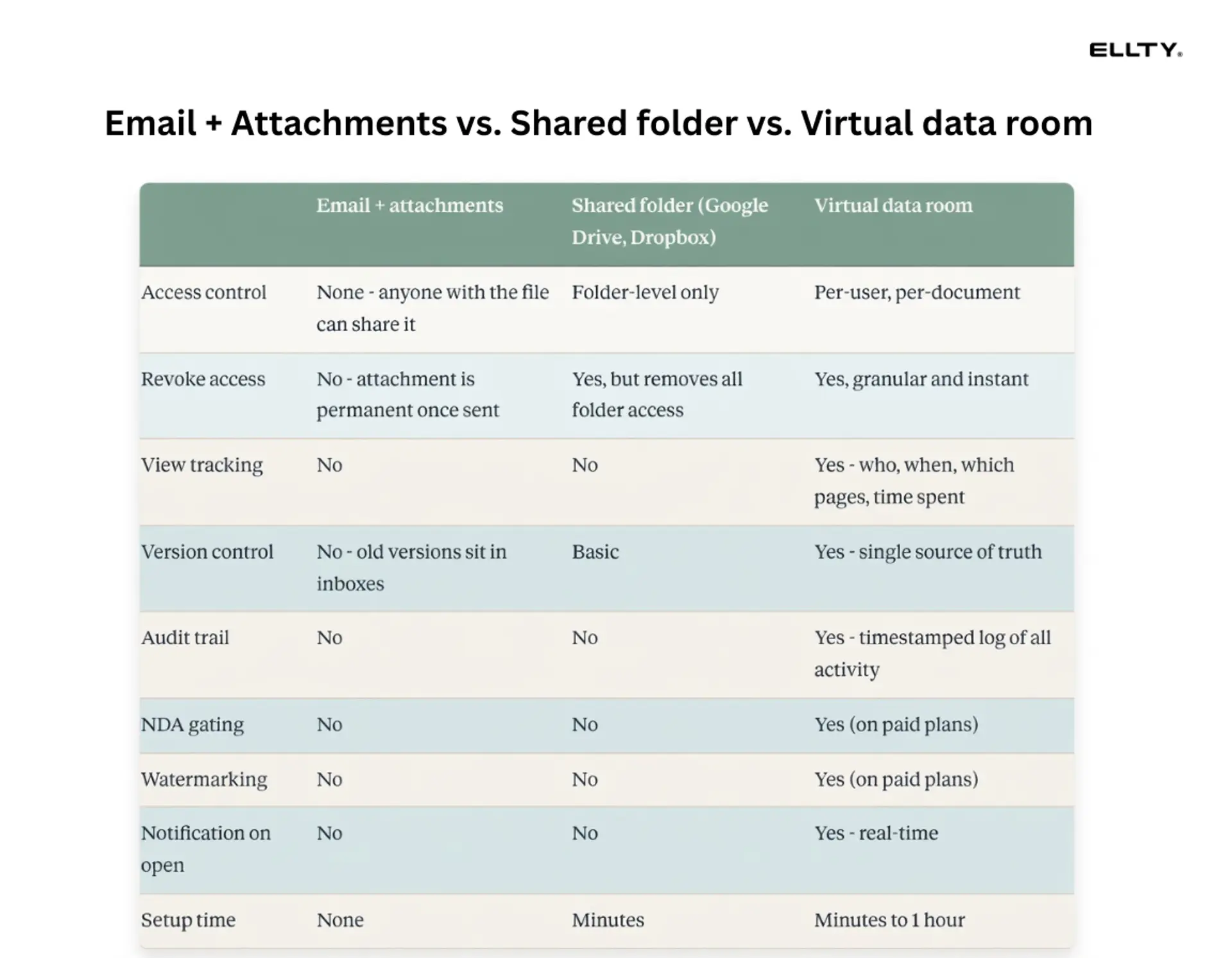
It's different from a shared Google Drive folder, even though people often use those as a substitute. Google Drive doesn't give you granular access control by document, it doesn't log who viewed what page, and it doesn't let you revoke access at the document level without removing the person from the folder entirely.
Ellty is built for exactly this - whether you're a startup sharing board materials, a consultant managing client documents, or an M&A team running a deal process. Anyone who needs to share sensitive documents securely, with real control over access, has a use for a proper data room.

What is a data room for investors?
This deserves its own section because investor data rooms and board communication data rooms are related but serve slightly different purposes.
An investor data room is typically built for due diligence. When a VC or angel is evaluating your company, they'll ask for a data room. This is a one-way information sharing environment where you give them structured access to the documents they need to make an investment decision. It's time-limited, highly controlled, and you want to know exactly what they looked at.
Common documents in an investor data room include:
- Pitch deck
- Financial model and projections
- Historical financials
- Cap table (often with a Carta or SAFE summary)
- Customer contracts and pipeline data
- Incorporation documents and IP assignments
- Team bios and org chart
- Product demos or technical documentation
A board communications data room, by contrast, is ongoing. It's used repeatedly, updated regularly, and shared with a smaller, more trusted group. The overlap is significant - many businesses use the same platform for both - but the use cases are distinct.


Virtual data rooms for board communication
1. Ellty


Ellty is a modern virtual data room built for anyone who needs to share sensitive documents securely, not just enterprise deal teams. It offers a clean, straightforward interface that doesn't require training to figure out. You get granular access control, document-level permissions, and activity tracking so you always know who viewed what and when. Pricing is transparent and flat - no per-user fees, no surprise charges. The free tier is genuinely usable, and paid plans start at $69/month, making it accessible for early-stage startups, consultants, real estate brokers, and small businesses alike. For board communications specifically, Ellty lets you organize folders by meeting date, control exactly what each board member or observer can see, and maintain a clean audit trail. It's the best option if you want something that works right away without a procurement process or a sales call.


2. Boardvantage (Nasdaq)

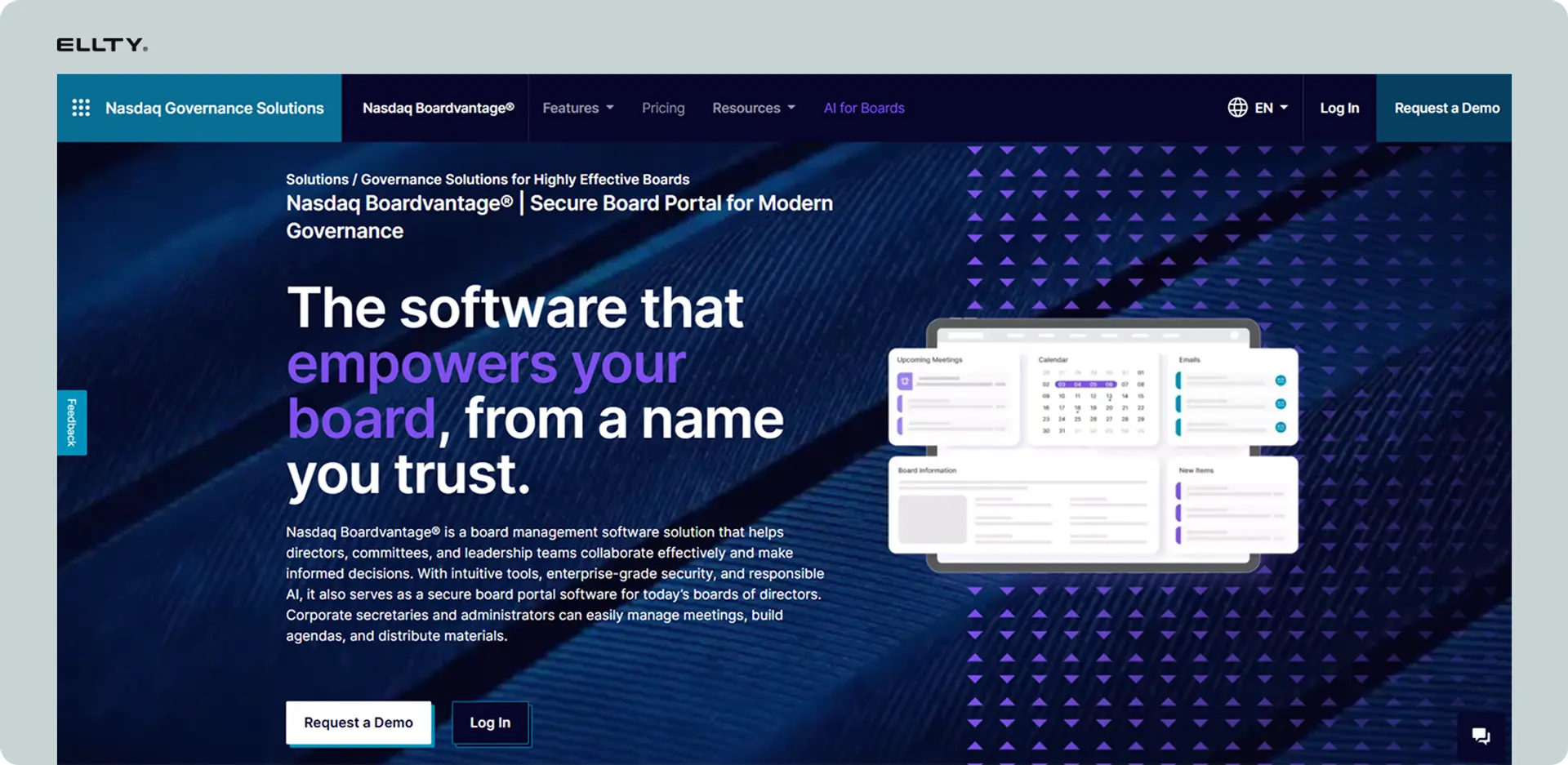
Boardvantage is a dedicated board portal used primarily by mid-to-large companies with formal governance requirements. It's built around the board meeting lifecycle - agenda creation, document distribution, annotations, and voting. Directors get a polished app experience on any device, and admins have strong control over permissions and document versions. It integrates well with other Nasdaq governance tools, which makes it attractive for public companies or those preparing for an IPO. The tradeoff is cost and complexity. Pricing is quote-based and typically runs into thousands per month, and setup requires dedicated onboarding. It's overkill for most early-stage companies but genuinely powerful for boards that meet frequently and handle heavy regulatory documentation.
3. Diligent Boards


Diligent is one of the most widely used board management platforms in the world, with a strong presence among large corporations, nonprofits, and public sector organizations. It combines board meeting management with a secure document repository, giving directors a single place to review materials, add annotations, and participate in votes. The platform has strong compliance and security credentials, which matters for heavily regulated industries. Like Boardvantage, it's not cheap, pricing is enterprise-tier and requires a conversation with sales. But if your board has complex governance needs, multiple committees, or operates across jurisdictions, Diligent has the depth to handle it. Not the right fit for startups, but a serious tool for serious boards.
4. Caplinked

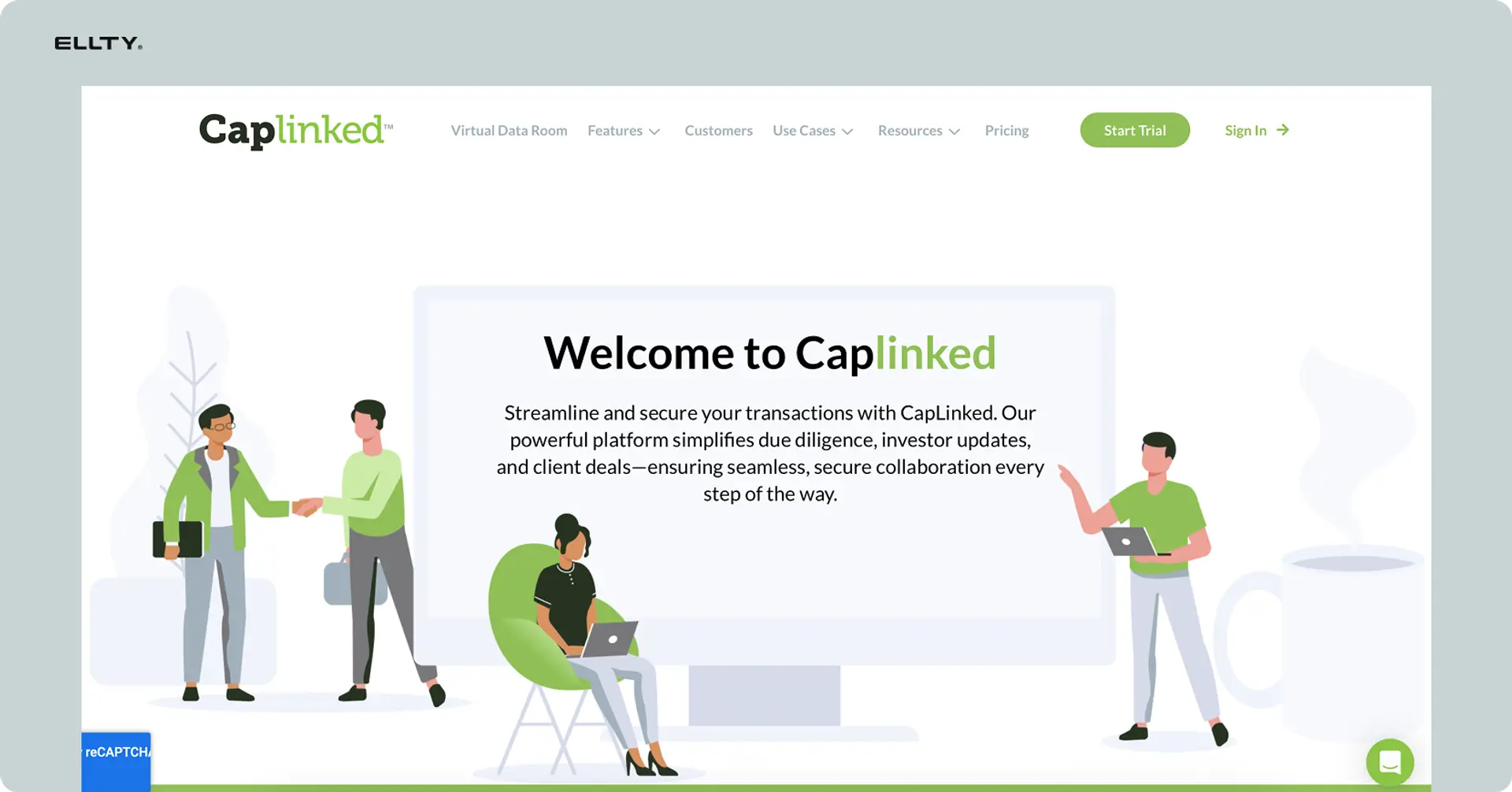
Caplinked sits in the middle ground between a lightweight data room and a full enterprise VDR. It's commonly used for M&A transactions, capital raises, and asset sales, but it works well for ongoing board communications too. You get solid access controls, activity reporting, and a clean document structure. Pricing varies and isn't always fully transparent upfront, but it's generally more affordable than the large enterprise players. Caplinked is a reasonable choice for growth-stage companies that need more structure than a basic tool offers but aren't ready to commit to an enterprise platform. It handles multiple deal rooms well, which makes it useful if you're managing board materials alongside an active fundraise or acquisition process at the same time.
5. DealRoom


DealRoom started as an M&A-focused platform but has expanded into a broader deal and board management tool. It's particularly strong for companies running multiple processes simultaneously, think a Series B raise happening at the same time as a strategic partnership negotiation. The platform includes pipeline tracking and workflow features on top of the standard VDR functionality, which sets it apart from pure document-sharing tools. Access controls and audit logs are solid. Pricing varies based on usage and deal volume. It's best suited for PE-backed companies, founder-led businesses in active deal mode, or CFOs who want one place to manage both board materials and transaction documents without jumping between platforms.
Free virtual data room options - what you actually get
"Free virtual data room" is one of the most searched terms in this category, and for good reason. If you're an early-stage company with a small board and no immediate due diligence process, you don't need to spend $500/month on enterprise software.
Here's the honest picture of what free options typically look like:
Most platforms offer a free tier with meaningful limitations. The common restrictions are:
- Limited storage (often 1-5 GB)
- Restricted number of documents or data rooms
- Basic analytics only (total views, not per-page data)
- No custom branding
- Limited access control options
- Watermarking or NDA gating locked behind paid plans
Ellty offers a free plan that includes document tracking, real-time analytics, and secure sharing - permanently free, not just a trial. You can upload pitch decks, create trackable links, and see who viewed what and for how long. That covers a lot of the basic board communication and investor sharing workflow without paying anything.
For more advanced needs - granular permissions, NDA gating, dynamic watermarking, audit logs - you'll need a paid plan. Ellty Data Room plan starts at $149/month and includes all of those features for up to 3 users.


Why businesses don't use email for board communications
The obvious reason is security. Email is not designed for confidential document sharing. But the less obvious reasons are just as important.
You can't revoke access to an email attachment. Once it's sent, it's out there. If a board member forwards the deck to someone they shouldn't, you'll never know.
You can't tell if the person read it. Before a board meeting, you want to know if your directors have actually reviewed the materials. With email, you're guessing.
You can't control versions. If you update a financial model and resend it, previous versions are sitting in inboxes. Someone inevitably shows up to the meeting with last month's numbers.
There's no audit trail. If a dispute ever arises about what information was shared with whom and when, email threads are a mess. A proper branded data room gives you a timestamped log.

How to set up a virtual data room for board communications
Setting up a data room doesn't have to take a week. Here's a practical structure that works for most early-stage boards.
Start with your folder structure. Don't overcomplicate it. A basic structure looks like:
- Board meetings (one subfolder per meeting, e.g., "Q1 2025 Board Meeting")
- Financials (current and historical)
- Legal documents (cap table, articles, shareholder agreements)
- Strategy (OKRs, roadmap, competitive landscape)
- Governance (board resolutions, minutes)
Set access levels before you invite anyone. Decide who gets access to what. Typically:
- All board members get full access to board meeting materials
- Some investors might get view-only access to financials
- Observers might see meeting decks but not legal documents
- Advisors might have access to specific sections only
Upload your materials a minimum of 48 hours before each board meeting. This gives directors time to read, and it gives you time to see who hasn't looked at the materials yet - which is useful context before you walk into the room.
Use trackable links rather than emailing documents directly. This means you can see when each person accessed the material, which pages they spent time on, and whether they came back for a second look. Ellty real-time notifications let you know the moment someone opens a document.



Virtual data room examples - what they look like in practice
It helps to see this in a real scenario. Here are three virtual data room examples across different stages.
Example 1: pre-seed founder with three angels
You have a small investor group and a two-person advisory board. You hold quarterly catch-ups. Your data room is simple: a pitch deck folder, a financial update folder, and a product roadmap. Total documents: maybe 15-20. You need basic access control and the ability to see if people are reading your updates. A free plan covers this entirely.
Example 2: Series A startup with a formal board
You have three board seats, two observer seats, and lead from your VC. You hold monthly board meetings. Your data room needs structured folders by meeting date, granular access so your observer can't see the cap table, version control on financials, and an audit trail. You're probably looking at the $149/month Data Room plan.
Example 3: Late-stage company in M&A discussions
You have a formal board plus a potential acquirer in a data room. You need NDA gating for the buyer, watermarking on financials, multiple access tiers for different buyer groups, a full audit log, and potentially hundreds of documents organized by category. You're evaluating whether to use an enterprise VDR or whether your existing data room software can handle the volume.
Example 4: Consulting firm sharing client deliverables
You run a boutique strategy consultancy. You deliver reports, financial models, and presentations to clients who shouldn't be able to forward them freely. Your data room has one folder per client, with access that expires when the engagement ends. You need to see whether the client has actually opened the deck before a follow-up call. A mid-tier plan covers this, and you're probably managing five to ten active client rooms at any time.
Example 5: Real estate broker managing a property sale
You're selling a commercial property. The buyer needs to review leases, inspection reports, title documents, and financial statements before making an offer. You create a room, invite the buyer's team, and grant tiered access - the lawyer sees everything, the financial analyst sees the numbers, and the broker sees the summary docs. When the deal falls through, you revoke access instantly and reopen the room for the next buyer.
Example 6: Small business going through an acquisition
You own a business with $3M in revenue and a potential buyer has signed an LOI. You need to share three years of financials, your contracts with suppliers, employee agreements, and IP documentation. You're not a lawyer or a banker - you just need a clean, organized room that looks professional and doesn't require a week of setup. A simple data room plan at a flat monthly rate is all you need.
Example 7: Independent consultant or freelancer
You work alone and occasionally handle sensitive client data - market research, competitive analysis, or internal strategy docs. You don't need an enterprise tool. You just need a secure place to share files that isn't Google Drive, with a record of who opened what. The free tier likely covers your needs entirely.
Board meeting materials checklist
Before you upload anything, it helps to have a standard set of materials. Here's what a well-prepared board data room typically includes for each meeting:


Keep your board deck template consistent across meetings. It reduces friction and means directors can find the sections they care about without hunting.
What features actually matter in a virtual data room for board use
Not all features are equal. Here's a breakdown of what matters for board communications specifically and what's overkill unless you're in an active M&A or fundraising process.
Features you'll use constantly:
- Document upload and organization (obviously)
- Access control by user or group - who can see what
- View tracking and analytics - which pages, how long, when
- Secure links that don't require the recipient to create an account
- Notifications when someone accesses materials
- The ability to update documents without changing the link
Features that matter when you're fundraising or in due diligence:
- NDA gating - require someone to sign an NDA before they can view
- Granular permission settings - view only, download, print
- Dynamic watermarking - documents display the viewer's email/name
- Audit logs - full timestamped record of every action
- Link expiration - links that stop working after a set date or time
Features that are mostly enterprise overkill for early-stage boards:
- Q&A modules (useful in M&A, unnecessary for board meetings)
- Redlining and markup tools (use Word or Google Docs for this)
- Translation features
- Complex multi-room structures with hundreds of user groups
Ellty focuses on the first two categories - document sharing, analytics, and the security features that matter for investor and board use - without making you pay for M&A infrastructure you don't need yet.
The pricing reality - what virtual data rooms actually cost
Pricing in the VDR market is all over the place. Here's an honest look at what you're dealing with.
Enterprise platforms (Datasite, Intralinks, Ansarada, Ideals) typically charge per page, per user, or per project. A single M&A data room can run $10,000 to $50,000+ depending on deal size and duration. These are not built for startup founders. They're built for investment banks and M&A advisory firms.
Mid-market platforms (iDeals, Firmex, Digify) run $400-$1,500/month. They have more features than you probably need and sales processes that slow you down.
Ellty pricing structure:
- Free: basic document tracking and analytics, secure sharing, permanent
- Standard ($69/month): unlimited documents, advanced analytics, eSignatures, custom branding
- Data Room ($149/month): NDA gating, granular permissions, watermarking, restricted access, 3 users
- Data Room Plus ($349/month): group permissions, audit logs, 4,000 assets per data room
One thing worth noting: many platforms charge per user, which adds up fast once you have a full board plus observers. Ellty doesn't use per-user pricing on its Data Room plan - the $149/month includes 3 users, and the structure doesn't penalize you for adding observers.

Stop paying enterprise prices for a tool you're using to share board decks. Try Ellty free plan and see if it covers what you need before committing to anything.
Security - what you need to know
Security is the main reason to use a VDR instead of email or a shared folder. But "secure" means different things at different levels, and it's worth being specific.
Basic security (covered by most paid tools):
- TLS encryption in transit
- Encryption at rest (AES-256 is standard)
- Password-protected links
- Access expiration
- Two-factor authentication for account login
Advanced security features for sensitive use cases:
- Dynamic watermarking - overlays the viewer's identifying information on documents
- Screen capture prevention (varies by platform, never 100% foolproof)
- NDA gating - legal layer before access
- Audit logs - every access event, timestamped and stored
- Restricted visitor access - no downloading, no printing, view only
For board communications at most stages, basic security plus view tracking is sufficient. If you're sharing anything that's genuinely material non-public information - pre-IPO financials, acquisition targets, undisclosed terms - you want the advanced layer.
Ellty Data Room plan covers dynamic watermarking, NDA gating, and restricted access. It's not certified to the same level as enterprise platforms designed for regulated industries (banks, pharma), but for board and investor use, it covers what most businesses actually need.


FAQ
What is a virtual data room?
A virtual data room is a secure online platform for storing and sharing confidential documents with a defined group of people. It provides access controls, document tracking, and an audit trail - features that email and standard cloud storage don't offer. In the business context, teams use them for board communications, fundraising due diligence, and M&A processes.
What is a virtual data room for board communications?
It's a dedicated space where you organize and share board meeting materials - decks, financials, minutes, and governance documents - with directors and investors. Unlike email or shared drives, a board data room gives you control over who sees what, lets you track who's actually read the materials, and keeps a record of all activity.
Is there a free virtual data room option?
Yes. Ellty offers a permanently free plan that includes document tracking, real-time analytics, and secure sharing. It's not a trial - it doesn't expire. Limitations include fewer features around access control and no NDA gating. For basic board communication and pitch deck sharing with investors, the free plan covers a lot of ground.
What is a data room for investors?
An investor data room is a structured collection of documents you share with potential investors during due diligence. It typically contains financials, legal documents, cap table, product information, and team details. The goal is to give investors everything they need to evaluate your company in a controlled, trackable environment.
What's the difference between a virtual data room and a board portal?
A board portal is specifically designed for managing board governance - voting, resolutions, meeting scheduling, minutes management. A virtual data room is primarily a document storage and sharing tool with access controls. Many companies use a VDR for board functions instead of a dedicated board portal because it's simpler and covers the document-sharing use case without the overhead of full governance software.
How much does a virtual data room cost?
It ranges from free to tens of thousands of dollars depending on what you need. Ellty plans start at free, with the Data Room plan at $149/month for teams who need NDA gating, granular permissions, and watermarking. Enterprise platforms used in M&A typically cost $500-$2,000+/month or are priced per page or per deal, which can push costs into five figures for active transactions.
What should I put in a virtual data room for board communications?
At minimum: board meeting decks, financial reports, prior meeting minutes, and any resolutions for approval. A more complete setup includes cap table, strategic plans, OKRs, legal agreements, and any significant operational metrics. Organize by meeting date and document type so directors can find what they need without asking you for links.
What is a virtual data room for M&A?
An M&A data room is a highly structured document repository used during acquisition processes. It allows multiple buyer groups to access different document sets, includes NDA gating before access, watermarks all documents with viewer information, and maintains a full audit log for legal purposes. M&A data rooms are more complex and higher-stakes than standard board or investor data rooms.
How do I know if someone has viewed my board deck?
With a virtual data room or document tracking tool, you get analytics showing who opened your document, when they accessed it, which pages they viewed, and how long they spent on each page. Ellty shows this in real-time and sends notifications when a document is opened. With email attachments or shared drive links, you have no visibility into this.
Can I use a virtual data room without making investors create an account?
Yes - most modern VDR tools, including Ellty, let you create shareable links that recipients can open without signing up for an account. This removes a significant barrier. Recipients just click the link, agree to any NDA if you've enabled gating, and access the documents directly. You still see full analytics on their activity.
How long does it take to set up a virtual data room?
For a basic board communication setup, you can be operational in under an hour. Upload your documents, organize them into folders, set access permissions, and generate links for each board member. More complex setups with NDA flows, granular permissions by document, and watermarking take longer to configure - typically a few hours for a full due diligence data room.
Set up your board data room in minutes - not days. Ellty free plan gives you document tracking, secure sharing, and real-time analytics with no credit card required. When you're ready for NDA gating, watermarking, and granular permissions, the Data Room plan is $149/month flat - no per-user pricing, no setup fees.
Author

Anika Tabassum Nionta is a Content Manager at Ellty, where she writes about secure document sharing, virtual data rooms, M&A, due diligence, fundraising, and sales enablement. With over 6 years of writing experience, she helps professionals understand how to share confidential documents securely, track engagement, and manage deals more effectively. Anika holds both a BA and MA in English from Dhaka University. Outside of work, she enjoys reading, exploring new cafes in Dhaka, and connecting with entrepreneurs and dealmakers in her community.

