
You sent the pitch deck three days ago. The investor hasn't replied. You have no idea if they opened it, skimmed it, or never looked past the cover slide.
That's the problem document tracking software solves.
For founders, knowing how someone engages with a document changes everything. It tells you when to follow up, which slides are resonating, and whether the deal is even alive. And beyond pitch decks, the same visibility matters for term sheets, contracts, NDAs, and due diligence materials.
This guide breaks down 7 of the best options - from purpose-built pitch deck tools to full document management systems - so you can find what fits your workflow without overpaying for features you don't need.
What is document tracking software?
Document tracking software lets you share files and see what happens after you hit send. At minimum, you get a notification when someone opens your document. Better tools show you exactly which pages they read, how long they spent on each one, and whether they shared it with someone else.
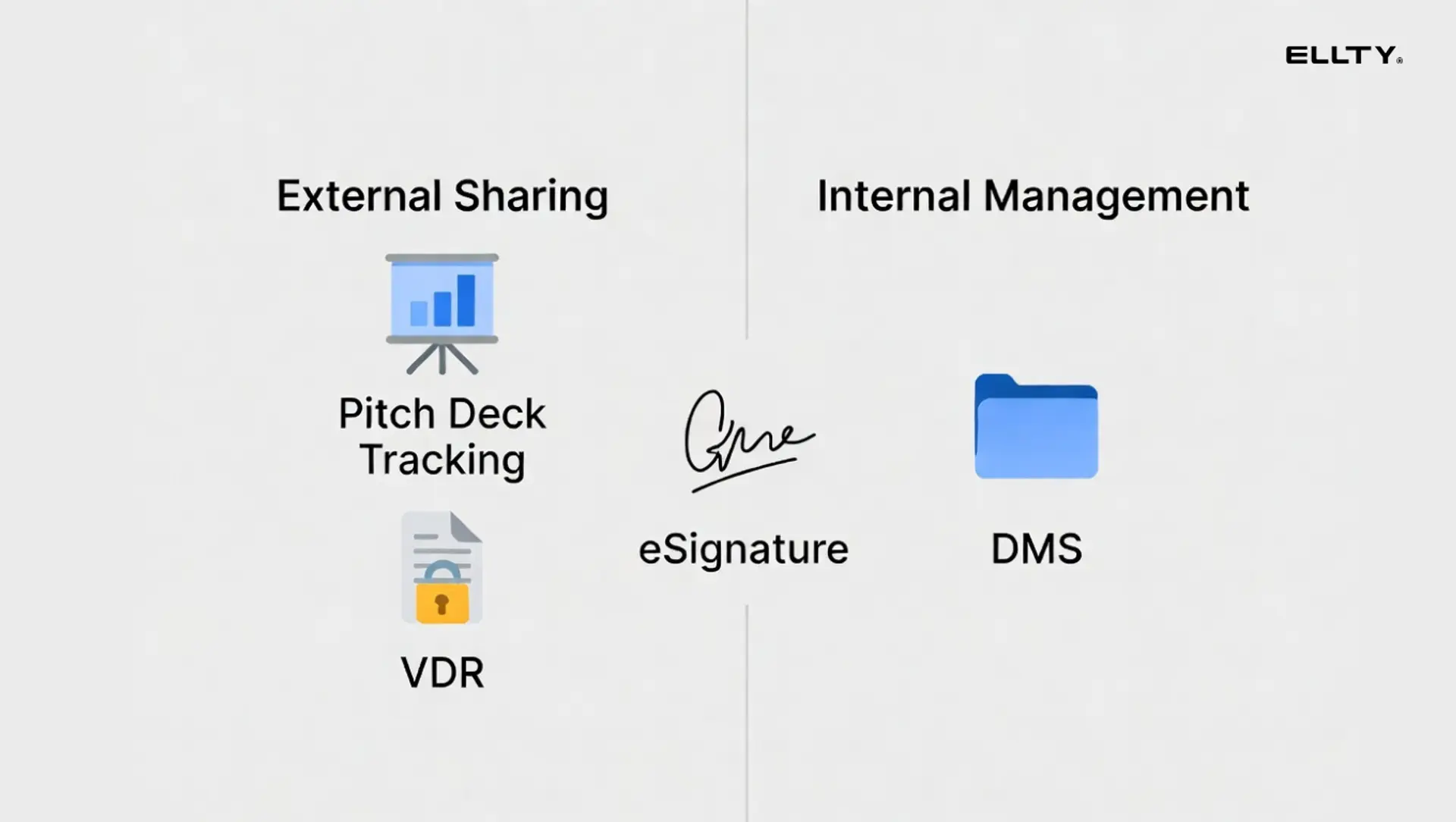
The category includes a few overlapping types of tools:
Pitch deck and proposal trackers - purpose-built for sending decks and getting analytics. Think DocSend, Ellty free plans.
Virtual data rooms (VDRs) - secure deal rooms for sharing sensitive documents during fundraising, M&A, or due diligence. Think Ellty Data Room, Intralinks, Firmex.
Document management systems (DMS) - broader platforms for organizing, storing, and controlling access to documents across a team. Think M-Files, SharePoint.
eSignature + tracking combos - tools like PandaDoc and DocuSign that add tracking on top of contract workflows.
Depending on where you are as a founder, you might need one, two, or a combination of these.

How we evaluated these tools
We looked at each tool across six criteria that matter to founders specifically:
- Setup speed - How fast can you go from signing up to sending a tracked link?
- Analytics depth - What data do you actually get? Page-by-page views, time spent, viewer identity?
- Security - Password protection, link expiration, access controls, certifications
- Pricing - Especially per-user fees vs. flat plans
- Data room capabilities - Can it handle due diligence-level document sharing?
- Ease of use - Not "intuitive UI" fluff. Does a non-technical founder figure it out in 10 minutes?
The 7 best document tracking software options
1. Ellty - best for teams who need virtual data room, and pitch deck analytics


Ellty is built for exactly the problem described at the top of this article. You upload a pitch deck, generate a trackable link, and share it. From there, you see who opened it, which pages they spent time on, and get real-time notifications when someone views your document.
What makes it stand out for early-stage founders is the combination: pitch deck tracking plus secure data room features, without the per-user pricing that makes enterprise tools expensive fast.
What you get with Ellty:
- Upload documents and create trackable shareable links
- Page-by-page analytics: which slides got attention, which got skipped
- Time-spent data per page and per viewer
- Real-time notifications when someone opens your document
- Secure data rooms for due diligence document sharing
- Access controls: password protection, link expiration, viewer permissions
- Clean, minimal interface that doesn't require training
Pricing:


No per-user fees. You're not paying $X per seat just to have your co-founder log in.
Who it works well for:
Ellty is the right fit when you're actively fundraising and need to know how investors are engaging with your deck. It also works well for founders sharing due diligence materials with a small group of potential investors - you get data room-level controls without enterprise-level pricing or setup time.
Limitations to know:
Ellty is focused on document sharing and analytics - it's not a full document management system for organizing internal files across your company. If you need version control across a large document library, workflow automation, or deep integrations with tools like Salesforce, look elsewhere. It also doesn't have eSignature built in.
Best for: Pre-seed to Series B founders sharing decks and due diligence documents with investors.
2. DocSend - best for detailed pitch deck analytics with investor tracking

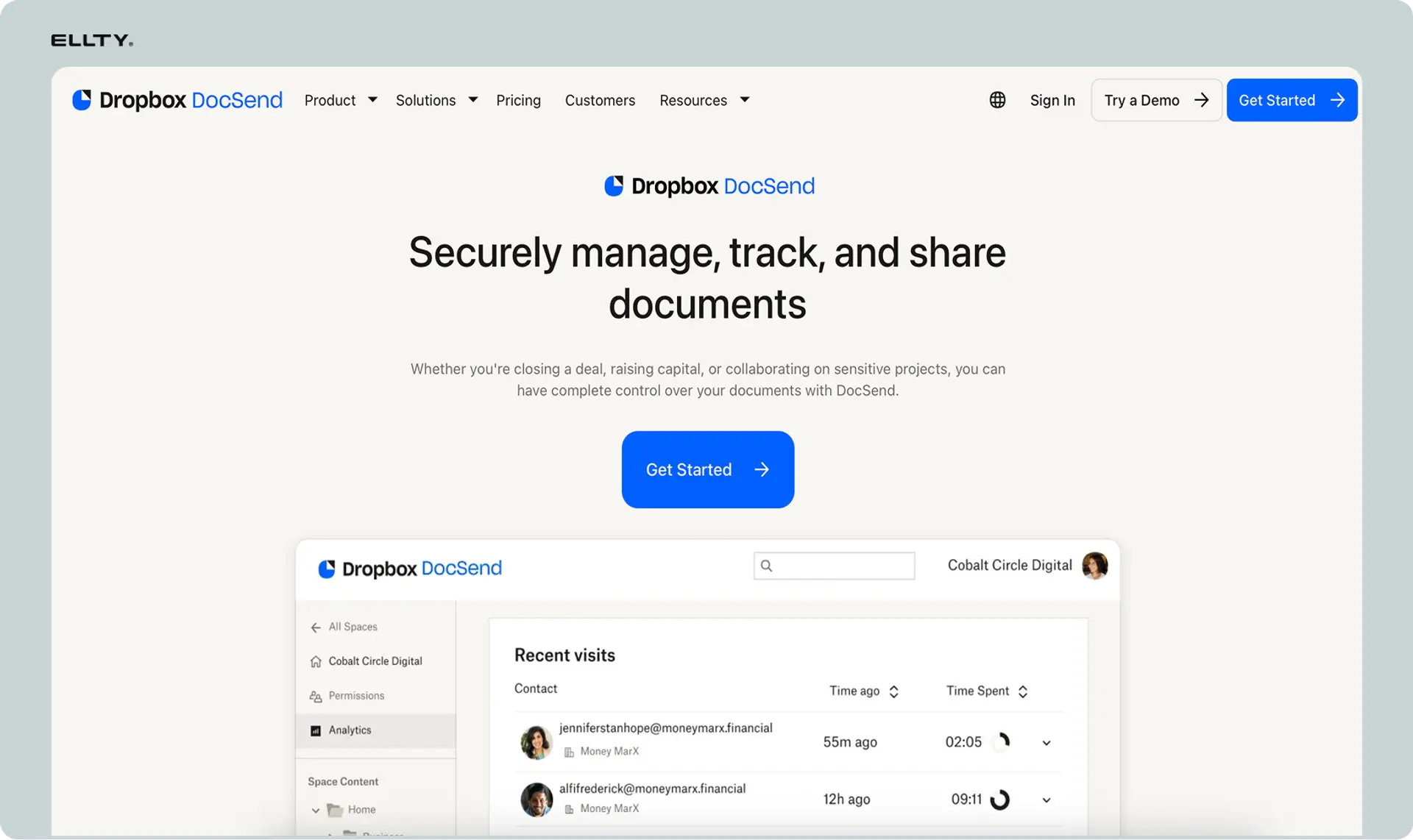
DocSend is the most well-known tool in this category for a reason. It was built specifically for founders sharing pitch decks and has deep analytics. You'll know exactly who viewed your deck, which slides they spent the most time on, and how long the full session lasted.
DocSend also introduced "spaces" - a lightweight deal room where you can group multiple documents and share them under a single link. This works well for sharing a deck alongside a financial model, exec summary, or data room.
Key features:
- Per-page analytics with time-spent data
- Viewer identity tracking (requires email verification or NDA gate)
- Spaces for multi-document sharing
- eSignature (available on higher plans)
- Link-level controls: password, expiration, disable forwarding
Pricing:
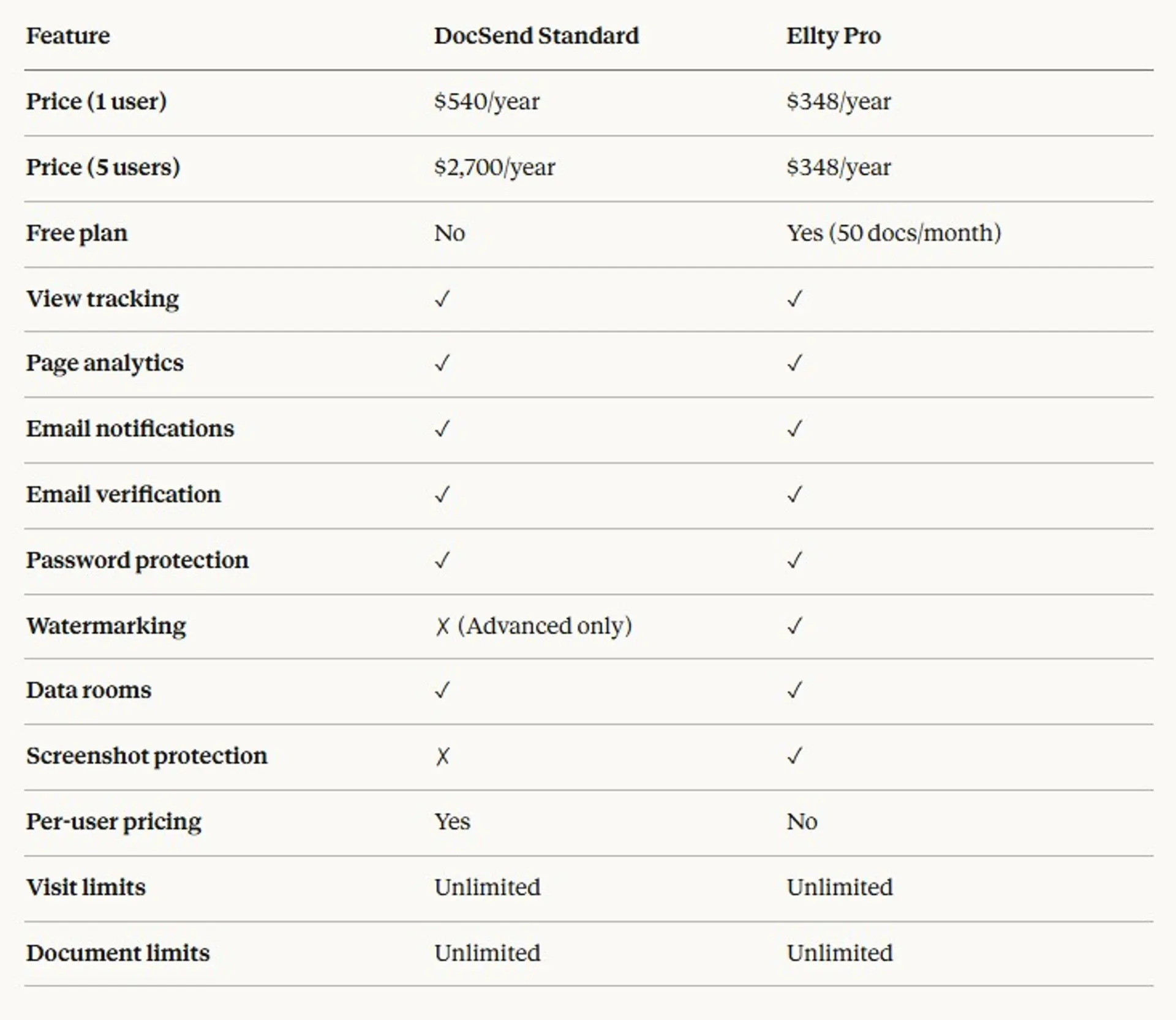
DocSend's pricing has moved around, but expect to pay in the range of $45-$65/month per user depending on the plan. If you need NDA gating or spaces, you're looking at higher tiers. It's per-user, which adds up if you're sharing access with a team.
Limitations:
The per-user pricing is the main friction point. If you want your co-founder and one advisor to have access, you're now paying for multiple seats. The interface is also more complex than tools like Ellty - not a dealbreaker, but expect a short learning curve.
Best for: Founders who want the most detailed investor-level analytics and are comfortable paying for a best-in-class dedicated tool.

3. PandaDoc - best for proposals and contracts with embedded tracking

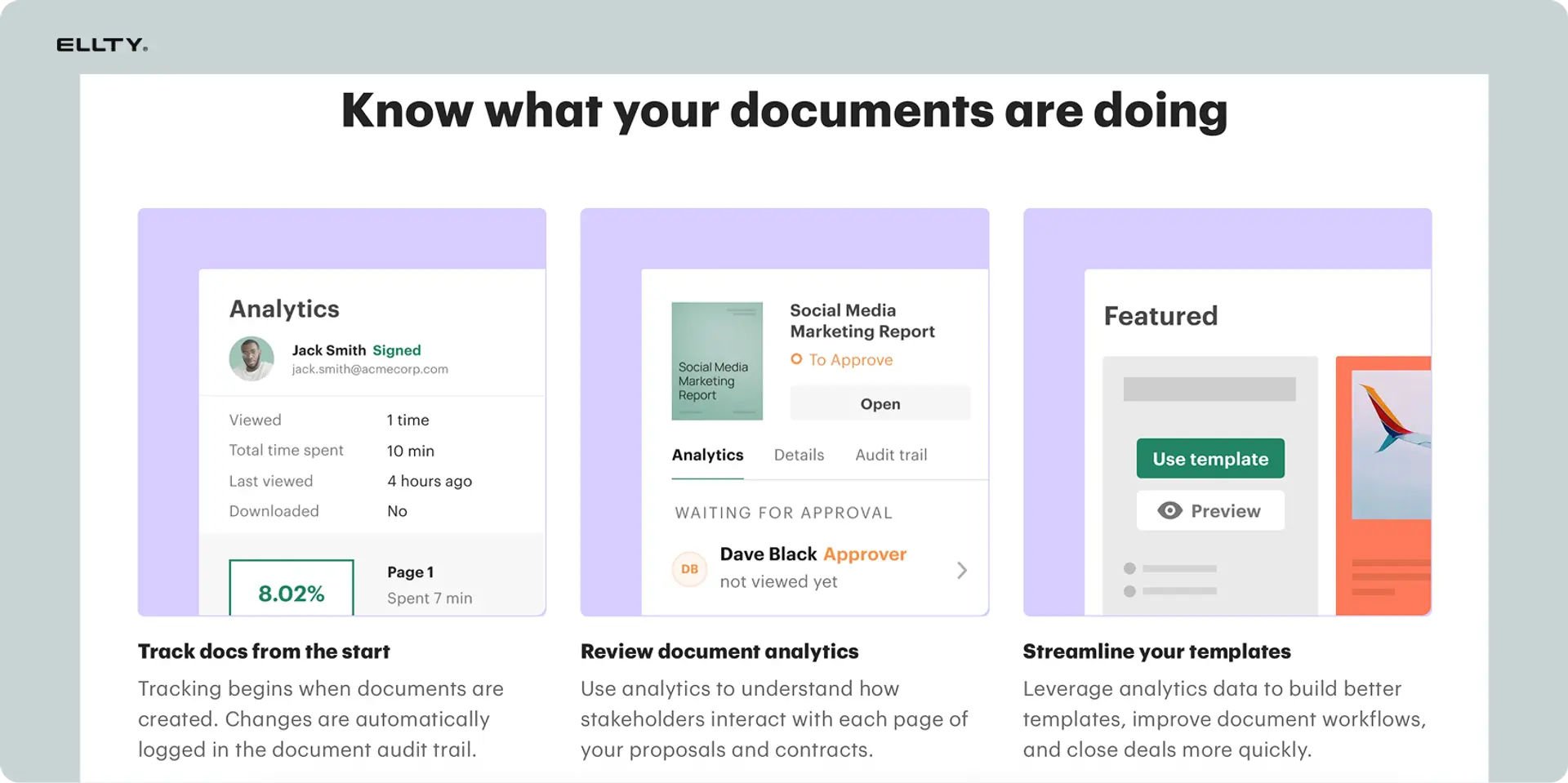
PandaDoc sits at the intersection of document creation, eSignature, and tracking. If you're regularly sending proposals, contracts, or agreements and want to know when clients open them, PandaDoc covers all of that in one platform.
The tracking is solid. You see when a document is opened, which sections the recipient spent time on, and get notified in real time. The eSignature workflow is built in, so you're not bouncing between tools to get a deal signed.
Key features:
- Document builder with templates
- Embedded tracking: views, page analytics, time spent
- eSignature with full audit trail
- Automated workflows (reminders, approvals)
- CRM integrations: Salesforce, HubSpot, Pipedrive
Pricing:
PandaDoc's Essentials plan starts around $19/month per user. Business plans with CRM integrations and workflow automation are higher. Like DocSend, it's per-user.
Limitations:
PandaDoc is optimized for sales and contract workflows, not pitch deck analytics. If you want page-by-page deck engagement data or a data room for investor due diligence, PandaDoc isn't the right fit. It's better suited for post-fundraise operations - sending client agreements, NDAs, and vendor contracts.
Best for: Founders with an active sales motion who need proposal tracking plus eSignature in one tool.
4. Notion - best for internal document organization with basic sharing controls

Notion isn't a document tracking tool in the traditional sense, but it deserves a spot here because many early-stage teams use it as their default document management system. And with some configuration, you can use it for external sharing with basic access controls.
You can share a Notion page with a specific email, require sign-in to view, or make it fully public. You won't get page-level analytics or view notifications, but for teams that need a lightweight internal knowledge base and occasional external sharing, Notion works.
Key features:
- Flexible document organization (databases, wikis, project pages)
- Basic sharing: public links, invite-only, workspace members
- View permissions: can view, can comment, can edit
- No built-in analytics or tracking notifications
Pricing:
Notion's free plan is generous for small teams. Paid plans start at $10/month per user and go up with team size and features.
Limitations:
No document tracking. No view notifications. No page-level analytics. If you share a Notion page with an investor and want to know if they read it, Notion won't tell you. It's a document management system, not a document tracking tool - keep that distinction clear before choosing it for investor communications.
Best for: Internal team documentation and knowledge management, not investor-facing document tracking.
5. M-Files - best for regulated industries needing document control and compliance

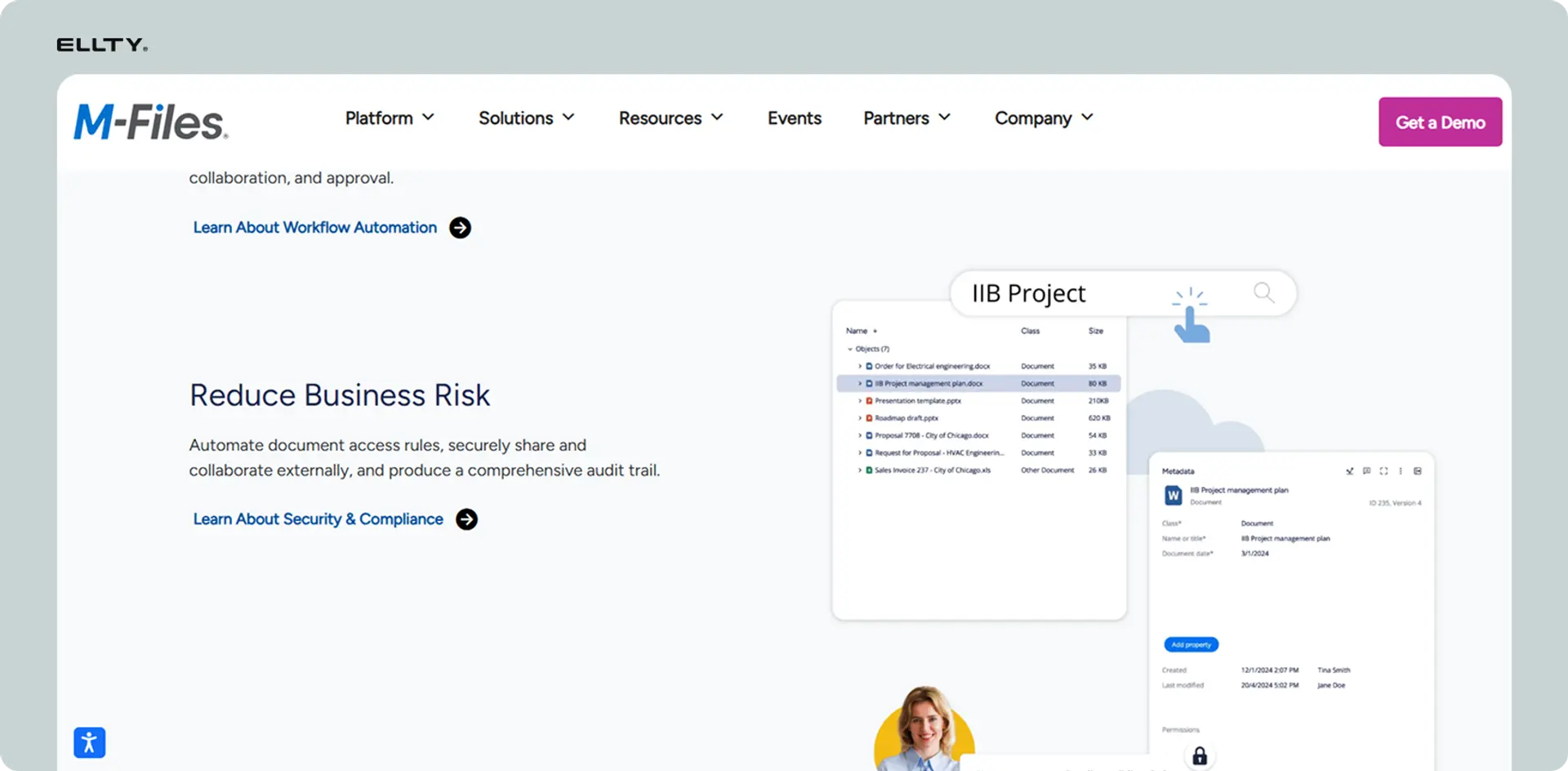
M-Files is a full document management system aimed at mid-sized to enterprise companies in regulated industries - legal, financial services, manufacturing, healthcare. It uses metadata-driven organization (rather than folder structures) and comes with workflow automation, version control, and compliance features.
If you're a founder in a regulated space - say, a fintech or healthtech startup scaling a compliance-heavy document process - M-Files is worth evaluating. For most early-stage founders, it's overkill.
Key features:
- Metadata-driven document organization
- Version control with full audit trail
- Workflow automation (approvals, reviews)
- Compliance controls for regulated industries
- Integrations with Microsoft 365, Salesforce
Pricing:
M-Files is enterprise-priced with custom quotes. Expect to invest significantly more than tools like Ellty or DocSend.
Limitations:
Complex setup. Requires IT involvement. Not designed for the "send a pitch deck and see who read it" use case. If you're an early-stage founder, this isn't your tool.
Best for: Scaling startups or SMBs in regulated industries needing document control as a core operational requirement.
6. Firmex - best for secure virtual data rooms in M&A and fundraising


Firmex is a dedicated virtual data room provider, used primarily for M&A transactions, fundraising due diligence, and legal document exchange. If you're running a Series B or later round and need an enterprise-grade data room that investors and their lawyers will take seriously, Firmex is a strong option.
You get granular permission controls (view-only, print restrictions, watermarking), detailed audit logs showing exactly who accessed what, and the compliance certifications that institutional investors and legal teams expect.
Key features:
- Granular document permissions (view, download, print restrictions)
- Watermarking to track document leaks
- Detailed audit logs and user activity reports
- Q&A module for due diligence question management
- SOC 2 and ISO 27001 certified
Pricing:
Firmex is quoted per-project or annually. Pricing typically starts in the hundreds per month for active deals and goes up with storage and user count.
Limitations:
It's expensive for what most early-stage founders need. The interface is functional but dated compared to newer tools. If you're a seed-stage founder sharing a deck with 10 angels, Firmex is more than you need.
Best for: Later-stage fundraising, M&A transactions, and legal document sharing where institutional-grade security is required.


7. DocuSign - best for eSignature with basic document tracking

DocuSign is the market leader in eSignature and comes with basic document tracking built in. You'll see when a recipient opens an agreement, views pages, and signs. It's not deep analytics, but for contract-focused workflows, the audit trail and status tracking are more than adequate.
Key features:
- Industry-standard eSignature
- Basic tracking: sent, opened, signed, declined
- Audit trail with timestamps and IP addresses
- Workflow routing for multi-party signatures
- Integrations with most CRMs and productivity tools
Pricing:
DocuSign's Personal plan starts around $15/month. Business plans are per-user and scale with volume and features.
Limitations:
DocuSign isn't a pitch deck tool or a data room. The tracking is limited to signature workflow status - you won't get page-level engagement data or real-time "they're reading it right now" notifications. If those are what you need, look at Ellty or DocSend instead.
Best for: Founders who primarily need eSignature with basic document status tracking for contracts and agreements.
How to choose the right tool for your stage
The right tool depends almost entirely on what you're trying to do right now.
If you're fundraising (seed to Series B): You need pitch deck analytics. You want to know if the investor opened your deck, which slides they engaged with, and whether they forwarded it to a partner. Ellty and DocSend are the two strongest options here. Ellty offers this at $0 to $69/month with no per-user fees. DocSend gives you slightly deeper analytics with a higher price tag.
If you're running due diligence: You need a data room - a secure, permissioned environment where investors and lawyers can access financial statements, cap tables, customer contracts, and other sensitive documents. Ellty covers simpler due diligence needs at the Pro or Business tier. For institutional-grade deals with multiple investor firms involved, Firmex or a comparable VDR provider is worth the cost.
If you're managing sales contracts: PandaDoc or DocuSign is the right fit. Both combine document tracking with eSignature in one workflow.
If you need internal document management: Notion works fine at early stages. M-Files is worth evaluating when compliance and version control become operational requirements.

Why document tracking matters more than most founders realize
Most founders think about document tracking after they've already lost a deal. They sent the deck, heard nothing, assumed the investor passed, and moved on. Three weeks later they find out the investor opened it four times but never got a follow-up.
The data you get from tracking changes your behavior in a few specific ways:
Follow-up timing: If you can see someone opened your deck 2 minutes ago, that's the moment to send a short note. The document is top of mind. Waiting three days to follow up cold is less effective.
Deck iteration: If you consistently see viewers drop off at slide 5, that's your problem slide. Without tracking, you're guessing.
Deal temperature: Multiple views from the same person, especially over multiple sessions, usually signal genuine interest. Zero engagement after a week is a clear signal too.
Access control: Knowing who has access to sensitive documents - and being able to revoke that access - matters especially during due diligence when documents like cap tables and customer contracts are in circulation.
What to look for in document tracking software
Before you commit to any tool, check these five things:
1. What analytics do you actually get?
"Document tracking" means different things to different tools. Some only tell you the document was opened. Better tools tell you which pages, how long on each, and how many sessions. Make sure the tool matches the depth you need.
2. How is viewer identity handled?
Some tools require the viewer to enter their email before accessing the document. Others just track by IP or session. The first approach gives you more accurate identity data but creates more friction for the viewer. Know the tradeoff.
3. What are the access controls?
Can you password-protect a link? Set an expiration date? Revoke access after sharing? Restrict downloading or forwarding? For investor-facing documents, these controls matter.
4. What does the pricing actually look like at scale?
Per-user pricing compounds fast. A tool at $45/user sounds reasonable until you have 5 people on your team who need access and you're paying $225/month. Flat pricing (like Ellty) is easier to budget.
5. How long does setup take?
Some enterprise tools require IT configuration, training, and weeks of onboarding. For a founder who needs to send a deck tomorrow, that doesn't work. Aim for tools where you're operational in under 30 minutes.
Start tracking your documents - don't fly blind


If you're sharing pitch decks, due diligence materials, or any document where engagement data matters, you should be using a tracking tool. The information is too useful to ignore.
For most early-stage founders, the stack is simple: Ellty for data rooms and due diligence document sharing, DocuSign or PandaDoc when you need eSignature on contracts.
Ready to stop guessing and start knowing?
You'll have your first trackable link live in under 10 minutes.
Frequently asked questions
What is document tracking software?
Document tracking software lets you share files via trackable links and see what happens after you send them. At minimum, you get a notification when someone opens the file. More advanced tools show which pages were viewed, how long the viewer spent on each, how many times they returned, and whether the link was forwarded. It's commonly used by founders sharing pitch decks with investors and by sales teams sharing proposals with prospects.
What's the difference between a document tracking tool and a virtual data room?
Document tracking tools are typically designed for one-to-few sharing - sending a pitch deck to an investor, for example. Virtual data rooms (VDRs) are designed for controlled multi-party access to a library of documents, like during M&A due diligence or a fundraising process where multiple investor groups need access to financial and legal documents simultaneously. Some tools, including Ellty, offer both: document tracking for individual deck sharing and data room features for more structured due diligence.
Can I use document tracking software for free?
Yes. Ellty has a free Starter plan that includes basic document tracking. Notion also has a free tier, though it doesn't include document analytics. Most other dedicated tools like DocSend don't have permanent free plans, though they may offer trials.
Is Ellty suitable for due diligence?
For fundraising - seed to Series B and beyond - yes. Ellty Standard ($69/month) and Data Room ($149/month) plans include secure data room features with access controls, link-level permissions, and viewer activity tracking. For larger institutional deals with multiple law firms and investor groups requiring enterprise-grade compliance certifications, a dedicated VDR provider like Firmex may be more appropriate.
What's the difference between document tracking and document management software?
Document tracking focuses on external sharing - knowing who opens a file and how they engage with it. Document management software (DMS) focuses on internal organization - storing, versioning, and controlling access to documents within a company. Many founders need both but start with tracking. Tools like Notion handle basic internal management. Tools like Ellty handle external tracking. Enterprise tools like M-Files do both, at enterprise prices.
Do I need eSignature built into my document tracking tool?
Not necessarily. If your primary use case is sending pitch decks or due diligence materials, eSignature isn't relevant - you're not asking investors to sign your deck. eSignature matters when you're managing contracts, term sheets, and agreements. PandaDoc and DocuSign are better fits for those workflows. You can always use a dedicated eSignature tool alongside a separate tracking tool.
How secure is document tracking software?
It varies by tool. At minimum, good tools offer password-protected links, link expiration, and the ability to revoke access after sharing. Enterprise tools and VDRs add features like watermarking, print and download restrictions, and compliance certifications (SOC 2, ISO 27001). Check the specific certifications and controls for any tool you're evaluating, especially if you're sharing sensitive financial or legal documents.
Can investors tell they're being tracked?
Typically no, not unless you tell them or the tool requires email verification to open the document. The viewer experience is usually just clicking a link and viewing the document normally. Some tools require the viewer to enter their email first (to capture identity), which investors are generally used to. Ellty lets you configure whether to require viewer identification.
What happens to my documents if I stop using a tool?
This varies. Most SaaS document tools let you export or download your documents before canceling. Check the data export and retention policy before committing to any platform. This matters especially for VDRs used during due diligence, where you may need access to the audit logs and document history even after a deal closes.
Is document tracking software worth it for a pre-revenue startup?
Yes - especially for fundraising. The cost of missing a follow-up with a warm investor because you didn't know they opened your deck is far higher than $69/month. Even the free tier of a tool like Ellty gives you basic visibility that changes how you manage investor conversations. It's one of the lowest-cost, highest-leverage tools for founders in active fundraising mode.
Author

Anika Tabassum Nionta is a Content Manager at Ellty, where she writes about secure document sharing, virtual data rooms, M&A, due diligence, fundraising, and sales enablement. With over 6 years of writing experience, she helps professionals understand how to share confidential documents securely, track engagement, and manage deals more effectively. Anika holds both a BA and MA in English from Dhaka University. Outside of work, she enjoys reading, exploring new cafes in Dhaka, and connecting with entrepreneurs and dealmakers in her community.

