
Need document tracking that actually works?
You send pitch decks to investors. Sales docs to prospects. Contracts to potential partners. Then nothing. Did they open it? Did they actually read it? Which pages did they skip?
Email attachments tell you nothing. Google Drive shows a view count but no details. You're fundraising or closing deals in the dark.
Document tracking tools solve this. They show you exactly who opened your file, which pages they viewed, how long they spent on each section, and when they came back for a second look.
This guide breaks down DocSend, one of the most popular document tracking platforms, so you can decide if it fits your needs.

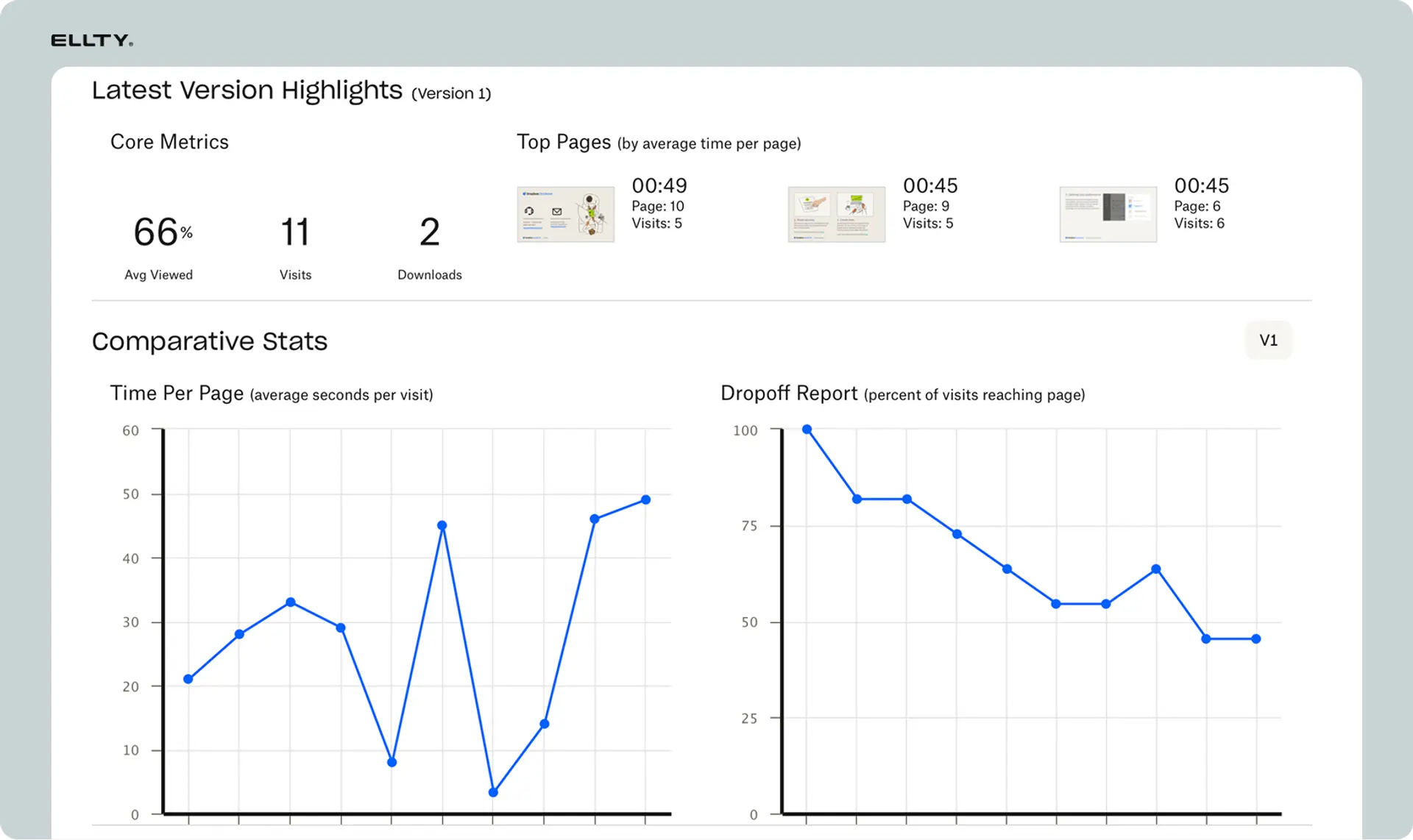
DocSend dashboard showing document analytics and tracking
What is DocSend?
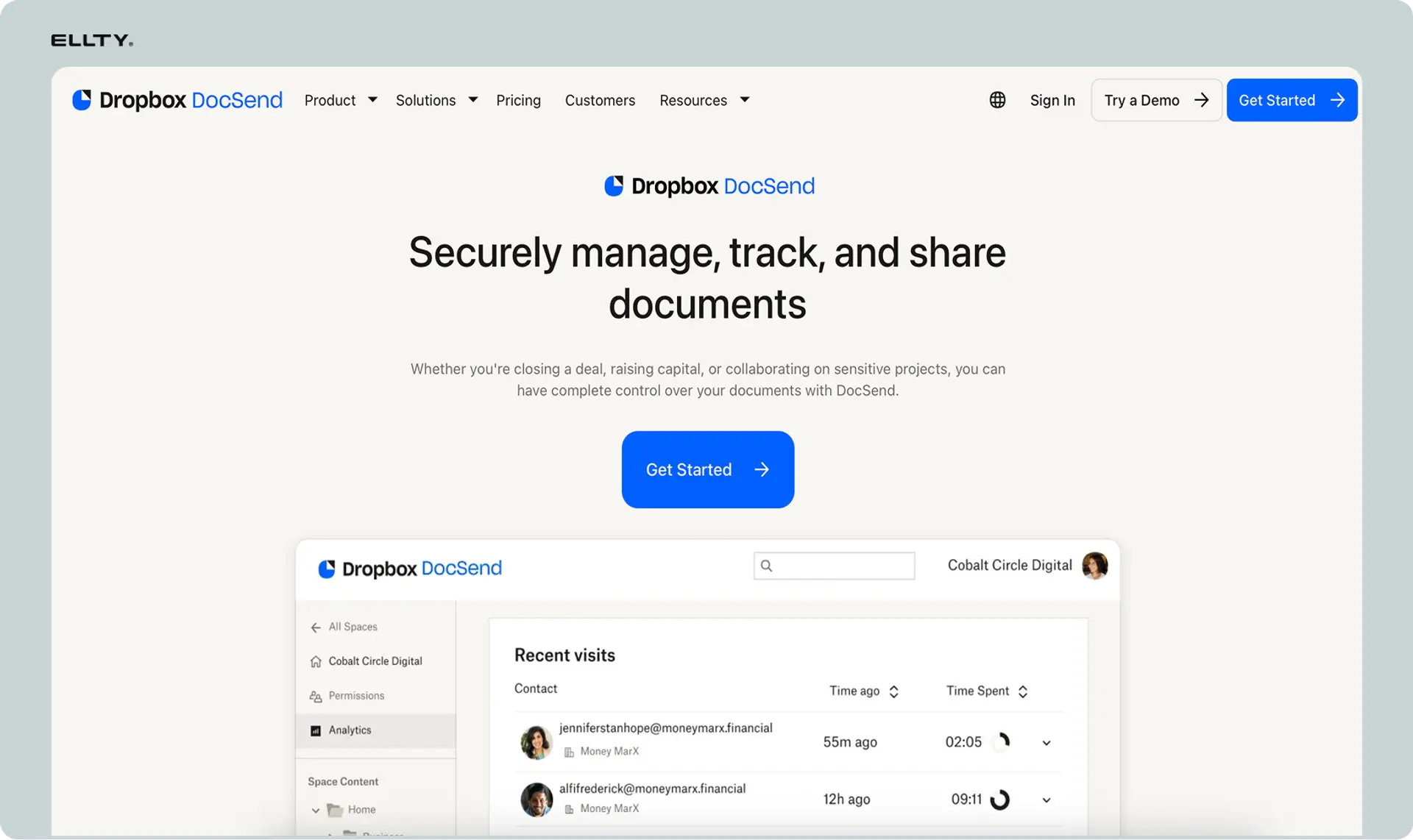
DocSend is a document tracking and analytics platform that shows you exactly how people engage with the files you share.
Instead of sending attachments or posting files to Dropbox, you upload documents to DocSend and share a trackable link. When someone opens that link, DocSend tracks everything: who viewed it, when they viewed it, which pages they looked at, how long they spent on each page, and whether they downloaded it.
Core functionality
What DocSend does:
DocSend replaces traditional file sharing with a tracking layer. You upload your PDF, PowerPoint, Word doc, or other file type. DocSend generates a secure link. You send that link instead of the actual file.
Document sharing:
Recipients don't need a DocSend account. They click your link and view the document in their browser. You control whether they can download the file or just view it online. You can require email verification before someone can access the document, which helps you identify anonymous viewers.
Tracking and analytics:
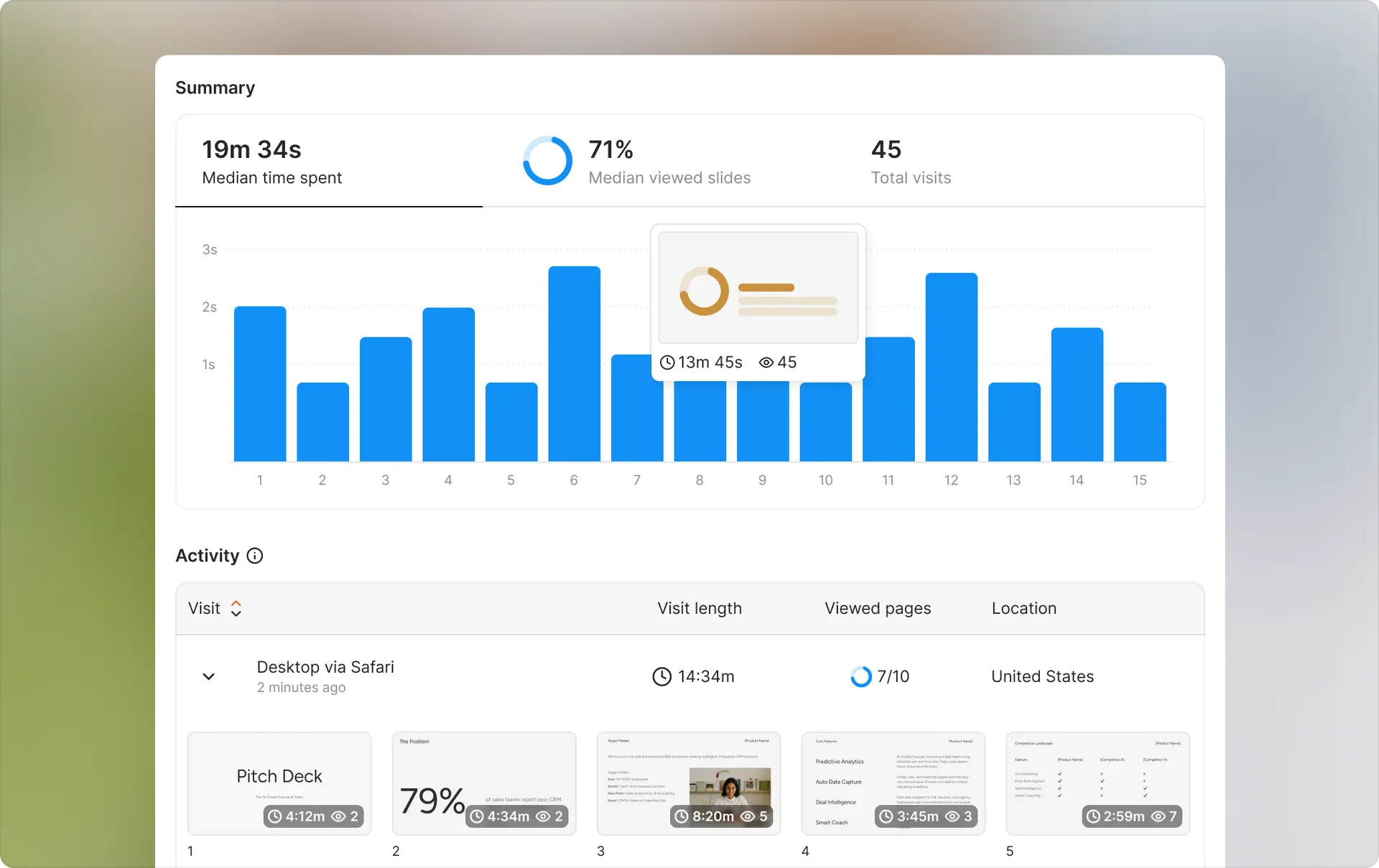
Every interaction gets logged. You see a list of everyone who opened the link, timestamped visits, page-by-page engagement (which pages they read, which they skipped, how long on each), geographic location of viewers, device type (mobile, desktop, tablet), and whether they forwarded the link to others.
Access control:
You can set expiration dates on links, require email verification, add password protection, disable downloads, and revoke access at any time even after sharing the link.
Use cases:
Founders use it for pitch decks sent to investors. Sales teams use it for proposals and contracts. Recruiters use it for candidate materials. Legal teams use it for sensitive documents during M&A or partnerships.
What makes DocSend different
Different from email attachments:
Email attachments give you zero visibility after you hit send. You don't know if the recipient opened it, forwarded it, or deleted it immediately. DocSend shows you everything.
Different from Google Drive or Dropbox:
Google Drive shows you if someone viewed a file but not which pages they read or how long they spent. Dropbox gives even less data. Both platforms make it easy for recipients to download and forward files without your knowledge. DocSend gives you granular analytics and better access control.
Different from enterprise document management systems:
Tools like SharePoint or Box focus on internal file storage and collaboration. DocSend focuses on external sharing and tracking. It's lighter weight, easier to set up, and designed for one-off shares rather than permanent file repositories.
Market position
DocSend launched in 2013 and built a strong reputation among startups and VCs. Dropbox acquired them in 2021 for $165 million. The product still operates independently under the DocSend brand but is now part of Dropbox's enterprise suite.
How DocSend works
Using DocSend follows a simple workflow. You upload, share, and track.
Step-by-step process
1. Upload your document
Log into DocSend and upload your file. Supported formats include PDF, PowerPoint, Word, Excel, images, and video files. The upload takes a few seconds to a few minutes depending on file size.
2. Configure sharing settings
Before sharing, you set access rules. Choose whether to require email verification (recommended for sensitive docs). Set an expiration date if you want the link to stop working after a certain time. Enable or disable downloads. Add password protection if needed. Choose whether to allow viewers to forward the link.
3. Share the link
DocSend generates a unique URL. You copy that link and send it however you want: email, text message, LinkedIn, Twitter DM, Slack, wherever. The link looks like docsend.com/view/xxxxxxx.
4. Get notified when someone views
The moment someone opens your link, you get a real-time notification via email or mobile push. You see who opened it (if they verified their email) or at least their location and device if they didn't.
5. Review analytics
Go to your DocSend dashboard to see detailed engagement data. You'll see a timeline of all opens, page-by-page view data showing how long they spent on each slide or page, heatmaps showing which sections got the most attention, and return visits if they came back multiple times.
Additional features
Data rooms (on higher plans):
For due diligence or complex deal processes, DocSend offers virtual data rooms. You create a secure folder structure with multiple documents. Potential investors or buyers request access. You control who sees which files. This works well for Series A and beyond when investors want to review financials, contracts, and other confidential materials.
Integrations:
DocSend connects with Salesforce, HubSpot, Gmail, Outlook, Slack, and other common tools. The Salesforce integration automatically logs document activity to contact records. The Gmail integration lets you send tracked links directly from your inbox.
Team collaboration:
On team plans, multiple people can upload and track documents under one account. You can assign documents to specific team members, share analytics across the team, and set permissions for who can edit vs. view documents.
Typical workflows
Fundraising: Founder uploads pitch deck. Sends tracked link to 50 investors. Sees that 12 opened it, 3 spent more than 5 minutes, 1 came back three times. Follows up strategically with the most engaged investors.
Sales: Account executive sends proposal to prospect. Sees prospect opened it twice, spent 8 minutes total, focused heavily on pricing page. Rep calls back knowing exactly which questions to address.
Recruiting: Hiring manager sends offer letter and benefits package. Sees candidate viewed it on mobile first, then desktop an hour later, spent longest time on equity section. Manager prepares to discuss equity in detail during follow-up call.
Ellty makes it simple. Share data rooms and secure links. Track document engagement. See exactly what matters to your recipients.

Do you have to pay for DocSend?
Yes, DocSend requires payment for any practical use beyond testing the platform.
The free plan exists but limits you to 1 active document at a time, which means you can't share multiple pitch decks or proposals simultaneously. This makes the free tier essentially a trial version rather than a viable long-term option.
Paid plans start at $10/user/month for Personal (basic tracking on unlimited documents), $45/user/month for Standard (team features and custom branding), and $65/user/month for Advanced (data rooms and advanced analytics). Most serious users end up on Standard or Advanced because the Personal plan lacks team collaboration features and integrations that make document tracking worthwhile for business use.
The pricing adds up quickly for teams. A 5-person sales team on the Advanced plan pays $325/month or $3,900/year. A 10-person team doubles that to $6,500/year. Unlike flat-fee alternatives, your costs scale directly with team size.
If you only need document tracking for a short period (like a 3-month fundraising push), paying for a few months might make sense. For ongoing use across a growing team, evaluate whether the per-user cost fits your budget long-term.
Are DocSend links legal for contracts?
DocSend links are legal for sharing contracts, but DocSend doesn't make signatures legally binding because it has no e-signature functionality.
The platform is simply a secure way to share documents. Sending a contract through a DocSend link is legally equivalent to emailing a PDF - the sharing method doesn't affect the contract's validity. You can track who viewed the contract and when, but you still need a separate tool like DocuSign or HelloSign to collect legally enforceable electronic signatures.
For situations where tracking matters more than signatures (sharing NDAs before a meeting, distributing term sheets to multiple parties, sending draft contracts for review), DocSend works fine. For final contract execution where you need binding signatures, you'll need an e-signature platform in addition to DocSend.
Some users work around this by tracking engagement in DocSend first, then moving to DocuSign for signatures once they know the recipient has reviewed the document. This two-tool workflow works but adds complexity and cost.
Is DocSend safe to use?
DocSend is generally safe for business documents like pitch decks, proposals, and sales materials.
The platform maintains SOC 2 Type II compliance, which means they follow established security standards for handling customer data. Documents are encrypted both in transit (when being uploaded or viewed) and at rest (when stored on DocSend servers). The company conducts regular security audits and penetration testing.
For access control, you can require email verification before viewing, add password protection, set expiration dates on links, revoke access after sharing, and enable dynamic watermarking on higher plans. These features give you reasonable protection for sensitive business documents.
However, understand what you're trusting DocSend with. Your documents live on their servers (part of Dropbox infrastructure after the acquisition). Anyone with your share link can potentially view the document unless you've enabled email verification. Recipients can take screenshots or photos of documents even if you disable downloads.
For extremely sensitive materials (unreleased financial statements, confidential M&A documents, personal health information, classified government documents), evaluate whether cloud-based sharing meets your security requirements. For standard startup pitch decks, sales proposals, and business contracts, DocSend's security is adequate for most situations.
If you have specific compliance needs (HIPAA, GDPR, industry-specific regulations), verify that your DocSend plan includes the necessary certifications and features before uploading regulated documents.
What are the limitations of DocSend?
DocSend does document tracking well but has real constraints you should know about before committing.
Per-user pricing gets expensive
The issue: DocSend charges per user per month. The cheapest paid plan starts at $10/user/month but lacks key features. The Advanced plan at $65/user/month is where most serious users land. If you have a 5-person sales team, that's $325/month just for document tracking.
Why it matters: Your costs scale linearly with team size. A 10-person team on the Advanced plan pays $650/month. For early-stage startups watching every dollar, this adds up fast.
Who this affects: Small teams who need multiple people tracking documents, startups in their first year when cash is tight, and companies who want to give access to contractors or part-time team members.
Limited customization on lower plans
The issue: White labeling and custom branding only appear on the highest plans. On cheaper tiers, recipients see DocSend branding when they open your link.
Why it matters: If you're sending pitch decks to investors or proposals to enterprise clients, DocSend branding makes you look less established. It signals you're using a third-party tool rather than your own infrastructure.
Who this affects: Enterprise sales teams, agencies working with big clients, and anyone who cares about appearing polished and professional.
No built-in e-signature
The issue: DocSend tracks document engagement but doesn't let recipients sign documents inside the platform. If you need a signature, you'll need DocuSign, HelloSign, or another separate tool.
Why it matters: You end up paying for two separate services and managing two different workflows. You track engagement in DocSend, then move to a different platform for signatures.
Who this affects: Sales teams closing contracts, HR teams sending offer letters, legal teams managing agreements - basically anyone who needs both tracking and signatures.
Analytics can be overwhelming
The issue: DocSend gives you tons of data but doesn't always surface the most important insights clearly. You get page-by-page metrics, heatmaps, time spent, but figuring out what actually matters requires digging.
Why it matters: You might spend 10 minutes analyzing whether someone spent 47 seconds or 52 seconds on slide 3 when the real insight is whether they even made it past slide 5.
Who this affects: First-time users who aren't sure which metrics matter, busy founders who don't have time to analyze detailed reports, and anyone who wants quick actionable insights rather than raw data.
Mobile viewing can be clunky
The issue: Documents displayed through DocSend sometimes don't render perfectly on mobile devices. Text might be small, images might not scale properly, and navigation can feel awkward on smaller screens.
Why it matters: Many investors and prospects check emails and open links on their phones first. If your pitch deck looks bad on mobile, you've lost them before they even reach a desktop.
Who this affects: Anyone sharing with mobile-first recipients, documents with detailed graphics or small text, and situations where you can't control how recipients will view your file.
When limitations become dealbreakers
If you're a solo founder or 2-person team sending pitch decks, the per-user pricing is manageable and the limitations won't hurt you much. If you're running a sales team of 8+ people who need signatures on contracts, you'll hit painful cost and workflow issues quickly. If you're sending one-off documents and just need basic tracking, DocSend might be overkill when simpler alternatives exist.
Who uses DocSend?
DocSend serves a specific profile of users who need detailed analytics on external document sharing.
Startup founders fundraising
Who they are: Early-stage founders raising pre-seed through Series B, typically sending pitch decks to angel investors and VCs.
How they use DocSend: Upload pitch deck once, send tracked links to 20-100 investors, monitor which investors engage most, follow up strategically with engaged prospects, update deck based on which slides lose attention.
Why it works for them: Fundraising is a numbers game but also requires smart follow-up. DocSend shows which investors are genuinely interested (multiple views, long time spent) vs. those who opened it once for 30 seconds. This helps founders prioritize their time.
Example scenario: Founder sends deck to 40 investors. Sees that 8 spent more than 5 minutes and came back for second views. Focuses follow-up calls on those 8 rather than the 32 who barely looked.
Sales teams closing deals
Who they are: B2B sales reps, account executives, and business development teams selling high-ticket products or services with longer sales cycles.
How they use DocSend: Send proposals, case studies, and product documentation with tracked links, see which prospects engage with materials, identify buying signals based on repeat views and time spent, share analytics with sales managers to prioritize hot leads.
Why it works for them: Sales is about timing. Knowing when a prospect views your proposal for the third time tells you to call them now, not next week. Seeing that they spent 10 minutes on the pricing page tells you price is their main concern.
Example scenario: Sales rep sends proposal on Monday. Prospect opens it Tuesday morning for 2 minutes. Opens again Thursday for 12 minutes, focusing on pricing and implementation timeline. Rep calls Friday with pricing flexibility and faster implementation options.
Venture capital and private equity firms
Who they are: Investors managing deal flow, conducting due diligence, and sharing investment memos internally.
How they use DocSend: Share investment memos with limited partners, send due diligence materials to potential co-investors, track which portfolio companies reviewed their quarterly reports, monitor engagement on fund performance updates.
Why it works for them: VCs deal with confidential information constantly. DocSend's access controls and tracking help them know who saw what and prevent unwanted forwarding.
Example scenario: VC shares investment memo with 5 potential co-investors. Sees that 3 opened it within an hour and spent significant time reviewing financials. The 2 who didn't open it clearly aren't interested, so the VC focuses on the engaged parties.
Marketing and content teams
Who they are: Content marketers, growth teams, and demand gen specialists sharing gated content, whitepapers, and case studies.
How they use DocSend: Gate premium content behind email verification, track engagement with case studies and whitepapers, identify which prospects download content repeatedly, use engagement data to score leads.
Why it works for them: Not all downloads are equal. Someone who downloads a whitepaper and spends 15 minutes reading it is a better lead than someone who downloaded and never opened it. DocSend shows the difference.
Example scenario: Marketing team shares case study with 200 prospects. 50 open it. 12 spend more than 5 minutes. Those 12 go into a high-intent nurture sequence while the other 38 get standard follow-up.
Company sizes
Best fit: 5-50 person teams, typically startups in growth mode or small sales organizations. Large enough to justify the cost but small enough that per-user pricing doesn't become prohibitive.
Stretches for: Solo founders (expensive for one person but might be worth it during fundraising) and enterprise teams over 100 people (costs add up quickly, might want enterprise solutions instead).
Industries
Common: SaaS companies, financial services, consulting firms, venture capital, real estate, recruiting agencies - basically anywhere deals happen through document exchange.
Less common: E-commerce, consumer apps, physical product companies - these businesses don't typically share sensitive documents externally as much.
When DocSend is NOT the right fit
If you're just sharing files internally with your team, use Google Drive or Dropbox. If you need signatures more than you need analytics, start with DocuSign or PandaDoc. If you're sending one or two documents per month, the cost probably isn't justified. If you're a large enterprise with 100+ users, you'll want an enterprise contract with custom pricing rather than paying per-user retail rates.
DocSend pricing & plans
DocSend uses per-user pricing that scales with your team size and feature needs.
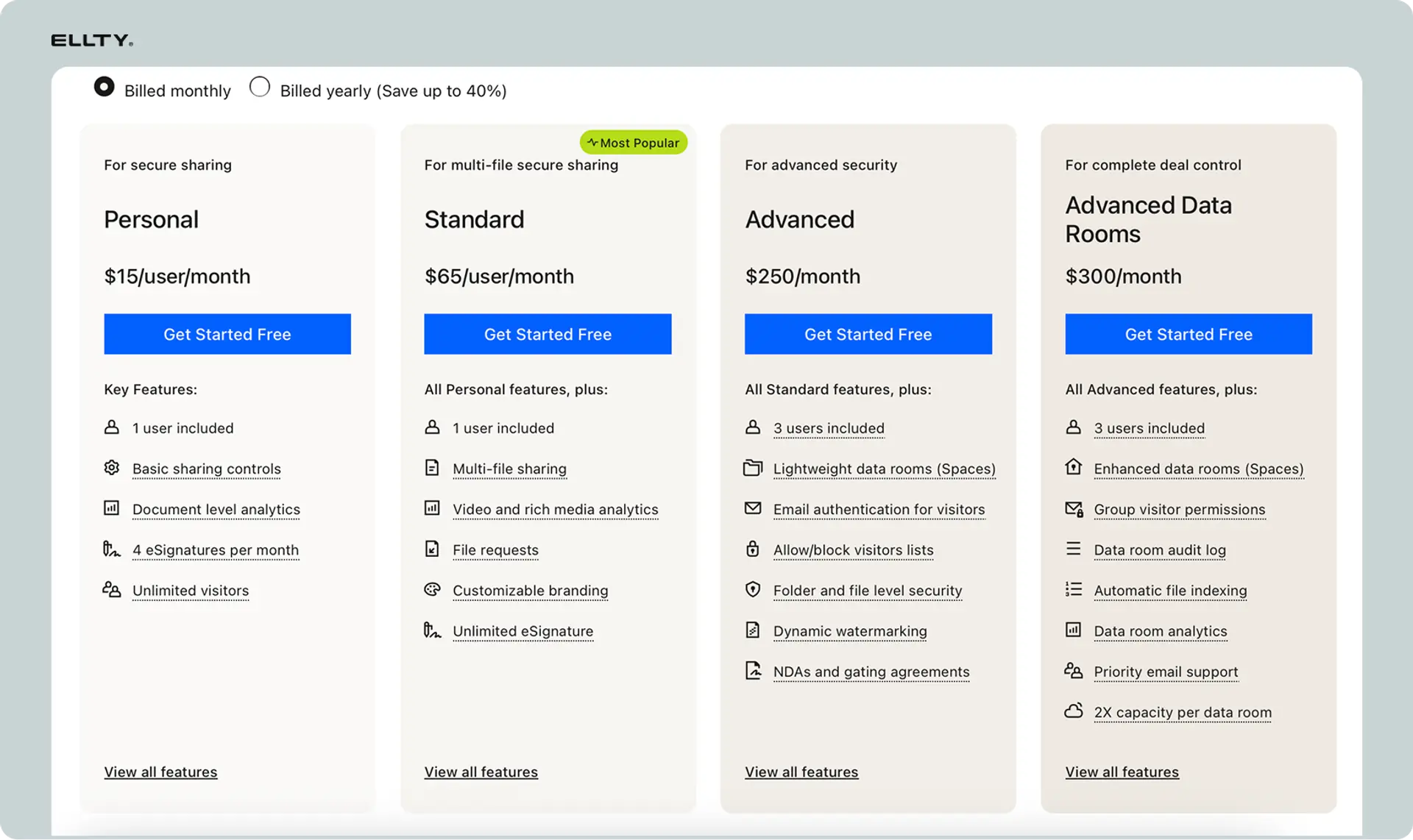
Quick pricing overview
DocSend offers four tiers: Free (limited features, 1 active document), Personal ($10/user/month, basic tracking), Standard ($45/user/month, team features), Advanced ($65/user/month, data rooms and advanced analytics). Prices are billed annually - monthly billing costs about 20% more.
Detailed plan breakdown
Free plan:
- 1 active document at a time
- Basic link tracking
- Email verification
- 100 MB storage
- Best for: Testing DocSend before committing
Personal plan ($10/user/month):
- Unlimited documents
- Document analytics
- Email notifications
- Download controls
- 1 GB storage
- No team features
- Best for: Solo founders or individual users
Standard plan ($45/user/month):
- Everything in Personal
- Team workspaces
- Custom branding on documents
- Salesforce and HubSpot integrations
- 10 GB storage per user
- Best for: Small sales teams and agencies
Advanced plan ($65/user/month):
- Everything in Standard
- Virtual data rooms
- Advanced analytics and reporting
- Dynamic watermarking
- 100 GB storage per user
- Priority support
- Best for: Fundraising founders and serious sales teams
Enterprise (custom pricing):
- Everything in Advanced
- SSO and advanced security
- Dedicated success manager
- Custom integrations
- Unlimited storage
- Best for: Large organizations with 50+ users
Pricing comparison table


Hidden costs
Team scaling: If you start with 3 users on Advanced and grow to 10 users, your monthly bill jumps from $195 to $650. Budget for growth.
Annual commitment: Monthly billing costs 20% more. A $45/month plan becomes $54/month if you pay monthly instead of committing annually.
Storage overages: If you exceed your storage limit, you'll need to upgrade plans. A team on Standard (10 GB per user) might need Advanced (100 GB per user) just for storage.
Integration add-ons: Some advanced integrations and features require enterprise contracts with custom pricing.
Discounts available
Nonprofits get 50% off any paid plan with verification. Annual billing saves roughly 17% compared to monthly. No published student or startup discounts exist.
Cost comparison to alternatives
At $65/user/month for Advanced, a 5-person team pays $3,900/year. That's significantly more than alternatives like Ellty (flat fee regardless of team size), PandaDoc (starts at $19/user/month), and Notion (free for small teams, $8/user/month for paid).
For fundraising founders who only need DocSend for 3-6 months of active fundraising, you're looking at $195-$390 for solo use on Advanced, which might be worth it. For ongoing sales team use, the costs compound quickly.


DocSend pros and cons
Here's an honest assessment of what DocSend does well and where it falls short.
Pros (Advantages)
Detailed page-by-page analytics: You see exactly which slides or pages people view and for how long. This is genuinely useful for understanding what content resonates and what people skip.
Real-time notifications: Getting pinged the moment someone opens your deck creates opportunities for perfectly timed follow-up calls and emails.
Professional among VCs and investors: DocSend has become an expected tool in startup fundraising. Investors recognize it and trust it for sharing pitch decks.
Easy access control: Revoking access to a document after you've shared the link is simple and immediate. This matters when deals fall through or situations change.
No recipient friction: People don't need to create accounts or download software. They click a link and the document opens in their browser.
Strong security features: Email verification, password protection, dynamic watermarking, and enterprise SSO give you solid control over sensitive documents.
Virtual data rooms work well: The data room functionality on higher plans handles due diligence processes effectively with proper folder structures and granular permissions.
Reliable Dropbox backing: Since Dropbox acquired them, platform stability improved and the company isn't going anywhere.
Cons (Disadvantages)
Expensive for teams: At $45-$65 per user per month, costs add up fast. A 10-person team might pay $6,500+ annually just for document tracking.
Per-user pricing model punishes growth: Every new team member increases your monthly bill. This discourages giving access to contractors, part-timers, or other occasional users.
No native e-signature: You still need DocuSign or similar for getting documents signed, meaning you're paying for and managing two separate platforms.
White labeling only on expensive plans: Lower tier users send links with DocSend branding, which doesn't look as professional as custom branding.
Analytics can overwhelm: The platform gives you lots of data but doesn't always highlight what actually matters, leaving you to interpret raw numbers.
Mobile viewing isn't perfect: Documents don't always render beautifully on phones, which matters when recipients open links on mobile devices first.
Limited file editing: Once you upload a document, updating it means uploading a new version. You can't make quick edits inside DocSend.
Overkill for simple needs: If you just want to know whether someone opened your document, DocSend's depth of analytics is more than necessary and the price doesn't match the simple need.
Email verification can cause friction: While security is good, requiring email verification adds a step that can discourage some recipients from viewing your document.
Storage limits on lower plans: 1-10 GB fills up quickly if you're sharing video files or large media-heavy presentations.
DocSend alternatives to consider
Several other tools handle document tracking and sharing, each with different strengths and pricing models.
Ellty - Virtual data room software without per-user fees


What it is:
Ellty is a virtual data room, pitch deck sharing and analytics platform built specifically for startup founders and sales teams who need document tracking without expensive per-user pricing.
Key features:
Upload pitch decks and sales documents, create trackable share links with analytics on views and engagement, see who viewed your deck and for how long, get real-time notifications when documents are opened, secure virtual data rooms for due diligence, control access with email verification and expiration dates, no per-user fees - unlimited team members on every plan.
Pricing:
Starts at $69/month for unlimited documents and users. Data Room plan at $149/month includes data rooms and advanced analytics.
Best for:
Founders raising capital who want detailed tracking without paying per user, sales teams that need multiple people sharing tracked documents, startups watching costs closely, teams that want simple document tracking without workflow complexity.
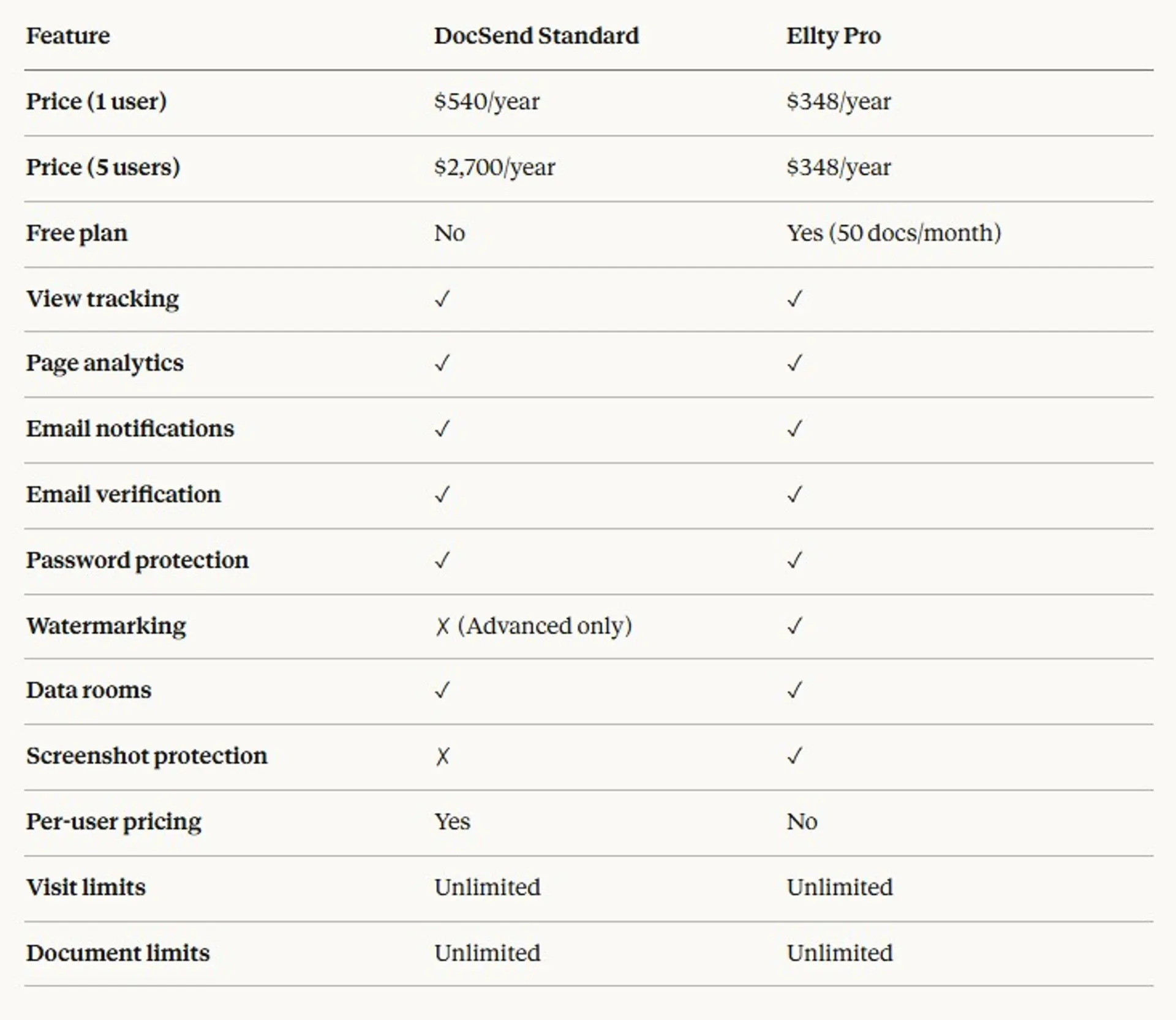
vs. DocSend comparison:

When to choose Ellty:
You're a startup founder tracking pitch deck engagement during fundraising, you have a growing team and don't want costs scaling with headcount, you need to securely send confidential documents but find DocSend too expensive, you want simple analytics without overwhelming detail, or you're budget-conscious but still need professional tracking.
When to choose DocSend:
You need extensive integrations with Salesforce and HubSpot, you're already paying for Dropbox Enterprise and want bundled pricing, investors or clients specifically request DocSend links, you need the deepest possible analytics on document engagement, or you have budget for per-user tools and want the most established platform.
PandaDoc - Documents plus e-signatures
What it is: All-in-one document platform combining proposals, quotes, contracts, and e-signatures in a single workflow.
Key differentiator: Built-in e-signature functionality means you can track engagement and collect signatures without needing a second tool. Strong template library for common business documents.
Pricing: Starts at $19/user/month for Essentials (basic features), $49/user/month for Business (advanced analytics and CRM integrations).
Best for: Sales teams and agencies that need both document tracking and signatures, businesses sending proposals and contracts regularly, teams that want document creation and tracking in one platform.
vs. DocSend: PandaDoc focuses on the full document lifecycle from creation to signature. DocSend focuses purely on sharing and tracking. PandaDoc costs less at the entry level but also offers less granular page-by-page analytics. See detailed comparison.
Papermark - Open source document sharing
What it is: Open-source alternative to DocSend built for developers and privacy-conscious teams who want self-hosted document tracking.
Key differentiator: Papermark is fully open source and self-hostable. You can run it on your own infrastructure and control all data. Free for self-hosted deployments.
Pricing: Free for self-hosted version. Cloud version starts at $29/month with unlimited documents and users.
Best for: Technical teams comfortable with self-hosting, companies with strict data residency requirements, developers who want to customize document tracking workflows, budget-conscious teams willing to manage their own infrastructure.
vs. DocSend: Papermark requires technical setup but offers complete data control and lower costs. DocSend is fully managed and easier to start but keeps your data on their servers. See detailed comparison.
Notion - Lightweight document sharing
What it is: All-in-one workspace that includes document creation, sharing, and basic analytics as part of a broader productivity platform.
Key differentiator: Not specifically designed for document tracking, but Notion pages can be shared with basic view analytics. If you're already using Notion, you get lightweight tracking essentially free.
Pricing: Free for individuals and small teams. Plus plan at $8/user/month for unlimited storage and advanced features.
Best for: Teams already using Notion for documentation, situations where basic "was it viewed" data is enough, internal document sharing with light external sharing needs.
vs. DocSend: Notion offers much broader functionality beyond document sharing but gives minimal analytics. DocSend is purpose-built for tracking with detailed page-by-page data. Notion costs less but isn't meant for sensitive deal documents.
BriefLink - Focused on sales teams
What it is: Document tracking platform designed specifically for sales teams with features like CRM integration and sales-focused analytics.
Key differentiator: Sales-specific features like automatic lead scoring based on document engagement and deep integrations with popular sales tools.
Pricing: Starts at $25/user/month with annual commitment. Custom pricing for enterprise.
Best for: B2B sales teams with longer sales cycles, account executives tracking proposals and contracts, sales operations teams that need analytics tied to CRM data.
vs. DocSend: BriefLink optimizes for sales workflows specifically while DocSend serves broader use cases including fundraising and general document sharing. BriefLink costs less but has fewer features outside sales contexts.
Is DocSend safe?
DocSend maintains SOC 2 Type II certification and follows standard enterprise security practices. Documents are encrypted in transit and at rest. Email verification and password protection add layers of access control.
The platform is generally safe for sharing pitch decks, proposals, and business documents. For highly sensitive materials like unannounced M&A documents or unreleased financial statements, verify that your plan includes the security features you need and consider whether cloud-based sharing fits your risk tolerance.
Is DocSend right for you?
DocSend works well if you're a founder raising capital and need detailed tracking on pitch deck engagement, if you're part of a small sales team closing high-value deals where timing matters, or if you regularly share sensitive documents and need strong access controls.
It's probably not right if you're a solo operator or very small team where per-user costs don't justify the value, if you need both tracking and signatures and don't want to pay for two platforms, or if you want simple "was it opened" data and don't need page-by-page analytics.
Getting started with document tracking
Document tracking gives you visibility into engagement that email attachments and file sharing services can't provide. When someone views your document, you learn what interests them, what they skip, and when they're most engaged - information that helps you follow up smarter.
Start by identifying which documents matter most. Not every PDF needs tracking. Focus on materials where timing and engagement actually change your actions: pitch decks going to investors, proposals sent to prospects, contracts in negotiation, or materials shared during due diligence.
Best practices include keeping documents concise (fewer pages means better engagement), front-loading important information (many viewers won't reach the end), testing on mobile before sharing (many people will view on phones first), and using email verification for sensitive documents even though it adds friction. Track a baseline first by sending a few documents and reviewing the analytics before changing your follow-up strategy based on the data.
Frequently asked questions
How do I contact DocSend support?
DocSend support is available through email at [email protected] and via live chat inside the platform when you're logged in. Response times vary by plan - Personal plan users typically get responses within 24-48 hours, while Advanced and Enterprise customers get priority support with faster response times. The DocSend Help Center at help.docsend.com has articles covering common issues and setup questions. There's no phone support number for standard plans, though Enterprise customers get access to dedicated account managers who can be reached directly.
Is DocSend down right now?
You can check DocSend's current status at status.docsend.com, which shows real-time platform health and any ongoing outages or degraded performance. If you're having trouble accessing DocSend, first check that page to see if there's a known issue. The status page also shows historical uptime data. Since Dropbox acquired DocSend in 2021, reliability has generally been strong with uptime above 99.5%. If the status page shows everything operational but you still can't access your account, try clearing your browser cache, using a different browser, or checking your internet connection. For persistent access issues when the platform is up, contact DocSend support.
Can I download documents from DocSend?
Whether you can download a document from DocSend depends entirely on the settings chosen by the person who shared it with you. Document owners can enable or disable downloads when they create the share link. If downloads are enabled, you'll see a download button in the document viewer. If downloads are disabled, you can only view the document in your browser - no download button appears. Some users try to screenshot or print documents when downloads are disabled, which technically works but violates the sharer's intent for access control. As a DocSend user sharing documents, you control this setting for each link you create. Disabling downloads doesn't prevent screenshots but does add a layer of friction.
Is DocSend good for pitch decks?
Yes, DocSend became popular specifically because of startup founders using it for pitch decks during fundraising. The platform shows you exactly which investors opened your deck, how long they spent on each slide, which slides they focused on most, and when they came back for repeat views.
Does DocSend have a free trial?
DocSend offers a 14-day free trial of their paid plans when you sign up. You get full access to the plan you choose (Personal, Standard, or Advanced) for two weeks without entering a credit card.
Can people tell they're being tracked by DocSend?
Yes. Recipients see that they're viewing a document through DocSend - the URL says docsend.com and the interface shows DocSend branding (unless you're on a plan with white labeling). This isn't hidden tracking.
Does DocSend work on mobile devices?
Yes. Documents open in mobile browsers. The experience varies by document type - PDFs usually render well while PowerPoint files sometimes have formatting issues on smaller screens.
Can I edit a document after sharing the link?
You can upload a new version and the link remains the same, but you can't edit the document directly inside DocSend. Upload your corrected file and it replaces the old one at the same URL.
What happens if I downgrade my plan?
Your documents remain accessible but you lose access to features from the higher plan. If you were on Advanced and downgrade to Personal, you'll lose data room functionality and some analytics features.
Does DocSend integrate with Gmail?
Yes. There's a Gmail extension that lets you insert tracked DocSend links directly from your compose window without leaving Gmail.
Can I track documents sent by email attachment?
No. DocSend only tracks documents shared through DocSend links. If you attach a PDF to an email, you get zero tracking data.
Is there a DocSend mobile app?
Yes. DocSend has iOS and Android apps for uploading documents and checking analytics on the go. You don't need the app to view documents - those open in any mobile browser.
Can I require a password for document access?
Yes. You can add password protection when creating a share link. Recipients need the password to view the document.
What file types does DocSend support?
PDF, PowerPoint, Word, Excel, images (JPG, PNG), and video files. PDFs and PowerPoint files get the best analytics since DocSend can track page-by-page engagement.
How long does DocSend store my documents?
Documents stay on DocSend until you delete them, as long as you maintain an active account and stay within your storage limits.
Can I see who forwarded my document to someone else?
Yes, to an extent. DocSend shows you if your link was accessed from a new email address, suggesting the original recipient forwarded it. You can disable link forwarding when you create the share link.
What's the difference between DocSend and Dropbox Paper?
Dropbox Paper is for creating and collaborating on documents. DocSend is for sharing and tracking external engagement. Different tools for different purposes, even though Dropbox owns both.
Author

Anika Tabassum Nionta is a Content Manager at Ellty, where she writes about secure document sharing, virtual data rooms, M&A, due diligence, fundraising, and sales enablement. With over 6 years of writing experience, she helps professionals understand how to share confidential documents securely, track engagement, and manage deals more effectively. Anika holds both a BA and MA in English from Dhaka University. Outside of work, she enjoys reading, exploring new cafes in Dhaka, and connecting with entrepreneurs and dealmakers in her community.

