

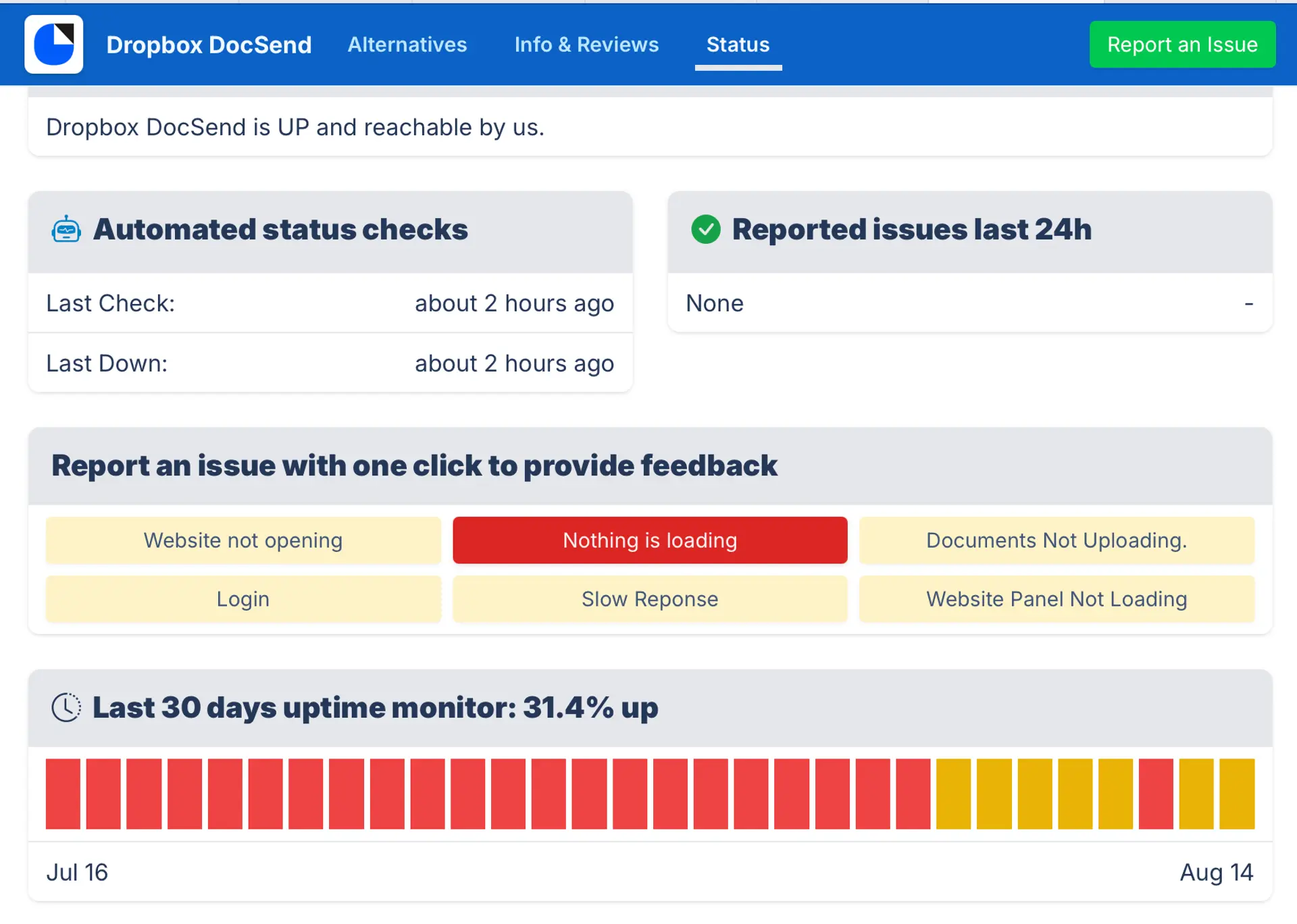
When DocSend stops working, business doesn't stop. Your investor pitch deck still needs delivery. That time-sensitive proposal has a deadline. Contracts require immediate signatures. Documents must be shared, tracked, and accessed - regardless of platform availability.
This comprehensive guide covers everything you need when DocSend experiences downtime: how to verify outage status, troubleshoot common issues, implement immediate workarounds, and transition to more reliable alternatives that won't leave you stranded during critical business moments.
Don't Let Platform Downtime Kill Your Deals

DocSend down during crucial document sharing moments? You're not alone, and you have options.
Your pitch deck needs to reach investors today. That proposal has an immovable deadline. The contract requires signatures now, not later. When document-sharing platforms fail, deals don't pause, they often die.
Ellty maintains 99.9% uptime with redundant server architecture. When other platforms experience outages, we remain operational. Share documents instantly, track engagement in real-time, and never miss another deadline because of infrastructure issues.
How to Check if DocSend is Down Right Now
Before troubleshooting your connection or browser, verify whether DocSend is actually experiencing an outage. Check these authoritative sources in order:
Official DocSend Status Page
Visit https://status.dropbox.com to check DocSend's operational status. This page displays current issues, planned maintenance windows, and detailed incident history. Look for red or yellow indicators showing service degradation.
The status page provides:
- Real-time operational status for all DocSend features
- Scheduled maintenance announcements (usually with 48-72 hour notice)
- Historical incident reports with timelines and resolution details
- Subscribe to updates via email, SMS, or RSS feed
Dropbox Status Dashboard
Check status.dropbox.com because DocSend operates on Dropbox infrastructure. When Dropbox experiences problems, DocSend typically suffers cascading failures. A Dropbox outage almost always means DocSend issues.
DownDetector Community Reports
Visit downdetector.com/status/docsend to see user-reported problems. This crowd-sourced platform shows outage maps by geographic region, real-time problem reports, and historical outage patterns. If you see a sharp spike in reports, the issue is widespread.
DownDetector reveals:
- Live outage maps showing affected regions
- Problem type breakdown (login issues, document access, performance)
- 24-hour report timeline showing when issues started
- Comment section where users describe specific problems
Social Media Monitoring
Search Twitter/X for @DocSend or #docsenddown to find real-time user complaints. Social media reports often appear faster than official status updates, especially during rapidly developing outages. Look for multiple users reporting identical issues from different locations.
Common Error Messages Indicating DocSend Outages
When DocSend experiences problems, you'll typically see these error messages:
"Service Unavailable" or "503 Error" - Indicates server overload or maintenance. Backend systems can't handle current request volume.
"502 Bad Gateway" - Backend server communication failure. The DocSend application servers aren't responding to load balancer requests.
"Cannot generate link" or "Link creation failed" - Core service failure affecting primary functionality. Usually indicates database or API endpoint problems.
Endless loading spinner - Connection problems between your browser and DocSend servers. Can indicate CDN issues, DNS problems, or server unresponsiveness.
"Authentication failed" (despite correct credentials) - Login server problems. Authentication services may be overwhelmed or experiencing database issues.
If multiple independent sources confirm problems, and you see these error messages, DocSend is experiencing an outage, it's not your connection.
Understanding DocSend Outages: Frequency and Patterns
How Often Does DocSend Go Down?
Based on incident tracking over the past three years, DocSend experiences major outages affecting core functionality approximately 3-4 times annually. Minor performance degradations, slow loading times, or feature-specific issues occur roughly monthly.
Problematically, these outages tend to occur during peak business hours (9 AM - 5 PM PST/EST), precisely when users need the service most. This timing pattern suggests capacity planning issues rather than random infrastructure failures.
Typical DocSend Outage Duration
Most DocSend outages last between 30 minutes to 3 hours. However, severe incidents have persisted for 6+ hours, particularly when involving database corruption or complex infrastructure failures.
The recovery pattern typically follows this timeline:
- 0-30 minutes: Users report problems, official acknowledgment pending
- 30-60 minutes: Status page updated, investigation begins
- 1-3 hours: Engineers implement fixes, gradual service restoration
- 3-6+ hours: Complex issues requiring database recovery or infrastructure changes
Common DocSend Issues and Problems
Login and Authentication Failures
Users report being unable to access accounts despite entering correct credentials. Password authentication fails, two-factor authentication codes time out, or the login page becomes unresponsive.
This usually indicates authentication server stress or database synchronization issues. During peak usage times, authentication services may become overwhelmed, creating login queues or complete access denial.
Troubleshooting steps:
- Clear browser cache and cookies
- Try incognito/private browsing mode
- Attempt login from a different device
- Check if you can access other Dropbox services (shared infrastructure)
- Wait 15-30 minutes and retry during outages
Document Upload Errors and Failures
Files become stuck at 0% upload progress. "Upload failed" error messages appear repeatedly. Larger files (over 50MB) refuse to process. Upload appears to complete but documents don't appear in your dashboard.
These issues intensify during peak business hours (9-11 AM PST, 1-3 PM EST), suggesting server capacity problems. The upload infrastructure struggles to handle concurrent upload volumes, leading to failures and timeouts.
Common upload error patterns:
- PDFs under 10MB upload successfully, larger files fail
- Uploads work in early morning/late evening, fail during business hours
- Upload appears to complete but document isn't accessible
- Repeated "Network error" or "Connection timeout" messages
Link Generation Broken or Failing
Documents upload successfully, but clicking "Create Link" or "Share" produces no result. Buttons become unresponsive. Generated links return 404 errors when recipients try accessing them. Previously working links suddenly break.
This represents a core functionality failure affecting DocSend's primary value proposition. Usually indicates API endpoint problems, database issues preventing link record creation, or CDN configuration errors.
Analytics and Tracking Not Updating
Recipients view documents, but views don't register in your analytics dashboard. Real-time tracking shows delays of several hours. Historical analytics data appears incomplete or corrupted. Visitor insights fail to populate.
Database synchronization issues cause these problems. The analytics data pipeline, separate from core document serving, experiences delays or failures. Data typically recovers once systems stabilize, but real-time decision-making suffers.
Impact on business operations:
- Cannot gauge investor interest in pitch decks
- Miss follow-up opportunities with engaged prospects
- Unable to identify which content sections resonate
- Lose critical timing data for sales conversations
Slow Loading Times and Performance Issues
Documents take 30+ seconds to open for recipients. Preview images won't generate. Page navigation within documents becomes sluggish. Recipients complain about frustrating user experience.
Server overload or Content Delivery Network (CDN) problems cause these symptoms. When DocSend's infrastructure struggles, document delivery suffers even if core systems remain technically "operational." Poor performance drives recipients away before viewing critical content.
Access Permission and Security Errors
Shared links work for some recipients but not others. Email verification fails randomly. Password protection doesn't enforce. Download restrictions are ignored, documents download despite settings preventing it. NDA screens don't appear.
Permission system malfunctions create security risks. If access controls fail, confidential documents may reach unintended audiences or fail to reach intended recipients. This represents both a security and business continuity problem.
Third-Party Integration Failures
Salesforce synchronization stops updating. Gmail plugin throws errors. Zapier webhooks fail silently. HubSpot integration disconnects. API calls return timeout errors.
API endpoint failures break entire automated workflows. For businesses relying on DocSend integrations for CRM updates, marketing automation, or sales processes, these failures cascade throughout their tech stack.
What to Do When DocSend Is Down: Immediate Action Steps
Step 1: Verify the Problem Isn't On Your End
Before assuming DocSend is down, eliminate local issues:
Check your internet connection - Visit other websites, run a speed test, verify you're actually online.
Try a different browser - Switch from Chrome to Firefox, Safari, or Edge. Browser-specific issues occasionally masquerade as platform problems.
Clear cache and cookies - Corrupted cached data can prevent proper loading. Clear browsing data from the past hour.
Disable browser extensions - Ad blockers, privacy tools, or security extensions sometimes interfere with web applications. Test in incognito/private mode where extensions are disabled.
Try a different device - Access DocSend from your phone, tablet, or another computer. If it works elsewhere, the issue is device-specific.
Check firewall/VPN settings - Corporate firewalls or VPN configurations occasionally block DocSend's servers. Try disabling temporarily.
If DocSend still doesn't work after these steps, the problem is on their end.
Step 2: Assess Downtime Duration and Severity
Check when the outage started - Look at DownDetector reports and Twitter mentions to determine timeline. Recent outages (under 30 minutes) may resolve quickly. Extended outages (2+ hours) suggest deeper problems.
Identify affected features - Is the entire platform down, or just specific functionality (analytics, uploads, link generation)? Partial outages may allow workarounds.
Evaluate business impact - Do you have an immovable deadline? Can you afford to wait for restoration? Time-sensitive situations require immediate alternatives.
Step 3: Contact DocSend Support
Submit a support request at https://help.docsend.com/hc/en-us/requests/new with details about your specific issue. Include:
- Error messages you're seeing
- Screenshots if possible
- Account email address
- Affected document IDs
- Timeline of when problems started
Set realistic expectations: During widespread outages, support teams are overwhelmed. Response times extend from hours to days. Support tickets document your issue but rarely provide immediate solutions during active outages.
For urgent business needs, support contact won't solve your immediate problem. You need alternatives.
Step 4: Implement Immediate Workarounds
If you can't wait for DocSend to recover:
Stop refreshing error pages. Stop waiting for fixes that may take hours. Your deals won't pause. Your deadlines won't extend. Your recipients expect documents now.
Switch to an alternative platform immediately. Ellty provides:
- Upload in seconds, not minutes
- Instant trackable link generation
- Same document tracking features
- More detailed analytics actually
- 99.9% uptime guarantee
- No learning curve, familiar interface
- Same workflow you're used to
While DocSend users wait for engineering teams to restore service, Ellty users close deals. Migration takes under 5 minutes:
- Sign up free (no credit card required)
- Upload your document
- Create trackable link
- Share with recipients immediately
- Watch real-time analytics
Your DocSend is down. Your business operations don't have to be. Don't sacrifice another deal to platform downtime.
Why DocSend Experiences Outages: Technical Causes
Server Overload and Capacity Issues
Too many concurrent users overwhelming finite server resources. During peak business hours, request volumes exceed provisioned capacity. The system becomes slow, unresponsive, or crashes entirely.
This suggests inadequate capacity planning or cost-cutting measures that prioritize margins over reliability. Growing user bases require infrastructure scaling, which DocSend appears to delay until outages force action.
Dropbox Infrastructure Dependencies
DocSend operates on Dropbox infrastructure. When Dropbox experiences authentication problems, storage issues, API failures, or network outages, DocSend inherits those failures automatically.
This architectural dependency creates a single point of failure. Users experience "double exposure" to outages - both Dropbox-specific problems and DocSend-specific issues affect service availability.
Major Dropbox outages in recent years have cascaded to DocSend, leaving users unable to access documents for extended periods despite DocSend's own systems functioning properly.
Poorly Scheduled Maintenance Windows
"Scheduled maintenance" occurring during peak business hours (10 AM - 2 PM PST) demonstrates questionable operational planning. Standard practice schedules maintenance during low-usage periods (late night/early morning in primary user time zones).
DocSend's maintenance windows frequently conflict with critical business hours across major markets, suggesting:
- Insufficient staffing for off-hours maintenance
- Limited geographic distribution of operations teams
- Prioritization of internal convenience over user impact
AWS and Cloud Provider Outages
DocSend relies on Amazon Web Services (AWS) infrastructure. When AWS experiences regional outages, service disruptions ripple across thousands of dependent services, including DocSend.
Major AWS outages affecting US-EAST-1 (Virginia) or US-WEST-2 (Oregon) regions have historically impacted DocSend availability. Cloud provider diversification or multi-region failover could mitigate this risk but apparently hasn't been implemented.
Database Failures and Corruption
Analytics databases corrupt. User authentication databases become inconsistent. Document metadata tables experience locking issues. Recovery requires taking systems offline, running repairs, and restoring from backups - processes that consume hours.
Database problems often stem from:
- Inadequate backup and disaster recovery procedures
- Lack of database redundancy
- Insufficient monitoring and alerting
- Delayed responses to emerging issues
DocSend Alternatives: More Reliable Options
Ellty - 99.9% Uptime with Better Infrastructure

Ellty delivers document sharing and data room access with superior reliability through redundant server architecture, geographic distribution, and proactive infrastructure scaling — so your documents are always available when it matters most.
Key advantages:
- 99.9% uptime SLA backed by service credits
- Automatic failover to backup systems
- Real-time engagement analytics that actually update instantly
- Document tracking with visitor identification
- Email verification, password protection, and NDA acceptance screens
- Download prevention and expiration date controls
- Detailed engagement metrics across documents and data rooms
Pricing:
- Free plan: Document tracking and real-time analytics at no cost, forever
- Standard plan: $69/month — unlimited documents, advanced analytics, eSignatures, and data rooms
- Data Room plan: $149/month — full data room functionality with NDA gating, granular permissions, dynamic watermarking, and restricted visitor access
- No setup fees or long-term contracts
Migration simplicity: Import existing DocSend documents, recreate links in minutes, maintain tracking continuity. No interruption to ongoing deals or shared documents.
PandaDoc - 99.99% Uptime for Mission-Critical Documents
PandaDoc offers enterprise-grade reliability with comprehensive document workflow features beyond simple sharing.
Features:
- Document creation with templates
- Electronic signatures (legally binding)
- Payment collection integration
- Approval workflows
- CRM integrations (Salesforce, HubSpot, Pipedrive)
- Advanced analytics and reporting
Pricing:
- Essentials: $35/month per user
- Business: $65/month per user with advanced features
- Enterprise: Custom pricing with SLA guarantees
Best for: Teams needing both document sharing and contract management in one platform.
Papermark - Self-Hosted Control
Papermark provides open-source document sharing you can host on your own infrastructure, eliminating dependency on third-party service availability.
Advantages:
- Complete control over uptime and performance
- No service provider failures
- Custom security implementations
- Data sovereignty compliance
- Unlimited users and documents
Considerations:
- Requires technical infrastructure management
- Self-responsibility for security and backups
- Initial setup complexity higher than SaaS options
Best for: Organizations with technical resources prioritizing control and data sovereignty over convenience.
Notion - Document Sharing with Collaboration
While primarily a workspace tool, Notion enables document sharing with granular permissions, real-time collaboration, and excellent uptime.
Features:
- Share documents publicly or with specific individuals
- Real-time collaboration and commenting
- Version history and change tracking
- Integration with existing Notion workspaces
Limitations:
- No dedicated analytics on document views
- Less focused on tracking engagement metrics
- Primarily designed for collaboration, not presentation
Best for: Teams already using Notion who need basic document sharing without heavy analytics requirements.
Google Drive with Trackable Link Tools
Google Drive combined with third-party analytics tools provides reliable sharing with the world's most dependable cloud infrastructure.
Advantages:
- Google's industry-leading uptime (99.95%+)
- Unlimited storage with workspace plans
- Familiar interface for most users
- Strong security and permission controls
Limitations:
- Native analytics minimal
- Requires third-party tools for advanced tracking
- Less presentation-focused than purpose-built platforms
Platform Comparison: Finding Your Best Alternative


Emergency Document Sharing Protocol
When DocSend fails during critical moments, implement this emergency protocol:
For Immediate Sharing (Next 15 Minutes)
Use Ellty's free tier:
- Visit Ellty.com and create free account (60 seconds)
- Upload urgent document (30 seconds)
- Configure basic settings (30 seconds)
- Generate and copy trackable link (15 seconds)
- Send to recipients with brief explanation of platform change
Total time: Under 3 minutes from decision to sent link.
For Same-Day Sharing (Next Few Hours)
Evaluate and select alternative platform:
- Review comparison table above
- Select platform matching your primary needs
- Create account and configure settings
- Upload critical documents
- Set up integrations if needed
- Test with internal recipient before sending externally
Total time: 30-60 minutes for proper setup with testing.
For Planned Migration (Next Week)
Systematic transition to more reliable platform:
- Export all DocSend documents and analytics data
- Catalog active links and recipients
- Set up comprehensive alternative platform account
- Migrate document library with organized folders
- Configure team access and permissions
- Test all integrations (CRM, email, automation)
- Train team members on new platform
- Update link redirects or notify recipients of platform change
- Monitor analytics to ensure continuity
Total time: 1-2 days for complete enterprise migration.
Preventing Future Downtime Disruptions
Maintain a Backup Platform
Don't wait for outages to explore alternatives. Set up accounts on at least one alternative platform now:
- Create free account on Ellty, PandaDoc, or alternative
- Upload your most critical documents as backups
- Familiarize yourself with the interface
- Test link generation and sharing workflow
- Bookmark login URL for emergency access
When DocSend fails during your next crucial pitch or deadline, you'll have an operational backup ready immediately instead of scrambling to research and set up alternatives under time pressure.
Implement Document Redundancy
For absolutely mission-critical documents:
- Maintain copies in multiple platforms simultaneously
- Create links in both primary and backup platforms
- Include both links in email signatures or proposal documents
- Test both links regularly to ensure accessibility
Monitor DocSend Status Proactively
Subscribe to status page notifications:
- Visit status.dropbox.com
- Click "Subscribe to Updates"
- Enter email address or phone number
- Receive instant alerts when issues arise
Set up Google Alerts for "DocSend outage" or "DocSend down" to catch early warning signs from social media and news sources before official acknowledgment.
Diversify Your Document Sharing Technology Stack
Avoid single-vendor dependency:
- Use DocSend for investor pitch decks
- Use PandaDoc for contracts requiring signatures
- Use Google Drive for internal document collaboration
- Use Ellty for sales materials and proposals
When one platform fails, others remain operational. Your business operations continue with minimal disruption.
Understanding DocSend's Reliability Challenges
No Public SLA or Uptime Guarantee
Unlike enterprise-grade competitors, DocSend publishes no Service Level Agreement (SLA) defining uptime commitments, performance standards, or compensation for service failures.
This absence means:
- No contractual obligation to maintain specific availability levels
- No service credits or refunds when outages occur
- No recourse for business losses caused by downtime
- Users absorb all risks associated with platform unreliability
Limited Infrastructure Transparency
DocSend provides minimal visibility into their technical infrastructure, capacity planning, or reliability investments. Users cannot assess:
- Geographic distribution of servers
- Redundancy and failover capabilities
- Disaster recovery procedures
- Capacity scaling mechanisms
This opacity prevents informed decisions about whether DocSend's infrastructure meets your business continuity requirements.
Terms of Service Liability Limitations
DocSend's Terms of Service explicitly disclaim liability for service interruptions and their business consequences. Users agree that DocSend bears no responsibility for:
- Lost deals due to document inaccessibility
- Missed deadlines caused by platform outages
- Reputation damage from unreliable document delivery
- Revenue losses attributable to service disruptions
Frequently Asked Questions About DocSend Outages
How often does DocSend go down?
Major outages affecting core functionality occur approximately 3-4 times per year based on incident tracking over recent years. Minor issues including slow performance, partial feature failures, or specific functionality problems happen roughly monthly. These outages disproportionately occur during peak business hours rather than randomly distributed throughout the day.
Does DocSend have a status page?
Yes, DocSend maintains a status page at status.dropbox.com showing current operational status, planned maintenance, and historical incidents. However, the page often updates slowly during actual outages, sometimes lagging 30-60 minutes behind the onset of problems users experience. For faster confirmation of issues, check DownDetector or Twitter where user reports appear immediately.
What is DocSend's uptime guarantee?
DocSend publishes no public SLA or uptime guarantee. No contractual commitment to specific availability levels exists. Users receive no service credits, refunds, or compensation for outages regardless of duration or business impact. This contrasts with enterprise platforms like PandaDoc (99.99% SLA) or Ellty (99.9% SLA with service credits).
Can I get refunds for DocSend downtime?
No. DocSend's Terms of Service explicitly state that service interruptions do not qualify for refunds, prorated credits, or any compensation. Subscription fees remain due regardless of service availability. Downtime risk and business impact are your responsibility, not DocSend's contractual obligation.
Why does DocSend crash during business hours?
Peak usage during standard business hours (9 AM - 5 PM in major time zones) overloads server capacity. This pattern suggests inadequate capacity planning or infrastructure underinvestment. Well-architected systems scale automatically to handle demand fluctuations, but DocSend apparently lacks this capability, causing performance degradation or complete failures precisely when users need the service most.
What's the fastest alternative during outages?
Ellty enables immediate document sharing. Sign up and share documents in under 2 minutes using the free tier requiring no credit card. Upload documents, generate trackable links, and send to clients while DocSend users remain stuck refreshing error pages. Free tier provides full functionality for emergency situations.
Should I have a backup platform ready?
Absolutely yes. Don't wait for outages to explore alternatives. Set up free accounts on Ellty, PandaDoc, or other alternatives now. Upload critical documents as backups. Familiarize yourself with the interface. When DocSend inevitably fails during a crucial moment, you'll have operational backup ready immediately instead of scrambling under deadline pressure.
Is this why DocSend has no free plan?
DocSend eliminated free plans likely to reduce server load from users generating no revenue. However, this hasn't solved infrastructure capacity issues, paying customers still experience frequent outages. The lack of free tier means you must commit financially before fully understanding reliability limitations.
How long do DocSend outages typically last?
Most outages last 30 minutes to 3 hours. However, severe incidents involving database corruption or complex infrastructure failures have persisted 6+ hours. During major outages, official communication often provides limited specificity about resolution timelines, leaving users unable to make informed decisions about whether to wait or switch platforms.
Will DocSend notify me when service is restored?
Only if you've subscribed to status page notifications at status.dropbox.com. Email and SMS alerts notify you when incidents are reported and resolved. Without subscription, you must manually check the status page or attempt accessing DocSend to determine if service has returned.
Can I switch to alternatives and back to DocSend?
Yes. Most alternatives allow document import/export. You can use alternatives during outages and return to DocSend afterward. However, consider whether a platform experiencing frequent reliability issues deserves continued trust for mission-critical documents. Many users who switch during emergencies discover alternatives offer superior features and reliability, making permanent migration attractive.
Does DocSend compensate for business losses caused by outages?
No. Terms of Service explicitly disclaim liability for consequential damages including lost deals, missed opportunities, or revenue impacts. Users bear all business risks associated with platform unreliability. This contrasts with enterprise platforms offering SLA-backed service credits and formal accountability for downtime.
Conclusion: Prioritize Reliability for Business-Critical Documents
DocSend outages are recurring events, not anomalies. The platform experiences major service disruptions 3-4 times annually with minor issues monthly. No public SLA exists. No uptime guarantee protects users. No compensation addresses business losses from downtime.
When platform reliability directly impacts deal closures, investor relationships, contract execution, and revenue generation, accepting frequent outages represents an unnecessary business risk.
Alternatives like Ellty (99.9% uptime), PandaDoc (99.99% uptime), or self-hosted solutions provide superior reliability with comparable features at similar or better pricing.
The question isn't whether DocSend will experience another outage, it's whether you'll have functional alternatives ready when it inevitably happens during your next critical business moment.
Set up backup platforms now. Test their functionality. Familiarize yourself with alternatives. When DocSend fails during your next investor pitch, proposal deadline, or contract signature, you'll shift to reliable platforms instantly instead of losing deals to infrastructure failures outside your control.
Your documents are too important to depend on platforms without reliability commitments. Choose accordingly.
Author

Anika Tabassum Nionta is a Content Manager at Ellty, where she writes about secure document sharing, virtual data rooms, M&A, due diligence, fundraising, and sales enablement. With over 6 years of writing experience, she helps professionals understand how to share confidential documents securely, track engagement, and manage deals more effectively. Anika holds both a BA and MA in English from Dhaka University. Outside of work, she enjoys reading, exploring new cafes in Dhaka, and connecting with entrepreneurs and dealmakers in her community.

