
Why DocSend Pitch Deck Tracking Matters for Fundraising Success
Fundraising is one of the most challenging aspects of building a startup. You spend weeks perfecting your pitch deck, carefully crafting each slide to tell your company's story. You send it to investors with high hopes, and then... nothing. Just silence.
Did they even open your deck? Which slides resonated with them? Did they share it with their partners? Are they interested but need more time, or have they already moved on? Without visibility into how investors engage with your pitch deck, you're operating completely blind.
This is where DocSend transforms the fundraising process. DocSend is a document sharing and tracking platform that gives founders unprecedented insight into how investors interact with their pitch decks. Instead of sending static PDF attachments that disappear into the void, you send trackable links that reveal exactly when, how, and by whom your deck is being viewed.
In this comprehensive guide, we'll explore everything you need to know about using DocSend for pitch decks, from initial setup and best practices to advanced analytics interpretation and alternative solutions like Ellty free plan for early-stage startups.
Whether you're raising your first pre-seed round or preparing for Series B, understanding how to leverage DocSend's pitch deck analytics can be the difference between closing your round efficiently and struggling for months without traction.
Why Traditional PDF Pitch Decks Are Holding You Back
Before diving into DocSend's capabilities, it's important to understand why the traditional method of sharing pitch decks, email attachments or file-sharing links, creates significant disadvantages for founders.
The Black Hole Problem
When you email a PDF pitch deck to an investor, it enters a black hole. You have absolutely no visibility into what happens next:
- Did they open it? You'll never know if they downloaded the attachment or if it's sitting unread in their inbox.
- Which slides did they read? Even if they opened it, did they view the entire deck or just skim the first few slides?
- How much time did they spend? A 30-second glance means something very different from a 10-minute careful review.
- Did they share it internally? Most VC decisions involve multiple partners, but you won't know if your deck made it to the Monday partnership meeting.
This lack of information leaves you making blind follow-up decisions, often reaching out too early, too late, or with the wrong messaging.
The Loss of Control Problem
PDF attachments create permanent, uncontrolled copies of your pitch deck:
- Outdated information spreads: If you find a typo, update your metrics, or close a major customer after sending, that old version continues circulating.
- Unintended forwarding: Investors can forward your deck to competitors, journalists, or anyone else without your knowledge.
- No expiration: Your deck stays available indefinitely, even after your fundraising round closes or your strategy pivots.
- Can't revoke access: If conversations with an investor sour or circumstances change, you can't take back what you've shared.
The Security Risk Problem
Sensitive business information in pitch decks can include:
- Detailed financial projections
- Customer lists and revenue breakdowns
- Proprietary technology explanations
- Market strategy and competitive positioning
- Cap table information
Sending this as an unprotected PDF means losing all control over who sees this sensitive information and how it's used.
The Professional Perception Problem
Using modern, professional tools signals competence to investors. Conversely, basic email attachments can suggest:
- Lack of technical sophistication
- Inexperience with fundraising processes
- Insufficient attention to data security
- Amateur approach to business operations
While this shouldn't matter in a perfect world, investor psychology is real, and every signal counts during fundraising.
Why DocSend Has Become the Standard for Pitch Deck Sharing


DocSend has emerged as the de facto standard for pitch deck sharing among startups and venture capitalists. Understanding why reveals the platform's core value proposition.
Real-Time Engagement Visibility
DocSend's primary advantage is showing you exactly how investors interact with your pitch deck, in real-time:
Instant open notifications: Receive alerts the moment an investor opens your deck. This tells you they're actively evaluating your opportunity, helping you time follow-ups perfectly.
Slide-by-slide analytics: See precisely how long each viewer spends on every slide. This reveals what resonates (team slide viewed for 3 minutes) and what doesn't (competitive analysis skipped entirely).
Completion tracking: Know whether investors viewed your entire deck or dropped off halfway through. A 30% completion rate signals major problems with your narrative flow.
Return visitor identification: Track when the same person views your deck multiple times, indicating serious consideration or internal advocacy.
Complete Document Control
Unlike static files, DocSend gives you ongoing control over your pitch deck after sharing:
Live updates: Upload a new version of your deck, and everyone with the link automatically sees the updated content. No need to send embarrassing "please disregard the previous deck" emails.
Permission management: Change access settings on the fly, add password protection, enable/disable downloads, or revoke access entirely.
Link expiration: Set automatic expiration dates to create urgency or prevent outdated decks from circulating months after your round closes.
Download control: Prevent viewers from downloading copies, ensuring they always view the most current version through your controlled link.
Detailed Viewer Intelligence
DocSend helps you identify exactly who's engaging with your pitch deck:
Email verification: Require viewers to enter their email address before accessing your deck, building a complete database of every individual who's seen your materials.
Company identification: DocSend's system identifies viewer companies based on IP addresses, revealing when an analyst views your deck but a partner makes the final decision.
Geographic tracking: See where viewers are located, helping you understand if your deck has reached the New York office or been forwarded to the London team.
Device analytics: Know whether viewers are reading on desktop (serious evaluation) or mobile (quick glance), informing your follow-up strategy.
Investor Relationship Intelligence
Beyond basic analytics, DocSend reveals relationship dynamics within investor firms:
Internal forwarding detection: See when an investor forwards your deck to colleagues, indicating you've passed the first screening and reached the partnership discussion phase.
Viewing patterns: Identify whether multiple people from the same firm are viewing simultaneously (partnership meeting) or sequentially (passing it up the chain).
Engagement depth: Distinguish between cursory reviews (2-minute scan) and serious consideration (10+ minutes with multiple return visits).
Setting Up DocSend for Your Pitch Deck: Step-by-Step Guide
Getting started with DocSend for pitch deck sharing requires more than just uploading a file. Strategic setup ensures you extract maximum value from the platform.
Step 1: Prepare Your Pitch Deck File
Before uploading to DocSend, optimize your pitch deck file:
Choose the right format:
- PDF (recommended): Universal compatibility, preserves formatting perfectly, works on all devices. Export from PowerPoint or Keynote with "highest quality" settings.
- PowerPoint (.pptx): Works well but may have minor formatting variations across devices. Use if you need animation tracking (DocSend converts to viewable format).
- Keynote: Export as PDF first for best results, as Keynote files may not convert reliably.
Optimize file size:
- Keep total file size under 50MB for fast loading (investors won't wait for large files)
- Compress images to 150-200 DPI (sufficient for screens, not print)
- Avoid embedding videos larger than 5MB
- Remove hidden slides or unused assets
Use clear naming conventions:
- Format:
CompanyName_DeckType_Date - Example:
AcmeAI_SeedDeck_Jan2026 - Include your company name (helps when investors have dozens of decks open)
- Specify deck type (seed, Series A, teaser, full)
- Add date to track versions
Step 2: Upload to DocSend
Log into your DocSend account at docsend.com (start free trial if you don't have an account).
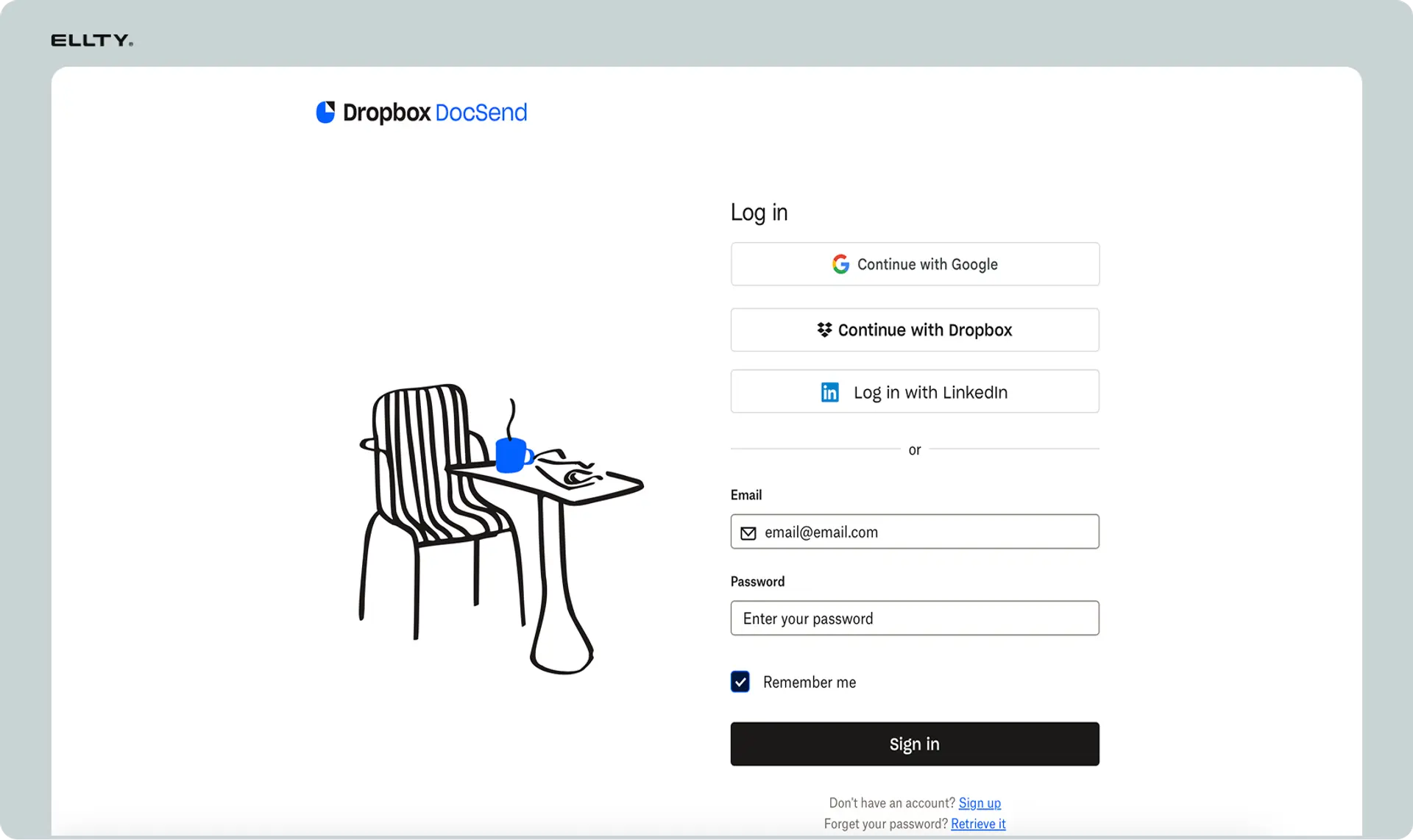
Click "Upload." Drag your PDF or PowerPoint file. DocSend converts everything to its viewer format.

Navigate to the upload section:
- Click the "Upload" button (top right of dashboard)
- Or click "+ New" and select "Document"
Upload your file:
- Drag and drop your pitch deck file
- Or click "Choose File" to browse your computer
- Wait for DocSend to process and convert (usually 30-60 seconds)
Add document metadata:
- Title: Clear, descriptive name visible in your dashboard
- Description: Note the deck version, target audience, or other context
- Tags: Use tags like "Q1-2026," "Seed Round," "Full Deck" for organization
DocSend conversion process: DocSend converts your file into its proprietary web viewer format, which:
- Prevents direct downloads (unless you permit them)
- Enables page-by-page tracking
- Ensures consistent viewing across all devices
- Allows for live updates without changing the link
Step 3: Create Investor-Specific Links


This is where most founders make a critical mistake: creating one generic link for all investors. Instead, create unique links for each investor or investor group.
Why unique links matter:
- Identify exactly which investor viewed your deck
- Compare engagement across different investors
- Personalize follow-up based on specific viewing behavior
- Track which introduction sources lead to engaged investors
How to create unique links:
- Click on your uploaded pitch deck in the dashboard
- Click "Create Link" or "+ New Link"
- Name the link clearly:
Investor_Name_Firm(e.g.,Sarah_Chen_Sequoia) - Configure link settings (see next step)
- Copy the generated unique URL
Link naming best practices:
- Individual investors:
FirstName_LastName_Firm→John_Smith_Andreessen - Firm-wide sharing:
FirmName_General→AccelPartners_General - Warm introductions:
IntroSource_InvestorName→MutualFriend_Jane_Doe - Events:
EventName_Date→YC_Demo_Day_Jan2026
Organizational strategy: Create different link groups for different stages:
- Cold outreach links: For initial contact with no prior relationship
- Warm intro links: When a mutual connection introduces you
- Follow-up links: After initial meetings, containing updated materials
- Partner meeting links: When you're asked to present to the full partnership
Step 4: Configure Link Settings and Permissions
DocSend offers granular control over how each link behaves. Configure these settings strategically for pitch deck sharing:
Email Verification (Strongly Recommended: ON)
- What it does: Requires viewers to enter their email before accessing your deck
- Why enable it: Identifies exactly who viewed your deck, builds your investor contact database
- When to disable: Never for pitch decks, always know who's viewing
Download Permissions (Recommended: OFF)
- What it does: Prevents viewers from downloading a copy of your deck
- Why disable it: Keeps control, ensures they view updated versions, prevents uncontrolled sharing
- When to enable: For investors who specifically request downloadable materials or before final partner meetings
Password Protection (Situational)
- What it does: Requires a password to access the deck
- Why use it: Extra security for decks containing sensitive financials or proprietary information
- Downside: Adds friction; investors may ignore password-protected links
- Best practice: Use for detailed financial models, not your main pitch deck
Link Expiration (Recommended: 30-60 days)
- What it does: Automatically deactivates the link after a set period
- Why use it: Creates urgency, prevents outdated decks from circulating indefinitely
- Timeframe suggestions:
- Initial outreach: 30 days
- After first meeting: 60 days
- Partner presentations: 90 days
- Renewal: You can always extend expiration dates as needed
NDA Requirement (Advanced)
- What it does: Requires viewers to accept an NDA before viewing
- When to use: For decks with extremely sensitive IP, customer lists, or detailed financials
- Warning: Most early-stage investors won't sign NDAs before viewing, so use sparingly
Viewer Alerts (Recommended: ON)
- What it does: Sends you email/SMS when someone views your deck
- Why enable it: Enables real-time follow-up while you're top of mind
- Caution: Can be overwhelming during active fundraising, consider email-only, not SMS
Custom Branding (Optional)
- What it does: Adds your company logo to the DocSend viewer
- Why use it: Reinforces brand professionalism
- Availability: Requires Standard plan or higher ($65/month+)
Step 5: Organize Your DocSend Workspace
As you create dozens of investor links, organization becomes critical:
Create folders:
- By fundraising stage: Seed Round / Series A / Bridge Round
- By investor type: VC / Angel / Strategic
- By geography: US Investors / International / Specific Regions
- By status: Active Conversations / Passed / Term Sheet Received
Use tags consistently:
- Round stage (Seed, Series A)
- Quarter (Q1-2026, Q2-2026)
- Deck version (v1, v2, v3)
- Investor tier (Top Choice, Interested, Long Shot)
Set up spaces for team access: If you have co-founders or team members involved in fundraising, DocSend's "Spaces" feature (Standard plan+) lets you:
- Share access to specific folders
- Collaborate on pitch deck strategy
- Assign follow-up responsibilities
- Track team-wide fundraising progress
Step 6: Test Before Sending to Investors
Never send a DocSend link to investors without testing it first:
Test checklist:
- Open the link in an incognito browser window
- Verify email verification works properly
- Check all slides display correctly
- Test on mobile (50%+ of first views happen on phones)
- Confirm analytics are recording views
- Verify branding appears correctly (if using custom branding)
- Test link expiration date is set appropriately
- Ensure password works (if using password protection)
Send a test to yourself or a co-founder:
- Create a test link named "TEST_Internal"
- Send to your personal email
- Go through the complete viewer experience
- Review the analytics to confirm tracking works
Common issues to catch:
- Slides appearing out of order
- Formatting problems (especially with complex charts)
- Missing images or broken links within slides
- Slow loading times (indicates file needs compression)
- Mobile display problems (text too small, images cut off)
Understanding DocSend Pitch Deck Analytics: What the Data Really Means
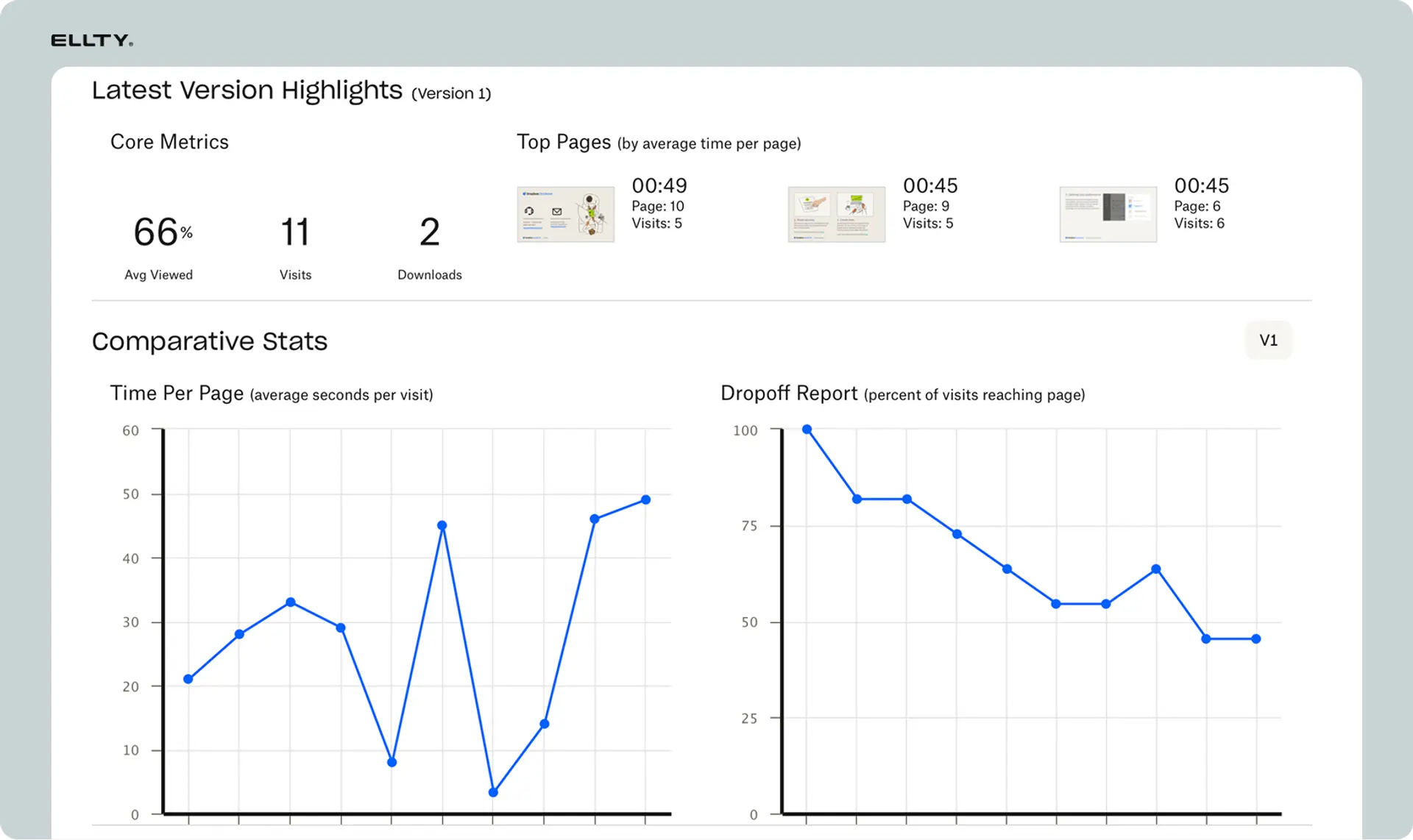
Once investors start viewing your pitch deck, DocSend provides a wealth of analytics. Understanding how to interpret this data is crucial for optimizing your fundraising strategy.
Overview Dashboard Metrics
When you click on a specific pitch deck link in DocSend, the overview dashboard shows high-level engagement metrics:
Total Visits
- Definition: The number of times your deck has been viewed
- What it means: Multiple visits from the same email = high interest or internal sharing
- Typical pattern: 1-2 visits = cursory review; 3-5 visits = serious consideration; 6+ visits = strong interest or partnership circulation
- Action: If a single investor has 5+ visits, prioritize your follow-up with them
Total Visitors
- Definition: The number of unique individuals who've viewed your deck
- What it means: Difference between visits and visitors reveals sharing behavior
- Example: 15 visits from 5 visitors = internal forwarding within an investor firm
- Action: High visitor-to-visit ratio suggests your deck is being circulated; prepare for partner meetings
Average Time Spent
- Definition: Mean viewing duration across all sessions
- Industry benchmark: According to DocSend's data from thousands of pitch decks, the average is 3 minutes 44 seconds
- Interpretation:
- Under 2 minutes: Deck didn't capture interest or isn't relevant
- 2-3 minutes: Quick review, likely a pass unless they return
- 3-5 minutes: Solid engagement, they're genuinely evaluating
- 5-10 minutes: High interest, careful consideration
- 10+ minutes: Exceptional engagement or confusion (check slide-level data)
- Action: If average time is under 2 minutes, your opening slides aren't hooking investors
Completion Rate
- Definition: Percentage of viewers who reached the final slide
- Industry benchmark: 40-60% completion is typical for pitch decks
- Interpretation:
- Under 30%: Major problem, deck loses interest early
- 30-50%: Average engagement
- 50-70%: Good engagement
- 70%+: Excellent narrative flow
- Action: Low completion rates indicate you should front-load your strongest content and shorten the deck
Downloads
- Definition: Number of times viewers downloaded your deck (if enabled)
- What it means: Investors keeping a copy for offline review or partnership meetings
- Risk: Once downloaded, you lose tracking and control
- Action: Only enable downloads for investors in advanced stages who specifically request it
Slide-by-Slide Analytics: The Most Valuable Data
This is where DocSend's pitch deck analytics become truly powerful. Click on "Detailed Analytics" to see individual slide performance.
Time Spent Per Slide
Each slide shows total viewing time and average time per viewer:
- High time on a slide can mean:
- The content resonates and they're thinking deeply about it
- The slide is confusing and they're trying to understand it
- There's a lot of text or data they're reading carefully
- They paused on this slide to take notes or discuss with colleagues
- Low time on a slide can mean:
- The content is clear and digestible
- The slide isn't relevant to them
- They're skimming quickly through the deck
- The information doesn't add value
Which slides investors spend the most time on (DocSend industry data):
- Team Slide (Slide 3-5): Average 18-25 seconds
- Investors heavily evaluate founder backgrounds
- They're assessing domain expertise and execution capability
- Often cross-reference with LinkedIn profiles
- High time here is positive, they're taking you seriously
- Financial Projections (Slide 12-15): Average 20-30 seconds
- VCs scrutinize revenue models and unit economics
- They're doing mental math on valuation
- Looking for realistic assumptions vs. hockey sticks
- Extended time can indicate skepticism
- Product/Technology (Slide 6-8): Average 15-22 seconds
- Technical evaluation of your solution
- Assessing competitive differentiation
- Understanding complexity and defensibility
- Traction/Metrics (Slide 9-11): Average 20-28 seconds
- Most data-driven slide review
- Comparing growth rates to portfolio companies
- Evaluating product-market fit evidence
Which slides investors often skip or spend minimal time on:
- Competition Slide: Frequently skimmed or skipped entirely
- Investors already know the landscape
- Most founders underestimate competitors
- VCs form their own competitive assessment
- Vision/Mission Slides: Often given minimal attention
- Seen as generic or aspirational
- Investors focus on near-term execution
- "Change the world" statements without substance get ignored
- Appendix/Additional Slides: Rarely viewed unless specifically referenced
Drop-Off Points: Where Investors Stop Reading
DocSend shows you exactly which slide causes viewers to exit:
- Slide 2-3 drop-off: Your problem statement isn't compelling or relevant
- Slide 5-7 drop-off: Your solution doesn't adequately address the problem
- Mid-deck drop-off (Slide 10-12): The narrative loses steam or becomes too detailed
- Late-deck drop-off (Slide 15+): Deck is too long; cut slides
Action steps based on slide analytics:
- If team slide has low engagement: Strengthen founder credibility, add relevant accomplishments, include logos of previous employers
- If financial slide has excessive time (45+ seconds): Your projections may seem unrealistic; add more conservative scenarios
- If problem slide has low time: Make the problem more visceral and relatable with specific examples or customer quotes
- If multiple slides show high drop-off: Reorder your deck to front-load the strongest content
Visitor Details: Understanding Who's Engaging
DocSend's visitor tracking reveals individual viewer information:
Email Addresses (when verification is enabled)
- Primary value: Identifies exactly who viewed your deck
- Cross-reference: Look up their role, background, and fund focus
- Unexpected viewers: Sometimes analysts or associates view first, then pass to partners
- Action: Personalize follow-ups based on the specific person's background and interests
Company/Organization
- Identification method: DocSend uses IP address and domain matching
- Accuracy: Highly accurate for corporate networks; less so for VPNs or mobile networks
- Multi-viewer detection: See when multiple people from the same firm view (e.g., "4 viewers from Sequoia Capital")
- Action: If 3+ people from same firm view, you're likely being discussed in partnership; prepare for partner meeting
Geographic Location
- What it shows: City and country of viewer
- Interpretation:
- Matches investor's known office = standard review
- Different location = viewing while traveling or at home
- International location = possible international office or unexpected forwarding
- Action: Evening/weekend views from residential areas often indicate serious personal interest
Device Type
- Desktop/Laptop: Suggests detailed, serious review at the office
- Mobile (phone): Quick preview, often while commuting or in between meetings
- Tablet: Moderate attention, possibly in a meeting or casual review
- Pattern: Desktop → Mobile → Desktop often indicates they reviewed at office, previewed on phone, then returned for deeper analysis
- Action: If an investor only views on mobile briefly, consider sending a follow-up: "Happy to send a shorter summary if helpful"
Viewing Time Patterns
- Business hours (9am-6pm, weekdays): Standard professional review
- Early morning (6-9am): Investor is prioritizing your deck, reviewing before meetings start
- Evening/night (7pm-midnight): Taking your deck seriously enough to review at home
- Weekend views: Exceptional interest or seriously considering investment
- Action: If an investor views at 11pm on a Saturday, they're extremely interested, follow up Monday morning
Return Visitor Analysis
Multiple views from the same person tell a story:
2-3 visits over several days:
- Likely scenario: Initial review, then returning to specific slides for deeper evaluation
- Action: They're seriously considering; prepare for detailed due diligence questions
4-6 visits with multiple viewers from same firm:
- Likely scenario: Championing your deal internally, sharing with partners
- Action: Proactively offer to present to the full partnership
10+ quick visits in one day:
- Likely scenario: Using your deck in a live presentation or meeting
- Action: This is a strong signal; follow up to ask how the meeting went
Single view, never returned:
- Likely scenario: Passed after initial review
- Action: Send a brief follow-up in case they missed something, then move on
Comparison Analytics: Benchmarking Across Investors
DocSend allows you to compare engagement across different links:
Engagement leaderboard: Create a mental ranking of investors by:
- Total time spent
- Number of visits
- Completion rate
- Number of internal forwards
Segment analysis: Compare groups:
- Warm introductions vs. cold outreach
- Top-tier VCs vs. emerging funds
- Angels vs. institutional investors
- Different geographic markets
Conversion correlation: Over time, identify patterns:
- Do investors who spend 5+ minutes convert to meetings at a higher rate?
- Does multiple-viewer engagement correlate with term sheets?
- Which introduction sources lead to the most engaged investors?
What Investor Behavior Actually Reveals: Interpreting Engagement Patterns
Beyond raw numbers, DocSend analytics reveal psychological signals about investor interest and decision-making processes.
High-Interest Signals
Pattern: Multiple views over several days + long time per view
- What it means: The investor is seriously considering your opportunity, returning multiple times to evaluate different aspects
- Psychology: They're building conviction, possibly discussing with partners or advisors
- Next step: Schedule a follow-up call within 48 hours while interest is high
- Email template: "Hi [Name], I noticed you had a chance to review our deck. Would love to discuss any questions and share recent traction updates."
Pattern: Forwarded to 3+ colleagues + viewing during business hours
- What it means: Your deck is being circulated within the partnership for formal evaluation
- Psychology: The initial reviewer is championing your deal and seeking partner consensus
- Next step: Proactively offer to present to the full partnership
- Email template: "Hi [Name], Happy to present to your partners if it would be helpful. We have some exciting developments since the deck that would be great to share live."
Pattern: Viewed late evening or weekend + returned multiple times
- What it means: Investor is personally interested enough to review outside work hours
- Psychology: They're excited about the opportunity and want to evaluate thoroughly before discussing with partners
- Next step: Strike while the iron is hot, request a meeting for early the following week
- Email template: "Would love to find time to connect this week. I have updates on [specific traction metric] that align with your thesis around [investment focus]."
Pattern: Extended time on financials slide (40+ seconds) + return to traction slides
- What it means: Investor is doing detailed analysis of your unit economics and growth trajectory
- Psychology: Moving from "is this interesting?" to "can I make the numbers work?"
- Next step: Offer to share detailed financial model or unit economics breakdown
- Email template: "Happy to share our detailed financial model and discuss unit economics in depth. Our [key metric] has improved significantly since the deck."
Cautionary Signals
Pattern: Only viewed financials slide + very short total time (under 1 minute)
- What it means: They're price shopping or just checking valuation without genuine interest
- Psychology: Your story didn't land; they're treating you as a commodity
- Next step: Reframe the conversation around value creation, not just valuation
- Action: Consider revising your opening slides to better hook investor interest
Pattern: Drop-off after problem slide (Slide 2-3)
- What it means: The problem you're solving isn't compelling enough or doesn't fit their thesis
- Psychology: If the problem doesn't resonate immediately, they won't be interested in your solution
- Next step: Rework your problem statement with more visceral, data-driven framing
- Revision strategy: Add customer quotes, quantify pain points with specific data, demonstrate market urgency
Pattern: Skipped team slide entirely
- What it means: They've likely already decided "no" before getting to team evaluation
- Psychology: Team evaluation comes after interest in market/product; skipping it suggests they're not seriously considering
- Next step: This is usually a pass; move on unless you have a strong introduction or new traction
Pattern: Anonymous view only (email verification bypassed somehow) + very short time
- What it means: Investor doesn't want you to know they viewed or is casually browsing
- Psychology: Low-intent browsing, not serious evaluation
- Next step: This is normal for some cold outreach; don't over-interpret single anonymous views
Pattern: Single view months ago + no follow-up
- What it means: They reviewed and passed without bothering to formally decline
- Psychology: Standard investor behavior, most passes are silent
- Next step: Send one last follow-up with significant new traction; if no response, move on
Neutral Patterns (Don't Over-Interpret)
Pattern: Quick mobile view (1-2 minutes) followed by longer desktop view
- What it means: Normal evaluation workflow - preview on phone, then serious review at desk
- Action: Wait for the desktop view analytics before drawing conclusions
Pattern: Moderate time (3-4 minutes) + completion + no follow-up
- What it means: Professional review but didn't match their current investment thesis
- Action: Standard pass; this is the majority of your outreach
Pattern: Forwarded once internally + no additional views
- What it means: They shared with a partner who had final say and decided to pass
- Action: Normal part of fundraising; continue outreach to other investors
What Industry Data Reveals: DocSend's Benchmark Insights
DocSend regularly publishes aggregate data from thousands of pitch decks, revealing fundraising best practices and investor behavior patterns.
Optimal Deck Length and Investor Attention Span
Key finding: Investor engagement drops significantly after slide 20
- Decks under 15 slides: Average 4+ minutes viewing time
- Decks 15-20 slides: Average 3:44 viewing time (industry average)
- Decks 20-25 slides: Average 2:48 viewing time
- Decks over 25 slides: Average under 2 minutes viewing time
Interpretation: Investors have limited attention. Every slide after 15 needs to justify its existence. Most successful pitch decks are 12-18 slides.
Action: Ruthlessly edit your deck. If a slide doesn't directly advance your narrative, move it to an appendix or remove it entirely.
Timing: When Investors Actually View Pitch Decks
Peak viewing times:
- Tuesday-Thursday: Highest viewing frequency (60% of all views)
- 9-11am: Peak viewing window (35% of daily views)
- Monday: Lowest engagement (investors catching up from weekend)
- Friday afternoon: Very low engagement (investors wrapping up week)
Interpretation: Investors have specific patterns for reviewing pitch decks, usually mid-week when they're not in back-to-back meetings.
Action: Send your pitch decks on Monday evening or Tuesday morning for Tuesday-Thursday viewing. Avoid Friday sends, your deck gets buried over the weekend.
Successful vs. Rejected Deck Engagement Patterns
DocSend analyzed thousands of decks that received funding vs. those that didn't:
Funded companies' deck analytics:
- Average viewing time: 4+ minutes
- Completion rate: 60%+
- Multiple viewers: Average 3.2 people per firm
- Return visits: Average 2.8 views per interested investor
Rejected companies' deck analytics:
- Average viewing time: 2-3 minutes
- Completion rate: 30-40%
- Multiple viewers: Average 1.2 people per firm
- Return visits: Average 1.1 views per investor
Interpretation: While correlation doesn't equal causation, decks that get funded generate significantly more engagement. This could be because:
- Better decks naturally attract more attention
- Investors spend more time on opportunities they're considering seriously
- Successful companies have better market timing, making their decks more relevant
Action: Use these benchmarks to gauge investor interest. If your analytics show low engagement, you need to strengthen your deck, not just send it to more investors.
Which Slides Get the Most Attention
Based on DocSend's aggregate data across industries:
Most time per slide:
- Team slide: 18-25 seconds (investors bet on people)
- Financials/Projections: 20-30 seconds (evaluating unit economics)
- Traction/Metrics: 20-28 seconds (evidence of product-market fit)
- Product Demo/Screenshots: 15-22 seconds (understanding differentiation)
- Market Size: 12-18 seconds (TAM/SAM/SOM evaluation)
Least time per slide:
- Competition: Often skipped or under 8 seconds (investors know the landscape)
- Vision/Long-term: Under 10 seconds (too abstract)
- Thank you/Contact: Under 5 seconds (informational only)
Action: Front-load the slides that get the most attention. Consider putting team on slide 3-5 rather than at the end.
Industry-Specific Patterns
SaaS companies:
- Investors spend more time on metrics slide (ARR, MRR, LTV/CAC)
- Customer logos slide gets high engagement
- Technical architecture gets skipped unless deep tech
Consumer/Marketplace:
- Traction metrics (GMV, users, retention) get heaviest focus
- Network effects slide critical
- Team slide less important than B2B
Hardware/DeepTech:
- Product demo and IP slides get extended time
- Team expertise scrutinized heavily
- Financials often questioned (long development cycles)
Biotech/Healthcare:
- Regulatory pathway slide critical
- Team credentials paramount
- Market size often questioned
Pitch Deck Best Practices Based on DocSend Analytics
Structural Optimization
Front-load your strongest content:
Recommended deck structure (based on engagement data):
- Cover Slide: Company name, tagline, contact
- The Hook: One sentence problem + solution (10 seconds to capture interest)
- Problem: Visceral, quantified, urgent
- Solution: Clear, visual, differentiated
- Team: Credibility, domain expertise, execution capability
- Traction: Hard metrics, growth trajectory, validation
- Product: Visual demo or screenshots
- Market Opportunity: TAM/SAM/SOM with bottoms-up analysis
- Business Model: How you make money (unit economics)
- Go-to-Market: Customer acquisition strategy
- Competitive Landscape: Positioning, not exhaustive competitor list
- Financials: 3-year projections with key assumptions
- Use of Funds: Specific allocation for the round
- Vision: Where you're going long-term
- Ask: Round size, terms, timeline
- Appendix: Additional slides for Q&A
Why this order works:
- Hook immediately in slides 2-3 (where drop-off is highest)
- Team early (slide 5) when investor is still engaged
- Traction before product (show proof before asking investors to imagine)
- Financials late but not too late (slide 12 vs. slide 20)
Slide-Specific Optimizations
Problem Slide (Slide 3):
- High drop-off here? Your problem isn't compelling enough
- Fixes:
- Add customer quotes showing pain
- Quantify the problem ("Costs companies $X annually")
- Make it visceral and relatable, not abstract
- Show a "day in the life" before your solution
Team Slide (Slide 5):
- Low engagement time? Investors don't see credibility
- Fixes:
- Add recognizable company logos from past experience
- Highlight domain expertise relevant to THIS problem
- Include specific accomplishments (not just titles)
- Show complementary skill sets across co-founders
Traction Slide (Slide 6):
- Extended time here? Could mean confusion about metrics
- Fixes:
- Use standard SaaS metrics (ARR, MRR, not vanity metrics)
- Show clear growth trajectory with visual graphs
- Include context (growth rate, cohort retention)
- One metric per chart, don't overcrowd
Competition Slide (Slide 11):
- Frequently skipped? This is normal; investors form their own competitive view
- Optimization:
- Don't spend 3 slides on competitors
- Use a simple 2x2 positioning matrix
- Focus on differentiation, not exhaustive analysis
- Consider moving to appendix if investors consistently skip
Financial Slide (Slide 12):
- Very high time (45+ seconds)? Projections may seem unrealistic
- Fixes:
- Show conservative, moderate, and aggressive scenarios
- Include key assumptions explicitly
- Ground projections in current unit economics
- Add a "how we get there" narrative
Design and Readability Principles
One idea per slide:
- Problem: Slides trying to convey 3-4 concepts confuse viewers
- Evidence: High time-per-slide combined with low completion suggests confusion
- Solution: Break complex slides into 2-3 simpler slides, or move detail to appendix
Visual hierarchy:
- Use large, clear headlines
- Limit text to 3-5 bullet points with 8-10 words each
- Use visuals (charts, screenshots, images) over text when possible
- Ensure mobile readability (50%+ of first views are on phones)
Consistent formatting:
- Same font throughout (avoid mixing Sans Serif and Serif)
- Consistent color scheme aligned with brand
- Uniform chart styles
- Same slide template/layout structure
Slide numbers:
- Always include page numbers
- Helps in follow-up conversations ("Can we revisit slide 8?")
- Allows you to reference specific slides in emails
Setting Up Smart Notifications and Alerts


DocSend's notification system can be a powerful tool or an overwhelming distraction. Configure it strategically:
Email Notifications (Recommended: ON)
When to enable:
- Document viewed: Get alerted immediately when an investor opens your deck
- Document forwarded: Know when your deck is being shared internally
- Link expired: Reminder to follow up before access ends
Notification strategy:
- Enable for all investor links during active fundraising
- Create a filter in your email to organize DocSend notifications (label: "Fundraising/DocSend Alerts")
- Check notifications 2-3 times daily, not obsessively
Action workflow:
- Receive "Investor X viewed your deck" notification
- Wait 2-4 hours (don't seem like you're stalking)
- Check full analytics to understand engagement depth
- Send personalized follow-up if engagement was meaningful (3+ minutes, high completion)
SMS Notifications (Recommended: OFF for most users)
Pros:
- Instant alerts even when away from email
- Enables real-time follow-up within minutes
Cons:
- Can be overwhelming during active fundraising (dozens of texts per day)
- Creates unhealthy obsession with tracking
- Interrupts focus on other critical work
When SMS makes sense:
- Final round of fundraising with 5-10 key target investors
- Limited time frame where immediate response is critical
- You can discipline yourself not to obsess over every ping
Most founders' experience: SMS notifications create anxiety without material benefit. Email alerts provide sufficient real-time awareness.
Weekly Summary Reports (Recommended: ON)
What they include:
- Total views across all pitch deck links
- Top-performing links (most engagement)
- Viewing trends over time
- Comparison to previous weeks
Value:
- Big-picture view without getting lost in individual alerts
- Helps identify which investor outreach channels are working
- Tracks fundraising momentum over time
Action: Review weekly summaries every Monday morning to:
- Identify highest-engagement investors for priority follow-up
- Assess whether your outreach strategy is working
- Adjust deck content if engagement is declining
Custom Notification Rules
Advanced DocSend users can create custom alerts:
High-engagement trigger:
- Alert when single investor views 3+ times
- Alert when investor spends 5+ minutes total time
- Alert when 3+ people from same firm view
Urgency trigger:
- Alert when link is about to expire
- Alert when viewer downloads deck (if downloads enabled)
Setting these up: Go to Settings > Notifications > Advanced Rules
Following Up Based on DocSend Data: The Right (and Wrong) Way
DocSend analytics enable data-driven follow-ups, but there's a fine line between insightful and creepy.
Personalization Strategies That Work
Example 1: Referencing specific content interest
❌ Wrong (creepy): "Hi Sarah, I saw you spent 4 minutes and 37 seconds viewing our deck, with particular focus on slides 8, 12, and 15."
✅ Right (insightful): "Hi Sarah, thanks for taking the time to review our materials. I noticed you spent time on our go-to-market strategy, happy to discuss our enterprise sales approach in detail and share recent wins with similar customers."
Why it works: References insights from data without revealing you're tracking, focuses on providing value.
Example 2: Leveraging internal forwarding
❌ Wrong: "Hi John, DocSend showed me you forwarded our deck to three partners. Can we schedule a partner meeting?"
✅ Right: "Hi John, hope you had a chance to discuss our opportunity with your team. If it would be helpful, we'd love to present to your partners and share some recent developments since the deck."
Why it works: Acknowledges likely internal discussion without explicitly revealing tracking, provides value by offering updated information.
Example 3: Timing follow-up based on viewing behavior
❌ Wrong: Investor views deck at 11pm Saturday You email them at 11:05pm: "Saw you're reviewing our materials, want to jump on a call now?"
✅ Right: Investor views deck at 11pm Saturday You wait until Monday morning at 9am: "Hope you had a great weekend. Would love to find time this week to discuss any questions from the deck and share our latest traction."
Why it works: Uses timing insight to know they're interested but doesn't seem like you're stalking their every move.
Follow-Up Cadence Based on Engagement
High engagement (4+ minutes, 70%+ completion, or 2+ views):
- Follow-up timing: Within 24 hours
- Approach: Enthusiastic, offer next steps immediately
- Template: "Would love to find 30 minutes this week to discuss. I have updates on [specific metric that's improved] since the deck."
Medium engagement (2-4 minutes, 40-70% completion, single view):
- Follow-up timing: 48-72 hours
- Approach: Helpful, offer additional information
- Template: "Happy to answer any questions or provide additional details on [area where they seemed interested based on slide analytics]."
Low engagement (under 2 minutes, under 40% completion):
- Follow-up timing: 5-7 days
- Approach: Brief, value-add with new information
- Template: "Wanted to share that we just [recent accomplishment]. Let me know if you'd like to reconnect."
No engagement (link sent but never viewed):
- Follow-up timing: 1 week
- Approach: Gentle reminder, check if it got lost
- Template: "Wanted to make sure our deck didn't get buried in your inbox. No rush, happy to reconnect when timing is better."
What NOT to Mention
Never explicitly reveal:
- Exact viewing times or durations
- That you know they forwarded internally
- That you're tracking them at all
- Specific slides they viewed
Why this matters:
- Many investors find tracking uncomfortable (even though they know it's happening)
- Explicit mentions feel invasive
- Focuses conversation on tracking rather than substance
- Can damage relationship before it starts
The paradox: Investors know DocSend tracks them, but discussing it explicitly breaks an unspoken etiquette. Use insights to inform your follow-up strategy, but keep the tracking invisible in your communication.
Updating Your Pitch Deck After Sending: DocSend's Killer Feature
One of DocSend's most powerful (and underutilized) features is the ability to update your deck after sending, with all existing links automatically pointing to the new version.
When to Update Your Deck
Immediate updates needed for:
Critical errors:
- Typos or grammatical mistakes (especially in headlines or key stats)
- Incorrect data or financials
- Broken charts or formatting issues
- Missing information that investors are asking about
Material changes:
- Closed a major customer
- Hit a new traction milestone
- Secured a strategic partnership
- Raised a portion of the round
- Significant press coverage or validation
Iterative improvements:
- Investors consistently asking about the same topic (add a slide)
- Specific slide showing high drop-off (revise or reorder)
- Feedback from investors about clarity or framing
- A/B testing different positioning
How to Update Without Creating Confusion
Step 1: Upload the new version
- In DocSend, click on the original document
- Click "Upload New Version"
- Upload your revised file
- DocSend replaces the content but keeps all links active
Step 2: Version tracking
- Add version notation to your internal file name (v2, v3, etc.)
- Keep a changelog noting what you changed
- Track analytics separately for each version to measure improvement
Step 3: Decide whether to notify investors
Notify investors if:
- The update includes materially new traction they'd care about
- You're adding information they specifically requested
- The change strengthens your ask or positioning significantly
Don't notify if:
- You're fixing typos or formatting
- Changes are minor or cosmetic
- Investor has already viewed and you don't want to seem indecisive
Notification template (when appropriate): "Hi [Name], wanted to share a quick update: we just [major development]. I've updated the deck you have with this new information. The link you have still works, just reflects the latest version."
Version Testing Strategy
Advanced founders use DocSend's update feature for A/B testing:
Test different elements:
- Problem framing: Version A focuses on cost savings, Version B on revenue opportunity
- Ordering: Version A puts team early (slide 5), Version B puts team later (slide 10)
- Use of funds: Version A shows detailed breakdown, Version B shows high-level allocation
How to test:
- Create two separate DocSend links from the same base deck
- Send Version A to half your target investors
- Send Version B to the other half
- Compare analytics after 2 weeks
- Adopt the higher-performing version universally
What to measure:
- Average viewing time
- Completion rate
- Drop-off points
- Conversion to next meeting
Creating Different Deck Versions for Different Audiences
Smart founders don't use one-size-fits-all pitch decks. DocSend enables you to create tailored versions for different stakeholders.
The Deck Hierarchy
1. Teaser Deck (8-10 slides)
- Purpose: Initial cold outreach, conference sharing, warm introductions
- Audience: First contact with investors who know nothing about you
- Content:
- Problem
- Solution
- Traction (high-level)
- Team
- Market size
- Ask (round size, stage)
- Strategy: Designed to get a meeting, not close a deal
- DocSend settings: Email verification ON, expiration 30 days, downloads OFF
2. Full Pitch Deck (15-18 slides)
- Purpose: After initial interest, for investor meetings
- Audience: Investors who've agreed to a first call
- Content: Complete story with all standard slides
- Strategy: Comprehensive evaluation deck
- DocSend settings: Email verification ON, expiration 60 days, downloads OFF
3. Detailed Deck with Appendix (20-25 slides)
- Purpose: Due diligence, partner meetings
- Audience: Investors in serious consideration phase
- Content: Full deck + appendix with detailed financials, customer case studies, technical architecture, competitive analysis
- Strategy: Answer every possible question without requiring follow-up
- DocSend settings: Email verification ON, expiration 90 days, downloads MAYBE
4. Data Room Materials
- Purpose: Final due diligence before term sheet
- Audience: Investors ready to commit
- Content: Complete set including pitch deck, financial model, customer contracts, cap table, legal docs
- DocSend feature: Use Data Room functionality (separate from pitch deck sharing)
- Settings: Strict access controls, NDA required, download enabled for legal review
Customization by Investor Type
For Angel Investors:
- Emphasize vision and market opportunity
- Less focus on detailed unit economics
- More emphasis on founder story and passion
- Include specific ask and what they get (equity %, board involvement)
For Venture Capital Firms:
- Lead with traction and metrics
- Detailed unit economics and financial projections
- Clear articulation of fund use and milestones
- Comparison to portfolio companies or competitors they've funded
For Strategic/Corporate Investors:
- Emphasize strategic fit and partnership opportunities
- Show how you solve their specific business problem
- De-emphasize venture returns, emphasize strategic value
- Include integration or partnership possibilities
For International Investors:
- Convert financials to local currency
- Reference local market dynamics if expanding there
- Include time zone considerations for communication
- Address any regulatory or market-specific concerns
Track Each Version Separately
Create distinct DocSend links for:
- Version type: Teaser vs. Full Deck
- Investor category: Angels vs. VCs vs. Strategic
- Geography: US investors vs. European vs. Asian
- Introduction source: Cold outreach vs. warm intro vs. conference connections
Analytics insights from segmentation:
- Which deck version generates the most meetings?
- Do warm intros engage more deeply than cold outreach?
- Which investor type spends the most time on your deck?
- Does traction emphasis work better than vision for your specific case?
Alternatives to DocSend for Pitch Deck Sharing


While DocSend has become the industry standard, several alternatives exist depending on your needs and budget.
Ellty: Free Plan for Early-Stage Startups
What it offers:
- Permanent free tier (no trial expiration)
- Real-time document tracking and engagement analytics
- Aggregate & individual visit dashboard
- Secure link sharing with view tracking
- 10 GB storage per user
- Data rooms available on paid plans for managing due diligence and investor materials
- Live chat support
Best for:
- Pre-seed startups with minimal budget who can start free and scale into data rooms
- Founders who need reliable tracking without committing to a paid tool upfront
- Teams preparing for due diligence who need a scalable, affordable data room solution
Limitations compared to DocSend (free plan):
- No link access controls on free tier (passcode, expiration, email requirement)
- No eSignature or data room features on free tier
- Fewer integration options
Pricing:
- Free plan: Document tracking, engagement analytics, unlimited documents
- Paid plans: Start at $69/month — including data rooms, eSignatures, and advanced access controls
When to choose Ellty: If you're early in fundraising — pre-seed or bootstrapped — Ellty's free plan covers the essentials. And when you're ready for investor due diligence, upgrading unlocks full data room functionality at a fraction of DocSend's cost.
Google Drive: The Basic (But Limited) Option
What it offers:
- Completely free with Google account
- 15 GB free storage (sufficient for dozens of pitch decks)
- Easy sharing via links
- Folder organization
- Basic version history
- Familiar interface for most investors
Best for:
- Founders who don't need any analytics
- Sharing with investors who explicitly prefer Google Drive
- Supplement to DocSend for downloadable materials
Limitations compared to DocSend:
- No page-by-page tracking: You'll never know which slides investors viewed
- No time analytics: Can't see how long they spent reviewing
- No visitor identification: Unless you require Google sign-in (which adds friction)
- No engagement insights: Just "opened" or "not opened"
- Limited control: Can't prevent downloads or sharing
- No professional polish: Looks less sophisticated than dedicated pitch deck tools
When to choose Google Drive: If analytics aren't important and you just need a simple sharing mechanism, Google Drive works. However, for serious fundraising, the lack of insights makes it difficult to optimize your deck or prioritize follow-ups.
Notion: Emerging Alternative with Different Approach
What it offers:
- Free plan with unlimited pages
- Rich formatting and embedding capabilities
- Public link sharing
- Collaborative editing
- All-in-one workspace for fundraising materials
Best for:
- Teams that already use Notion extensively
- Creating living documents that update frequently
- Combining pitch materials with other fundraising resources
Unique approach: Notion pitch decks are web pages, not PDF viewers. This allows:
- Embedded videos and demos
- Interactive content
- Always-updated information
- Links to additional resources
Limitations compared to DocSend:
- Not designed specifically for pitch decks (general document tool)
- Minimal analytics (can see page views, not slide-level engagement)
- Less professional for traditional VC pitching
- Requires learning Notion's paradigm
- Not the expected format for most investors
When to choose Notion: If you're pitching to more progressive, tech-forward investors or if you want a more interactive presentation than static slides, Notion can work. However, most traditional VCs expect standard pitch deck formats.
PandaDoc: If You Need E-Signatures Too
What it offers:
- Document creation, editing, and tracking
- E-signature capabilities (major differentiator)
- Payment collection integration
- CRM integrations
- Team collaboration
- Advanced analytics
Best for:
- Later-stage companies with complex fundraising documents (SAFEs, convertible notes)
- Teams that need document creation + signing in one platform
- Companies that also use it for sales contracts
Limitations compared to DocSend:
- More expensive ($19-$49/month per user)
- Steeper learning curve
- Designed for contracts/proposals, not optimized for pitch decks
- Different analytics focus (completion rates, signing time vs. slide engagement)
When to choose PandaDoc: If you need e-signature functionality for fundraising documents (not just pitch deck tracking), PandaDoc combines both. However, if you only need pitch deck analytics, DocSend or Ellty are better fits.
Docsend vs. Alternatives: Decision Matrix


Bottom line:
- Choose DocSend if: You have budget and want the industry standard with best-in-class analytics
- Choose Ellty if: You're bootstrapped/early-stage and need free tracking indefinitely
- Choose Google Drive if: You don't care about analytics at all
- Choose Notion if: You want interactive, always-updated materials for progressive investors
- Choose PandaDoc if: You need e-signature + tracking in one platform
The Psychology of Tracked Pitch Decks: Investor Perspective
Understanding how investors feel about DocSend tracking helps you use it more effectively.
Why Some Investors Dislike Being Tracked
Privacy concerns:
- Feels invasive to have viewing behavior monitored
- Uncomfortable with founders knowing exactly when/how long they viewed
- Prefer to evaluate materials privately without external observation
Pressure dynamics:
- Creates implicit expectation of timely follow-up
- Reduces flexibility to review on their own schedule
- Feels like being watched during evaluation
Professional autonomy:
- Experienced investors pride themselves on independent evaluation
- Tracking can feel like lack of trust in their process
Behavioral signals: If an investor:
- Specifically requests a PDF instead of DocSend link
- Views your deck in incognito/anonymous mode
- Mentions discomfort with tracking tools
How to respond: "Of course, happy to send a PDF. We primarily use DocSend for our own analytics to improve our materials, but completely understand the preference."
Never:
- Push DocSend on investors who explicitly prefer PDFs
- Mention that you're tracking them
- Make them feel pressured by the analytics
Why Most Investors Accept (or Even Prefer) DocSend
Professionalism signal:
- Shows you're serious and sophisticated about fundraising
- Demonstrates awareness of industry-standard tools
- Indicates you're data-driven in your approach
Convenience factors:
- Always-updated content (they see latest version automatically)
- No large email attachments
- Easy access from any device
- No downloading required
Mutual benefit:
- Investors know tracking helps founders improve decks
- Better decks make their evaluation easier
- Creates more efficient fundraising process overall
Industry normalization: DocSend has become so standard that most investors expect it. Not using tracking tools can actually seem unsophisticated to some VCs.
The Unspoken Etiquette
Investors understand:
- You're using DocSend (or similar tracking)
- You can see when they view and how long
- You might follow up based on this information
But expect you to:
- Not explicitly mention the tracking
- Not follow up immediately (give them space)
- Not pressure them based on viewing behavior
- Use insights subtly in your communication
The social contract: Both parties pretend tracking isn't happening, even though both know it is. Violating this by explicitly discussing the analytics breaks professional norms.
Advanced DocSend Strategies for Experienced Fundraisers
Multi-Stage Funnel Tracking
Create a complete investor funnel using different DocSend links:
Stage 1: Initial Outreach (Teaser Deck)
- Link naming:
Investor_Teaser_V1 - Content: 10-slide high-level overview
- Goal: Generate interest for a call
- Success metric: 3+ minutes viewing time, 70%+ completion
Stage 2: First Meeting (Full Deck)
- Link naming:
Investor_FullDeck_PostCall - Content: 15-18 slide comprehensive deck
- Goal: Demonstrate traction and potential
- Success metric: Multiple viewers from firm, 4+ minute average time
Stage 3: Partner Meeting (Detailed Deck + Appendix)
- Link naming:
Investor_Partnership_Materials - Content: Full deck + financial models, case studies, technical deep-dives
- Goal: Address all partner questions
- Success metric: 5+ viewers, extended time on financials, download requests
Stage 4: Due Diligence (Data Room)
- Link naming:
Investor_DataRoom_DD - Content: Complete set of fundraising materials
- Goal: Enable thorough diligence
- Success metric: Systematic review of all materials
Tracking conversion: Monitor how many investors progress from each stage to the next. This reveals where your funnel breaks down.
Competitive Intelligence Gathering
DocSend analytics can reveal competitive dynamics:
Investor shopping behavior:
- Multiple investors viewing on same day = they're discussing your round
- Same investor viewing your deck + competitor decks = comparison shopping
- Viewing only financials slide = price checking
Market validation:
- High engagement from multiple top-tier VCs = strong market timing
- Consistent drop-off at market size slide = investors skeptical of TAM
- Extended time on competition slide = they're worried about competitive dynamics
Thesis alignment:
- Which investor types engage most deeply?
- Does your deck resonate with generalist or specialist funds?
- Geographic patterns in engagement
Integration with CRM for Systematic Follow-Up
Advanced users integrate DocSend with CRM systems:
Salesforce integration:
- Automatically log document views as activities
- Trigger follow-up tasks based on engagement thresholds
- Track investor pipeline systematically
HubSpot integration:
- Add prospects to specific workflows based on viewing behavior
- Score leads by engagement depth
- Automate personalized email sequences
Custom workflows:
- High engagement (4+ minutes) → "Hot lead" status → immediate founder outreach
- Medium engagement (2-4 minutes) → "Warm lead" → value-add email
- Low/no engagement → "Cold lead" → long-term nurture sequence
Preparing for Investor Questions Based on Analytics
Use DocSend data to predict investor questions:
If they spent extended time on market slide: Prepare: Detailed TAM/SAM/SOM analysis, bottoms-up market calculations, adjacent market opportunities
If they quickly skipped competitive landscape: Prepare: Deep competitive differentiation, why incumbents can't replicate, moat analysis
If they returned multiple times to financial projections: Prepare: Detailed unit economics, growth assumptions, scenario planning, comparison to comparable companies
If they spent minimal time on problem slide: Prepare: More visceral problem examples, customer pain point stories, quantification of current solution costs
Common Mistakes Founders Make with DocSend
Mistake 1: Creating One Link for Everyone
The error: Sending the same DocSend link to all investors, thinking it's more efficient.
Why it's wrong:
- Can't identify which specific investor viewed
- Can't compare engagement across investors
- Can't personalize follow-up based on individual behavior
- Can't track which introduction sources perform best
The fix: Create unique links for every investor or investor group. Yes, it takes 30 extra seconds per link. Yes, it's worth it.
Mistake 2: Obsessing Over Real-Time Analytics
The error: Checking DocSend every 10 minutes, following up within an hour of viewing, mentioning exact viewing times to investors.
Why it's wrong:
- Creates unhealthy anxiety and distraction
- Makes you seem desperate or stalker-ish
- Investors need space to evaluate without pressure
- You waste time that should be spent improving your business
The fix: Check analytics 2-3 times per day maximum. Wait 24-48 hours before following up unless there's a specific reason for urgency.
Mistake 3: Ignoring Low Engagement Signals
The error: Continuing to send the same deck despite consistently low viewing times (under 2 minutes) and poor completion rates (under 30%).
Why it's wrong:
- If your deck isn't resonating with investors, more outreach won't help
- You're wasting time on a broken pitch
- Each failed pitch damages your reputation in the investor community
The fix: If you see low engagement from 10+ investors, pause outreach. Revise your deck based on drop-off data. Test the new version with a small sample before resuming broad outreach.
Mistake 4: Enabling Downloads Too Early
The error: Allowing downloads from the first DocSend link to avoid seeming controlling.
Why it's wrong:
- You lose all tracking once they download
- Old versions circulate even after you update
- Can't revoke access if circumstances change
- Investors can forward downloaded PDFs untraceably
The fix: Keep downloads disabled for initial outreach and early-stage conversations. Only enable downloads for investors in late-stage due diligence who specifically request it.
Mistake 5: Not Testing Mobile Experience
The error: Only reviewing your DocSend deck on desktop, then sending to investors who primarily view on mobile.
Why it's wrong:
- 50%+ of initial pitch deck views happen on mobile devices
- Text that looks perfect on desktop may be unreadable on phones
- Charts and images may not display properly
- Poor mobile experience creates negative first impression
The fix: Before sending any DocSend link, open it on your phone and tablet. Ensure:
- Text is readable without zooming
- Charts display clearly
- Images load quickly
- Navigation works smoothly
Mistake 6: Forgetting to Set Link Expiration
The error: Creating DocSend links with no expiration date, letting them stay active indefinitely.
Why it's wrong:
- Old versions of your deck circulate months after your round closes
- Outdated information damages your credibility
- Can't create urgency for investor decision-making
- Lose track of which decks are current
The fix: Always set expiration dates:
- Initial outreach: 30 days
- Post-first meeting: 60 days
- Partner presentations: 90 days You can always extend if needed, but having a default expiration creates healthy urgency.
Mistake 7: Sending DocSend Links in Cold Emails Without Context
The error: Cold emailing investors with just a DocSend link and no explanation or value proposition.
Why it's wrong:
- Investors get hundreds of cold emails weekly
- No context = no reason to click
- Looks lazy and generic
- Doesn't build any relationship
The fix: Always include context in cold outreach:
- Brief, compelling problem statement (1 sentence)
- Your unique solution (1 sentence)
- Key traction metric (1 number)
- Why you're reaching out to THIS investor specifically
- THEN the DocSend link
Real-World Success Stories: How Founders Use DocSend Data
Case Study 1: Pivot Based on Drop-Off Data
Situation: SaaS startup raised pre-seed but struggled to generate Series A interest. Investors consistently dropped off after slide 6 (product demo).
DocSend insights:
- Average viewing time: 2:15 minutes
- Drop-off rate at slide 6: 65%
- Completion rate: 18%
Action taken: Realized their product demo was too technical and overwhelming. Restructured deck:
- Moved customer testimonial to slide 6
- Simplified product demo to high-level benefits
- Moved technical architecture to appendix
Results:
- Average viewing time increased to 4:20 minutes
- Drop-off at slide 6 reduced to 25%
- Completion rate improved to 58%
- Successfully raised Series A within 3 months
Lesson: When investors consistently disengage at a specific slide, that slide is broken. Fix it based on data, not assumptions.
Case Study 2: Identifying Champion Investors
Situation: Hardware startup sent deck to 50 investors during initial outreach.
DocSend insights: Segmented investors by engagement:
- Tier 1 (5+ minutes, 2+ views): 4 investors
- Tier 2 (3-5 minutes, completion): 12 investors
- Tier 3 (under 3 minutes): 34 investors
Action taken: Focused exclusively on Tier 1 investors:
- Sent personalized follow-ups within 24 hours
- Offered to present to partners
- Shared updated traction data
Sent lighter touch to Tier 2:
- Value-add email with new customer announcement
- Offered to reconnect in 2 weeks
Deprioritized Tier 3:
- Single follow-up email
- Moved to long-term nurture
Results:
- 3 of 4 Tier 1 investors led to partner meetings
- 2 eventually invested
- Saved hundreds of hours not chasing disinterested investors
Lesson: Not all investor outreach deserves equal attention. Use DocSend data to prioritize your limited time.
Case Study 3: A/B Testing Deck Positioning
Situation: Fintech startup couldn't decide whether to position as B2B SaaS or consumer fintech.
DocSend strategy: Created two versions:
- Version A: Positioned as B2B SaaS infrastructure
- Version B: Positioned as consumer fintech product
Sent Version A to 25 investors, Version B to 25 investors (matched by tier/focus).
Results: Version A (B2B positioning):
- Average time: 3:50 minutes
- Completion: 52%
- Meetings generated: 7
Version B (Consumer positioning):
- Average time: 4:45 minutes
- Completion: 68%
- Meetings generated: 12
Action taken: Adopted consumer positioning universally, ultimately raising round with consumer-focused VCs.
Lesson: When you're uncertain about positioning, let data decide. DocSend enables scientific testing of narrative approaches.
Conclusion: Using DocSend to Close Your Fundraising Round Faster
DocSend transforms pitch deck sharing from a black box into a data-driven process. The platform's analytics reveal exactly how investors engage with your materials, enabling you to:
Optimize your deck: Identify which slides resonate and which cause drop-off, then iterate based on real investor behavior.
Prioritize follow-up: Focus your limited time on highly engaged investors rather than chasing everyone equally.
Personalize outreach: Reference specific areas of investor interest in your communications without seeming creepy.
Maintain control: Update your deck after sending, prevent uncontrolled sharing, and revoke access when needed.
Track your funnel: Understand which investors are moving through your pipeline and where conversations stall.
Professional signal: Demonstrate sophistication and data-driven thinking that investors respect.
However, remember that DocSend is a tool, not a strategy. The platform provides insights, but you still need:
- A compelling business with real traction
- A clear, concise narrative in your pitch deck
- Genuine relationships with investors
- Timing aligned with market conditions
- The resilience to handle rejection and iterate
Best practices summary:
- Create unique DocSend links for each investor
- Configure settings strategically (email verification ON, downloads OFF initially)
- Check analytics 2-3 times daily, not obsessively
- Wait 24-48 hours before following up on views
- Never explicitly mention tracking in investor communications
- Update your deck based on engagement data
- Use viewing behavior to prioritize your time
- Test on mobile before sending
- Set expiration dates on all links
- Combine DocSend data with relationship-building
When to upgrade beyond free trial:
- If you're raising institutional funding (seed or later)
- If you're sending to 20+ investors
- If you value data-driven optimization
- If $15-65/month is insignificant compared to time saved
When to use free alternatives (Ellty, Google Drive):
- If you're pre-revenue bootstrapped
- If you're only sending to 5-10 angels
- If you don't need detailed analytics
- If budget is extremely constrained
Ultimately, DocSend's value is proportional to your fundraising scale and sophistication. For serious fundraising efforts, the insights it provides typically pay for themselves many times over in time saved, deals closed faster, and relationships managed more effectively.
Great analytics won't fix a bad business or broken pitch deck. But when you have a solid opportunity and compelling story, DocSend helps you tell that story more effectively and close your round faster.
Start your fundraising with clear goals, a data-driven mindset, and the willingness to iterate based on what investors actually respond to, not what you assume they'll care about. DocSend gives you the visibility to make that iteration possible.
Author

Anika Tabassum Nionta is a Content Manager at Ellty, where she writes about secure document sharing, virtual data rooms, M&A, due diligence, fundraising, and sales enablement. With over 6 years of writing experience, she helps professionals understand how to share confidential documents securely, track engagement, and manage deals more effectively. Anika holds both a BA and MA in English from Dhaka University. Outside of work, she enjoys reading, exploring new cafes in Dhaka, and connecting with entrepreneurs and dealmakers in her community.

