
A data room organizes confidential documents in one secure, trackable space, essential for due diligence, M&A transactions, and sensitive document sharing.
DocSend added data room functionality for users handling investor due diligence, merger and acquisition deals, board communications, and any scenario requiring controlled access to document collections. Instead of sending dozens of individual links that become impossible to manage, you create a structured repository with granular access controls.
Think of it as a sophisticated folder system with enterprise-grade tracking. Upload documents in bulk, organize by category, control precisely who sees what, and track every single action taken on your documents.
Data rooms are available on Standard plans ($65/user/month) and above, not included in the basic Personal plan ($15/month).
This comprehensive guide covers everything you need to know: what DocSend data rooms are, detailed pricing breakdowns, security features, pros and cons, best practices for startup fundraising, and when to choose alternatives.
Need a secure data room without the premium price?


You're sharing confidential documents. Due diligence files. Board materials. Financial records. Intellectual property documentation.
Individual links create chaos. You need organized spaces with folder structures. Controlled access with granular permissions. Detailed tracking showing exactly who accessed what and when.
DocSend charges $180/user minimum for basic data room functionality when you factor in required plan tiers.
Ellty offers secure document rooms starting at $69/month flat rate. Organize files in collections. Set granular permissions. Track every view, download, and action. No feature gates. No per-user pricing that scales exponentially with team size or stakeholder count.
What is DocSend data room?


DocSend Data Room is a virtual repository designed specifically for sensitive document collections. It's fundamentally different from regular document sharing, not just links, but organized, controlled spaces.
Definition and Core Purpose
Regular DocSend sharing: Upload one document. Generate one link. Track views and engagement. Simple, straightforward, perfect for individual files.
DocSend Data Room: Upload hundreds of documents simultaneously. Organize in nested folder structures. Manage access for multiple users with different permission levels. Generate comprehensive activity logs showing granular detail about every interaction.
Data rooms are built for scenarios where you need to share complete document collections, not individual files. The use case shifts from "review this pitch deck" to "here's everything you need for due diligence."
Who Uses Data Rooms and Why
Startups in fundraising rounds: Upload pitch decks, financial statements, cap tables, legal documents, customer contracts, and product documentation. Give investors controlled access during due diligence phases. Track which documents receive attention to gauge serious interest versus casual browsing.
M&A teams managing acquisitions: Share confidential company information with potential buyers. Track which documents receive heavy scrutiny to understand buyer priorities. Revoke access immediately after deals close or negotiations terminate. Maintain detailed audit trails for compliance.
Board directors and governance teams: Distribute quarterly board materials, sensitive strategic documents, and confidential discussion items. Control precisely who sees what based on committee assignments. Maintain comprehensive audit trails for regulatory compliance and governance requirements.
Legal teams handling complex cases: Organize case files, discovery documents, and confidential legal materials. Share with specific parties (opposing counsel, expert witnesses, co-counsel). Track document access to demonstrate proper handling for court requirements.
Private equity and venture capital firms: Manage portfolio company documents, conduct investment due diligence, and organize deal documentation. Track investor review patterns and maintain organized repositories for multiple simultaneous deals.
Key Features That Define Data Rooms
Bulk upload capabilities: Drag entire folder structures from your computer. DocSend maintains the organizational hierarchy. No need to upload files individually or recreate folder structures manually, a critical time-saver when dealing with hundreds of documents.
Sophisticated folder organization: Create main categories and nested subfolders that mirror your existing file organization. Rename, rearrange, and restructure as needed. The visual hierarchy helps external users navigate complex document collections efficiently.
Granular permission controls: Set access at both room and folder levels. Decide which users can see which folders. Configure view-only access versus download permissions. Apply different rules to different user groups, investors might get view-only while lead investors receive download rights.
Comprehensive activity dashboard: See exactly who accessed which documents and when. Track time spent per document. Monitor download attempts (successful and blocked). View aggregate patterns showing which folders receive most attention. All activity consolidated in one comprehensive view.
Document watermarking: Add user-specific information (name, email, timestamp) to documents automatically. This discourages unauthorized sharing and enables leak tracking if confidential documents surface inappropriately. Available on Advanced plans only.
Automated access expiration: Set time-limited access that automatically revokes after specific dates. No manual cleanup needed after deal deadlines pass. Ensures sensitive documents don't remain accessible indefinitely to users who no longer need them.
Email verification requirements: Force users to verify their identity via email before accessing documents. Adds an additional security layer beyond simple link sharing.
Detailed access logs: Maintain comprehensive records of every action taken in the data room. Required for regulatory compliance in many industries and useful for demonstrating proper handling of sensitive information.
DocSend Data Room vs Regular DocSend: Understanding the Difference
These are two distinct tools on the same platform, designed for fundamentally different use cases.
Regular DocSend Link Sharing
How it works: One document equals one link. Upload your pitch deck, generate a trackable link, send to clients. Track who viewed it, how long they spent on each slide, and whether they forwarded it.
Best for: Everyday document sharing needs. Sales proposals sent to individual prospects. Marketing content distributed to specific contacts. Pitch decks sent to individual investors. Scenarios requiring basic tracking of single-document engagement.
Analytics provided: Link opened or not, viewer identity (if email verification enabled), total time spent viewing, time spent per page, geographic location of viewer, device type used for viewing.
Limitations: Each document requires its own link. Sharing 50 documents means creating, managing, and tracking 50 separate links. No way to see aggregate activity across document collections. Organizational overhead becomes unmanageable quickly.
DocSend Data Room
How it works: Multiple documents organized in folder hierarchies, all accessible through a single access point. Upload 50, 100, or 500 files simultaneously. Create meaningful folder structures. Set different permissions per folder or user group. View comprehensive analytics showing all activity in one unified dashboard.
Built for: Complex deals requiring organized document collections. Due diligence processes involving dozens or hundreds of documents. Scenarios where multiple stakeholders need different levels of access to different document subsets.
Analytics provided: Everything from regular DocSend plus who downloaded which specific documents, which folders went ignored, user activity patterns over time, comparative engagement across different document types, bulk permission change tracking.
When to Use Each Approach
Use regular DocSend link sharing when:
- Sending a single proposal to one prospect
- Sharing one pitch deck with an individual investor
- Distributing a single document for quick review
- Basic tracking of individual document engagement suffices
- No need for organizational hierarchy
Use DocSend data room when:
- Managing due diligence with 20+ related documents
- Multiple stakeholders need to review different document subsets
- Audit trail requirements demand comprehensive access logs
- Organized document sets need logical folder structures
- Different permission levels are required for different users
The Pricing Catch
Data rooms cost significantly more than basic DocSend. Not available on the $15/month Personal plan. Requires Standard plan minimum at $65/user/month.
Many users initially try making regular DocSend work for complex document sharing. They create 50 separate links, track engagement in spreadsheets, manually manage who has access to what. This approach becomes chaotic fast, precisely when they either upgrade to data room features or start exploring alternatives.
DocSend Data Room Pricing and Plans: Complete Breakdown

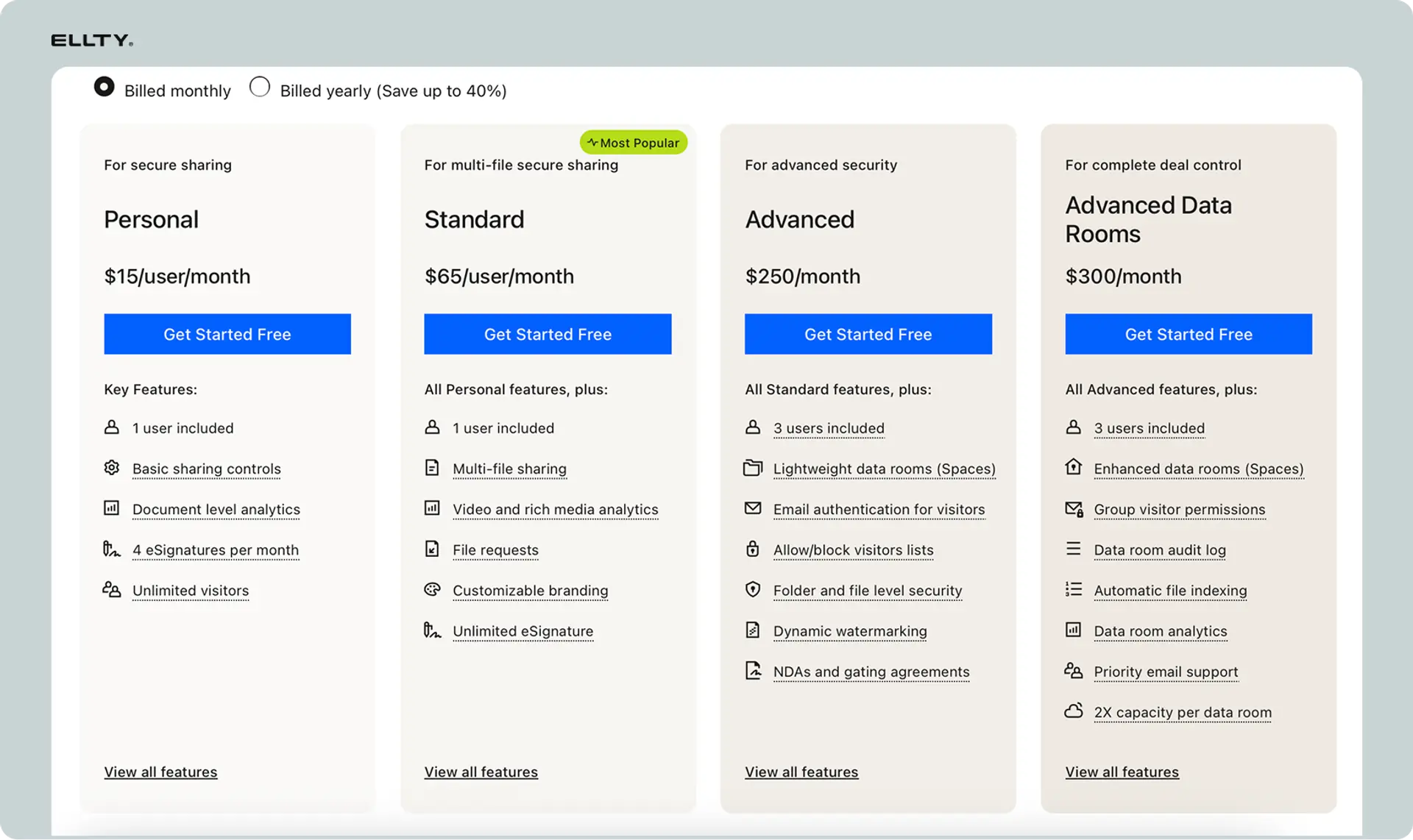
Understanding DocSend's data room pricing requires navigating a tiered structure where features and capabilities increase with price.
Personal Plan ($15/user/month)
Data room availability: None. Zero data room features included.
What you get: Individual document link sharing only. Basic analytics. Email verification. NDA screens. Download controls on individual links.
Suitable for: Solo entrepreneurs, freelancers, or anyone needing simple document tracking without folder organization.
Standard Plan ($65/user/month)
Data room availability: Basic data room functionality included.
Features included:
- Folder organization and structure creation
- Basic permission controls at folder level
- Multi-document upload capabilities
- Standard activity tracking across documents
- User management for room access
- Email verification for viewers
- 100MB maximum file size per document
What's missing:
- Document watermarking (Advanced plan feature)
- Detailed audit logs (Advanced plan feature)
- Advanced permission granularity
- Custom branding options
- Priority support
Annual pricing: $45/user/month when billed annually (31% savings)
Best for: Small teams conducting simple due diligence, startups in early funding rounds, organizations needing basic document organization without advanced security features.
Advanced Plan ($250/user/month)
Data room availability: Full data room feature set.
Minimum commitment: 3 users required = $750/month minimum spend
Features included:
- Everything from Standard plan
- Document watermarking with user details
- Comprehensive audit logs for compliance
- 250MB maximum file size per document
- Advanced permission granularity
- Single sign-on (SSO) capability
- Custom branding options (limited)
- Priority email support
- API access for integrations
Annual pricing: $150/user/month when billed annually (40% savings)
Best for: Mid-size companies managing M&A transactions, organizations with compliance requirements demanding audit trails, teams needing watermarking for leak prevention.
Enterprise Plan (Custom Pricing)
Data room availability: Fully customized to requirements.
Contact sales required: No published pricing. Quotes based on user count, feature requirements, and contract length.
Additional features:
- Unlimited user accounts
- Unlimited storage capacity
- Dedicated account manager
- Custom security requirements
- Advanced API capabilities
- Custom integrations
- Service level agreements (SLAs)
- White-label options (limited)
- Training and onboarding support
Best for: Large enterprises with complex requirements, organizations needing extensive customization, companies requiring formal SLAs.
The Real Cost Mathematics
Understanding total cost requires calculating based on actual user needs:
Five-person team scenario:
- Standard plan: 5 users × $65 = $325/month = $3,900/year
- Advanced plan: 5 users × $250 = $1,250/month = $15,000/year
- Annual commitment discount: $3,900 → $2,700 or $15,000 → $9,000
Ten-person company scenario:
- Standard plan: 10 users × $65 = $650/month = $7,800/year
- Advanced plan: 10 users × $250 = $2,500/month = $30,000/year
- Annual commitment discount: $7,800 → $5,400 or $30,000 → $18,000
What Kills Budgets: Hidden Cost Factors
Per-user pricing model: Every individual needing access requires a paid seat. No viewer-only pricing tier exists. An investor reviewing documents for 30 minutes? Still requires a paid user account or you're limited to restricted guest access with reduced tracking.
Storage limits not transparent: Official limits aren't clearly published. Teams hit storage caps mid-deal and face surprise upgrade requirements. No clear guidance on how close you are to limits until you exceed them.
No partial-month refunds: Paid annually but need to downgrade? No prorated refunds. You're locked into your commitment period.
Integration costs: API access limited to Advanced plan. Want to integrate with your CRM or custom tools? Minimum $750/month commitment required.
Comparing Alternative Pricing Models

Ellty: Flat $69/month for unlimited users accessing organized document spaces. All features included. No tiers, no per-user scaling.
Dedicated virtual data room providers: Typically charge $300-$500/month flat rate for unlimited users during active deals. Project-based pricing rather than per-user.
Box/SharePoint: Enterprise pricing based on storage and features, not individual user counts. Viewer access typically included in base pricing.
DocSend's per-user model becomes exponentially more expensive as stakeholder count increases, particularly problematic for fundraising scenarios involving multiple investors or M&A transactions with several potential buyers.
DocSend Data Room Security: Features, Compliance & Limitations
Security is paramount when sharing confidential documents, financial data, intellectual property, and sensitive business information.
Core Security Features
Encryption standards:
- Data encrypted in transit using TLS 1.2 or higher
- Data encrypted at rest using AES-256 encryption
- Encryption keys managed by DocSend/Dropbox infrastructure
- No option for customer-managed encryption keys
Access controls:
- Email verification required before viewing
- Password protection available for additional security layer
- IP address restrictions (Advanced plan)
- Device-specific access controls (Advanced plan)
- Automatic session timeouts after inactivity
Document protection:
- Screenshot prevention (limited effectiveness)
- Print blocking controls
- Download prevention options
- Copy/paste restrictions in browser view
- Watermarking with user details (Advanced plan only)
Access expiration:
- Time-based access revocation
- Automatic link expiration after set dates
- Manual revocation capabilities
- No access renewal required, completely disabled when expired
Compliance and Certifications
SOC 2 Type II compliance: DocSend maintains SOC 2 Type II certification, demonstrating security controls for handling sensitive data. Annual audits verify controls remain effective.
GDPR considerations: Privacy controls allow users to comply with GDPR requirements for data handling. However, data residency options are limited, all data stored on Dropbox's infrastructure, primarily US-based servers.
HIPAA compliance: Not HIPAA-compliant. Do not use for protected health information (PHI) or medical records requiring HIPAA safeguards.
Industry-specific compliance: No specific certifications for financial services, legal discovery, or other regulated industries with specialized requirements.
Audit Trail Capabilities
What's tracked (Advanced plan):
- Every document access with timestamp
- User identity for each action
- Duration of document viewing
- Download attempts (successful and blocked)
- Permission changes and who made them
- User additions and removals
- Failed access attempts
Audit log retention: Logs maintained for duration of account activity. Export capabilities limited. No long-term archival guarantees after account closure.
Compliance value: Audit trails satisfy basic compliance requirements for demonstrating proper access controls. Sufficient for most due diligence processes but may fall short of highly regulated industry requirements.
Security Limitations and Gaps
No advanced DRM: Digital rights management features are basic. Sophisticated users can bypass screenshot prevention and print blocking using various methods.
Limited control after download: Once a document is downloaded (if permitted), DocSend has no control over subsequent handling, sharing, or distribution.
No document redaction: Must manually redact sensitive information before uploading. No built-in tools for blacking out confidential sections.
Infrastructure dependency: Security posture depends entirely on Dropbox's infrastructure. Any Dropbox security incident potentially affects DocSend users.
No zero-knowledge architecture: DocSend/Dropbox can theoretically access your documents. Not suitable for scenarios requiring zero-knowledge encryption where even the service provider cannot access content.
Watermark limitations: Watermarks can be removed by sophisticated users using PDF editing tools. Provides deterrence but not ironclad protection.
Security Comparison: DocSend vs Dedicated VDRs
Dedicated virtual data room providers typically offer:
- Military-grade security with enhanced encryption options
- Customer-managed encryption keys
- Data residency selection (choose server locations)
- Advanced DRM with persistent protection
- View-only document rendering preventing extraction
- Detailed forensic watermarking harder to remove
- Specific compliance certifications (ISO 27001, FedRAMP)
DocSend offers:
- Standard enterprise security sufficient for most scenarios
- Simpler implementation without complex security configuration
- Lower price point than specialized VDR solutions
- Adequate protection for typical fundraising and M&A processes
- SOC 2 compliance meeting basic enterprise requirements
For most startup fundraising and standard M&A transactions, DocSend's security is adequate. For highly sensitive transactions, regulated industries, or scenarios with extreme confidentiality requirements, dedicated VDR solutions provide more robust protection.
DocSend Data Room Pros and Cons: Honest Assessment
Advantages of DocSend Data Room
1. Familiar interface for existing users If your team already uses DocSend for regular document sharing, adding data room capabilities requires zero learning curve. Same interface, same workflow, just expanded functionality.
2. Integrated analytics ecosystem Activity tracking across both regular links and data rooms provides comprehensive view of document engagement. See which investors reviewed your pitch deck (regular link) and which sections of your data room they explored most thoroughly.
3. Quick setup for basic needs Creating a simple data room takes 30-60 minutes. Upload documents, create basic folder structure, invite users. No complex configuration required for straightforward use cases.
4. Adequate for standard fundraising For typical seed through Series B fundraising rounds, DocSend data rooms provide sufficient functionality. Most investors are familiar with the platform, reducing friction.
5. Reasonable pricing for small teams Three-person startup using Standard plan pays $195/month, competitive with some alternatives. Cost efficiency works at small scale.
6. Single platform consolidation Manage both regular document sharing and organized data rooms in one platform. Single login, unified billing, consistent user management.
7. Mobile accessibility Recipients can access data rooms from mobile devices. Responsive design works reasonably well on tablets and phones.
Disadvantages of DocSend Data Room
1. Explosive per-user pricing scaling Every stakeholder requiring access costs full user price. Ten investors reviewing your fundraising data room? $650/month on Standard or $2,500/month on Advanced. Cost becomes prohibitive quickly.
2. Critical features locked behind expensive tiers Watermarking and detailed audit logs, features many consider essential for data rooms, require Advanced plan minimum $750/month. Basic plan data rooms lack these critical capabilities.
3. Missing core VDR functionality No Q&A module for managing investor questions centrally. No document redaction tools. No version control showing document history. No advanced permission rules at document (versus folder) level.
4. Limited white-label capabilities DocSend branding remains visible even on Enterprise plans. Organizations wanting fully branded experiences must look elsewhere.
5. File size limitations 100MB per file on Standard, 250MB on Advanced. Large financial models, detailed presentations, or video content may exceed limits.
6. No granular document-level permissions Permissions work at folder level only. Cannot give specific users access to individual documents within folders. Must create separate folders for each permission variation.
7. Unclear storage limits No transparent communication about storage capacity. Users report hitting unstated limits and requiring unexpected upgrades.
8. Support quality inconsistent Email support only (no phone). Response times vary significantly. Priority support on Advanced helps but doesn't guarantee rapid resolution.
9. Infrastructure dependency risks When Dropbox experiences outages, DocSend inherits those problems. Cannot diversify infrastructure risk away from Dropbox architecture.
10. Limited API capabilities API access restricted to Advanced plan. Custom integrations or automated workflows require expensive tier commitment.
The Verdict: Who Should and Shouldn't Use DocSend Data Rooms
DocSend data rooms work well for:
- Startups conducting Series A/B fundraising with 5-10 investors
- Teams already committed to DocSend ecosystem
- Straightforward due diligence without complex requirements
- Organizations prioritizing ease of use over advanced features
- Small teams (3-5 users) where per-user pricing remains reasonable
Look at alternatives if you:
- Need to provide access to 15+ external stakeholders
- Require Q&A functionality for managing investor questions
- Must have watermarking and audit logs but cannot afford Advanced plan
- Want white-label branding without visible provider identity
- Need document-level permission granularity
- Operate in highly regulated industries with specific compliance needs
- Require dedicated phone support for urgent issues
Setting Up a DocSend Data Room: Complete Implementation Guide
Creating an effective data room requires strategic planning beyond just uploading files.
Step 1: Create the Room
Navigate to your DocSend dashboard and click "Create Data Room." Name it descriptively, use the deal name, company name, or purpose (e.g., "Acme Corp Series B Data Room" or "Q1 2026 Board Materials").
Choose access type:
- Restricted: Invite-only access requiring explicit user addition
- Link-based: Anyone with link can request access (you approve)
- Open: Anyone with link enters automatically (rarely appropriate for confidential materials)
Step 2: Plan Your Folder Structure
Before uploading, design your organizational hierarchy. Common effective structures:
For fundraising data rooms:
01_Company Overview
- Pitch Deck
- Executive Summary
- Company Timeline
02_Financial Information
- Historical Financials (3 years)
- Financial Projections
- Cap Table
- Revenue Analysis
03_Legal and Corporate
- Certificate of Incorporation
- Shareholder Agreements
- Board Resolutions
- Contracts (subfolder by type)
04_Product and Technology
- Product Roadmap
- Technical Architecture
- IP Documentation
- Patents
05_Team and Organization
- Org Chart
- Key Employee Bios
- Stock Option Agreements
06_Market and Customers
- Market Analysis
- Customer References
- Case Studies
- Pipeline Data
For M&A data rooms:
01_Corporate Documents
02_Financial Statements
03_Tax Returns
04_Contracts and Agreements
05_Intellectual Property
06_Litigation and Compliance
07_Human Resources
08_Real Estate and Assets
09_Insurance
10_Environmental
Number folders to maintain consistent ordering. Use descriptive names that are immediately understandable.
Step 3: Upload Documents Strategically
Bulk upload method: Drag complete folder structures from your computer. DocSend preserves the hierarchy. This saves hours compared to individual uploads and manual folder recreation.
File preparation:
- Convert to PDF when possible for consistent rendering
- Name files descriptively: "2024_Audited_Financials.pdf" not "Financials_FINAL_v3.pdf"
- Check file sizes against plan limits (100MB Standard, 250MB Advanced)
- Remove any unnecessary large embedded images to reduce file sizes
Upload in phases: Start with critical documents investors or stakeholders request first. Add comprehensive materials later. This allows sharing the room sooner while continuing to populate it.
Step 4: Configure Permissions Thoughtfully
Room-level permissions determine who can enter the data room at all.
Folder-level permissions control what specific users can see once inside.
Permission options available:
- View only (no download)
- View and download
- View with watermark
- Time-limited access (expires on specific date)
- Email verification required
Strategic permission design:
- Most investors: View-only access to all folders
- Lead investor: Download rights to financial folders
- Legal advisors: Download rights to legal folders only
- Board members: Full download access to relevant folders
Permission mistakes to avoid:
- Giving everyone full download access "to be helpful"
- Creating too many permission variations that become impossible to manage
- Forgetting to set expiration dates for time-sensitive materials
- Not testing permissions before sharing widely
Step 5: Invite Users with Proper Onboarding
Individual invitations: Add users one by one with specific email addresses. Each receives unique login credentials. You can track exactly who accessed what.
Access link method: Generate a single access link that multiple users can use. Less tracking granularity but simpler distribution for large groups.
Invitation best practices:
- Include context explaining what the data room contains
- Provide guidance on folder structure and where to find specific information
- Set expectations about access duration (particularly if time-limited)
- Include contact information for questions
- Request confirmation that they received access successfully
Step 6: Create an Index Document
Create a simple PDF or Word document listing what's located in each folder. Include:
- Folder names and what they contain
- Any missing documents and when they'll be added
- Important notes about specific files
- Contact information for questions
Upload this as the first document in the root folder. Users open it first and immediately understand the room's organization.
Step 7: Test Everything Before Launch
Create a test user account (use a personal email address). Verify:
- Access link works correctly
- Permissions are properly configured
- All folders display as intended
- Documents open and render properly
- Mobile access functions adequately
- Download controls work as expected
Testing prevents embarrassing discoveries when stakeholders are already accessing the room.
DocSend Data Room Best Practices for Startup Fundraising
Fundraising data rooms require specific strategies to facilitate efficient investor due diligence while maintaining proper security.
Pre-Launch Preparation
1. Anticipate investor information requests
Prepare documents investors typically request before they ask:
- Three years of financial statements
- Detailed financial projections (3-5 years)
- Current cap table with complete option pool detail
- All material contracts (customer, supplier, partnership)
- Intellectual property documentation
- Key employee agreements and compensation details
- All legal entity documents
Having these ready demonstrates preparedness and accelerates the process.
2. Organize for investor workflow
Structure folders matching how investors conduct due diligence. They typically review:
- First: Pitch deck and executive summary
- Second: Financial information and projections
- Third: Legal/corporate documentation
- Fourth: Product, technology, market data
- Last: Supporting materials and details
Mirror this sequence in your folder numbering and organization.
3. Prepare your cap table for scrutiny
Investors examine cap tables intensely. Ensure yours shows:
- All stockholders with share counts and percentages
- Complete option pool with grants, exercises, expirations
- All convertible notes and SAFEs with conversion terms
- Anti-dilution provisions and liquidation preferences
- Clear post-financing ownership calculations
Use proper cap table software (Carta, Pulley) and export clean PDFs.
During Active Fundraising
1. Monitor analytics strategically
Track which investors spend significant time in financial folders, indicates serious evaluation rather than casual browsing. Heavy engagement with projections and cap table suggests they're modeling investment scenarios.
2. Respond quickly to access requests
Approve access within hours, not days. Fundraising momentum matters. Delays signal disorganization or lack of seriousness.
3. Update documents promptly
When investors request additional documents, add them within 24 hours. Create a "Recently Added" folder so returning investors immediately see new materials.
4. Manage Q&A efficiently
Since DocSend lacks built-in Q&A functionality, create a separate document: "Investor Q&A Log" - List questions received with answers. Update regularly. Investors can review before asking duplicate questions.
5. Provide breadcrumb access strategically
Don't give full access immediately. Provide pitch deck first. After initial meeting, offer financial folder access. After serious interest indication, open full data room. This staged approach shows professionalism and maintains appropriate boundaries.
Permission Management for Fundraising
Three-tier access model:
Tier 1 - Initial Meeting Investors:
- View-only access to Company Overview folder
- No financial information access yet
- No download permissions
- 30-day expiration
Tier 2 - Serious Interest Investors:
- View-only access to Company Overview and Financial folders
- No download permissions yet
- 60-day expiration
- Email verification required
Tier 3 - Term Sheet Stage Investors:
- View access to all folders
- Download permissions for financial and legal folders
- Watermarked documents
- 90-day expiration
- Requires signed NDA upload before access
Security and Confidentiality
1. Always require NDAs
Upload signed NDAs before granting data room access. Create an NDA folder in the data room where investors upload their signed documents. No signed NDA = no access to sensitive materials.
2. Use watermarking religiously
If on Advanced plan, enable watermarking for all financial and legal documents. Investor name and email appear on every page, discouraging unauthorized sharing.
3. Set appropriate expiration dates
Most fundraising processes shouldn't exceed 90-120 days. Set access expiration to match your anticipated timeline plus buffer. Revoke access manually for investors who drop out.
4. Redact sensitive information initially
In early stages, redact specific customer names, detailed pricing, individual salaries. Provide summary information. Share detailed specifics only after serious interest is established.
Communication Practices
1. Send periodic update emails
Every 1-2 weeks, email all active data room users about:
- New documents added
- Updates to existing documents
- Timeline reminders
- Next steps in the process
2. Maintain investor communication log
Track which investors accessed which materials and when. Use this to prioritize follow-ups. Investor who spent 45 minutes reviewing financials deserves immediate call.
3. Provide room navigation guidance
Not all investors are tech-savvy. Include a "READ ME FIRST" document with:
- How to navigate the data room
- Where to find specific information types
- Who to contact with questions
- Expected timeline and next steps
Common Fundraising Data Room Mistakes
Mistake 1: Information overload Uploading every document you have. Investors face analysis paralysis. Include only materials relevant to investment decision.
Mistake 2: Disorganized folder structure Random folder naming and illogical hierarchy. Investors waste time searching. Use numbered folders with clear descriptive names.
Mistake 3: Outdated financials Showing 18-month-old statements. Investors question your seriousness. Update to most recent quarter always.
Mistake 4: Missing critical documents Investors request cap table, you scramble to create it. Appears unprepared. Have all standard materials ready from day one.
Mistake 5: Too much access too soon Giving full data room access after first coffee meeting. Seems desperate. Stage access based on investor commitment level.
Mistake 6: No analytics review Never checking who accessed what. Miss signals about serious versus casual interest. Review analytics daily during active fundraising.
Mistake 7: Poor document naming "Budget_v7_FINAL_USE_THIS.xlsx" - Looks amateurish. Use clear, professional naming: "2026_Financial_Projections.xlsx"
Post-Fundraising Cleanup
1. Revoke all investor access
After round closes, revoke data room access for all investors except those who actually invested. No need for declined investors to maintain access.
2. Archive the data room
Don't delete, you may need to reference what was shared. Archive it but make inaccessible. Useful for future rounds or if questions arise.
3. Document lessons learned
Record which documents investors most frequently requested. Which folders got most attention. What questions arose repeatedly. Apply to your next fundraising round.
DocSend Data Room Support: What to Expect
Understanding support capabilities helps set realistic expectations when issues arise.
Available Support Channels
Email support (all plans):
- Submit tickets through help center
- Response time: 24-48 hours typical (not guaranteed)
- Support hours: Business hours PST (not 24/7)
- Language: English only
Priority email support (Advanced and Enterprise):
- Faster response times (4-8 hours typical)
- Access to more senior support staff
- Still email-only, no phone support
Dedicated account manager (Enterprise only):
- Assigned point of contact
- Proactive check-ins
- Assistance with setup and configuration
- Faster escalation paths
Common Support Issues and Resolution Times
Access problems:
- Users can't log in: Usually resolved within 24 hours
- Password reset issues: Typically same-day resolution
- Permission errors: May require 24-48 hours for investigation
Upload failures:
- File size too large: Immediate (upgrade required)
- Upload hangs or fails: 24-48 hour investigation
- Folder structure problems: Usually resolved within business day
Analytics discrepancies:
- Missing view data: May require several days for investigation
- Export problems: Typically resolved within 48 hours
- Tracking not working: Can take 3-5 business days
Billing issues:
- Charge disputes: Usually resolved within week
- Plan changes: Effective next billing cycle (not immediate)
- Refund requests: Can take 2-3 weeks
Support Limitations
No phone support: Even Enterprise customers get email-only support. No urgent hotline for critical issues during deals.
No 24/7 availability: Support operates during US business hours. International users or urgent evening/weekend issues wait until next business day.
Limited technical depth: Front-line support handles basic issues well. Complex technical problems or integration questions may require escalation with additional delays.
No dedicated onboarding: Unless on Enterprise plan, you're responsible for learning the platform independently. No hands-on training or guided setup.
Self-Service Resources
Help center articles:
- Searchable knowledge base covering common tasks
- Video tutorials for basic operations
- Written guides with screenshots
- Generally helpful for straightforward issues
Product documentation:
- API documentation (Advanced plan users)
- Integration guides
- Best practices articles
- Feature announcements
Community resources:
- No official user community or forum
- No peer-to-peer support channel
- Limited user-generated content available
Getting Better Support
1. Submit detailed tickets Include screenshots, error messages, specific steps to reproduce issues. Detailed information accelerates resolution.
2. Use clear subject lines "Data room permission error - user can't access folder" beats "Problem with data room help!"
3. Escalate when appropriate If initial response doesn't resolve your issue, ask to escalate to senior support or technical team.
4. Document ongoing issues If experiencing repeated problems, maintain your own log. Patterns help support identify root causes.
5. Leverage your account manager Enterprise customers should route issues through dedicated account managers for faster resolution.
When to Expect Support Won't Help
Platform limitations: Support can't add features that don't exist. Need Q&A functionality? Support can't build it for you.
Third-party integration issues: Problems with Salesforce sync or other integrations may require those vendors' support, not DocSend's.
User error in document preparation: Upload corrupted files? Need help redacting documents? That's outside support's scope.
Performance during outages: When platform-wide outages occur, support can confirm the issue but cannot accelerate resolution.
Complete Use Cases for DocSend Data Rooms
Understanding specific scenarios helps determine if DocSend fits your needs.
Startup Fundraising (Seed Through Series B)
Scenario: SaaS startup raising Series A round, needs to share documents with 8-12 potential investors.
Requirements:
- Organized financial documentation
- Cap table and legal documents
- Product and market information
- Ability to track investor engagement
- Professional presentation
DocSend fit: Excellent. Standard plan ($195-$390/month for 3-6 users) provides adequate functionality. Basic folder organization works well. Analytics reveal serious versus casual investors.
Implementation:
- Create fundraising data room with 6 main folders
- Stage access: pitch deck first, full room after interest confirmation
- Track which investors spend time reviewing financials
- Use analytics to prioritize follow-up calls
- Revoke access for investors who decline
Alternatives to consider: None necessary, DocSend handles this use case well at reasonable price point.
M&A Transaction (Buy-Side Due Diligence)
Scenario: Mid-size company acquiring competitor, needs to share confidential documents with buyer's due diligence team.
Requirements:
- Comprehensive document organization
- Detailed audit trails for compliance
- Watermarking to prevent leaks
- Multiple user access with different permissions
- Q&A functionality for buyer questions
DocSend fit: Partial. Advanced plan ($750-$2,500/month) provides watermarking and audit trails but lacks Q&A module. May be adequate for straightforward acquisitions but falls short for complex transactions.
Implementation:
- Create detailed folder structure mirroring due diligence checklist
- Enable watermarking for all financial and legal documents
- Set up separate folders for different buyer team members
- Manage Q&A through email (limitation)
- Export audit logs for compliance documentation
Alternatives to consider: Dedicated VDR (Datasite, Intralinks) for transactions over $10M or with complex requirements. They provide Q&A functionality and more robust features.
Board Document Management
Scenario: Private company board distributes quarterly materials to 7 board members and 3 observers.
Requirements:
- Regular document distribution
- Historical document access
- Different access levels for directors vs observers
- Audit trail for governance compliance
- Simple, familiar interface for non-technical directors
DocSend fit: Good. Standard plan ($650/month for 10 users) handles this well. Familiar interface minimizes training. Adequate security and tracking.
Implementation:
- Create quarterly data rooms (Q1 2026, Q2 2026, etc.)
- Standard folder structure: financials, strategy, HR, legal
- Directors get download access, observers view-only
- Send materials 48 hours before meetings
- Archive previous quarters for historical reference
Alternatives to consider: Board management software (Diligent, BoardEffect) offers specialized features like meeting scheduling, voting, and minute management. Worth considering if you need comprehensive board portal functionality.
Legal Case Management
Scenario: Law firm managing discovery documents for complex litigation involving multiple parties.
Requirements:
- Detailed permission controls
- Document-level access granularity
- Redaction capabilities
- Comprehensive audit trails
- Long-term document retention
DocSend fit: Poor. Lacks document-level permissions, built-in redaction, and specialized legal features. Advanced plan provides audit trails but missing critical legal-specific functionality.
Implementation challenges:
- Cannot set document-level permissions (folder-level only)
- Must redact documents manually before upload
- No Bates numbering or legal-specific features
- Uncertain long-term retention after account closure
Alternatives to consider: Legal-specific platforms (Everlaw, Relativity) built for discovery and case management. They provide features essential for legal document handling.
Private Equity Portfolio Management
Scenario: PE firm managing documents for 15 portfolio companies, needs organized repositories for each.
Requirements:
- Multiple separate data rooms (one per portfolio company)
- Different access levels for different stakeholders
- Consistent organizational structure across companies
- Ability to track portfolio company activity
- Integration with portfolio management tools
DocSend fit: Moderate. Can create multiple data rooms but becomes expensive with many users across portfolio. Limited integration capabilities.
Implementation:
- Create separate data room for each portfolio company
- Standard folder template applied to all rooms
- Partner access to all rooms, operators limited to their company
- Track which portfolio companies receive most review
- Manual export for integration with other tools
Alternatives to consider: Portfolio management platforms with built-in document capabilities. More expensive but provides integrated workflow.
DocSend Data Room Alternatives: Comprehensive Comparison
When DocSend doesn't fit your needs, numerous alternatives exist across different price points and feature sets.
Ellty - Modern Alternative for Growing Teams

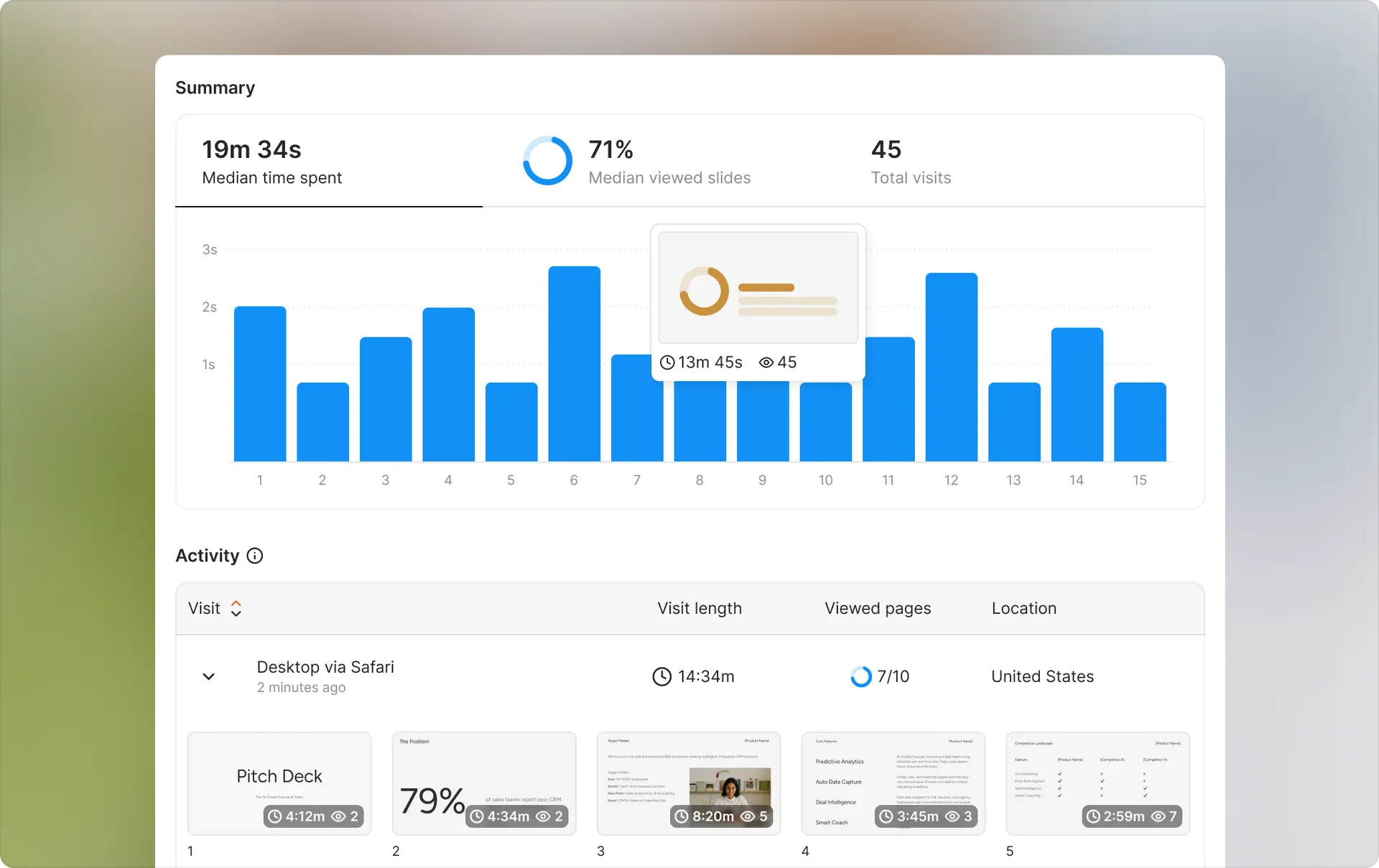
Overview: Document sharing platform with organized spaces, designed as modern alternative to DocSend without per-user pricing.
Pricing:
- Flat $79/month for unlimited users
- All features included
- No tiers or feature gates
Key features:
- Document collections with folder organization
- Granular permission controls
- Real-time analytics and tracking
- Email verification and password protection
- Download controls and expiration dates
- NDA acceptance screens
- Watermarking included (not extra tier)
Best for:
- Startups with limited budgets
- Teams needing access for many stakeholders
- Organizations wanting predictable costs
- Simple to moderate due diligence requirements
Limitations:
- Newer platform with smaller user base
- Fewer integrations than established competitors
- Limited API capabilities currently
When to choose: You need basic to moderate data room functionality but cannot justify DocSend's per-user pricing. Perfect for seed through Series B fundraising with investor counts making DocSend expensive.
Dedicated Virtual Data Room Providers
Datasite (formerly Merrill DataSite)
Overview: Industry-leading VDR for M&A and complex transactions.
Pricing:
- Project-based pricing: $1,000-$3,000/month typical
- Based on deal size, document volume, user count
- No per-user charges within project parameters
Key features:
- Comprehensive Q&A module with threading
- Advanced permission controls at document level
- Built-in redaction tools
- AI-powered document organization
- Analytics predicting deal success
- 24/7 phone support
Best for:
- M&A transactions over $10M
- Highly regulated industries
- Complex deals requiring robust functionality
- Enterprises with dedicated budgets
When to choose: You're managing significant M&A transactions where platform cost is negligible compared to deal value and sophisticated functionality justifies premium pricing.
Intralinks
Overview: Enterprise VDR with bank-grade security, focused on financial services and large transactions.
Pricing:
- Project-based: $2,000-$5,000/month typical
- Enterprise licenses available
- Custom pricing for large organizations
Key features:
- Military-grade security and encryption
- Advanced DRM with persistent protection
- Comprehensive compliance certifications
- Dedicated project management support
- Integration with financial services workflows
Best for:
- Investment banking transactions
- Private equity deals
- Large corporate M&A
- Highly sensitive transactions
When to choose: You need absolute top-tier security and compliance, and have budget for premium VDR capabilities. Typical for deals involving investment banks or public companies.
Ansarada
Overview: Mid-market VDR with AI capabilities and strong focus on deal insights.
Pricing:
- $500-$1,500/month per project
- Unlimited users within project
- Month-to-month or annual contracts
Key features:
- AI-powered due diligence assistance
- Automatic Q&A routing
- Deal prediction analytics
- Strong mobile experience
- Integration capabilities
- Dedicated support team
Best for:
- Mid-market M&A ($5M-$50M deals)
- Organizations wanting AI assistance
- Teams needing strong mobile access
- Companies doing frequent deals
When to choose: You want VDR functionality more robust than DocSend but cannot justify Datasite/Intralinks pricing. Sweet spot for mid-size transactions.
Document Platform Alternatives
Box
Overview: Enterprise content management platform with data room capabilities.
Pricing:
- Business: $20/user/month
- Business Plus: $33/user/month
- Enterprise: Custom pricing
- Unlimited storage on Enterprise
Key features:
- Sophisticated permission controls
- Extensive integration ecosystem
- Advanced security and compliance
- Collaboration capabilities
- Viewer access doesn't require licenses
- Strong governance features
Best for:
- Large enterprises with existing Box deployment
- Organizations needing comprehensive document management
- Teams requiring extensive integrations
- Companies with complex governance requirements
When to choose: You need data room capabilities as part of broader document management strategy, or already use Box organization-wide.
Microsoft SharePoint
Overview: Enterprise content platform within Microsoft 365 ecosystem.
Pricing:
- Included with Microsoft 365 (varies by plan)
- SharePoint Plan 1: $5/user/month
- SharePoint Plan 2: $10/user/month
- Often bundled with other Microsoft services
Key features:
- Deep Microsoft integration (Teams, Outlook, Office apps)
- Sophisticated permission controls
- Extensive customization capabilities
- Strong security and compliance
- External sharing capabilities
- Often already licensed by organizations
Best for:
- Organizations committed to Microsoft ecosystem
- Enterprises with IT resources for configuration
- Teams needing tight Office integration
- Companies with existing Microsoft 365 licenses
When to choose: You already have SharePoint licenses and IT resources to configure it properly. Incremental cost is minimal but requires technical implementation.
PandaDoc
Overview: Document workflow platform with proposal creation, e-signatures, and basic data room features.
Pricing:
- Essentials: $35/month per user
- Business: $65/month per user
- Enterprise: Custom pricing
Key features:
- Document creation with templates
- Built-in e-signature capabilities
- Payment collection
- CRM integrations
- Basic folder organization
- Approval workflows
Best for:
- Sales teams needing proposals and contracts
- Organizations requiring e-signature functionality
- Teams wanting all-in-one document workflow
- Companies prioritizing creation over pure sharing
When to choose: You need both document creation/signing and organized sharing. If data room is secondary to contract workflow, PandaDoc makes sense.
Self-Hosted Open Source Options
Papermark
Overview: Open-source document sharing platform you can self-host.
Pricing:
- Free (self-hosted)
- Cloud hosting available: $29-$99/month
Key features:
- Complete source code access
- Self-hosting provides full control
- Customizable to your needs
- Analytics and tracking included
- No vendor lock-in
- Data sovereignty
Best for:
- Organizations with technical resources
- Companies requiring data sovereignty
- Enterprises with strict compliance needs
- Teams wanting customization freedom
When to choose: You have technical staff to manage infrastructure and prioritize complete control over your document sharing platform.
Nextcloud
Overview: Self-hosted file sync and share platform with extensive capabilities.
Pricing:
- Free (self-hosted)
- Hosted plans available: Starting $5/user/month
Key features:
- Complete self-hosting control
- European data residency options
- Extensive plugin ecosystem
- Collaboration capabilities
- Mobile apps
- Privacy-focused
Best for:
- Privacy-conscious organizations
- European companies with GDPR requirements
- Organizations with technical infrastructure
- Teams needing customization
When to choose: You prioritize privacy and control, have technical resources, and prefer open-source solutions.
Quick Comparison Table


Decision Framework
Choose DocSend if:
- Small team (3-5 users) keeps costs reasonable
- Already using DocSend for regular sharing
- Need basic data room without complex requirements
- Familiar interface matters to stakeholders
Choose Ellty if:
- Budget-conscious startup or small business
- Need access for many external stakeholders
- Want predictable flat-rate pricing
- Require basic to moderate functionality
Choose dedicated VDR if:
- Managing M&A over $10M
- Need specialized features (Q&A, redaction)
- Highly regulated industry with strict requirements
- Platform cost negligible relative to deal value
Choose Box/SharePoint if:
- Need comprehensive document management
- Already have enterprise license
- Require extensive integrations
- IT resources available for configuration
Choose self-hosted if:
- Have technical infrastructure
- Prioritize data sovereignty
- Need complete customization
- Want no vendor dependency
Frequently Asked Questions About DocSend Data Rooms
What is DocSend data room?
DocSend data room is an organized virtual space for sharing multiple documents with controlled access. Unlike regular DocSend links (one document, one link), data rooms allow you to upload dozens or hundreds of documents, organize them in folder structures, set granular permissions for different users, and track detailed analytics showing who accessed which documents.
Think of it as a secure, trackable folder system specifically designed for due diligence, fundraising, M&A transactions, or any scenario where you need to share organized document collections with multiple stakeholders while maintaining control and visibility.
How much does DocSend data room cost?
DocSend data room starts at $65 per user per month on the Standard plan, which includes basic data room functionality with folder organization and simple permissions. Full features including watermarking and detailed audit logs require the Advanced plan at $250 per user per month with a 3-user minimum ($750/month).
Annual commitments reduce costs by 30-40%. Personal plan ($15/month) does not include any data room features. Enterprise plans with custom pricing are available for large organizations.
Can I create a data room on DocSend Personal plan?
No. Data room functionality is not available on the Personal plan ($15/user/month). You must upgrade to at least the Standard plan ($65/user/month) to access data room features. The Personal plan only supports individual document link sharing without folder organization or data room capabilities.
How many documents can I upload to DocSend data room?
DocSend doesn't publish a specific document count limit. However, file size limits apply: 100MB per file on Standard plan, 250MB per file on Advanced plan. Storage capacity limits exist but aren't transparently communicated. Users report hitting storage limits that require upgrades, though specific thresholds aren't publicly documented.
For most fundraising or due diligence scenarios, you can typically upload 100-500 documents without issues.
Can external users access DocSend data room without accounts?
Limited guest access is available, but full tracking and analytics require users to create accounts. For maximum security and detailed tracking, require email verification and account creation for all data room users.
Guest access with restricted functionality may work for casual viewing but isn't suitable for serious due diligence where you need comprehensive audit trails and user identification.
Is DocSend data room a real virtual data room?
DocSend data room provides basic virtual data room functionality suitable for simple due diligence and document sharing. However, it lacks features typically found in dedicated VDRs like Q&A modules, document redaction tools, document-level permissions (only folder-level), and advanced audit capabilities.
For straightforward startup fundraising or basic M&A, DocSend's data room features are adequate. For complex transactions, highly regulated industries, or scenarios requiring specialized VDR functionality, dedicated platforms like Datasite or Intralinks provide more robust capabilities.
What are the best alternatives to DocSend data room?
Best alternatives depend on your specific needs:
For budget-conscious startups: Ellty ($69/month flat rate) provides similar functionality without per-user pricing.
For complex M&A: Dedicated VDRs like Datasite ($1,500-$3,000/month) or Ansarada ($500-$1,500/month) offer comprehensive features.
For enterprises: Box ($20/user/month) or SharePoint ($5/user/month) provide broader document management.
For complete control: Self-hosted options like Papermark (free) or Nextcloud give full data sovereignty.
Can I white-label DocSend data room?
No. DocSend branding remains visible even on Enterprise plans. White-label capabilities are extremely limited. Organizations requiring fully branded data room experiences without provider branding visible to users need to look at alternative platforms offering white-label options.
Is there an API for DocSend data room?
API access is only available on the Advanced plan ($250/user/month minimum) and Enterprise plans. Standard plan users cannot access the API. This means custom integrations, automated workflows, or programmatic data room management require the expensive tier commitment.
API documentation is available to Advanced and Enterprise customers after purchasing.
How secure is DocSend data room?
DocSend provides enterprise-grade security including:
- TLS 1.2+ encryption in transit
- AES-256 encryption at rest
- SOC 2 Type II compliance
- Email verification requirements
- Password protection options
- Access expiration capabilities
- Watermarking (Advanced plan)
- Audit trails (Advanced plan)
However, it is NOT HIPAA compliant and lacks some advanced security features found in dedicated VDRs like customer-managed encryption keys, zero-knowledge architecture, or military-grade DRM. Security is adequate for most business use cases but may fall short of highly regulated industry requirements.
What happens to my data room when my subscription ends?
DocSend's terms don't guarantee long-term data retention after account closure. Best practice is to export all documents and audit logs before canceling your subscription. Once your account closes, you may lose access to data room contents and historical analytics data.
Always maintain backup copies of all documents uploaded to data rooms on your own infrastructure.
Can I track who downloaded documents?
Yes, if you enable download permissions. Analytics show successful downloads, failed download attempts (when permissions block them), and who attempted downloads. This tracking is available on all plans that include data room functionality.
However, once a document is successfully downloaded, DocSend has no control over what happens to it subsequently, users can share, copy, or distribute downloaded files without further tracking.
Does DocSend data room work on mobile devices?
Yes. Recipients can access data rooms from mobile browsers and the DocSend mobile app. The responsive design adapts to smaller screens, though the experience is more optimized for tablets and desktops. Complex folder navigation can be cumbersome on small smartphone screens.
Most users prefer reviewing substantial document collections on larger screens, but mobile access works for on-the-go review needs.
Can I integrate DocSend data room with my CRM?
API access (required for integrations) is only available on Advanced and Enterprise plans. Native integrations with Salesforce exist but require Advanced plan minimum. Custom integrations with other CRMs require API access and custom development work.
If CRM integration is critical, verify your plan tier includes API access before committing.
Conclusion: Is DocSend Data Room Right for Your Needs?
DocSend data room provides solid basic functionality for straightforward document sharing scenarios. Small teams conducting Series A/B fundraising, managing simple due diligence processes, or organizing board materials find it adequate and reasonably priced at small scale.
However, limitations become apparent quickly:
Pricing scales explosively with user count. What starts as $195/month for a three-person team becomes $2,500/month for ten users on Advanced plan, pricing that rapidly approaches or exceeds dedicated VDR solutions offering more features.
Critical features locked behind expensive tiers. Watermarking and detailed audit logs, arguably essential for any serious data room, require Advanced plan minimum commitment of $750/month.
Missing functionality compared to dedicated VDRs. No Q&A module for investor questions. No redaction tools. No document-level permissions. No version control. These gaps force workarounds that reduce efficiency.
Infrastructure dependency on Dropbox means inheriting any Dropbox reliability issues. No diversification possible.
Who Should Use DocSend Data Room
Ideal users:
- Startups raising seed through Series B with 5-10 investors
- Teams already committed to DocSend ecosystem wanting to add data room capabilities
- Organizations with simple due diligence requirements and small user counts
- Companies prioritizing familiar interfaces over advanced features
- Scenarios where the 3-5 user sweet spot keeps costs reasonable
Who Should Look at Alternatives
Better served by alternatives:
- Organizations needing 15+ external user access (per-user costs explode)
- M&A transactions requiring Q&A, redaction, and advanced VDR features
- Budget-conscious startups wanting predictable flat-rate pricing
- Highly regulated industries with specialized compliance requirements
- Teams requiring white-label branding
- Companies needing extensive API integration capabilities on reasonable budgets
Making Your Decision
Evaluate based on your specific context:
- Count your users. Calculate total monthly cost including all stakeholders needing access. Compare against flat-rate alternatives.
- List required features. Do you need watermarking? Audit logs? Q&A functionality? Redaction tools? Determine which tier you actually need.
- Consider your use case. Simple fundraising? DocSend probably works. Complex M&A? Dedicated VDR likely worth the investment.
- Calculate total cost of ownership. Include setup time, training, and potential costs of limitations or missing features.
- Test before committing. Most alternatives offer trials. Upload actual documents, run through real workflows, get stakeholder feedback.
The right platform provides the functionality you need at a cost your budget tolerates without forcing workarounds or feature compromises. For many organizations, that's not DocSend, but for some specific scenarios, it fits perfectly.
Choose based on your reality, not marketing promises.
Author

Anika Tabassum Nionta is a Content Manager at Ellty, where she writes about secure document sharing, virtual data rooms, M&A, due diligence, fundraising, and sales enablement. With over 6 years of writing experience, she helps professionals understand how to share confidential documents securely, track engagement, and manage deals more effectively. Anika holds both a BA and MA in English from Dhaka University. Outside of work, she enjoys reading, exploring new cafes in Dhaka, and connecting with entrepreneurs and dealmakers in her community.

