
If you've ever been involved in a deal, whether it's a business acquisition, a legal case, a real estate transaction, or a regulatory review, you've probably heard the term "data room." But what exactly is it?
A data room is a secure space where sensitive documents are stored and shared with a specific group of people. It's used when one party needs to give another party access to important information, but in a controlled, structured, and trackable way.
The whole point of a data room is to make sure that only the right people see the right documents, and that there's a clear record of who accessed what. This is especially important when there's a lot at stake - financially, legally, or operationally.
Historically, data rooms were physical rooms. Today, most of them exist online. Both serve the same core purpose, but the experience of using them is very different.

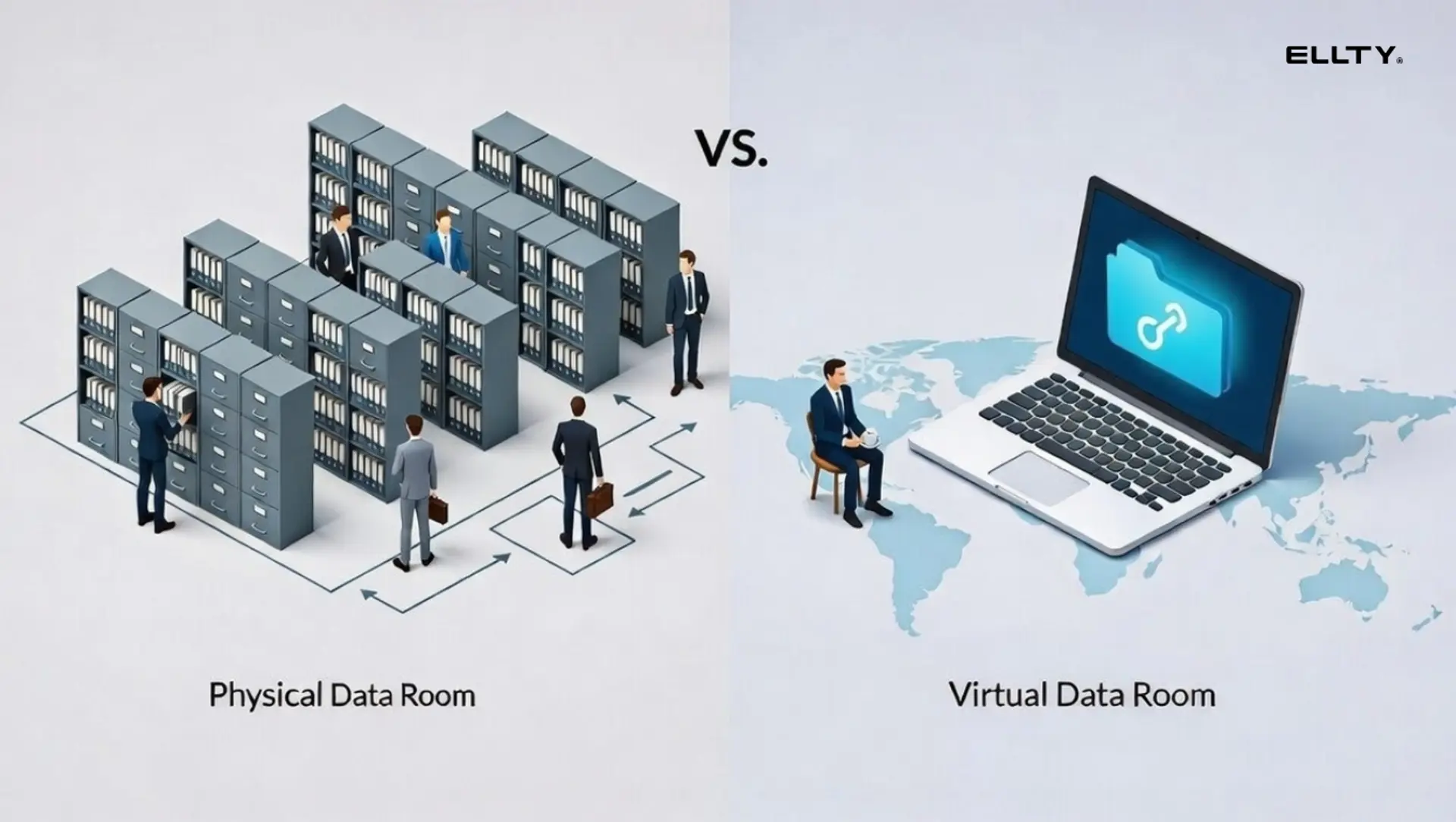
Physical Data Room
A physical data room is exactly what it sounds like - a real room, usually inside a law firm, a bank, or a company's office, filled with printed documents, binders, and filing cabinets.
If you needed to review the documents, you had to show up in person. You'd sign in, often sign an NDA on paper, and then sit in that room with the files. You couldn't take anything with you. Sometimes you couldn't even bring a phone in. And when your time was up, you left and so did your access.
This approach made sense for a long time. It gave the document owner full control over who saw what. There was no risk of someone emailing a file to the wrong person or downloading everything onto a USB drive.
But it came with serious limitations:
- Reviewers had to travel to a specific location, often across cities or countries
- Only a limited number of people could review documents at the same time
- Setting up the room was expensive: printing, organizing, staffing, and maintaining a secure location all cost money
- Any updates to documents meant reprinting and re-filing everything
- Coordinating schedules across multiple parties was slow and frustrating
For decades, this was the only option. But as business became faster and more global, the limitations of the physical model became harder to ignore.
Virtual Data Room
A virtual data room (VDR) does the same job as a physical one, it stores sensitive documents and controls who can access them, but it does it entirely online.
Instead of flying to a law office and sitting in a locked room, reviewers log in through a browser. The document owner controls exactly who can see what, whether they can download files, how long they have access, and whether they've agreed to an NDA before getting in. Every action is logged automatically.
The shift to virtual didn't just make things more convenient. It fundamentally changed what was possible. Multiple parties in different countries can review documents at the same time. You can update a file instantly without reprinting anything. You can see exactly which sections of a document someone spent time on. And you can revoke access with a single click if something changes.


One platform worth knowing here is Ellty. Ellty is a secure document sharing and analytics platform with full data room functionality, built for anyone who needs to share sensitive documents in a controlled, trackable way. It covers the features that matter most: granular access controls, real-time activity tracking, NDA gating before document access, dynamic watermarking, and a clean audit trail. And unlike many enterprise VDR platforms, it doesn't charge per user or per page. Pricing is flat, transparent, and built for teams that need professional tools without the enterprise contract.


How Virtual Data Rooms Are Used
Virtual data rooms aren't limited to one type of deal or industry. Anywhere that sensitive documents need to be shared with a controlled audience, a VDR fits. Here are some of the most common use cases:
Mergers and Acquisitions (M&A)
M&A is where VDRs are most commonly associated. When one company is acquiring another, the buyer needs to conduct due diligence: reviewing financials, contracts, employee records, IP, liabilities, and more. A VDR gives the seller a structured way to share this information while tracking exactly who reviewed what. Multiple bidders can be given separate access without knowing about each other.
Real Estate Transactions
Whether it's a commercial property sale, a portfolio acquisition, or a development deal, real estate involves a lot of documentation such as title deeds, surveys, lease agreements, inspection reports, and financial statements. A VDR keeps everything organized and accessible for buyers, lenders, solicitors, and agents - all in one place.
Legal Proceedings and Litigation
Law firms use VDRs to manage large volumes of documents during litigation, arbitration, or regulatory investigations. Secure access, a complete audit trail, and the ability to share documents with opposing counsel or regulators in a controlled way makes VDRs a natural fit.
Fundraising and Investment
Companies raising capital, whether through venture funding, private equity, or debt financing, use VDRs to share pitch decks, financial models, cap tables, and due diligence materials with potential investors. The ability to track investor engagement (who opened what, for how long) is particularly useful here.
Clinical Trials and Life Sciences
Pharmaceutical and biotech companies use VDRs to manage clinical trial data, regulatory submissions, and licensing agreements. Given the sensitivity of this data and the compliance requirements involved, a VDR's access controls and audit logs are essential.
Government and Public Sector
Government bodies use VDRs for procurement processes, infrastructure project documentation, policy reviews, and inter-agency information sharing. The audit trail and access control features help maintain compliance and accountability.
Consulting and Professional Services
Consultants, accountants, and advisors regularly deal with client documents that are sensitive and confidential. A VDR gives them a professional, secure environment to share deliverables, gather client input, and maintain a clean record of all document activity.
Board and Executive Communications
Many organizations use VDRs to manage board materials, shareholder reports, and executive briefings, ensuring that sensitive governance documents are only accessible to authorized individuals, with full logging of access.
Physical Data Rooms vs. Virtual Data Rooms
Here's a direct comparison of how the two approaches stack up across the things that matter most:

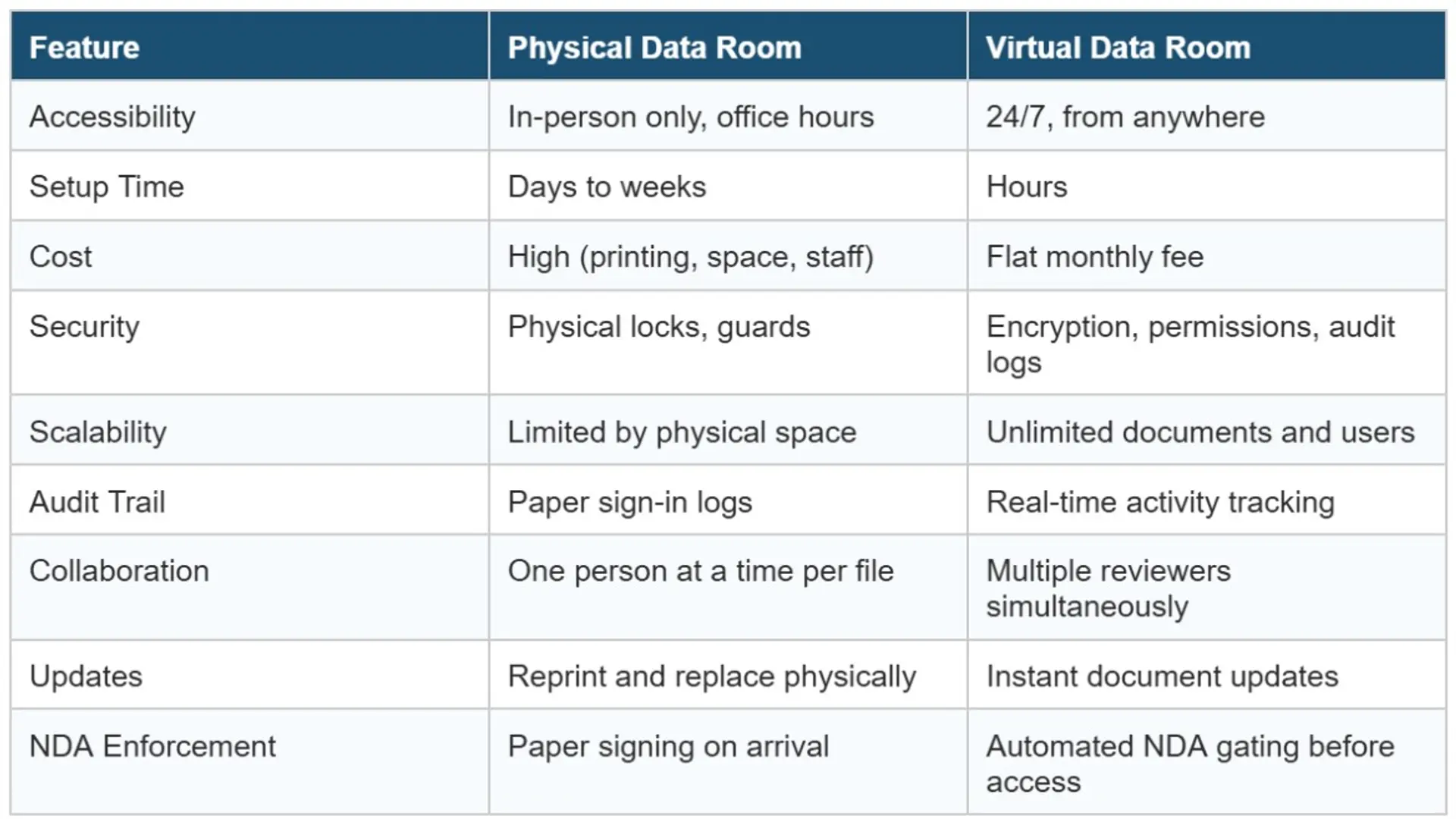
The trade-off used to be security for convenience. Physical data rooms were harder to breach because the documents literally weren't online. But modern VDRs have closed that gap considerably with end-to-end encryption, multi-factor authentication, granular permissions, and watermarking, they provide strong security alongside the operational benefits that physical rooms simply can't match.
For most situations today, a physical data room is slower, more expensive, and less useful than a well-configured virtual one.
Why Choose Virtual Data Rooms (VDRs)?
The short answer: because they save time, reduce cost, and give you better control without sacrificing security.
Here's what makes VDRs the right choice for most sensitive document sharing needs:
Access from anywhere
Reviewers don't need to travel. Whether you're managing a deal across five countries or sharing documents with a regulatory body in another city, everyone can access the data room from their own location. This speeds up timelines significantly.
Parallel review
In a physical data room, if two parties are reviewing the same binder, someone has to wait. In a VDR, multiple reviewers can access documents simultaneously, which compresses the review period and keeps deals moving.
Real-time visibility
You can see who opened which document, how long they spent on it, how many times they came back, and what they downloaded. This kind of activity intelligence helps you understand where a deal stands, anticipate questions before they're asked, and identify which parties are serious.
Instant updates
If you need to update a document: correct a figure, add a new exhibit, or replace an outdated contract. It's done instantly. The updated version is live immediately, and you can notify reviewers automatically. No reprinting, no re-filing.
Automated compliance and access control
NDAs can be enforced at the point of entry, nobody gets in without signing. Permissions can be set at the folder or document level. You can restrict downloading, printing, or copying. And you can set expiration dates on access so that a reviewer's window automatically closes when the review period ends.
Lower cost at scale
Physical data rooms involve printing costs, venue costs, and staffing costs. VDRs have a predictable subscription cost. As the number of reviewers or documents grows, the cost of a physical room scales; a good VDR doesn't.
Why Ellty stands out

Most enterprise VDR platforms are built for billion-dollar deals and priced accordingly. Ellty takes a different approach: full data room features at a flat, transparent price, with no per-user fees, no per-page charges, and no surprise overages as your team grows.

The Data Room plan at $149/month covers everything you need to run a proper controlled review - NDA gating, dynamic watermarking, granular permissions, and restricted visitor access. The Data Room Plus plan at $349/month handles heavier workloads with group-level permissions, full audit logs, and support for up to 4,000 assets per data room.
Whether you're running a single deal or managing ongoing client relationships, Ellty is designed to be usable immediately, no weeks-long onboarding, no custom contract negotiations. You pick a plan, get set up, and know exactly what you're paying.


How to Choose a Virtual Data Room
Not all VDRs are built the same. Here's what to look for when making your choice:
- Access controls and permissions: Can you set different access levels for different users or groups? Can you restrict downloading, printing, or forwarding?
- NDA gating: Can you require users to sign an NDA before they see any documents automatically, without a manual step?
- Audit trail: Is there a complete log of every action: who accessed what, when, for how long? Is this log tamper-proof?
- Watermarking: Does the platform support dynamic watermarking so that documents can be traced back to the person who downloaded them?
- Ease of use: Can you and your reviewers get started quickly without a long onboarding process? A complicated VDR slows deals down.
- Pricing model: Are you paying per user? Per page? Per GB? Or a flat fee? Make sure the pricing is predictable and doesn't punish you for growing your deal team.
- Support: If something goes wrong during a live deal, how quickly can you get help?
- Integrations: Does it connect with tools you already use like e-signature platforms, cloud storage, or workflow tools?
For most teams, the right balance is a platform that has strong security fundamentals, is easy to get up and running, and doesn't become unexpectedly expensive as the deal scales.
Best Practices for Transitioning from Physical to Virtual Data Rooms
If your organization has been relying on physical data rooms and is making the switch to virtual, here are some practical things to keep in mind:
Audit your documents before you upload
Don't just scan everything and dump it into the VDR. Take the opportunity to review what you have, remove outdated or duplicate files, and organize documents into a logical folder structure. A well-organized VDR is much easier to navigate for reviewers.
Define your access structure upfront
Decide in advance which user groups should see which documents. In a physical room, you'd physically hand people the files they needed. In a VDR, you set permissions once and the system enforces them automatically. Getting this right at the start saves a lot of back-and-forth later.
Set up NDA gating before you invite anyone
Don't send access invitations before your NDA workflow is configured. In a VDR, you can require every reviewer to sign an NDA before they can see a single document. Make sure this is in place before the first person logs in.
Train your team, not just your reviewers
The people managing the data room need to know the platform as well as the people reviewing it. Make sure whoever is handling document uploads, user management, and permissions understands the tools they're working with.
Use activity data to stay on top of the process
One of the biggest advantages of a VDR is visibility. Check in on activity logs regularly. See who's been in the room, which documents are getting attention, and whether there are any unusual access patterns. This data helps you manage the process proactively.
Plan for access expiry
Unlike a physical room where you just stop letting people in, a VDR requires you to actively manage when access ends. Set expiration dates on access at the start, and confirm all access is properly closed when a deal concludes or a review period ends.
FAQs
What is the main difference between a physical and a virtual data room?
A physical data room is a real, secure location where printed documents are stored and reviewed in person. A virtual data room provides the same secure access to documents, but entirely online with better tracking, lower cost, and access from anywhere.
Who uses virtual data rooms?
VDRs are used across industries including M&A advisors, real estate professionals, law firms, investment teams, government agencies, life sciences companies, and consulting firms. Essentially anyone who needs to share sensitive documents with a defined group of people in a controlled, auditable way.
Are virtual data rooms secure?
Yes. Reputable VDRs use end-to-end encryption, multi-factor authentication, granular permissions, NDA enforcement, and dynamic watermarking. For most use cases, they are at least as secure as physical data rooms and significantly more practical.
How is a VDR different from a regular cloud storage tool like Google Drive or Dropbox?
Regular cloud storage tools are designed for convenience and collaboration. VDRs are designed for security, control, and auditability. A VDR gives you NDA gating, activity tracking, restricted permissions, watermarking, and tamper-proof audit logs, things that general file sharing tools simply don't offer.
How long does it take to set up a virtual data room?
With a modern VDR platform, setup can be done in a matter of hours. You upload your documents, configure your folder structure and permissions, set up NDA requirements, and invite reviewers. There's no lengthy installation or onboarding process required.
Can multiple people access a virtual data room at the same time?
Yes, this is one of the key advantages over a physical data room. Multiple reviewers across different locations can access a VDR simultaneously, without any conflict or need to coordinate scheduling.
What should I look for in a VDR if I want to avoid unexpected costs?
Look for a platform with flat, transparent pricing that doesn't charge per user, per page, or per GB. Some legacy VDR platforms can become very expensive as the number of reviewers or documents grows. A flat-fee model, like what Ellty offers, ensures your costs stay predictable regardless of deal size.
Final Thoughts
The physical data room had its moment. It was the best available tool for decades, and for certain very specific situations, where the physical proximity of a reviewer to documents is legally required.
But for most organizations, in most situations, a virtual data room is simply better. It's faster to set up, easier to manage, accessible from anywhere, and gives you a level of visibility and control that no physical room can match.
The key is choosing a VDR that's built for real use, one that has the security features you need, is easy for both you and your reviewers to use, and doesn't surprise you with a complicated pricing structure.
Ellty was built with exactly that in mind. Flat pricing, no per-user fees, and the core data room features that matter such as access controls, NDA gating, activity tracking, watermarking, and audit logs - all in one place. If you're looking for a professional, trackable, and cost-predictable way to share sensitive documents, it's a strong place to start.


Author

Anika Tabassum Nionta is a Content Manager at Ellty, where she writes about secure document sharing, virtual data rooms, M&A, due diligence, fundraising, and sales enablement. With over 6 years of writing experience, she helps professionals understand how to share confidential documents securely, track engagement, and manage deals more effectively. Anika holds both a BA and MA in English from Dhaka University. Outside of work, she enjoys reading, exploring new cafes in Dhaka, and connecting with entrepreneurs and dealmakers in her community.

