
If your work involves sharing sensitive documents with outside parties, whether that's a merger, a litigation matter, a regulatory filing, or a client transaction, you've probably run into the term "virtual data room."
Most guides on this topic are written by enterprise software vendors pushing platforms that cost more than most legal teams need to spend.
This one is different.
Here's what we'll cover: what a VDR actually is, why legal teams use them, how to set one up, what it costs, and which tools are worth your time in 2026.
What is a virtual data room?
A virtual data room (VDR) is a secure online space where you store and share confidential documents with specific people - lawyers, investors, auditors, or buyers - during a deal or legal process.
Think of it like a shared Google Drive, but with serious security controls. You can see who opened what, set permissions per person, add watermarks, require NDAs before access, and pull access instantly if the deal falls through.
Before VDRs existed, companies would rent physical rooms full of documents and let lawyers come in to review them. That's where the name comes from. Now it's all online.
A good VDR gives you:
- Controlled access (not everyone sees everything)
- A full audit log (who viewed what and when)
- Document security (watermarks, download restrictions)
- Easy sharing without email attachments
- Analytics on engagement
For legal work specifically, these features aren't just nice to have. They're necessary. You can also revoke access instantly. If a deal falls through, a party exits negotiations, or a matter closes, you remove their access and the documents are gone, regardless of what they downloaded or saved. This is something email can never give you.
Virtual data room for legal M&A
Legal work almost always involves sharing documents you can't afford to lose control of. A virtual data room gives you that control, no matter what kind of legal matter you're handling.
Here are the most common use cases:
M&A due diligence
When a buyer wants to acquire a company, their legal and financial teams will request a large set of documents before signing anything. Corporate records, financials, contracts, IP filings, litigation history, tax records - all of it. A VDR lets you share this in a structured, trackable way instead of sending files back and forth over email.
Litigation and dispute resolution
Law firms use VDRs to share discovery materials, case documents, and evidence with co-counsel, opposing parties, or expert witnesses. Audit logs are especially useful here, you have a record of exactly who accessed what and when.
Regulatory and compliance reviews
When regulators, auditors, or compliance teams request documentation, a VDR gives you a controlled environment to share only what's requested, with a clear trail of activity.
Contract negotiations
During complex transactions, multiple parties need to review and comment on drafts. A VDR keeps everything in one place, with version control and access permissions so the right people see the right documents at the right time.
Real estate transactions
Property deals involve a significant volume of documents such as title records, surveys, environmental reports, lease agreements. A VDR organizes all of this for buyers, sellers, and their legal teams.
Corporate restructuring and insolvency
Restructuring processes involve sensitive financial and legal documents that need to be shared with creditors, advisors, and courts in a controlled way.
Across all of these, the core value is the same: you know who has access, what they've seen, and you can revoke that access at any time.
One thing legal teams often overlook: how you present your data room reflects on the matter. A well-organized, clearly structured room signals that your team is prepared. A disorganized one raises questions.
How to set up a VDR for legal use
Setting up a VDR doesn't have to take days. Here's a straightforward process you can follow.
Step 1 - Choose your VDR platform
Pick a tool based on your use case. A litigation matter has different requirements than a real estate closing or a regulatory review. We'll cover the top tools below.
Step 2 - Define your document structure
Before uploading anything, map out your folder structure. For legal M&A, a standard index looks like this:


Step 3 - Upload and organize your documents
Upload files in the correct folders. Use consistent naming conventions - dates in filenames help (e.g., "2024-03-financial-statements.pdf").
Step 4 - Set permissions
Decide who sees what. Not everyone needs access to everything. A financial advisor might only need the financials section. A technical reviewer might only need the product section.
Step 5 - Set up security features
Enable NDA gating if needed (visitors must agree to an NDA before they view anything). Add watermarks to sensitive documents. Turn off download permissions for documents you don't want leaving the room.
Step 6 - Invite your team and guests
Send invitations to the people who need access. Most VDRs let you track when they accept and when they first log in.
Step 7 - Monitor activity
Check your analytics regularly. Who's viewed what? Which sections have been ignored? This tells you a lot about where the process stands.
If you're using Ellty, the setup is fast. You can have a data room live in under an hour - upload your documents, configure access controls, enable NDA gating, and share a link. The platform shows you real-time notifications when someone views a document and tracks time spent per page.


How much does a VDR cost?
VDR pricing varies a lot. Here's a realistic breakdown:

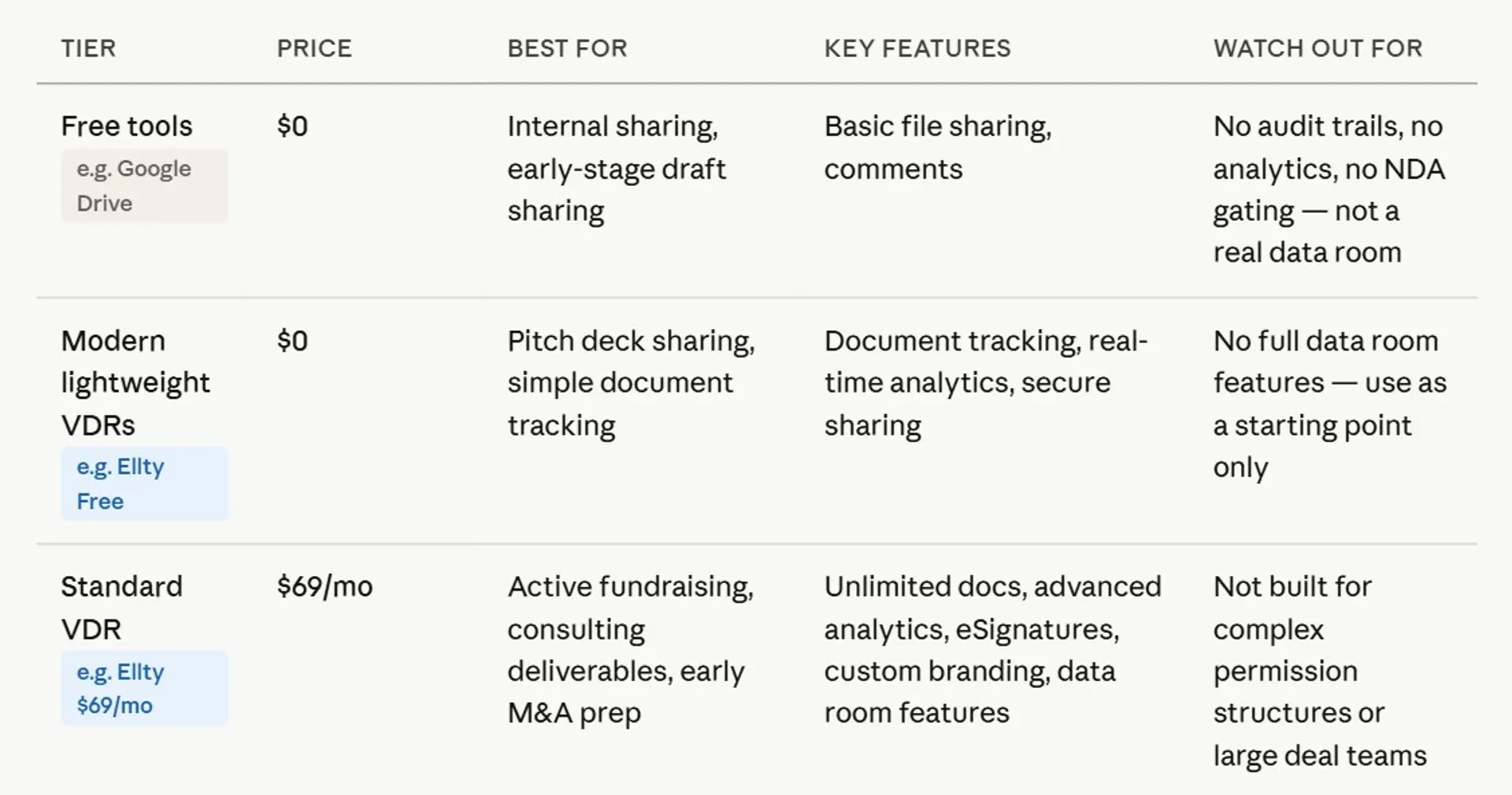

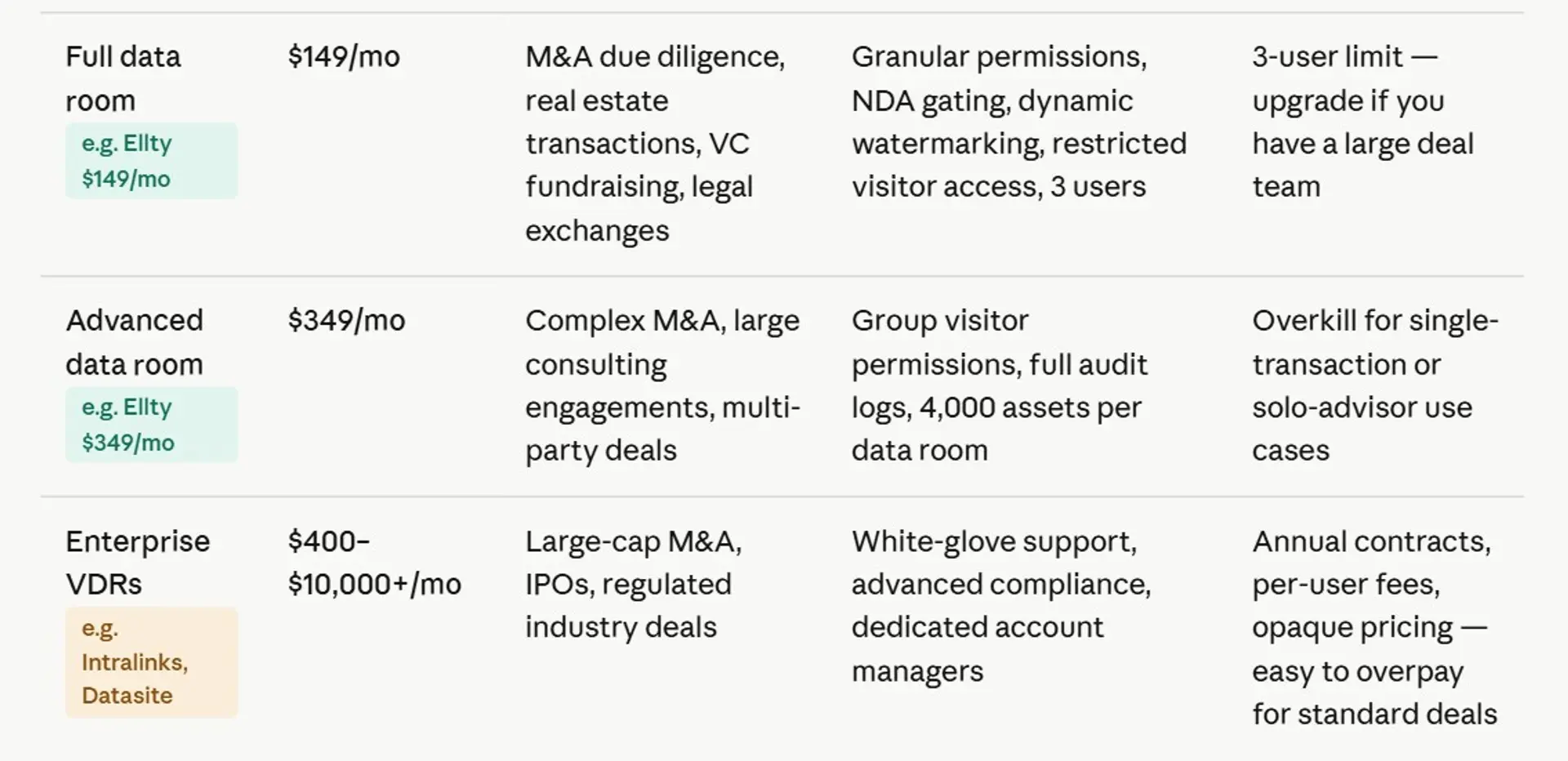
The enterprise tools (iDeals, Intralinks, Datasite) are built for complex transactions with hundreds of users and billions of dollars on the line. You probably don't need those.
For startups and small legal teams, there are solid options in the $50-$300/month range that cover 90% of use cases.
Ellty pricing breaks down like this:
- Free plan: Document tracking, real-time analytics, secure sharing - free forever
- Standard ($69/month): Unlimited documents, advanced analytics, eSignatures, data room features, custom branding
- Data Room ($149/month): Granular permissions, NDA gating, dynamic watermarking, restricted visitor access, 3 users included
- Data Room Plus ($349/month): Group visitor permissions, audit logs, 4,000 assets per data room
No per-user fees on any plan. That matters a lot when you're inviting a large legal team or multiple investors to review your room.
7 top-rated virtual data rooms for legal teams
Here's an honest breakdown of the top tools. Each one has different strengths depending on what kind of legal work you're doing.
1. Ellty


Ellty is built for growing teams who need a clean, functional data room without paying enterprise prices. You can set up data room in under an hour, upload your pitch decks or legal documents, and share them via trackable links. The analytics are genuinely useful - you see who viewed which pages, how long they spent, and get real-time notifications when someone opens a document.
For legal use, Ellty Data Room plan ($149/month) covers the essentials: NDA gating before access, dynamic watermarking on sensitive documents, granular permission controls, and restricted visitor access. The Data Room Plus plan ($349/month) adds group permissions and full audit logs.
It works well for fundraising due diligence, investor document sharing, and smaller M&A transactions. It's not designed for massive enterprise deals with hundreds of users and complex compliance requirements. But if you're a startup founder preparing for a Series B or running a straightforward acquisition process, Ellty gives you everything you need without the bloat.


2. Ideals VDR


iDeals is one of the most well-regarded mid-market VDRs on the market. It's used heavily in M&A, real estate, and legal due diligence. The platform offers a clean interface, strong security features (ISO 27001 certified), and solid support.
Features include bulk upload, fence view (blurring documents), detailed audit trails, and AI-assisted document organization. It supports multiple languages, which matters for cross-border transactions. iDeals offers per-page and per-user pricing models - you'll need to request a quote, but expect to pay in the range of $500-$1,500/month depending on deal size. It's a good fit for legal professionals handling mid-to-large deals who need a reliable, proven platform. The onboarding is smooth and customer support is responsive.
3. Firmex


Firmex is built specifically for legal and financial professionals. It's been around since 2000 and is used by law firms, investment banks, and corporate development teams. The platform is straightforward - no frills, just solid document management and security.
Key features include granular user permissions, print and download controls, redaction tools, and SOC 2 Type II compliance. Firmex doesn't publish pricing publicly - you request a quote based on your transaction size and duration. It's known for good customer support and a simple interface that doesn't require training. A good choice if you're a legal professional who needs something dependable without a steep learning curve.
4. Intralinks

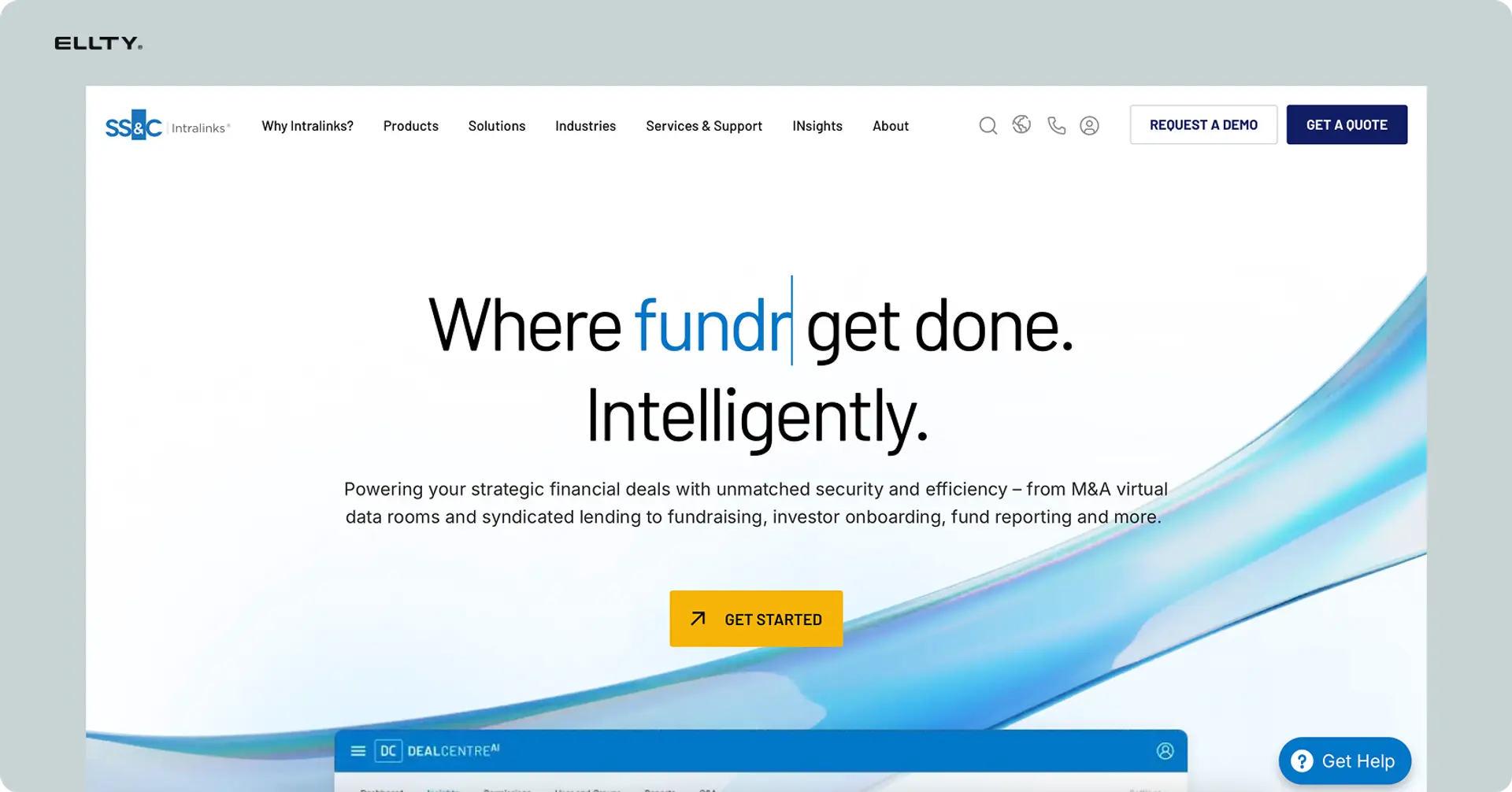
Intralinks is an enterprise-grade VDR used by major investment banks and law firms for large-scale M&A transactions. It's one of the original VDR platforms and has been through thousands of deals.
It offers AI-powered document intelligence, automated redaction, advanced Q&A workflows, and deep compliance features. If you're running a billion-dollar acquisition or working at a large law firm on complex cross-border deals, Intralinks is designed for that. Pricing is enterprise - expect significant costs, typically negotiated per deal. It's overkill for startups but a legitimate choice for large legal teams managing high-stakes transactions.
5. Ansarada


Ansarada (now part of Datasite) takes an interesting approach - it uses AI to score deal readiness and guide you through the due diligence process. It's not just a document repository; it actively helps you prepare.
Features include AI-powered materiality scoring, deal workflows, automated Q&A management, and strong security controls. It's particularly strong for M&A buy-side and sell-side processes. Pricing starts around $399/month and goes up based on deal complexity. If you want a VDR that also acts as a deal management tool, Ansarada is worth considering.
6. Digify


Digify is a simpler, more accessible VDR that works well for startups and small legal teams. It focuses on document security - you can set expiry dates on files, restrict screenshots, add watermarks, and track views.
It's priced more accessibly than enterprise tools - plans start around $149/month. Digify is a reasonable choice if your main need is secure document sharing with tracking, rather than a full-blown due diligence platform. It lacks some of the advanced features of the bigger players but gets the basics right.
7. SecureDocs

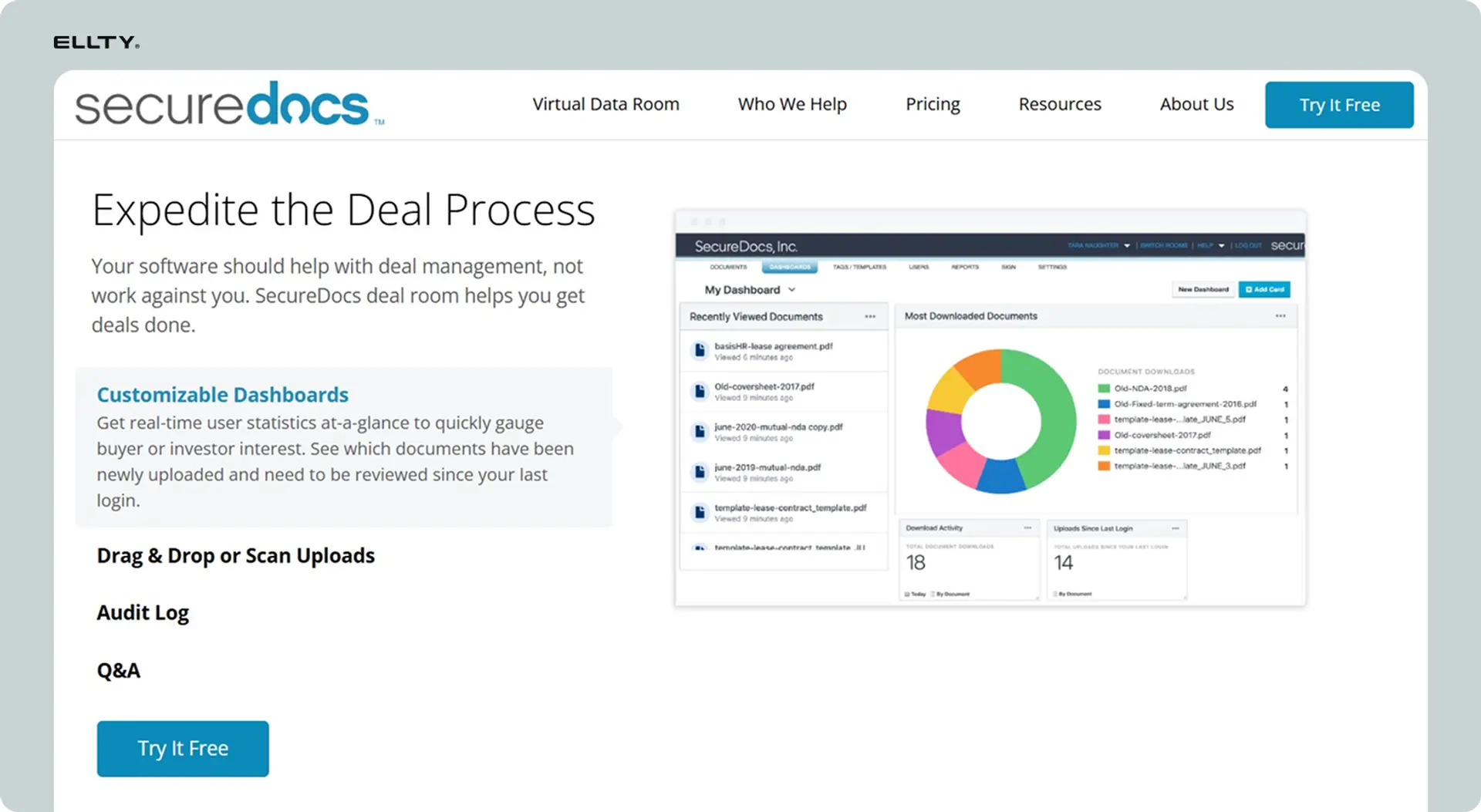
SecureDocs is a no-frills, flat-rate VDR. One of its main selling points is simple pricing - a flat monthly fee regardless of the number of users or documents. This makes it predictable for legal teams that want to avoid per-user surprises.
It includes the core features: user permissions, audit trails, watermarking, and two-factor authentication. The interface is basic but functional. It's a good option for legal teams that prioritize cost predictability and don't need advanced analytics or AI features. Pricing starts around $250/month.
Security features you actually need in a legal VDR
Not all security is equal. Here's what to look for:


For legal use, audit logs and NDA gating are non-negotiable. You need to be able to prove who accessed what and when - especially if a dispute arises later.
Common mistakes people make with legal VDRs
You can have the best platform in the world and still make a mess of your data room. Here are the mistakes that happen most often:
No clear folder structure - Dumping 200 files into one folder isn't a data room. Take 30 minutes to set up a logical index before uploading anything.
Giving everyone full access - Not everyone needs to see everything. Set permissions by role and restrict sections that aren't relevant to each reviewer.
Forgetting to update documents - If your financials are from 18 months ago, that's a problem. Keep your data room current, especially during active deals.
No NDA in place - Sharing sensitive documents without any NDA or access agreement is a legal risk. Most VDRs let you gate access behind an NDA acceptance.
Not checking analytics - The whole point of a VDR is that you can see engagement. If you're not checking who's viewed what, you're leaving valuable information on the table.
Using email for sensitive attachments - If you're still emailing contracts and financial statements, stop. Email isn't secure and it leaves no controlled audit trail.
FAQ
What is a virtual data room used for in legal?
A virtual data room is used to securely share and manage confidential documents during legal processes — including M&A due diligence, litigation, regulatory audits, contract negotiations, real estate transactions, and corporate restructuring. It gives you access control, audit logs, and document tracking that email and standard cloud storage don't provide.
What's the difference between a VDR and Google Drive?
Google Drive is general-purpose cloud storage. A VDR is built specifically for sensitive document sharing in business and legal contexts. VDRs include features like NDA gating, dynamic watermarking, per-document permission controls, detailed audit logs, and view analytics - none of which Google Drive offers at a meaningful level.
How much does a virtual data room cost for legal?
It depends on the scale of your needs. Basic tools with VDR features start around $69-$149/month. Mid-market platforms run $300-$1,000/month. Enterprise platforms for large M&A deals can cost $2,000-$5,000+ per month or per deal. Ellty Data Room plan is $149/month with no per-user fees.
Does every legal matter need a VDR?
Not always. For simple internal document sharing, a well-organized shared drive might be enough. But once you're dealing with external parties such as opposing counsel, regulators, buyers, or auditors, a proper VDR protects you and creates a defensible record of who accessed what. The audit trail alone is often worth it.
What documents go in a legal data room?
It depends on the transaction, but typically: corporate documents (incorporation, bylaws, cap table), financials (P&L, balance sheets, tax returns), customer and vendor contracts, IP filings, employment agreements, equity grants, litigation history, regulatory filings, and technical documentation.
Is a virtual data room secure enough for legal documents?
It depends on the matter. For M&A: corporate records, financials, contracts, IP filings, and litigation history. For litigation: case documents, discovery materials, and expert reports. For regulatory reviews: compliance records, filings, and correspondence. For real estate: title documents, surveys, leases, and environmental reports. The structure should match the type of legal matter you're managing.
How long does it take to set up a VDR?
For a basic setup, a few hours. For a full M&A due diligence room with a complete document index, expect 1-3 days depending on how organized your documents already are. Platforms like Ellty are designed for fast setup - you can have a basic room live in under an hour.
Can I control who downloads documents from my data room?
Yes. Most VDRs let you disable download and print permissions at the document or user level. You can allow someone to view a document but not download it. Combined with watermarking, this significantly reduces the risk of document leaks.
What's NDA gating in a VDR?
NDA gating means a visitor must accept a non-disclosure agreement before they can access any documents in the data room. This is important for legal protection - you want a record that anyone who viewed your sensitive documents agreed to confidentiality terms first.
What's the difference between a data room and a virtual data room?
Technically, a data room was originally a physical room. A virtual data room (VDR) is the digital equivalent, an online platform that replicates the controlled, auditable environment of a physical data room. In practice, people use "data room" and "VDR" interchangeably today.
Wrapping up
A virtual data room isn't just a secure folder. It's how legal teams demonstrate that they're organized, prepared, and in control of sensitive information.
Whether you're managing a complex transaction, preparing for a regulatory review, or coordinating a litigation matter, the way you handle document sharing matters, both for security and for how the other side perceives your team.
You don't need to spend thousands a month on an enterprise platform to get this right. The tools in the $100–$350/month range cover everything most legal teams and small firms need.
Pick a platform that fits your current matter, build a clean document structure, lock down your permissions, and track who's engaging with what.
Don't wait until you're in the middle of a deal or a dispute to figure this out. Set up your data room before you need it. Ellty free plan lets you start today and if you need the full data room features, you can upgrade in a click.
Author

Anika Tabassum Nionta is a Content Manager at Ellty, where she writes about secure document sharing, virtual data rooms, M&A, due diligence, fundraising, and sales enablement. With over 6 years of writing experience, she helps professionals understand how to share confidential documents securely, track engagement, and manage deals more effectively. Anika holds both a BA and MA in English from Dhaka University. Outside of work, she enjoys reading, exploring new cafes in Dhaka, and connecting with entrepreneurs and dealmakers in her community.

