
You closed the deal. Or it fell through. Either way, there's a folder somewhere. Maybe a Google Drive, a shared Dropbox link, or a full virtual data room with your financial statements, contracts, compliance documents, or proprietary data sitting in it. And someone who no longer needs that information still has access to it.
This happens across industries and deal types. Whether you're sharing documents for a merger, a legal review, a vendor negotiation, a clinical trial, or a board audit, sensitive files get shared, people get access, and when the process ends, nobody thinks about cleanup.
That's a problem. Not a theoretical one. A practical, legal, and reputational one.
This guide will walk you through exactly how to revoke document access across different tools, for different scenarios, and how to build a habit around it so you're never left wondering who still has eyes on your data.

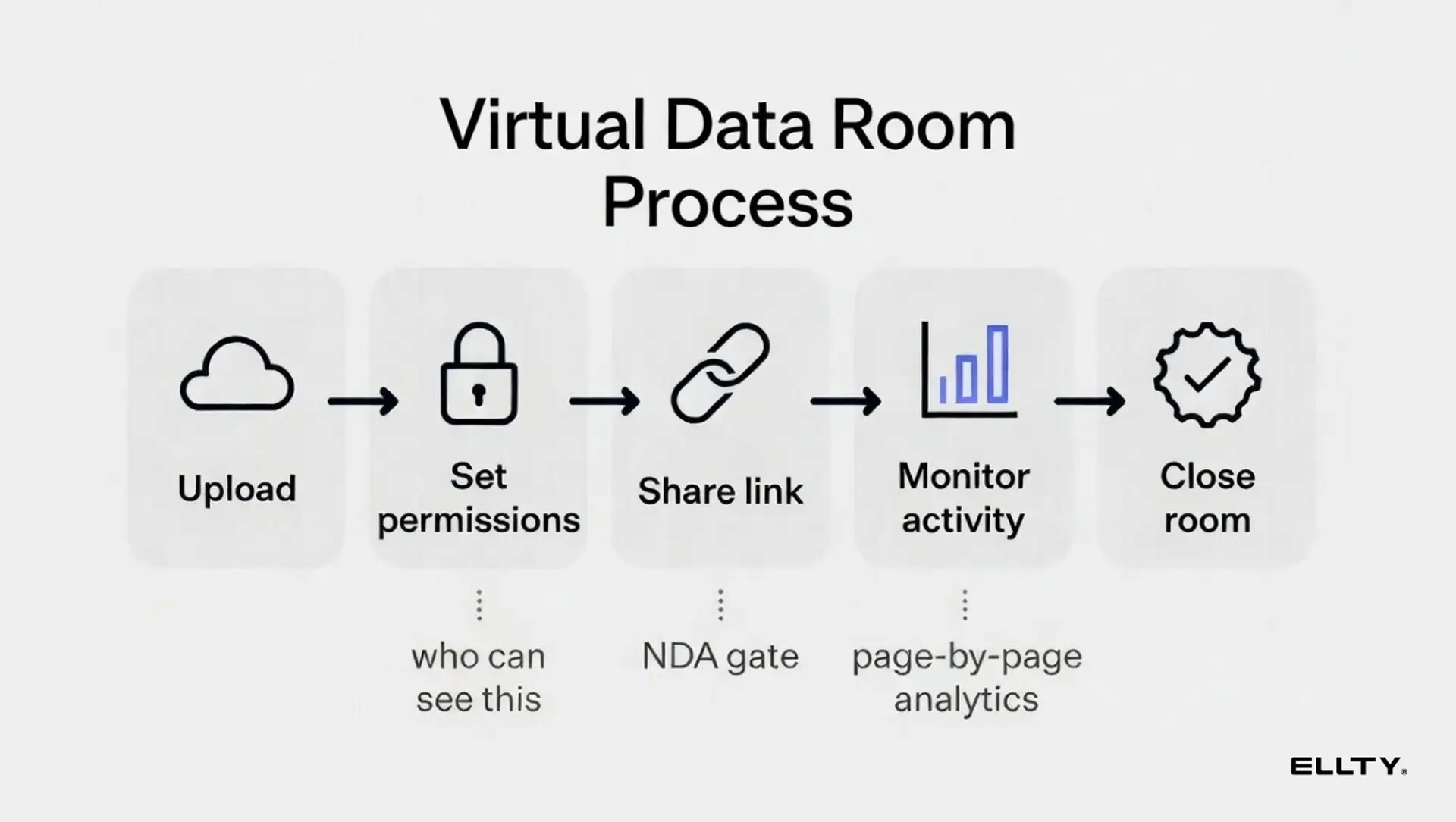
Why revoking access matters more than you think
Most people treat document access like a one-way door. You share something, the other party views it, and then you move on. But access doesn't expire on its own. Unless you revoke it, someone who finished their review weeks ago can still open your files today.
Here's what's actually at stake:
Confidentiality. You may have had them sign an NDA, but an NDA is only as useful as your ability to enforce it. Leaving access open makes it harder to prove intent if something leaks.
Competitive or operational exposure. A partner, vendor, or counterparty who didn't end up working with you may still have visibility into your pricing, internal processes, client lists, or strategic plans. That's sensitive information in the wrong hands.
Legal liability. Depending on your industry and jurisdiction, failing to revoke access to certain documents, especially those containing personal data, health records, or financial information can create real compliance problems under GDPR, CCPA, HIPAA, or similar frameworks.
Trust with stakeholders. Whether it's an auditor, a client, or a future partner, being able to show clean, controlled document access with logs of who viewed what and when access was removed, signals that your organization handles sensitive information responsibly. That matters in every industry.
The fix isn't complicated. It just requires knowing how to actually do it across the tools you're using.
How to remove access to a document - the basics
Before diving into specific tools, here's the core concept. Document access generally comes in two forms:
Direct permission access - you've added someone's email address and given them explicit view or edit rights. Revoking this means removing their email from the permissions list.
Link-based access - you've shared a "anyone with the link can view" URL. Revoking this means disabling or regenerating the link. Anyone with the old link loses access automatically.
Both types require active steps from you. Neither expires on its own unless you've set an expiration date in advance (which, as you'll see, is one of the smarter habits to build).
How to revoke Google Doc access
Google Docs is probably where most early-stage sharing happens. It's fast, it's collaborative, and it has decent access controls if you actually use them.
To remove access permission from a Google Doc:
Open the document. Click "Share" in the top right corner. You'll see a list of everyone who has been given direct access. Find the person you want to remove. Click the dropdown next to their name (it'll say "Viewer," "Commenter," or "Editor"). Select "Remove access." Click "Save."
If you've shared the document via a link (the "Anyone with the link" setting), go to the same Share menu. Under "General access," change the setting from "Anyone with the link" to "Restricted." This immediately kills the link. Anyone who tries to open it will be blocked.
One limitation: Google doesn't give you granular audit logs on its free tier. You can see who has access, but you can't easily see when someone last opened the file or how many times they've viewed it. For due diligence scenarios, that's a real gap.
How to revoke access to a Word document
Word documents are trickier because "access" usually means something different depending on how you shared them.
If you shared a Word doc via email attachment, there's no central access control. The file is on their computer. You can't revoke it remotely. This is why sharing raw file attachments for sensitive documents is genuinely bad practice.
If you shared it via OneDrive or SharePoint (which is how Microsoft intends for collaborative sharing to work):
Go to OneDrive or SharePoint and find the file. Right-click and select "Manage access" or "Share." You'll see a list of people and links with access. To remove a specific person, click the "x" next to their name. To disable a shared link, find the link under "Links giving access" and click the three dots, then "Disable link."
How to remove permissions from a Word document (document-level restrictions): If you've used Word's built-in document protection (under Review > Protect Document), you can remove those restrictions by going back to the same menu and entering the password. This is different from sharing permissions, it's about what people can do inside the document, not whether they can open it.
For most due diligence scenarios, OneDrive/SharePoint access management is what you'll be dealing with. The key takeaway: never share sensitive Word docs as email attachments. Always share a link to a controlled location so you can revoke it later.
How to remove access permission for shared links
Shared links are deceptively dangerous. They feel casual - "here's a link to the folder" but they're often the hardest to clean up because you might not remember all the places you've dropped that link.
The general process for removing link-based access:
Go to the platform where the file is stored (Google Drive, Dropbox, OneDrive, etc.). Find the file or folder. Open the sharing settings. Look for "shared links" or "link access." Disable or delete the link.
Once a link is disabled, it stops working immediately. Anyone who bookmarked it or tries to open it will get an error.
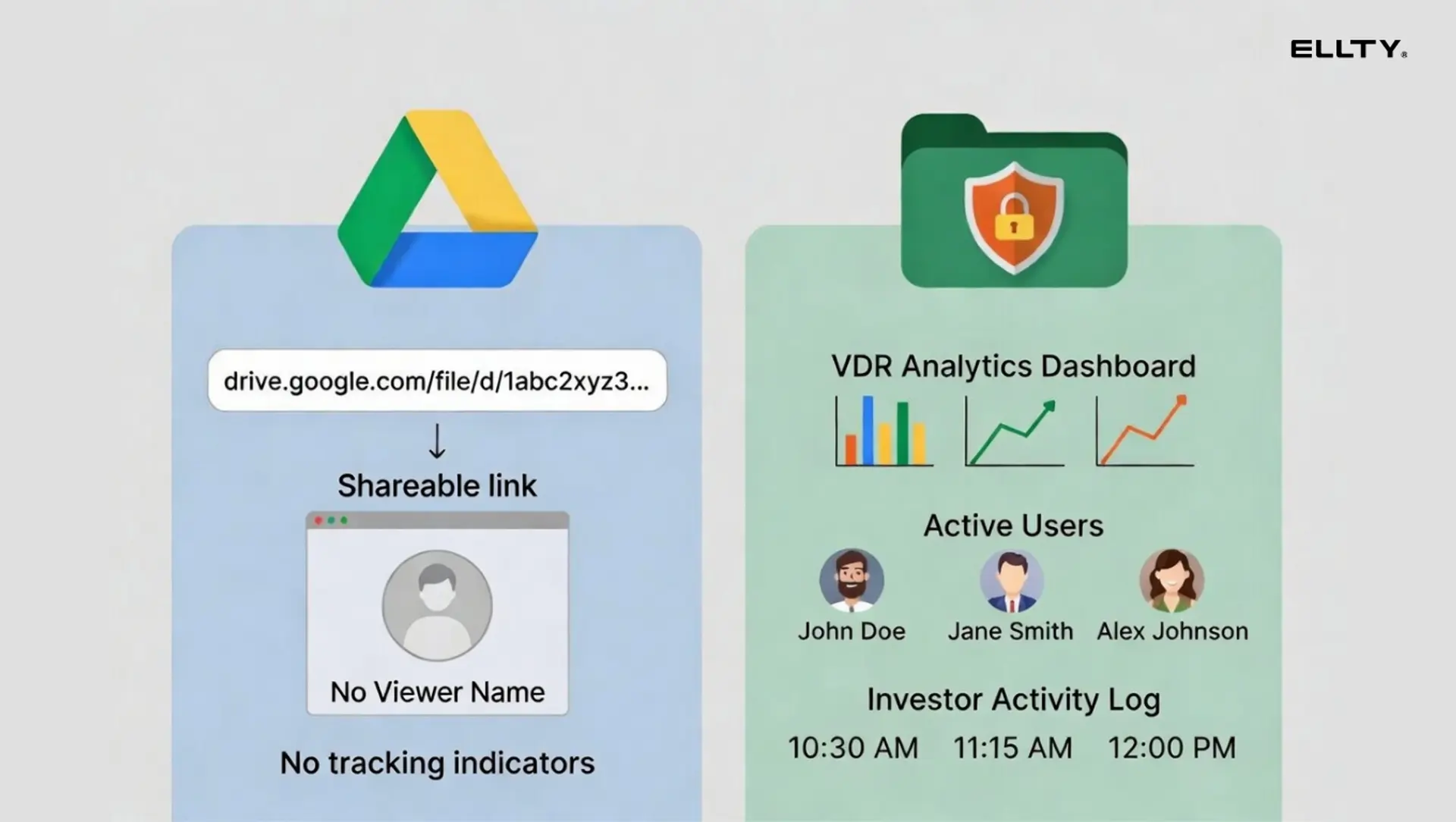
The problem is that most platforms don't tell you how many times a link has been opened, who opened it, or from where. You're flying blind. You can revoke the link, but you don't know what already happened.
This is one of the core reasons purpose-built data room software exists.
How to revoke user access in a data room
If you ran a proper due diligence process, you (hopefully) used a virtual data room. Data rooms give you much more control over access than general file sharing tools and revoking access is a first-class feature, not an afterthought.
The general process in most data room platforms:
Go to the user management or permissions section. Find the investor, acquirer, or advisor you want to remove. Revoke their access. Their session is immediately terminated (in most platforms). You retain the audit log of everything they viewed before access was revoked.
That last point matters a lot. Even after you revoke access, you should have a permanent record of what was viewed, when, and for how long. This is your paper trail if anything ever surfaces later.
How to remove access permission in Ellty
Ellty is built for exactly this use case - sharing pitch decks and documents with trackable links, then controlling or cutting off that access when the time comes.
Here's how access management works in Ellty:
You upload your documents and create a shareable link. That link can be set with specific access controls before you ever send it, like password protection, email verification, expiration dates, or NDA gating (on the Data Room plan).
When you want to revoke access: go to your Ellty dashboard, find the link or data room, and disable it. The link stops working immediately. Anyone trying to open it gets blocked.

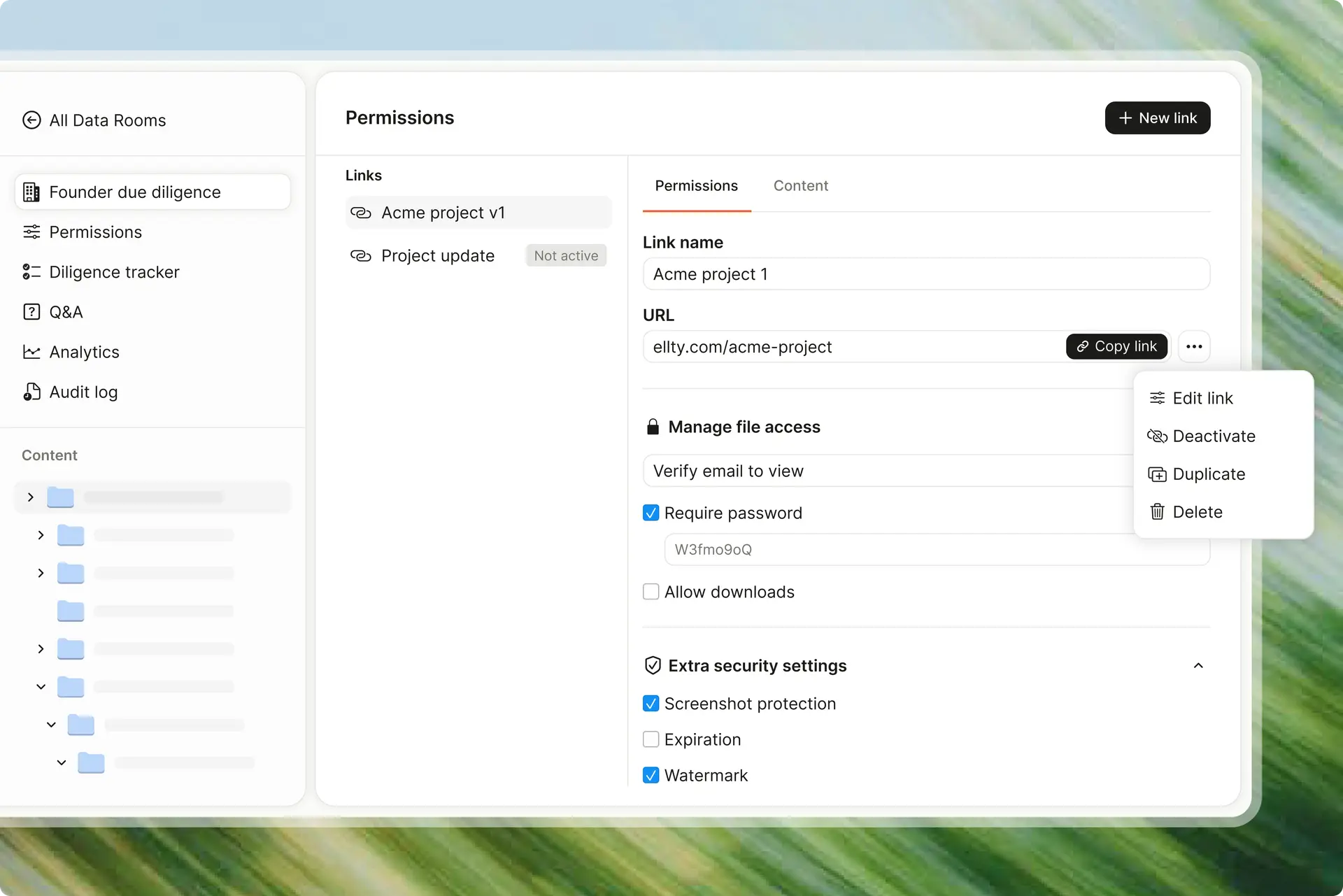
What Ellty gives you beyond basic revocation:
Before you revoke: you can see who opened the link, which pages they viewed, how long they spent on each page, and when they last accessed it. This is real-time analytics built into the platform.
After you revoke: the audit log stays. You have a record of all activity associated with that link or data room.
For teams sharing data rooms with multiple counterparties, Ellty trackable links mean you don't need to create a separate link for every person. You can see individual viewer sessions and revoke access whenever you feel necessary.
Ellty works particularly well when:
- You're sharing a data room and confidential docs with 10-20 people and want to know who's actually engaged
- You're running a due diligence process and don't need a $500/month enterprise platform
- You want to revoke access after a round closes without sending awkward follow-up emails
Ellty Data Room plan ($149/month) includes granular permissions, NDA gating before someone can view documents, dynamic watermarking, and restricted visitor access. The Data Room Plus plan ($349/month) adds group visitor permissions and audit logs, with support for up to 4,000 assets per data room.
If you're on the free plan, you get document tracking and real-time analytics, enough to see who's viewing your pitch deck, but the more advanced permission controls require upgrading.




The best time to think about revoking access is before you share anything. If you build a short pre-share checklist, the cleanup process becomes almost automatic.
Here's a practical checklist you can adapt:
Before sharing:
- Am I sharing a link or a file attachment? (Always prefer a link.)
- Have I set an expiration date on this link? (Even a loose one.)
- Does this platform let me see who views it?
- Have I enabled password protection or email verification for sensitive documents?
- Have I required an NDA before access? (For due diligence materials.)
After the deal closes or falls through:
- Revoke access to the data room or shared folder immediately.
- Disable all individual links shared with that party.
- Download or export the audit log before clearing anything.
- Confirm access is revoked by checking the permissions list.
- Note the date of revocation in your deal notes.
After revocation:
- Do a search in your email for any file attachments you may have sent (these can't be revoked, note them separately).
- If personal data was involved, document the revocation as part of your data handling records.
Common mistakes people make with document access
These come up constantly. Worth knowing so you can avoid them.
Sharing attachments instead of links. Once a file lands in someone's inbox, it's theirs. You can't revoke an attachment. Always use link-based sharing for anything sensitive.
Using "anyone with the link" for sensitive documents. This feels fine until you realize that link can be forwarded, posted, or indexed. Always require email verification or a password for due diligence materials.
Not setting expiration dates. Most platforms let you set a link to expire automatically. People almost never use this. Set a default expiration, even 90 days is better than never.
Forgetting about old links. You might revoke access to your main data room and forget about the three individual document links you shared via email three months ago. Do a search.
Not keeping the audit log. Before you close a data room or delete a project, export the audit log. This is your documentation of what was accessed, when, and by whom.
Assuming NDA = protection. An NDA is a legal instrument, not a technical one. Revoking access is the technical protection. You need both.
How to handle access when a deal falls through
This is the scenario nobody wants to think about but everyone needs to plan for.
The deal fell through. The investor passed. The acquirer went cold. Now what?
First: don't wait. Revoke access the same week the deal ends. The longer you wait, the more likely it is that someone on their team opens something they shouldn't, or that it just slips your mind entirely.
Second: do it cleanly. Send a short, professional note: "Thanks for the process. I've closed the data room, let me know if you need anything going forward." It's courteous. It signals that you're organized. And it implicitly confirms they no longer have access without making it awkward.
Third: document it. Note the date you revoked access, the specific links or permissions you removed, and any outstanding file attachments you couldn't recall. This is basic hygiene for your records.
Fourth: keep the analytics. Don't delete your view data. If you used a tool with analytics, the record of what they viewed is useful context, both for understanding their interest level (if the conversation might resume) and for your own protection.
How to revoke access by document type - a quick reference
Different document types have different workflows. Here's a quick reference:
Pitch decks (PDF or presentation files):
Use link-based sharing from the start. Revoke the link when done. If you used Ellty, disable the link from the dashboard. If you used Google Slides, change the sharing setting to "Restricted."
Financial models (Excel/Google Sheets):
Google Sheets - remove the person from the sharing list. Excel on OneDrive - go to Manage Access and remove them. Never share as an email attachment.
Legal documents (contracts, term sheets, NDAs):
These should almost always live in a data room, not a general file sharing tool. Use the data room's access management to revoke.
Technical documentation (product specs, architecture docs):
Same principle. Link-based, controlled sharing. Revoke when the engagement ends.
Employee records, customer data:
These have regulatory implications. Revoke access immediately when no longer needed. Document the revocation.
What happens if you don't revoke access
Let's be specific about the risks, because "it could cause problems" isn't useful.
Data leak: The most obvious one. Someone uses information from your documents that they shouldn't have. This is hard to prove and even harder to remedy. Prevention is the only real answer.
Investor information asymmetry: If a visitor who passed is still watching your data room, they can see updates you make to financials or your deck. That's a competitive intelligence problem if they're backing a competitor.
GDPR/CCPA exposure: If your data room contained personal data (employee records, customer lists), and you left a non-EU party with access longer than necessary, you may have a compliance problem. Fines under GDPR can be substantial.
Reputational damage: If a leak is traced back to a data room you didn't close, the story isn't "they had bad luck." The story is "they were careless with sensitive information." That follows you.
None of these are hypothetical. They happen. The fix is a five-minute process, revoke access when the engagement ends.
FAQ
How do you remove access to a document?
It depends on where the document is stored. In Google Docs, open the Share menu and remove the person's email or change the link setting to "Restricted." In OneDrive or SharePoint, go to "Manage access" and remove the user or disable the link. In a data room like Ellty, disable the link or remove the user from the permissions list. If you shared a file as an email attachment, you can't remotely revoke access - which is why link-based sharing is always better for sensitive documents.
How do I revoke access to a Word document?
If the Word document was shared via OneDrive or SharePoint, go to the file, right-click, and select "Manage access." From there you can remove individual users or disable shared links. If the document has in-file restrictions (password protection, editing restrictions), go to Review > Protect Document and remove the restrictions with the password. If you sent it as an email attachment, you can't revoke access remotely.
How do I revoke Google Doc access?
Open the document and click "Share" in the top right. Find the person in the list and click the dropdown next to their name, then select "Remove access." If you shared via a link, change "General access" from "Anyone with the link" to "Restricted." Changes take effect immediately.
How do I remove access permission from a shared link?
Go to the platform where the file is hosted and find the sharing settings. Look for "link access" or "shared links" and disable or delete the link. In Google Drive, this is under the Share menu. In Dropbox, it's under "Shared links." In Ellty, you can disable any link from the dashboard in one click. Once a link is disabled, it stops working for anyone who had it.
How do I remove permissions from files in a data room?
In most virtual data rooms, go to the user management or permissions section. Find the user or group and revoke their access. In Ellty, you can disable individual links or entire data room sections from the dashboard. The audit log of their previous activity is preserved even after access is removed.
How do I revoke user access in Ellty?
Go to your Ellty dashboard, find the document or data room, and disable the relevant link. If you're on the Data Room plan, you can also manage individual visitor permissions and see a full audit log of what was accessed before you revoked access.
When should I revoke document access after a deal?
As soon as the deal closes or the engagement ends - ideally the same day. Don't wait. If a deal falls through, revoke access within the same week. The longer you wait, the more exposure you have and the harder it becomes to track down all the active links you may have shared.
What's the difference between revoking a link and removing a user?
Revoking a link means disabling the shared URL. Anyone with that link loses access, regardless of who they are. Removing a user means removing a specific person's direct email-based access. For maximum cleanup, you should do both - disable any shared links and remove direct user permissions.
Can I see what someone viewed before I revoked access?
In most general file sharing tools (Google Drive, Dropbox), no. You don't get detailed view analytics. In a purpose-built data room with analytics like Ellty, you can see which documents were opened, which pages were viewed, how long was spent on each page, and the full viewing history before access was revoked.
Do I need to tell someone when I revoke their access?
There's no legal requirement in most cases, but a short professional note is good practice. It confirms the process is closed, sets clear expectations, and keeps the relationship clean. Something like: "I've closed the data room - thanks again for your time in the process" is enough.
What if I shared sensitive documents as email attachments?
You can't revoke them. The file is already on their device. What you can do: note this in your records, make sure an NDA covers the content, and going forward, switch to link-based sharing so you always have a revocation option. This is one of the most common mistakes people make, and the only fix is prevention.
Final thoughts
Revoking document access isn't complicated. It's just something most people don't think about until it's too late.
The basic rules: always use link-based sharing (not file attachments) for sensitive documents, use a platform that gives you visibility into who's actually viewing your materials, and revoke access the same day a deal closes or an engagement ends.
If you want a simple way to share, track, and revoke access to pitch decks and due diligence documents without the enterprise pricing, Ellty lets you do exactly that. Set up a data room or a trackable link in minutes, see real-time analytics on who's viewing your documents, and disable access instantly when you're done. Start with the free plan and see how it fits your process.


Author

Anika Tabassum Nionta is a Content Manager at Ellty, where she writes about secure document sharing, virtual data rooms, M&A, due diligence, fundraising, and sales enablement. With over 6 years of writing experience, she helps professionals understand how to share confidential documents securely, track engagement, and manage deals more effectively. Anika holds both a BA and MA in English from Dhaka University. Outside of work, she enjoys reading, exploring new cafes in Dhaka, and connecting with entrepreneurs and dealmakers in her community.

