
Permissions are what separate a real data room from a shared Google Drive folder. Here's how they work, which ones you actually need, and how to set them without overcomplicating it.
In this guide
- What is data room access
- What are the three types of permissions
- What are the 4 types of shared data
- Why permissions matter in a VDR
- Common permission mistakes teams make
- How to set permissions in a data room
- NDA gating and watermarking
- Audit logs and access tracking
- How Ellty handles permissions
- FAQ
What is data room access
Data room access is the system that controls who can enter your virtual data room and what they can do once they're inside.
Without access controls, a data room is just a folder with a link. Anyone who gets that link can see everything - download it, share it, forward it. You'd have no record of who saw what. If something leaks, you have no way to trace it.
With proper access controls, you decide exactly who gets in, which documents they can see, whether they can download files, and whether they need to sign an NDA before any of that happens. You can also revoke someone's access at any time, instantly, if needed.
In any situation where sensitive information is being shared with multiple external parties, whether that's due diligence, an audit, a legal matter, a partnership negotiation, or a major transaction, access control is how you stay in charge of the process.
Why this matters
You might have several parties working through your data room at the same time, each at a different stage. Access controls let you show one party your complete financial records while another only sees a high-level summary. One room, multiple controlled views, no messy email threads, no accidental oversharing.
What are the three types of permissions
Across most VDR platforms, permissions fall into three broad categories. The exact labels vary, but the logic is the same everywhere.
👁 View only
The person can open and read documents but can't download, copy, or modify anything. This is the default for most external parties - reviewers, auditors, counterparties in early stages. They see the content. That's it.
💬 Comment / annotate
The person can view documents and leave comments or questions, but still can't download or edit source files. Useful during review processes when you want someone to flag questions directly in the document rather than managing a separate back-and-forth over email.
✍ Full access / admin
The person can upload, modify, organize, and delete files. This is for internal team members who are actively managing the data room. Keep this list short, ideally limited to those who genuinely need it.
Some platforms add a fourth level - download access - as a separate permission distinct from view-only. This lets someone view a document on screen but blocks them from saving a local copy. It's a useful middle ground when you want to share content without creating an uncontrolled copy that can be forwarded.
What are the 4 types of shared data in a data room
Not everything you put in a data room carries the same sensitivity. A useful framework is to think about your documents in four categories based on what they reveal and how much damage it causes if they end up in the wrong hands.

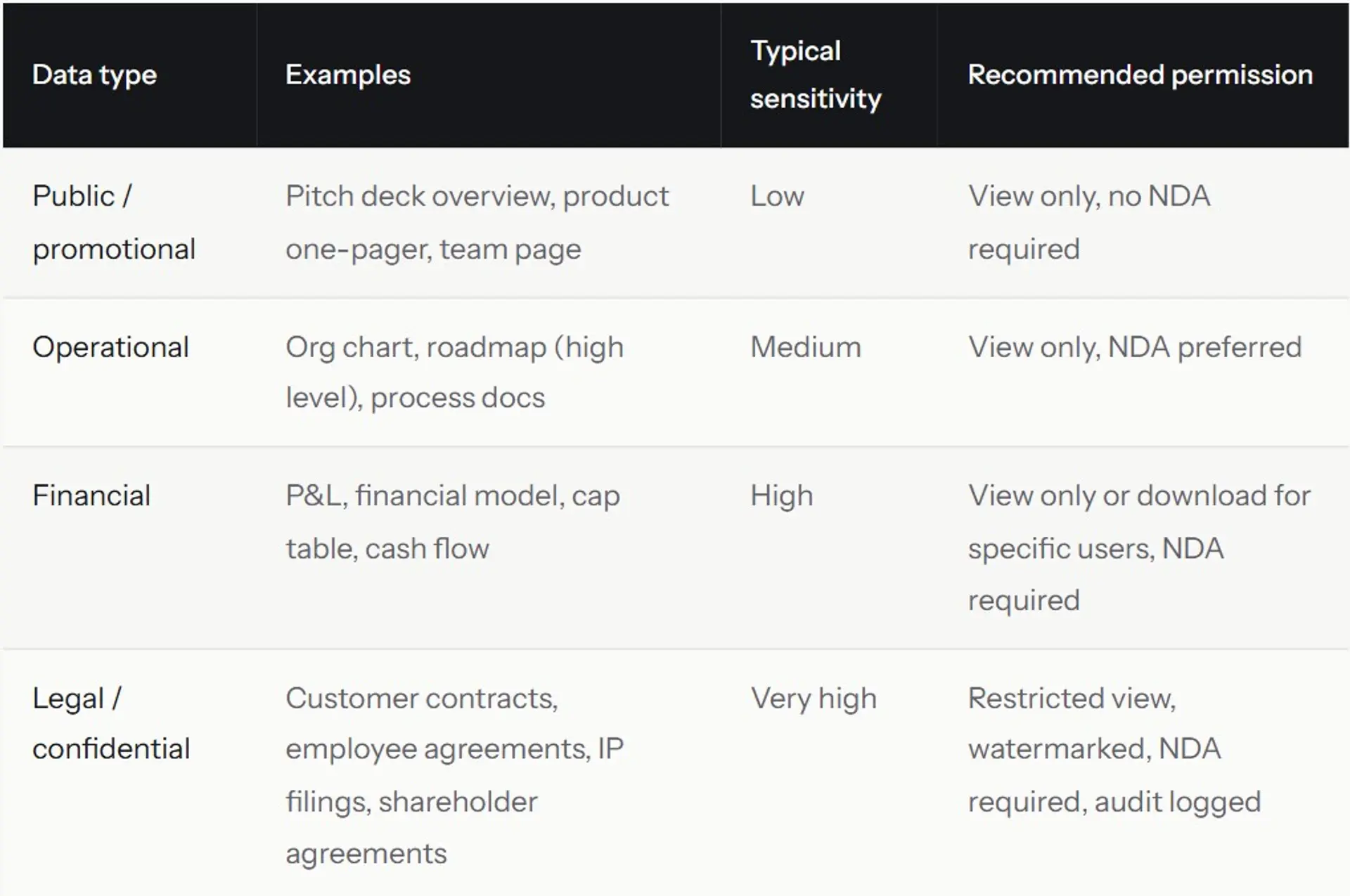
This framework helps you avoid the most common mistake: treating all documents the same. Your company overview and your cap table are not the same kind of information. They shouldn't have the same permission settings.
The four-type model also helps you think about sequencing. Early in a conversation, you share type 1 and type 2. As the relationship develops and trust builds, you open access to type 3. Type 4 usually only appears when you're close to signing something.
Practical tip
Create separate folders for each data type and set permissions at the folder level, not the individual file level. It's faster to manage and harder to accidentally misconfigure. If you need to add a new document to your financials folder, it automatically inherits the right permissions.
Why permissions matter in a VDR
Here are the situations where getting permissions right is not optional.
When multiple parties are reviewing simultaneously
Different parties often need different levels of access. Someone in early discussions doesn't need the same depth as someone in final-stage legal review. Permissions let you manage this without running separate data rooms for each party.
When a counterparty is also a potential competitor
This is more common than people admit, especially in corporate transactions, licensing deals, or strategic partnerships. You want to explore the opportunity, but you're not handing over your customer list or internal roadmap until there's a signed agreement. Permissions let you engage without overexposing.
When multiple internal stakeholders are involved
Your finance lead might need to manage the financial section. Legal counsel might need to upload contracts. A project manager might need full admin access. User-level permissions let you delegate responsibilities without losing oversight or creating a single point of failure.
When a deal or process ends
When a transaction falls through, an audit wraps up, or a party exits the process, you need to revoke access cleanly and immediately. Without a permissions-based system, you can't. With one, it's one click and every document they had access to becomes inaccessible instantly.
Common permission mistakes teams make
These come up repeatedly, usually because people move fast and don't think through access design before sharing data room.
Giving everyone the same access level
Sharing one link with full access to everything is the easiest option and the worst one. A counterparty who can download your complete financials before due diligence has even started didn't need that. A partner who can access sensitive operational data before an NDA is signed is a real problem.
Not using folder-level permissions
If you set permissions file by file, you'll miss something eventually. A new document gets uploaded and nobody sets the right access. Use folder-level settings and let files inherit them automatically.
Never revoking access
Parties who exited a process months ago may still have access to your data room if you never removed them. Review your access list regularly and remove anyone who's no longer actively involved.
Forgetting about download controls
View-only is not the same as no-download. On many platforms, view-only still allows screenshots or local saves. On better platforms, you can block downloads specifically. Know exactly what your platform does and doesn't restrict.
No NDA before sensitive access
Someone opens your data room, reviews sensitive documents, and then walks away with no legal framework around what they can do with that information. An NDA gate before access is a quick setup that creates meaningful legal protection.
A common scenario
An organization shares their full data room with a potential partner who also operates in an overlapping space. The deal doesn't close. That party now has detailed knowledge of pricing, key accounts, and internal strategy. With proper permissions and a signed NDA in place, there would be legal recourse. Without them, there's nothing.


How to set permissions in a data room
Here's a practical walkthrough of how to think about and configure permissions before you share your data room with anyone.
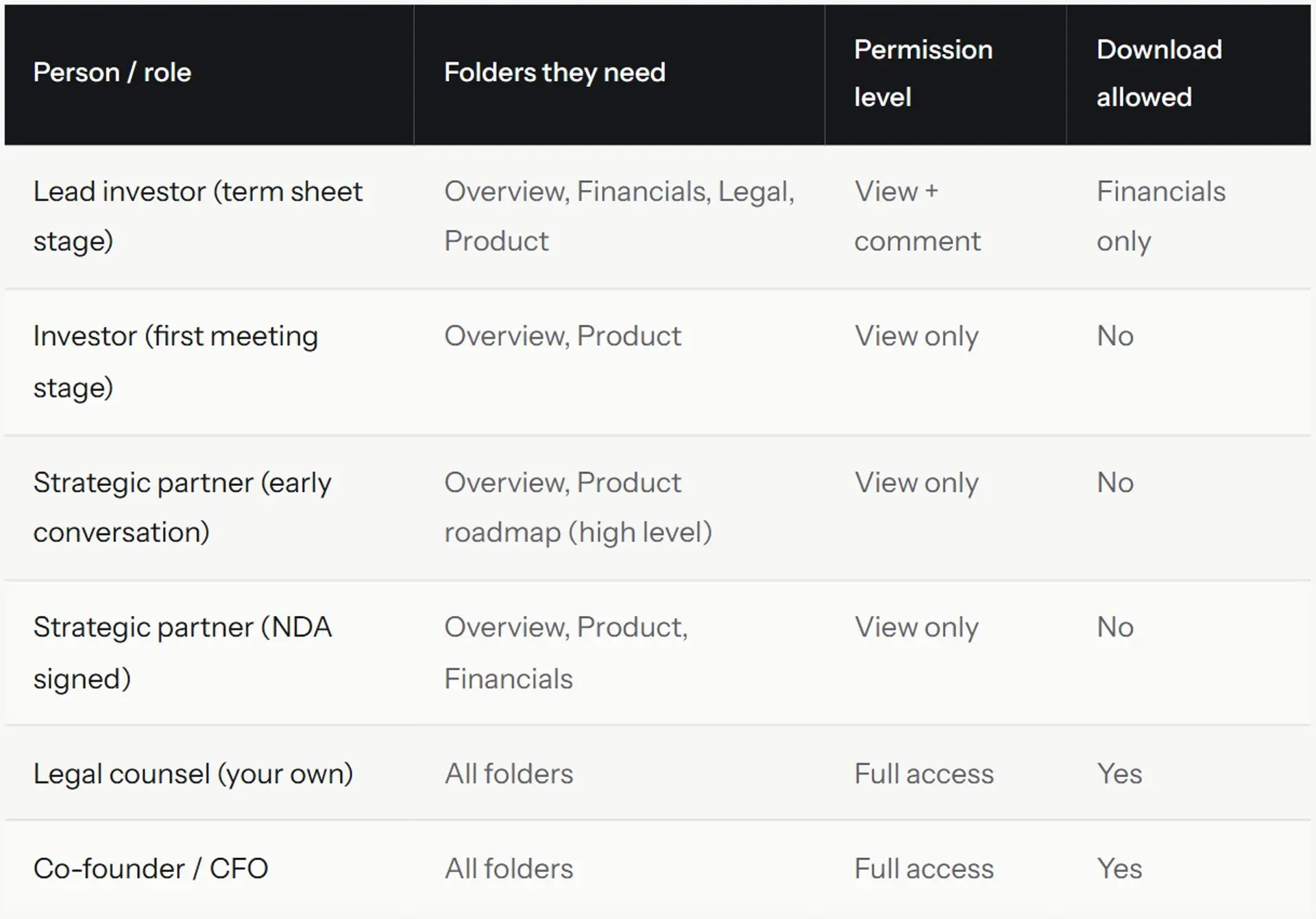
Step 1 - map out who needs access and at what depth
Before you touch any settings, write a simple list. Column one is the person or group. Column two is what they need to see. Column three is what they're allowed to do with it (view, download, comment). This takes 10 minutes and prevents most configuration mistakes.

Step 2 - set up your folder structure first
Create folders before you upload documents. A clean structure makes permission management much simpler. You set permissions at the folder level, not the file level. When you add a new document to a folder, it automatically gets the folder's permission settings.
A standard folder structure for a data room looks like this: Overview / Financials / Legal / Product / Team / Customers. For a partnership data room, you'd adjust based on what's relevant - sometimes Product and GTM matter more than Legal in early conversations.
Step 3 - configure access by user or group
Most VDR platforms let you create groups "Seed investors," "Legal reviewers," "Strategic partners", and apply permissions to the whole group at once. This is more efficient than configuring each user individually and reduces the risk of inconsistency.
In Ellty Data Room Plus plan, group visitor permissions let you manage cohorts of reviewers with consistent settings. For smaller processes, individual user permissions on the Data Room plan work fine.
Step 4 - add NDA gating before you share
If your data room contains anything sensitive, which it almost certainly does, add an NDA gate. The reviewer agrees to your confidentiality terms before they can access any documents. You get a timestamped record of their agreement.
Step 5 - generate unique links per person or group
Don't share one link with everyone. Generate a unique trackable link per user or per group. This is how you get meaningful analytics, you'll know that it was the visitor from firm X who spent 45 minutes in your financials, not just that "someone" did.
NDA gating and watermarking
These two features deserve their own section because they're frequently misunderstood or skipped entirely.
NDA gating
An NDA gate is a step that appears before someone enters your data room. They have to agree to your confidentiality terms before they can see anything. The agreement is logged, you get a record of who agreed, and when.
This isn't a foolproof legal shield. But it's a meaningful layer of protection. If information is later misused, you have documented evidence that the person agreed to keep it confidential. Without it, you have nothing.
Most teams skip NDA gating for early-stage conversations where they're only sharing a pitch deck. That's reasonable. Once you're sharing financials, customer data, or detailed product information, turn it on. It takes less than five minutes to configure.
Dynamic watermarking
Watermarking adds visible text to every page of a document when someone views it, usually the viewer's email address and a timestamp. If they screenshot a page and share it, your watermark is on it. You know exactly who leaked it.
Dynamic watermarking is different from static watermarking. A static watermark is the same on every copy. Dynamic means the watermark changes per viewer - so each person who accesses the document gets a uniquely marked version.
This is a deterrent more than a technical block. A determined person can get around it. But most accidental or opportunistic leaks don't involve someone going out of their way to remove a watermark. It changes the calculus for a lot of people.

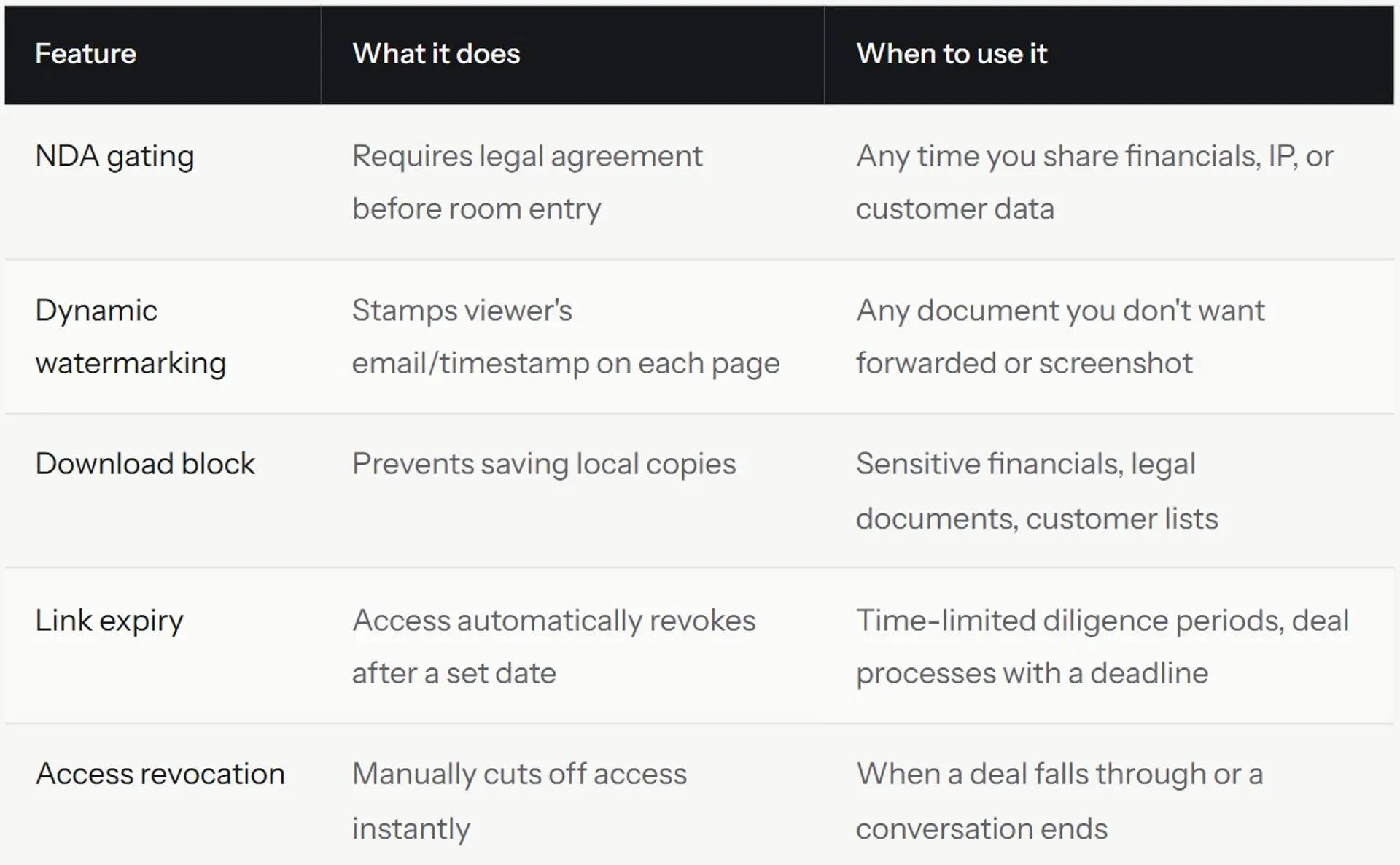
In Ellty, NDA gating and dynamic watermarking are available on the Data Room plan at $149 per month. These aren't extras, they're core to what makes a data room different from a shared folder.
Audit logs and access tracking
An audit log is a timestamped record of every action taken inside your data room. Who opened it. Which documents they viewed. How long they spent. Whether they tried to download something. Whether access was granted or revoked.
This matters for two reasons.
First, it gives you useful intelligence about the deal. If a visitor spends 40 minutes on your financial model and then requests a call, you know what they're going to ask about. If a potential partner opened your data room three times in one day, they're engaged. That changes how you run the conversation.
Second, it protects you legally. If a confidentiality dispute arises, you have a timestamped record proving who accessed what and when. This is much more useful than trying to reconstruct events from email threads after the fact.


What a good audit log captures
- User identity (email, name) and access time
- Which documents were opened and for how long
- Page-by-page time tracking within documents
- Download attempts and whether they were allowed or blocked
- NDA agreement timestamp
- Any access setting changes made by admins
What most basic platforms miss
- Page-level analytics (they show document opens but not which pages were read)
- Session-level detail (multiple visits vs. single long session)
- Export functionality for audit records
- Alerts when specific documents are accessed
Ellty includes real-time notifications when someone opens your documents, useful when you're waiting to hear from a viewer who said they'd review the room "this week." Audit logs with detailed access history are available on the Data Room Plus plan.
How Ellty handles permissions

Ellty is a secure file sharing, document analytics, and virtual data room platform. Here's what it actually does on the permissions side, without the marketing language.
What's included by plan


Where Ellty works well for permissions
- Granular per-user or per-folder permissions without technical complexity
- NDA gating before data room entry - configurable in minutes
- Dynamic watermarking on documents to track unauthorized sharing
- Real-time notifications when someone accesses specific documents
- Page-level analytics so you know exactly what reviewers are spending time on
- Trackable unique links per user, not one shared link for everyone
- No per-user pricing - your internal team accesses the same plan
Where Ellty permissions have limits
- Audit logs with full export capability are only on the Data Room Plus plan
- Group permissions (managing cohorts of users) also require Data Room Plus
- Very large processes with thousands of documents and complex user hierarchies may need a more enterprise-grade tool
- Always verify current security certifications directly on Ellty site
For most use cases, the Data Room plan at $149 per month covers what you need. You get the permissions features that matter without paying for enterprise infrastructure you won't use.


Frequently asked questions
What are the three types of permissions in a data room?
The three core permission types are view only (the person can read documents but not download or modify them), comment or annotate (they can read and leave notes but not change source files), and full access or admin (they can upload, edit, and manage files). Some platforms add download access as a separate tier distinct from view-only, making it effectively four levels. For most data rooms, you'll use view-only for all external parties and full access only for your internal team.
What is data room access and how does it work?
Data room access is the system that controls who can enter your virtual data room and what they can do once they're inside. You set it up by inviting specific users or generating unique trackable links. Each user or link can be assigned a permission level (what they can see and do), and many platforms let you add additional controls like NDA gating, download blocking, and link expiry. When someone's access needs to be revoked - say, a deal falls through - you remove their access and they immediately lose the ability to view any documents.
What are the 4 types of shared data in a data room?
A useful framework breaks data room content into four sensitivity types: public or promotional content (pitch decks, company overviews - low sensitivity), operational content (org charts, high-level roadmaps - medium sensitivity), financial content (P&L, financial model, cap table - high sensitivity), and legal or confidential content (customer contracts, employee agreements, IP filings - very high sensitivity). Each type should have different permission settings. Don't treat your financial model the same as your company overview.
Do I need an NDA before giving someone data room access?
It depends on what you're sharing. For early-stage conversations where you're only sharing a pitch deck and company overview, most people skip the NDA - it can feel like friction before a first meeting. Once you're sharing financials, customer data, or detailed product information, an NDA gate is worth configuring. It takes a few minutes and creates a timestamped record of the reviewer's agreement. If a dispute arises later, that record matters. For strategic partner conversations, especially if the partner is in an adjacent market, get the NDA in place early.
Can someone download documents from my data room even if I set view only?
It depends on the platform. Some platforms that say "view only" still allow users to take screenshots or use browser tools to save content. Better VDR platforms have a specific download block setting that's separate from view-only access. They may also restrict print-to-PDF and similar workarounds. Dynamic watermarking is an additional layer, even if someone manages to save a copy, your watermark (with their email and timestamp) is on every page. Check your specific platform's documentation to understand what view-only actually prevents.
What is dynamic watermarking and do I need it?
Dynamic watermarking stamps each viewer's identifying information (usually their email address and a timestamp) on every page of a document when they view it. It's different from a static watermark because the mark changes per viewer - so each person who accesses your documents gets a uniquely marked version. If someone screenshots your financial model and shares it, you'll know exactly who did it. You don't absolutely need it for every document, but for anything sensitive - financials, customer data, proprietary technology details - it's a meaningful deterrent that takes seconds to enable.
How do I revoke data room access when a deal falls through?
In any reputable VDR platform, you go into the access settings, find the user, and remove or deactivate their access. It takes about 30 seconds. Their link or login immediately stops working, they won't be able to open any documents even if they have the URL saved. This is one of the core reasons to use a proper data room instead of a Google Drive link. With a shared Drive folder, removing access is less reliable and you often can't be sure a local copy doesn't exist. With a VDR, the access revocation is clean and immediate.
What is an audit log in a virtual data room?
An audit log is a timestamped record of every action inside your data room - who accessed it, which documents they opened, how long they spent, whether they tried to download anything, and when. It's useful for two things: understanding engagement (which visitors are actively reviewing your materials and which aren't), and legal protection (if a confidentiality issue arises, you have documented evidence of exactly who accessed what and when). On Ellty, full audit log export is available on the Data Room Plus plan.
Can I set different permissions for different folders in the same data room?
Yes, on most proper VDR platforms including Ellty Data Room plan, you can set permissions at the folder level. This means viewer A might have access to your Overview and Financials folders but not your Legal folder, while your co-founder has access to everything. Set permissions at the folder level rather than per file, it's easier to manage and you're less likely to accidentally misconfigure a newly uploaded document. When a file goes into a folder, it inherits the folder's settings automatically.
The short version
Permissions are not a nice-to-have. They're the difference between sharing information intentionally and losing control of it. Set up folder-level permissions before you share anything. Add an NDA gate when the documents get sensitive. Use unique trackable links so you know who's engaged. Revoke access the moment a conversation ends. None of this is complicated, it just has to be done deliberately.
Author

Anika Tabassum Nionta is a Content Manager at Ellty, where she writes about secure document sharing, virtual data rooms, M&A, due diligence, fundraising, and sales enablement. With over 6 years of writing experience, she helps professionals understand how to share confidential documents securely, track engagement, and manage deals more effectively. Anika holds both a BA and MA in English from Dhaka University. Outside of work, she enjoys reading, exploring new cafes in Dhaka, and connecting with entrepreneurs and dealmakers in her community.

