
You sent the deck. Now you're waiting. Refreshing your inbox. Wondering if they even opened it.
That's the problem pitch deck analytics solves.
This guide covers how pitch deck analytics work, what the data actually means, which software to use, and how to turn viewer behavior into smarter fundraising decisions. Whether you're sharing a PDF, a PPT, or a hosted link - this applies to you.
What pitch deck analytics actually is
Pitch deck analytics is the ability to track how investors (or anyone you send your deck to) interact with your presentation.
At minimum, you'll see:
- Did they open it?
- Which slides did they spend time on?
- When did they stop reading?
- Did they come back?
At its best, pitch deck analytics gives you a live signal on investor interest before they respond to you - or don't.
This isn't theoretical. If a partner at a VC firm opens your deck, spends 4 minutes on your market size slide, skips your financials, and then forwards it to two colleagues - that's actionable information. You know they're interested. You know where to focus the follow-up. You know the conversation has already started internally.
Without analytics, you're guessing. With it, you're working with data.
Why founders ignore this (and why that's a mistake)
Most first-time founders send decks as email attachments. A PDF. A Google Slides link with no tracking. A PowerPoint file.
The problem with attachments is simple: you have no idea what happens after you hit send.
You don't know if:
- The email bounced or went to spam
- They opened it once and closed it
- They forwarded it to their team
- They're still reading it three days later
Fundraising is a process built on limited information. Analytics closes that gap. The founders who use it don't just feel better about the process - they make better decisions about where to spend their time.
How pitch deck tracking works (technically)


When you upload your deck to a platform like Ellty, it converts your file (PDF, PPT, PPTX) into a hosted presentation. You then share a trackable link instead of the file itself.
Here's what happens under the hood:


When someone opens the link:
- A session is created and timestamped
- Each slide view is recorded with time spent
- The viewer's location and device type are logged
- If they close and reopen, it's tracked as a return visit
- If they forward the link, the new viewer gets their own session
You get all of this in a dashboard. Real-time, in most cases.
Some platforms also support email-gating - requiring the viewer to enter their email before they can see the deck. This lets you capture identity even when you share a link publicly.
The metrics that actually matter
Not all analytics data is equally useful. Here's what to focus on:


Time per slide
This is the most underrated metric. A slide that gets 30 seconds of attention when your average is 8 seconds is a slide that made them stop and think. If that's your traction slide - great. If it's your "how it works" page - you might have a clarity problem.
Total time spent
The quickest signal on whether someone actually read your deck. Under 2 minutes usually means they scanned the cover, maybe flipped through a few slides, and moved on. It doesn't always mean they're not interested - but it's a weak signal. Anything over 5-6 minutes is worth a follow-up.
Return visits
Someone who opens your deck, closes it, and comes back the next day is almost certainly still thinking about you. This is a warm lead. Follow up. Don't wait for them to reach out first.
Slides skipped
If a slide gets zero or near-zero time, one of two things is true: it's visually skippable, or it's not relevant to what they care about. A pattern of skipped slides across multiple viewers tells you something structural is off - either the slide order doesn't flow, or the content isn't pulling its weight.
Forwarded views
When a link you sent to one person gets opened by two or three others, the decision is being discussed internally. That's a good time to prompt a call. You don't need to mention that you saw the forwarding - just reach out and ask if they have questions or want to connect.
Drop-off point
If 80% of viewers stop at slide 6, slide 6 is the problem. It might be a confusing chart, a wall of text, or a claim that doesn't land. Don't guess - fix it and track whether the next version holds attention longer. A consistent drop-off point is the most actionable signal analytics gives you.
View timestamp
When someone opens your deck matters almost as much as how they engage with it. A 9pm open on a Sunday suggests they're doing personal research. A Tuesday morning open during work hours suggests they're actively evaluating you. Use the timestamp to time your follow-up - if they opened it two hours ago, you're already in their head. Send the email now.
Device and location
This one's mostly a verification tool. If you sent a link to a partner at a firm in San Francisco and you see a mobile open from New York, it's probably not them - or it got forwarded. If the location matches, you have reasonable confidence the right person actually looked at it. It also tells you whether they're reading on a phone (less likely to engage deeply) versus a desktop (more likely to be in evaluation mode).
Reading the data: what different patterns mean


Here are common patterns and what they usually signal:
Pattern 1 - Quick scan, high drop-off early
They opened it, spent 30-45 seconds total, stopped at slide 3 or 4. Likely: not a fit, or the opening didn't hook them. Check your problem and solution slides.
Pattern 2 - Long session, skipped financials
They spent time on everything except the numbers. Likely: interested in the story but not ready to evaluate financials, or they're not the decision-maker. Follow up with the deck, not the numbers.
Pattern 3 - Multiple return visits over 3-5 days
They keep coming back. Likely: in discussion internally, or doing light due diligence. This is a strong signal. Don't wait too long to follow up.
Pattern 4 - High time on team slide
They care about who you are. Likely: early-stage investor who bets on people. Personalize your follow-up around your background and why you're the right team.
Pattern 5 - Forwarded to 2+ viewers who also spend time
Internal committee review is happening. Likely: moving toward a partner meeting. This is the moment to ask for one.
When to follow up based on analytics
This is where analytics turns into action.
A few rules:
Follow up within 24 hours of a strong session. If someone spends 6+ minutes on your deck, that's real interest. Strike while it's fresh. Don't wait three days to send a polite email.
Don't follow up after a 30-second open. They bounced. A follow-up won't fix that. Rework the deck first.
Use the data as context, not a script. Don't say "I saw you opened my deck three times." That's creepy. Instead, say: "I wanted to follow up - happy to walk you through any questions." You know where to focus because you saw the data. You don't need to reveal that you saw it.
Time your follow-up to their last view. If they opened it at 9am on Tuesday, email them Tuesday afternoon or Wednesday morning. You're in their head already.
Pitch deck analytics software: what's available
You have several options. Here's a realistic breakdown:


Docsend
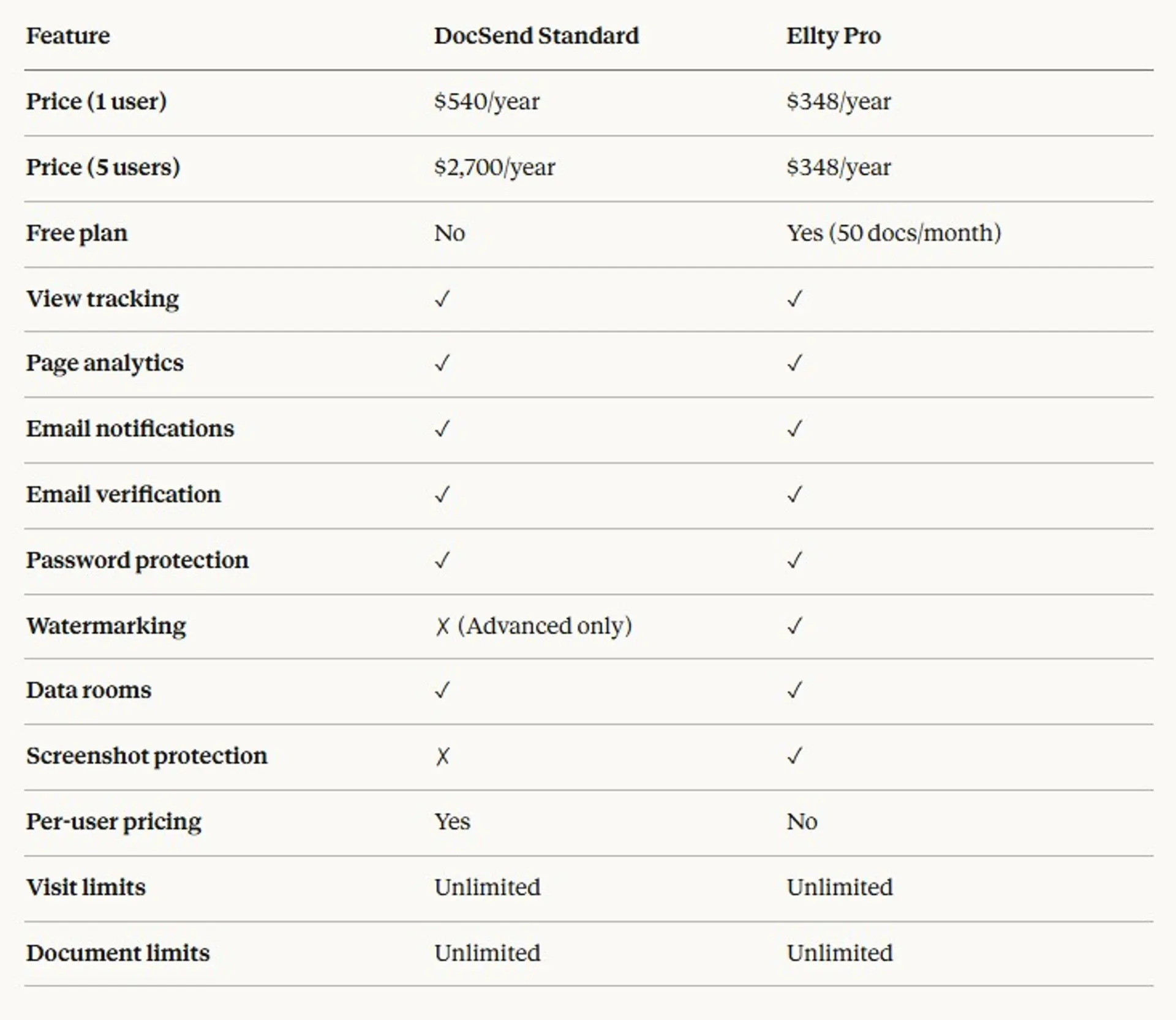
The most well-known tool. Used widely in VC circles. Offers per-document tracking, email gating, and data room features.
Pricing starts around $45/month per user. Per-user pricing adds up fast if you're on a team or sharing multiple decks.
Good for: founders who want the most recognizable name in the space and don't mind the price.
Ellty


Ellty is a pitch deck sharing and analytics platform that also includes virtual data room features. You upload your deck (PDF or PPT), generate a trackable link, and get real-time analytics on who viewed it, which slides, and for how long.
Ellty offers comprehensive document tracking, eSignatures, and full virtual data room functionality without the per-user pricing that platforms like DocSend or Carta charge. The free plan lets you get started immediately with no credit card required, the Standard plan at $69/month covers most fundraising needs including eSignatures and data rooms, the Data Room plan at $149/month handles structured due diligence with NDA gating, granular permissions, and dynamic watermarking, and the Data Room Plus plan at $349/month adds group visitor permissions, audit logs, and 4,000 assets per data room for more demanding due diligence processes. A practical option if you want full visibility into investor engagement and a clean due diligence process - without complex setup or enterprise-tier pricing.
There are no per-user fees on the plans. For early-stage founders who are sharing decks without a full team, this removes a cost that compounds quickly on other platforms.
Ellty works well when you want clean analytics without a heavy setup process and don't need enterprise-level compliance infrastructure. The data room features also make it useful for due diligence once you're further along in a deal.
It's not the right fit if you need deep CRM integrations or enterprise SSO out of the box - but for most pre-seed and seed founders, that's not what you need right now.

Notion + Google Analytics (DIY)
Some founders cobble together a tracking setup using Notion embeds or custom Google Analytics events. It works at a basic level but requires setup time and gives you limited per-slide data.
Good for: technical founders who want free and are willing to trade features for flexibility.
Pitch.com
More focused on design and collaboration, but includes some sharing and analytics features. Better as a deck builder than a tracking tool.
Good for: teams who care about design and want basic share tracking.
Pitch deck analytics for PDFs specifically
A lot of founders default to PDF because it feels "safe." It's easy to attach. It's universally compatible. But a PDF sent as an attachment gives you zero analytics.
To get analytics on a PDF, you need to:
- Upload it to a tracking platform (like Ellty)
- Share the generated link, not the file
- View per-page analytics in the dashboard
When the platform converts your PDF, each page becomes a trackable "slide." You'll see time spent per page, total views, drop-off points - same as you would with a PPT.
One thing to keep in mind: PDF tracking requires the viewer to open the link in a browser. If they download the file, that view won't be tracked. Platforms like Ellty address this by keeping the deck hosted and not offering a download button unless you enable it - which also protects your document.
Pitch deck analytics for PPT and PPTX files


PowerPoint files work the same way. Upload the file, and the platform converts it to a hosted presentation. You share the link, not the PPTX.
One advantage of PPT over PDF: animations and slide structure are preserved better in some platforms. If your deck has a specific design flow, check that the platform renders it correctly before sharing.
Ellty supports both PDF and PPT upload formats.
Setting up your first trackable pitch deck: step by step
This takes about 10 minutes.
Step 1 - Finalize your deck Don't track a draft. Get your deck to a shareable state first. Analytics on an incomplete deck just tells you what's wrong with something you already know is wrong.
Step 2 - Create an account on a tracking platform For a free starting point, Ellty starter plan gives you basic analytics without a credit card.
Step 3 - Upload your file PDF or PPT. Most platforms accept both. Upload takes under a minute.
Step 4 - Configure your link settings Decide:
- Do you want to require an email to view?
- Do you want a password on the link?
- Do you want download disabled?
- Should the link expire?
For investor decks, email gating is worth enabling. It captures who's viewing even if you shared the link publicly (like on a website or LinkedIn).
Step 5 - Create separate links per recipient This is important. Don't send one link to twenty investors. Create a unique link per person. That way, when you check analytics, you know exactly who spent 8 minutes on your traction slide - not just that "someone" did.
Step 6 - Share and monitor Send the link. Check your dashboard. Set up real-time notifications if the platform supports it (Ellty does) so you get an alert the moment someone opens your deck.
Data rooms and advanced analytics: when you need more
Once you're in active due diligence, a basic trackable link isn't enough.
Investors doing due diligence need to review:
- Financial models
- Cap tables
- Legal documents
- Customer contracts
- Technical documentation
All of this needs to be organized, access-controlled, and trackable. That's where virtual data rooms come in.
Ellty includes data room functionality on the Data Room plans. You can create a secure space, organize documents into folders, set viewer permissions, and track exactly who accessed what and when.
This is useful for:
- Series A and later rounds where multiple parties are reviewing documents
- M&A processes
- Partnership due diligence
For most pre-seed founders, you won't need a data room until you're in active diligence with a lead investor. But it's worth knowing the feature exists on the same platform you're already using for deck tracking - so you're not switching tools mid-process.
Common mistakes founders make with pitch deck analytics
Sending the same link to everyone
You can't tell who's who. Fix: create unique links per contact.
Treating analytics as a vanity metric
"1,000 people viewed my deck" is useless if you're not following up with the engaged ones. Analytics is input for action, not a number to feel good about.
Over-reading a single data point
One 30-second view doesn't mean they hated it. Maybe they were on their phone. Maybe they got interrupted. Look for patterns across multiple sessions.
Not testing your own link
Before you send it, open the link yourself and check: does it render correctly? Does it load fast? Is the email gate working? This takes 2 minutes and prevents embarrassing technical issues.
Sharing a download-enabled link
If investors can download your deck, you lose all future tracking. They'll share the file. You'll have no idea where it goes. Disable downloads by default.
Forgetting to act on the data
Analytics is only valuable if you use it. Build a simple habit: check your dashboard every morning during an active raise. Flag anyone who hit 5+ minutes or returned twice. Follow up that day.
What good pitch deck analytics looks like in practice
Here's a simple example scenario:
You're raising a pre-seed round. You've sent your deck to 15 investors over two weeks. Here's what your dashboard might show:


From this data alone, you know:
- Investors 1, 3, and 5 are engaged. Follow up today.
- Investors 2 and 4 bounced. Don't chase. Revisit your opening two slides.
- Slide 3 and Slide 2 may have issues worth addressing.
This is more information than most founders have after two weeks of outreach. And it takes less than two minutes to interpret.
Free pitch deck analytics: what you actually get
"Free" in this context means: you can get started without paying.
Ellty's starter plan is $0. You get basic deck sharing and view tracking without a credit card. This is useful for:
- Testing whether analytics is worth adding to your process
- Early outreach before you're in full fundraising mode
- Founders who are sharing one deck with a small group
The free plan won't have every feature. Advanced analytics, data rooms, and custom branding are on paid plans. But for a first raise, you may not need those yet.
If you're actively fundraising and sending decks to 20+ investors, the $24/month Pro plan pays for itself the first time you avoid wasting a week chasing a dead lead.
FAQ
What is pitch deck analytics?
It's the ability to track how someone interacts with your pitch deck after you share it. You can see who opened it, which slides they read, how long they spent, and whether they came back.
Do I need to use a special format for analytics to work?
No. Most platforms accept PDF and PPT/PPTX. You upload the file, and the platform generates a trackable link. Share the link, not the file.
Can investors tell I'm tracking them?
They can't see the data you see. If you use email gating, they'll know they had to enter their email to view the deck. But the per-slide tracking happens in the background without visible indicators.
What's the difference between pitch deck analytics and a virtual data room?
Pitch deck analytics tracks engagement with a single presentation. A virtual data room is a secure, organized space for multiple documents - used during due diligence. Some platforms, including Ellty, offer both.
Is there a free pitch deck analytics tool?
Yes. Ellty has a $0 starter plan. Google Slides gives you basic view counts if you share with tracking enabled, but no per-slide data. For real analytics, a dedicated platform is worth it.
How do I know which slides to fix?
Look at your drop-off slide (where most people stop) and your lowest time-per-slide pages. If a slide gets less than 3 seconds of attention, it's either being skipped or not landing. Test a different version.
Should I use one link or multiple links?
Always create a separate link per recipient. This is the only way to know who specifically engaged with your deck. One shared link makes all the data anonymous and useless for follow-up decisions.
Does pitch deck analytics work for PDFs?
Yes. Upload the PDF to a platform that supports it. The platform hosts the document and tracks each page view. The viewer opens a link in their browser - no download needed.
What's a good engagement benchmark for a pitch deck?
There's no universal standard, but as a rough guide: under 2 minutes total is low engagement, 3-6 minutes is average, 6+ minutes suggests real interest. More useful than total time is whether they returned and which slides held their attention.
Can I use pitch deck analytics for more than fundraising?
Yes. Founders use it for partnership pitches, sales decks, and board updates. Any time you share a document and care about whether it's being read - analytics is useful.
Start tracking your pitch deck today
Most founders send their deck and wait. You don't have to.
Analytics turns a passive process into an active one. You'll know who's interested before they tell you. You'll know what's working before you rewrite the whole deck. You'll make better calls about where to spend your time.
If you haven't tried pitch deck analytics yet, start with Ellty free plan. Upload your deck, create a trackable link, and see what your data tells you. It takes 10 minutes to set up, and the first insight you get will change how you think about your raise.
Already in due diligence? Set up a data room on the same platform and keep all your documents in one trackable, access-controlled space.
Ellty is a secure documents sharing, analytics, and virtual data room platform built for founders. Plans start at $0.
Author

Anika Tabassum Nionta is a Content Manager at Ellty, where she writes about secure document sharing, virtual data rooms, M&A, due diligence, fundraising, and sales enablement. With over 6 years of writing experience, she helps professionals understand how to share confidential documents securely, track engagement, and manage deals more effectively. Anika holds both a BA and MA in English from Dhaka University. Outside of work, she enjoys reading, exploring new cafes in Dhaka, and connecting with entrepreneurs and dealmakers in her community.

