
If you've ever asked yourself "can't I just use SharePoint for this?" - you're not alone. It's a fair question. SharePoint is already inside most organizations, it's familiar, and it handles files. So why would you pay for a dedicated virtual data room? This guide breaks down the real differences so you can make the call without wasting time or money.
In this article
- What is a virtual data room?
- Is SharePoint a virtual data room?
- Virtual data room vs SharePoint: feature-by-feature
- SharePoint data room: what actually works
- Cost comparison
- What has replaced SharePoint for document sharing?
- Are ShareFile and SharePoint the same thing?
- Which one should you use?
- How Ellty fits in
- FAQ
What is a virtual data room?
A virtual data room (VDR) is a secure online space for sharing confidential documents with outside parties. It's built specifically for situations where the stakes are high: fundraising rounds, M&A due diligence, legal proceedings, board reporting, or any deal where you're handing sensitive information to investors, lawyers, or acquirers.
The key word there is "outside parties." A VDR is not just a folder with a password. It's a controlled environment where you can set granular permissions per user or group, see exactly who viewed what and for how long, restrict downloads, add watermarks automatically, and revoke access at any time - even after a document has been opened.
A proper VDR also creates a full audit trail. Every login, every document view, every download is logged. That log can matter in legal contexts or investor negotiations.
Common VDR use cases


Is SharePoint a virtual data room?


Short answer: no. SharePoint is a collaboration and intranet platform built for internal teams. It was designed so employees can co-author documents, share updates, and organize internal knowledge. That's a fundamentally different job from what a VDR does.
SharePoint can be configured to share files externally, but that doesn't make it a VDR any more than sending a Google Drive link makes it one. The architecture is different, the permissions model is different, and the audit capabilities are different.
Here's what SharePoint is missing when you try to use it as a data room:


A useful way to think about it: SharePoint is an internal filing cabinet you've left unlocked for select guests. A VDR is a secure reading room where you control exactly what each guest picks up, how long they stay, and whether they can take anything home.
SharePoint data room: what actually works
To be fair, SharePoint isn't useless in deal contexts. If you're already a Microsoft 365 organization and your situation fits within its limits, it can handle some of the work.
SharePoint works reasonably well when:
- Internal document review before external sharing: Your team is already in the Microsoft ecosystem
- Sharing with a single counterparty who has a Microsoft account: Fewer friction points with guest access setup
- Low-stakes document repository: No need for audit logs or NDA gating
- Internal compliance storage: Microsoft's security certifications cover basic requirements
Where SharePoint falls apart:
- Multiple external parties with different access levels: Permission management gets messy fast and requires IT
- You want to know if a visitor actually opened your financials: No document-level engagement data
- You need to gate access behind an NDA signature: Not possible natively
- You need to revoke access to a specific document immediately: Cumbersome and error-prone at scale
- Counterparty doesn't use Microsoft: Guest access setup creates friction for both sides
Virtual data room vs SharePoint: cost comparison
Cost is where this gets interesting, because most people assume SharePoint is free. It's not, it's bundled with Microsoft 365, which your company may already pay for. But that bundling hides the real cost: the IT configuration time, the admin overhead, and the risk of misconfiguration.
Here's how the numbers look:

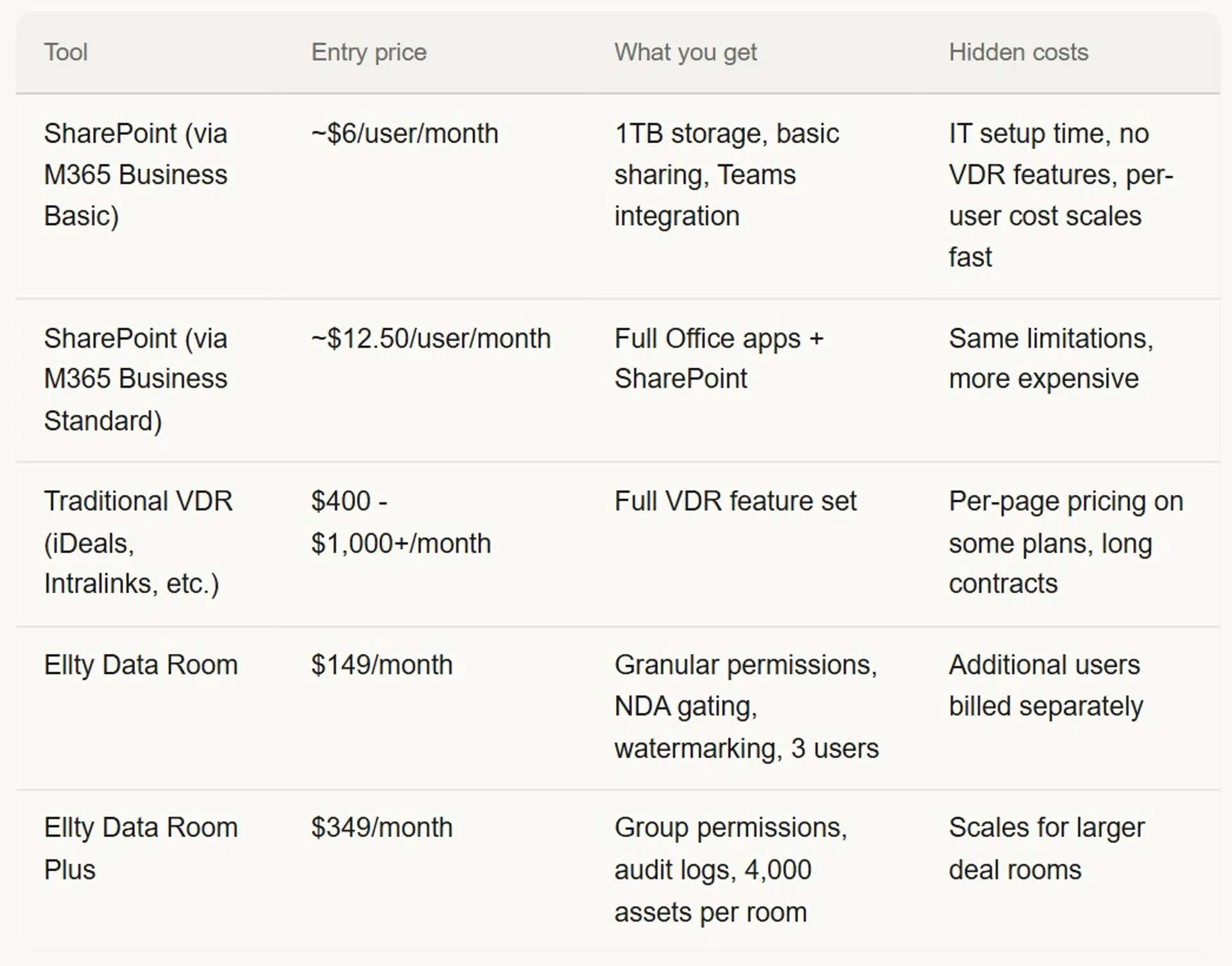
If your company already pays for Microsoft 365, SharePoint is a $0 marginal cost for basic file sharing. But if you need a real data room for a fundraise, a serious deal, or M&A process, you're adding configuration time and still missing core features. Running a Series A process on SharePoint is like running payroll in Excel, technically possible, but not what the tool is for.



What has replaced SharePoint for document sharing?
For internal collaboration, SharePoint is still widely used. Teams integration has helped it stay relevant inside organizations. But for external document sharing, especially in deal contexts, a whole category of tools has emerged to fill the gap.
Here's what people are actually using instead:

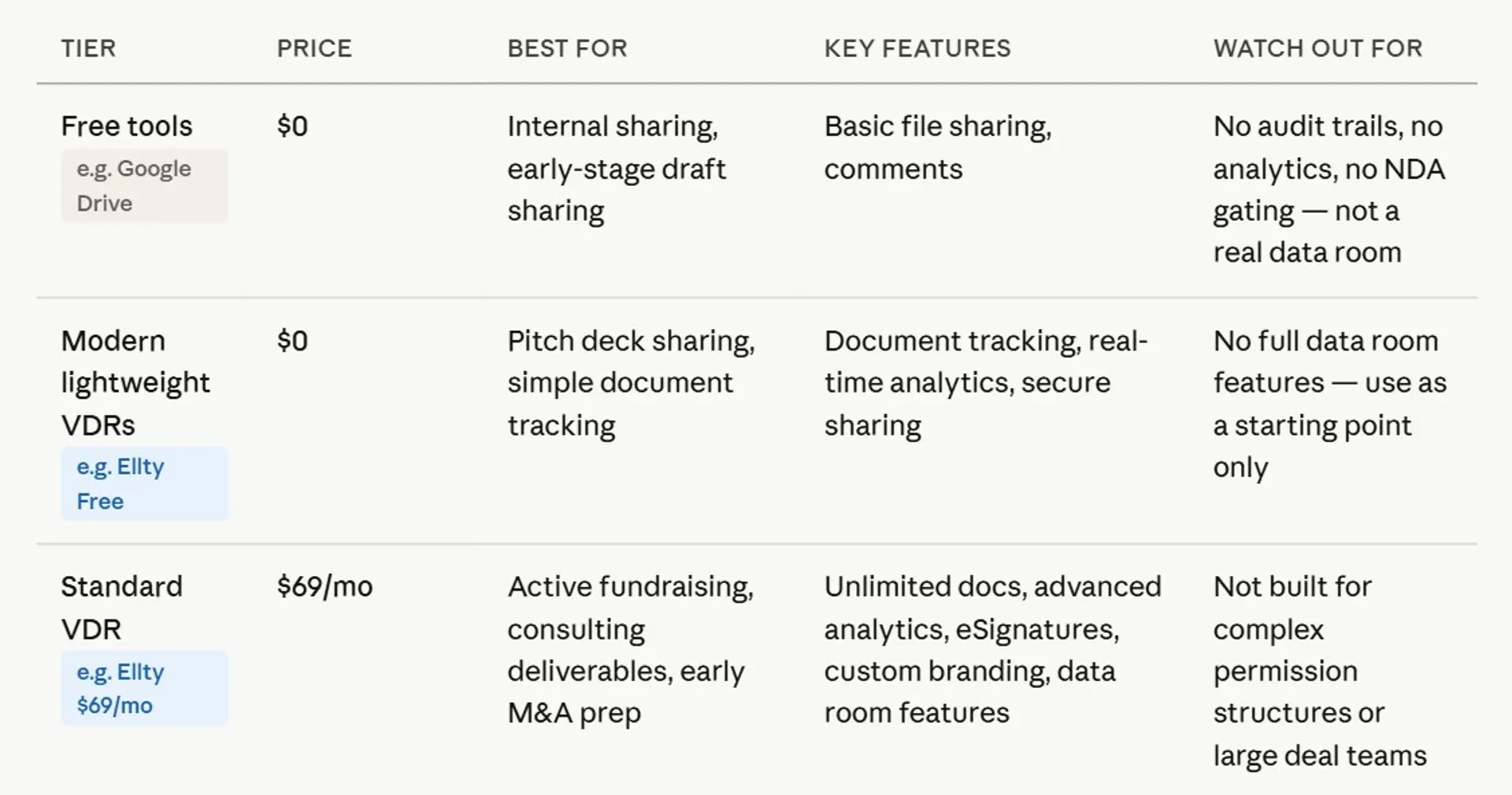

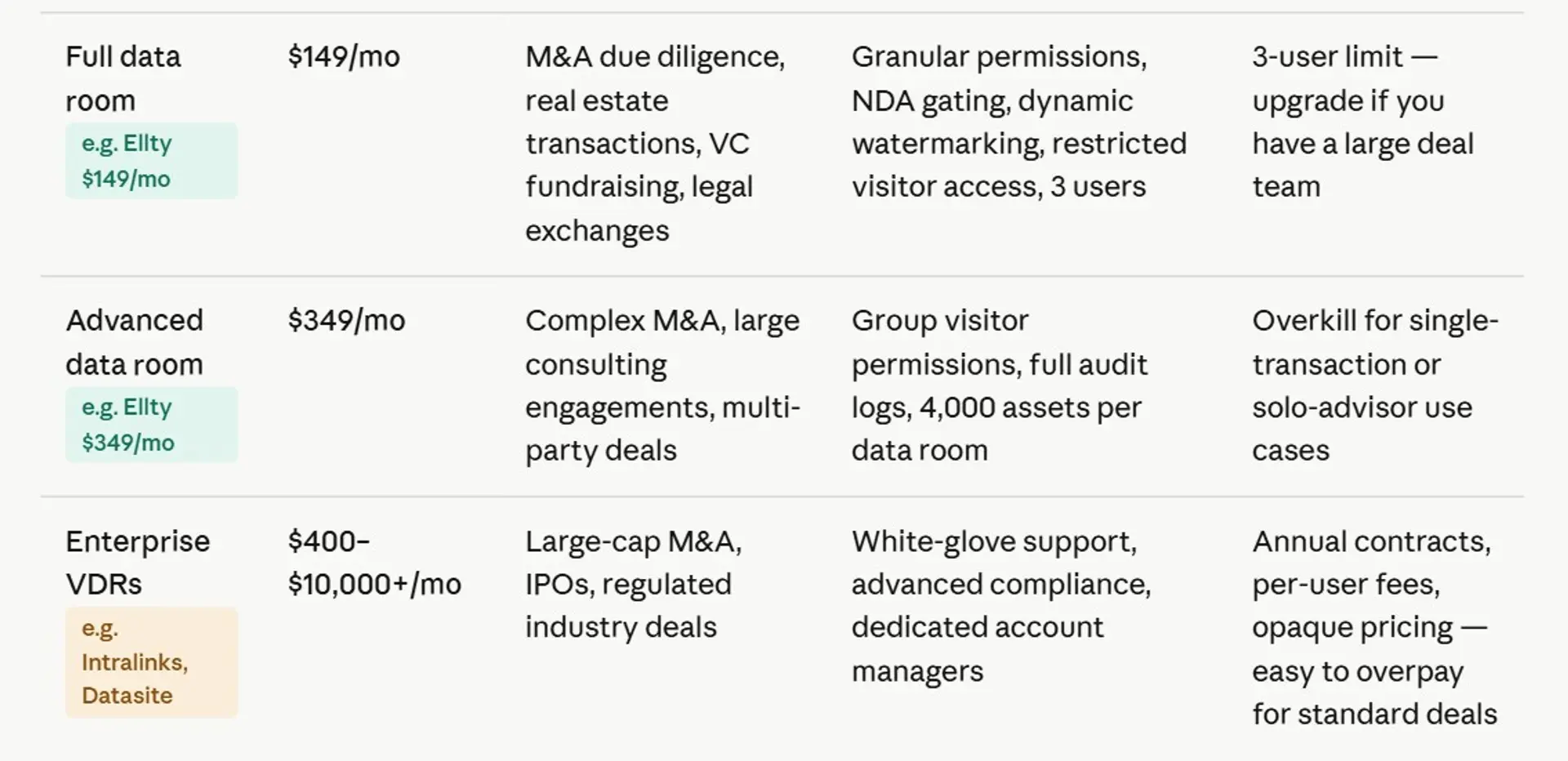
The trend is specialization. People don't want a single tool that does everything poorly, they want the right tool for the specific job. For sensitive external document sharing with analytics and control, dedicated VDRs have largely taken over from SharePoint in deal workflows.


Are ShareFile and SharePoint the same thing?
No, and this causes genuine confusion. Both names start with "Share" and both come from large companies, but they're completely different products.
SharePoint is a Microsoft product. It's part of Microsoft 365 and designed for internal team collaboration, intranets, and document management within organizations.
ShareFile is a Citrix product. It's a secure file-sharing and storage platform originally designed for professional services firms (law, accounting, financial services) that need to share sensitive documents with clients. ShareFile is closer to a VDR in concept than SharePoint is, but it's not a full VDR either. It focuses more on file delivery and client portals than deal-specific features like NDA gating or audit trails.


Which one should you use?
This depends entirely on what you're actually doing. Here's the decision split:
Use SharePoint when...
- You're sharing internally within your org
- You already pay for Microsoft 365
- External parties have Microsoft accounts
- You don't need engagement analytics
- Low-stakes, no NDA needed
- IT can configure and maintain permissions
Use a VDR when...
- You're raising funding or going through M&A
- Multiple external parties need different access
- You need to know who opened what
- NDA gating is required before access
- Dynamic watermarking is needed
- You need a full audit trail for legal purposes
If you're using a data room for a deal and you don't know whether your lead visitor has opened your financials, you're flying blind. That's exactly the visibility a VDR gives you that SharePoint doesn't.
How Ellty fits in

Ellty is a secure file-sharing and data room platform built for teams that need VDR functionality without enterprise pricing or complex setup.
If you're raising a funding round, closing a property deal, running a consulting engagement, or managing an acquisition, Ellty offers the data room features you actually need:


Where Ellty works best: anyone who needs to share sensitive documents in a controlled and trackable way, where you need real data room functionality, quick setup, and per-document analytics, without paying for a traditional enterprise VDR that starts at $400/month and comes with a sales rep and an onboarding call you didn't ask for.
Where Ellty may not be the right fit: very large M&A transactions with hundreds of participants across many deal rooms simultaneously, or situations requiring deep integration with enterprise legal systems. For those, a platform like Datasite or Intralinks is probably more appropriate.


Frequently asked questions
What is a virtual data room used for?
A virtual data room is used to share sensitive documents with external parties in a controlled, auditable environment. Common use cases include fundraising due diligence, M&A transactions, legal proceedings, board reporting, and real estate deals. The key feature is control, you decide who sees what, you can track engagement, and you can revoke access at any time.
Is SharePoint a virtual data room?
No. SharePoint is a collaboration and document management platform built for internal teams. It lacks the core features that define a VDR: NDA gating, document-level audit trails, dynamic watermarking, granular per-user permissions, and real-time viewer analytics. You can share files externally via SharePoint, but configuring it for a proper due diligence process requires significant IT work and still doesn't give you full VDR functionality.
What has replaced SharePoint for secure document sharing?
For external document sharing in deal contexts, dedicated VDRs have largely replaced SharePoint. Platforms like Ellty, iDeals, Datasite, and Firmex offer purpose-built features that SharePoint doesn't provide natively. For internal document management, SharePoint is still widely used - Teams integration has helped it stay relevant in many organizations.
Are ShareFile and SharePoint the same thing?
No. SharePoint is a Microsoft product built for internal team collaboration. ShareFile is a Citrix product designed for secure client-facing file sharing, primarily used by professional services firms like law and accounting practices. They're different products from different companies with different use cases. ShareFile is closer to a VDR in concept than SharePoint is, but neither is a full virtual data room.
How much does a virtual data room cost compared to SharePoint?
SharePoint is included with Microsoft 365, which starts at around $6/user/month. The marginal cost is $0 if you already pay for it. Dedicated VDRs range from $149/month (Ellty Data Room) to $400-$1,000+ per month for traditional enterprise providers like Intralinks or Datasite. The cost difference is real, but so is the feature gap - if you need NDA gating, per-document analytics, and dynamic watermarking, SharePoint doesn't deliver those regardless of price.
Can I use SharePoint for M&A due diligence?
You can, but you'll run into friction fast. SharePoint wasn't built for multi-party external access with different permission levels per folder or document. You'll need IT involvement to configure guest access, you won't get document-level engagement data, and you can't gate access behind an NDA signature. For a serious M&A process, most advisors and legal teams now expect a proper VDR. Using SharePoint in that context can slow down the process and raises questions about how seriously you're managing confidentiality.
What's the difference between a virtual data room and cloud storage?
Cloud storage (Google Drive, Dropbox, OneDrive) is optimized for convenience - easy access, easy sharing. VDRs are optimized for control and auditability. The main differences: VDRs offer per-document permissions, full audit trails, NDA enforcement, dynamic watermarking, and viewer engagement analytics. Cloud storage generally offers none of these natively. When the documents are confidential and the situation has legal or financial stakes, cloud storage isn't the right tool.
How long does it take to set up a virtual data room?
With modern VDR platforms, a basic data room can be ready in under an hour. You upload your documents, set permissions for each folder or file, add your counterparties via email, and share the access link. Traditional enterprise VDRs sometimes involve onboarding calls and configuration support, which can stretch the process to a few days. Ellty setup is self-serve - most users have their data room populated and shared the same day they sign up.
Does Ellty require a Microsoft account to access shared documents?
No. External parties access Ellty data rooms via a secure link and email verification. They don't need a Microsoft account, an Ellty account, or any specific software. This reduces friction significantly compared to SharePoint, which often requires guest account creation for external users outside the Microsoft ecosystem.
What security certifications should I look for in a virtual data room?
The most important ones to look for are SOC 2 Type II (covers security, availability, and confidentiality practices), ISO 27001 (information security management), and where applicable, GDPR compliance for EU data. You should also check whether the VDR offers data residency options if your deal involves regulated industries. Always verify certifications directly with the vendor - don't rely on marketing copy alone.
Author

Anika Tabassum Nionta is a Content Manager at Ellty, where she writes about secure document sharing, virtual data rooms, M&A, due diligence, fundraising, and sales enablement. With over 6 years of writing experience, she helps professionals understand how to share confidential documents securely, track engagement, and manage deals more effectively. Anika holds both a BA and MA in English from Dhaka University. Outside of work, she enjoys reading, exploring new cafes in Dhaka, and connecting with entrepreneurs and dealmakers in her community.

