
In this guide:
- Why file naming matters more than you think
- Core file naming conventions
- The naming rules to follow
- Folder structure that actually works
- Good vs bad: naming examples
- How to name datasets and financial files
- Naming conventions for electronic documents
- How Ellty helps you organize a data room
- FAQ
You've put serious work into pulling your documents together. Someone finally needs access to your data room, a buyer, a partner, an auditor, a lender. You send them the link.
And on the other side, they find something like this:
What the other party actually sees
- final report v3 REAL.pdf
- financials copy (2).xlsx
- agreement NEW.docx
- Contract - Sarah edits - USE THIS ONE.docx
- documents folder 2022 backup.zip
That's not a data room. That's a mess. And it sends a clear message that things aren't organized on your end.
File naming sounds like a small thing. It isn't. A well-organized data room with clean file names speeds up review, builds trust, and shows that you run a professional operation. Sloppy naming creates doubt before anyone has read a single word.
This guide gives you the naming conventions, folder structure, and real examples you need to get this right, whether you're running due diligence for a deal, managing an audit, handling a legal matter, or sharing documents with any outside party.
Why file naming matters more than you think
Reviewers, whether they're lawyers, auditors, buyers, or partners, move fast. They're often handling multiple matters at once. If they can't find a document quickly, they'll email you asking for it. That back-and-forth slows everything down and adds unnecessary friction to the process.
Messy naming also creates version confusion. "Which contract is the current one?" is a question you never want someone asking. And if they guess wrong, that's an even bigger problem.
Here's what clean file naming actually does for you:
- Cuts down the number of "where is X?" messages you receive
- Makes version control simple and clear
- Shows that your organization has proper processes in place
- Speeds up the review process, which means faster decisions and faster closes
- Keeps your own team organized as the room grows over time
If your data room tool tracks who views which files, clean names also make those analytics far more useful. You'll know exactly which document someone spent time on, not just "financials (3).xlsx."
Core file naming conventions
A naming convention is simply a consistent pattern you use for every file. You pick one system and stick to it. The goal is simple: anyone like your colleague, the other party's lawyer, an auditor you've never met, should be able to look at a file name and understand what it is without opening it.
There are a few common approaches. Here's how they compare:

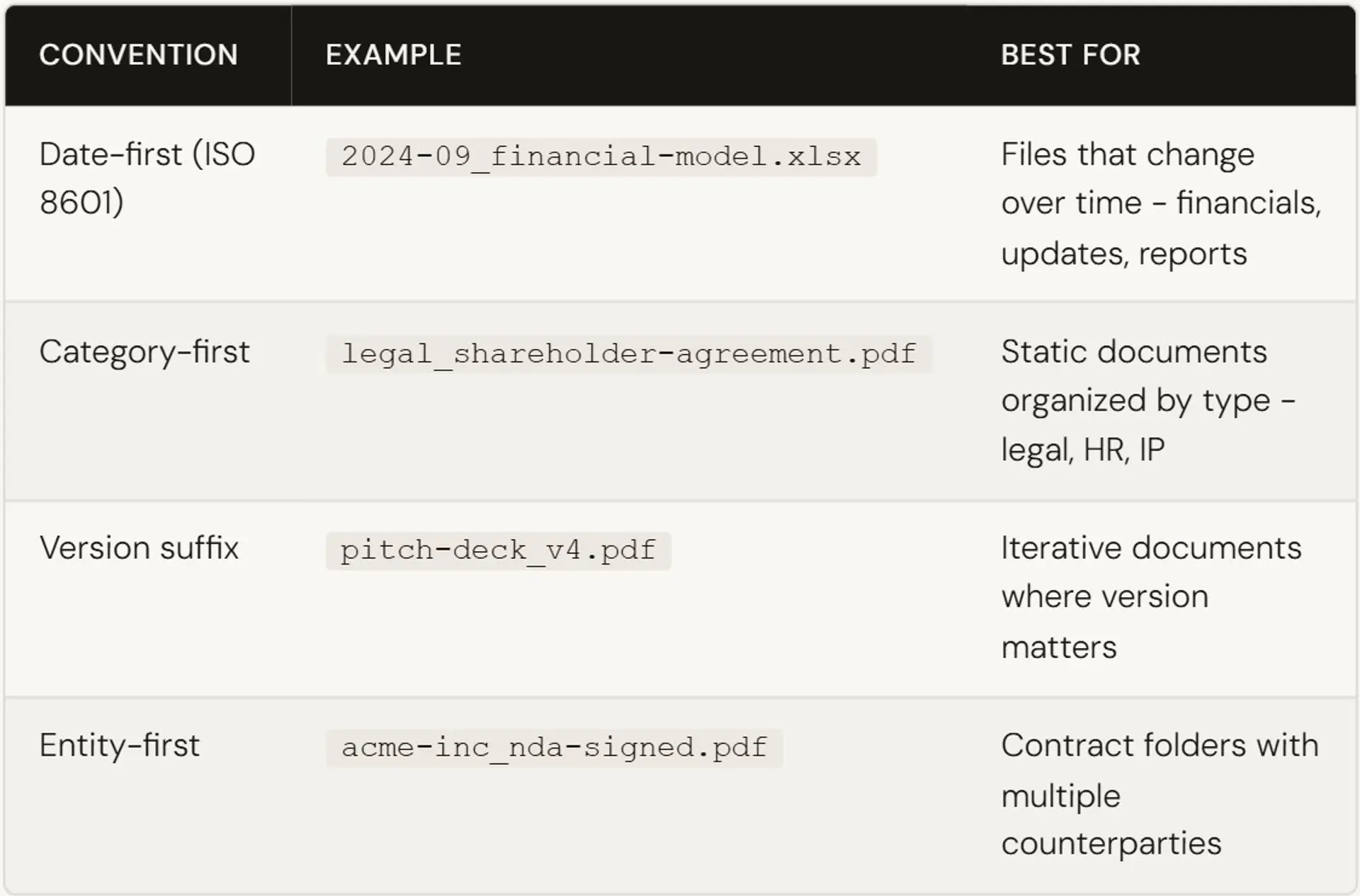
You don't have to pick just one. Use date-first for anything time-sensitive. Use category-first for stable documents like policies or certificates. Use version suffixes for anything still being revised. The key is being consistent within each folder type.
The naming rules to follow
These aren't preferences. They're rules that prevent real problems - broken links, file conflicts across operating systems, confusion when files get downloaded or emailed.
Use lowercase only
Capital letters cause inconsistency and can create file-matching issues across systems. Cap-Table.xlsx and cap-table.xlsx are two different files on some operating systems.
Replace spaces with hyphens
Spaces turn into %20 in URLs and break file paths in some tools. Use hyphens instead. Underscores work too, but pick one and don't mix them.
- ✗ Cap Table Final Version.xlsx
- ✓ cap-table-v2.xlsx
Skip special characters
No / \ : * ? " < > | # @ ! - these break across platforms. Parentheses and ampersands cause problems too. Keep names clean.
Be specific, not generic
A file called document.pdf tells you nothing. 2024-09_board-resolution-series-a.pdf tells you everything.
Use ISO date format
That's YYYY-MM or YYYY-MM-DD. This sorts chronologically when files are listed alphabetically. 01-2026 will sort wrong. 2026-01 won't.
Keep names reasonably short
Under 50 characters is a good target. Long names get truncated in some interfaces and are hard to scan at a glance.
Use version numbers, not "final"
There's no such thing as final. Use v1, v2, v3. When you're done iterating, delete the old versions from the data room - keep only the current one, clearly named.
Never use "final," "new," "latest," or "USE THIS ONE" in a file name. It always backfires. At some point you'll have "final_v2_FINAL_FOR_REAL.pdf" and you'll wish you had a system.
Folder structure that actually works
A good naming convention only works if the folder structure supports it. Anyone accessing your data room should be able to find what they need without having to ask. Here's a structure that works across most common VDR use cases such as M&A, audits, financing, legal reviews, and more:
01-organization/
company-overview.pdf
organizational-chart.pdf
registration-certificate.pdf
02-financials/
2026-09_financial-statements.xlsx
2026_revenue-and-budget.xlsx
2026-09_cash-flow-statement.xlsx
03-legal/
corporate/
articles-of-association.pdf
certificate-of-incorporation.pdf
agreements/
2024-06_partnership-agreement.pdf
2023-11_nda-template.pdf
ip/
trademark-registration.pdf
04-contracts/
acme-corp_services-agreement-signed.pdf
acme-corp_amendment-001.pdf
beta-ltd_supply-agreement-signed.pdf
05-compliance-and-regulatory/
operating-licenses.pdf
2025_audit-report.pdf
regulatory-filings-summary.pdf
06-assets/
property-valuations.pdf
asset-register.xlsx
insurance-certificates.pdf
07-team-and-hr/
key-personnel-bios.pdf
org-chart.pdf
employment-agreements-summary.pdf
08-reports-and-presentations/
board-presentation-2026-q1.pdf
due-diligence-summary.pdf
Good vs bad: naming examples
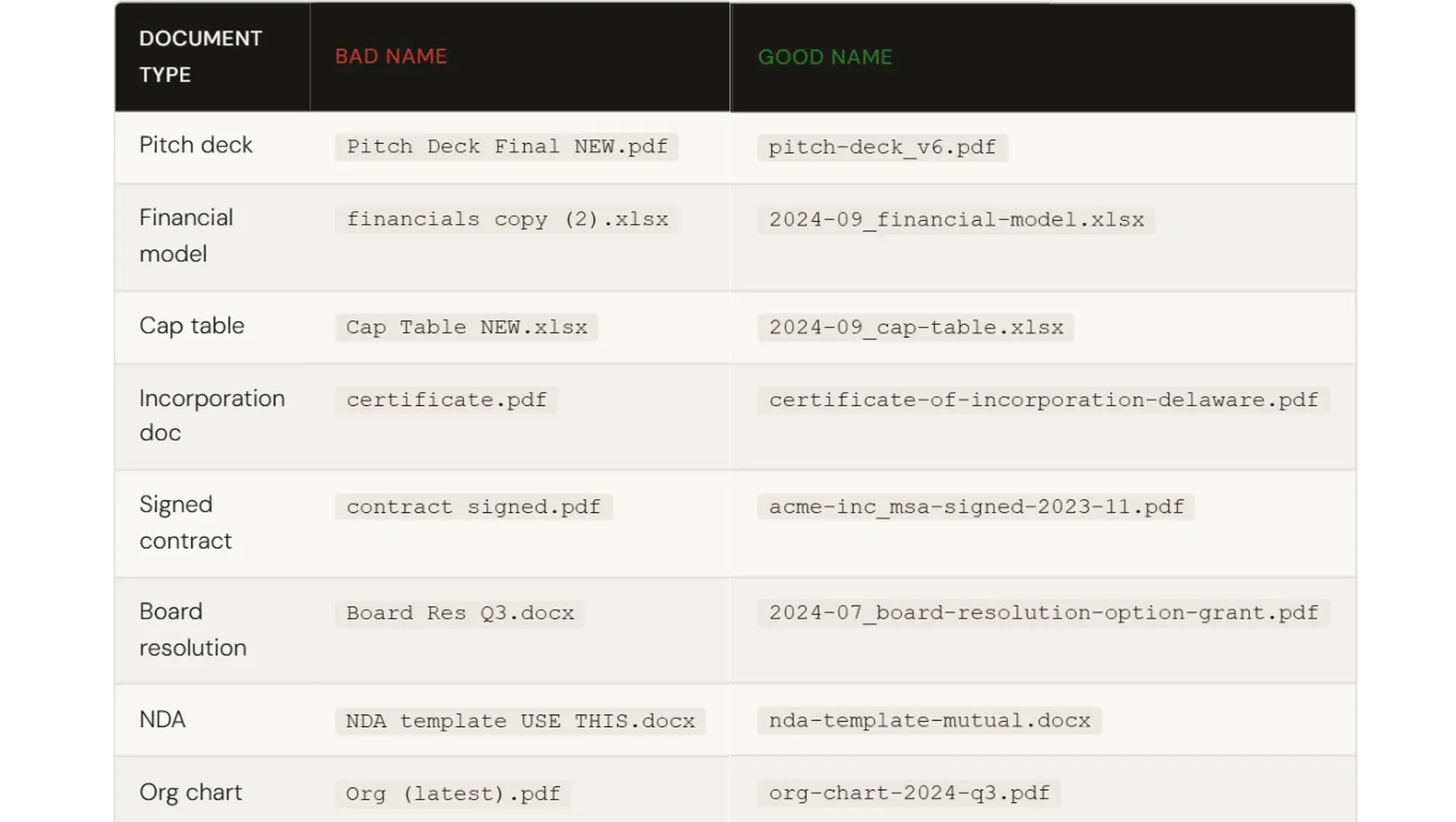
Here are real-world examples across the main document types you'll have in a virtual data room.

How to name datasets and financial files
Financial files and data exports deserve their own section because they're the most sensitive and the most frequently updated.
The naming principle for datasets is to answer three questions in the file name: what is this data, what time period does it cover, and what version or export is this?
Format: [period]_[description]_[version-or-source].ext
- 2026-q3_mrr-by-cohort.xlsx
- 2026-09_arr-breakdown-by-segment.xlsx
- 2026_customer-churn-monthly.csv
- 2026-09_cac-ltv-analysis.xlsx
- 2023-2024_revenue-actuals.xlsx
For files that are regularly updated (monthly P&L, rolling forecast), use the date of the most recent data in the name, not the date you exported it. That way it's always clear what period the file covers, not when you generated it.
If you export data from a tool (like Stripe or QuickBooks), add the source: 2024-09_stripe-revenue-export.csv. Visitors may want to cross-reference and knowing the source saves them asking.
Keep only the current version of financial files in your data room. Archive old versions in your internal storage. Viewers don't need to see your work-in-progress, they need the current, accurate picture.
Naming conventions for electronic documents and PDFs
Most of your data room will be PDFs. A few things specific to electronic documents worth knowing:
Always save final documents as PDFs, not editable formats like .docx or .pptx, unless the visitor needs to edit something. PDFs preserve formatting, can't be accidentally modified, and are easier to track via tools like Ellty.
When naming PDFs from legal agreements, include the signing date if the document is fully executed: 2023-06_employment-agreement-cto-signed.pdf. This makes it immediately clear whether you're looking at a draft or an executed document.
For compliance documents, include the jurisdiction or standard where relevant: gdpr-data-processing-agreement.pdf or soc2-type2-report-2024.pdf.
How Ellty helps you organize a data room


Organizing files properly is one side of the equation. How you share them, track them, and control access is the other.
Ellty is a virtual data room and pitch deck analysis platform built for teams who need to move fast. You can upload documents, create trackable share links, and see exactly who viewed which file, all without a long setup process or per-user pricing that makes sharing with a small team expensive.
Here's what's available across plans:

Ellty works well when you need to share a core set of documents like a pitch deck, financial model, and supporting materials with multiple stakeholders in a structured way. The analytics are especially useful: seeing when a document was opened, how long someone spent on it, and which sections held attention gives you real signals to guide follow-ups.
It’s less suited to highly complex M&A transactions that require built-in Q&A modules, project management layers, or deeply customized enterprise security workflows. For most lean, fast-moving processes, that level of complexity isn’t necessary anyway.


Common mistakes people make with data room files
Before the FAQ, here's a quick list of things that regularly trip people up:
- Uploading draft documents instead of final versions - always audit before sharing access
- Including personal or sensitive data that shouldn't be in the room yet (employee salaries, personal guarantees) - use permissions to stage what visitors see
- Mixing languages in file names if your team is international - pick one language for naming, usually English
- Creating too many folders - a data room with 12 top-level folders and 4 levels of nesting is harder to navigate than a flatter structure
- Not updating the data room after key changes - if your cap table changes post-conversion, update the file and don't leave the old one there
- Uploading compressed files or ZIP archives - extract everything before uploading so files are viewable and trackable individually
Audit your data room before every new viewer gets access. What made sense six months ago may now be outdated, mislabeled, or missing entirely.
Frequently asked questions
What is the proper way to name files in a data room?
Use lowercase letters, hyphens instead of spaces, and descriptive names that include the document type, date (in YYYY-MM format), and version where relevant. Example: 2024-09_financial-model.xlsx. Avoid vague names, special characters, and words like "final" or "new."
What are file naming conventions for electronic documents?
For electronic documents in a data room, use a consistent pattern: [date]_[description]_[version].ext for time-sensitive files, and [category]_[document-type].ext for static documents like legal or HR files. Stick to lowercase, use hyphens, and save final documents as PDFs.
How do I name datasets in a data room?
For data files, answer three things in the name: what the data is, what period it covers, and where it came from if relevant. Example: 2024-q3_mrr-by-cohort.xlsx or 2024-09_stripe-revenue-export.csv. Use the period of the data, not the export date.
Should I use underscores or hyphens in file names?
Either works, but pick one and stick to it. Hyphens are slightly preferred because they're treated as word separators by most search engines and operating systems. Mixing the two in the same data room is what you want to avoid.
How should I structure folders in a data room?
Use numbered top-level folders so they sort in a logical order (01-company-overview, 02-financials, etc.). Aim for no more than two levels of depth. Sub-folders only make sense when a top-level category has genuinely different document types underneath it, like legal.
What file format should I use for data room documents?
PDF is the standard for everything that's been finalized - agreements, decks, reports. PDFs preserve formatting, can't be accidentally edited, and are trackable via analytics tools. Use .xlsx for financial models where investors may want to run their own calculations, but note this as an editable model in the file name.
How many versions of a file should I keep in the data room?
One. Keep only the current version of every file in the visitor-facing data room. Archive older versions in your internal storage. Having multiple versions of the same file forces visitors to figure out which one to read, that's friction you don't want.
Do file naming conventions apply to folder names too?
Yes. Apply the same rules to folders: lowercase, hyphens, no special characters. Add numbers to the front of folder names (01-, 02-, etc.) so they sort in your intended reading order rather than alphabetically.
What's the difference between a data room and a shared Google Drive folder?
A data room gives you access controls, document-level analytics, and audit trails. You can see who opened a file, how long they spent on it, and which pages they read. A shared Google Drive lets you share files, but you have very little visibility into who's actually engaging with them.
Can I set up a data room quickly without technical help?
Yes, with tools like Ellty, you can upload your documents, organize them into folders, and create a shareable link. The setup itself takes under an hour if your files are already organized. The harder part is making sure your documents are named and structured correctly before you upload, which is what this guide is for.


Author

Anika Tabassum Nionta is a Content Manager at Ellty, where she writes about secure document sharing, virtual data rooms, M&A, due diligence, fundraising, and sales enablement. With over 6 years of writing experience, she helps professionals understand how to share confidential documents securely, track engagement, and manage deals more effectively. Anika holds both a BA and MA in English from Dhaka University. Outside of work, she enjoys reading, exploring new cafes in Dhaka, and connecting with entrepreneurs and dealmakers in her community.

