
In this guide:
- What is data room access?
- How does a virtual data room work?
- Permission levels explained
- How to grant access - step by step
- Granting access for due diligence
- How to set up a virtual data room
- How Ellty handles data room access
- FAQ
You've got a data room set up. Documents are uploaded, folders are organized. Now a visitor asks for access. What do you actually do next?
This is where a lot of people get stuck or worse, get it wrong. They either share too much with the wrong people, or they set up access so restrictively that viewers can't find anything. Neither is a good look during a serious deal.
This guide covers everything you need to know about granting access to a virtual data room - what the different permission levels mean, how to set them up, and how to track what happens after you share.
What is data room access?
Data room access is the system that controls who can enter your virtual data room, what they can see inside it, and what they can do with the documents they find there.
It's not a single switch. It's a layered set of controls. You decide who gets in, which folders they can open, whether they can download files or only view them, and whether they need to agree to an NDA before seeing anything at all.
In a physical data room, the kind used in M&A transactions before everything moved online, access was controlled by who could physically walk in the door. Virtual data rooms replicate this with digital permissions, and they go further. You can track exactly what each visitor read, how long they spent on each document, and when they were active.
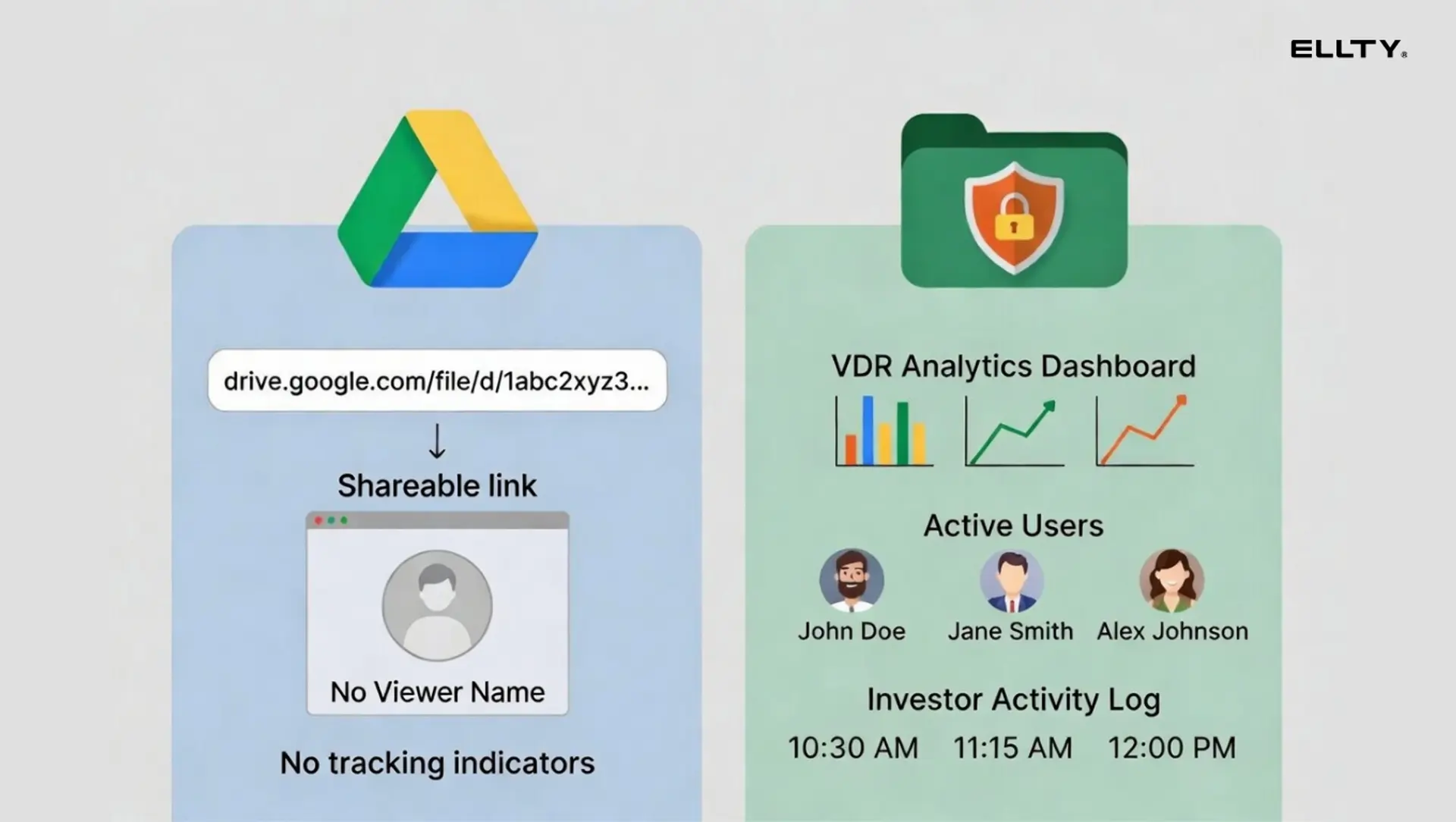
That visibility is what makes a proper VDR different from a shared Google Drive link. It's not just about restricting access, it's about understanding how visitors are engaging with your materials.

How does a virtual data room work?
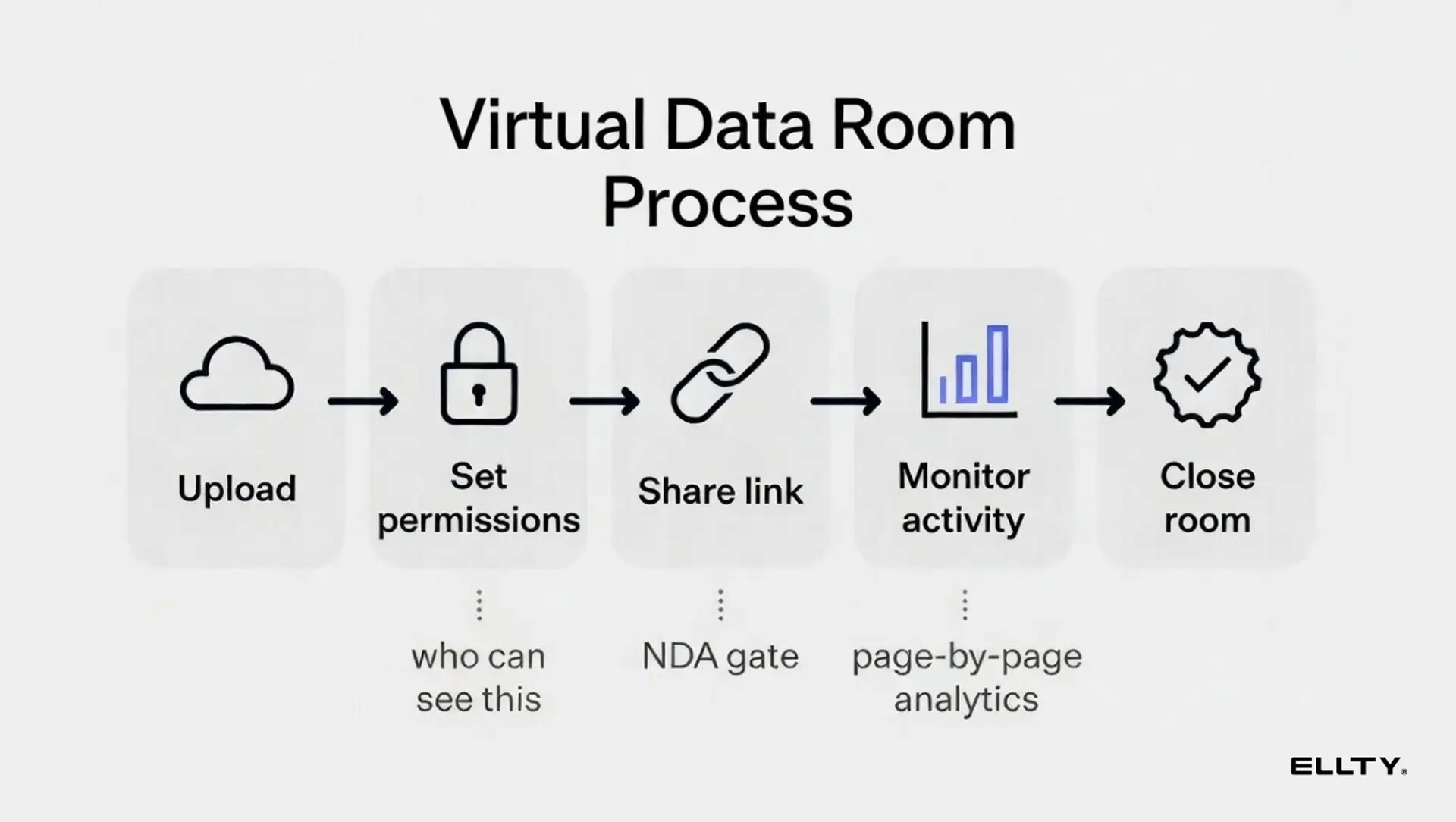
At its core, a virtual data room is a secure online repository. You upload documents, organize them into folders, and then invite specific people to view them. The platform handles the security layer like encrypted storage, access controls, activity logging. So you don't have to build any of that yourself.
Here's the basic flow:
- Upload your documents
You add files to the data room, pitch deck, financials, legal documents, cap table. They're stored securely on the platform's servers. - Organize by folder and category
You arrange documents into a folder structure that investors can navigate. Some folders may be for all visitors; others may be restricted to specific people or groups. - Configure access settings
You decide who can view each section, whether downloads are allowed, whether a watermark appears on documents, and whether an NDA needs to be signed before entry. - Invite specific users or share a link
You either send invitations to specific email addresses, or create a shareable link with defined access rules attached to it. - Monitor activity
Once visitors are in, you see real-time analytics, who's active, which documents they opened, how long they spent on each page.


Permission levels explained
Not everyone who accesses your data room should see the same things. A lead visitor in final due diligence needs different access than an early-stage visitor doing preliminary review. Your lawyer needs different access than an acquirer's junior associate.
Most data room platforms structure permissions in three broad tiers:

Beyond these base tiers, more advanced platforms let you set folder-level permissions, so a visitor sees the company overview and financials but not the legal or HR folders until a later stage. This is called granular or document-level access control.
A common approach during any deal: give early-stage viewers view-only access to the top-level deck and financial summary. Once they're serious, open up the full data room with the legal and cap table folders. This is sometimes called a "staged" or "phased" data room approach.
How to grant access - step by step
The exact steps vary by platform, but the underlying process is consistent across most virtual data room tools.
Option 1: Invite by email
This is the most secure method. You enter the visitor's email address, assign their permission level, select which folders they can access, and send the invitation. They receive an email with a link and often need to create a password or verify their identity before entering.
Use this for anyone you want to track individually - investors, lawyers, acquirers. You'll see their specific activity in analytics.
Option 2: Create a shareable link
You generate a link with defined permissions attached. Anyone with the link can enter but you control what they can see and do. Some platforms let you set an expiry date on the link or a maximum number of uses.
Use this for early-stage sharing when you don't have specific email addresses yet, or when you want to send one link to a small group. Be more conservative with permissions here since you can't predict exactly who will open it.
Option 3: Group access
Available on higher-tier plans, this lets you create groups (for example, "Investor Group A" or "Legal Team") and assign permissions to the group rather than to individuals. When you add someone to the group, they automatically get all the group's permissions.
This is useful when you have multiple parties doing simultaneous due diligence and they should all see the same things.

Steps to grant access in a typical data room platform
- Open your data room settings
Navigate to the access or user management section of your platform. - Choose invite method
Select email invitation for individual tracking, or link generation for broader sharing. - Set permission level
Choose view-only, download, or admin. If the platform supports it, configure folder-level restrictions at this step. - Add NDA requirement (optional)
If your platform supports it, require the visitor to sign or accept an NDA before entering. This is especially important for early-stage visitors who haven't signed anything formally yet. - Set an expiry date (optional)
Limit how long the link or invitation remains active. You can always extend it. - Send the invitation or copy the link
The visitor receives access. They'll see only what you've configured for them. - Monitor activity
Check your analytics dashboard to see when they entered, what they opened, and how long they engaged with each document.
Granting access for due diligence
Due diligence is the most sensitive context in which you'll grant data room access. You're sharing documents that can affect deal terms - financials, contracts, cap table, IP - with people who have strong incentives to find problems.
Here's what to think about before you open access for a due diligence process:
Stage your access
Don't open everything on day one. Start with the high-level room: deck, financial model summary, team overview. Once the visitor has signed a term sheet or you're deep into diligence, open the sensitive folders: detailed financials, legal documents, customer contracts.
Most people open too much too early. The documents you share before an NDA is in place are largely unprotected.
Require an NDA before entry
If your platform supports NDA gating, turn it on for your full data room. Visitors have to accept the NDA before they can see anything. This won't stop a bad actor but it creates a legal record and filters out people who aren't serious.
Use watermarks on sensitive documents
Dynamic watermarking stamps the visitor's name, email, or IP address on documents as they're viewed. If a document leaks, you can trace it. This is particularly important for cap tables, term sheets, and any document with information that could affect your negotiating position.
Revoke access when needed
If a deal falls through, revoke access immediately. Don't leave old links active. Most platforms let you deactivate a specific user's access or disable a link without affecting other users in the room.
How to set up a virtual data room
If you don't have a data room yet, here's the setup process at a high level. Most modern platforms make this faster than you'd expect.
You'll need to:
- Choose a platform that fits your use case and budget
- Create an account and name your data room
- Set up your folder structure before uploading (easier to organize as you go)
- Upload your documents - start with the ones you'd share in an early conversation
- Configure your access settings - default permission level, NDA requirement, watermarks
- Test the experience by inviting yourself or a trusted colleague as a viewer
- Grant access to your first real visitor
The folder structure and file naming are worth getting right before you start sharing. You don't want to be reorganizing while a viewer is actively reviewing documents. If you need help with this, the file naming guide covers the structure in detail.
Realistically, setup takes a few hours if your documents are already organized. The platform configuration itself takes 30 to 60 minutes. The rest is document preparation.
How Ellty handles data room access
Ellty is built for sharing sensitive documents and data rooms that's fast to set up and gives them visibility into investor engagement. Here's what the access control features look like across plans:

Ellty works well when you need more control and visibility than a shared Drive link, but don’t want the overhead of an enterprise VDR. The analytics layer page-by-page viewing data, time spent per document, and real-time open notifications - is where it delivers immediate value. It shows you what’s getting attention and where follow-ups actually matter.


It’s also important to be clear about scope. Ellty is well suited for structured document sharing, ongoing stakeholder updates, and early-stage due diligence. If you’re running a full M&A process with multiple bidders and a dedicated legal team, enterprise platforms with certifications like ISO 27001 and hands-on support, such as Intralinks or Datasite, are built for that level of complexity. Knowing what you actually need upfront makes the decision much easier.


Common access control mistakes to avoid
A few things that regularly go wrong when setting up data room access for the first time:
- Sharing the same link with every party - you lose individual tracking and can't revoke one person's access without revoking everyone's
- Not setting an expiry date on links - old links stay active indefinitely unless you manually disable them
- Opening the full data room before an NDA is in place - once someone has seen your cap table, you can't unsee it for them
- Giving download permissions by default - most parties only need to view; download permissions increase the risk of documents circulating without your knowledge
- Not testing the access flow yourself - always enter your own data room as a guest before inviting real viewers, to see exactly what they'll see
- Forgetting to update access levels as the deal progresses - the person who got early-stage view-only access may need full access once they're in final diligence
Create a simple access log for yourself such as a spreadsheet or even a notes doc, tracking who has active access, what permission level they have, when you granted it, and the current deal status. This takes five minutes to maintain and saves a lot of confusion over a long deal process.
Frequently asked questions
How do I grant access to a virtual data room?
Most platforms let you either invite someone by email address (which gives them individual tracked access) or generate a shareable link with defined permissions attached. You set the permission level such as view-only, download, or admin, and optionally restrict which folders they can see before sending. The visitor receives a link and enters the room with the access level you've defined.
What is data room access control?
Access control is the system of rules that determines who can enter your data room, what they can see inside it, and what they can do with the documents. It covers user-level permissions (who's invited), folder-level permissions (which sections they can open), and action-level permissions (view, download, print). Good access control lets you share confidently while keeping sensitive materials protected.
How does a virtual data room work?
A virtual data room is a secure online space for storing and sharing sensitive documents. You upload files, organize them into folders, configure who can access what, and then invite users. The platform handles encryption, access logs, and activity tracking. You can see who viewed which documents, how long they spent reading, and when they were last active, all in real time.
How much does a virtual data room cost?
It depends on what features you need. Free tools like Google Drive work for basic sharing. Startup-focused platforms like Ellty start free and go up to $349/month for advanced permissions, audit logs, and group access. Mid-market VDRs typically cost $400-$1,000/month. Enterprise platforms for complex M&A can run $1,000-$5,000/month or more. Per-user pricing is common in enterprise tools and can add up fast if you're inviting many external parties.
How do I set up a virtual data room for due diligence?
Start by organizing your documents into a clear folder structure before uploading. Then configure your access defaults, typically view-only for external parties, with NDA acceptance required before entry. Upload your documents in stages: company overview and financials first, legal and cap table only when diligence is serious. Test the access flow yourself, then invite visitors individually by email so you can track each person's activity separately.
Can I restrict which folders a visitor can see?
Yes, on platforms that support granular or folder-level permissions. This lets you open some sections to all visitors while keeping sensitive folders like legal documents, detailed cap table, or employee data, restricted to specific users or until a later stage of the process. Ellty offers granular permissions on the Data Room plan ($149/month and above).
How do I revoke access to a virtual data room?
Most platforms let you disable a specific user's access from your admin panel without affecting other users. If you shared via a link, you can usually deactivate or expire the link. Do this as standard practice when a deal falls through or when a round closes. Don't leave old access active, it's a security risk and a compliance issue if anything you've uploaded changes.
What's the difference between view-only and download access?
View-only lets visitors read documents inside the platform but doesn't let them save a copy. Download access lets them save files to their device. In most VDR contexts, view-only is appropriate for visitors until you have a strong level of trust. Download access is typically reserved for advisors and lawyers who need to annotate documents or share with their team.
How do I know if a visitor has actually looked at my data room?
Any decent data room platform shows you this in the analytics dashboard. You can see when a user entered the room, which documents they opened, how many pages they read, and how long they spent on each one. Ellty sends real-time notifications when someone opens your documents, so you don't have to check manually. This is one of the most useful features during an active deal, it tells you exactly when to follow up and what to address.
Author

Anika Tabassum Nionta is a Content Manager at Ellty, where she writes about secure document sharing, virtual data rooms, M&A, due diligence, fundraising, and sales enablement. With over 6 years of writing experience, she helps professionals understand how to share confidential documents securely, track engagement, and manage deals more effectively. Anika holds both a BA and MA in English from Dhaka University. Outside of work, she enjoys reading, exploring new cafes in Dhaka, and connecting with entrepreneurs and dealmakers in her community.

