
If you've started shopping for a virtual data room, you've probably already noticed the pricing feels a little opaque. Most providers don't list it publicly. You have to request a demo. Then someone calls you and starts asking how many users you need, how many documents, and what kind of deal you're running.
That's not an accident. Enterprise VDR pricing is built to extract maximum budget from every deal. Whether you're a founder sharing documents with investors, a consultant managing client due diligence, or a real estate firm closing a property deal that model probably isn't built for you.
This guide breaks down what a virtual data room actually is, what you need for your situation, and how to find something affordable without giving up on security or analytics.
What is a virtual data room?
A virtual data room (VDR) is a secure online space where you share confidential documents with investors, acquirers, legal teams, clients, or any other party that needs controlled access. Think of it as a private folder with access controls, audit trails, and analytics baked in.
The traditional use case is M&A due diligence where a company selling itself needs to share financials, contracts, and IP documents with potential buyers. But today, a much wider range of professionals rely on them.
People use VDRs for:
- M&A transactions (sharing financials, contracts, and IP with buyers and their advisors)
- Fundraising (sharing financial models and cap tables with investors)
- Consulting engagements (exchanging sensitive client documents securely)
- Real estate deals (sharing property records, lease agreements, and due diligence files)
- Legal document exchange (between firms, clients, and counterparties)
- Investor updates (controlled sharing with existing stakeholders)
- Partnership negotiations (sharing agreements without losing track of who's seen what)
The technology has gotten cheaper and easier. What cost $2,000/month in 2015 now costs $150/month or less and some tools offer free tiers.

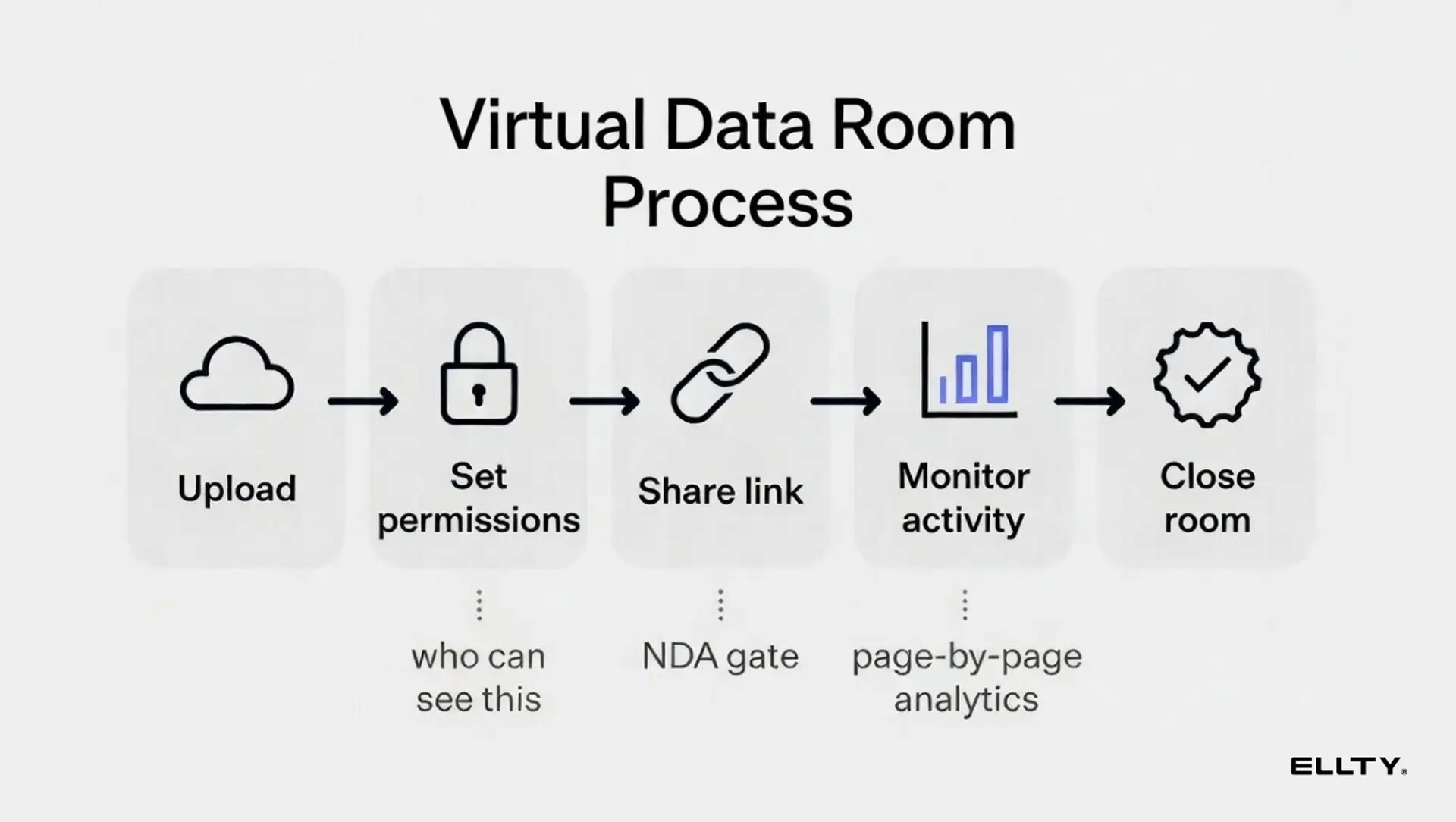
Virtual data room pricing: what you actually pay
This is where things get messy. VDR pricing ranges from $0 to $10,000+ per month depending on who you're talking to. Here's an honest breakdown.

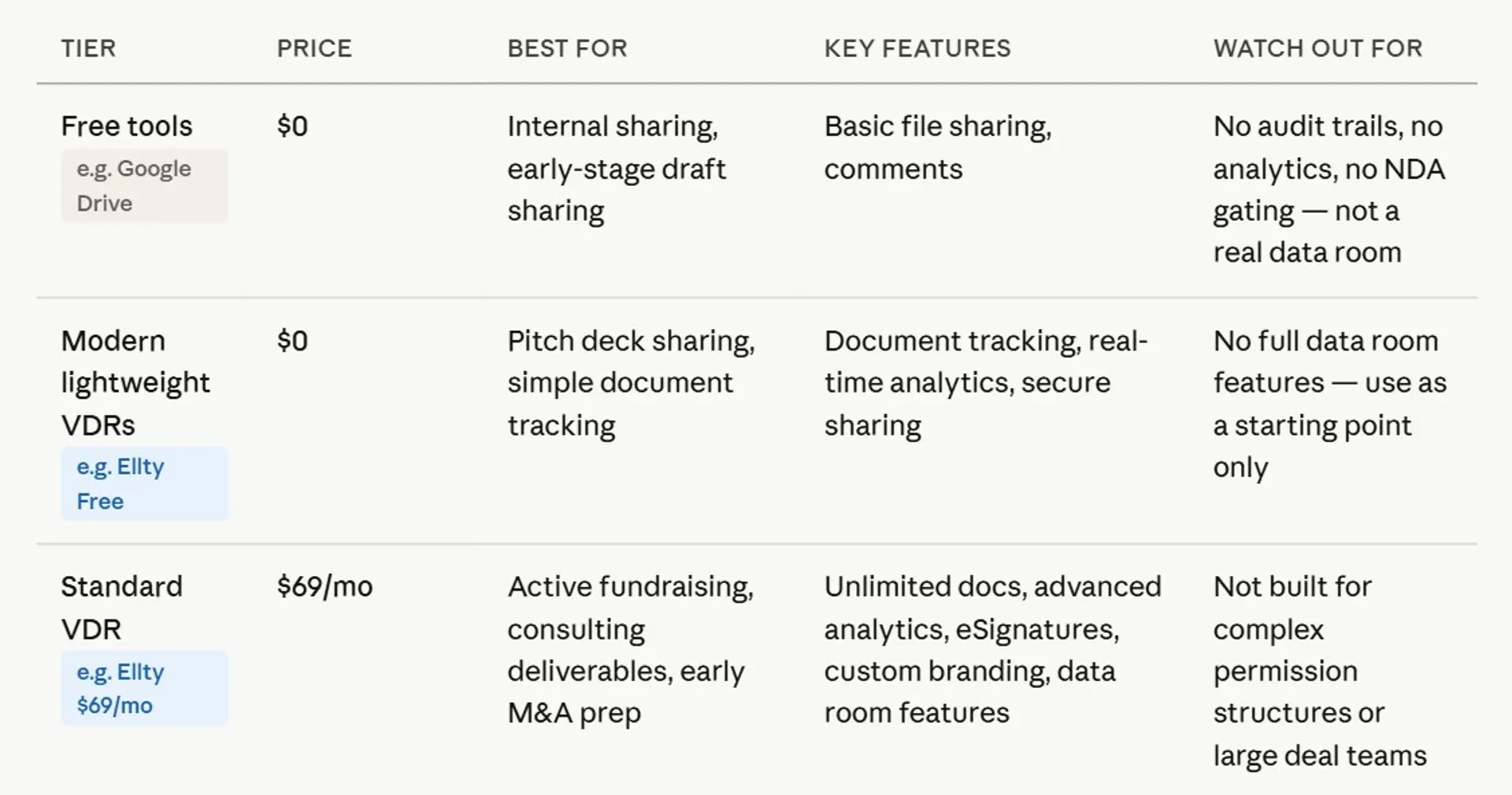

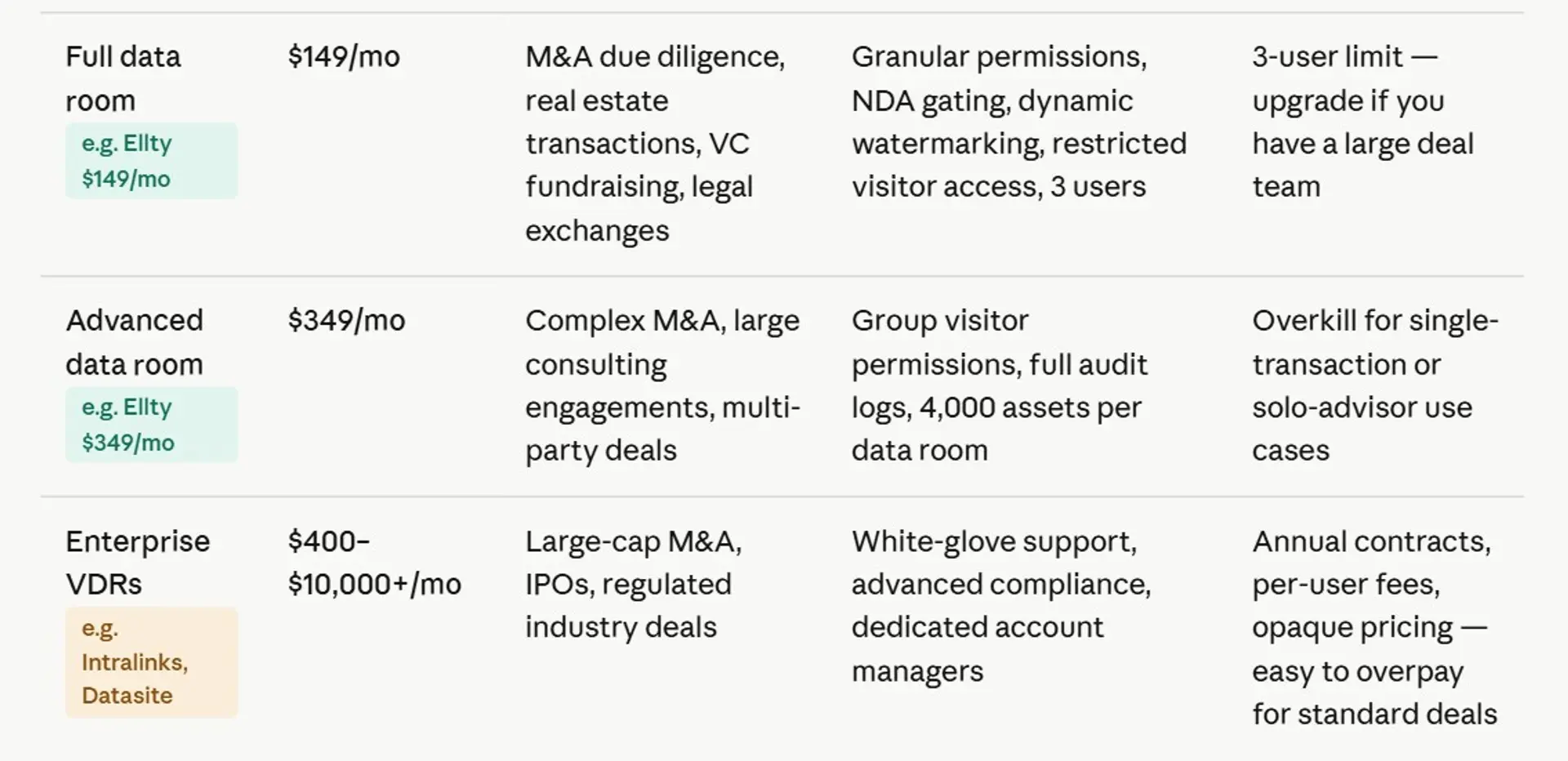
The biggest pricing traps:
Per-user fees. Some VDR providers charge $15–$50 per user per month. If you're sharing with a large team, multiple advisors, or several counterparties, that adds up fast.
Per-page or per-GB pricing. A few legacy platforms still charge by the page or by storage. Avoid these entirely.
Annual commitment requirements. Many enterprise VDRs won't let you pay month-to-month. You're signing a 12-month contract for a deal that might close in 60 days. That rarely makes sense.
Overage fees. You upload more than your plan allows and they charge extra. Always read the fine print.
What's actually included. "Data room" means different things to different vendors. Some include NDA gating. Some don't. Some are just calling a password-protected link a data room.
Virtual data room pricing tiers explained
To give you a more concrete picture, here's how modern tools tend to structure their pricing using Ellty as a clear example, since their pricing is actually published:
- Free - document tracking, real-time analytics, secure sharing. Good for basic document distribution when you don't need full data room controls.
- Standard ($69/month) - unlimited documents, advanced analytics, eSignatures, custom branding, and data room features included. Good for active deals that don't require heavy permission management.
- Data Room ($149/month) - granular permissions, NDA gating, dynamic watermarking, restricted visitor access, 3 users included. Built for real due diligence whether that's an M&A transaction, a fundraising round, or a consulting engagement with sensitive deliverables.
- Data Room Plus ($349/month) - group visitor permissions, audit logs, 4,000 assets per data room. For complex deals with multiple stakeholders, advisors, and document sets.
Compare that to enterprise VDR pricing that starts at $400–$600/month just for basic access, often with per-user fees on top. For anyone running a time-limited deal or a single transaction, that's a significant and often unnecessary expense.


7 affordable VDR options worth considering:
1. Ellty Starting at $0 (free tier) up to $349/month


Ellty is one of the few VDR providers that actually publishes its pricing, which tells you a lot right away. The free plan gives you document tracking and real-time analytics, so you can see who's opening your files and for how long. Paid plans start at $69/month and step up to full data room features at $149/month, including NDA gating, dynamic watermarking, granular visitor permissions, and eSignatures. The $349/month plan adds group permissions, audit logs, and support for up to 4,000 assets per room.
What makes Ellty stand out isn't just the price, it's that the platform works for almost any document-sharing situation. M&A teams, real estate firms, consultants, and founders all use it for the same core reason: they need to know who's seen what, and they need to control access without building a spreadsheet to track it. There are no per-user traps or surprise overage fees buried in the fine print. The interface is clean, setup is fast, and you don't need a dedicated IT person to run it. If you're evaluating VDRs and want a transparent, modern option that doesn't require a sales call just to learn what things cost, Ellty is the natural starting point.


2. SecureDocs Starting at $250/month (flat rate)

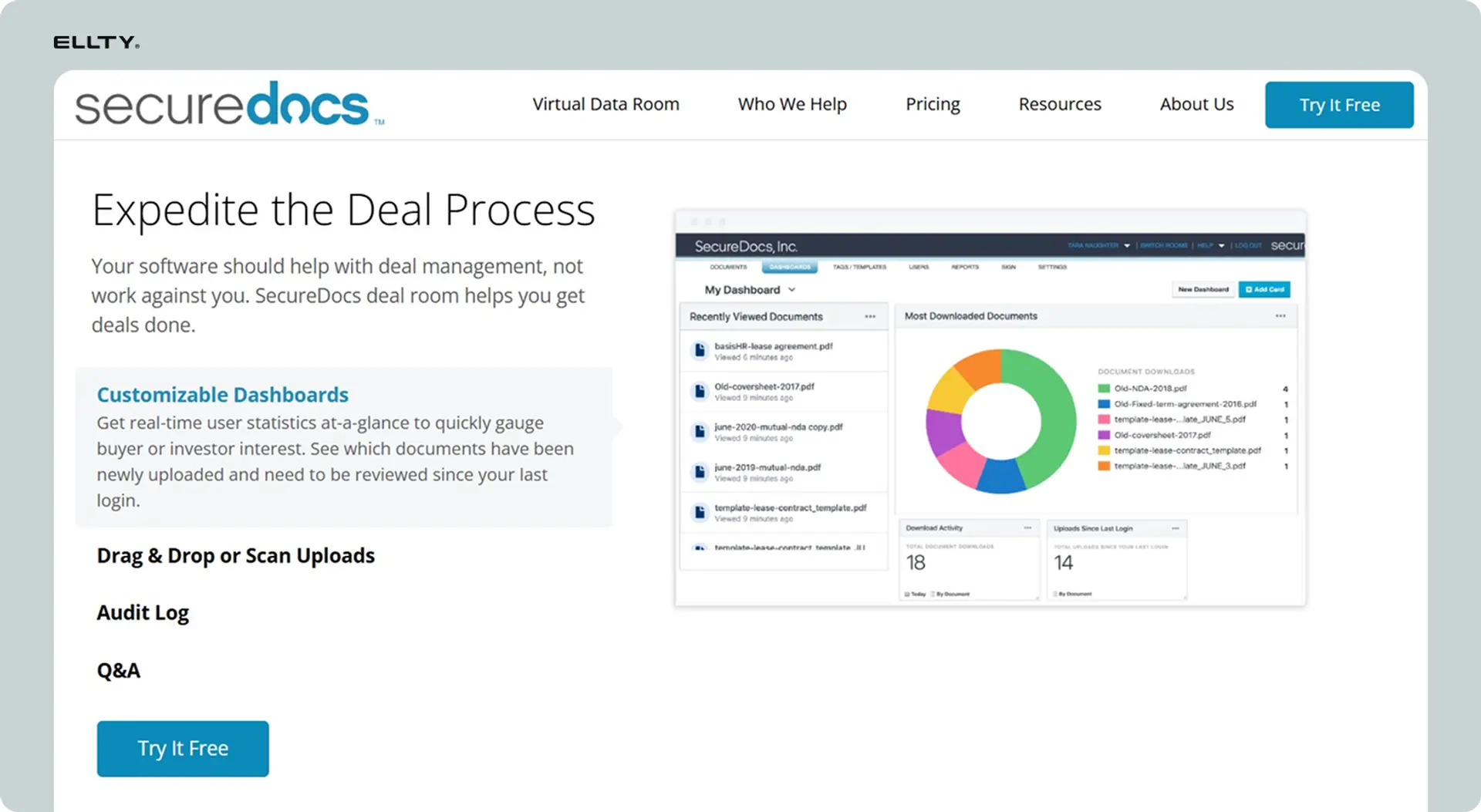
SecureDocs takes the opposite approach from enterprise providers, it strips the VDR down to essentials and charges a flat $250/month per room with unlimited users and storage. The platform can be set up in under 10 minutes and requires minimal training. That flat-rate model is genuinely useful when you're running a deal with a large team or multiple advisors, because you're not watching the invoice climb every time someone new needs access.
SecureDocs is a solid choice for straightforward M&A due diligence, fundraising rounds, and legal document exchange where the priority is security and simplicity over advanced analytics. Users consistently mention how easy it is to get external parties - investors, lawyers, buyers - onto the platform without confusion. The tradeoff is that it lacks page-level engagement tracking, white-labeling, custom domains, and workflow automation that some deal teams need. If your deal is complex or you want detailed insight into how investors are engaging with specific documents, you may eventually outgrow it. But for anyone who just needs a secure, reliable room that won't blow up their budget, SecureDocs is a practical, no-nonsense pick.
3. Digify Starting at ~$140–$180/month


Digify is a cloud-based document security service and virtual data room that allows companies to track and protect files. It can be used on a web browser, and apps are offered for Android and iOS devices. The platform is secure, simple to use, and takes minutes to set up. Digify VDR also brings together built-in Terms of Access (like NDA) and automated watermarking to further uphold the integrity and privacy of your data.
At its Pro price point, Digify is lighter than a full enterprise VDR but stronger on document-level security than almost any provider in this category. Its Capterra rating is among the highest of any VDR platform. It's a popular choice with startups, investors, legal firms, and consultants who care more about document-level control than deal pipeline management. The main limitations are that it doesn't sync with Google Drive or Dropbox natively, you'll be uploading files manually and pricing for larger teams becomes less transparent. But for solo advisors or small deal teams running a single transaction, Digify hits a good balance of security, usability, and cost. It's especially well-regarded by users who've tried enterprise tools and found them overkill for what they actually needed.
4. Papermark Starting at $59/month


Papermark is an open-source VDR built for modern teams who want flexibility without the enterprise price tag. With startup-friendly pricing starting at $59/month, it offers unlimited data rooms, custom domains, and modern analytics - features that most tools reserve for much higher tiers. It's particularly popular with founders who've outgrown DocSend and want something with more data room functionality, not just link tracking.
The open-source foundation means Papermark also offers a self-hosted option, which is useful for companies in regulated industries or those with strict data residency requirements. You can keep documents on your own infrastructure while still getting the access controls, audit trails, and analytics you'd expect from a purpose-built VDR. Papermark offers advanced analytics, unlimited data rooms, and a modern interface at a price point that makes it competitive with almost anything in this list. The platform is actively developed and has built a following among founders, investors, and consultants who want a tool that's easy to use but doesn't cut corners on security. A strong choice for anyone running multiple deals or data rooms simultaneously.
5. FirmRoom Starting at ~$250–$500/month


FirmRoom is an easy-to-use virtual data room built to simplify M&A transactions, secure document management, and due diligence processes. It simplifies file uploads with drag-and-drop functionality, automatic indexing, and powerful full-text search, so users can quickly find what they need. The flat-rate pricing model is one of its biggest selling points, you know what you're paying before you sign anything, and there are no per-user fees stacking up as your deal team grows.
FirmRoom has earned trust from larger organizations including Pfizer, Baird, and J.P. Morgan, which gives it more credibility than many tools in this price range. It works well for corporate development teams, private equity firms, and investment banks who need a dependable room for mid-market M&A without the complexity of a full enterprise platform. It lacks some features that growing deal teams increasingly expect, including AI-powered document processing and custom domains. But for teams that don't need those things, it's a clean and dependable solution. If predictable pricing and ease of use matter more to you than cutting-edge features, FirmRoom is worth a close look.
6. iDeals Starting at ~$500/month


Since 2008, iDeals has transformed the virtual data room market by introducing transparent pricing, an intuitive platform, and exceptional customer care. The company is trusted by 1 million users globally, including investment bankers, advisors, real estate professionals, and public institutions. iDeals has been independently rated on G2 as the best product and service for 4 consecutive years.
iDeals sits in the middle ground between budget tools and full enterprise VDRs. The platform is feature-rich - covering M&A due diligence, legal document exchange, real estate transactions, and fundraising. And it is well-regarded for its customer support, which is available 24/7. Most reviewers indicate that iDeals offers strong value for money, highlighting its competitive and reasonable pricing compared to other VDR providers. The main complaint is that the pricing and licensing model can feel inflexible and expensive for smaller or less frequent use cases, and some advanced features are only available in higher tiers. iDeals is best suited to professionals running regular transactions - M&A advisors, real estate firms, legal teams - where the platform's reliability and audit capabilities justify the price.
7. DealRoom Starting at ~$500/month

DealRoom takes a slightly different angle compared to the others on this list. Rather than just being a place to store and share documents, it's built as an end-to-end M&A platform - combining the data room with pipeline management, due diligence checklists, integration tracking, and collaboration tools all in one place. Key features include M&A pipeline management, due diligence request tracking with automated checklists, integration management, unlimited users and storage, custom branding, and a multi-deal portfolio view.
That makes it a strong choice for corporate development teams and serial acquirers who are managing multiple deals at once and need more than a folder with permissions on it. The unlimited user pricing model is attractive for deals involving many stakeholders across multiple workstreams. The tradeoff is that DealRoom is more specialized - if you're a consultant, real estate firm, or founder running a single fundraising round, you probably don't need all the pipeline tooling, and you'd be paying for features you won't use. But for teams that live inside M&A processes day-to-day, DealRoom offers meaningful workflow improvements over a traditional VDR.
Is there a free virtual data room?
Yes, but with important caveats. Some tools offer free tiers that give you secure document sharing and basic analytics.
Ellty free plan includes document tracking, real-time analytics, and secure sharing - which is enough for initial pitch deck distribution.
What free tiers usually don't include:
- NDA gating
- granular access permissions
- watermarking
- audit logs
- multiple user management
For simple use cases - sharing your deck with a handful of trusted visitors and wanting to know who opened it - free plans work. For anything involving actual due diligence, or legal implications, you'll want a paid data room plan.
There's also a practical risk to free tools: if you're asking sophisticated professionals to access a free-tier data room, it can signal that you're not taking the process seriously. Use the right tool for the situation.
How to set up a virtual data room (the fast version)

Most teams overthink this. Here's what actually matters.
Step 1: organize your documents before you upload anything. Create your folder structure on your desktop first. Don't just dump files in and rename them later.
Step 2: decide on tools and access levels. Who gets to see everything? Who should only see the deck and high-level financials? Make this decision before you invite anyone.
Step 3: configure your NDA gate. If your VDR supports it, set up the NDA before you share any links. This protects you legally.
Step 4: create segmented links or user groups. Don't give every investor the same link if they should have different access levels.
Step 5: test the experience. Open the link yourself in an incognito window. See what your visitor sees. Fix anything that looks messy.
Step 6: monitor engagement. Check your analytics after each viewer visit. Are they spending time in the financials? Are they skipping the team section? Use this to guide your follow-up conversations.
Tools like Ellty are built so you can get through steps 1-5 in under an hour if you're prepared. No lengthy onboarding, no account manager calls required.
Pitch deck sharing vs. data room: what's the difference?


These two things serve different purposes, and conflating them leads to mistakes.
Pitch deck sharing is what you do first. You're sending a deck to a party you've just met. You want to know if they opened it, how long they looked at it, and which slides got the most time. You're not sharing financials. You're not doing due diligence. You just want signal.
A data room is what comes after. The party is interested. Now they want to look under the hood. This is when you share sensitive documents under controlled access.
The mistake businesses make is treating these as the same step. They either share everything too early (before there's real interest), or they share too little too late (sending a deck over email with no tracking).
The best setup: use a tool that handles both. Track your initial pitch deck sends and see who's engaged. Then invite those viewers into a proper data room for deeper review. You get analytics at every stage of the process.
Ellty handles both in one platform - from initial document sharing with per-page analytics to full data room setup with NDA gating, permissions, and watermarking. No need to stitch together two separate tools.


Key features to look for in a virtual data room
Here's a quick reference for evaluating any VDR you're considering:


Don't pay for features you won't use in the next 90 days. A $149/month plan with the right features beats a $500/month plan with 40 features you'll never touch.
FAQs
What is the cheapest virtual data room available?
Free plans from tools like Ellty cover basic secure sharing and document analytics with no cost. If you need NDA gating, granular permissions, and watermarking - which you should for any real due diligence - expect to pay $100-$200/month. Enterprise VDR pricing typically starts at $400-$600/month and goes well above that for complex deals.
What's the difference between a virtual data room and a shared folder?
A shared folder (Dropbox, Google Drive) gives you no control over what happens after sharing. You can't see if someone downloaded the file, you can't revoke access if a deal falls through, and you have no analytics. A virtual data room adds access controls, audit trails, watermarking, analytics, and NDA gating. For anything involving sensitive deal documents, a shared folder isn't a serious option.
Do investors actually care what data room software you use?
Not usually. They care that it's organized, secure, and easy to navigate. They don't care whether you're on Ellty, Docsend, Ansarada, or anything else. The exception is very large M&A deals where buyers may have preferences for specific enterprise platforms their legal teams are already using.
Is a virtual data room free trial available?
Most providers offer either a free plan or a 14-day free trial. Ellty has a free plan that includes document tracking and secure sharing indefinitely - not just a trial. Paid data room features are available from $149/month.
How long does it take to set up a virtual data room?
With a modern tool, 1-3 hours if your documents are ready. The setup itself is fast. The time-consuming part is organizing your documents before upload. If you're disorganized going in, it'll take longer. Some enterprise VDR providers have onboarding processes that take days.
What is M&A due diligence and how does a VDR help?
M&A due diligence is the process where a potential buyer reviews your company's financials, legal structure, contracts, and operations before finalizing an acquisition. A VDR makes this process controlled - you decide what gets shared, who sees it, and when access expires. It also creates a legal record of what was disclosed to whom. Without a proper VDR, managing this over email creates serious legal and organizational risk.
Can I use a virtual data room for investor updates?
Yes, and more businesses should. Instead of emailing quarterly updates with PDFs attached, you can maintain a data room with your latest investor update, financials, and metrics. Investors access it directly, you control the version, and you can see who's actually engaging with the information. It's also more professional than a shared Google folder.
What's the difference between NDA gating and password protection?
Password protection just requires a password to open a document. NDA gating requires users to actively agree to a non-disclosure agreement before they can access anything. NDA gating creates a legal record of who agreed to your NDA and when - which matters if confidential information leaks. For serious processes, NDA gating is worth having.
What is dynamic watermarking in a virtual data room?
Dynamic watermarking automatically adds identifying information to documents viewed in your data room - typically the viewer's name, email, and timestamp. This means if a document leaks, you can trace which viewer it came from. It also deters people from screenshotting or sharing documents they were given restricted access to. It's a standard feature in proper due diligence data rooms.
How is virtual data room pricing typically structured?
You'll encounter a few models: flat monthly fee (most common in startup tools), per-user pricing (common in enterprise tools), per-page or per-GB pricing (legacy pricing, avoid), and project-based or deal-based pricing (used by some M&A-focused providers). Always calculate the total cost based on your expected number of viewers, not just the base plan price.
What should I look for in a virtual data room for startups specifically?
Fast setup (you shouldn't need a demo call to get started), flat pricing without per-user fees, document analytics, NDA gating at a minimum, and real-time notifications. Mobile access is worth having. You don't need Q&A workflow management or complex user hierarchy systems at the early stage. Match the tool to where you actually are in the process.
Final thoughts
Building a data room isn't complicated. Companies make it complicated by either picking tools that are too expensive for what they need, or skipping proper setup and sharing documents over email.
Here's the short version of everything above:
Match the tool to the stage. A free plan with analytics works for initial pitch deck sharing. A proper data room with NDA gating and permissions makes sense for more serious deals. Enterprise M&A platforms make sense for complex acquisitions. Don't pay for features two stages ahead of where you are.
Don't ignore analytics. Knowing who opened your deck, which slides got attention, and who came back for a second look changes how you follow up. That information is available - use it.
Organize before you upload. A messy data room signals poor operational maturity. Viewers notice. Spend the time upfront.
Watch out for per-user pricing. It sounds small until you're inviting multiple contacts from multiple firms and the bill quadruples.
Security basics aren't optional. NDA gating, watermarking, and access controls aren't enterprise features anymore. They're standard. If a tool doesn't offer them at a reasonable price point, keep looking.
The good news is that affordable virtual data rooms have gotten genuinely good. You don't need to spend $1,000/month to run a credible due diligence process or share your pitch deck professionally. The right tool at the right stage costs a fraction of what enterprise VDRs charge - and for most companies, it's more than enough.
Author

Anika Tabassum Nionta is a Content Manager at Ellty, where she writes about secure document sharing, virtual data rooms, M&A, due diligence, fundraising, and sales enablement. With over 6 years of writing experience, she helps professionals understand how to share confidential documents securely, track engagement, and manage deals more effectively. Anika holds both a BA and MA in English from Dhaka University. Outside of work, she enjoys reading, exploring new cafes in Dhaka, and connecting with entrepreneurs and dealmakers in her community.

