
In this guide
- What is a virtual data room?
- What is Dropbox?
- Core differences: VDR vs Dropbox
- Is Dropbox a virtual data room?
- Can you use Dropbox as a data room?
- How to set up a data room in Dropbox
- How secure is a virtual data room?
- Virtual data room vs Dropbox cost
- VDR vs Dropbox vs cloud storage
- What is a better option than Dropbox for due diligence?
- Where Ellty fits in
- FAQ
If you're raising a round, going through due diligence, or sharing sensitive company documents with outside parties, you've probably wondered whether Dropbox is enough or whether you need a virtual data room (VDR).
The short answer: it depends on what you're doing. Dropbox is solid file storage. A VDR is a tool built specifically for high-stakes document sharing where you need to know who looked at what, control exactly what they can do with it, and have a paper trail that holds up.
This guide breaks it all down - no jargon, no unnecessary fluff. Just what each tool actually does, where it fits, and what you should be using for your specific situation.
What is a virtual data room?
A virtual data room is a secure online space designed for sharing sensitive documents during high-stakes transactions. Think: fundraising rounds, mergers and acquisitions, legal proceedings, or investor due diligence.
The core idea is control. You don't just upload files and share a link. You decide who sees what, what they can do with it (view only? download? print?), and you get a full record of every action they take inside the room.
VDRs replaced physical data rooms, which were literally rooms full of printed documents that lawyers and investors would fly in to review. The digital version does the same job but faster, cheaper, and with a lot more visibility into how people are engaging with your documents.
A virtual data room is purpose-built for due diligence. It's not just file storage, it's controlled access, full audit trails, and document-level analytics, all in one place.
Key things a VDR typically gives you:
1. Granular access control
Set different permissions for each viewer or group. One investor can view only the financials. Another can see the full deck but can't download anything.
2. Audit logs and activity tracking
See exactly who opened which document, which pages they spent the most time on, and when they last visited.
3. Document security features
Dynamic watermarking, NDA gating (require users to sign before they can see anything), view-only mode, download restrictions.
4. Notifications and real-time alerts
Know the moment someone opens your pitch deck or revisits your financials, useful signal during a serious deal.
5. Professional presentation
Branded, structured, clean - looks like you take your documents seriously. Because you do.
What is Dropbox?

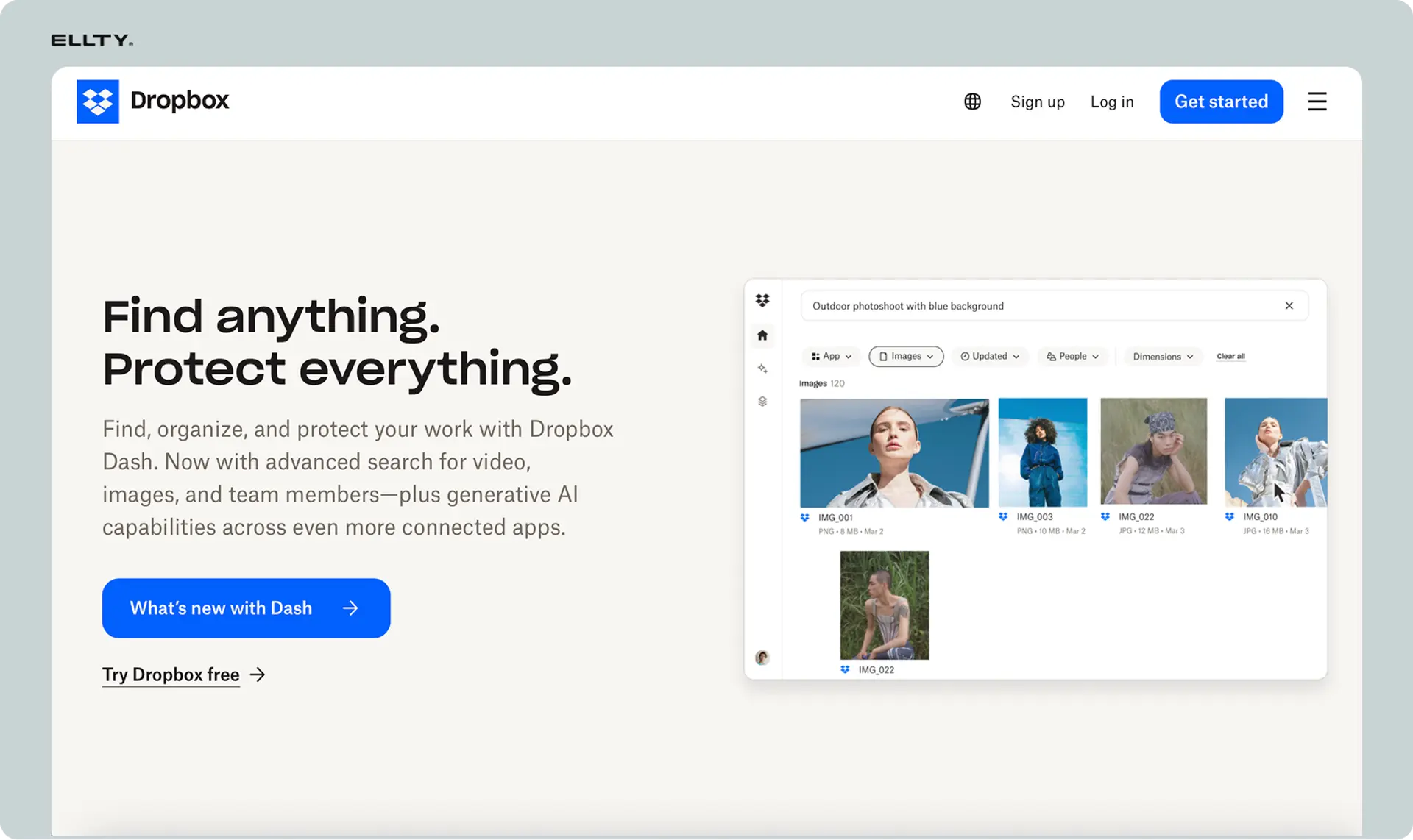
Dropbox is a cloud storage and file-sharing platform. It's one of the most widely used tools in the world for syncing files across devices, sharing documents with teammates, and backing up important files.
It's genuinely great at what it does. You can upload a pitch deck, generate a share link, and someone can view it in under a minute. For everyday file management and team collaboration, it's hard to beat.
Dropbox does have some security and sharing features. You can password-protect links, set expiration dates, and on Business plans, get basic activity tracking. But these features are designed for general file management, not for the structured, audit-grade oversight that a formal due diligence process requires.
Dropbox is cloud storage done well. It's built for teams who need to store and share files. It's not built for situations where you need to know exactly how a specific visitor interacted with page 7 of your financial model.
Core differences: VDR vs Dropbox
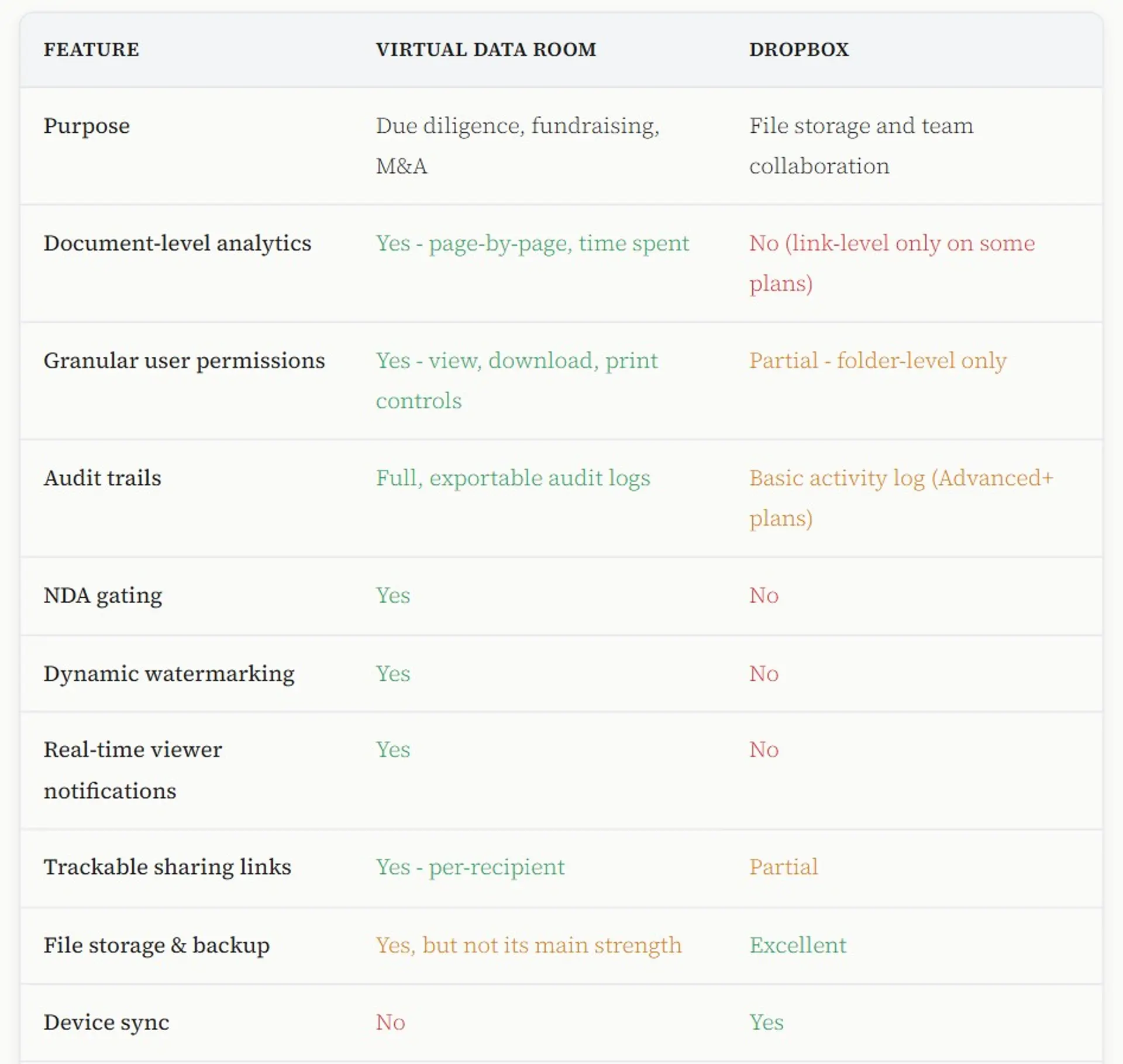
Here's a side-by-side look at how they compare on the things that matter most for most use cases:

Is Dropbox a virtual data room?
No, Dropbox is not a virtual data room. It's a cloud storage platform. The two tools are built for fundamentally different jobs.
Dropbox gives you a place to store, sync, and share files. A VDR gives you controlled access, document tracking, audit logs, and security built for high-stakes situations. Both let you upload and share files, but that's where the similarity ends.
People use Dropbox for everyday file sharing, and it works well for that. But it wasn't built for situations where you need to know exactly who viewed a document, prevent someone from downloading and forwarding sensitive files, or require an NDA before anyone gets access.
Whether you're sharing confidential documents during a merger, a legal transaction, a board review, a licensing deal, or any process where access control and accountability matter, Dropbox simply wasn't designed for that job. A dedicated VDR was.
Can you use Dropbox as a data room?
Technically, yes. Practically, it has real limitations you should know about before you try.
Here's what you can do with Dropbox as an improvised data room:
What works
- Organize folders by category (financials, legal, team)
- Share folder access with specific email addresses
- Password-protect shared links
- Set link expiration dates
- Control edit vs. view-only at folder level
What's missing
- No per-document analytics or page tracking
- No NDA gating before access
- No dynamic watermarks
- No real-time viewer notifications
- No exportable audit log for legal purposes
- No way to restrict downloads per person
For simple, low-stakes sharing between people you already trust, Dropbox can do the job. But for anything that involves sensitive information, multiple parties, legal accountability, or documents you can't afford to lose control of, a proper VDR gives you the control and visibility that Dropbox can't.
How to set up a data room in Dropbox
If you've decided to use Dropbox for now and want to set it up properly, here's a step-by-step approach that minimizes the gaps.
You'll need at least a Dropbox Business plan ($18/user/month, minimum 3 users) to get the most relevant features for this setup.
Create a master folder
Call it something clear like "Due Diligence - [Company Name] - [Year]". Inside, create subfolders: Company overview, Financials, Legal, Team, Product, Customers/traction.
Upload your documents
Use consistent naming conventions: "01_pitch_deck_Q1_2026.pdf", "02_cap_table_current.xlsx". Visitors appreciate clean structure. It signals organization.
Set sharing permissions carefully
Share the master folder with the viewer's email. Set it to "can view" not "can edit". Uncheck any option that allows them to re-share the folder link.
Enable link settings on sensitive files
For your most sensitive documents (cap table, contracts), create individual shared links with password protection and expiration dates. This adds a minimal extra layer.
Send a custom access note
Don't just drop a link in an email. Send a clean note explaining what's in the room, what they have access to, and any confidentiality expectations. This sets the tone even without an NDA gate.
Check activity logs periodically
On Business plans, you get basic activity tracking in the admin console. Check it. It won't tell you which pages they read, but it'll tell you whether they accessed the folder at all, which is still useful signal.
This setup works, but it's manual and limited. You won't get real-time alerts when a visitor opens your deck, and you won't know if they forwarded the link to someone else. For due diligence at scale, a proper VDR removes all of that uncertainty.


How secure is a virtual data room?
This is one of the most common questions and the answer is: significantly more secure than general cloud storage, when the VDR is built specifically for document security.
Here's what makes a VDR more secure than using Dropbox or similar tools for sensitive sharing:
Encryption
Most modern VDRs encrypt data both in transit (while it's moving) and at rest (while it's stored). This is table stakes. Dropbox does this too, so it's not a VDR-exclusive advantage, but it's worth confirming for any tool you use.
Access controls that actually hold
In Dropbox, if someone has a link, they often have a lot of flexibility. In a proper VDR, you can restrict access to view-only, block downloads, block printing, and revoke access instantly. Even if someone screenshots or records their screen, dynamic watermarking means every page is stamped with their name and access timestamp, which creates accountability even if a document leaks.
Audit trails
A full audit log documents every action inside the data room - who viewed, what they viewed, when they accessed it, and from which IP address. This isn't just for security, it's legally useful if a dispute ever arises around document disclosure during a transaction.
NDA gating
Requiring a signed NDA before anyone can enter the room adds a layer of legal protection you simply don't get from a shared folder link. This is standard practice for M&A data rooms and increasingly common for smaller deals.
Industry certifications
When evaluating a VDR (or any tool you're using for sensitive documents), look for these certifications:


For context: Dropbox Business holds ISO 27001, SOC 2, SOC 3, and GDPR certifications - so it's not an insecure platform. The gap isn't in Dropbox's infrastructure security; it's in the document-level controls you need during a high-stakes transaction.
Virtual data room vs Dropbox cost
Pricing is one of the biggest reasons people default to Dropbox for due diligence. Traditional enterprise VDRs can cost thousands of dollars per month. But that's not the whole picture anymore.
Dropbox pricing

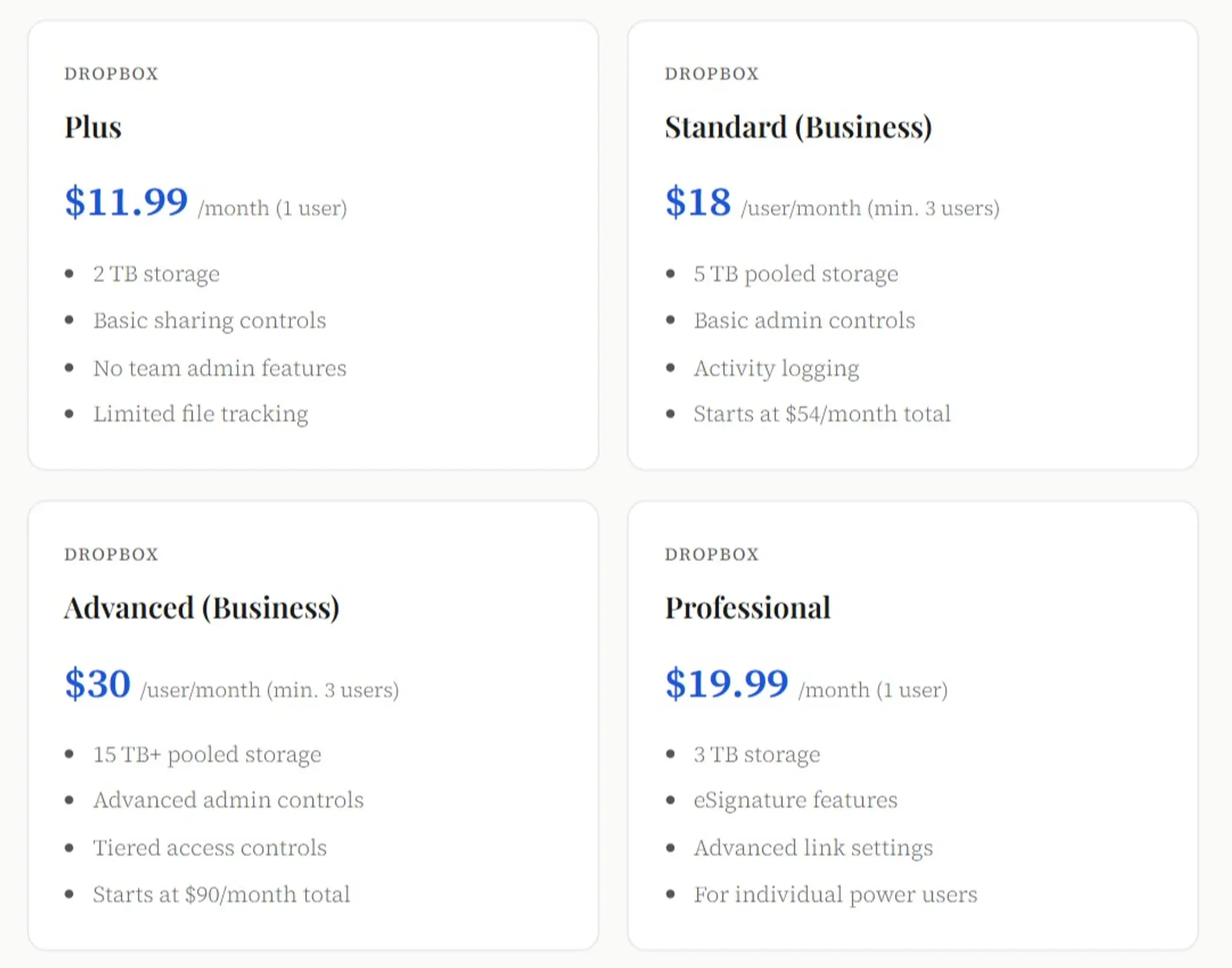
Note: Dropbox's per-user model means costs scale fast. A 5-person team on the Standard plan runs $90/month. A 10-person team pays $180/month. And you still don't get document-level analytics or NDA gating.
Ellty pricing (for comparison)


The key difference: Ellty uses flat pricing rather than per-user billing. That means a 3-person team sharing a data room with 20 visitors doesn't pay 25x the base rate. You pay for the room, not every seat.


VDR vs Dropbox vs cloud storage: what's the difference?
People sometimes use these terms interchangeably, but they describe three different categories of tool. Here's how to think about them:

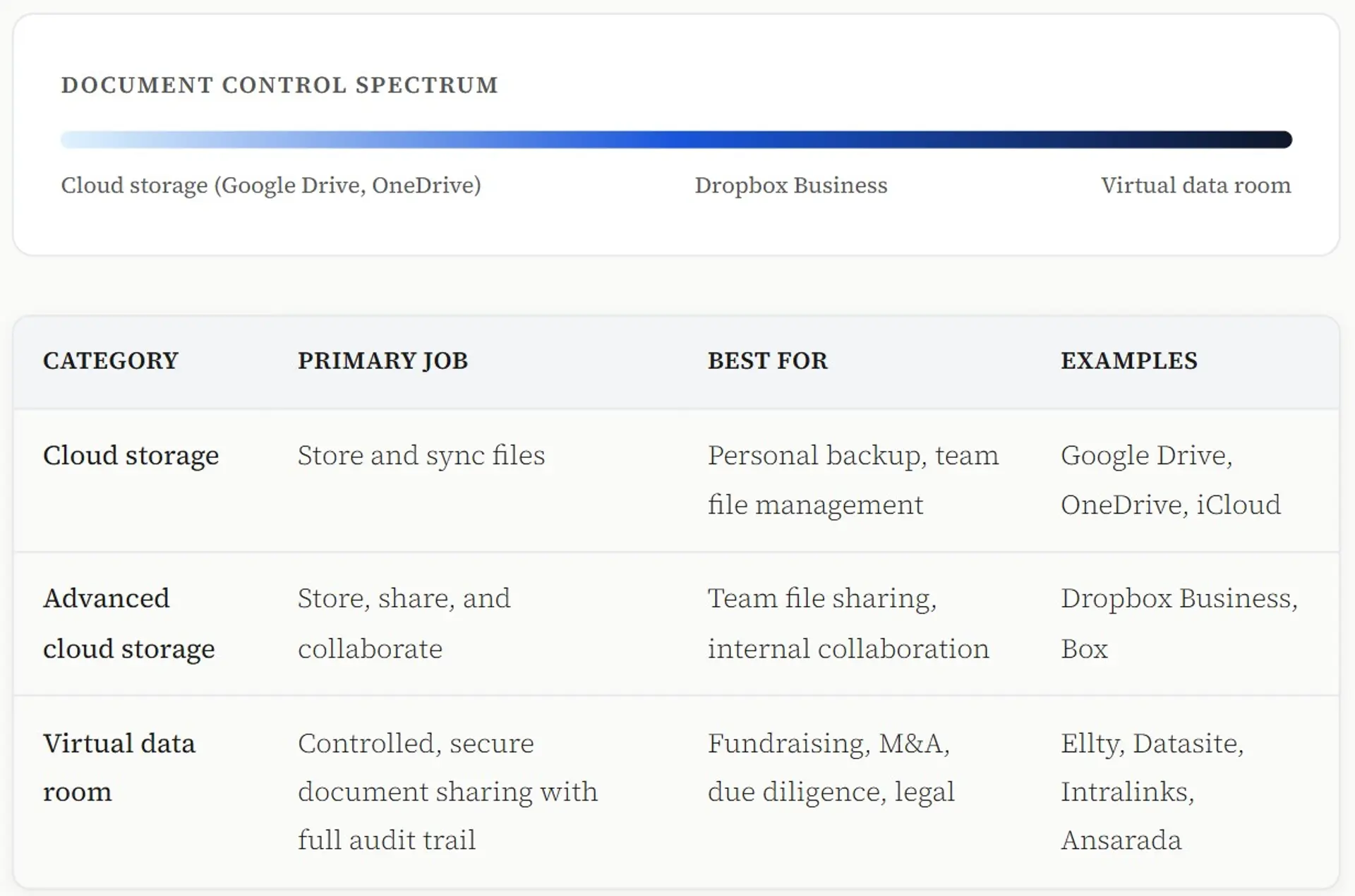
Basic cloud storage is about accessibility. Advanced cloud storage adds collaboration and admin controls. A VDR adds a layer specifically for high-stakes document transactions where visibility, security, and accountability are non-negotiable.
Most businesses use all three at different times - Google Drive for everyday team work, Dropbox for file management and sharing large assets, and a VDR specifically when sharing externally.
What is a better option than Dropbox for due diligence?
It depends on what your situation actually needs. There's no single right answer, but here's an honest way to think about it.
When Dropbox is genuinely enough
If you're sharing documents with one or two people you already know and trust, and the stakes are relatively low, Dropbox with a clean folder structure can work fine. Not every document-sharing situation needs enterprise-level security. For quick, informal reviews between known parties, it's a reasonable choice.
When Dropbox starts to fall short
Once the process gets more formal, more parties involved, sensitive information on the table, legal or compliance requirements in play, or decisions with real financial or contractual consequences, Dropbox's limitations become real problems. You lose visibility into who's looking at what, you can't control where documents end up, and there's no proper record if something goes wrong later.
When enterprise VDR tools are overkill
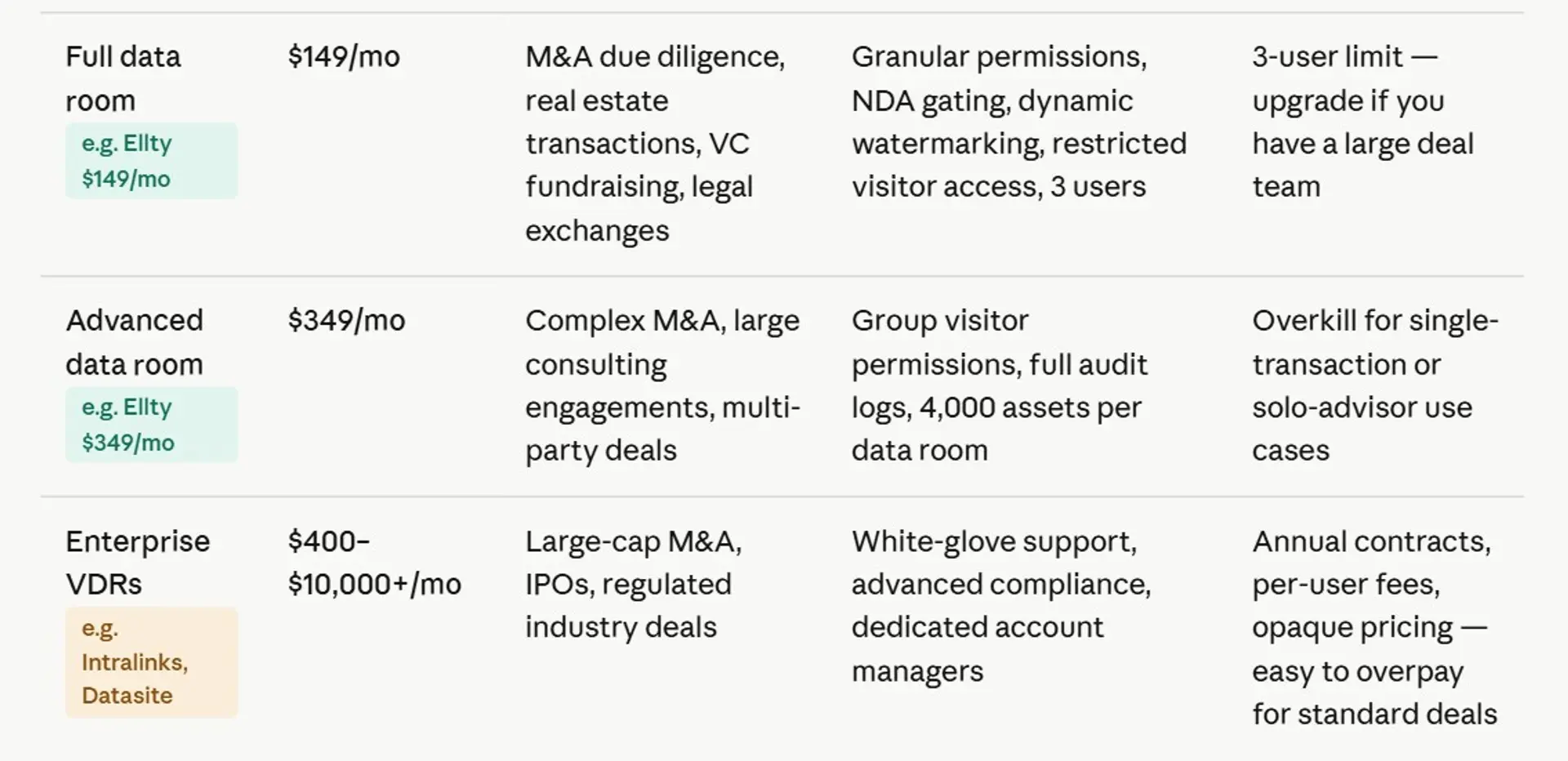
Tools like Datasite and Intralinks are genuinely powerful, but they're built for large, complex transactions such as multi-party M&A deals with legal teams on both sides and months-long timelines. For most organizations that just need a secure, controlled environment to share documents, those tools are more complexity and cost than the situation calls for.
The sweet spot for most use cases
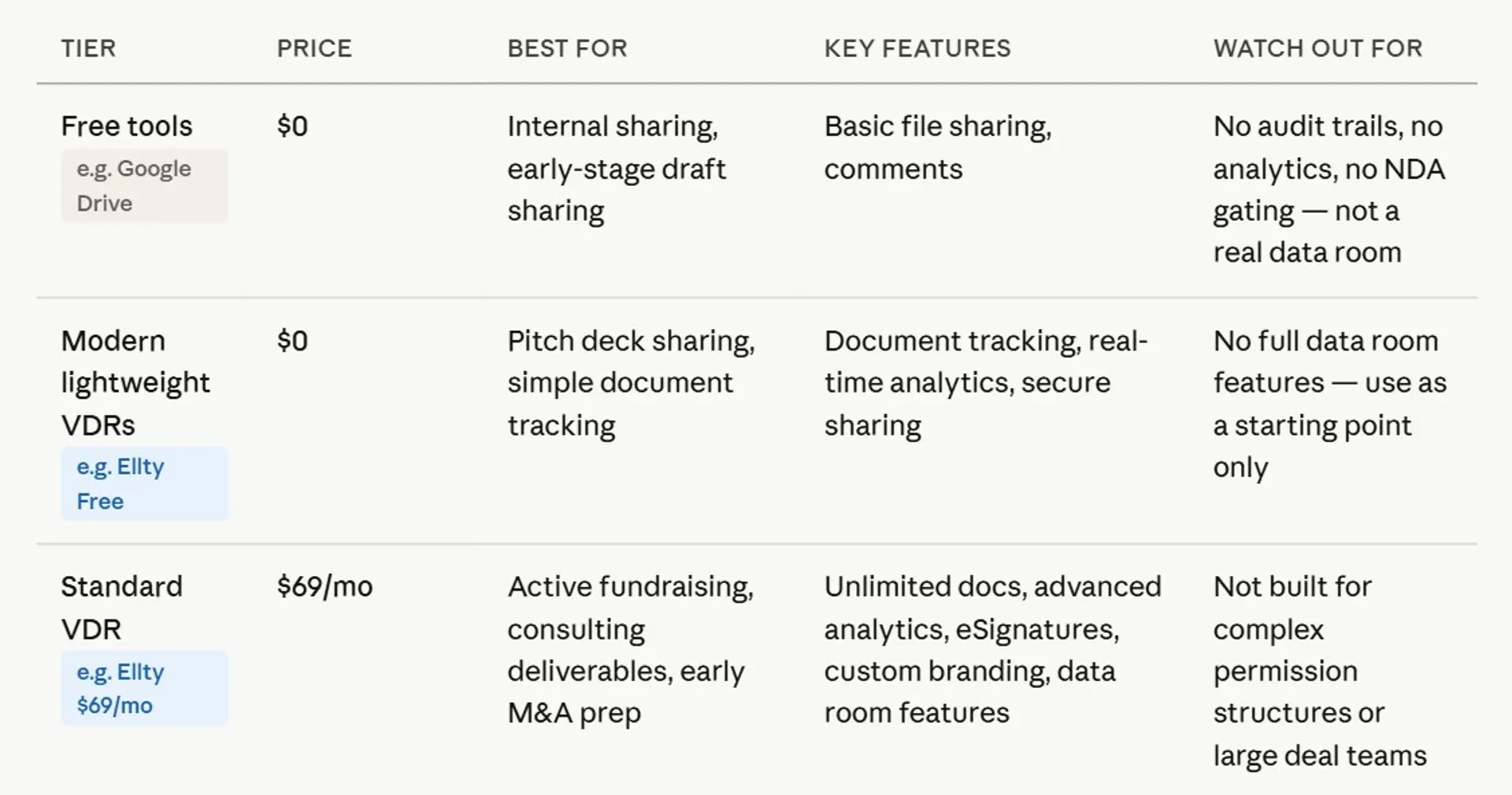
Most people running a formal but not massive process need something in the middle, whether it's a business acquisition, a licensing negotiation, a board review, or a compliance audit. A VDR that gives you real document analytics, access controls like NDA gating and watermarking, a clean audit trail, and straightforward pricing. Not the cheapest option, but not overkill either.
The right tool matches the size and formality of your process, not the other way around.


Where Ellty fits in


Ellty is built for exactly the gap between "too basic" (Dropbox) and "too complex and expensive" (enterprise VDRs). It's a confidential document sharing, pitch deck analytics, and virtual data room platform built with all workflows in mind.
Here's what Ellty actually offers, no overselling:
1. Trackable sharing links
Create a unique link for each visitor or recipient. When they open it, you'll know. When they re-open it on a Tuesday at 11pm before a meeting, you'll know that too.
2. Page-by-page analytics
See which pages of your pitch deck held their attention and which ones they skipped. Useful signal when you're iterating the deck or preparing for a follow-up call.
3. Real-time notifications
Get an alert the moment someone opens your document. No more wondering whether they actually looked at it.
4. Data room with NDA gating and watermarking
On the Data Room plan, you can require a signed NDA before anyone enters, apply dynamic watermarks, and restrict access per user. This is where it starts to replace a traditional VDR for most use cases.
5. Flat pricing, not per user
Ellty doesn't charge per visitor who accesses your room. The Data Room plan at $149/month covers 3 internal users and you can share with as many visitors as you need.
Ellty works well when you're raising a funding round, closing a property deal, running a consulting engagement, or managing an acquisition.
It's worth being honest: if you're running a complex cross-border M&A transaction with heavy legal involvement, you'll likely need a more enterprise-grade tool.


When to use a VDR vs Dropbox: quick reference
Use a VDR when...
- You're running any formal process that involves sharing confidential documents with outside parties
- Multiple people or organizations are reviewing documents at the same time
- You need to know who viewed what and when
- You're sharing sensitive financial, legal, clinical, technical, or proprietary information
- Access should require an NDA or agreement before anyone gets in
- You need a proper audit trail for legal, regulatory, or compliance reasons
- Documents need watermarks to protect against unauthorized sharing
- You can't afford to lose control of where your files end up
Dropbox is fine when...
- You're sharing internal team files
- You're collaborating on non-sensitive documents
- You need file sync across your team's devices
- You're sending a casual deck to one known contact
- File storage and backup is the primary need
- You're in early conversations, not formal diligence
Frequently asked questions
Is Dropbox a virtual data room?
No. Dropbox is a cloud storage and collaboration platform. A virtual data room is a purpose-built tool for secure document sharing with audit logs, granular permissions, and due diligence features. They overlap on file storage, but the use cases are different. Dropbox doesn't offer NDA gating, dynamic watermarking, or page-level document analytics - all of which matter during a formal process.
How secure is a virtual data room?
Modern virtual data rooms are very secure, often more secure than general cloud storage for document-sharing purposes. Look for tools with SOC 2 Type II and ISO 27001 certifications, encryption at rest and in transit, granular access controls, dynamic watermarking, and full audit logs. The security of a VDR isn't just about infrastructure, it's about the controls you have over how documents are accessed and used, which is where VDRs have a significant edge.
How much does a virtual data room cost vs Dropbox?
Dropbox Business plans start at $18/user/month (minimum 3 users, so $54/month minimum) and go up to $30/user/month. Enterprise VDRs from legacy providers can cost thousands per month. Ellty offers a free plan, with data room features starting at $149/month on a flat (non-per-user) model. For a 3-person team sharing documents with multiple visitors, Ellty flat pricing often works out cheaper than a Dropbox Business plan and includes document analytics and NDA gating that Dropbox doesn't offer.
What is the difference between cloud storage and a virtual data room?
Cloud storage (Google Drive, Dropbox, OneDrive) is designed for storing, syncing, and sharing files, primarily for internal team use or casual external sharing. A virtual data room adds a layer of controlled access, per-recipient tracking, audit logs, NDA enforcement, and document security features designed specifically for high-stakes transactions. Cloud storage is for everyday file management. A VDR is for when the documents you're sharing are sensitive and the stakes of them being mishandled are high.
How do I set up a data room in Dropbox?
Create a well-organized folder structure (Company overview, Financials, Legal, Team, Product), share the master folder with specific visitor emails set to view-only, password-protect individual sensitive files, and monitor the activity log in your admin console. You'll need at least a Dropbox Business Standard plan ($18/user/month) to get admin controls. The setup works but won't give you document-level analytics, NDA gating, or real-time notifications - which is why many people switch to a dedicated VDR once they're in active due diligence.
Does Ellty work as a virtual data room?
Yes, on the Data Room and Data Room Plus plans. Ellty offers NDA gating (require a signed NDA before access), dynamic watermarking, granular visitor permissions, restricted access controls, and real-time analytics. It's designed for all business use cases, not just for billion-dollar M&A with enterprise legal teams. It covers the essentials without the complexity or cost of traditional enterprise VDRs.
Is a virtual data room worth it for a small startup?
It depends on what stage you're at. Pre-seed with 1-2 angels, probably not necessary, a well-organized Dropbox folder is fine. Seed round with 5-10 investors doing real due diligence - yes, a VDR pays for itself in time saved and peace of mind. Series A and beyond, you'll almost certainly be expected to have a proper data room. Ellty free plan lets you start tracking document engagement immediately, so there's no real reason not to at least start there.
Author

Anika Tabassum Nionta is a Content Manager at Ellty, where she writes about secure document sharing, virtual data rooms, M&A, due diligence, fundraising, and sales enablement. With over 6 years of writing experience, she helps professionals understand how to share confidential documents securely, track engagement, and manage deals more effectively. Anika holds both a BA and MA in English from Dhaka University. Outside of work, she enjoys reading, exploring new cafes in Dhaka, and connecting with entrepreneurs and dealmakers in her community.

