
In this guide
- Why folder structure matters in M&A
- The 4 types of file organization
- What is the ISO standard for folder structure?
- M&A deal phases and what documents each needs
- The M&A document folder structure template
- How to organize a documents folder
- File naming inside the folder structure
- Sharing and controlling access to M&A documents
- How Ellty supports M&A document management
- FAQ
Most M&A deals don't fall apart because of bad business fundamentals. They slow down, lose momentum, or deteriorate in trust because the seller's documents are a mess. Buyers and their lawyers spend hours asking for files that should have been easy to find. Sellers spend hours answering emails that a well-organized folder structure would have made unnecessary.
This guide gives you a working M&A document folder structure template you can use immediately. It covers what folders to create, what goes in each one, how to name files, and how to share the whole thing securely without sending attachments back and forth over email.
Why folder structure matters in M&A
An M&A due diligence process generates a lot of documents. A typical deal, even a small one, involves dozens of legal agreements, financial statements, employee records, customer contracts, IP filings, and regulatory documents. Without a clear folder structure, this becomes unmanageable fast.
Here's what a poor folder structure costs you in an M&A process:
- Delays - buyers can't find documents and have to ask, adding days to a process that's already slow
- Doubt - disorganized data rooms signal operational immaturity to experienced acquirers
- Risk - without clear version control, outdated documents can be reviewed as if they're current
- Rework - your legal team spends time locating documents instead of reviewing them
- Missed issues - when documents aren't organized, gaps in your disclosure are harder to spot before they become problems
A clean folder structure doesn't just make due diligence faster. It also signals that you run a well-organized company - which affects how buyers perceive the business itself.
Buyers and their lawyers have seen hundreds of data rooms. They notice immediately when a seller's documents are well-organized versus thrown together. It's one of those things that's invisible when done right and very visible when done wrong.
The 4 types of file organization
Before building your folder structure, it helps to understand the four main approaches to file organization. Most M&A data rooms use a combination of two or three of these.


For an M&A data room, the answer is hierarchical as the primary structure, chronological within financial folders, and alphabetical within contract folders. That combination covers most scenarios cleanly.
What is the ISO standard for folder structure?
There isn't a single ISO standard that dictates exactly how to structure folders in a data room or document management system. What does exist is ISO 15489, the international standard for records management, and ISO 9001, which covers document control as part of quality management systems.
ISO 15489 sets principles rather than a specific folder template. The relevant principles for M&A document organization are:
- Documents should be identifiable - clear names, clear categories
- Documents should be retrievable - someone unfamiliar with your system should be able to find what they're looking for
- Version control should be maintained - it should be clear which version of a document is current
- Access should be controlled - who can see, modify, or delete documents should be defined
- Retention rules should apply - how long documents are kept should follow a policy
For most startup founders running an M&A process, the practical takeaway from ISO principles is simpler: use consistent naming, maintain single versions of documents, and organize by logical category rather than by who created the file or when you found it on your desktop.
If your acquirer is a large corporation or a PE firm with compliance requirements, they may ask about your document management practices during due diligence. Having a structured, versioned data room is evidence that you take records management seriously - even if you've never heard of ISO 15489.
M&A deal phases and what documents each needs
An M&A deal typically moves through four phases. Each phase has different document requirements and a different audience reviewing them.


You don't need to have every document ready on day one. But you should build your folder structure for the full process from the start - even if most folders are empty in phase one. It makes it easier to add documents as the deal progresses without reorganizing everything mid-process.
The M&A document folder structure template
Here is a practical, ready-to-use folder structure for an M&A data room. It's organized hierarchically with numbered top-level folders so they sort in a logical reading order. Sub-folders appear only where there are genuinely distinct document types.
M&A data room - folder structure template
01-company-overview/
- company-overview-one-pager.pdf
- management-presentation.pdf
- cim-confidential-information-memorandum.pdf
- company-history-and-milestones.pdf
- organizational-chart.pdf
02-financials/
historical-statements/
- 2022_annual-financial-statements.pdf
- 2023_annual-financial-statements.pdf
- 2024_annual-financial-statements.pdf
management-accounts/
- 2024-q1_management-accounts.xlsx
- 2024-q2_management-accounts.xlsx
- 2024-q3_management-accounts.xlsx
projections/
- 2025-2027_financial-projections.xlsx
- 2025-2027_assumptions-memo.pdf
tax/
- 2022_tax-return.pdf
- 2023_tax-return.pdf
- tax-compliance-summary.pdf
- financial-model-working-file.xlsx
- debt-and-liabilities-schedule.xlsx
03-legal/
corporate/
- certificate-of-incorporation.pdf
- articles-of-association.pdf
- certificate-of-good-standing.pdf
- registered-agent-details.pdf
shareholder-agreements/
- 2020-06_sha-founding-team.pdf
- 2022-11_sha-series-a-investors.pdf
board-resolutions/
- 2024-03_board-resolution-annual-accounts.pdf
- 2024-07_board-resolution-option-grant.pdf
litigation/
- litigation-summary-memo.pdf
# add individual case files if applicable
regulatory/
- business-licenses.pdf
- regulatory-correspondence.pdf
04-cap-table-and-equity/
- 2024-09_cap-table.xlsx
- option-pool-summary.xlsx
- vesting-schedules-summary.pdf
- warrant-register.xlsx
- previous-financing-rounds-summary.pdf
05-intellectual-property/
- ip-asset-register.xlsx
- trademark-registrations.pdf
- patent-applications-and-grants.pdf
- domain-names-register.pdf
- software-license-agreements.pdf
- open-source-usage-summary.pdf
06-contracts/
customer-contracts/
- acme-inc_msa-signed-2023-04.pdf
- beta-corp_msa-signed-2023-09.pdf
supplier-contracts/
- aws_cloud-services-agreement.pdf
- stripe_payment-processing-agreement.pdf
partnership-agreements/
- partner-a_reseller-agreement-2023.pdf
ndas/
- nda-template-mutual.pdf
07-human-resources/
- headcount-summary.xlsx
- org-chart-detailed.pdf
- compensation-summary-anonymized.xlsx
- key-employee-contracts.pdf
- employee-handbook.pdf
- benefits-summary.pdf
# do not include individual employee files without legal advice
08-product-and-technology/
- product-overview.pdf
- technical-architecture-overview.pdf
- product-roadmap.pdf
- technology-stack-summary.pdf
- security-and-compliance-overview.pdf
09-customers-and-sales/
- key-metrics-dashboard.pdf
- arr-mrr-history.xlsx
- customer-concentration-analysis.xlsx
- churn-and-retention-data.xlsx
- sales-pipeline-summary.pdf
- customer-reference-list.pdf
10-insurance/
- insurance-schedule-summary.pdf
- do-insurance-policy.pdf
- cyber-liability-policy.pdf
11-data-privacy-and-compliance/
- gdpr-compliance-overview.pdf
- data-processing-agreements.pdf
- privacy-policy.pdf terms-of-service.pdf
- soc2-report-if-applicable.pdf
12-closing-documents/
- letter-of-intent.pdf
- spa-draft-v1.pdf
- disclosure-schedules-draft-v1.pdf
- conditions-precedent-checklist.xlsx
# populated later in the process
📁 Free template
This M&A document folder structure is available as a free download. Copy the structure directly from this page, or use it as a reference when setting up your data room in Ellty or any other virtual data room platform.
To use it: create the numbered top-level folders first, then add sub-folders and upload documents into each section as they become available.
How to organize a documents folder
The template above gives you the structure. Here's how to actually populate it without losing your mind.
Start with what you have, not what's perfect
Don't wait until every document is ready before setting up the folder structure. Create all the folders on day one. Upload documents as you gather them. An empty folder with the right name is more useful than a full folder with no structure, at least your lawyers know where to put things.
Work backwards from what buyers will ask for
Experienced M&A advisors use due diligence checklists. Most of these checklists are organized by category - legal, financial, HR, IP, contracts. The folder structure above maps closely to standard due diligence request lists. If a buyer's lawyer asks for "all existing customer contracts," you want folder 06 to be the complete answer.
Audit before you open access
Before inviting buyers or their advisors into your data room, go through every folder and ask: is this the current version? Is this complete? Is there anything in here that shouldn't be here yet? An audit takes a few hours and prevents a lot of embarrassing questions during diligence.
Use a document tracker alongside the data room
Maintain a simple spreadsheet that lists every document you need to gather, its current status (not started / in progress / uploaded), and who owns it internally. This is your data room readiness tracker. It's separate from the data room itself and is just for your team.
Assign one person internally to own the data room. Not a committee, one person. They're responsible for what goes in, what stays out, and making sure documents are current.
Stage what buyers can see
Not everything in your data room needs to be visible from day one. Grant access to the overview and financial folders early. Hold back HR compensation details and sensitive customer contracts until the deal is more advanced and an LOI is in place. Most data room platforms let you control folder-level access per user or group.
File naming inside the folder structure
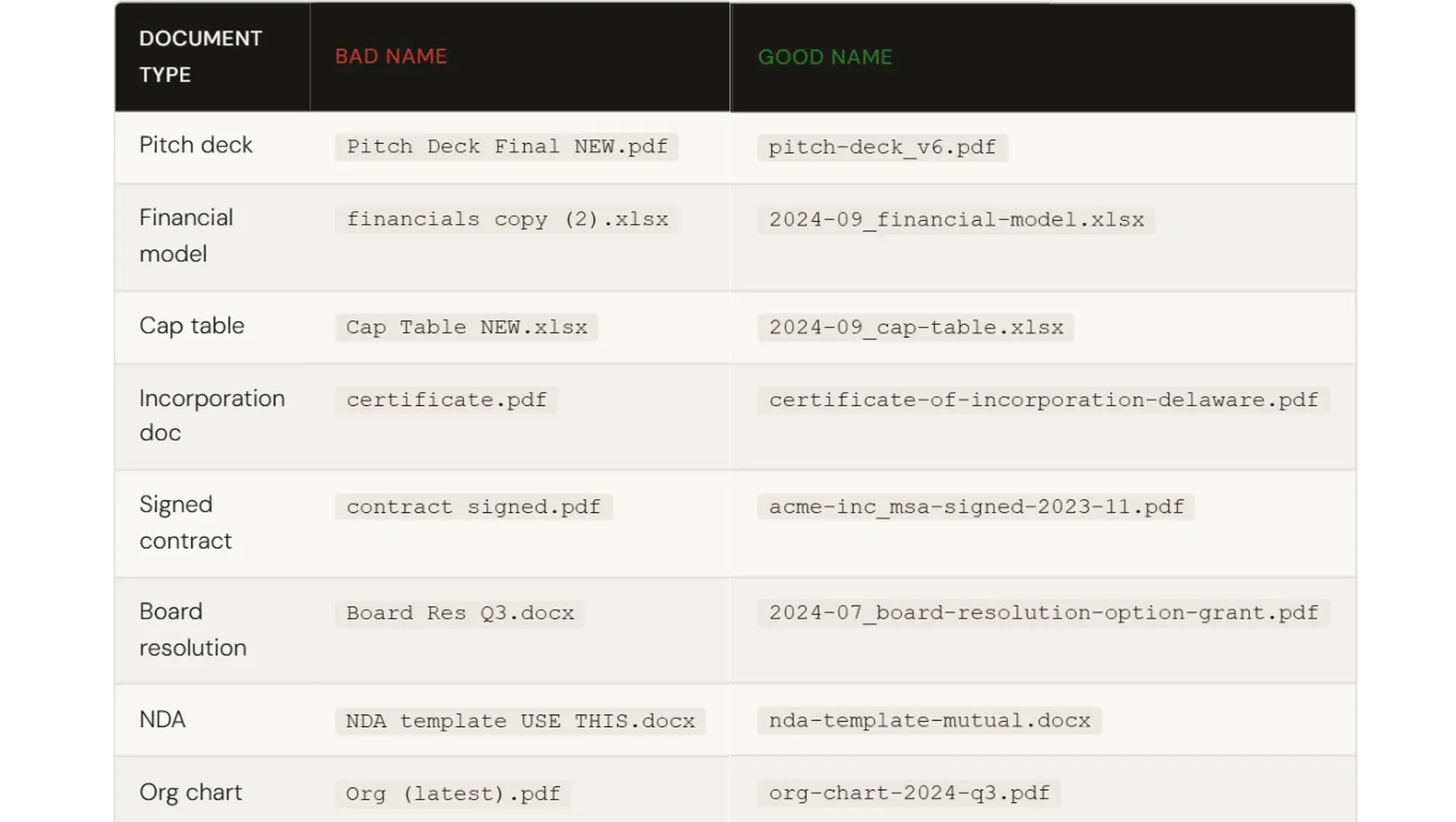
A good folder structure only works if the files inside it are named consistently. Here are the rules that matter most for M&A documents:
- Use lowercase and hyphens - no spaces, no capital letters, no special characters
- Put the date first for any time-sensitive file - use YYYY-MM format so files sort chronologically
- Be specific - 2024_annual-financial-statements.pdf not financials.pdf
- Add "signed" or "draft" to contracts where the status matters - acme-inc_msa-signed-2023-04.pdf
- Use version numbers for iterative documents - spa-draft-v3.pdf not spa-latest.pdf
- Never use "final," "new," or "use this one" in a file name
Keep only the current version of each document in the data room. Archive older versions in internal storage. Buyers shouldn't have to figure out which version of a document they're supposed to be reviewing.
Sharing and controlling access to M&A documents
Once your folder structure is ready, you need a secure way to share it. Email attachments don't work. They're untrackable, uncontrollable, and version chaos guaranteed.
A virtual data room gives you:
- Controlled access - invite specific people by email, assign permission levels, restrict which folders they can open
- Trackability - see who viewed which document, which pages they read, how long they spent on each one
- Revocability - remove someone's access instantly if the deal falls through or their involvement ends
- NDA gating - require visitors to accept an NDA before entering the room
- Watermarking - stamp each document with the viewer's email so leaks are traceable
- Audit logs - a record of every action taken in the room, which matters for compliance and dispute resolution
In any M&A transaction, multiple parties are typically accessing the data room at the same time - the counterparty, their legal counsel, financial advisors, external consultants, and your own internal team. Each group has a different role, and each role should come with a different level of access.
A buyer's financial advisor doesn't need to see employment contracts. External consultants brought in to assess one part of the business don't need visibility into everything else. Granular permission settings let you give each party exactly what they need and nothing more. This isn't just about confidentiality. It's about running a clean, professional process where sensitive information is shared deliberately, not carelessly.


How Ellty supports M&A document management
Ellty is a virtual data room and document sharing platform built for teams who need to move quickly without enterprise software complexity. For M&A processes, it handles the sharing and tracking side of things. You bring the folder structure and documents, Ellty handles access control and analytics.


Ellty works well for some M&A processes - acqui-hires, strategic acquisitions in the $1M-$20M range, and asset sales where you don't need the full compliance infrastructure of an enterprise VDR. The analytics are particularly useful: you can see exactly which documents a buyer's team has reviewed and for how long, which helps you know what questions are coming and when to follow up.
If your deal involves multiple simultaneous bidders, complex regulatory compliance, or institutional PE/strategic buyers with detailed compliance requirements, larger enterprise platforms may be a better fit. It's worth knowing your deal's complexity before choosing a tool.


Common mistakes in M&A document organization
Even well-prepared teams make avoidable mistakes when putting together a data room. Here are the ones that come up most often:
Building the data room reactively
Waiting for a counterparty to request documents before you start organizing is one of the most common mistakes. By the time requests come in, you're scrambling and scrambling leads to errors. The data room should be ready before serious conversations begin.
Treating it like a document dump
More is not better. Due diligence is a curated set of current and relevant documents, not every file you've ever created. Uploading everything you can find makes the room harder to navigate and raises more questions than it answers.
Mixing in documents that don't belong
Personal data belonging to employees, confidential individual information, or materials that have no bearing on the transaction can create legal and compliance issues. Get legal guidance on what should and shouldn't be in the room before you open access.
Uploading drafts or unsigned documents as finals
Every executed agreement should be clearly identified as signed. If a counterparty is reviewing a document they assume is final and it turns out to be a draft, it damages trust and creates confusion that slows the process down.
Skipping legal review before opening the room
Your legal counsel should review the contents of the data room before any external party gets access. What looks routine to you may be sensitive, privileged, or inadvisable to share without context or conditions.
Letting documents go stale mid-process
Transactions take time and documents have a shelf life. Financial statements age, ownership structures change, new board resolutions get passed. If the data room isn't updated as the deal progresses, counterparties end up working from outdated information, which can derail negotiations or create problems at closing.
Get a lawyer involved before you open your data room to buyers. What you include and what you omit, has legal implications. Missing a material disclosure in your data room can create liability after closing.
Frequently asked questions
What is an M&A document folder structure?
It's an organized hierarchy of folders and sub-folders that contains all the documents a buyer needs to evaluate during M&A due diligence. A standard structure groups documents by category with numbered top-level folders so everything sorts in a logical reading order. The template in this guide covers the full structure for a typical deal.
How do I organize a documents folder for due diligence?
Start by creating all top-level folders before uploading anything. Use numbered folders (01, 02, 03) so they sort consistently. Work through each category and gather the relevant documents. Use consistent file naming - lowercase, hyphens, date-first for time-sensitive files. Upload current versions only, not drafts or historical versions. Audit the full room before granting buyer access.
What is the ISO standard for folder structure?
There's no single ISO standard that prescribes a specific folder structure. ISO 15489 covers records management principles - documents should be identifiable, retrievable, version-controlled, and access-controlled. ISO 9001 addresses document control within quality management systems. For M&A purposes, following these principles means clear naming, single current versions, and defined access rules - which is what the folder structure template in this guide is built around.
What are the 4 types of file organization?
Alphabetical (sorted A-Z by name or category), chronological (sorted by date), hierarchical (folders nested by category and subcategory), and functional/topic-based (grouped by purpose). M&A data rooms typically use hierarchical as the primary structure, with chronological sorting within financial folders and alphabetical sorting within contract folders.
Is there a free M&A document folder structure template I can download?
Yes - the full template in this guide is free to use. Copy the folder structure directly from the page and recreate it in your data room platform or local file system. You can also set it up in Ellty free plan, which includes secure sharing and document-level analytics at no cost. The template covers all 12 standard due diligence categories for a typical M&A transaction.
What documents go in an M&A data room?
The core categories are: company overview and management presentation, historical and projected financials, corporate legal documents and board resolutions, cap table and equity details, intellectual property register, customer and supplier contracts, HR summary and key employment contracts, product and technology overview, customer metrics and sales data, insurance policies, and data privacy compliance documents. Closing documents (LOI, SPA, disclosure schedules) are added later in the process.
How should I name files in an M&A data room?
Use lowercase letters and hyphens instead of spaces. Start time-sensitive files with the date in YYYY-MM format so they sort chronologically. Be specific - include the document type, entity, and date where relevant. Mark signed agreements as "signed." Use version numbers (v1, v2, v3) for documents that go through multiple drafts. Never use words like "final," "new," or "latest" in a file name.
How many folders should an M&A data room have?
A standard M&A data room has 10-14 top-level folders, each representing a due diligence category. Sub-folders within each category are added only where there are genuinely distinct document types - for example, historical statements, management accounts, projections, and tax within the financials folder. Avoid deep nesting (more than two levels). The goal is that any document can be found in two clicks from the top level.
When should I set up a data room for an M&A process?
Before you start conversations with potential buyers, not after. Having a data room ready signals preparedness and speeds up the process when buyer interest becomes serious. At minimum, have the folder structure and core documents (company overview, financials, corporate legal) ready before your first serious buyer meeting. The rest can be populated in stages as the deal progresses.
Can I use Ellty for an M&A data room?
Ellty works well for almost all M&A processes - acquisitions where you need secure sharing, access control, and activity analytics without enterprise VDR pricing. The Data Room plan at $149/month includes NDA gating, dynamic watermarking, and granular permissions - the features that matter most in a due diligence context. For complex multi-bidder processes or deals requiring institutional compliance certifications, larger platforms may be more appropriate.


Author

Anika Tabassum Nionta is a Content Manager at Ellty, where she writes about secure document sharing, virtual data rooms, M&A, due diligence, fundraising, and sales enablement. With over 6 years of writing experience, she helps professionals understand how to share confidential documents securely, track engagement, and manage deals more effectively. Anika holds both a BA and MA in English from Dhaka University. Outside of work, she enjoys reading, exploring new cafes in Dhaka, and connecting with entrepreneurs and dealmakers in her community.

