
Not every small business needs a $500/month data room. Here's what you actually need, how to evaluate it, and which tools make sense at each stage.
In this guide
- What is a virtual data room?
- When do you actually need one?
- What features matter for small business?
- How much does a virtual data room cost?
- Virtual data room providers compared
- Which cloud service is best for small business?
- Best data rooms for small businesses
- How to choose
- FAQ
What is a virtual data room?
A virtual data room (VDR) is a secure online space where you store and share sensitive documents with specific people. Think of it as a locked folder in the cloud, but with controls over who sees what, when they saw it, and how long they spent on each page.
The term gets used loosely. Some people mean a full enterprise-grade deal room with granular permissions and audit logs. Others just mean a password-protected shared folder. The difference matters, especially when you're spending money on it.
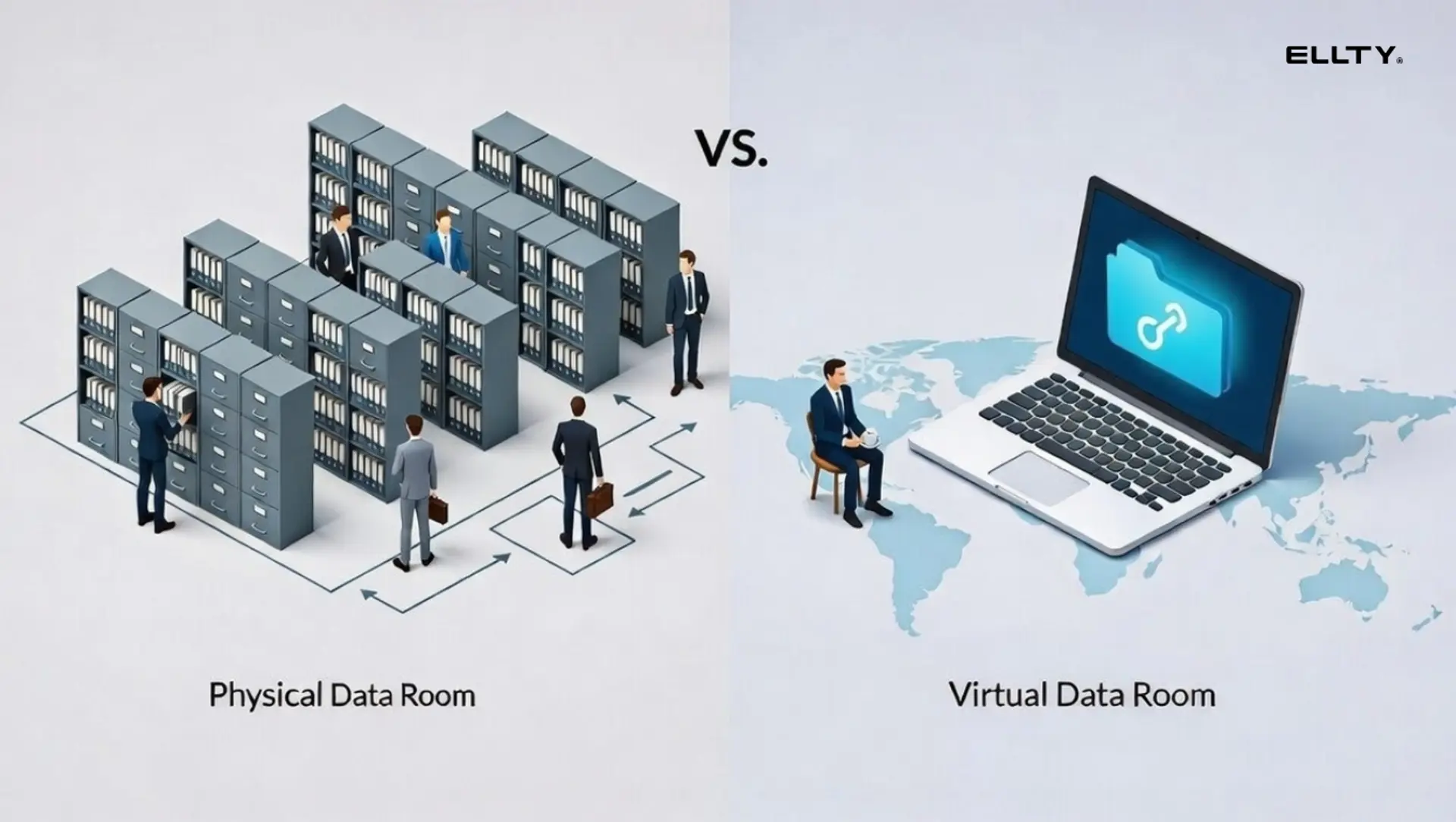
Originally, data rooms were physical rooms - literally a room full of binders where buyers would fly in to review documents during a corporate acquisition. The process was slow, expensive, and painful. Virtual data rooms replaced that starting in the early 2000s. Today, even early-stage businesses use them for investor due diligence, fundraising, and M&A prep.

Virtual data room vs. cloud storage: what's the real difference?
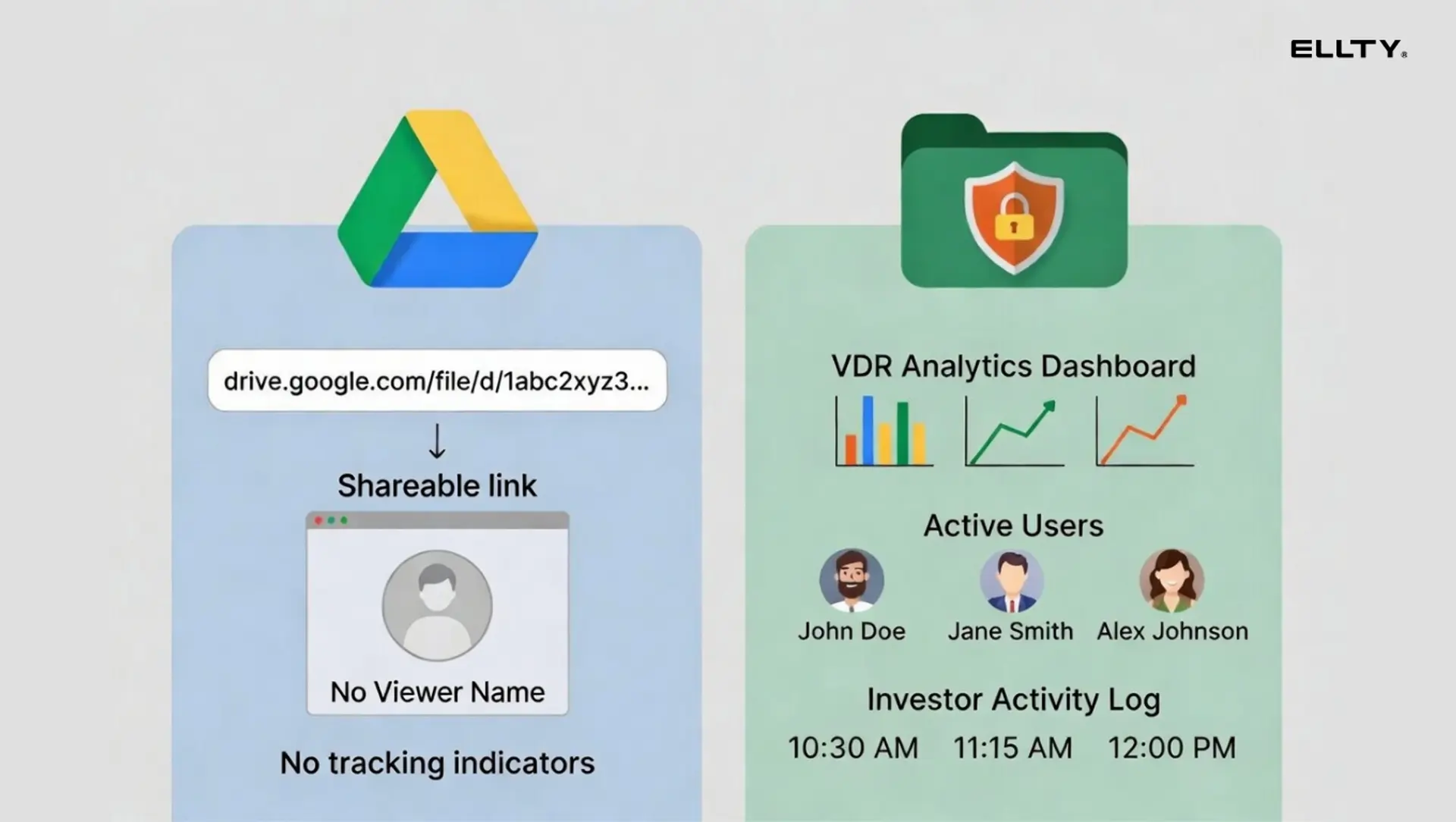
This is where most small businesses get confused. Google Drive and Dropbox are cloud storage tools. They're great for working files. They're not great for controlled, audited document sharing with outside parties.


The short version: if you're sharing a pitch deck with an external party and want to know whether they read page 8 (the financials), cloud storage won't tell you that. A data room or document tracking tool will.
When do you actually need a virtual data room?
You don't need a data room to run your business. You need one for specific, high-stakes moments.

If you're not in one of those situations, you probably don't need a dedicated data room yet. A good document sharing tool with tracking capabilities might be all you need.
Worth knowing
Teams use data room activity as a signal. If you send a data room link and see they spent 45 minutes on your financial model, that tells you something. If they opened it for 30 seconds, that tells you something else. This alone is worth the cost of a tracking-enabled tool.
What features matter for small business?
Enterprise data room vendors will sell you everything. Here's what small businesses actually use.
Must-have features


Most small businesses need the top five features. If you're running an M&A process, add NDA gating, watermarking, and audit logs to your requirements list.
Features that sound good but rarely get used
Enterprise VDR vendors love to list features. Here are the ones most small businesses pay for but never touch: built-in Q&A modules, multi-language support, print control, and advanced bulk user management. Don't let feature count drive your decision.
How much does a virtual data room cost?
This is the question everyone asks. The honest answer: it varies a lot, and the pricing models are deliberately confusing.
How VDR pricing models work
Most traditional VDR providers use one of these structures:
- Per-user pricing: you pay for every person who needs access. Costs balloon fast when investors, lawyers, and advisors all need their own logins.
- Per-page/per-GB pricing: older model used by legacy vendors. Dangerous if you have a lot of documents.
- Flat monthly/annual: set fee regardless of users or documents. More predictable. Most modern tools use this.
- Deal-based pricing: you pay per transaction. Works for M&A advisors running multiple deals, not great for ongoing use.
Typical price ranges in 2026


Watch out
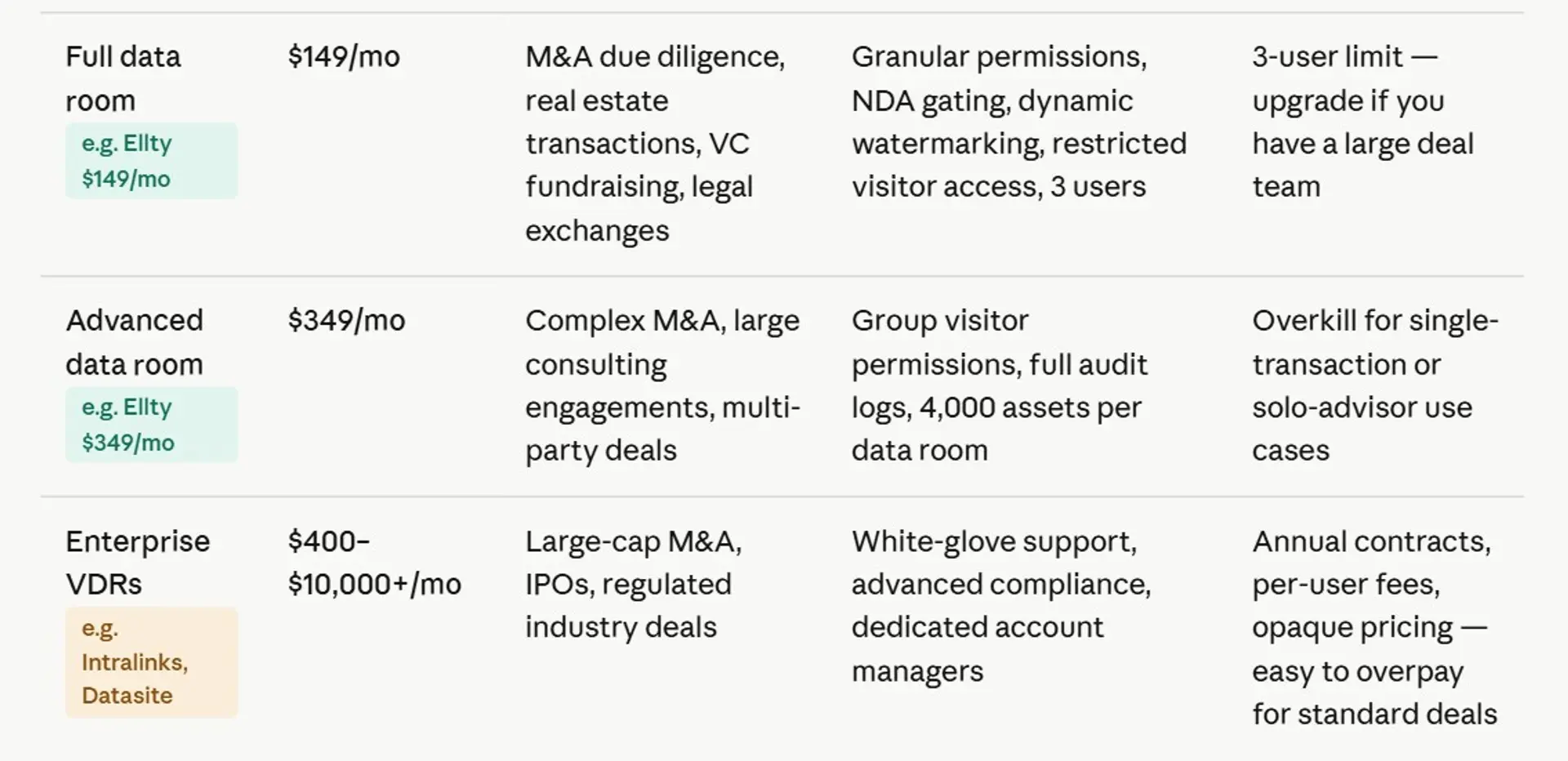
Many enterprise VDR providers don't publish pricing. That's a red flag. You'll get on a sales call, they'll ask about your deal size, and the quote will come in 3-10x what you expected. If you're a small business, this pricing model isn't built for you.
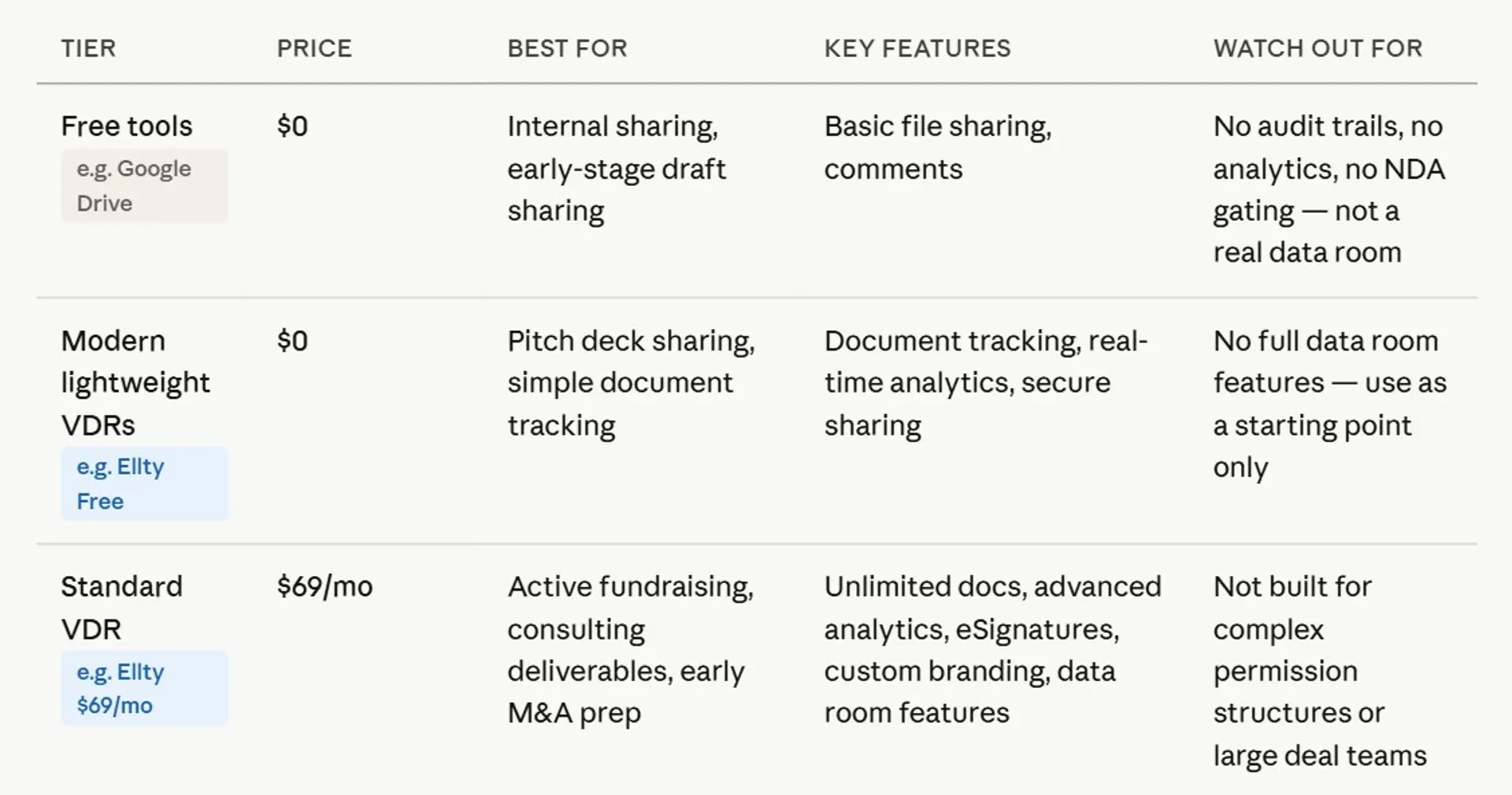
The sweet spot for most small businesses is between $69 and $200/month - flat pricing, no per-user surcharges, and enough security features to satisfy investors, advisors, and lawyers.

Virtual data room providers compared
Let's look at what's actually available. This isn't a definitive ranking - it's a practical breakdown of who each tool is built for.


A note on Reddit recommendations
If you've searched for data room recommendations on Reddit or business forums, you'll find a split: companies at early stages often recommend Ellty, or Docsend for pitch decks, while those going through M&A tend to mention Intralinks or Ansarada. The real answer is that different stages need different tools. Intralinks overkill for a seed round. Docsend might not be enough for a $20M acquisition.


Best data rooms for small businesses
1. Ellty


Ellty is a secure document sharing and analytics platform that small businesses can actually afford and use without a steep learning curve. Whether you're selling a local business, sharing financial records with a potential buyer, or giving an investor access to your books, Ellty gives you the tools that matter most: access controls, real-time activity tracking, NDA gating so buyers sign before they see anything sensitive, and a clean audit trail of every interaction.
The pricing is flat and honest. No per-user fees, no surprise charges as your deal team grows, and no enterprise contracts to negotiate. The free plan covers basic document tracking and secure sharing, good enough for early buyer conversations. The Standard plan at $69/month adds unlimited documents, eSignatures, custom branding, and advanced analytics. The Data Room plan at $149/month brings in granular permissions, dynamic watermarking, and restricted visitor access - everything a small business needs to run a proper due diligence process. The Data Room Plus plan at $349/month handles heavier loads with group permissions and full audit logs for up to 4,000 assets.
For a small business owner running a sale without a big advisory team, Ellty removes the complexity and keeps the cost predictable from day one.


2. Firmex

Firmex is a solid choice for small businesses that need a reliable data room without paying enterprise prices. It offers unlimited users across its plans, which is a real advantage when your asset sale involves a mix of buyers, lawyers, and accountants all needing access at the same time. Small business owners often underestimate how quickly the number of people touching a deal grows, Firmex handles that without charging you per head.
The platform is straightforward to set up. Drag-and-drop uploads, familiar folder structures, and simple permission controls mean you don't need a technical background to get your data room organized and ready for buyers. Activity reports show exactly who opened what and when, giving you a clear read on which buyers are serious and which ones have gone quiet.
Firmex also offers strong customer support, which matters a lot when you're a small business owner managing a sale largely on your own. A subscription-based model with a free trial makes it easy to test before committing, and the pricing is more accessible than the big enterprise platforms without cutting corners on the features a proper asset sale needs.
3. iDeals


iDeals is a well-rounded virtual data room that works well for small businesses running their first asset sale. The platform covers the full process - from uploading and organizing documents to managing buyer access and tracking due diligence activity - in a clean interface that doesn't require much training to navigate.
One of its standout features for small business sellers is the fence view option, which prevents buyers from screenshotting or printing your documents. When you're sharing profit and loss statements, customer contracts, or proprietary operational details with parties who haven't yet committed to a deal, that kind of protection matters. Auto-indexing keeps your data room organized as you add files, which saves time during a busy preparation phase when you're also trying to run the business.
The built-in Q&A module lets buyers submit questions directly inside the platform, keeping all communication structured and on the record. This is especially useful for small business owners who don't have a dedicated advisor fielding buyer inquiries. Tiered pricing is available without needing a custom quote, so you can get started quickly and know what you're paying upfront.
4. Digify


Digify is a lightweight but capable document security platform that small businesses often gravitate toward because of its simplicity and transparent pricing. It's not a traditional enterprise data room, but for a small business asset sale, it covers the essentials well: document access controls, watermarking, view-only sharing, and detailed tracking of who opened your files and for how long.
What makes Digify particularly useful for small businesses is the ability to set automatic document expiry. Once a buyer's access window closes, the documents become inaccessible without any manual action on your part - a clean and low-maintenance way to manage access during a competitive sale process. You can also restrict downloading and printing on a per-document basis, which gives you fine-grained control over how sensitive materials are handled.
Setup is fast, the interface is easy to understand, and pricing starts at an accessible monthly rate with no per-user fees on most plans. For a small business owner who needs secure, trackable document sharing without the complexity or cost of a full enterprise VDR, Digify offers a practical and affordable entry point into the asset sale process.
5. Ansarada


Ansarada is a smart choice for small business owners who want more than just a place to store documents, it actively helps you prepare your business for sale. Its readiness scoring tool evaluates how complete and well-organized your data room is before buyers arrive, flagging missing documents or gaps that could slow down due diligence or raise concerns. For a small business owner who may be going through a sale for the first time, that kind of guided preparation is genuinely valuable.
The platform includes structured pathways designed around specific deal types - business sales, real estate, and others - so the data room is shaped around what buyers typically expect to see in that context. This removes a lot of guesswork from the document preparation phase. Buyer engagement scoring shows how actively each party is reviewing your materials, helping you focus your time and follow-up on the buyers who are most serious.
Ansarada offers both deal-based and subscription pricing, which suits small businesses that are running a one-time sale rather than continuous deal activity. It sits at a higher price point than the most basic options, but the guided tools justify the cost for sellers who want a more structured and supported sale process.
6. ShareVault


ShareVault is built around document security, making it a strong fit for small businesses where the underlying assets are sensitive - a technology product, a proprietary process, a healthcare-adjacent service, or any business where confidentiality is critical throughout the sale. The platform uses digital rights management to control documents even after they've been downloaded, meaning buyers cannot open or share your files outside the access rules you set.
Expiring access links automatically cut off a buyer's access after a set period, without requiring you to manually revoke permissions - a small but meaningful feature when you're managing multiple parties across a busy sale process. For small businesses operating in regulated industries, ShareVault is built to support compliance requirements, which can simplify conversations with buyers who have their own legal and compliance teams.
Pricing is fixed with monthly and annual billing options, so there are no surprises as the deal progresses. Customer support is consistently praised for being responsive during live transactions, which matters for a small business owner who doesn't have an in-house IT team to troubleshoot issues. It's not the flashiest platform, but it does the security fundamentals exceptionally well.
7. DocSend

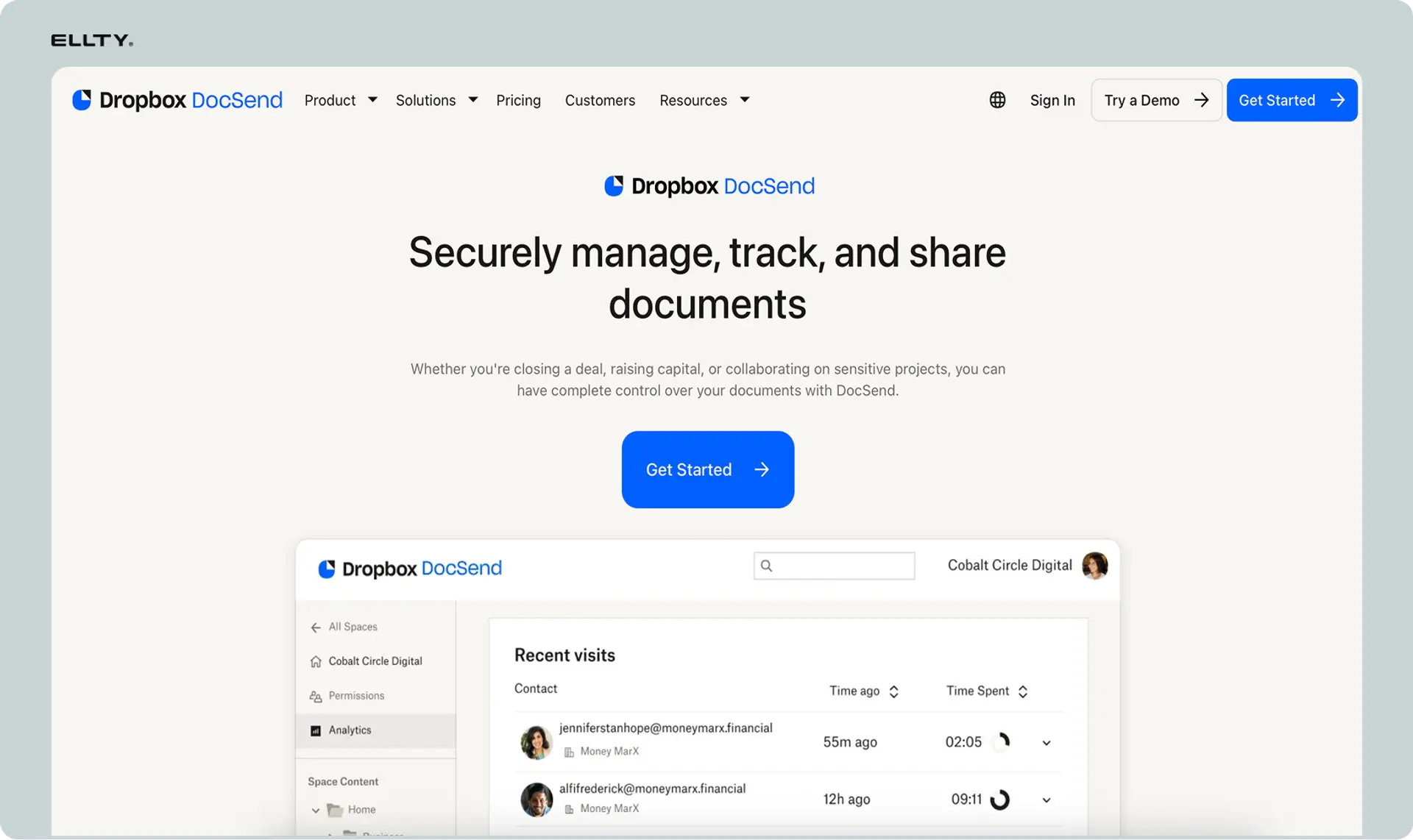
DocSend is a document sharing and analytics tool that works well for small businesses in the earlier stages of an asset sale - particularly when you're sharing teasers, pitch decks, or information memorandums with prospective buyers before a formal data room is opened. It's not a full virtual data room in the traditional sense, but for the front end of a sale process it fills the gap cleanly and at a low cost.
The core value is visibility. DocSend tells you exactly who opened your document, how long they spent on each page, and whether they forwarded it to someone else. For a small business owner trying to gauge buyer interest before investing time in a full due diligence process, that intelligence is extremely useful. You can also require an NDA or email verification before a recipient can access a document, adding a basic layer of protection without complex setup.
Pricing starts at around $15 per month, making it one of the most affordable options on this list. It works best as a complement to a proper data room rather than a replacement, but for small businesses that need a simple, trackable way to share early-stage deal materials, DocSend is hard to beat on value.
Which cloud service is best for small business?
When people ask this, they usually mean: should I use basic file sharing platforms such as - Google Drive, Dropbox, or something purpose-built?
The answer depends on what you're trying to do. For everyday collaboration - shared documents, working files, internal knowledge bases - Google Workspace or Microsoft 365 are the obvious choices. They're well-integrated, familiar, and affordable.
For most small businesses, the answer is layered: use Google Workspace or Microsoft 365 for internal operations, and layer in a document tracking or VDR tool for external high-stakes sharing.
You don't need to replace your cloud storage. You need a tool for the moments when "anyone with the link can view" isn't good enough.


How to choose the right virtual data room
The decision comes down to three questions: what's the deal type, how complex is your document set, and what's your budget?
A simple decision framework

Questions to ask before signing up
Before committing to any VDR, ask these: Does the pricing scale with users, or is it flat? What security certifications do they hold (SOC 2, ISO 27001)? Is there a free trial or sandbox? What's the setup time? Can you revoke access instantly? What does the support look like - chat, email, phone, 24/7?
Don't over-engineer it
The best data room is the one you actually use properly. A $500/month platform you can't configure correctly is worse than a $149/month platform set up well. Start with what fits your current deal stage and upgrade if the process demands it.
Frequently asked questions
What is the best virtual data room for small business?
For most small businesses, the right answer depends on what you're doing with it. If you're tracking pitch decks and running early fundraising, tools like Ellty free plan or Docsend cover the basics. For more structured due diligence with NDA gating and audit logs, mid-tier data room plans in the $149-$200/month range are usually the right fit. Enterprise providers like Intralinks or Datasite are overkill for most small businesses unless you're running a large M&A deal.
How much does a virtual data room cost?
Virtual data room pricing ranges from free to $1,500+/month depending on features and deal complexity. For small businesses, you're typically looking at $0 for basic document tracking, $69-$149/month for small business data room plans, $150-$400/month for SMB M&A use cases, and $500+ per month for enterprise-grade platforms. Be cautious of providers who don't publish pricing - that usually means the cost is going to surprise you.
Which cloud service is best for small business?
For internal collaboration, Google Workspace or Microsoft 365 are the standard picks. They're affordable, familiar, and well-integrated. For external secure document sharing with analytics and access control, you'll need a dedicated document sharing tool or VDR on top of that. Standard cloud storage doesn't give you page-level analytics, NDA enforcement, or proper audit logs.
What's the best data room for big deals?
For large M&A transactions - typically above $50M - enterprise platforms like Intralinks, Datasite, and Ansarada are industry standards. They're built for complex multi-party deals with heavy compliance requirements. That said, their pricing reflects that - expect quote-based pricing that often runs into thousands per month or per deal. For smaller deals in the $5-20M range, mid-tier VDRs with proper audit logs and permissions are usually sufficient.
What do people recommend for data rooms on Reddit and business forums?
Business communities tend to split on this. Early-stage companies often mention Ellty, or Docsend for pitch sharing (before Dropbox raised prices significantly) and Notion-based data rooms for basic organization. Those further along, running due diligence or M&A, mention Firmex, Digify, or Ansarada. The pattern is consistent: tool recommendations follow deal complexity.
Is a virtual data room necessary for businesses?
Strictly necessary? No. But a proper data room makes you look more organized and gives you information about outside engagement. When you can see that a VC spent 12 minutes on your financial model and zero time on your team slide, you know how to prepare for the follow-up call - that's probably when you need VDR. That's genuinely useful. At minimum, use a document tracking tool so you're not sending pitch decks into a black hole.
What security certifications should a virtual data room have?
For most small business use cases, look for SOC 2 Type II compliance as a baseline - it means the provider has had their security controls independently audited. For regulated industries or larger deals, ISO 27001 certification is often also required. Dynamic watermarking, encrypted storage, and granular access control are features to look for as well. Don't take security claims at face value - ask for the actual certifications.
How long does it take to set up a virtual data room?
It depends on the tool and your document readiness. Enterprise VDR setups can take a week or more with onboarding and training. Modern tools designed for smaller teams - including Ellty - are built for faster setup, where you can have a functional data room running in hours rather than days. The bigger time investment is organizing your documents before you upload them. A well-structured data room takes planning, not just technical setup.
Author

Anika Tabassum Nionta is a Content Manager at Ellty, where she writes about secure document sharing, virtual data rooms, M&A, due diligence, fundraising, and sales enablement. With over 6 years of writing experience, she helps professionals understand how to share confidential documents securely, track engagement, and manage deals more effectively. Anika holds both a BA and MA in English from Dhaka University. Outside of work, she enjoys reading, exploring new cafes in Dhaka, and connecting with entrepreneurs and dealmakers in her community.

