
In this guide
- Why you need a template before you need a data room
- The startup data room folder structure
- Section-by-section document guide
- Startup data room template: Excel, PDF, and Notion
- Using Notion as a data room - what works and what doesn't
- What to include at each stage (seed vs Series A vs M&A)
- How to set permissions on each folder
- How to build a startup data room step by step
- Best data room for startups - which tool to use
- How Ellty fits in
- Mistakes to avoid
- FAQ
You've got an investor interested. They ask for your data room. You say "give me a few days" and spend the next week scrambling to find documents, rename files, and figure out what goes where.
That's the most common data room story. It doesn't have to be yours.
This guide gives you a ready-to-copy startup data room template - the exact folder structure and document list that investors expect, organized by stage. Use it to get set up before you need it, so when the moment comes, you're ready in hours, not days.
Why you need a template before you need a data room
Most founders build a data room reactively - when an investor asks for it. That's a mistake for two reasons.
First, scrambling to organize documents when a deal is in motion adds stress at exactly the wrong time. You'll forget things, mislabel files, or rush to create documents that should have existed already.
Second, how your data room looks is itself a data point. Investors are evaluating you, not just your metrics. A clean, organized data room signals that you run a tight operation. A messy one signals the opposite.
The right approach
Set up a basic data room structure three to six months before you plan to raise. Populate it gradually as documents get created. When due diligence starts, you're 80% ready on day one.
A template gives you the structure so you don't start from a blank screen. You don't need every document on day one. You just need the folders in place and a clear list of what needs to go in each one.
The startup data room folder structure
Here's the folder structure most investors are familiar with. It's modeled on what VCs and due diligence checklists actually ask for. Copy this exactly.
📁 01 - Company overview
├──Pitch deck (latest)
├──Executive summary / one-pager
└──Company overview memo
📁 02 - Financials
├──Financial model (3-year projections)
├──Monthly actuals (last 12-24 months)
├──Revenue breakdown by segment
├──Cap table (fully diluted)
├──Use of funds
└──Audited financials (if available)
📁 03 - Legal
├──Certificate of incorporation
├──Shareholder agreements
├──Previous round term sheets + closing docs
├──IP assignments and patents
├──Key contracts (customers, vendors, partners)
└──Employee agreements and NDAs
📁 04 - Product and technology
├──Product roadmap
├──Technical architecture overview
├──Security documentation
└──Data privacy documentation
📁 05 - Team
├──Org chart
├──Founder bios
└──Key hire plan
📁 06 - Traction and metrics
├──Key metrics dashboard or report
├──Cohort analysis
├──Customer references or case studies
└──NPS or satisfaction data
📁 07 - Market and competition
├──Market sizing analysis
├──Competitive landscape overview
└──Relevant third-party research
Number your folders. It forces a specific order in the room and makes it easy for investors to navigate. Don't rely on alphabetical sorting - it'll break the logical flow.


Section-by-section document guide
Here's what to include in each section, what format to use, and what to watch out for.
01 - Company overview
This is the first folder an investor opens. It sets the tone. Keep the pitch deck current - if you updated it last week, replace the old version. Don't include multiple versions here. One clean current deck, clearly named with a date.
The executive summary is a one to two page document covering what you do, who you serve, your traction, the ask, and why now. Think of it as the pitch deck compressed into a page. It's what investors forward to partners before the partner meeting.
02 - Financials
The financial model is the most scrutinized document in the room. Make sure it's clean, has clear assumptions documented on a separate tab, and isn't password-protected in a way that breaks formulas. Use PDF for the version you share - but be ready to send the live Excel or Google Sheet if asked.
The cap table should show current ownership, option pool, any SAFEs or convertibles outstanding, and the fully diluted percentage breakdown. Use a tool like Carta or a clean Excel sheet. Don't handwrite this in a Word doc.
03 - Legal
Organize legal documents chronologically. If you've done two previous rounds, put them in order - oldest to newest. Investors doing legal diligence will read through the document history, so make it easy to follow the chain of events.
For customer contracts, include your top three to five contracts. Redact pricing if necessary, but don't redact so much that the contract is unreadable. Investors want to see terms, renewal clauses, and any unusual conditions.
04 - Product and technology
The product roadmap should cover the next 12 months at minimum. Keep it high level for the data room - you don't need to expose every internal sprint. A strategic roadmap showing major themes and milestone releases is sufficient.
Technical architecture doesn't need to be a 40-page document. A one-page diagram showing your stack, data flow, and infrastructure is enough. If you're in a security-sensitive space, include any pen test summaries or certifications.
05 - Team
Don't underestimate this section. Investors invest in teams. The org chart should reflect actual reporting lines, not aspirational ones. Founder bios should be two to three paragraphs - relevant experience, why this problem, why now. Include LinkedIn links.
06 - Traction and metrics
This is where you show the data behind the story you told in the pitch deck. ARR/MRR trends, churn rate, customer acquisition cost, lifetime value, growth rate month over month. Show your methodology - don't just drop a number.
07 - Market and competition
Be honest about the competitive landscape. Investors know your competitors. If you pretend they don't exist or undersell them, it looks naive. Show how you're differentiated without needing to tear anyone else down.
Startup data room template: Excel, PDF, and Notion
Founders often search for a startup data room template in a specific format - Excel, PDF, or Notion. Here's what each one is actually useful for, and where the limits are.

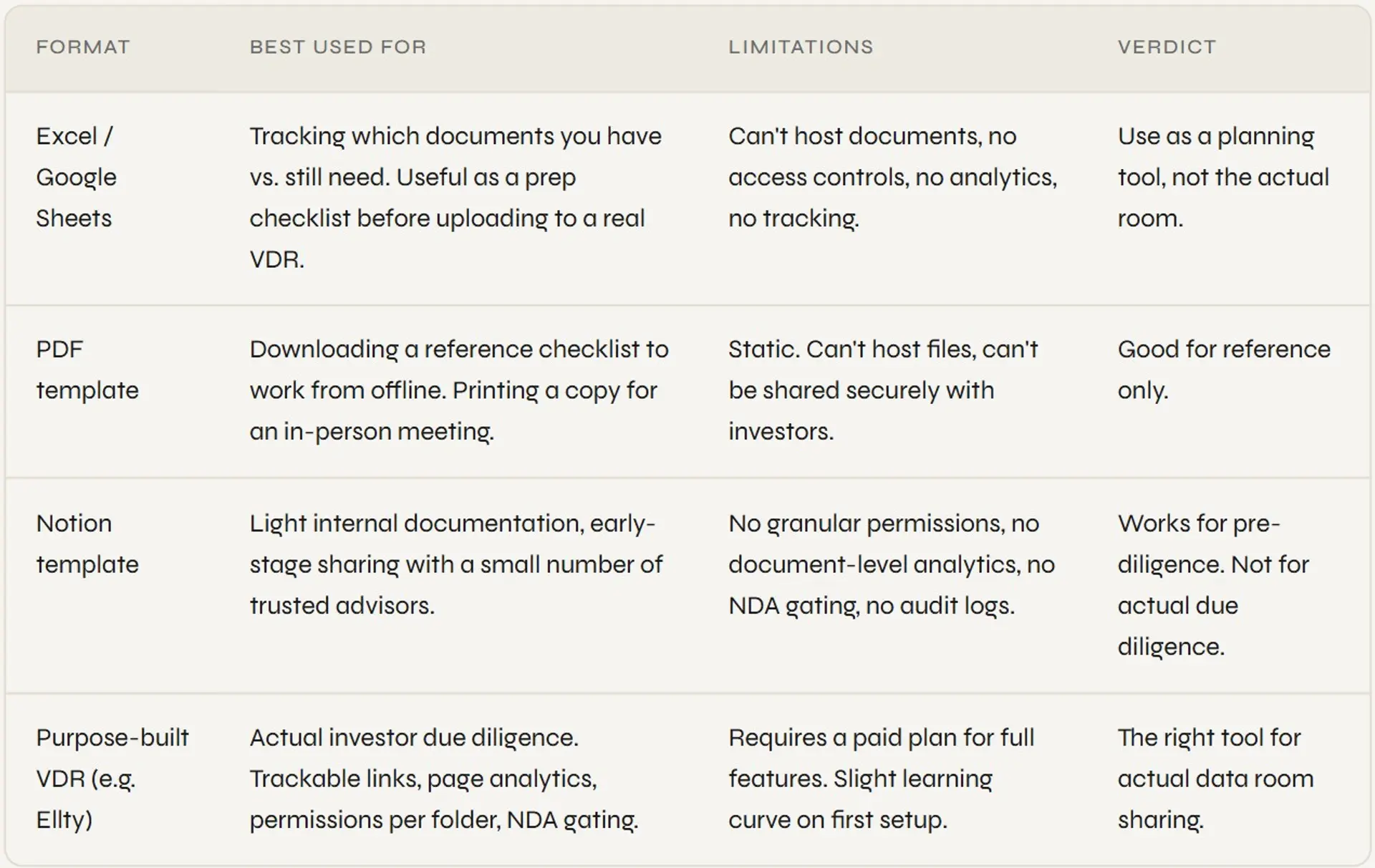
The pattern most founders land on: use an Excel or Notion checklist to plan what documents you need, then build the actual room in a purpose-built tool once you're ready to share with investors.
A PDF checklist tells you what to gather. A VDR is where you actually share it.
Using Notion as a data room - what works and what doesn't
Notion is flexible, free, and a lot of early-stage founders already use it. So the idea of building a Notion data room is appealing. Here's the honest picture.
What Notion handles well: organizing internal documentation, tracking your document checklist, sharing a lightweight overview with advisors or angels who don't need heavy security controls.
What Notion doesn't handle: you can't see who viewed a specific page and for how long. You can't restrict one section to one investor and a different section to another. You can't set a document to view-only without download. You can't require an NDA before access. You can't generate an audit log of who saw what.
For a pre-seed raise with three angels you already know personally, a Notion page might be fine. For any institutional investor doing actual due diligence, it's not the right tool.
The Notion trap
Notion looks organized. Founders think it looks professional. But investors who do this often know immediately when something is in Notion rather than a proper data room - and it signals you haven't done this before.
What to include at each stage
Your data room should match where you are. An overloaded pre-seed room with 80 documents signals poor judgment. A sparse Series B room with three PDFs signals unpreparedness. Here's what's right for each stage.


When in doubt, ask your lead investor what they need. Most will give you a due diligence checklist. Use their list as the primary guide and layer your own template on top of it.
How to set permissions on each folder
Permissions matter as much as the documents themselves. Here's a sensible starting point for each folder in your room.


These are defaults. Adjust based on how far along diligence is and how much trust you have with a specific investor. You can always loosen permissions later - it's harder to tighten them after something's already been downloaded.
Ellty lets you set folder and document permissions individually for each investor link you create. No per-user pricing, no per-seat fees for visitors. Set up your room free and upgrade when you need the extra controls.
How to build a startup data room step by step


Here's the practical process. This assumes you're starting from zero and want to be ready in a week.
- Audit what you already have
Before you touch any tool, make a list of every document you need (use the template above) and check which ones already exist. Mark each as "ready", "needs update", or "doesn't exist yet". This gives you a clear gap list. - Create the missing documents
Work through your gap list. Some documents (incorporation certificate) are easy to retrieve. Others (financial model, cap table) take time to build or clean up. Don't upload anything to the room until the document is actually ready - a placeholder folder with nothing in it looks worse than not having the folder. - Choose your platform
Pick a tool that matches your stage and deal complexity. For seed to Series A, a modern VDR with analytics and permissions is sufficient. For M&A, you'll need audit logs and group permissions. More on tool choices below. - Build the folder structure
Create the numbered folders in the exact order from the template above. Don't customize the order yet - use the standard structure first. Investors are used to this layout. - Upload and name documents correctly
Use clear, dated names. "2025-03 Financial Model" not "Model_final_v3". PDF for everything unless the investor asks for the working file. Version control lives in your name, not in the room - don't upload multiple versions of the same document. - Set permissions per folder
Follow the permission guide above. Set sensitive documents to view-only before you share anything. Test permissions as a guest account before sending any link. - Create unique links per investor
Don't send one link to everyone. A unique link per firm means you track engagement per investor, revoke access individually, and know which firm is most active. - Turn on notifications and review analytics
Set up real-time notifications so you know the moment someone enters the room. Check analytics before every follow-up call - know what they looked at and for how long before you get on the phone.
Best data room for startups - which tool to use
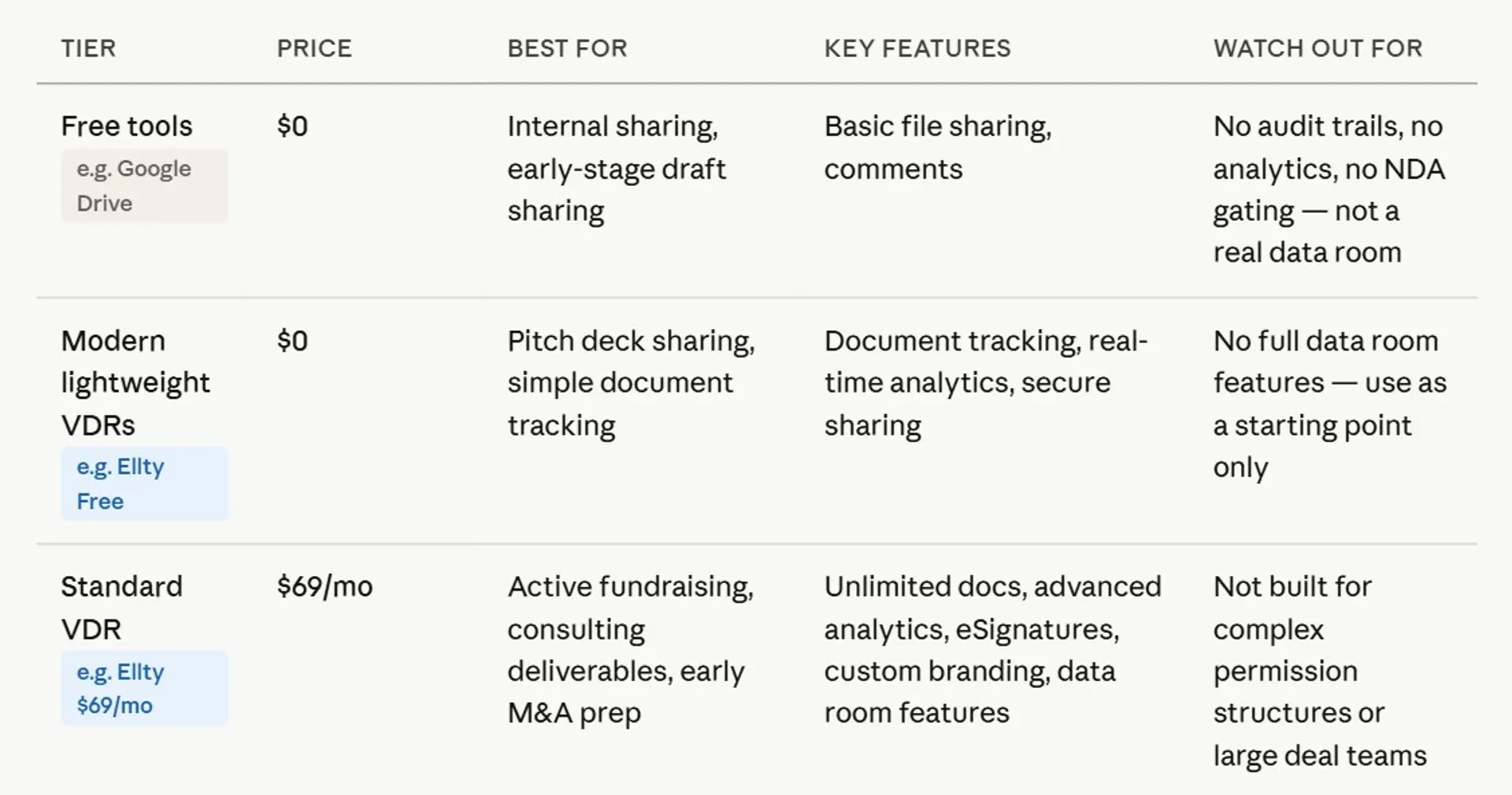
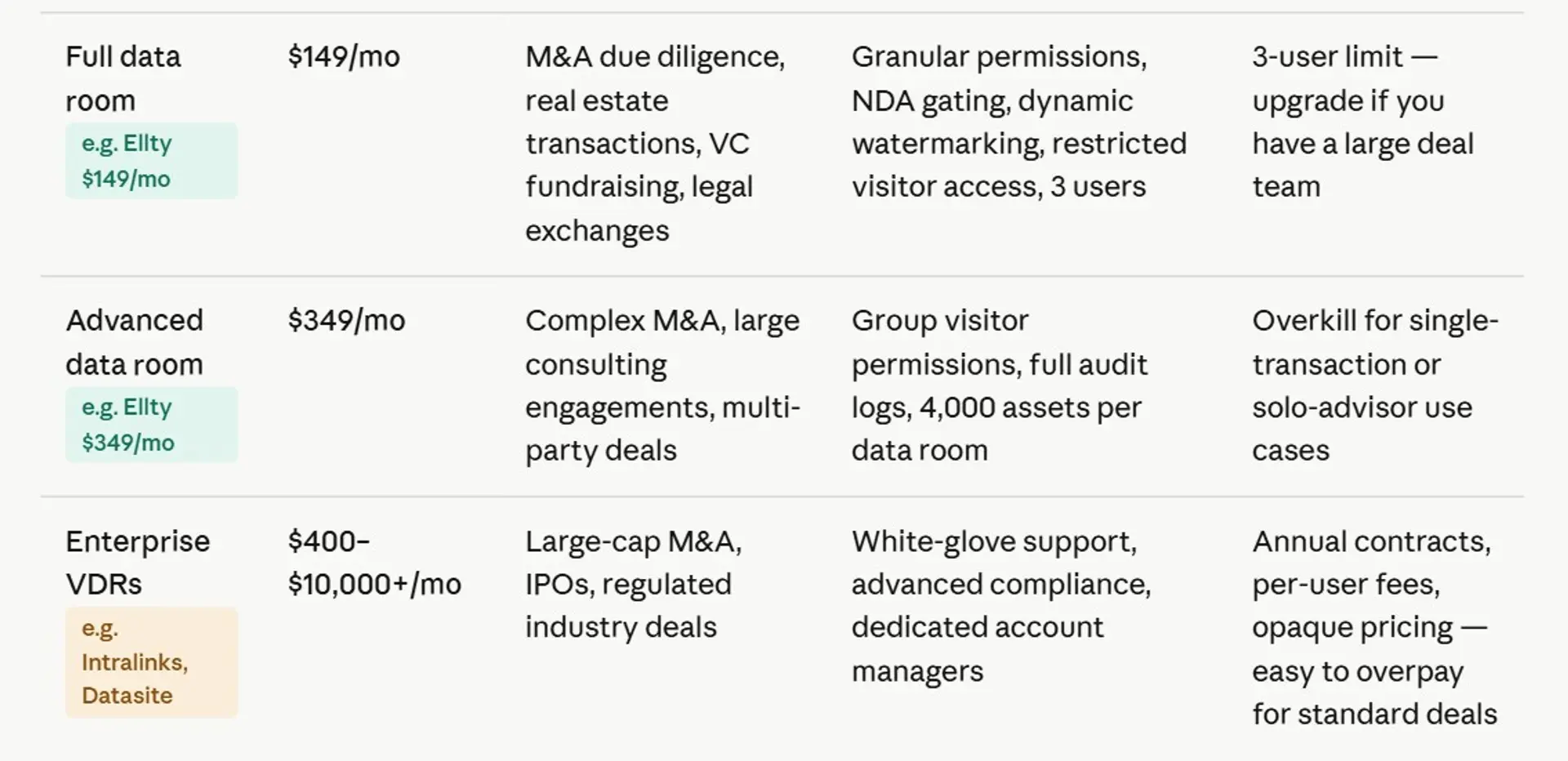
There's no single best tool. The right choice depends on your stage, deal complexity, and how many parties are involved.



How Ellty fits in
Ellty is built for companies who need a professional data room without enterprise complexity or per-user pricing that scales awkwardly with your investor list. Here's what you get across plans:


Ellty works well when you’re running a serious process with a manageable number of stakeholders in due diligence, want page-level analytics across your documents, and need to get set up quickly without spending weeks configuring enterprise software for a short, focused process.
Where Ellty is clear about its limits: large M&A transactions with complex multi-party workflows, dedicated redaction tools, or advanced Q&A modules are better handled by enterprise platforms. It’s built to stay focused, not to cover every edge case.


Mistakes to avoid when using a data room template
Even with a good template, founders make the same errors. Here are the most common ones.
Treating the template as a checklist, not a minimum bar
The template shows you what investors expect. It doesn't mean you upload a half-finished financial model just to tick the box. Every document you include should be polished. If something isn't ready, leave the folder empty and note it's coming - or don't create the folder yet.
Using the same link for all investors
One link gives you no analytics per firm. You can't tell who's engaged, you can't revoke access for one investor without killing the link for everyone, and you lose the data that would tell you who to follow up with first. Always create a unique trackable link per firm.
Uploading documents without renaming them
Your documents will look exactly like how you manage your computer. If you upload "Final Draft v2 ACTUAL.docx", that's what the investor sees. Rename everything before uploading. Use clear, descriptive names with dates.
Not setting the cap table to view-only
The fully diluted cap table is one of the most sensitive documents in the room. Set it to view-only by default. If an investor needs the working file, share it separately through a secure channel after they've signed an NDA.
Ignoring the analytics
The point of a good VDR isn't just to organize documents - it's to understand how investors are engaging with them. If someone spent 20 minutes in your financial model and then closed the room, know that before your next call. It tells you exactly where to spend the first five minutes of the meeting.
Waiting too long to set up the room
The data room should be 80% ready before you start actively reaching out to investors. Not after they ask for it. Set it up as part of your fundraising prep, not as a reaction to investor demand.
Document naming conventions that work
Naming matters more than most founders think. Here's a simple convention that keeps things clean.

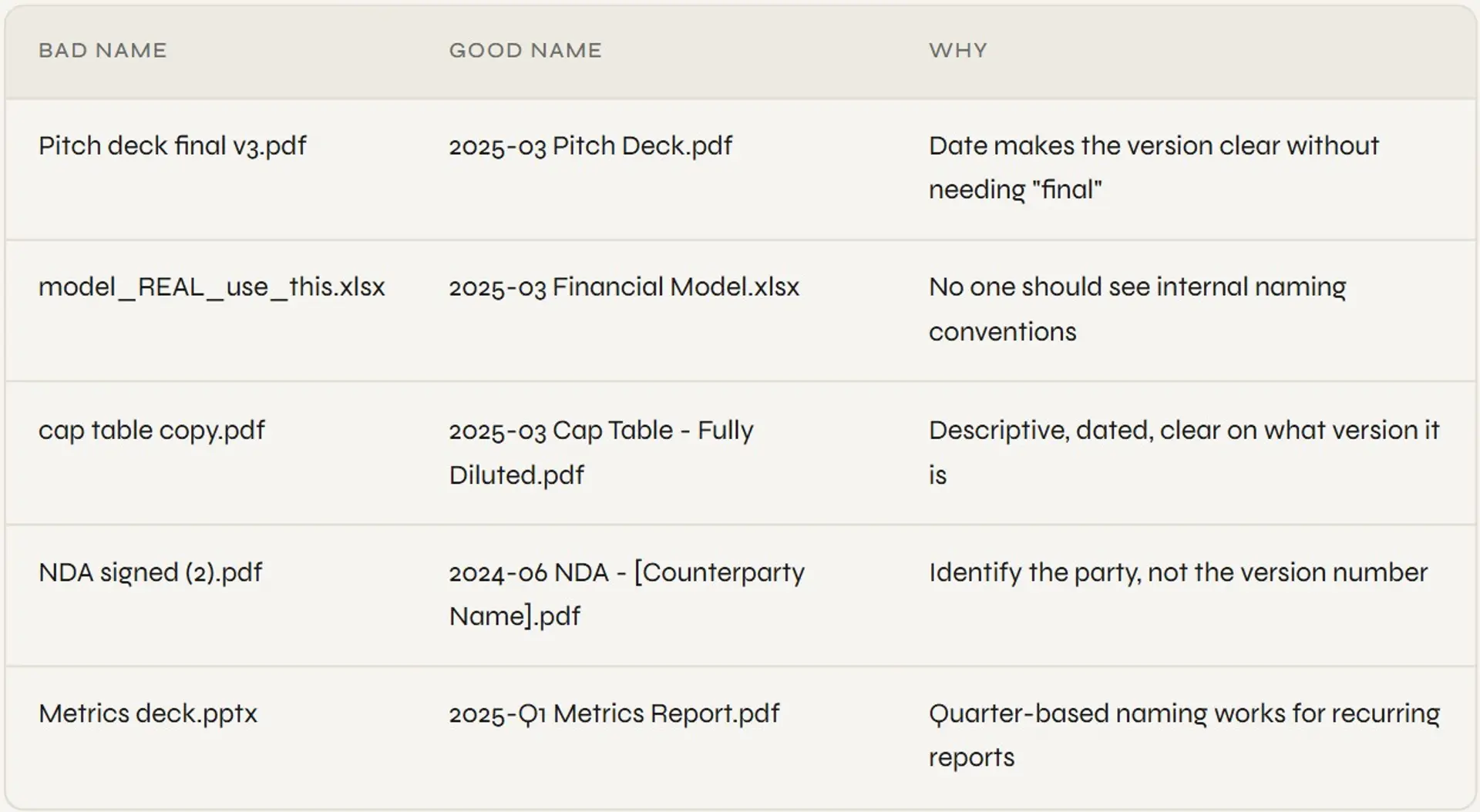
The simplest rule: if an investor screenshot the file name and sent it to a colleague, would it make sense with zero context? If not, rename it.
Startup data room template - free download
If you're looking for a startup data room template as a free download in Excel or PDF format, you'll find plenty of static checklists online. They're useful as a planning tool. Here's what most of them look like:
- A spreadsheet with the folder structure listed as rows
- Columns for document name, status (ready / pending / not applicable), and notes
- A separate tab for permissions planning
- A naming convention guide
You can build that in Google Sheets in 20 minutes using the structure above. It's worth doing as a planning exercise - but remember that the spreadsheet is the prep tool, not the actual data room.
The actual room - the place you share with investors - needs to be a purpose-built platform with access controls, tracking, and analytics. A spreadsheet can't do that.
Rather than downloading a static template, set up a live data room with real tracking inside Ellty for free and have something you can actually share with investors from day one.
Frequently asked questions
What is a startup data room template?
A startup data room template is a pre-built folder structure and document checklist that tells you exactly what to include in your data room for investor due diligence. It covers sections like company overview, financials, legal, product, team, and traction - and saves you from building the structure from scratch every raise. Think of it as the blueprint; the actual data room is what you build on top of it.
Can I use a Notion data room template for investor due diligence?
Notion works for light-touch document sharing with advisors or angels who are close contacts and don't need formal access controls. For actual investor due diligence, Notion falls short: there are no granular permissions per document, no view-only mode, no page-level analytics, no NDA gating, and no audit logs. Investors doing serious diligence expect a purpose-built data room, not a Notion page. Use Notion to plan what goes in the room, then use a real VDR to build it.
Is there a free startup data room template I can download?
Yes - several sites offer static templates in Excel or PDF format that list the standard folder structure and document checklist. They're useful for planning. But a downloadable template doesn't give you a working data room; it just tells you what to put in one. Platforms like Ellty let you set up an actual data room for free, with document tracking and real-time analytics included on the free plan - which is more useful than a static spreadsheet.
What documents should be in a startup data room?
At minimum: pitch deck, financial model with projections, monthly actuals, cap table, certificate of incorporation, shareholder agreements, key customer contracts, IP assignments, product roadmap, org chart, and key metrics. The exact list varies by stage - pre-seed rooms are lighter than Series A rooms. Most investors will give you a specific due diligence checklist; always use their list as the primary guide and supplement with the standard template.
What is the best data room for startups?
It depends on your stage. For seed to Series A, modern platforms with analytics and permissions - like Ellty - cover what you need without enterprise pricing or complexity. For large M&A transactions or Series C+ processes with many parties, enterprise platforms like Intralinks or Datasite have deeper feature sets. For basic deck sharing pre-raise, DocSend is a common choice. Match the tool to the complexity of the deal, not to what looks most impressive.
How many documents should a startup data room have?
There's no magic number, but a good seed-stage data room typically has 15 to 30 documents across 6 to 8 folders. A Series A room might have 30 to 60. More documents don't mean a better room - every document should be intentional and polished. Don't include documents just to fill folders. An empty, clearly labeled folder is better than a folder full of rough drafts.
Should I use an Excel template to build my startup data room?
An Excel or Google Sheets template is useful as a planning and tracking tool - you can list every document you need, mark what's ready and what's missing, and track progress. But Excel can't host documents, enforce permissions, track who viewed what, or generate an audit log. Once your documents are ready, you need to upload them to an actual VDR platform to share them securely with investors.
How long does it take to set up a startup data room?
The platform setup takes less than an hour. The real time investment is gathering and preparing documents. If you already have everything organized and cleaned up, you can have a working data room live in a few hours. If you're starting from scratch - needing to create a financial model, clean up the cap table, and retrieve legal documents - plan for one to two weeks of prep time. This is why setting up the room before you need it is important.
What permissions should I set on my data room documents?
Sensitive documents - cap table, financial model, legal agreements, technical architecture - should be set to view-only with no download rights by default. Documents investors need to share internally - pitch deck, exec summary, team bios - can allow download. Adjust permissions based on how far along diligence is and your trust level with a specific investor. Always start more restrictive and loosen later, not the other way around.
Do I need a different data room template for M&A vs. fundraising?
The core folder structure is similar, but M&A requires significantly more documents - full legal diligence, all customer contracts, detailed IP portfolios, employment agreements, and board minutes at minimum. M&A data rooms also typically need features that go beyond fundraising rooms: group-level permissions for multiple bidder parties, redaction tools, Q&A modules, and full audit log exports. The template above works as a starting point, but you'll expand it significantly for a serious M&A process.
The bottom line
A data room template isn't about filling folders. It's about showing investors that you're organized, that you take this seriously, and that you've done this kind of work before - or at least thought it through carefully enough to look like you have.
Use the folder structure and document list in this guide as your starting point. Build the room before you need it. Set permissions correctly from day one. Create individual trackable links per investor and actually look at the analytics before every call.
The founders who do this well aren't doing anything magical. They're just prepared. And in a fundraising process, prepared founders close faster.
Author

Anika Tabassum Nionta is a Content Manager at Ellty, where she writes about secure document sharing, virtual data rooms, M&A, due diligence, fundraising, and sales enablement. With over 6 years of writing experience, she helps professionals understand how to share confidential documents securely, track engagement, and manage deals more effectively. Anika holds both a BA and MA in English from Dhaka University. Outside of work, she enjoys reading, exploring new cafes in Dhaka, and connecting with entrepreneurs and dealmakers in her community.

