
Need a secure data room without the premium price?
You're raising a Series A and investors want access to your financials. Or you're in M&A due diligence and need to share sensitive documents with multiple parties. You need more than Dropbox, but traditional data rooms cost $10,000+ per month.
Box positions itself as the middle ground. Enterprise security without enterprise pricing. But the per-user fees add up fast, and you'll hit feature walls unless you're on the highest tier.
This guide breaks down what Box data room actually offers, what it really costs, and when simpler alternatives like Ellty make more sense for startups and smaller teams.
What is Box data room?

Data rooms explained
A data room is a secure repository where companies store and share confidential documents during high-stakes processes. Think fundraising, M&A, legal due diligence, or board governance.
Unlike basic file sharing, data rooms provide granular access controls, detailed activity tracking, watermarking, and audit trails. You can see exactly who viewed which document, when, and for how long. This matters when you're sharing cap tables with investors or financial statements with acquirers.
Box's data room feature
Box started in 2005 as simple cloud storage for college students. Over the years, it evolved into an enterprise content management platform. The "data room" capability isn't a separate product, it's how Box markets its higher-tier plans for sensitive document workflows.
Box added dedicated virtual data room features around 2015-2016, positioning itself against traditional VDR providers like Datasite and Intralinks. The core offering includes folder-based organization, permission controls, version history, and collaboration tools.
What Box offers:
Box provides secure cloud storage with features designed for due diligence and confidential sharing. You get unlimited storage on business plans, 1,500+ app integrations, and compliance certifications (HIPAA, GDPR, FedRAMP, SOC 2).
The platform includes tools like Box Shield (AI-powered threat detection), Box Governance (retention policies and legal holds), Box Zones (regional data storage), and Box Sign (unlimited e-signatures). These are add-ons on top of base plans, and you'll need Enterprise tier for most data room features.
Who uses it:
Startups raising funding rounds share pitch decks, financials, and cap tables with investors. Companies in M&A processes organize due diligence materials for buyers. Legal teams share case documents with external counsel. Finance teams distribute audit materials to accounting firms.
Box targets mid-market and enterprise customers across finance, healthcare, and government sectors. Over 8 million active users, with clients like General Electric, Under Armour, and Stanford University.
Box data room vs regular Box
Box offers two approaches to document sharing: standard link sharing and what they market as "data room" capabilities. Here's how they differ and when each makes sense.
The key difference:
Regular Box works like Dropbox or Google Drive. You upload files, create shared links, and collaborate in real time. Good for team projects and internal work.
Box data room refers to using Box's enterprise features for high-security scenarios. Same platform, but you're leveraging permission controls, watermarking, detailed analytics, and compliance tools. Think of it as Box configured for due diligence instead of casual file sharing.
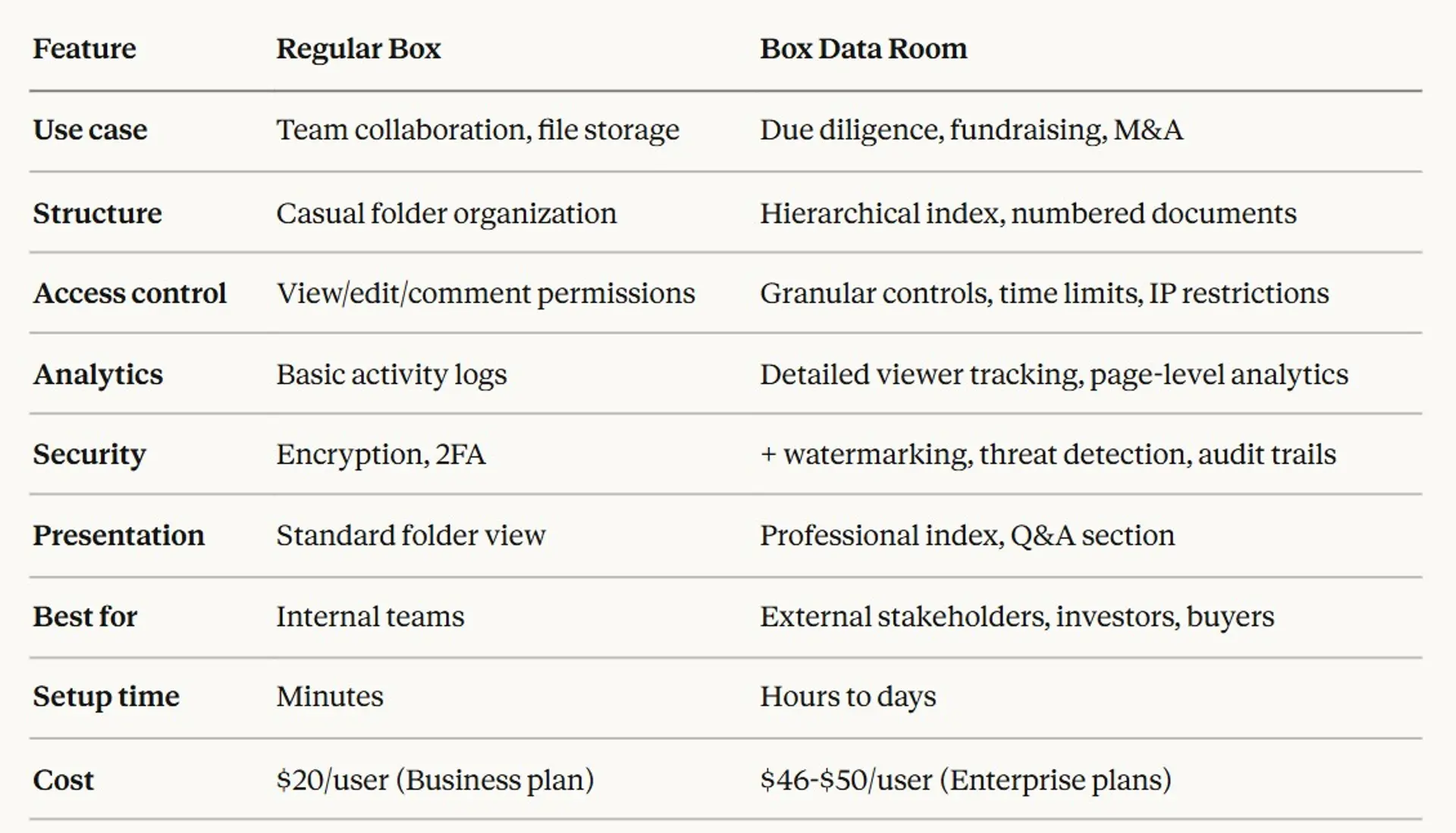
Comparison table

When to use regular Box:
You're sharing files within your company. Your team needs to collaborate on documents in real time. Security matters but you're not dealing with M&A or fundraising. You want unlimited storage without paying for advanced features.
When to use Box data room:
You're raising capital and need to share financials with investors. You're in M&A due diligence with buyers reviewing documents. You need detailed tracking of who viewed what. Compliance requirements demand audit trails and watermarking. You want to present documents professionally to external parties.
The reality:
Box doesn't have a separate "data room product." You're using the same platform with advanced features enabled. The Business plan lacks watermarking and advanced security. You need Business Plus ($33/user) for decent controls, or Enterprise ($46/user) for full data room capabilities.
Setting up a Box data room
Box setup is more complex than newer alternatives. Here's what actually happens when you create a data room.
Step 1: Plan your structure (30-60 minutes)
Decide how to organize documents. Most teams use numbered folders: 01-Company Overview, 02-Financials, 03-Legal, 04-Technology, etc. Create a master index document listing all files. This takes time but investors expect professional organization.
Step 2: Upload and organize documents (2-4 hours)
Bulk upload works but Box has file size limits. Business plan caps individual files at 5GB, Business Plus at 15GB, Enterprise at 50GB. Large video files or detailed CAD drawings might need splitting. Drag files into folders. Rename for consistency. Add version numbers if needed.
Step 3: Set up user groups and permissions (1-2 hours)
Create groups for different stakeholder types: lead investors, syndicate members, lawyers, advisors. Assign folder-level permissions. Box has seven permission levels: co-owner, editor, viewer uploader, previewer uploader, viewer, previewer, uploader. Sounds granular but gets confusing fast.
Step 4: Configure security settings (30 minutes)
Enable two-factor authentication for all users. Set password requirements. Configure watermarking (Enterprise only). Add download restrictions if needed. Enable access logs and reports.
Step 5: Create access links and invite users (30 minutes)
Generate shared links or direct invitations. Box requires external collaborators to have Box accounts on lower tiers. Business Plus allows unlimited external users without paid accounts. Send invites with custom welcome messages.
Step 6: Set up notifications and Q&A (optional, 30 minutes)
Configure email alerts for file views, uploads, or comments. Some teams create a dedicated Q&A folder where investors post questions as comments. Not as clean as purpose-built data room Q&A features.
Total setup time: 5-8 hours for a basic fundraising data room. M&A rooms with thousands of documents take days.
Ongoing maintenance:
Every time you update financials or add new documents, you'll need to manage versions and update permissions. Box doesn't auto-update shared links to new versions. Investors bookmark old files. You're constantly checking "who has access to what" in the admin console.
Box data room pricing
Box pricing is per-user, per-month. What you actually pay depends on which features you need and how many people access documents.
Plan availability
Which plans include data rooms:

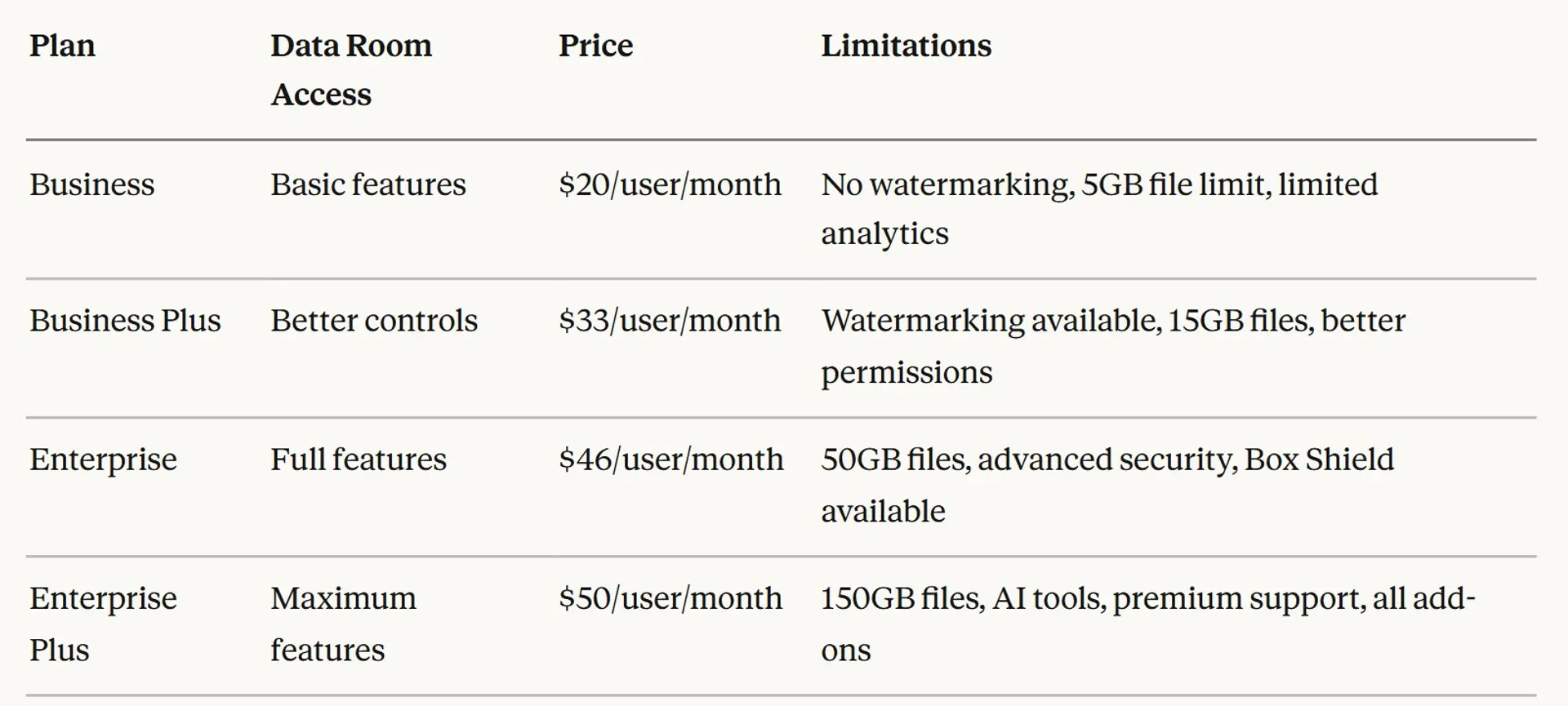
All business plans require 3-user minimum. Annual billing saves 25% compared to monthly.
Detailed pricing breakdown
Business - $20/user/month
You get unlimited storage, basic collaboration, and Box Sign (unlimited e-signatures). Good for simple document sharing. Not really suitable for data rooms because you lack watermarking, advanced permissions, and detailed analytics. External collaborators need their own paid Box accounts. File uploads capped at 5GB.
Real cost for 5 users: $100/month or $1,200/year ($900 with annual billing)
Business Plus - $33/user/month
Adds watermarking, unlimited external collaborators, advanced admin controls, and better analytics. This is the minimum tier that works for basic fundraising data rooms. Still lacks Box Shield (threat detection) and Box Governance (retention policies). File limit increases to 15GB.
Real cost for 5 users: $165/month or $1,980/year ($1,485 with annual billing)
Enterprise - $46/user/month
Full data room capabilities. Includes Box Shield, Box Governance option, advanced compliance, 50GB file uploads, and priority support. Most M&A processes need this tier. You can add Box Zones (regional storage) and Box KeySafe (encryption key management) for extra fees.
Real cost for 5 users: $230/month or $2,760/year ($2,070 with annual billing)
Enterprise Plus - $50/user/month
Maximum file size (150GB), AI-powered features, 24/7 support, and includes some add-ons at base price. Only available with annual contracts. Overkill for most startups.
Real cost for 5 users: $250/month or $3,000/year (annual billing required)
Hidden costs to consider
Beyond base subscription:
Setup and training:
Box doesn't charge for onboarding, but expect to spend internal time. Complex setups might need Box consulting services (extra fee). Premier support costs additional $2,000-$5,000/year depending on user count.
User scaling:
Every person who needs edit access counts as a paid user. View-only external users are free on Business Plus and above, but you pay for every team member who manages the room. A 10-person startup might pay for 5 users, but a 50-person company in M&A might need 15-20 paid licenses.
Feature add-ons:
Box Shield (threat detection): custom pricing, typically $5-10/user/month. Box Governance (legal holds): $3-8/user/month. Box Zones (regional storage): significant extra cost. Box KeySafe (encryption management): enterprise-only pricing.
Storage overages:
Business and higher plans include "unlimited" storage, but Box enforces fair use policies. Heavy media companies or engineering firms with TB of data might get flagged.
Real cost examples
Startup raising Series A (5 users)
You need watermarking and decent permissions. Business Plus minimum: 3 users × $33 × 12 months = $1,188/year with annual billing. But you have 5 people who need access, so $1,980/year. Add premier support and you're at $3,000-$4,000/year.
Company in M&A process (15 users)
Enterprise tier required for Box Shield and Governance. 15 users × $46/month = $690/month or $8,280/year. Add Box Shield ($5/user) and Governance ($5/user): $150/month extra = $10,080/year total. Plus enhanced support for 24/7 access during deal: $12,000-$15,000/year all-in.
Cost comparison with competitors
Box is cheaper than traditional VDRs like Datasite ($30,000+ per year) or Intralinks ($25,000+). But more expensive than modern alternatives like Ellty ($5000-1000/year) or Docsend ($10-50/user/month).
The value equation depends on whether you need Box's full enterprise features. If you're just sharing a pitch deck and financials with investors, you're overpaying.
Use cases for data rooms
Here are specific scenarios where data rooms add value and how Box handles each.
1. Fundraising (Seed to Series B)
The scenario:
You're raising capital and need to share company information with investors. Each VC asks for different materials. Some need full financial access, others just high-level metrics. Conversations happen over weeks or months, and documents get updated frequently.
Why a data room helps:
Centralize all fundraising materials in one place. Grant different access levels to different investors. Track which materials each investor reviews. Update documents once, everyone sees current version. Professional presentation builds credibility with institutional investors.
What you'd include:
Pitch deck and executive summary. Financial statements (historical and projections). Cap table and equity structure. Product roadmap and technology overview. Team bios and organizational chart. Customer contracts, pipeline, and unit economics. Legal documents (incorporation, IP assignments, material contracts).
Example workflow:
Create data room with organized folders. Send initial access to lead investors with full permissions. As more investors express interest, grant view-only access to early materials. Expand access to detailed financials as conversations progress. Track engagement to prioritize follow-ups.
Box features that matter:
User-level permissions for different investor stages. Document-by-document analytics to see engagement. External collaborator access without requiring paid accounts (Business Plus+). Version control when updating financials.
Box limitations:
No built-in NDA signing. Analytics less detailed than purpose-built fundraising tools. No page-by-page tracking on individual documents. External users can't comment without Box accounts.
2. M&A due diligence (sell-side)
The scenario:
You're selling your company and buyers want to review everything before closing. Due diligence involves hundreds or thousands of documents across legal, financial, HR, and operations. Multiple buyers might be reviewing simultaneously, and you need to track their progress.
Why a data room helps:
Organize massive document sets systematically. Control exactly what each buyer sees and when. Track which documents get most attention. Provide Q&A mechanism for buyer questions. Maintain audit trail for legal protection.
What you'd include:
Corporate structure and governance documents. Financial records (3-5 years of statements, tax returns). Customer and vendor contracts. Employee agreements and benefit plans. IP documentation (patents, trademarks, licenses). Real estate leases and equipment lists. Compliance and regulatory filings.
Example workflow:
Build comprehensive folder structure with numbered index. Upload documents in phases (initial CIM, phase 1 DD, phase 2 DD). Create separate access groups for different buyers. Grant tiered access as buyers advance. Use Q&A folder for buyer questions. Generate activity reports for your advisors.
Box features that matter:
Unlimited storage for large document sets. Watermarking to identify leaks (Enterprise tier). Granular permissions to show different docs to different buyers. Activity logs to see buyer engagement.
Box limitations:
No purpose-built Q&A tool with threading. Can't redact documents natively. No automatic audit report generation. Buyers complain about Box interface vs. traditional VDRs.
3. Board governance
The scenario:
Your board meets quarterly and needs access to sensitive materials. Board members are busy, work across time zones, and need secure mobile access. Materials include financial reports, strategic plans, and confidential HR matters.
Why a data room helps:
Centralized location for all board materials. Secure access from any device. Easy updates without emailing 47 different versions. Clear organization by meeting date and topic. Retention for historical records.
What you'd include:
Board meeting agendas and minutes. Financial reports and dashboards. Strategic plans and initiatives. Executive compensation details. Committee reports (audit, compensation, governance). Legal and compliance updates.
Example workflow:
Create annual folder structure (Q1 2026, Q2 2026, etc.). Upload materials 3-5 days before meetings. Board members review on tablets during meetings. Update minutes post-meeting. Archive for compliance requirements.
Box features that matter:
Mobile app for iPad access. Box Notes for collaborative minute-taking. Unlimited storage for years of materials. Compliance certifications for regulated industries.
Box limitations:
Not purpose-built for board management. No integrated voting or resolutions. No automated minute templates. No built-in meeting scheduling.
4. Legal case management
The scenario:
You're managing litigation with external counsel and need to share discovery materials, depositions, and case strategy. Documents are privileged and confidential. Multiple parties need access with different permission levels.
Why a data room helps:
Secure sharing of privileged materials. Clear audit trail of who accessed what. Organized repository for massive discovery sets. Collaboration between internal team and outside counsel.
What you'd include:
Pleadings and court filings. Discovery documents and responses. Deposition transcripts. Expert reports. Case strategy memos. Settlement communications.
Example workflow:
Create matter-specific data room. Organize by discovery topic or timeline. Grant external counsel view and upload access. Maintain privilege log separately. Track document reviews and annotations.
Box features that matter:
Encryption and compliance certifications. Detailed access logs for privilege protection. Collaboration tools for document review. Integration with e-discovery platforms.
Box limitations:
No native redaction tools. No privilege tagging. Not designed for large-scale e-discovery. Legal teams prefer specialized platforms.
5. Real estate transactions
The scenario:
You're buying or selling commercial property and need to share due diligence materials. This includes property documents, environmental reports, tenant leases, and financial statements. Multiple parties (buyers, lenders, brokers) need different levels of access.
Why a data room helps:
Organize property documents systematically. Share with multiple interested parties simultaneously. Track buyer engagement to gauge interest. Update materials as due diligence progresses.
What you'd include:
Property deeds and title documents. Surveys and plats. Environmental assessments (Phase I/II). Lease agreements and rent rolls. Operating expenses and financial statements. Inspection reports. Zoning and permits.
Example workflow:
Create property-specific data room. Upload documents by category. Share with qualified buyers under NDA. Track which buyers review financials vs. just browsing. Answer questions via comments or separate Q&A folder.
Box features that matter:
Large file support for architectural drawings and surveys. Mobile access for on-site reviews. Unlimited external collaborators. Version control for updated financials.
Box limitations:
File size limits on lower tiers (5GB on Business, 15GB on Business Plus). Not designed for property-specific workflows. No built-in NDA enforcement.
6. Startup accelerator program
The scenario:
You run an accelerator with 10-15 startups per cohort. Each startup needs secure storage for their materials. Mentors and investors need access to specific startup folders. You need to track engagement and provide templates.
Why a data room helps:
Centralized hub for all cohort materials. Secure sharing between startups and mentors. Template library for common documents. Track investor interest in each startup.
What you'd include:
Startup pitch decks and one-pagers. Financial models and projections. Demo day materials. Weekly update templates. Mentor feedback documents. Investor introduction materials.
Example workflow:
Create cohort folder with subfolder per startup. Provide templates for pitch decks and financials. Grant mentors access to relevant startup folders. Track investor views of demo day materials. Archive cohort materials post-program.
Box features that matter:
Unlimited storage for growing cohort archive. Template sharing across portfolio. User permissions for different stakeholder types. Integration with email and calendar.
Box limitations:
Complex permission management across multiple startups. No accelerator-specific workflows. Expensive if each startup needs paid users.
7. IPO process
The scenario:
You're taking your company public and need to manage confidential materials with investment banks, lawyers, and auditors. Strict regulatory requirements govern document handling. Multiple parties need simultaneous access to evolving documents.
Why a data room helps:
Secure environment for S-1 drafts and financial materials. Compliance with SEC regulations. Audit trail for regulatory purposes. Collaboration between multiple advisors.
What you'd include:
S-1 registration statement drafts. Financial statements and MD&A. Underwriting agreements. Legal opinions and consents. Marketing materials and roadshow decks. Due diligence responses.
Example workflow:
Create IPO data room with strict access controls. Upload S-1 drafts with version numbers. Grant underwriters, lawyers, and auditors appropriate access. Track all document views for audit trail. Maintain compliance with Regulation FD.
Box features that matter:
SOC 2 and other compliance certifications. Detailed audit logs. Encryption and security controls. Enterprise-grade reliability.
Box limitations:
Not specifically designed for IPO workflows. No integrated Q&A threading. Expensive for large teams (10-20+ users). Traditional VDRs still preferred by banks.
8. Clinical trials (life sciences)
The scenario:
You're running multi-site clinical trials and need to share protocols, patient data, and results with investigators, CROs, and regulatory bodies. HIPAA compliance is mandatory. Documents are constantly updated.
Why a data room helps:
HIPAA-compliant document storage and sharing. Organized repository for trial documentation. Version control for evolving protocols. Secure sharing with external investigators.
What you'd include:
Clinical trial protocols and amendments. Institutional review board (IRB) approvals. Patient consent forms. Case report forms. Safety data and adverse event reports. Regulatory submissions.
Example workflow:
Create trial-specific data room. Upload protocol and supporting documents. Share with site investigators and CROs. Update safety reports in real time. Maintain audit trail for FDA inspection.
Box features that matter:
HIPAA compliance certification. GxP validation for pharma. Unlimited storage for large datasets. Box Governance for retention requirements.
Box limitations:
Not purpose-built for clinical trials. No EDC integration. Expensive for large multi-site trials. Life sciences teams prefer specialized platforms.
Box data room limitations
Box is powerful but not perfect. Here's what it can't do or where it falls short.
1. Not a true virtual data room
Box is content management software adapted for data room use cases. It lacks purpose-built VDR features like integrated Q&A tools with threading, automatic index generation, bulk redaction, and deal-specific analytics. Traditional VDR providers offer white-glove service and dedicated project managers. Box gives you software and expects you to figure it out.
2. Limited page-level analytics
Box shows you who opened a file and when. It doesn't show which pages they viewed, how long they spent per page, or whether they skipped sections. Investor behavior tracking matters in fundraising. If they skip your financials but spend 20 minutes on team bios, that tells you something. Box can't provide that insight.
3. No built-in NDA management
Box can't enforce NDAs before granting access. You handle NDAs separately (DocuSign, HelloSign) then manually provision access. Purpose-built data rooms like iDeals require signed NDA before document access. This creates more work and potential gaps.
4. Complex permission management at scale
Seven permission levels sound granular until you're managing 50 users across 5 different investor groups. The admin console gets messy fast. You'll spend hours setting up and troubleshooting permissions. Modern alternatives use role-based access that's simpler.
5. External collaborator friction on lower tiers
Business plan requires external users to have paid Box accounts. Business Plus allows free external collaborators, but you're paying $33/user/month. If you're a 3-person startup, that's $1,188/year just to share documents with investors.
6. File size limits below Enterprise
5GB per file on Business is tight for video pitch decks or detailed product demos. 15GB on Business Plus is better but still restrictive. You need Enterprise ($46/user) for 50GB files. Competitors often allow larger files at lower price points.
7. No automatic watermarking on Business tier
Watermarking protects against leaks by marking documents with viewer info. Box reserves this for Business Plus ($33/user) and above. If you're on Business, documents can leak without traceability.
8. Weak Q&A functionality
Box lets users comment on files. That's it. No threaded Q&A. No question categorization. No automatic notifications. Compare to dedicated data rooms where investors post questions, you respond with links to relevant docs, and everything stays organized.
9. Learning curve for administrators
Box has powerful features but they're not intuitive. Setting up proper data room structure takes hours of admin time. Users complain about the interface compared to modern, streamlined alternatives. Your CFO doesn't want to spend days learning Box admin.
10. Expensive for small teams
3-user minimum means $60/month minimum on Business, $99/month on Business Plus, $138/month on Enterprise. For a 2-person startup, you're paying for a user you don't need. Competitors charge per data room, not per user.
11. Mobile experience is adequate, not great
Box has mobile apps, but the data room experience on mobile is clunky. Investors reviewing on iPad find it frustrating compared to purpose-built platforms. Document viewing works, but navigation and analytics suffer.
12. Limited customer support on lower tiers
Standard support is ticketing during business hours. Premier support costs extra. If you're in M&A and a buyer can't access documents at 9 PM, you wait until morning for help. Traditional VDRs offer 24/7 support at all tiers.
13. No deal-specific features
Box doesn't understand deal stages, buyer tracking, or fundraising workflows. You're adapting generic file storage to specific use cases. Purpose-built platforms have fundraising templates, investor CRM integration, and round-specific analytics.
14. Compliance add-ons cost extra
Box Governance (retention policies, legal holds) is an add-on. Box Shield (threat detection) is an add-on. Box Zones (regional storage) is an add-on. Your "all-inclusive" Enterprise plan isn't actually all-inclusive.
15. Overkill for simple use cases
If you're just sharing a pitch deck and financial model with 3 investors, Box is like using a semi-truck to move a couch. The complexity, setup time, and cost don't match the simplicity of the task.
Alternatives to Box data room
Box isn't your only option. Here are legitimate alternatives with fair comparison.
Ellty - Virtual data rooms without per-user fees


What it offers:
Ellty is a pitch deck sharing and virtual data room platform designed for startups. Upload your pitch deck, financial model, or due diligence documents. Create trackable links. See real-time analytics on who viewed what. No per-user fees, no 3-user minimums, no enterprise complexity.
Key features:
Upload pitch decks and documents in any format. Create secure, trackable sharing links with optional passwords. Real-time notifications when someone views your materials. Page-by-page analytics showing which slides get attention. Secure data room for organizing due diligence documents. Custom branding on shared links. Viewer insights including location and device.
Pricing:
Free plan: Document tracking, real-time analytics, secure sharing - free forever
Standard ($69/month): Unlimited documents, advanced analytics, eSignatures, data rooms, custom branding
Data Room ($149/month): Granular permissions, NDA gating, dynamic watermarking, restricted visitor access, 3 users included
Data Room Plus ($349/month): Group visitor permissions, audit logs, 4,000 assets per data room
No per-user fees. No minimum users required. Pay for features, not headcount.
Best for:
Startups fundraising, and founders who need simple setup with their data rooms, easy pitch deck sharing with analytics. Teams that want affordable data rooms without Box's complexity. Anyone frustrated by per-user pricing models.
Compared to Box:

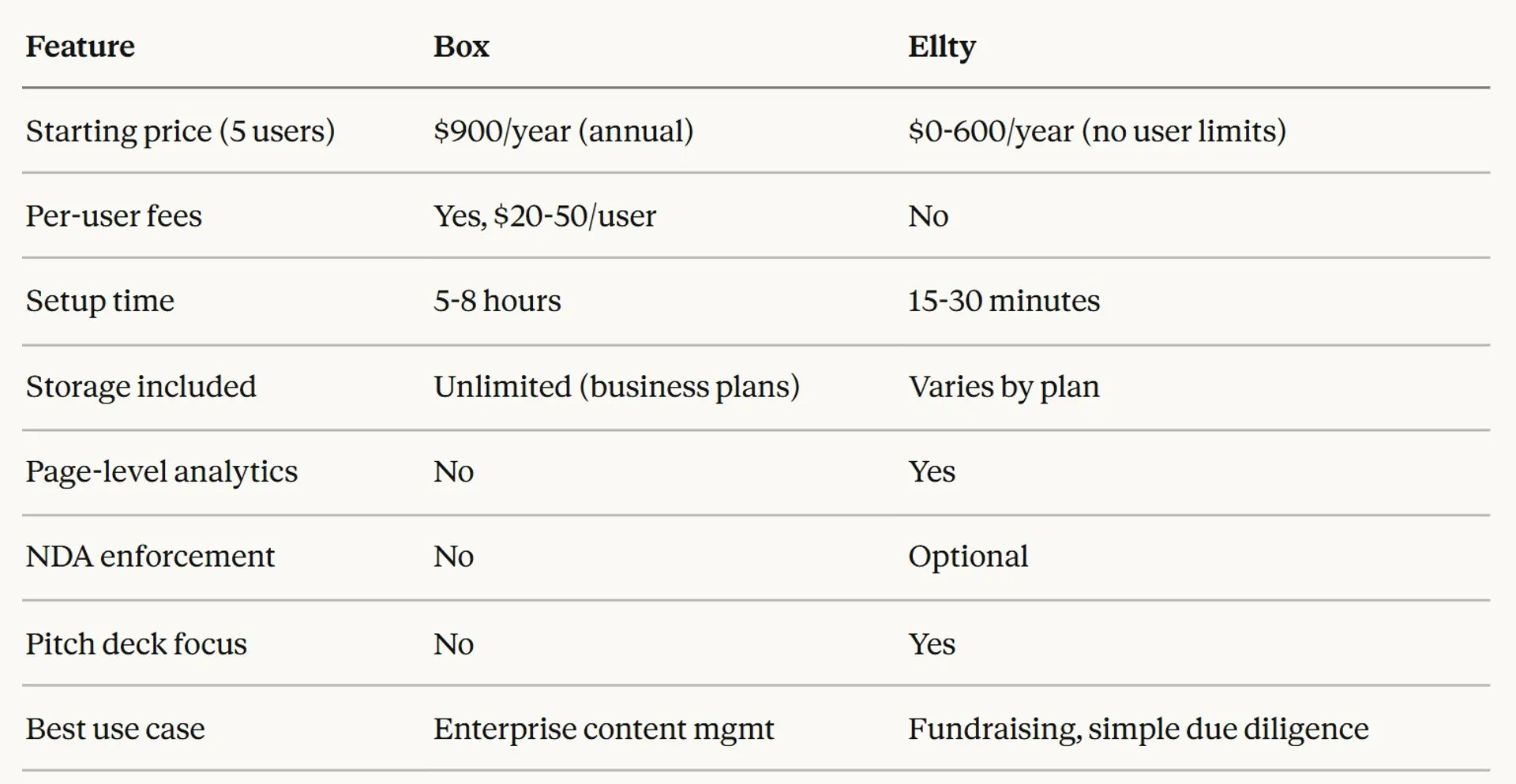
When to choose Ellty:
You're a startup founder sharing data rooms, and pitch materials with investors. Per-user pricing doesn't make sense for your use case. You need page-level analytics to see investor engagement. You want simple, fast setup without IT involvement. Budget is constrained and you need affordable data room quickly.
When to stick with Box:
You need enterprise compliance certifications. You're managing thousands of documents in M&A. You already use Box for everything else. You need 1,500+ app integrations. Your industry requires specific security controls.
iDeals - Purpose-built VDR for M&A
What it offers:
iDeals is a traditional virtual data room provider focused on M&A, IPOs, and complex deals. White-glove service, dedicated project managers, purpose-built Q&A tools.
Key features:
Advanced security with granular permissions. Built-in Q&A with threading and categorization. AI-powered indexing and redaction. 24/7 customer support. Industry-specific templates.
Pricing:
Custom pricing. Typically $2,000-5,000+ per month depending on users and deal size. Per-page or per-user models available.
Best for:
Mid-market and enterprise M&A. Investment banking deals. Companies with complex compliance requirements.
Docsend (Dropbox)
What it offers:
Document sharing with analytics, acquired by Dropbox. Strong fundraising focus with investor-friendly features.
Key features:
Page-by-page analytics. NDA enforcement before viewing. Email verification for viewers. Pitch deck templates. Investor CRM integration.
Pricing:
Personal: $10/user/month. Standard: $45/user/month. Advanced: $150/user/month.
Best for:
Startup fundraising. Sales teams sharing proposals. Marketing teams distributing content.
Google Drive with advanced settings
What it offers:
Free cloud storage that most teams already use. Not a data room but can work for simple use cases.
Key features:
15GB free storage per user. Basic sharing controls. Real-time collaboration. Comments and version history.
Pricing:
Free for personal use. Google Workspace starts at $6/user/month.
Best for:
Internal team collaboration. Very casual external sharing. Teams on zero budget.
Limitations:
Minimal security features. No analytics. No watermarking. No audit trails. Not suitable for due diligence.
Intralinks
What it offers:
Enterprise VDR with decades of M&A experience. Used by investment banks and Fortune 500 companies.
Key features:
Bank-grade security. Dedicated project managers. Advanced indexing and redaction. Global 24/7 support. AI-powered insights.
Pricing:
$25,000-50,000+ per project. Enterprise pricing only.
Best for:
Large M&A transactions. Private equity deals. Investment banking. Complex multi-party transactions.
Quick comparison table


Choosing the right alternative
If budget is your main concern: Ellty offers full data room features without per-user fees. Google Drive works for very simple sharing if security isn't critical.
If you need investor-specific features: Docsend and Ellty both focus on fundraising workflows. Ellty is cheaper, Docsend has more CRM integrations.
If you're in serious M&A: iDeals or Intralinks provide the security, support, and features that buyers and lawyers expect. Worth the cost for $10M+ deals.
If you're already on Google/Microsoft: Google Drive or SharePoint might suffice for basic needs. Add Docsend or Ellty for investor-facing materials.
If you need compliance certifications: Stick with Box, iDeals, or Intralinks. They have the certifications that regulated industries require.
Is Box data room right for you?
Box works well for some situations and poorly for others. Here's how to decide.
Choose Box data room if:
You're an enterprise company (100+ employees) already using Box for content management. You need specific compliance certifications (HIPAA, FedRAMP, SOC 2). You're managing thousands of documents across multiple departments. You want unlimited storage and can utilize Box's full feature set. You need 1,500+ app integrations with existing tools. You have IT staff who can manage Box administration. You're willing to pay $2,000-10,000+ per year for data room capabilities. You need Box's specific security features like Box Shield or Box Zones.
Look at alternatives if:
You're a startup with under 20 employees. Per-user pricing feels expensive for your use case. You just need to share a pitch deck and financials with investors. You want page-by-page analytics on document viewing. You need faster setup without IT involvement. You don't need enterprise compliance certifications. Your budget is under $1,000/year for data room features. You want purpose-built fundraising or M&A tools.
Decision framework
Ask yourself:
About your use case:
What are you sharing? (Simple pitch materials vs. complex M&A documents). Who's viewing? (3 investors vs. 30 potential buyers). How often will you use it? (One fundraise vs. ongoing deals). What's the deal size? ($500K seed round vs. $50M acquisition).
About your team:
How many people need admin access? (Affects per-user cost). Do you have IT staff to manage Box? (Setup complexity). Are you already using Box? (Integration value). What's your technical comfort level? (Learning curve).
About your budget:
What can you spend annually? ($0 vs. $1,000 vs. $10,000+). Do you prefer per-user or flat pricing? (Cost predictability). Can you justify Box's cost with its full feature set? (Utilization).
About timing:
How quickly do you need this running? (Hours vs. days). Is this urgent? (Investor deadline vs. planned process). One-time use or recurring need? (ROI calculation).
Honest recommendation
Box makes sense if you're already invested in their ecosystem and need enterprise-grade content management beyond just data rooms. The platform is powerful, secure, and feature-rich. But you pay for that power with complexity and cost.
Box doesn't make sense if you're a startup just trying to share materials with investors. The per-user pricing, setup complexity, and feature overkill don't match the simplicity of the task. You'll be paying for capabilities you don't use.
Most startups raising seed through Series B are better served by simpler alternatives like Ellty ($500-1000/year) or Docsend ($10-45/user). You get the features you actually need (sharing, analytics, security) without Box's enterprise baggage.
If you're in M&A or dealing with serious due diligence, consider purpose-built VDRs like iDeals or Intralinks. They cost more than Box but provide features and support that Box can't match.
The middle ground is tricky. Mid-market companies ($10-50M revenue) often outgrow simple tools but find Box expensive. In that range, Business Plus ($33/user) might work if you can justify the cost with Box's broader content management value.
Frequently asked questions
Is Box a true virtual data room?
No. Box is enterprise content management software marketed for data room use cases. It lacks purpose-built VDR features like integrated Q&A tools, automatic indexing, and deal-specific analytics. Box works for basic data room needs but can't match dedicated VDR providers for complex M&A.
What's the minimum cost to use Box as a data room?
$900/year with annual billing on the Business plan (3 users minimum). But Business lacks watermarking and advanced controls. Realistic minimum is Business Plus at $1,188/year for actual data room features.
Can external users access Box data rooms for free?
Depends on your plan. Business requires external collaborators to have paid Box accounts. Business Plus and above allow unlimited free external collaborators. They just need a Box account to view, but you don't pay for them.
Does Box provide page-by-page analytics?
No. Box shows file-level views (who opened what document and when). It doesn't track which pages were viewed, time per page, or viewer behavior within documents. Purpose-built tools like Docsend and Ellty offer page-level tracking.
What file size limits does Box have?
Business: 5GB per file. Business Plus: 15GB per file. Enterprise: 50GB per file. Enterprise Plus: 150GB per file. Large video files or detailed CAD drawings might exceed limits on lower tiers.
Is Box HIPAA compliant?
Yes. Box offers HIPAA compliance, but you need a Business Associate Agreement (BAA) which typically requires Enterprise tier. The platform includes necessary security features (encryption, access controls, audit logs) to handle protected health information.
Can you track who downloaded documents in Box?
Yes. Box activity logs show file views, downloads, edits, and shares. Enterprise tier provides more detailed audit reports. But tracking isn't as granular as dedicated VDRs that show page-by-page behavior.
Does Box include e-signature capabilities?
Yes. Box Sign provides unlimited e-signature requests on all business plans. Good for signing NDAs or investment documents. Not as feature-rich as DocuSign but included at no extra cost.
How long does it take to set up a Box data room?
5-8 hours for basic fundraising data room with 50-100 documents. Complex M&A data rooms with thousands of files take days. Setup includes planning structure, uploading documents, configuring permissions, and testing access.
What's the difference between Box Business and Box Enterprise?
Business ($20/user) has 5GB file limit, limited integrations, no watermarking, basic support. Enterprise ($46/user) has 50GB files, unlimited integrations, watermarking, advanced security (Box Shield, Box Governance available), priority support. Enterprise is minimum for serious data room use.
Can you white-label Box data rooms?
Limited. Box allows custom branding (logo, colors) on shared links with Enterprise tier. But the Box interface itself isn't fully white-labeled. Purpose-built data rooms offer more customization.
Does Box offer a free trial?
Yes. 14-day free trial for business plans. You get full access to features during trial period. Good for testing whether Box meets your needs before committing.
Is Box data room suitable for fundraising?
Depends. Box works for basic fundraising (sharing pitch deck and financials) but lacks investor-specific features like page-level analytics, NDA enforcement, and CRM integration. Alternatives like Ellty and Docsend are purpose-built for fundraising workflows.
Author

Anika Tabassum Nionta is a Content Manager at Ellty, where she writes about secure document sharing, virtual data rooms, M&A, due diligence, fundraising, and sales enablement. With over 6 years of writing experience, she helps professionals understand how to share confidential documents securely, track engagement, and manage deals more effectively. Anika holds both a BA and MA in English from Dhaka University. Outside of work, she enjoys reading, exploring new cafes in Dhaka, and connecting with entrepreneurs and dealmakers in her community.

