
Need document tracking that actually works?
You send your pitch deck to investors. You email proposals to clients. You share contracts with partners.
And then... nothing. No idea if they opened it. No clue which pages they read. Zero visibility into whether they're interested or ghosting you.
Document tracking tools solve this. They let you see exactly who viewed your documents, which pages they spent time on, and when they're engaging. You get real-time notifications when someone opens your file instead of wondering if your email ended up in spam.
This guide covers Papermark - what it is, how it works, what it costs, and whether it's the right document tracking tool for you. We'll also look at alternatives so you can make an informed decision.

What is Papermark?

Papermark is an open-source document sharing platform that lets you upload files, create trackable links, and see analytics on who viewed your documents.
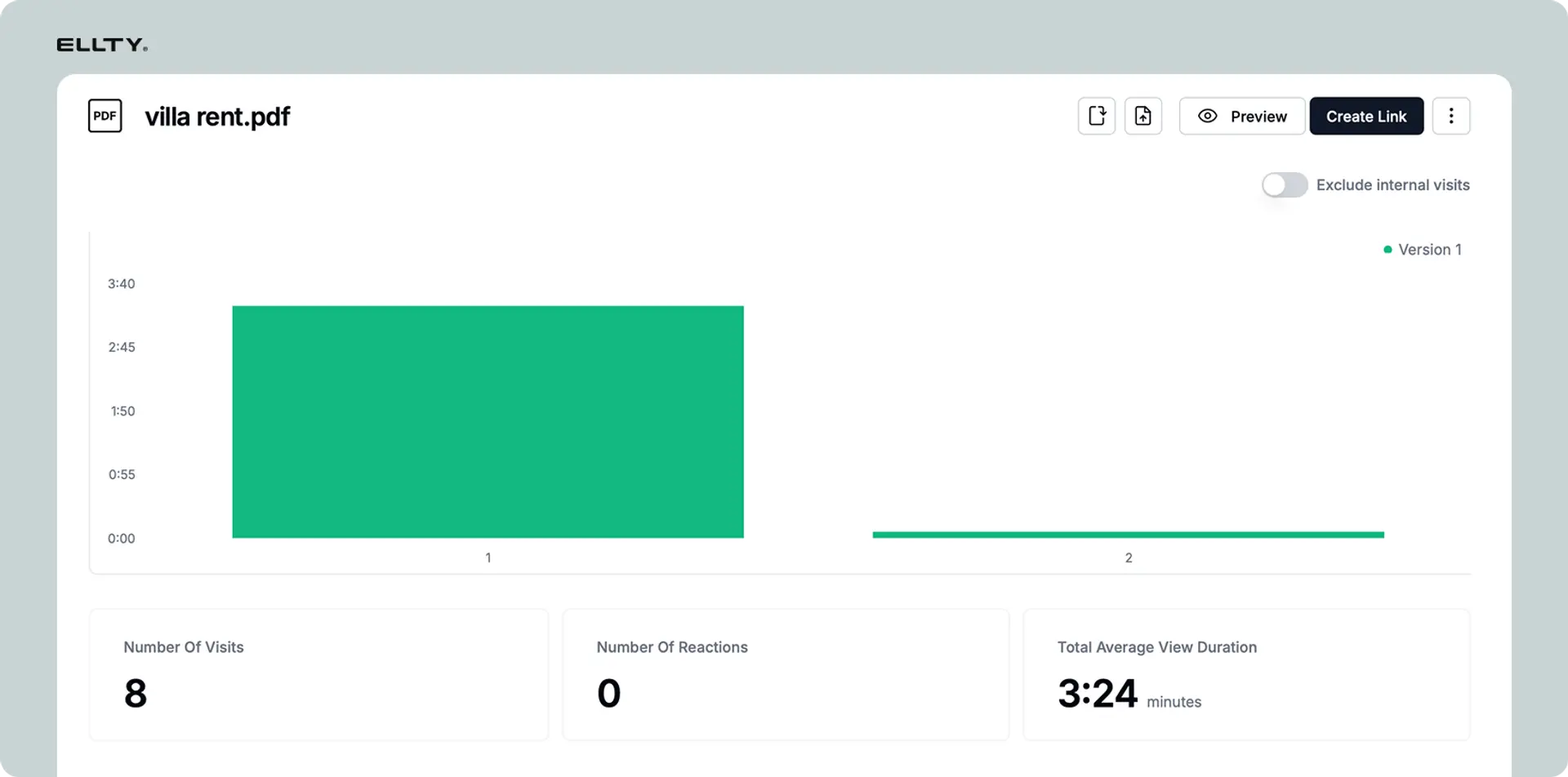
Instead of sending PDFs through email or sharing Google Drive links, you upload documents to Papermark and send recipients a custom link. When they open it, you get real-time notifications and can see exactly which pages they viewed, how long they spent on each page, and when they accessed the document.
Core functionality
Document sharing: You upload PDFs, pitch decks, or other documents to Papermark. The platform generates a unique, shareable link for each document. Recipients don't need to create an account or download anything - they click the link and view the document in their browser.
Tracking and analytics: Every time someone opens your link, Papermark logs it. You see who viewed the document (if you collected their email), which specific pages they looked at, how much time they spent on each page, and when they accessed it. This gives you insight into whether prospects are actually reviewing your materials and which sections interest them most.
Access control: You can password-protect documents, set expiration dates on links, restrict access to specific email domains, and disable downloads. You can also revoke access to a document at any time, even after you've shared the link.
Use cases: Startups use Papermark to share pitch decks with investors and track engagement. Sales teams send proposals and see which sections prospects focus on. Recruiters share job descriptions and hiring materials. Anyone who needs to know if their documents are being read uses tools like this.
What makes Papermark different
Different from email attachments: When you email a PDF, you have no idea if the recipient opened it. With Papermark, you get confirmation the moment they view it and can see exactly how they engaged with the content.
Different from Google Drive or Dropbox: These platforms let you share files, but they don't show you page-level analytics. You might see that someone downloaded a file, but you won't know if they actually read it or which sections they focused on. Papermark shows you the full engagement story.
Different from enterprise document management systems: Tools like SharePoint or Box focus on internal file organization and compliance. Papermark focuses specifically on external sharing and engagement tracking. It's lighter, faster to set up, and built for outbound document sharing rather than internal collaboration.
Market position
Papermark positions itself as an open-source alternative to tools like DocSend (now part of Dropbox) and PandaDoc. Being open-source means the code is publicly available, and you can self-host it if you want full control over your data. The company targets startups, investors, and small teams who need document analytics without enterprise pricing.


How Papermark works
You upload a document, share a link, and Papermark tracks everything that happens next.
Step-by-step process
1. Upload your document: Log into Papermark and upload your PDF, pitch deck, or document. The platform processes it and creates a web-based viewer. This takes a few seconds for most documents.
2. Configure sharing settings: Before you share, you can add a password, set an expiration date, require email verification before viewing, enable or disable downloads, or restrict access to specific email domains. You can also add custom branding if you're on a paid plan.
3. Get your trackable link: Papermark generates a unique URL for your document. This link is what you'll send to recipients. Each link is tied to that specific document and tracks all activity.
4. Share the link: Send the link via email, Slack, text - however you normally communicate. Recipients click it and view the document in their browser. No downloads required unless you've enabled that option.
5. Track engagement in real-time: As soon as someone opens your link, you get notified. The dashboard shows you who viewed it, when they viewed it, how long they spent on each page, and whether they downloaded it. If multiple people view the same link, you'll see separate entries for each viewer.
6. Follow up strategically: Use the data to time your follow-ups. If someone spent 10 minutes on your pricing page, that's a buying signal. If they skipped straight to the last slide, maybe they're not as interested. You can see this and adjust your approach.
Additional features
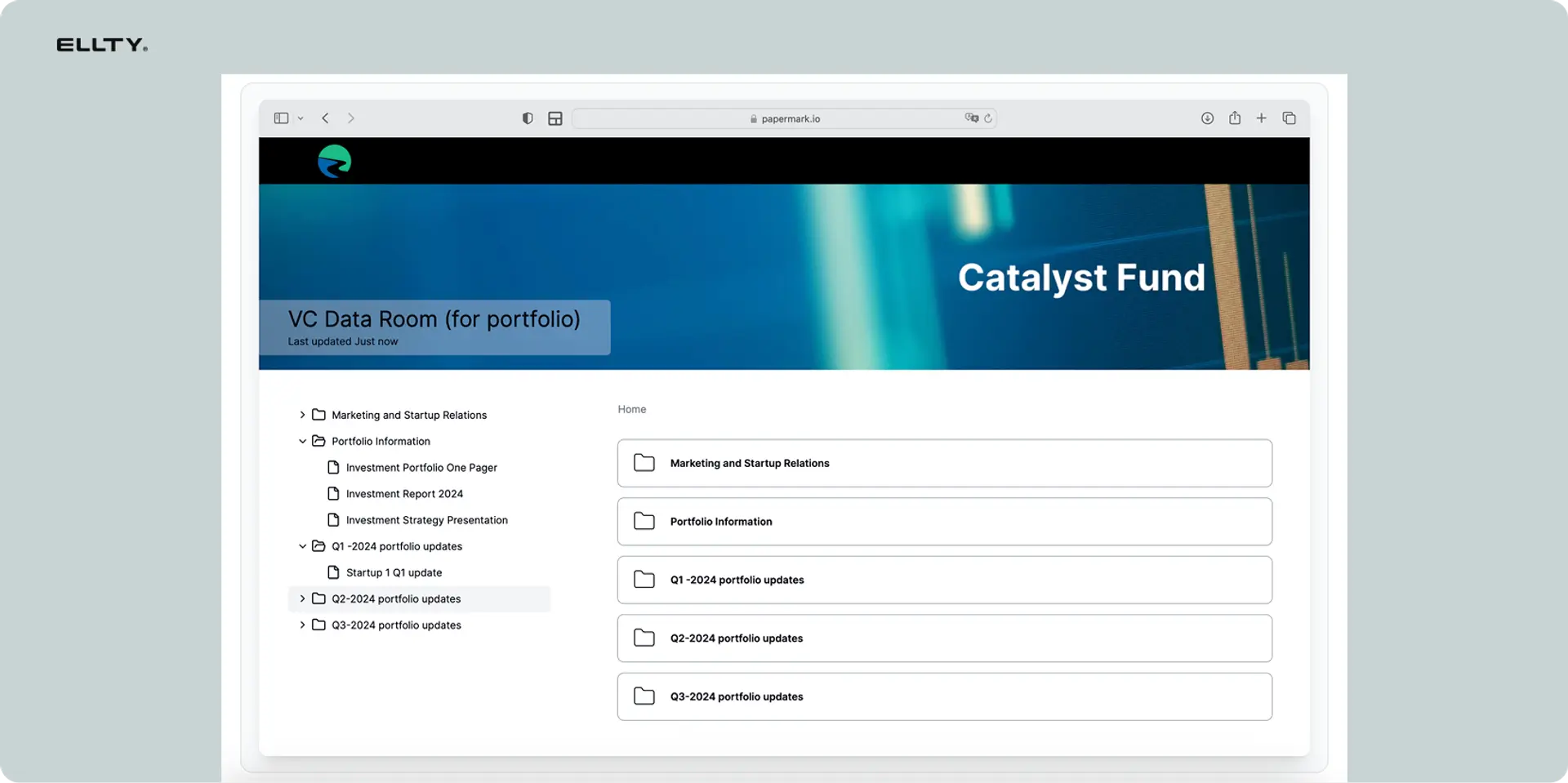
Data rooms (on higher plans): Data rooms let you organize multiple documents in one secure location. This is useful during due diligence when investors need access to financial statements, legal docs, and other sensitive materials. You control who accesses what, and you can see exactly which documents each person reviewed.
Integrations: Papermark connects with Slack for notifications, Zapier for workflow automation, and various CRM tools. The integrations aren't as extensive as enterprise platforms, but they cover the basics.
Team collaboration: On team plans, multiple people can upload documents and view analytics. You can assign documents to specific team members and collaborate on tracking leads.
Typical workflows
Fundraising workflow: Upload pitch deck → Share link with investors → Get notified when they view it → See which slides they spent time on → Follow up mentioning specific sections they reviewed → Track multiple investors simultaneously.
Sales workflow: Upload proposal → Send to prospect → See if they opened it → Notice they spent 5 minutes on pricing → Follow up with pricing conversation → Close deal with engagement data as context.
Recruiting workflow: Share job packet → Track candidate engagement → See which candidates thoroughly reviewed materials → Prioritize interested candidates → Make offers based on demonstrated interest.
What are the limitations of Papermark?
Papermark works well for basic document tracking, but it's not perfect. Here's what you need to know about its limitations.
Limited enterprise features
The issue: Papermark doesn't have advanced features like SSO (single sign-on), advanced permission hierarchies, or detailed audit logs that compliance teams need.
Why it matters: If you're at a larger company with strict security requirements or regulatory compliance needs, you'll hit walls. There's no way to integrate with your existing identity provider or create complex access rules.
Who this affects: Companies in regulated industries (finance, healthcare, legal), larger organizations with InfoSec requirements, and teams that need to pass security audits for enterprise clients.
No built-in e-signature
The issue: You can track when someone views a document, but you can't collect signatures within Papermark. You'll need a separate tool for that.
Why it matters: If you're sending contracts or agreements that need signatures, you're managing two separate workflows - one for tracking, one for signing. This adds friction and complexity.
Who this affects: Sales teams sending proposals that need signatures, legal teams managing contracts, HR teams with offer letters, anyone who needs both tracking and signing in one flow.
Analytics are basic
The issue: You get page-by-page view data, but you don't get heatmaps, scroll depth analysis, or advanced engagement scoring that some competitors offer.
Why it matters: You can see which pages someone viewed, but you can't see where on a page they focused their attention or how thoroughly they reviewed complex sections. The data answers "what" but not always "how."
Who this affects: Sales teams optimizing proposal performance, marketers A/B testing materials, anyone who wants deep insights into document engagement patterns.
Self-hosting requires technical knowledge
The issue: While Papermark is open-source and you can self-host it, this isn't trivial. You need to set up servers, manage databases, handle updates, and maintain security yourself.
Why it matters: If you want to self-host for data control but don't have a technical team, you're stuck. The cloud version is easy, but self-hosting has a steep learning curve.
Who this affects: Small teams without developers, non-technical founders who want data sovereignty, companies that want self-hosting but lack infrastructure resources.
Limited customization on lower tiers
The issue: Custom branding, custom domains, and white-labeling are restricted to higher-paid plans. Free and starter users send links with Papermark branding.
Why it matters: If you're representing your company professionally, branded links look more polished. Sending "papermark.io/xyz" instead of "yourcompany.com/proposal" can feel less professional.
Who this affects: Agencies presenting to clients, consultants who want to maintain their brand, sales professionals who need polished presentations, anyone building brand credibility.
Storage limits scale with price
The issue: Free and lower-tier plans have document storage limits. If you're sharing lots of documents or large files, you'll need to upgrade or delete old documents.
Why it matters: If you're sharing video files, large design portfolios, or managing ongoing document needs, storage fills up fast. You either pay more or constantly manage what you keep.
Who this affects: Agencies with large client files, creators sharing video content, teams with high document volume, anyone working with media-heavy materials.
When limitations become dealbreakers
If you need e-signatures in the same workflow, Papermark won't work - you'll need PandaDoc or DocuSign. If you're at an enterprise with strict compliance requirements, the lack of advanced security features is a blocker. If you want deep analytics like heatmaps and engagement scoring, you'll want something more robust. And if you're non-technical but want to self-host, the complexity will frustrate you.
For basic document tracking - knowing who viewed what and when - Papermark delivers. For anything beyond that, evaluate carefully.
Who uses Papermark?
Papermark serves anyone who sends documents externally and wants to know if recipients actually engage with them.
Startup founders
Who they are: Early-stage founders raising funding rounds, building investor relationships, and pitching constantly.
How they use Papermark: They upload pitch decks and share links with investors. When an investor opens the deck, they get notified immediately and can see which slides resonated. They use this data to time follow-ups and tailor conversations based on what investors focused on.
Why it works for them: It's affordable (often free for their volume), gives them visibility into investor interest, and helps them prioritize warm leads over tire-kickers. They can see if an investor spent 10 minutes reviewing financials or just skimmed the first few slides.
Example scenario: A founder sends their deck to 20 investors. Three open it within hours and spend significant time on the traction slides. The founder follows up with those three first, mentioning their growth metrics since they clearly resonated. The other 17 either didn't open it or barely looked - the founder deprioritizes them.
Sales professionals
Who they are: Account executives, business development reps, and sales consultants sending proposals, pricing documents, and case studies.
How they use Papermark: They share sales collateral and track engagement to identify hot prospects. If a prospect reviews a proposal multiple times or spends significant time on pricing, that's a buying signal. They use this to prioritize outreach and customize follow-ups.
Why it works for them: Instead of blindly following up after sending a proposal, they have data. They know who's interested, who's just browsing, and who hasn't looked at all. This makes their time more efficient and their conversations more relevant.
Example scenario: A sales rep sends proposals to five prospects on Monday. By Wednesday, two have opened them multiple times and spent 15+ minutes reviewing pricing and implementation sections. The rep reaches out to these two with pricing questions and implementation timelines, while putting the others on a slower nurture track.
Venture capitalists and investors
Who they are: VCs, angel investors, and investment professionals who receive dozens of pitch decks weekly and need to share deal memos internally.
How they use Papermark: They upload pitch decks from startups they're evaluating and share them with partners for review. They track which decks their team actually reviews and which sections generate interest. They also use data rooms for due diligence materials.
Why it works for them: Managing deal flow is chaotic. Papermark helps them see which opportunities their team is actually reviewing and which are getting ignored. This helps them prioritize time and make faster decisions on what to pass on.
Example scenario: A VC uploads 10 startup decks to review with partners. Analytics show that three decks get opened by multiple partners and generate significant time spent on team and traction slides. These three advance to partner meetings. The other seven barely get opened - the venture capitalist passes quickly instead of scheduling unnecessary calls.
Recruiters and HR teams
Who they are: Internal recruiters, HR professionals, and talent acquisition teams sharing job descriptions, onboarding materials, and offer letters.
How they use Papermark: They send job packets to candidates and track engagement to gauge interest. If a candidate spends significant time reviewing benefits and culture materials, that suggests strong interest. If they barely open the packet, maybe they're not serious.
Why it works for them: Recruiting is time-sensitive. Knowing which candidates are genuinely interested helps them move faster with the right people and not waste time on candidates who aren't engaged.
Example scenario: An HR team sends detailed job packets to 15 finalists. Five candidates open and review the materials thoroughly within 24 hours. Three don't open it at all. The recruiter prioritizes the engaged candidates for next-round interviews and follows up more cautiously with the others.
Consultants and agencies
Who they are: Independent consultants, marketing agencies, design studios, and professional services firms pitching projects.
How they use Papermark: They share proposals, project scopes, and pricing documents with prospective clients. They track whether clients review materials before meetings and which sections generate the most interest. This helps them prepare better and focus conversations on what matters.
Why it works for them: Client work is competitive. Knowing a prospect spent 20 minutes reviewing case studies tells them to emphasize relevant experience in the next call. Seeing they skipped pricing tells them price might be an obstacle to address proactively.
Example scenario: A design agency sends three proposals on Monday. One client opens and reviews their proposal twice before the Friday call, spending most time on case studies. The agency brings additional portfolio pieces from similar projects to the meeting. Another client hasn't opened it by Friday - the agency postpones the meeting rather than waste time.
Company sizes
Individuals and solopreneurs: Free plan works fine for occasional sharing.
Small teams (2-10 people): Starter or team plans provide enough seats and features.
Growing companies (10-50 people): Business plans with higher limits and team collaboration features.
Larger organizations: May hit limitations around enterprise security and compliance - would need to evaluate carefully or consider enterprise alternatives.
Industries
Technology and SaaS: Heavy users for product demos, sales materials, and investor decks.
Professional services: Consultants, agencies, and advisors sharing proposals and project scopes.
Finance and investing: VCs and angels managing deal flow and due diligence.
Real estate: Agents sharing property information and investment materials.
Creative industries: Designers, photographers, and agencies sharing portfolios and proposals.
When Papermark is NOT the right fit
If you need signatures on documents (use DocuSign or PandaDoc instead), if you're at an enterprise with strict compliance requirements (you'll need more robust security features), if you need advanced analytics like heatmaps (look at tools with deeper tracking), or if you primarily share documents internally rather than externally (use Google Drive or Notion), Papermark probably isn't what you need.
Papermark excels at external document sharing with basic analytics for small to medium teams. If that's your use case, it works well. Outside that, evaluate carefully.
Papermark pricing & plans

Papermark offers a free plan plus paid tiers based on usage and features. Pricing is per workspace, not per user.
Quick pricing overview
Free: $0 - unlimited documents, basic tracking, Papermark branding
Pro: $29/month - custom branding, advanced analytics, more storage
Business: $79/month - data rooms, team features, priority support
Enterprise: Custom pricing - self-hosting, white-label, dedicated support when system is down
(Prices current as of January 2026 - verify on papermark.io for latest)
Detailed plan breakdown
Free Plan - $0/month
- Unlimited documents
- Basic page-by-page analytics
- Email notifications
- Password protection
- Link expiration
- Papermark branding on links
- 1GB storage
- Best for: Individuals testing document tracking or occasional use
Pro Plan - $29/month
- Everything in Free
- Custom branding (remove Papermark logo)
- Advanced analytics dashboard
- Email capture before viewing
- Custom domain for links
- 10GB storage
- Download tracking
- Best for: Solopreneurs and small teams sharing regularly
Business Plan - $79/month
- Everything in Pro
- Data rooms for due diligence
- Team collaboration (up to 5 seats)
- Folder organization
- Priority email support
- 50GB storage
- Advanced access controls
- Best for: Growing teams and companies with higher volume
Enterprise Plan - Custom
- Everything in Business
- Unlimited team members
- Self-hosting option
- White-label solution
- Dedicated support
- Custom storage limits
- SSO (on roadmap)
- Best for: Larger companies needing control and customization
Pricing comparison table


Hidden costs
Storage overages: If you exceed your plan's storage limit, you'll need to upgrade or delete old documents. There's no pay-as-you-go storage option.
Additional team members: On the Business plan, you get 5 seats. Additional seats cost $15/month each.
Custom domain setup: While custom domains are included in Pro+, you'll need to configure DNS settings yourself or get technical help.
Self-hosting infrastructure: If you choose the Enterprise plan with self-hosting, you'll pay for your own servers, database hosting, and maintenance. This can add hundreds per month depending on your infrastructure choices.
Discounts available
Annual billing: Save 20% by paying yearly instead of monthly. Pro drops to $23/month, Business to $63/month when billed annually.
Non-profit discount: Available on request - typically 50% off paid plans.
Startup programs: Papermark participates in some startup accelerator programs offering credits.
Cost comparison to alternatives
vs. DocSend: DocSend starts at $50/month for similar features. Papermark Pro at $29/month is cheaper for basic tracking, but DocSend includes e-signatures.
vs. PandaDoc: PandaDoc starts at $35/month but requires annual commitment. More expensive but includes document creation and signatures in one platform.
vs. Ellty: Ellty starts at $0/month with no per-user fees and includes unlimited team members even on lower tiers. Cheaper for teams but different feature focus.
vs. Notion: Notion starts at $10/user/month but doesn't offer document-specific analytics. Fine for internal sharing, not for external tracking.
For pure document tracking, Papermark's pricing is competitive. If you need additional features like signatures or document creation, you'll pay more with other tools but get more functionality in one place.
Papermark pros and cons
Here's a balanced look at what Papermark does well and where it falls short.
Pros (Advantages)
Open-source and transparent The code is publicly available on GitHub. You can see exactly how it works, contribute improvements, or self-host if you want full control. This level of transparency is rare in document tracking tools.
Affordable pricing for individuals The free plan is genuinely useful, not a teaser. You get unlimited documents and real tracking. Pro at $29/month is cheaper than most competitors for similar features.
Real-time notifications You get instant alerts when someone views your document. No waiting for daily digest emails or checking dashboards constantly. This is valuable when timing matters in sales or fundraising.
Page-level analytics You see exactly which pages someone viewed and how long they spent on each one. This granular data helps you understand what resonated and what they skipped.
No per-user pricing on Free and Pro Unlike tools that charge per seat, Papermark's Free and Pro plans don't multiply costs as your team grows. One person or five can use the same account.
Easy setup and simple interface Upload a document, get a link, share it. The core workflow takes under a minute. The dashboard is clean and you don't need training to understand the analytics.
Password protection and link expiration Basic security features are included even on free plans. You can add passwords and set expiration dates without paying for premium security.
Works on any device Recipients don't need accounts or apps. Links work on desktop, mobile, and tablets. This removes friction from sharing - anyone can view immediately.
Active development Papermark ships updates regularly. The team responds to GitHub issues and feature requests. Being open-source means community contributions improve the product over time.
Data rooms for due diligence On Business plans, you can organize multiple documents securely. This is useful for fundraising or any situation where you're sharing sensitive materials in a controlled environment.
Cons (Disadvantages)
No e-signature functionality You can track documents but not collect signatures. If you need both, you're managing two separate tools or switching to an all-in-one platform like PandaDoc.
Limited enterprise features No SSO, no advanced audit logs, no granular permission systems. Larger companies with security requirements will hit walls quickly.
Basic analytics compared to competitors You get page views and time spent, but no heatmaps, scroll depth, or engagement scoring. DocSend and others offer deeper insights.
Self-hosting requires technical skills The open-source promise is great, but actually self-hosting means setting up infrastructure, managing databases, and handling updates yourself. Not friendly for non-technical teams.
Storage limits on lower plans 1GB on Free, 10GB on Pro. If you're sharing large files or high volumes, you'll upgrade or constantly delete old documents.
Branding on free plan Links include Papermark branding unless you pay for Pro. For professional presentations, this can look less polished.
Limited integrations Basic Slack and Zapier integrations exist, but CRM connections and workflow automation are minimal compared to enterprise tools.
No built-in collaboration features You can't comment on documents or collaborate in real-time like you can in Google Docs. Papermark is for sharing and tracking, not collaborative editing.
Team features only on Business plan If you want proper team collaboration with multiple seats, you're jumping to $79/month. There's no mid-tier option for small teams.
Email verification can add friction Requiring email before viewing protects your data, but it adds a step for recipients. Some prospects won't want to give their email just to view a document.
Papermark alternatives to consider
Papermark isn't the only document tracking option. Here are legitimate alternatives worth evaluating.
Ellty - Document tracking without per-user fees

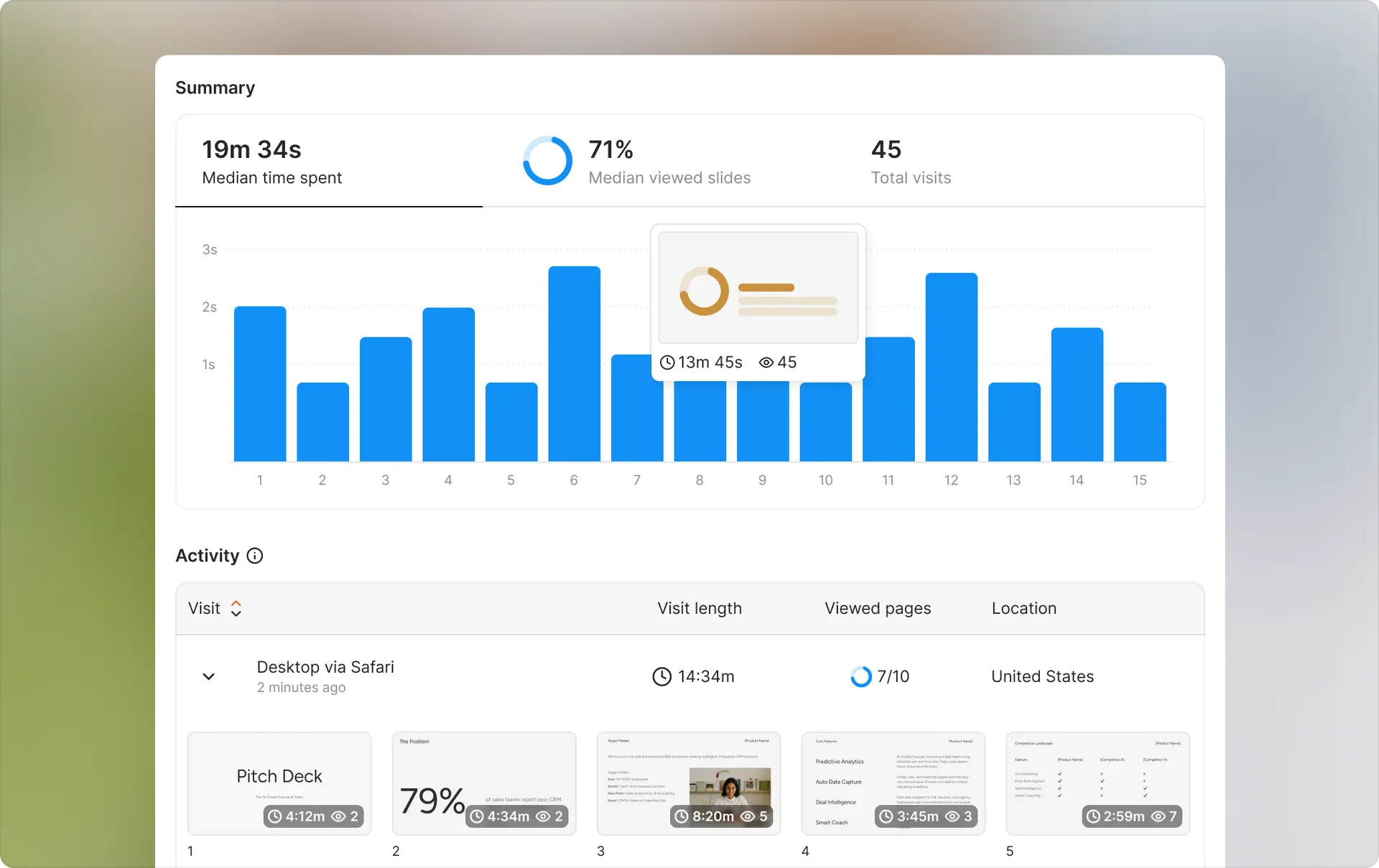
What it is: Ellty is a document sharing, tracking, and virtual data room platform built for startup founders, investors, and sales teams. Upload documents, get trackable links, see detailed engagement analytics, and manage full investor due diligence — all in one place.
Key features:
- Real-time notifications when someone opens your document
- Aggregate & individual visit dashboard with time-spent and page-level analytics
- Virtual data rooms with folder organization, granular permissions, and NDA gating
- Password protection and email verification for access control
- Dynamic watermarking to prevent leaks
- Download control and link expiration
- eSignatures built in — no separate tool needed
- Custom branding and branded custom subdomain
- Unlimited visitors on all plans
Pricing:
- Free plan: Document tracking, real-time analytics, 10 GB storage — free forever
- Standard: $69/month — unlimited documents, advanced analytics, eSignatures, data rooms
- Data Room: $149/month — granular permissions, NDA gating, dynamic watermarking, restricted visitor access, 3 users included
- Data Room Plus: $349/month — group visitor permissions, data room audit logs, 4,000 assets per data room, 3 users included
Best for: Startup founders managing investor outreach and due diligence, sales teams tracking proposal engagement, and any team that needs document tracking, eSignatures, and a full virtual data room without juggling multiple tools.
vs. Papermark comparison


When to choose Ellty: Choose Ellty if you're a growing team that doesn't want per-user pricing to scale costs, if you're focused specifically on pitch decks or sales proposals, if you want a platform built for founders by founders, or if you value predictable pricing as you add team members.
When to choose Papermark: Choose Papermark if you want open-source transparency and the option to self-host, if you're an individual using the free plan, if you value community-driven development, or if you need just basic tracking without team collaboration features.
DocSend (by Dropbox) - Enterprise document tracking
What it is: DocSend is Dropbox's document tracking and analytics platform, focused on enterprise teams and professional document sharing. It's been around longer than most alternatives and offers robust features.
Key differentiator: Enterprise-grade security and compliance features, including SSO, advanced permissions, and detailed audit logs. Built for larger organizations with strict security requirements.
Pricing: Starts at $50/month for Personal plan, $250/month for Standard team plan. Enterprise pricing custom.
Best for: Larger companies with compliance requirements, teams already using Dropbox ecosystem, organizations that need SSO and advanced security.
vs. Papermark: DocSend costs more but offers deeper enterprise features. Papermark is cheaper and open-source but lacks enterprise security. DocSend includes one-click NDAs which Papermark doesn't offer.
PandaDoc - All-in-one document workflow
What it is: PandaDoc combines document creation, tracking, and e-signatures in one platform. You can build proposals, track engagement, and collect signatures without switching tools.
Key differentiator: Built-in e-signature functionality and document creation templates. You're not just tracking documents, you're creating and closing them in the same platform.
Pricing: Starts at $35/month (requires annual commitment). Business plan at $65/month includes advanced features.
Best for: Sales teams that need proposals + signatures, businesses sending contracts regularly, teams that want document creation and tracking in one place.
vs. Papermark: PandaDoc is more expensive but includes signatures and document builders. Papermark is cheaper for pure tracking but requires separate tools for signing. If you need all-in-one, PandaDoc makes sense. For just tracking, Papermark is more affordable.
Notion - Collaborative document platform
What it is: Notion is a workspace platform for documents, notes, databases, and collaboration. While not built specifically for document tracking, it offers basic sharing analytics and works well for teams already using Notion.
Key differentiator: Combines document creation, collaboration, and knowledge management in one tool. Better for internal documentation than external sharing.
Pricing: Starts at $10/user/month for Plus plan. Free plan available for individuals.
Best for: Teams that want documents + collaboration + project management in one place, internal documentation needs, companies building knowledge bases.
vs. Papermark: Notion isn't built for external document tracking - analytics are minimal. Papermark gives you detailed engagement data that Notion doesn't provide. Use Notion for internal docs, Papermark for external tracking.
Google Drive - Free file sharing with basic tracking
What it is: Google's cloud storage and file sharing platform. Everyone has it, it's free for basic use, and it integrates with the rest of Google Workspace.
Key differentiator: Completely free for 15GB storage, universal access, familiar interface. Basic view tracking shows who opened files but no page-level analytics.
Pricing: Free for 15GB. Google Workspace starts at $6/user/month for more storage and business features.
Best for: Basic file sharing without analytics needs, teams already using Google Workspace, anyone wanting free cloud storage.
vs. Papermark: Google Drive is free and familiar but gives you almost no engagement data. You can see someone opened a file, but not which pages they viewed or how long they spent. Papermark provides the analytics layer Drive lacks. Use Drive for storage, Papermark when you need tracking.
Is Papermark safe?
Papermark uses standard security practices including SSL encryption for data in transit and secure cloud storage. The platform is SOC 2 compliant and follows GDPR requirements for data privacy. Being open-source means the code is publicly auditable, which adds transparency. However, Papermark doesn't offer enterprise features like SSO or advanced audit logging that regulated industries might require. For most startups and small businesses, security is adequate. For enterprises with strict compliance needs, evaluate whether the current security features meet your requirements or if you need a more robust alternative.
Is Papermark right for you?
Choose Papermark if you need basic document tracking without high costs, value open-source transparency, are an individual or small team sharing documents externally, or want simple analytics on who viewed your materials and when. Skip it if you need e-signatures in the same workflow, require enterprise security features like SSO, want deep analytics like heatmaps and engagement scoring, or primarily share documents internally rather than with external recipients. Papermark excels at straightforward external document sharing with engagement tracking for small to medium teams at affordable prices.
Getting started with document tracking
Why start tracking: Sending documents without tracking is like having conversations with your eyes closed. You have no idea if people are engaging, what interests them, or when to follow up. Document tracking gives you visibility into recipient behavior so you can act strategically instead of guessing. When you see an investor spent 10 minutes on your traction slides, you know what to emphasize in the next conversation. When a prospect hasn't opened your proposal three days after you sent it, you know the deal might be cold and adjust accordingly.
How to begin: Pick one type of document you send regularly - pitch decks, sales proposals, job descriptions, whatever. Start tracking just that one document type so you can learn what the data tells you without getting overwhelmed. Upload your document to whichever platform you choose, configure basic settings like passwords or expiration dates, send the link to your first recipient, and watch what happens. Pay attention to when they open it, which sections they focus on, and how long they engage. Use this information to inform your next interaction with them.
Best practices: Don't track every document you create - focus on high-value external documents where engagement matters. Set up notifications so you know immediately when someone views your materials, but don't obsess over the data. Use insights to guide conversations, not to stalk recipients. Keep your documents concise because analytics show most people don't review everything thoroughly. Test different document structures and see which versions generate better engagement. And remember that tracking is a tool for better communication, not a replacement for building genuine relationships. The data should inform your approach, not dictate it robotically.
Frequently asked questions
Is Papermark really free?
Yes. The free plan includes unlimited documents and basic analytics. You're not limited to a trial period or capped number of documents. You will see Papermark branding and have storage limits, but the core tracking functionality works without paying.
Can recipients tell I'm tracking them?
It depends on your settings. If you use the standard Papermark link, recipients might notice it's a tracking link rather than a direct PDF. If you enable email capture, they'll definitely know you're collecting data. On paid plans with custom domains, it's less obvious but still detectable by technically savvy users.
Does Papermark work on mobile devices?
Yes. Recipients can view documents on phones and tablets. The viewer interface adjusts to different screen sizes. However, the analytics dashboard works better on desktop.
Can I password-protect documents?
Yes. Even on the free plan, you can add password protection to any document. Recipients will need to enter the password before viewing.
How long are documents stored?
Documents stay in your account until you delete them or hit storage limits. There's no automatic deletion after a certain time period. You can set link expiration dates so links stop working, but the documents themselves remain in your account.
Can I see the IP address of viewers?
Yes. Analytics include IP addresses and location data (city/country level) for each view. This helps you verify who's accessing your documents.
Does Papermark integrate with CRMs?
Basic integrations exist through Zapier, but native CRM integrations are limited. You can push data to tools like HubSpot or Salesforce through Zapier, but it requires setup.
What file types does Papermark support?
Primarily PDFs. You can also upload PowerPoint files which get converted to PDF format for viewing. The platform is built around PDF document sharing and tracking.
Can I revoke access after sharing?
Yes. You can disable any link at any time. Once disabled, recipients who try to access the link will get an error message.
Is there a limit to document size?
File size limits depend on your plan. Free plans handle standard pitch decks and proposals fine, but very large files (50MB+) may require paid plans.
Does Papermark work in China or other restricted regions?
Papermark uses standard cloud infrastructure which may be blocked in some regions. If you're sharing with recipients in China or other countries with internet restrictions, test access before relying on it for important documents.
Can I export analytics data?
Yes. You can export view data and analytics to CSV format for analysis in other tools or to include in reports.
Author

Anika Tabassum Nionta is a Content Manager at Ellty, where she writes about secure document sharing, virtual data rooms, M&A, due diligence, fundraising, and sales enablement. With over 6 years of writing experience, she helps professionals understand how to share confidential documents securely, track engagement, and manage deals more effectively. Anika holds both a BA and MA in English from Dhaka University. Outside of work, she enjoys reading, exploring new cafes in Dhaka, and connecting with entrepreneurs and dealmakers in her community.

