
Need a secure data room without the enterprise price tag?
You're raising a round, running due diligence, or preparing for an acquisition. You need a secure place to share sensitive documents with investors, buyers, or lawyers - fast. Someone mentions Intralinks. You visit the site. There's no pricing page. You have to talk to sales.
That's the reality with enterprise virtual data room providers. They're built for billion-dollar M&A deals, and the pricing reflects that. But not every data room use case is a $50M acquisition.
This guide explains exactly what Intralinks offers, what it actually costs, where it falls short, and which alternatives - including Ellty - are worth looking at if you want a data room without a six-figure contract.
What is Intralinks data room?

Data rooms explained
A virtual data room (VDR) is a secure online repository for sharing and managing confidential documents during sensitive business transactions. Think of it as a locked digital folder structure with granular access controls, audit trails, and document-level analytics.
Data rooms are used when you need to share sensitive materials with multiple external parties - investors, acquirers, lawyers, auditors - and you need to control exactly what each person sees, track who viewed what, and maintain a clear record of access. Standard cloud storage like Google Drive or Dropbox doesn't offer this level of control.
Key features that distinguish a real data room from a file-sharing tool include role-based permissions, watermarking, audit logs, NDA enforcement, and the ability to revoke document access after it's been sent.
Intralinks data room feature
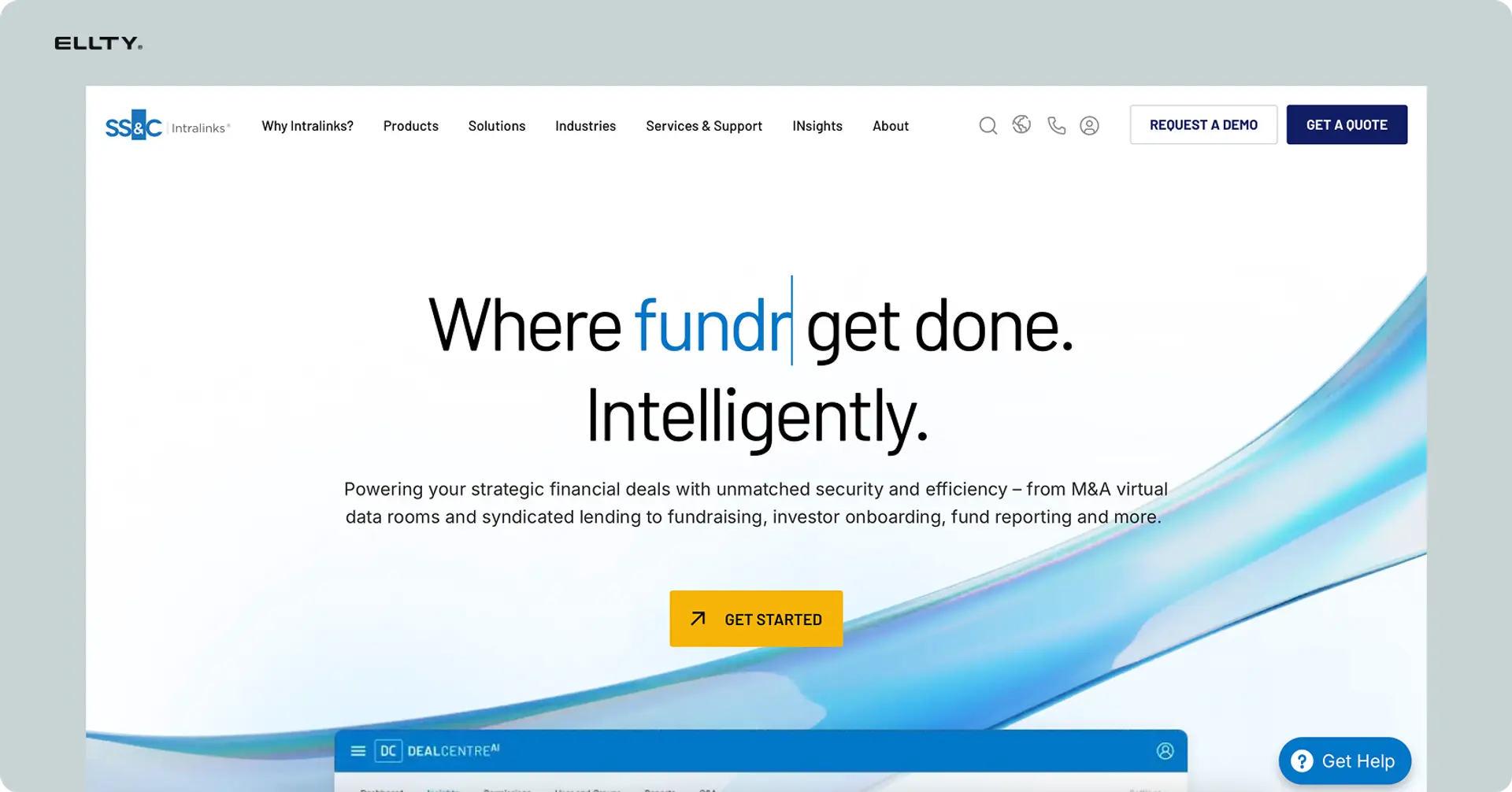
Intralinks is one of the oldest names in the VDR space. Founded in 1996, the company is widely credited with pioneering the virtual data room concept. Their flagship product is VDRPro, currently branded under SS&C Intralinks after the company's acquisition by SS&C Technologies.
Intralinks VDRPro has helped process more than 6,000 transactions annually and is trusted by 99% of Fortune 1000 companies. The platform is specifically built for high-stakes financial transactions - M&A, capital raises, IPOs, debt financing - where document security and compliance aren't optional.
VDRPro's core capabilities include automated document indexing, AI-powered redaction to remove personally identifiable information (PII), granular user permissions across 16 different user roles, a built-in Q&A workflow for due diligence teams, dynamic watermarking, and detailed activity reporting. The platform is the first VDR to earn ISO 27701 certification - the highest standard for data privacy.
Who uses Intralinks:
- Investment banks and private equity firms managing M&A deals
- Large corporates running sell-side or buy-side due diligence
- Legal teams handling multi-party document review
- Life sciences and pharma companies managing regulatory submissions
- Fortune 1000 companies running complex cross-border transactions
Intralinks is not built for a startup sharing a pitch deck with 10 investors. It's built for a $500M acquisition involving 50 counterparties, thousands of documents, and six months of due diligence.
Intralinks data room vs regular document sharing
Intralinks offers different tools for different sharing needs. VDRPro is their purpose-built data room. But it's worth understanding how a proper VDR like Intralinks compares to standard document sharing - and when each makes sense.

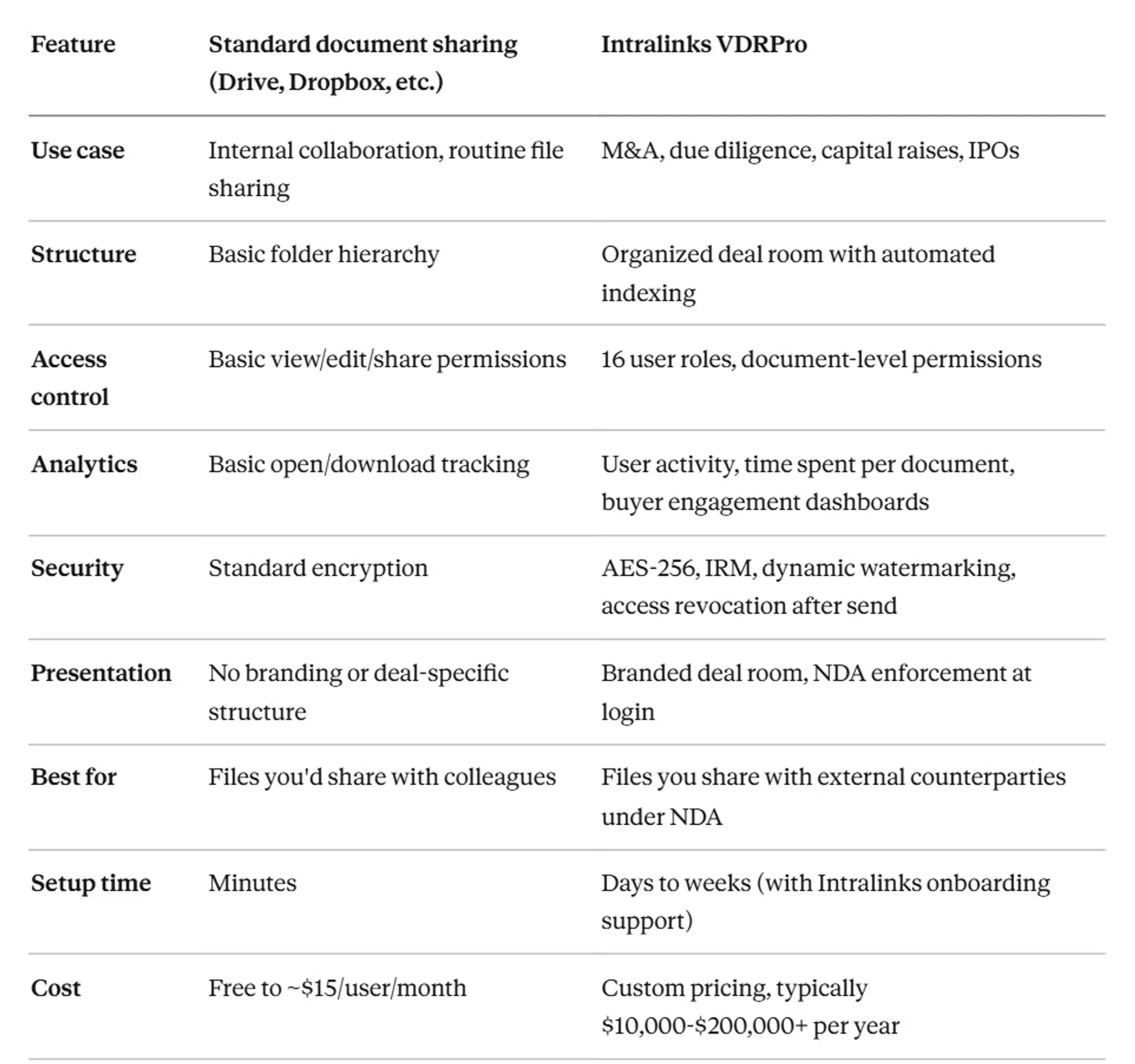
When to use standard document sharing: You're sharing internal materials, collaborating with your own team, or doing basic file distribution that doesn't require strict access control or compliance documentation.
When to use Intralinks VDRPro: You're running a formal M&A process, a due diligence review, or a capital raise where document security, access auditing, and professional presentation matter. You're sharing documents with lawyers, investment bankers, or institutional investors who expect a proper data room.
The key difference: Standard tools are for sharing. Intralinks is for controlled deal management at enterprise scale. If you're running a process where document access needs to be tracked, logged, and revocable, you need a data room - the question is which one.
Setting up an Intralinks data room
Getting started with Intralinks isn't a self-serve process. Here's what the setup actually looks like.
Step-by-step process
Step 1 - Contact sales and get a quote There's no sign-up button. You fill out a form or call Intralinks sales. They'll ask about deal type, size, number of users, duration, and storage requirements. Expect 1-3 business days to get a quote and contract.
Step 2 - Contract and onboarding Once you sign, Intralinks assigns a dedicated client services team. They help with initial room configuration, folder structure, and permission setup. Each client is assigned a dedicated customer service manager who understands their business and specific deals, and Intralinks' client assist team handles the heavy lifting from setup to deal closing.
Step 3 - Document preparation and upload You organize your documents locally, then use Intralinks' bulk upload tool to push files into the room. The platform supports drag-and-drop bulk uploads with folder renaming. For large deals, this can take several days.
Step 4 - Automated indexing VDRPro automatically indexes documents as they're uploaded, assigning deal room numbers and organizing the folder hierarchy.
Step 5 - AI redaction (if needed) If you have documents with PII or sensitive information, Intralinks' AI redaction tool scans and flags content. There are over 70 preset PII parameters to choose from to efficiently customize the document redaction process, and documents redacted can be reverted to their original state.
Step 6 - User setup and permissions You add counterparties, assign them to user groups, and set permissions at the folder or document level. Intralinks has 16 different user roles, so this step takes time if you have multiple parties with different access levels.
Step 7 - NDA enforcement and access Set up NDA acceptance at login, then send invitations to users.
Step 8 - Monitor and manage Track buyer engagement via Intralinks' activity dashboards, manage Q&A rounds, and update documents as needed.
Total setup time: 1-2 weeks minimum for a standard deal. Complex transactions with large document sets and multiple counterparty groups can take 3-4 weeks to fully configure.
Ongoing maintenance: Expect to assign someone to manage the room actively - responding to access requests, updating documents, handling Q&A, and monitoring activity reports. For a serious M&A process, this is a part-time job during the deal.
Intralinks data room pricing
Intralinks doesn't publish a pricing page. That's not an oversight - it's a deliberate positioning choice.
Intralinks virtual data room pricing is customized to meet the specific needs of your deal. Since every M&A transaction, due diligence process, or confidential project is unique, Intralinks offers tailored pricing based on factors like data volume, number of users, project duration, and required features.
In practice, this means you can't budget for Intralinks without talking to their sales team first.
Plan availability
Intralinks doesn't offer tiered public plans the way most SaaS tools do. Pricing is negotiated per deal or per annual contract. Based on available industry data, user reports, and third-party research:

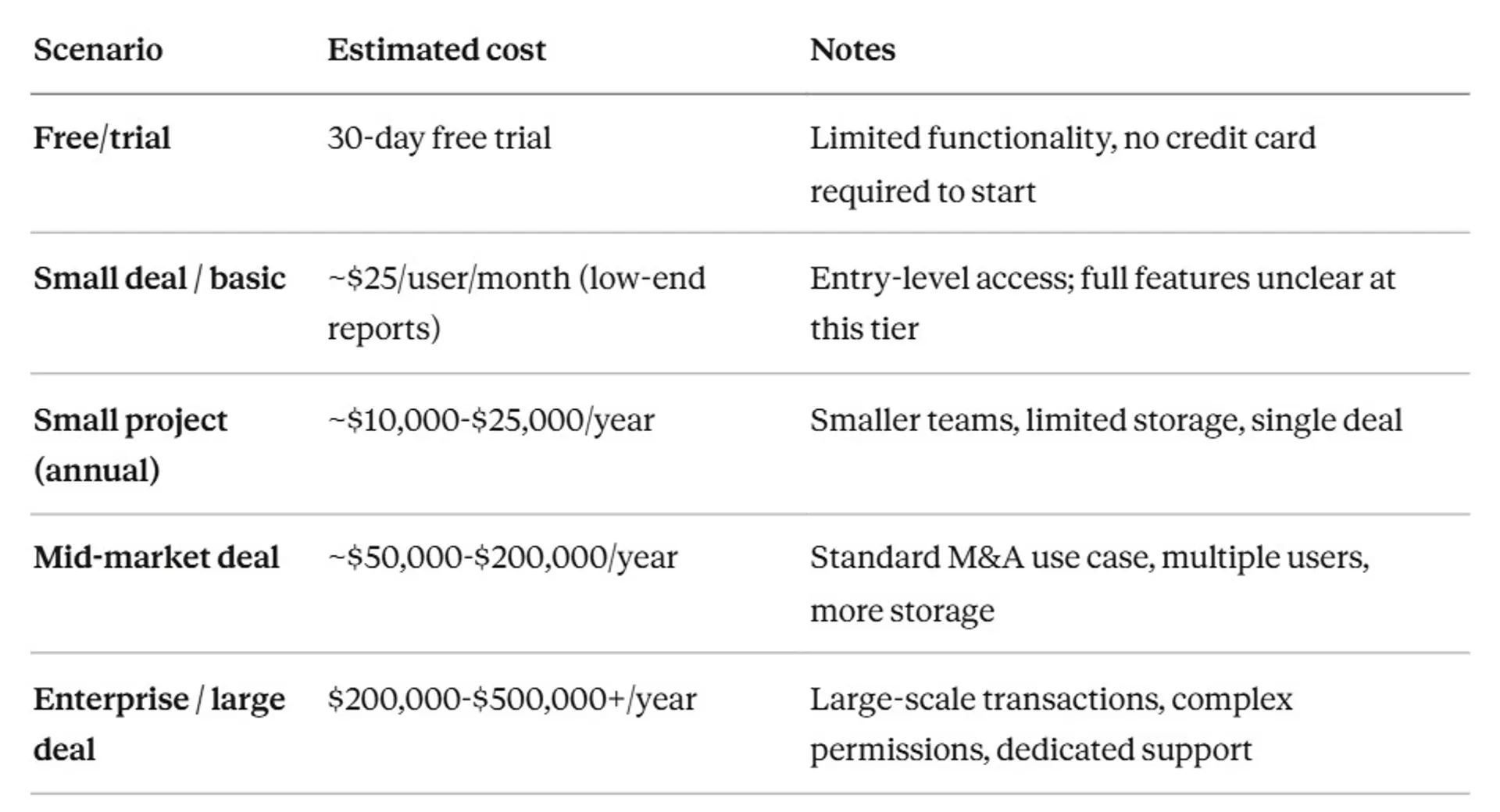
Note: These are industry estimates based on user reviews, third-party reports, and market research. Intralinks does not publish transparent pricing, and their enterprise-focused pricing often requires lengthy sales negotiations before revealing any pricing information.
Pricing model factors
Intralinks pricing typically depends on several variables:
- Data volume: How many gigabytes or pages you upload. Intralinks has historically used a per-page pricing model (approximately $0.60 per page), though flat-rate deals are also available.
- Number of users: Each counterparty you invite may add to the cost.
- Deal duration: Longer projects cost more.
- Feature requirements: AI redaction, advanced analytics, and dedicated support tiers add cost.
- Storage overages: Exceeding your contracted storage can trigger additional charges.
Hidden costs to consider
Beyond the base contract:
Per-page risk: Per-page pricing, an older model charging $0.35-$0.70 per page, remains in use. A 75,000-page deal at $0.50 per page could result in $37,500 in fees, often exceeding the cost of flat-rate enterprise plans. If your contract includes per-page pricing, uploading large document sets gets expensive fast.
Storage overages: Exceeding your contracted data limits typically triggers additional fees. These aren't always clearly defined upfront.
User access fees: Adding team members or counterparties beyond your contracted count can add per-user charges.
Duration extensions: If a deal takes longer than planned, expect surcharges for extending beyond the original contract term.
Training and implementation: Professional services are typically not included in base pricing. Intralinks' client services team is available, but dedicated training programs may cost extra.
Advanced feature upgrades: AI capabilities, premium analytics, or enhanced security features may require upgrades beyond base pricing.
Real cost examples
Startup raising Series A (5 users, 1 data room, ~2GB of documents) Based on industry estimates, a basic Intralinks engagement for a startup fundraising process could start around $10,000-$25,000 for a short-term deal. This assumes limited storage, one data room, and a relatively simple permission structure. For comparison, purpose-built fundraising tools exist at a fraction of this cost.
Company in M&A process (15 users, multiple counterparty groups, 20GB+ documents, 6-month deal) A standard mid-market M&A deal on Intralinks likely falls in the $50,000-$150,000 range depending on storage, users, and contract terms. Large acquisitions with hundreds of users and extensive document sets push well past $200,000 annually.
Cost comparison with competitors


Use cases for data rooms
Data rooms aren't always necessary. Here's when they genuinely add value - and what to include.
1. Fundraising (seed to Series B)
The scenario: You're raising capital and need to share sensitive company information with multiple potential investors. Each investor asks for different materials. Some need full financial access. Others just need the deck and a one-pager.
Why a data room helps:
- Centralizes all fundraising materials in one place
- Grants different access levels to different investors
- Tracks which materials each investor reviews
- Lets you update documents once and everyone sees the current version
- Creates a professional impression with institutional investors
What you'd include:
- Pitch deck and executive summary
- Financial statements and projections
- Cap table and equity structure
- Product roadmap and technology overview
- Team bios and organizational chart
- Customer contracts and pipeline data
- Legal documents (incorporation, IP assignments, key contracts)
Example workflow: Create organized folders. Send initial access to lead investors with full permissions. As more investors express interest, grant view-only access to early materials. Expand access to detailed financials as conversations progress. Track engagement to prioritize follow-up meetings.
Intralinks features that matter here: User-level permissions for different investor stages, document-by-document analytics, NDA enforcement at login, and version control when financials or metrics change.
Honest note: For a seed or Series A raise with fewer than 20 investors and relatively simple materials, Intralinks is likely overkill - and overpriced. Tools like Ellty, Docsend, or Notion Data Rooms handle fundraising data rooms at a fraction of the cost.
2. M&A sell-side due diligence
The scenario: Your company is being acquired. The buyer's diligence team - lawyers, accountants, advisors - needs access to hundreds or thousands of documents. Multiple firms are involved. Each needs different access. The process runs for 3-6 months.
Why a data room helps:
- Manages access for multiple counterparty organizations simultaneously
- Provides a clear audit trail of who reviewed what and when
- Supports structured Q&A between buyer and seller teams
- Allows instant access revocation if a party drops out
- Keeps all documents organized and versioned throughout the process
What you'd include:
- Corporate structure and cap table
- Financial statements (3-5 years), audited and management accounts
- Material contracts (customers, suppliers, leases, IP licenses)
- Employee headcount, compensation, and org chart
- Regulatory filings and compliance documentation
- IP portfolio and ownership documentation
- Litigation history
Example workflow: Set up the room during deal preparation. Grant your investment bank admin access. Open read-only access to the buyer's legal team for initial review. Expand to full diligence access for a more detailed review phase. Manage Q&A through the built-in Q&A module. Close and archive the room at deal completion.
Intralinks features that matter here: The Q&A module, AI redaction for sensitive contracts, detailed buyer activity reporting, and the ability to manage multiple user groups with different permission levels.
3. Buy-side M&A due diligence
The scenario: You're acquiring a company. You need your deal team - lawyers, accountants, financial advisors - to access the seller's documents and track findings.
Why a data room helps:
- Gives your team a central place to review seller documents
- Creates a record of everything reviewed (important for representations and warranties)
- Tracks which advisors have covered which areas
- Manages version control as the seller updates documents
What you'd include: This depends on what the seller shares. Your team uses their data room. Your job is making sure the right people on your side have access.
4. IPO preparation
The scenario: You're preparing for a public listing. Investment banks, lawyers, underwriters, and regulators all need access to documents. The process is heavily regulated and the documentation volume is enormous.
Why a data room helps:
- Manages access for multiple regulated parties
- Maintains an audit trail required for regulatory compliance
- Provides secure sharing of pre-IPO materials under strict confidentiality
- Supports the document-heavy verification process
Intralinks features that matter here: ISO 27701 and GDPR compliance, data residency options, detailed audit logs, and enterprise-grade security certifications.
5. Private equity portfolio management
The scenario: A PE fund manages multiple portfolio companies and needs to share quarterly reports, board materials, and LP updates securely with limited partners.
Why a data room helps:
- Creates a permanent, organized repository for each company
- Manages LP access at the fund and portfolio company level
- Provides transparency into document activity without uncontrolled distribution
6. Real estate transactions
The scenario: Selling a commercial property or portfolio. Multiple potential buyers need access to leases, environmental reports, financial statements, and property documents.
Why a data room helps:
- Manages simultaneous access for multiple bidding parties
- Tracks which buyers are most engaged based on document activity
- Controls the release of sensitive lease terms based on deal stage
7. Legal and regulatory processes
The scenario: A legal team manages a litigation matter, regulatory response, or compliance review requiring controlled document sharing with outside counsel, regulators, or auditors.
Why a data room helps:
- Creates a defensible, audited record of document access
- Manages access for external counsel without uncontrolled email distribution
- Supports privilege management by controlling who sees privileged documents
8. Debt financing and loan syndication
The scenario: A company is raising debt, and multiple lenders need access to financial statements, projections, and legal documentation during underwriting.
Why a data room helps:
- Manages simultaneous access for multiple lender teams
- Tracks engagement to prioritize relationship management
- Ensures all lenders see the same, current version of financial materials
Intralinks data room limitations
Intralinks is the industry standard for enterprise M&A. It also has real limitations that affect whether it makes sense for your use case.
No transparent pricing. Intralinks requires lengthy sales negotiations before revealing any pricing information, and the customized pricing model can include storage restrictions and unexpected overages that inflate final costs. This makes budgeting difficult and puts smaller organizations at a disadvantage in negotiations.
Enterprise pricing for non-enterprise deals. If you're a startup raising a Series A, a small company running a straightforward asset sale, or a team with a short-term due diligence need, Intralinks pricing is disproportionate to the value you'd get.
Complex setup and steep learning curve. Some users describe the initial experience as dated, complicated, and clunky, with ongoing bugs requiring frequent communication with support. The 16 user roles and granular permissions system is powerful but takes significant time to configure correctly. Training external parties (buyers, their lawyers) adds more time.
UI feels dated compared to newer tools. Multiple user reviews flag limited customization and a learning difficulty compared to more modern platforms. Intralinks is actively updating the interface, but reviews consistently note that competing platforms like Ideals and Datasite feel more intuitive.
Per-page pricing risk. If your contract includes per-page pricing, the cost can escalate significantly with large document sets. A deal with 100,000 pages at $0.60/page adds $60,000 to your bill before you've considered any other fees.
Not built for lightweight use cases. Intralinks is overkill for sharing a pitch deck with 5 investors or managing a small asset sale. You'll pay for capabilities you don't need and deal with complexity that slows you down.
Limited granular page analytics. While Intralinks offers detailed reporting and real-time insights, it lacks the granular page-by-page engagement analytics that modern teams need to identify specific investor interest patterns and understand exactly which document sections are being reviewed.
Contract commitment. Intralinks is typically sold on annual contracts with committed usage levels. If your deal closes early, falls apart, or takes longer than expected, you're still paying.
Support can be slow for smaller accounts. Intralinks' support reputation is good for large enterprise clients with dedicated success managers. Smaller deals may get less responsive support.
Alternatives to Intralinks data room
Intralinks is the right tool for large, complex transactions at enterprise scale. For many other use cases, there are better-fitting options at significantly different price points.
Ellty - simple data rooms without per-user fees

Ellty is a virtual data room, pitch deck sharing, and analytics platform. It's built for startup founders and growing companies that need secure document sharing and real analytics without the overhead of an enterprise VDR.
What it offers:
- Upload documents and create trackable, shareable links
- View detailed analytics: who viewed, which pages, time spent per page
- Real-time notifications when someone accesses your materials
- Secure data rooms for due diligence with folder structure and access controls
- No per-user fees - invite as many viewers as you need
Key features:
- Trackable links with view analytics
- Page-by-page engagement data (not just "opened")
- Real-time notifications
- Secure data room with organized folders
- Access control (set expiry, revoke access, password protection)
Pricing:
- Free: $0 — document tracking, real-time analytics, secure links, 10 GB storage, free forever
- Standard: $69/month — unlimited documents, eSignatures, full data room functionality, advanced analytics, custom branding
- Data Room: $149/month — granular permissions, NDA gating, dynamic watermarking, restricted visitor access, 3 users included
- Data Room Plus: $349/month — group visitor permissions, audit logs, 4,000 assets per data room
No per-user fees. No sales calls. No custom quotes. You know what you're paying before you sign up.
Best for: Startup founders raising seed to Series B, small-to-mid-size companies in early M&A discussions, teams that need document analytics and secure sharing without enterprise complexity.
Compared to Intralinks:


When to choose Ellty:
- You're raising a round and need to share materials with investors securely
- You want to know which pages of your deck investors actually read
- Per-user pricing doesn't make sense for your use case
- You need a data room up and running today, not next week
- Your deal doesn't require enterprise compliance certifications
Ideals VDR - best mid-market alternative
Ideals is widely considered the most direct competitor to Intralinks at the mid-market level. It offers transparent pricing, a more modern interface, and faster deployment.
What it offers: Full VDR capabilities including granular permissions, watermarking, Q&A, audit trails, and data room analytics. Transparent, published pricing tiers. Supports M&A, due diligence, fundraising, and compliance use cases.
Pricing: Published subscription plans starting around $1,700-$2,400/year for starter-level access. Enterprise plans available.
Security: ISO/IEC 27001, SOC 2, SOC 3, GDPR, and HIPAA compliant. Flat-fee models like Ideals prevent page-count penalties and improve cost predictability.
Best for: Mid-market M&A, due diligence processes where budget predictability matters, teams that need a full-featured VDR without Intralinks-level pricing.
Limitation: Advanced features like dynamic watermarking and access expiry are excluded from the basic plan.
Firmex - strong mid-market option with unlimited plans
Firmex is a well-regarded VDR provider focused on the mid-market, with particularly strong ratings for ease of use and customer service.
What it offers: Full VDR functionality including SOC 2, HIPAA, and GDPR compliance. Unlimited data room plans available. Strong support infrastructure.
Pricing: Subscription-based. Unlimited plans available for teams that run multiple deals or ongoing compliance use cases.
Best for: Organizations running multiple deals simultaneously, M&A advisory firms, legal teams with recurring VDR needs.
Compared to Intralinks: Unlike Intralinks, Firmex offers an unlimited-use, fixed-cost subscription option and doesn't restrict the number of users or projects at higher tiers.
Datasite - the other enterprise option
Datasite (formerly Merrill DataSite) is the closest peer to Intralinks. Both serve enterprise M&A. Both use custom pricing. Both are overkill for anything that isn't a large financial transaction.
What it offers: AI-powered redaction, automated indexing, integrated Q&A, task list management, and enterprise-grade security. Purpose-built for M&A buy-side and sell-side processes.
Pricing: Custom quote, similar to Intralinks. Can reach six figures for complex deals.
Best for: Large M&A transactions, sell-side processes managed by investment banks, situations where the budget is not a constraint and deal complexity demands the highest-end platform.
Limitation: Per-page pricing model carries the same cost escalation risk as Intralinks.
SecureDocs - affordable, no-frills VDR
SecureDocs is a simpler, more affordable data room option for companies that don't need the full enterprise feature set.
What it offers: Core VDR features - permissions, audit trails, document tracking, bulk uploads - at transparent flat-rate pricing.
Pricing: Published flat-rate plans, significantly below enterprise VDR pricing.
Best for: Smaller M&A deals, early-stage fundraising where a structured data room is needed but full enterprise functionality isn't.
Quick comparison table


Choosing the right alternative
The right tool depends on your deal type and complexity. If you're an investment bank running a $200M acquisition, Intralinks or Datasite are the appropriate tools - not because they're "better" in the abstract, but because the deal's complexity and the expectations of your counterparties call for it.
If you're a founder sharing materials with 15 potential investors, or a mid-size company running a straightforward asset sale, you don't need enterprise VDR infrastructure. Tools like Ellty or Ideals handle these use cases well, with faster setup and pricing that makes sense for the scale.
Is Intralinks data room right for you?
Choose Intralinks data room if:
- You're running a large, complex M&A transaction ($50M+)
- Your counterparties include major investment banks or institutional buyers who expect enterprise-grade infrastructure
- You need ISO 27701 certification for compliance or regulatory reasons
- You have dedicated deal team resources to manage the platform
- Your deal involves hundreds of thousands of documents and multiple counterparty groups
- Data sovereignty and in-region data processing are non-negotiable requirements
- You need built-in Q&A workflow management at scale
- Budget is not a primary constraint and the deal justifies the cost
Look at alternatives if:
- You're a startup raising a seed to Series B round
- You need a data room set up today, not next week
- You don't know your deal timeline and can't commit to an annual contract
- Your use case is investor document sharing rather than formal M&A due diligence
- Budget predictability matters and you can't get a clear quote without sales negotiations
- You want page-level analytics to track investor engagement with specific documents
- You're running a smaller or mid-market deal where enterprise pricing doesn't make economic sense
- You want a free or low-cost tier to start before committing
Decision framework
Ask yourself:
About your use case:
- Is this a formal M&A transaction or a fundraising/investor sharing process?
- How many external counterparties need access?
- Do your counterparties expect enterprise-grade infrastructure?
About your team:
- Do you have someone who can dedicate time to managing the room?
- Do you need 24/7 dedicated support with a named account manager?
- Is training external parties (lawyers, buyers) on the platform viable?
About your budget:
- Can you justify $10,000-$200,000+ for document sharing?
- Is the deal value proportionate to the infrastructure cost?
- Do you need transparent pricing before you can commit?
About timing:
- Can you wait 1-2 weeks for setup, or do you need a data room this week?
- Are you on a fixed deal timeline that makes a long onboarding process viable?
Honest recommendation
Intralinks is the right choice for specific, well-defined use cases: large M&A transactions, institutional-grade due diligence, and situations where enterprise compliance certifications are required. If that describes your situation, the pricing is justifiable and the platform delivers.
For most startup founders, mid-market companies, and teams running simpler deal processes, Intralinks is oversized and overpriced. You'll spend time on setup and training that should be spent on your deal. Tools like Ellty (for fundraising and investor sharing), Ideals, or Firmex (for structured due diligence) handle the actual use case better at costs that don't require a capital raise to justify.
Start with the question: "What are my counterparties expecting?" If the answer is "institutional buyers and major law firms in a formal M&A process," Intralinks makes sense. If the answer is "early-stage investors and a few advisors," it doesn't.
Frequently asked questions
What is Intralinks data room used for?
Intralinks VDRPro is used primarily for M&A due diligence, capital raises, IPO preparation, debt financing, and other complex financial transactions requiring secure, controlled document sharing with multiple external parties. It's built for high-stakes, high-volume deals where security and compliance are non-negotiable.
How much does Intralinks data room cost?
Intralinks doesn't publish fixed pricing. They calculate costs based on data volume, user count, project length, and feature requirements. Based on industry estimates and user reports, small deals start around $10,000/year, mid-market transactions typically fall between $50,000-$200,000/year, and large enterprise deals can exceed $200,000-$500,000 annually. You have to contact their sales team for an actual quote.
Does Intralinks have a free plan?
Intralinks offers a 30-day free trial for VDRPro. No credit card is required to start the trial. There is no permanent free tier.
How long does it take to set up an Intralinks data room?
Expect 1-2 weeks minimum for a standard setup. Complex deals with large document sets and multiple user groups can take 3-4 weeks to fully configure. Intralinks provides dedicated client services support to help with setup, which reduces your burden but doesn't eliminate the time requirement.
Is Intralinks secure?
Yes. Intralinks employs AES-256 encryption with multi-tier key management, granular permissions control, risk-based multi-factor authentication, and auditable change controls. It's the first VDR to earn ISO 27701 certification and is GDPR-compliant with in-region data storage options.
What are the main alternatives to Intralinks?
The main alternatives depend on your use case. For enterprise M&A, Datasite is the primary peer. For mid-market deals with transparent pricing, Ideals and Firmex are strong options. For startup fundraising, investor sharing, and early-stage due diligence, Ellty provides data room functionality at a fraction of the cost with no per-user fees.
Can I use Intralinks for startup fundraising?
Technically yes, but it's almost certainly not the right fit. Intralinks is built for enterprise M&A and the pricing reflects that. For fundraising, tools like Ellty, Docsend, or Notion Data Rooms offer purpose-built investor sharing features with detailed page-level analytics at costs that make sense for a startup.
What's the difference between Intralinks VDRPro and Intralinks Elite?
VDRPro is Intralinks' flagship virtual data room product, purpose-built for M&A and due diligence. Elite is their enterprise file sharing and collaboration platform for more general secure document distribution. For formal transaction work, VDRPro is the relevant product.
Does Intralinks charge per user?
User count is a factor in pricing negotiations. While Intralinks doesn't publish per-user rates, the number of counterparties and internal users accessing a room affects the final quote.
How does Intralinks compare to Google Drive for due diligence?
They're not comparable tools. Google Drive is a general-purpose file storage and collaboration tool. Intralinks is a purpose-built virtual data room with enterprise security certifications, granular user permissions, audit trails, AI redaction, and Q&A workflows. Using Google Drive for formal M&A due diligence creates security, compliance, and credibility problems that Intralinks is designed to eliminate.
Can I try Intralinks before committing?
Yes. Intralinks offers a 30-day free trial for VDRPro with no credit card required. Use the trial to evaluate the interface and features before going through the sales and contracting process.
What's the minimum commitment for Intralinks?
Intralinks typically sells on annual contracts. Single-deal or project-based pricing may be available in some cases, but the standard model is an annual subscription. If your project has a short or uncertain timeline, ask about project-based pricing during the sales process.
Information in this guide is based on publicly available data, user reviews, and third-party market research as of 2026. Intralinks pricing is not publicly available and estimates are based on industry reports and user feedback. Always contact Intralinks directly for an actual quote for your specific use case.
Author

Anika Tabassum Nionta is a Content Manager at Ellty, where she writes about secure document sharing, virtual data rooms, M&A, due diligence, fundraising, and sales enablement. With over 6 years of writing experience, she helps professionals understand how to share confidential documents securely, track engagement, and manage deals more effectively. Anika holds both a BA and MA in English from Dhaka University. Outside of work, she enjoys reading, exploring new cafes in Dhaka, and connecting with entrepreneurs and dealmakers in her community.

