
Orangedox works well for sharing Dropbox files with clients through branded portals. The platform adds a professional layer on top of Dropbox - custom domains, password protection, and basic analytics. For agencies and consultants who already use Dropbox, it's a straightforward way to present files professionally.
We've been testing alternatives to Orangedox for the past few months. Some businesses need more than just Dropbox integration. Others want deeper analytics on file engagement or don't use Dropbox at all. A few teams prefer platforms built specifically for pitch decks or need virtual data room features for fundraising.
The main reasons people look for alternatives: need for features beyond basic file sharing, wanting analytics on viewer engagement like document tracking tools provide, looking for platforms that work with other storage services besides Dropbox, or seeking specialized tools for specific use cases like fundraising or sales proposals.
We've personally tested 7 alternatives to Orangedox. Each handles file sharing and client presentation differently. Some focus on document tracking analytics, others on comprehensive client portals, and a few offer specialized features for pitch decks or secure data rooms. Here's what we discovered after testing each one with real files and comparing the differences that actually matter.
Key takeaways
The file-sharing market offers many Orangedox alternatives, each with different strengths for analytics depth, client presentation, or specialized workflows.
Several alternatives eliminate the Dropbox dependency with direct upload, while others provide deeper analytics or specialized features for fundraising and sales.
Many modern solutions combine file sharing with collaboration tools, e-signatures, or virtual data rooms to provide more comprehensive platforms beyond basic branded presentation.
Why look for an Orangedox alternative?
Orangedox handles Dropbox file sharing with professional presentation well. The branded portals add a layer of polish to standard Dropbox folders - custom domains, password protection, and basic view tracking. For teams already committed to Dropbox who need client-facing file sharing, it's a straightforward solution.
But Orangedox isn't the only option, and it's not always the best fit for every file-sharing need.
Better features for specific use cases
Several alternatives offer features Orangedox doesn't emphasize. Some provide detailed page-by-page analytics like document tracking tools rather than just folder-level views. Others include virtual data room capabilities for fundraising or M&A scenarios.
We found tools built specifically for pitch deck sharing with investor-focused analytics. Some alternatives include e-signature workflows or document creation features that Orangedox lacks entirely. If you need more than branded file presentation, specialized tools handle those scenarios better.
Different storage and workflow needs
Orangedox requires Dropbox. That's great if you already use Dropbox for everything. But if you use Google Drive, store files locally, or prefer platforms with direct upload, you're adding Dropbox just to use Orangedox.
Some teams need simpler tools without portal configuration. Others need comprehensive client workspaces with chat, tasks, and file sharing combined. The right alternative depends on whether you're doing one-off file sharing, ongoing client relationships, or specialized workflows like fundraising.
Cost and scaling considerations
Orangedox's portal-based pricing works for some teams but not others. We found alternatives with different pricing models - flat rates for unlimited sharing, per-user pricing that includes more features, or free self-hosted options for technical teams.
The Dropbox dependency also affects total cost. If you're paying for Dropbox storage plus Orangedox portals, alternatives with built-in storage or direct upload might reduce your overall tool spending.
Orangedox alternatives overview
Here are the best Orangedox alternatives in 2026 for file sharing (in our opinion)
Ellty - Virtual data room software for startups and investors
Clinked - Full client portal with collaboration
DocSend - Enterprise document tracking
Papermark - Open-source file sharing control
Digify - Security-focused data rooms
PandaDoc - Document workflow with e-signatures
BriefLink - Simple document tracking
Types of Orangedox alternatives
Orangedox alternatives fall into different categories based on what they actually do.
Pitch deck and fundraising platforms - Built specifically for sharing decks with investors. Ellty fits here. Upload pitch decks directly, track which slides investors view, get real-time notifications when they open your materials. Virtual data rooms handle due diligence in the same platform. You're not presenting generic files - you're managing the fundraising process with analytics that matter for investor follow-up.
Enterprise document tracking - Comprehensive analytics with CRM integration. DocSend lives in this category. Track viewer engagement across documents, integrate with Salesforce and HubSpot, manage virtual data rooms for fundraising or sales. Built for teams with existing enterprise infrastructure who need document tracking to flow into their larger workflows.
Client portal systems - Full workspaces for ongoing relationships, not just file sharing. Clinked does this. White-labeled portals with file sharing, chat, task management, discussions. Way beyond what Orangedox offers. Good for agencies, consultants, or service providers managing multiple clients with continuous communication and file exchange needs.
Document workflow platforms - Create, share, track, and sign in one system. PandaDoc specializes here. Build proposals from templates, track engagement, collect e-signatures, automate approvals. You're managing the entire document lifecycle, not just presenting files professionally. Sales teams use this to consolidate multiple tools.
Security-focused data rooms - When protection matters more than presentation. Digify focuses on this. Watermarking, screenshot prevention, granular access controls, remote revocation. Setup complexity is higher, but you get security features that basic file-sharing tools don't provide. Built for confidential documents where unauthorized sharing creates real risk.
Open-source file control - Self-hosted alternatives for privacy or customization. Papermark fits here. Run it on your servers, modify the code, control your data completely. Technical setup required, but you own everything and pay no subscription fees. Hosted versions available if you want the privacy approach without infrastructure management.
Minimalist trackers - Stripped-down analytics without portals or branding. BriefLink is the example. Upload a file, get a link, see engagement metrics. No Dropbox integration, no branded portals, no learning curve. Answers one question: did they actually look at my document?
Different problems, different solutions. Orangedox sits in the branded file presentation category, adding a professional layer to Dropbox. These alternatives either approach file sharing differently (direct upload, different analytics, specialized features), or solve related but distinct needs (collaboration, security, e-signatures, fundraising workflows). Pick based on whether you need better analytics, specialized features, or want to eliminate the Dropbox dependency.
Quick comparison: Orangedox alternatives at a glance


We tested each of these tools ourselves. Below, we'll break down what we found - the good, the specific use cases, and who each one works best for.
1. Ellty - For data rooms with straightforward analytics
Ratings and Reviews: Recently launched - early users highlight the clean interface and fundraising-specific features.


We tried Ellty early in our testing because we wanted to see how a pitch deck-focused platform compared to general file sharing tools. Ellty offers viewer analytics, trackable sharing links, and virtual data room features built specifically for startup fundraising. What we appreciated most was how the platform focuses on the specific needs of founders sharing with investors rather than trying to handle every file-sharing scenario.
Orangedox vs Ellty


Why startup founders love it
When we tested this with a sample pitch deck, the setup took less than five minutes. Upload your deck directly to the platform, generate a shareable link, and you're tracking investor views immediately. We found this particularly useful when testing how quickly we could respond to investor requests without configuring storage integrations.
The analytics show which slides investors spent time on and when they returned to view your deck again. Founders we talked to mentioned this helps them understand investor interest and time follow-ups better. In our testing, the real-time notifications stood out because you know the moment an investor opens your materials.
The virtual data room feature handles due diligence documents in the same platform. For early-stage startups, this means one tool for both pitch sharing and later-stage document requests, without needing separate portals for each funding stage.
Best For: Founders who need pitch deck analytics and simple data room features without managing storage integrations.
Pricing: Free forever for core tracking and analytics; Standard from $69/month with unlimited documents, eSignatures, and data rooms; Data Room plan from $149/month for full due diligence functionality with granular permissions and NDA gating.
Support: Email and in-app chat support. Documentation covers setup and common fundraising scenarios clearly.
"Switched from a Dropbox-based solution to Ellty. The investor analytics are exactly what we needed for our seed round." — Startup Founder, Seed Stage, Early User Feedback
Try Ellty if you need pitch deck analytics without the complexity of general file-sharing tools. You can test the core features with the free starter plan to see if the fundraising focus fits your workflow.
2. Clinked - For comprehensive client portals and ongoing relationships
Ratings and Reviews: G2: 4.6/5 ⭐ | Capterra: 4.7/5 ⭐


Clinked goes beyond simple file sharing into full client portal territory. We tested it because some businesses need more than just document delivery - they need ongoing workspaces for client relationships. Clinked offers white-labeled portals with file sharing, messaging, task management, and discussion boards all in one branded space.
Orangedox vs Clinked


Why agencies and consultants love it
When we tested this with multiple client scenarios, the portal becomes a central workspace for the entire relationship. We found this particularly useful when testing ongoing projects where file sharing is just one part of client communication.
The white-labeling is comprehensive. In our testing, the ability to brand every aspect of the portal stood out - your logo, colors, domain, even the login page. Clients see your brand, not Clinked's. For agencies and professional services firms, this matters for client perception.
The collaboration features go beyond what file-sharing tools offer. You can assign tasks, have threaded discussions about specific files, and manage approvals all in the same portal. For long-term client relationships with multiple touchpoints, this consolidates what would otherwise be scattered across email, file sharing, and project management tools.
Best For: Agencies, consultants, and service providers managing ongoing client relationships with multiple file exchanges and communication needs.
Pricing: Starts at $83/month for up to 10 client portals. We tested the standard plan, which includes full branding and collaboration features.
Support: Email and phone support; extensive onboarding assistance and knowledge base.
"Our clients love having one place for files, conversations, and tasks. Cut our email volume in half." — Agency Owner, Marketing Services, G2
3. DocSend - For enterprise document tracking with deep integrations
Ratings and Reviews: G2: 4.5/5 ⭐ | Capterra: 4.6/5 ⭐

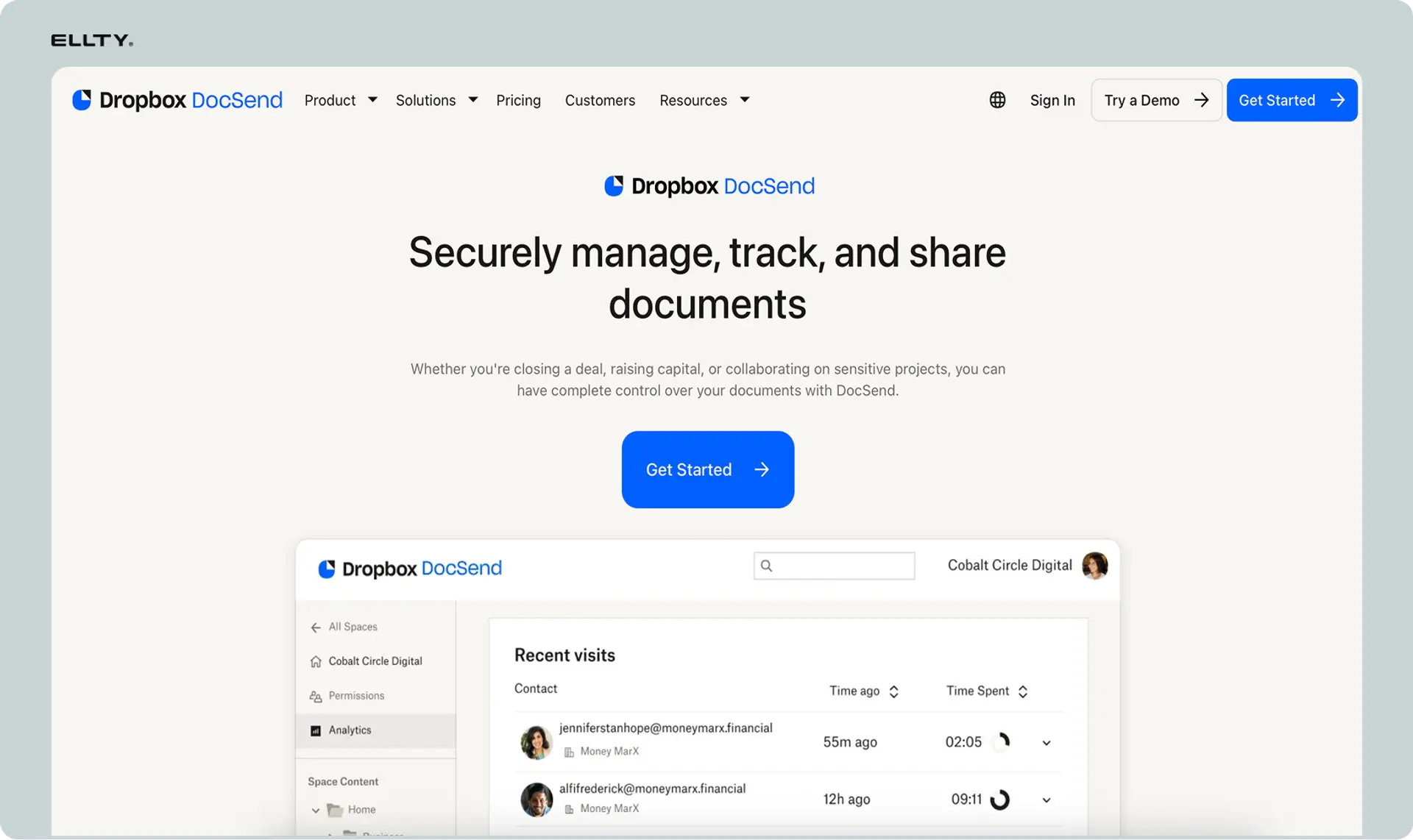
DocSend is the most recognized name in document tracking. We tested it because it represents the enterprise approach to file sharing with analytics. DocSend offers comprehensive viewer insights, virtual data rooms, and integration with tools like Salesforce and HubSpot. The platform feels built for teams already using enterprise sales or fundraising infrastructure.
Orangedox vs DocSend


Why enterprise teams love it
When we tested DocSend with various document types, the analytics went far deeper than simple view tracking. We found this particularly useful when testing scenarios with multiple stakeholders reviewing the same materials - you can see patterns across viewers and documents.
The Dropbox ownership brings tight integration if you're already storing files there. In our testing, the CRM integrations stood out for sales teams - document views flow directly into your pipeline without manual updates. The downside is the per-user pricing accumulates quickly as your team grows.
The brand recognition matters in some contexts. Some investors and enterprise buyers expect DocSend links. The platform has become somewhat standard in certain fundraising and sales circles.
Best For: Enterprise sales teams and well-funded startups needing deep tool integrations and comprehensive analytics.
Pricing: Starts at $10/user/month for Personal plan; Team and Advanced plans scale with features and users. We tested the Team plan, which includes data rooms and advanced analytics.
Support: 24/7 support for paid plans, extensive documentation, and dedicated onboarding for enterprise customers.
"The Salesforce integration alone justified the switch. We see exactly which prospects engage with our materials without leaving our CRM." — Sales Director, Enterprise Software, G2
4. Papermark - For open-source file sharing with complete control
Ratings and Reviews: GitHub: 4.8/5 ⭐ | Building review presence on traditional platforms


Papermark takes a different approach with open-source file sharing. We tested it because some teams prioritize data control and privacy over managed services. Papermark offers self-hosted document sharing with viewer analytics, keeping all data on your own infrastructure. The platform is privacy-focused and customizable.
Orangedox vs Papermark


Why privacy-focused teams love it
When we tested the self-hosted version, setup required technical knowledge but gave us complete control over data. We found this particularly useful when testing scenarios where files couldn't leave specific geographic regions or infrastructure.
The analytics work similarly to other platforms - you see who viewed what and for how long. In our testing, the open-source nature stood out because you can audit the code yourself or add custom features. For regulated industries or security-conscious organizations, this level of transparency matters.
The cloud-hosted option exists if you want Papermark's privacy-first approach without managing servers. You get the same features with simpler setup, though data lives on their infrastructure instead of yours.
Best For: Technical teams or organizations with strict data residency and control requirements.
Pricing: Free for self-hosted deployment; cloud version starts at €29/month. We tested the self-hosted option, which requires server infrastructure but has no ongoing software fees.
Support: Community support via GitHub and Discord; cloud plans include direct email support.
"We needed document sharing that kept everything on our infrastructure. Papermark solved this without compromising on analytics." — CTO, Healthcare Tech, GitHub
5. Digify - For maximum document security and watermarking
Ratings and Reviews: G2: 4.4/5 ⭐ | Capterra: 4.3/5 ⭐


Digify focuses heavily on document security. We tested it because some use cases need more than basic file sharing - they need watermarking, screenshot prevention, and strict access controls. Digify offers secure data rooms with features designed to prevent unauthorized sharing or leaking of confidential documents.
Orangedox vs Digify


Why security-conscious teams love it
When we tested this with confidential documents, the watermarking feature adds the viewer's email address to every page they see. We found this particularly useful when testing scenarios involving sensitive financial data, M&A documents, or legal files.
The screenshot prevention works on most platforms, though nothing is completely foolproof. In our testing, the granular permission controls stood out - you can limit printing, set document expiration dates, and revoke access remotely even after sharing. For legal teams or anyone sharing truly confidential materials, these features provide peace of mind.
The analytics track detailed engagement, but the real value is in the security layers. Orangedox handles basic file presentation well. Digify handles scenarios where unauthorized disclosure has serious consequences.
Best For: Teams sharing highly confidential documents that need security beyond basic password protection.
Pricing: Starts at $49/month for Team plan; Business at $129/month. We tested the Team plan, which includes watermarking and core security features.
Support: Email and chat support; security-focused knowledge base with compliance documentation.
"Sharing acquisition documents required more security than standard file sharing. Digify's watermarking was exactly what our legal team needed." — Corporate Development, Financial Services, Capterra
6. PandaDoc - For document workflows with e-signatures
Ratings and Reviews: G2: 4.7/5 ⭐ | Capterra: 4.5/5 ⭐

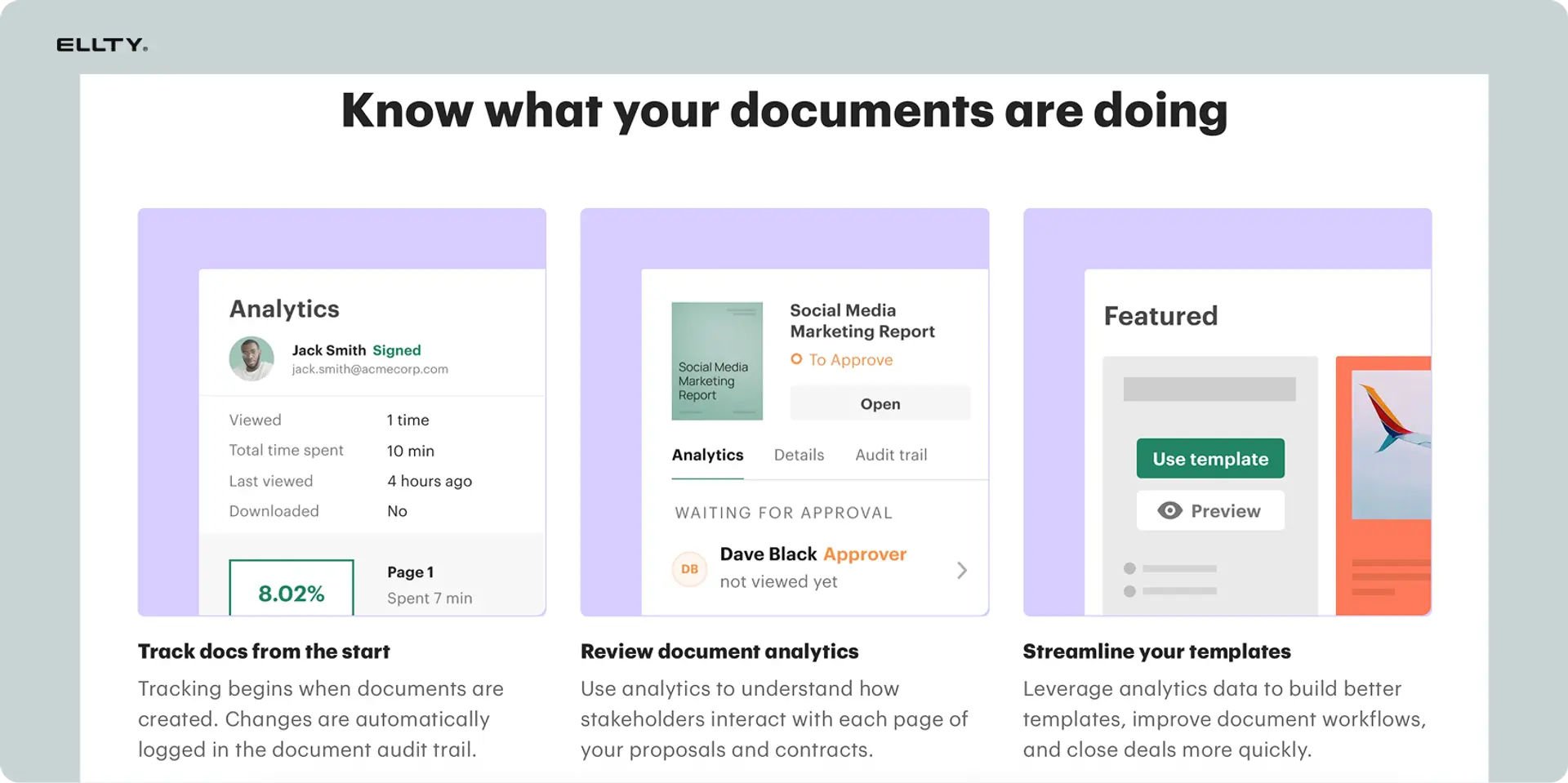
We tried PandaDoc because it combines file sharing with document creation and e-signatures. PandaDoc offers a full document workflow platform - create proposals, track views, collect signatures, and manage the entire sales or client process. What stood out was how it handles the complete document lifecycle, not just the sharing step.
Orangedox vs PandaDoc


Why sales teams love it
When we tested this with sample proposals, the ability to create, send, track, and sign in one platform eliminated multiple tools. We found this particularly useful when testing sales workflows where you need more than just file delivery.
The templates help sales teams create professional proposals quickly. In our testing, the e-signature feature stood out because recipients can review and sign without leaving the platform or downloading additional software. For teams closing deals, this streamlines what would otherwise be a multi-step process.
The workflow automation goes beyond basic tracking. You can set up approval chains for internal review, collect payments after signature, and trigger CRM updates based on document status. For sales teams, this means less manual work tracking proposal status.
Best For: Sales teams that need proposal creation, tracking, and e-signatures in one workflow platform.
Pricing: Starts at $19/user/month for Essentials; Business plan at $49/user/month includes advanced automation. We tested the Business plan, which gave us full workflow features.
Support: Phone, email, and chat support. Extensive template library and training resources.
"Consolidated three tools into PandaDoc. Our sales cycle shortened because clients can sign immediately instead of waiting for separate contract emails." — VP Sales, B2B SaaS, Capterra
7. BriefLink - For ultra-simple document tracking
Ratings and Reviews: Product Hunt: 4.5/5 ⭐ | Building review presence

BriefLink takes the opposite approach from feature-heavy platforms. We tested it because sometimes you just need simple document tracking without branding, portals, or complexity. BriefLink offers straightforward analytics for shared files - see who clicked, when, and which pages they viewed. The interface is minimal by design.
Orangedox vs BriefLink


Why minimalists love it
When we tested this with various file types, the setup was incredibly fast. We found this particularly useful when testing quick sharing scenarios where you need basic confirmation someone viewed your materials without caring about branded presentation.
The analytics are simple - you see clicks, timing, and page-by-page engagement. In our testing, the lack of complexity stood out as the main feature. No Dropbox integration to configure, no branding to set up, no team permissions to manage. Upload a file, share a link, see who viewed it.
For individuals or small teams that don't need client portals or branded experiences, BriefLink does one thing well. You share a document, you see who engaged with it, done.
Best For: Individuals or small teams wanting simple tracking without portal features or branding complexity.
Pricing: Starts at $29/month for unlimited tracking. We tested the standard plan, which covers all core features without usage limits.
Support: Email support; minimal documentation needed due to simple interface.
"Didn't need fancy branding or portals. BriefLink tracks who reads my documents and that's exactly what I wanted." — Freelance Consultant, Solo Professional, Product Hunt
Cheapest Orangedox alternatives
If you're watching costs carefully, several low-price alternatives offer solid file sharing with basic tracking:
1. Ellty

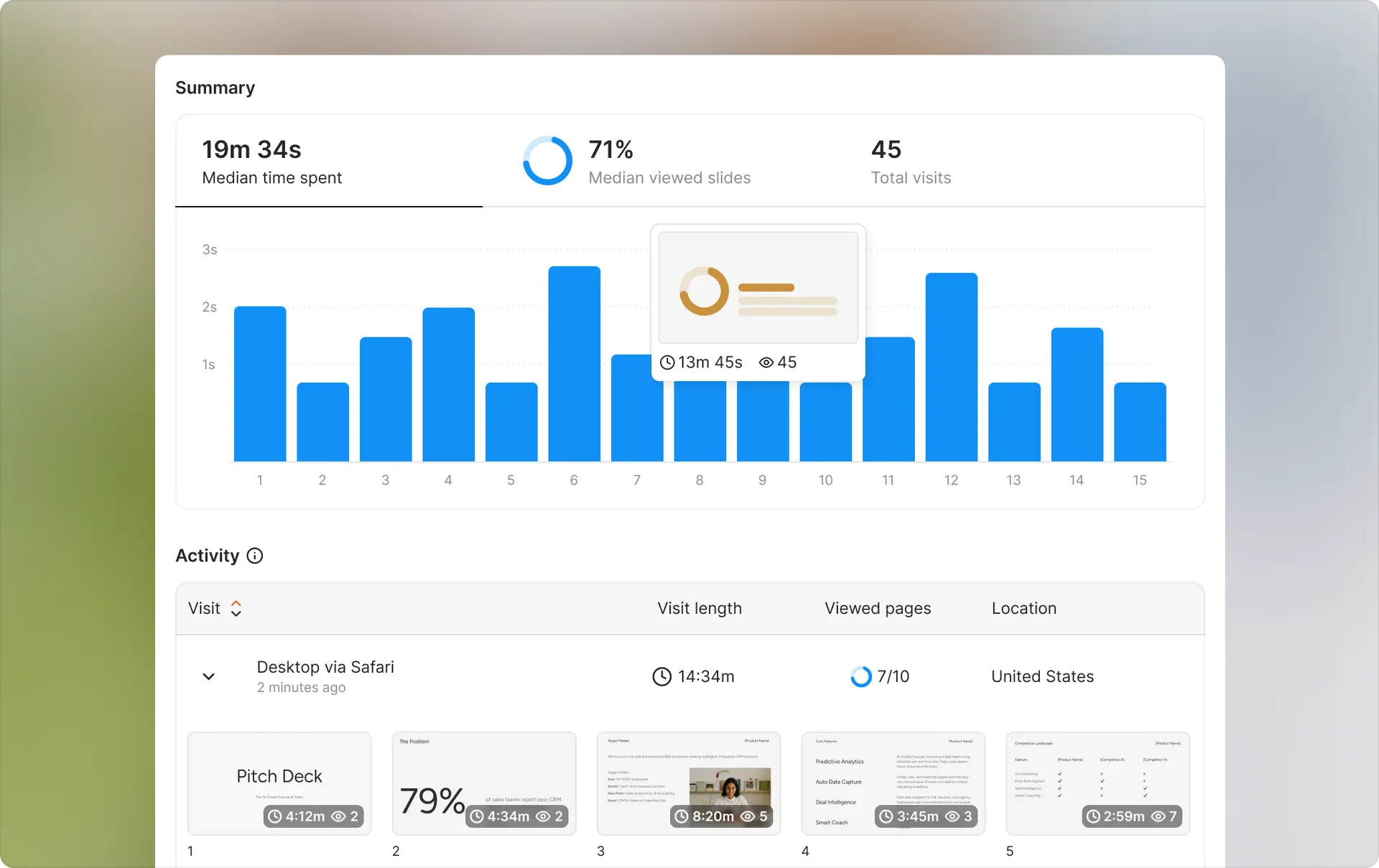
Ellty starts at $0 forever for document tracking and real-time engagement analytics. The free plan gives you secure trackable links, page-by-page viewer data, and an aggregate visit dashboard with no time limit. Standard at $69/month adds eSignatures, full virtual data room functionality, advanced access controls, and custom branding. Data Room at $149/month unlocks granular permissions, NDA gating, dynamic watermarking, and restricted visitor access for structured due diligence.
For fundraising specifically, Ellty focuses on what founders actually need - quick setup, clear analytics on investor engagement, eSignatures, and organized data rooms for due diligence. Flat-rate pricing means no surprises as you share with more investors, add team members, or scale into a full due diligence process.
The interface is straightforward by design. Upload your documents, organize your data room, generate trackable links, and see who viewed which pages and when. Real-time notifications tell you immediately when someone opens your materials, so you always know when to follow up. If you need document tracking and analytics without complexity, the free plan works perfectly for initial testing, with a clear upgrade path as your fundraising demands grow.
2. BriefLink
At $29/month for unlimited documents, BriefLink is simple and affordable. You get basic page-by-page analytics and sharing links without any portal or branding features. For individuals tracking document engagement without needing professional presentation, it works.
The interface is bare-bones on purpose. Upload a file directly to the platform, get a trackable link, see who viewed which pages. No Dropbox required, no portal configuration needed. If you need branded client experiences, you'll need to look elsewhere, but you won't find a simpler way to track basic document views.
3. Papermark (Self-hosted)
Free if you self-host, Papermark offers document sharing and analytics without ongoing subscription costs. You need technical knowledge to set up and maintain the infrastructure, but the software itself costs nothing. No Dropbox integration needed - you control the entire stack.
The cloud-hosted version starts at €29/month if you want Papermark's approach without managing servers yourself. Good for teams with strict data control requirements who don't want to pay for both storage and presentation layers.
How we chose which Orangedox alternative to recommend
After testing all these alternatives, here's what we'd consider if we were choosing for our own file sharing needs:
Your actual use case matters most. Are you sharing pitch decks with investors? Ellty handles this specifically with relevant analytics. Managing ongoing client relationships? Clinked provides the full portal experience. Need document tracking integrated with your CRM? DocSend makes sense. We found that the "best" tool depends entirely on what you're accomplishing with your file sharing, not just that you need to share files.
Storage and integration requirements narrow choices quickly. If you're committed to Dropbox and like branded portals, Orangedox works fine. If you want to eliminate Dropbox entirely, alternatives with direct upload (Ellty, BriefLink, Digify) simplify your tool stack. Some teams need specific integrations with Salesforce or HubSpot - this requirement alone determines your choice.
Budget and pricing model affect different teams differently. Portal-based pricing works if you have few clients and high file volume. Per-user pricing makes sense for small teams but scales poorly. Flat-rate pricing from Ellty or BriefLink simplifies budgeting for growing teams. Calculate what you'd pay now and in six months based on how your file sharing scales.
Analytics depth depends on your decisions. Do you need detailed page-by-page engagement or just confirmation someone opened your files? If you're fundraising, knowing which slides investors viewed helps time follow-ups. If you're just sharing project files with clients, basic view confirmation might be enough. We tested both scenarios - the insights you need determine which platform delivers value.
Presentation and branding needs vary. Some businesses need white-labeled portals to maintain professional appearance. Others prioritize function over branded presentation. For client-facing agencies, branding matters. For internal document sharing or quick investor updates, it doesn't. Clinked offers the most comprehensive branding. Ellty and DocSend provide clean professional interfaces without full white-labeling. BriefLink provides no branding at all.
Security requirements can be deal-breakers. Basic password protection works for most file sharing. Confidential documents during M&A or legal processes need watermarking and screenshot prevention from Digify. Regulated industries might require self-hosted control from Papermark. We tested support for each - know your actual security requirements before choosing based on features you don't need.
Common questions about Orangedox alternatives (from our testing)
What is Orangedox best known for?
Orangedox built its reputation on adding branded presentation layers to Dropbox. The platform lets you create professional client portals using your existing Dropbox files - custom domains, password protection, basic analytics. Agencies and consultants use it to present files more professionally than raw Dropbox folder links. The main value is branded file sharing without managing separate storage.
Why do businesses look for Orangedox alternatives?
Based on our conversations with users, the main reasons are: need for analytics beyond basic folder views, wanting platforms that work without Dropbox, looking for specialized features like pitch deck tracking or data rooms, preferring simpler tools without portal configuration, or needing comprehensive client workspaces with chat and tasks. Some teams also look for alternatives when they want to consolidate storage and presentation into one platform rather than paying for both Dropbox and Orangedox.
Are these alternatives cheaper than Orangedox?
It depends on your specific needs and team size. BriefLink at $29/month offers basic tracking cheaper than Orangedox portals. Ellty flat-rate pricing ($24-$50/month) can be more economical if you're sharing pitch decks frequently without needing multiple portals. However, Clinked costs more but includes comprehensive client workspace features. The real cost comparison includes whether you need to maintain Dropbox separately - alternatives with direct upload might reduce your total tool spending even if the per-platform price is similar.
Which alternative is best for client-facing agencies?
From our testing, it depends on your client relationships. For ongoing projects with continuous file exchange and communication, Clinked provides the most comprehensive branded workspace. For simpler file presentation without the full collaboration suite, DocSend offers professional document tracking with good analytics. For agencies focused primarily on branded presentation over analytics, Orangedox itself handles this well. We'd prioritize based on whether you need a workspace or just polished file delivery.
Do I need analytics for basic file sharing?
Not necessarily, but analytics help in specific scenarios. When sharing pitch decks with investors, knowing which slides they viewed helps time follow-ups. When sending proposals to clients, engagement data shows genuine interest. For general file distribution or internal sharing, basic confirmation of delivery might be enough. In our testing, we found that tools without analytics (like plain Dropbox) work fine until you need to make decisions based on whether people actually engaged with your content.
Can I switch from Orangedox to another tool easily?
Switching file-sharing platforms is straightforward since you're mostly changing where you upload and share from. Your files already exist in Dropbox, so moving them isn't complicated. The analytics history won't transfer, but that's rarely critical. In our testing, we moved files across platforms in under an hour. The harder part is updating any links you've already shared and changing team habits around where files get uploaded.
What's the difference between Orangedox and Clinked?
Both create branded client experiences, but Clinked goes much further. Orangedox adds professional presentation to Dropbox files - portals, custom domains, password protection. Clinked provides complete client workspaces with file sharing, chat, task management, discussions, approvals. In our testing, Orangedox felt like branded file delivery, while Clinked felt like a full client relationship platform. If you only need to share files professionally, Orangedox handles this. If you need ongoing collaboration and communication, Clinked makes more sense.
Do these alternatives work without Dropbox?
Most do. Ellty, BriefLink, Digify, and PandaDoc all have direct upload - no Dropbox account needed. DocSend integrates with Dropbox but doesn't require it. Papermark runs independently, either self-hosted or on their cloud. Clinked has its own storage. Only Orangedox specifically requires Dropbox as its core integration. If you want to eliminate Dropbox entirely or don't use it currently, these alternatives work fine without it.
Disclaimer
Parties other than Ellty may provide products, services, recommendations, or views on this site ("Third Party Materials"). Ellty is not responsible for examining or evaluating such Third Party Materials, and does not provide any warranties relating to the Third Party Materials. Links to such Third Party Materials are for your convenience and does not constitute an endorsement of such Third Party Materials.
Author

Anika Tabassum Nionta is a Content Manager at Ellty, where she writes about secure document sharing, virtual data rooms, M&A, due diligence, fundraising, and sales enablement. With over 6 years of writing experience, she helps professionals understand how to share confidential documents securely, track engagement, and manage deals more effectively. Anika holds both a BA and MA in English from Dhaka University. Outside of work, she enjoys reading, exploring new cafes in Dhaka, and connecting with entrepreneurs and dealmakers in her community.

