
Digify's pricing is publicly listed but understanding what you'll actually pay requires digging into limits and add-ons. The advertised prices only tell part of the story.
This guide covers current Digify plans and pricing, real costs for different team sizes and document volumes, how their pricing compares to alternatives, and how to calculate what you'll actually spend. Everything is based on current information as of early 2026.
What is Digify?


Digify is a virtual data room and secure document sharing platform. It helps companies share sensitive documents with external parties while controlling access and tracking engagement.
Core use cases:
- Sharing pitch decks with investors
- Managing due diligence data rooms
- Secure document sharing for M&A
- Board materials distribution
- Client document portals
Key features:
- Document watermarking
- View tracking and analytics
- Screen capture prevention
- Expiring access links
- NDAs and e-signatures
- Page-by-page analytics
- Q&A functionality for data rooms
- Role-based permissions
Market position: Digify launched in 2013 and positions itself as an affordable alternative to enterprise data room providers like Intralinks or Firmex. They focus on small to mid-sized businesses, startups, and deal teams that need secure document sharing without enterprise complexity or pricing.
Current Digify pricing (2026)

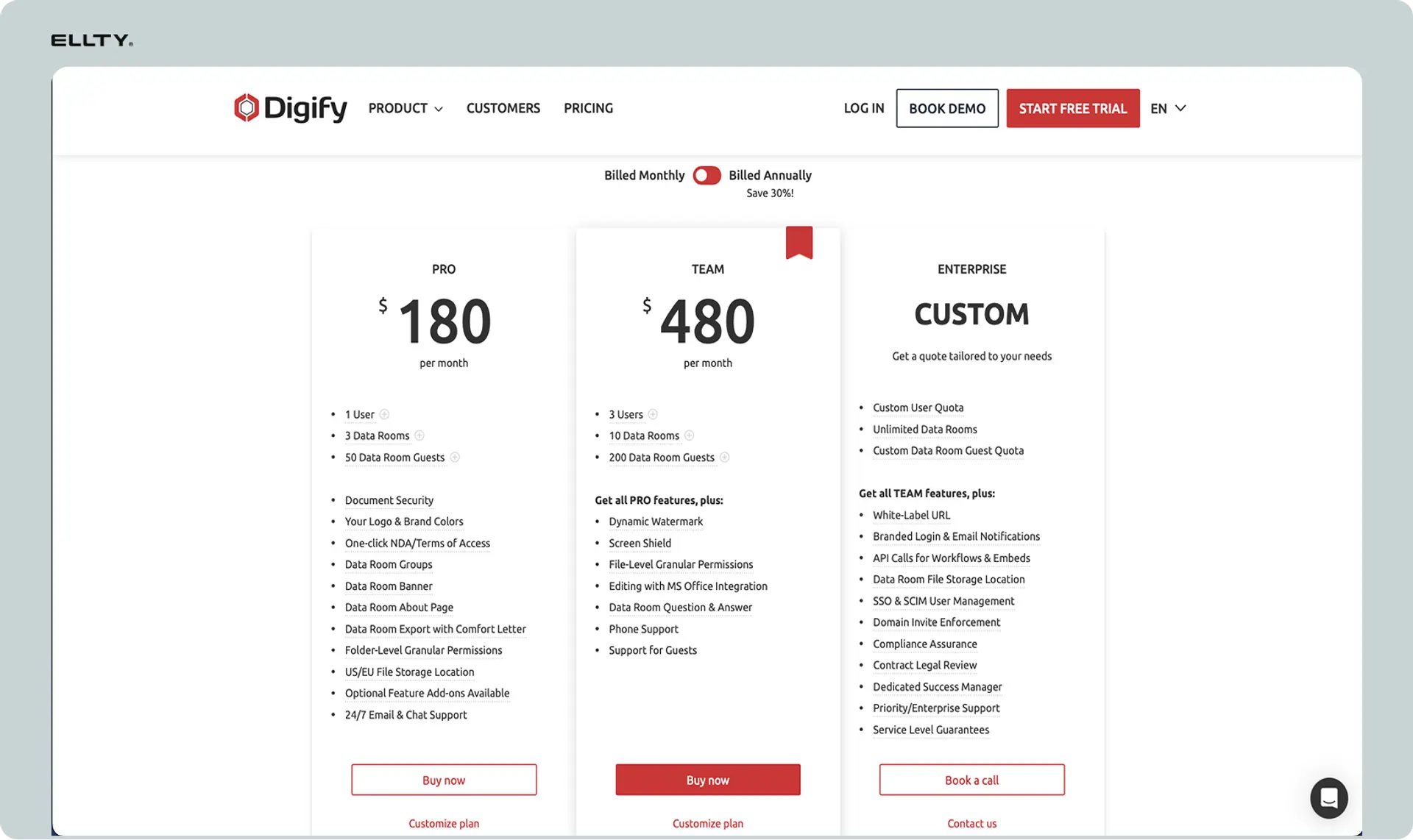
Digify publishes pricing on their website. All prices are in USD. They offer both monthly and annual billing, with annual plans providing a discount.
Billing structure: Pricing is per team/account, not per user. You pay a flat rate regardless of team size. Annual billing saves approximately 17% compared to monthly.
Currency note: All prices shown are in USD. International customers are charged in USD at current exchange rates.
Team plan - $99/month
Who it's for: Small teams and startups sharing documents occasionally.
What's included:
- Unlimited users
- 50 documents per month
- Unlimited visitors (people viewing documents)
- Document analytics and tracking
- Watermarking
- NDAs and e-signatures
- Screen capture prevention
- Expiring links
- Email support
- 10 GB storage
Key limitations:
- Only 50 documents per month (archive old ones to add new)
- 10 GB storage total
- No custom branding
- No dedicated support
- Basic analytics only
Best for: Startups sharing pitch decks with investors or small teams with occasional secure document sharing needs.
Business plan - $199/month
Who it's for: Growing companies with regular document sharing and data room needs.
What's included:
- Everything in Team
- 250 documents per month
- Custom branding (white-label)
- Advanced analytics
- Bulk upload
- Data room templates
- Priority email support
- 100 GB storage
- Advanced permissions
- API access
Key limitations:
- 250 document limit per month
- 100 GB storage cap
- Still no phone support
- Limited customization options
Best for: Companies actively fundraising, in M&A processes, or with regular due diligence needs.
Enterprise plan - Custom pricing
Who it's for: Large organizations with high-volume document sharing or specific security requirements.
What's included:
- Everything in Business
- Unlimited documents
- Unlimited storage
- Dedicated account manager
- Phone support
- Custom integrations
- SSO (Single Sign-On)
- Advanced security features
- Custom SLAs
- Onboarding and training
- Custom contract terms
Key limitations:
- Requires sales conversation
- Minimum commitment typically required
- Longer implementation timeline
Best for: Law firms, investment banks, PE firms, or corporations with extensive data room needs and compliance requirements.
Plan comparison table


Enterprise pricing
Enterprise plan: Custom pricing based on:
- Document volume requirements
- Storage needs
- Number of concurrent data rooms
- Advanced security and compliance features
- Integration requirements
- Level of support needed
Contact sales for quote. Based on market research, Enterprise plans typically start around $500-800/month for smaller enterprise needs and can go to $2,000+/month for large organizations with extensive requirements.
Costs not shown in base pricing
Document limits: The biggest hidden cost. If you exceed your monthly document limit, you either need to archive/delete documents or upgrade plans. You can't just pay for overages.
Storage limits: 10 GB (Team) or 100 GB (Business) sounds like a lot, but large PDFs, presentations, and financial documents add up. Exceeding storage requires plan upgrade.
API usage: Business plan includes API access, but heavy API usage might incur additional costs or require Enterprise. Not clearly documented.
Training and onboarding: Self-service on Team and Business plans. Enterprise includes training, but extensive training for large teams might cost extra.
Migration assistance: No migration services offered on standard plans. If you need help moving from another data room provider, that's manual work or requires Enterprise-level support.
Custom integrations: Standard integrations included. Custom integrations require Enterprise plan and may involve additional development costs.
Contract terms: Monthly plans can cancel anytime. Annual plans lock you in for 12 months with no prorated refunds for early cancellation.
Is the Digify free plan right for my business?
Digify offers a 7-day free trial, not a permanent free plan. The trial gives you access to Team plan features to test the platform.
What the free trial includes:
- Full Team plan features for 7 days
- 50 documents
- 10 GB storage
- All security features (watermarking, screen protection)
- Analytics and tracking
- No credit card required to start
Key limitations:
What you CAN'T do on the free trial:
- Use it permanently - expires after 7 days
- Access Business or Enterprise features
- Get priority support
- Remove Digify branding
- Use API access
Who the free trial works for:
The 7-day trial is useful for:
- Testing Digify before committing
- Sharing documents for a one-time deal (if completed within 7 days)
- Evaluating whether the platform fits your workflow
- Comparing with other tools
Who needs to upgrade:
You'll need a paid plan if:
- You need ongoing document sharing beyond 7 days
- You share documents regularly with investors or partners
- You're managing an active data room
- You need analytics over time to understand engagement patterns
Realistic assessment:
The free trial is genuinely useful for testing, but it's not a substitute for a paid plan. Most teams will need at least the Team plan ($99/month) for any regular use. The 7-day window is enough to evaluate the platform but not enough for most real business processes.
Real costs for teams
Flat-rate pricing means team size doesn't matter, but document volume does. Here's what Digify actually costs for common use cases.
Scenario 1: Startup sharing pitch deck
Team size: 2-3 founders
Use case: Sharing pitch deck with 20-30 investors during fundraise
Documents needed: 1-5 documents (deck, financials, product demo)
Recommended plan: Team
Monthly cost: $99
Annual cost: $984 ($82/month if paid annually)
What this includes:
- Unlimited users (all founders can access)
- 50 document slots (more than enough)
- Tracking on all investor views
- Watermarking for security
- NDAs if needed
Limitations to watch:
- Can't remove Digify branding from links
- Basic analytics only
- 10 GB storage should be fine for decks
Scenario 2: Growing startup in active fundraise
Team size: 5-8 people (founders, CFO, investor relations)
Use case: Active Series A fundraise, sharing materials with 50+ investors, managing due diligence
Documents needed: 50-150 documents (pitch deck, detailed financials, customer references, product specs, legal docs)
Recommended plan: Business
Monthly cost: $199
Annual cost: $1,992 ($166/month if paid annually)
What this includes:
- 250 document limit (enough for full data room)
- Custom branding (looks more professional)
- Advanced analytics to track investor engagement
- Data room templates for organization
- 100 GB storage
Limitations to watch:
- If you need more than 250 documents, must upgrade to Enterprise
- No phone support if issues arise
- API access included but might need Enterprise for heavy usage
Scenario 3: M&A sell-side process
Team size: 10-15 people (internal team + advisors)
Use case: Managing sell-side data room with comprehensive company information
Documents needed: 500+ documents (years of financials, contracts, legal docs, HR files, IP documentation)
Recommended plan: Enterprise
Monthly cost: Custom (estimated $500-1,000/month)
Annual cost: Estimated $6,000-12,000+
What this includes:
- Unlimited documents
- Unlimited storage
- Dedicated support
- SSO for security
- Custom integrations if needed
- Training for team
Limitations to watch:
- Requires sales process and contract negotiation
- Setup time can be several weeks
- Minimum commitment likely required
Scenario 4: Law firm managing multiple client data rooms
Team size: 20-50 lawyers and staff
Use case: Managing 5-10 active client data rooms simultaneously
Documents needed: 1,000+ documents across all clients
Recommended plan: Enterprise
Monthly cost: Estimated $1,500-3,000/month
Annual cost: Estimated $18,000-36,000
What this includes:
- Unlimited everything
- Multiple data rooms
- Dedicated account manager
- Phone support
- Client-specific branding
- Custom permissions and workflows
Limitations to watch:
- Price scales with usage
- May need additional services for specialized integrations
- Training costs for large teams
Cost comparison table


*Cost per document is illustrative only - pricing is flat rate regardless of actual usage.
Hidden cost multipliers:
Costs increase when you need:
- More documents than your plan allows (forces upgrade)
- More storage than plan limit (forces upgrade)
- Custom branding (Team to Business upgrade)
- API access (requires Business minimum)
- Phone support (requires Enterprise)
- SSO or advanced security (requires Enterprise)
What teams actually need
Most teams overpay because they upgrade for one feature when cheaper alternatives exist. Here's what actually matters for different use cases.
Early-stage fundraising (pre-seed/seed)
Must-have features:
- Secure link sharing
- Basic view tracking (who opened, when)
- Watermarking to prevent unauthorized sharing
- Expiring links
Nice-to-have features:
- NDAs (useful but not critical)
- Page-by-page analytics
- Custom branding
Skip these features:
- Data room templates (overkill for simple deck sharing)
- API access
- Advanced permissions
- Bulk upload tools
Recommended plan: Team ($99/month) is overkill for just pitch deck sharing. Consider alternatives like Ellty that focus specifically on deck sharing for much less.
Active Series A/B fundraising
Must-have features:
- Page-by-page analytics
- Custom branding (looks professional)
- Watermarking
- Bulk document upload
- Data room organization
Nice-to-have features:
- Advanced permissions
- NDA templates
- API access for automation
Skip these features:
- SSO (not needed for small team)
- Dedicated account manager
- Phone support
Recommended plan: Business ($199/month) if managing comprehensive due diligence with 100+ documents. Team plan if just sharing core materials.
M&A or due diligence
Must-have features:
- Unlimited documents
- Advanced permissions and roles
- Q&A functionality
- Comprehensive audit logs
- Phone support for urgent issues
- Custom branding
Nice-to-have features:
- SSO
- API integrations
- Dedicated account manager
Skip these features:
- Nothing - you need robust features
Recommended plan: Enterprise. M&A processes have too many documents and too much at stake for standard plans.
Ongoing client document sharing
Must-have features:
- Document organization
- Role-based access
- Analytics to see client engagement
- Professional branding
Nice-to-have features:
- Data room templates
- API for automation
- Bulk operations
Skip these features:
- Unlimited documents (if volume is predictable)
- Phone support (unless critical)
Recommended plan: Business ($199/month) for most consulting, legal, or professional services firms. Upgrade to Enterprise only if managing 10+ concurrent client rooms.
Decision framework
Ask yourself:
How many documents do you actually need to share?
- Under 20: You probably don't need Digify at all
- 20-50: Team plan works
- 50-250: Business plan makes sense
- 250+: Enterprise required
How long will you use it?
- One-time deal (3-6 months): Monthly billing, don't lock in annual
- Ongoing use (12+ months): Annual billing saves 17%
- Permanent need: Negotiate Enterprise annual pricing
Do you need custom branding?
- No: Team plan saves $100/month
- Yes: Business minimum required
What's at stake?
- Pitch deck: Basic security is fine
- M&A or sensitive IP: You need enterprise-grade features
How technical is your team?
- Non-technical: Stick with simple plans, avoid API complexity
- Technical team automating workflows: Business or Enterprise for API
What users say about Digify pricing
We reviewed user comments on G2, Capterra, and Product Hunt. Here's what actual customers say about Digify's pricing.
What users like
Affordable compared to enterprise alternatives:
"We looked at Intralinks and Firmex. Both wanted $5,000+ per month. Digify does 90% of what we needed for $199/month." — M&A advisor, G2
Flat-rate pricing is simple:
"I love that we don't pay per user. Our whole team can access documents without worrying about seat costs." — Series A founder, Capterra
No surprise costs:
"What you see is what you pay. No hidden fees or usage charges that pop up later." — Legal consultant, G2
Common pricing complaints
Document limits are restrictive:
"50 documents on the basic plan sounds like a lot until you actually use it. We hit the limit in week two and had to upgrade." — Seed-stage founder, G2
Forced upgrades for single features:
"We only needed custom branding but had to jump from $99 to $199/month. That's a 100% increase for one feature." — Business development manager, Capterra
Storage fills up fast with large files:
"10 GB is nothing when you're sharing video demos and detailed financial models. We maxed out storage in a month." — CFO, G2
Annual commitment to get good price:
"Monthly pricing is there but annual saves significant money. Feels like you're forced into annual even if you're unsure how long you'll need it." — Startup founder, Product Hunt
No overage billing option:
"Wish we could just pay for extra documents instead of upgrading the whole plan. We only need 75 documents, not 250." — Investor relations lead, G2
Enterprise pricing opacity:
"We clearly needed more than Business plan but getting Enterprise pricing required three sales calls. Just publish some ranges." — Legal operations director, Capterra
Is Digify worth the cost?
Teams managing complex due diligence or M&A processes find Digify significantly cheaper than traditional data room providers while offering most of the same features. The $199-500/month range feels reasonable for high-stakes deals.
Early-stage founders sharing pitch decks are split. Some appreciate the security features and analytics. Others feel it's expensive for what is essentially secure link sharing and would prefer simpler, cheaper tools.
Professional services firms (legal, consulting, accounting) using it for ongoing client document sharing generally find good value in the Business plan, especially with unlimited users.
The consensus: worth it for complex data rooms or ongoing professional use. Probably overkill (and overpriced) if you just need to share a pitch deck with investors.
Digify vs alternatives: quick comparison
Here's how Digify pricing compares to similar tools. All prices for comparable plans.


Ellty - Free to $69/month

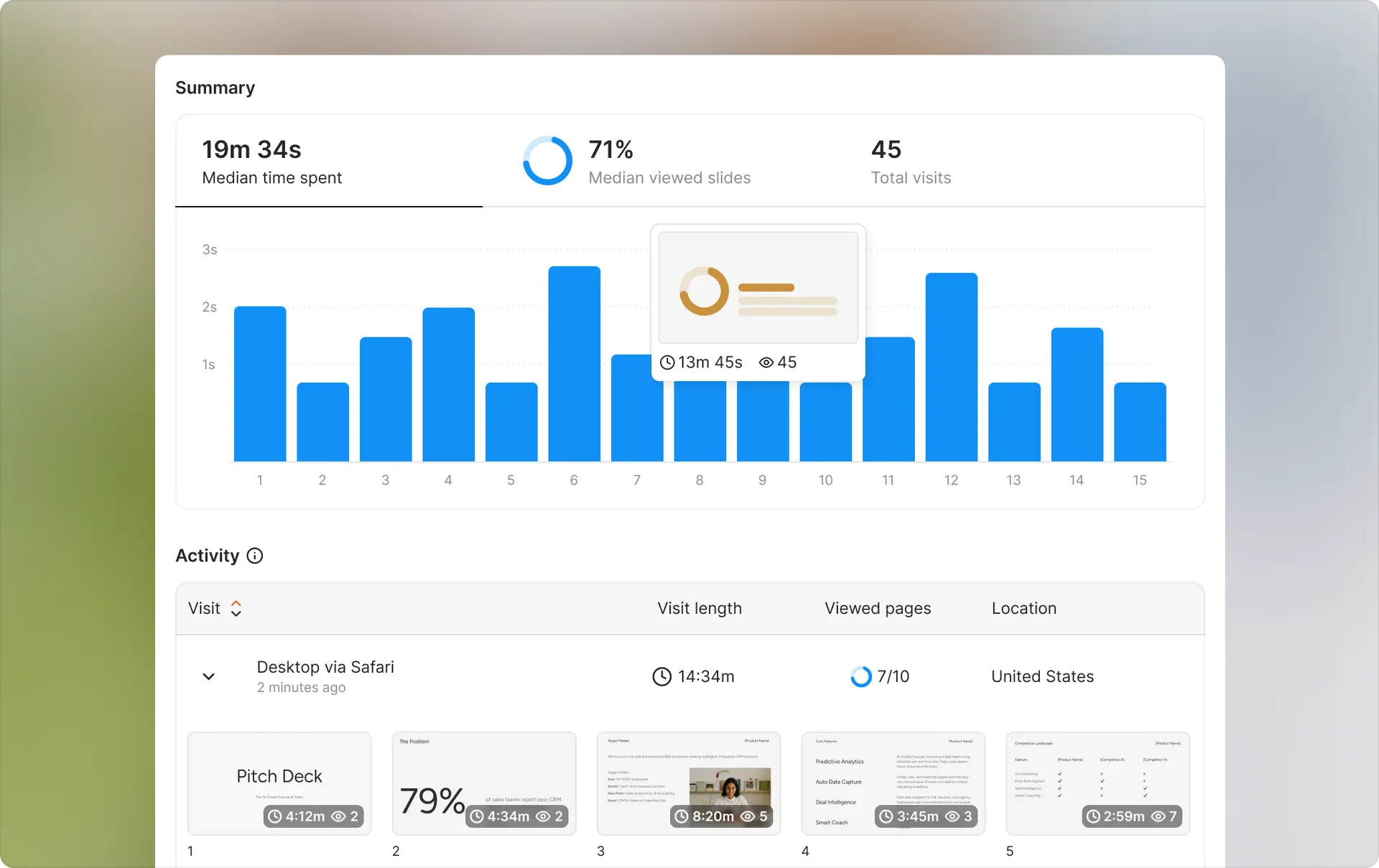
Ellty offers document sharing, tracking, and full virtual data room functionality — making it a strong alternative to Digify for startups that need more than just basic pitch deck analytics.
Pricing advantages:
- Free tier covers document sharing and real-time tracking — no expiration
- Standard plan is $69/month — significantly cheaper than Digify Team
- Data Room plan at $149/month includes NDA gating, granular permissions, and dynamic watermarking
- No document limits
- No annual commitment required
Feature comparison:
- Document sharing and trackable links ✓
- Real-time view analytics ✓
- Page-by-page engagement tracking ✓
- Virtual data rooms with folder organization ✓
- NDA gating and email verification ✓
- Dynamic watermarking ✓
- eSignatures ✓
- Multiple document types ✓
Who it's best for: Startups that need reliable document tracking for investor outreach and a full data room for due diligence — without paying enterprise prices. Ellty covers both use cases under one platform.
Free tier: Document tracking, real-time engagement notifications, and secure shareable links — free forever. Paid plans add data rooms, eSignatures, NDA gating, dynamic watermarking, custom branding, and advanced access controls.
DocSend - $10/user/month
Owned by Dropbox. Document sharing with analytics, middle ground between Ellty and Digify.
Pricing: Starts at $10/user/month (Standard). Advanced is $65/user/month.
vs Digify: Per-user pricing means small teams pay less ($30/month for 3 users vs $99), but costs scale with team size. More flexible document types than Ellty, but less secure than Digify. No document limits on any plan.
Who it's best for: Small teams that need document tracking beyond pitch decks but don't need full data room security features.
Firmex - $500+/month
Enterprise-focused virtual data room provider.
Pricing: Custom pricing, typically starts around $500-1,000/month for basic plans. Can go to $5,000+/month for large deals.
vs Digify: Firmex is built for large M&A transactions and complex compliance requirements. Much more expensive but offers white-glove service, dedicated support, and features Digify doesn't have.
Who it's best for: Large M&A deals, public company transactions, situations where you need proven enterprise infrastructure and can't risk using a smaller provider.
Ansarada - Custom pricing
AI-powered deal management and data room platform.
Pricing: Custom only. Typically $2,000+/month for their full platform. Sometimes offer lower-tier plans around $500-800/month.
vs Digify: Ansarada adds AI-powered insights, automated Q&A, and deal management features beyond basic data rooms. Much more expensive but built for complex, high-value transactions.
Who it's best for: Investment banks, PE firms, large corporates managing billion-dollar deals where AI insights and automation justify premium pricing.
Caplinked - $149/month
Mid-market data room focused on compliance and workflow.
Pricing: Starts at $149/month (Professional plan). Enterprise is $599/month.
vs Digify: $50/month more than Digify Business but includes unlimited documents on all plans. Stronger compliance features (SOC 2, HIPAA). Better for regulated industries.
Who it's best for: Healthcare, financial services, or any industry with strict compliance requirements that can't risk using lighter-weight tools.
Cost comparison for common scenarios
For a seed-stage startup (3-person team, annual pricing):


For a Series A company (active fundraise, 8-person team):


When Digify makes sense
You should consider Digify if you:
- Need a full data room with multiple document types
- Require strong security (watermarking, screen protection, NDAs)
- Share 50+ documents regularly
- Need audit trails and detailed analytics
- Want flat-rate pricing regardless of team size
- Can't afford enterprise data room providers ($500+/month)
- Need Q&A functionality for due diligence
When alternatives make sense
Consider alternatives if you:
- Primarily share pitch decks only (use Ellty)
- Have a very small team and want per-user pricing (use DocSend)
- Need enterprise compliance and support (use Firmex or Ansarada)
- Want unlimited documents at lower price (use Caplinked)
- Just need basic link tracking without security features (use free tools)
Special offers and discounts
Digify offers several ways to reduce costs if you know where to look.
Current promotions
Digify occasionally runs promotions for new customers. Check their website or ask sales if any offers are available. Common promotions include first month free or 10-20% off annual plans.
How to save money
Annual payment discount: Pay annually and save 17% compared to monthly billing.
- Team: $984/year vs $1,188/year (save $204)
- Business: $1,992/year vs $2,388/year (save $396)
Startup/accelerator programs: Digify partners with some startup accelerators and incubators. Y Combinator, Techstars, and similar programs sometimes offer deals:
- 3-6 months free on Team or Business plans
- 20-30% discount for first year
- Ask your program manager if they have a partnership
Educational pricing: Digify offers discounts to educational institutions and students. Typically 30-50% off standard pricing. You'll need to verify .edu email or student status.
Non-profit discounts: Non-profit organizations can request special pricing. Discounts vary but typically 20-40% off. Contact sales with your non-profit documentation.
Free trial strategy
7-day trial tips:
- Don't start trial until you're ready to actively use it
- Upload all documents early to test organization
- Invite your whole team to test workflow
- Test with real recipients to see tracking features
- Make decision before trial ends to avoid gap in service
Negotiation tips (for Enterprise)
Everything is negotiable at Enterprise level:
Pricing leverage:
- Ask for 20-30% discount for annual prepayment
- Request multi-year lock-in at current pricing
- Compare quotes from Firmex, Caplinked to show alternatives
- Mention you're evaluating multiple vendors
Feature additions:
- Ask for next-tier features at lower-tier price
- Request additional storage at no cost
- Get them to waive setup/onboarding fees
- Ask for extended pilot (30-60 days) before commitment
Payment terms:
- Negotiate quarterly instead of annual upfront
- Request month-to-month after first year
- Ask about usage-based pricing if volume varies
Best timing:
- End of quarter (sales teams have quotas)
- End of year (biggest discount potential)
- When they know you're seriously comparing alternatives
How to calculate your true cost
Base price is just the start. Here's how to calculate what you'll actually pay for Digify.
Step 1: Base subscription
Choose your plan:
- Team: $984/year ($82/month annual) or $99/month monthly
- Business: $1,992/year ($166/month annual) or $199/month monthly
- Enterprise: Custom (estimate $6,000-12,000/year)
For this example, let's use Business plan annual: $1,992/year
Step 2: Add-ons and extras
Additional storage: Business includes 100 GB. If you need more, you either manage within limits or upgrade to Enterprise.
- Staying within limits: $0
- Exceeding and need Enterprise: Add $4,000-10,000/year
Document management: Business includes 250 documents/month. If you consistently need more:
- Staying under 250: $0
- Need 251-500: Must upgrade to Enterprise, add $4,000-10,000/year
- Manage by archiving old documents: $0 but adds management time
API usage: Included in Business plan for standard usage. Heavy automation might need Enterprise discussion.
- Standard API use: $0
- Heavy automated workflows: Potentially Enterprise requirement
Total add-ons: $0 (assuming you stay within Business limits)
Step 3: Implementation
Setup time cost: Digify is relatively easy to set up, but you'll spend time:
- Initial setup and configuration: 4-8 hours
- Uploading and organizing documents: 8-16 hours
- Setting permissions and roles: 2-4 hours
- Team training: 2-4 hours
Total setup time: 16-32 hours
- At $100/hour blended rate: $1,600-3,200 (one-time)
Migration from existing tools: Moving from Dropbox, Google Drive, or another data room:
- Downloading and reorganizing documents: 8-16 hours
- Testing all links and permissions: 4-8 hours
- Total: 12-24 hours = $1,200-2,400
Total implementation: $2,800-5,600 (one-time)
Step 4: Ongoing costs
Document management time: Someone needs to upload, organize, and manage documents:
- Weekly document uploads: 2 hours/week
- Permission management: 1 hour/week
- Analytics review: 1 hour/week
- Total: 4 hours/week × 50 weeks = 200 hours/year
- Cost: 200 × $100 = $20,000/year
Visitor support: Helping external people access documents, password resets, troubleshooting:
- Average 2 hours/week: 100 hours/year
- Cost: $10,000/year
Total ongoing: $30,000/year in team time
Total first-year cost:
- Base subscription: $1,992
- Add-ons: $0
- Implementation: $4,200 (average)
- Ongoing team time: $30,000
- Total Year 1: $36,192
Total year two and beyond:
- Base subscription: $1,992
- Add-ons: $0
- Ongoing team time: $30,000
- Total Year 2+: $31,992/year
True monthly cost (amortized over 2 years):
($36,192 + $31,992) ÷ 24 months = $2,841/month true cost
This is 17x the advertised $166/month base price.
Hidden costs to remember:
- Team time to manage documents (biggest hidden cost)
- Time helping external users with access issues
- Storage management when approaching limits
- Document limit management (archiving old to add new)
- Training new team members as they join
- Potential forced upgrade when hitting limits
Compare this to alternatives:
Ellty for pitch deck sharing:
- Base: $29/month ($348/year)
- Setup: 2 hours ($200)
- Ongoing: 1 hour/month for uploads ($1,200/year)
- True monthly cost over 2 years: $140/month
Difference: $2,701/month (95% less)
DocSend for document sharing (5 users):
- Base: $50/month ($600/year for 5 users at Standard)
- Setup: 4 hours ($400)
- Ongoing: 2 hours/month ($2,400/year)
- True monthly cost over 2 years: $241/month
Difference: $2,600/month (91% less)
The question is whether Digify's advanced security features (watermarking, screen protection, NDAs) and data room functionality are worth the 10-20x price premium for your specific use case.
Switch to Ellty (simple pitch deck sharing alternative)


Digify makes sense for complex data rooms with hundreds of documents and strict security requirements. But most early-stage founders just need to share their pitch deck and see who's interested.
That's what Ellty does, without the complexity or document limits.
Ellty Free
Price: $0
- Upload unlimited pitch decks
- Create trackable share links
- See who viewed your deck
- Page-by-page analytics
- View time tracking
- Real-time notifications
- No document limits
- No storage limits
Best for: Pre-seed and seed-stage founders sharing decks with investors and wanting to know who's engaged.
Ellty Pricing
- Free plan: Document tracking, real-time analytics, 10 GB storage — free forever
- Standard: $69/month — unlimited documents, advanced analytics, eSignatures, data rooms
- Data Room: $149/month — granular permissions, NDA gating, dynamic watermarking, restricted visitor access, 3 users included
- Data Room Plus: $349/month — group visitor permissions, data room audit logs, 4,000 assets per data room, 3 users included
Best for: Startup founders managing investor outreach and due diligence, sales teams tracking proposal engagement, and any team that needs document tracking, eSignatures, and a full virtual data room without juggling multiple tools.
Side-by-side comparison: Digify vs Ellty

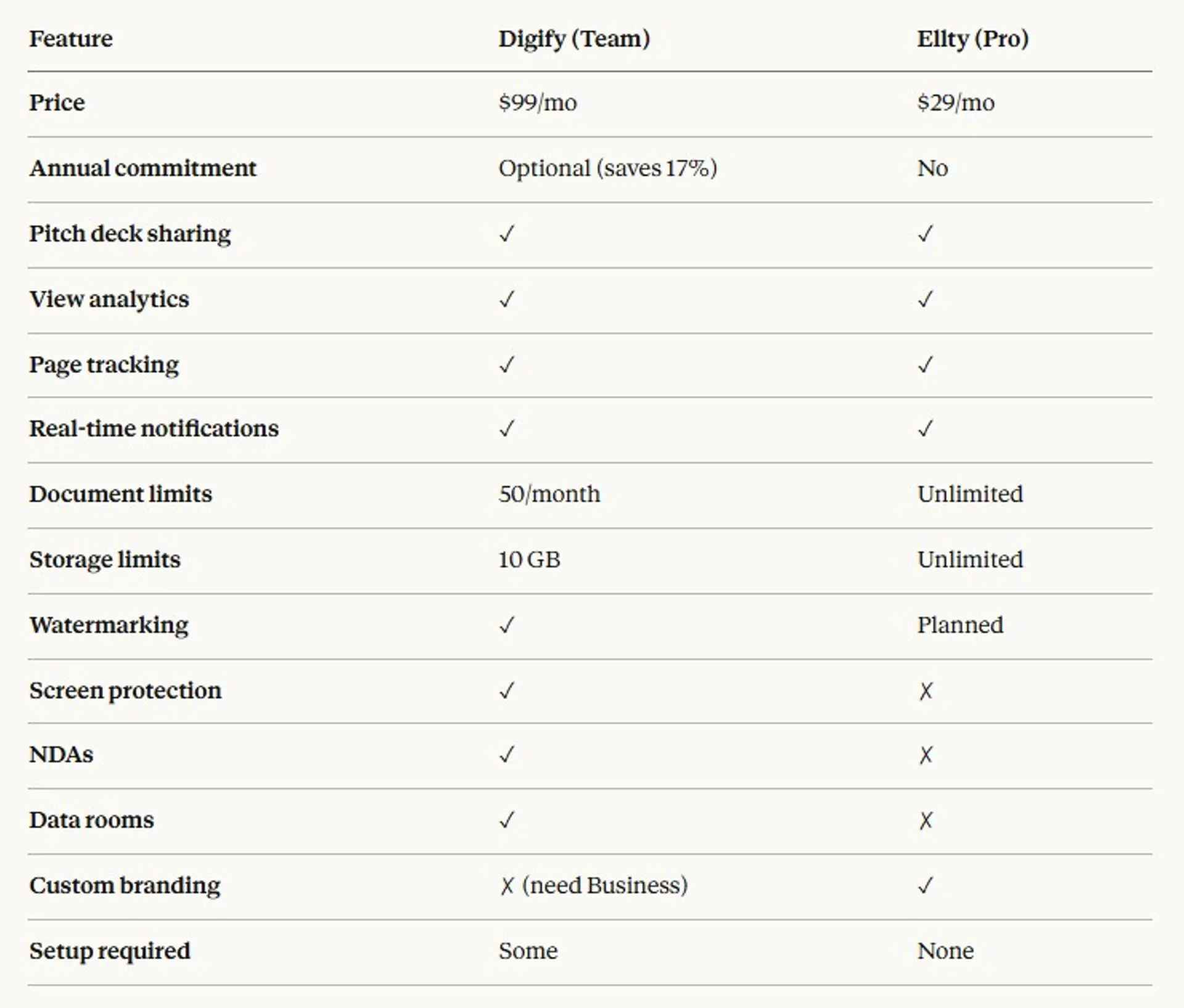
What you save with Ellty
For a seed-stage startup (annual pricing):
- Digify Team: $984/year
- Ellty Pro: $348/year
- Savings: $636/year (65%)
For a Series A company:
- Digify Business: $1,992/year
- Ellty Pro: $348/year
- Savings: $1,644/year (83%)
When Ellty makes sense
You should use Ellty instead of Digify if you:
- Primarily share pitch decks (not comprehensive data rooms)
- Want to track investor engagement on your deck
- Don't need watermarking yet
- Prefer simple, self-serve tools
- Want to avoid document and storage limits
- Are watching budget closely (pre-seed, bootstrapped)
- Need to get started immediately without setup complexity
When to stick with Digify
Digify makes more sense if you:
- Need to share 50+ different document types (not just decks)
- Require watermarking and screen capture prevention
- Need NDAs and e-signature functionality
- Managing formal due diligence with comprehensive data rooms
- Have strict security requirements from investors or acquirers
- Need Q&A functionality for buyer questions
- Want comprehensive audit trails for compliance
Migration is simple
From Digify to Ellty:
- Download your pitch deck from Digify
- Upload to Ellty (takes 30 seconds)
- Create a new trackable link
- Share with investors
No complex migration, no setup calls, no training needed. You can be up and running in under 2 minutes.
Try Ellty Free - No credit card required. Upload your deck and start tracking views immediately.
Quick answers
Does Digify have a free plan?
No permanent free plan. Digify offers a 7-day free trial that includes full Team plan features. After 7 days, you need to subscribe to a paid plan starting at $99/month.
Does Digify offer a free trial?
Yes. 7-day free trial with Team plan features (50 documents, 10 GB storage, all security features). No credit card required to start the trial.
Does Digify have monthly billing or only annual?
Both. You can pay monthly or annually. Annual billing saves 17% compared to monthly. Team is $99/month or $82/month annual. Business is $199/month or $166/month annual.
What payment methods does Digify accept?
Credit card (Visa, Mastercard, American Express) and PayPal. Enterprise plans can be invoiced and paid via wire transfer or check.
Does Digify charge for implementation or onboarding?
No separate charges for standard setup. Team and Business plans are self-service. Enterprise plans include dedicated onboarding as part of the package. If you need extensive custom setup, that might be negotiated separately.
Can I cancel anytime?
Yes for monthly plans - cancel anytime with no penalty. For annual plans, you're committed for the full year with no prorated refunds if you cancel early.
Does Digify have an API?
Yes. API access is included in Business and Enterprise plans. Team plan does not have API access. The API allows programmatic document upload, permission management, and analytics retrieval.
Does Digify have a mobile app?
Yes. Digify has mobile apps for iOS and Android. Users can view documents, see analytics, and manage permissions from mobile. The mobile experience is optimized for viewing and admin tasks, but document upload is easier on desktop.
Are there limits on storage or documents?
Yes. Team plan has 50 documents/month and 10 GB storage. Business plan has 250 documents/month and 100 GB storage. Enterprise has unlimited for both. If you exceed limits, you must upgrade plans - no overage billing available.
Do I need to pay per user or can I share one account?
Digify pricing is per account, not per user. All plans include unlimited users. Your whole team can access documents without additional per-seat charges. Account sharing (one login for multiple people) violates terms of service.
What happens if I exceed my plan limits?
You'll need to upgrade to the next plan tier. For documents, you can archive old documents to free up slots. For storage, you must delete files or upgrade. Digify doesn't offer overage billing - it's upgrade or manage within limits.
Does Digify offer refunds?
Refund policy isn't prominently published. Generally, no refunds on annual plans after the first 30 days. Monthly plans can be canceled anytime but no refunds for the current month. Contact support within first 30 days if unsatisfied to discuss options.
Author

Anika Tabassum Nionta is a Content Manager at Ellty, where she writes about secure document sharing, virtual data rooms, M&A, due diligence, fundraising, and sales enablement. With over 6 years of writing experience, she helps professionals understand how to share confidential documents securely, track engagement, and manage deals more effectively. Anika holds both a BA and MA in English from Dhaka University. Outside of work, she enjoys reading, exploring new cafes in Dhaka, and connecting with entrepreneurs and dealmakers in her community.

