
Need document tracking that actually works?
You send pitch decks, proposals, and contracts. Then you wait. Did they open it? Which pages did they actually read? Are they sharing it internally?
Email attachments give you zero visibility. Google Drive shows "last viewed" but nothing useful. You're making decisions blind.
Document tracking tools solve this. They show you exactly who opened your file, how long they spent on each page, and when they came back. You get real-time notifications when someone views your document.
This guide covers Digify - what it is, how it works, whether it's right for you, and what alternatives exist. We'll be direct about what works and what doesn't.
What is Digify?


Digify is a document tracking and data room platform that lets you share files securely while monitoring who views them and how they engage.
Founded in 2013, Digify started as a secure document sharing tool and expanded into virtual data rooms for M&A transactions and fundraising. It's owned by DigiSec360, a Singapore-based company focused on data security solutions.
Core functionality
What Digify does:
You upload documents (PDFs, presentations, spreadsheets) to Digify. It generates trackable links you can share via email or embed on websites. When someone opens your link, Digify records their activity - which pages they viewed, how long they spent, when they returned.
Document sharing:
Digify creates a branded viewer where recipients access your files. You're not sending attachments. Recipients view documents in their browser without downloading (unless you allow it). You can require email verification before viewing, set expiration dates, and revoke access anytime.
Tracking and analytics:
You see individual viewer data - names, companies, view duration, page-by-page engagement. Digify sends real-time email notifications when someone opens your document. The dashboard shows aggregate stats across all your shared documents.
Access control:
You can watermark PDFs with viewer email addresses, disable printing and downloading, require NDAs before viewing, and set geographic restrictions. For sensitive deals, Digify offers virtual data rooms with folder-level permissions and audit trails.
Use cases:
Sales teams track proposal engagement. Founders monitor investor pitch deck views during fundraising. M&A advisors run due diligence in secure data rooms. Marketing teams track content downloads and measure engagement.
What makes Digify different
Different from email attachments:
Email attachments give you no visibility. Once sent, you don't know if they were opened, forwarded, or ignored. Digify shows you everything.
Different from Google Drive or Dropbox:
These show "last viewed" at best. Digify gives you page-by-page analytics, time tracking, and viewer identification. You also get security features like watermarking and download blocking that consumer file-sharing tools don't offer.
Different from enterprise document management systems:
Full DMS platforms like SharePoint or Box manage internal documents across organizations. Digify focuses on external sharing - documents going to investors, customers, partners outside your company. It's lighter and faster to set up.
Market position
Digify sits in the middle market. It's more sophisticated than basic file sharing but simpler than enterprise data rooms like Intralinks or Firmex. Pricing starts lower than traditional data room providers but scales up quickly with usage.
How Digify works
Using Digify follows a straightforward workflow from upload to tracking.
Step-by-step process
1. Upload your document:
Log into Digify and upload your PDF, PowerPoint, Excel file, or other supported format. You can upload individual files or create multi-document data rooms for complex deals. Files process in seconds to minutes depending on size.
2. Configure security settings:
Choose your protection level. You can require email verification, set expiration dates (document becomes inaccessible after a certain time), enable watermarking with viewer details, block downloads and printing, or require NDA acceptance before viewing.
3. Share the link:
Digify generates a unique tracking link. You can send it via email directly from Digify, copy the link to paste elsewhere, or embed it on your website. Each recipient gets tracked individually when they open the link.
4. Monitor activity:
When someone views your document, you get a real-time email notification. The dashboard shows who viewed it, when they viewed it, how long they spent, and which pages they looked at. You can see if they returned multiple times.
5. Follow up strategically:
Use the data to time your follow-ups. If an investor spent 15 minutes on your pitch deck and returned twice, they're engaged. If they opened it for 30 seconds, maybe they forwarded it to someone else.
Additional features
Data rooms (on higher plans):
For complex transactions, you can create folder structures with hundreds of documents. Set different permissions for different folders. Invite multiple users with role-based access. Track everything with audit logs showing who accessed what and when.
Integrations:
Digify connects with Salesforce, HubSpot, Gmail, and Outlook. You can send tracked documents directly from your CRM or email client. View analytics inside these platforms without switching to Digify.
Team collaboration:
Share tracking data with teammates. Set up team workspaces where everyone can access the same documents and analytics. Assign documents to specific team members for follow-up.
Typical workflows
Fundraising: Founders upload pitch decks, share with investors, see who's actually reviewing materials, follow up with engaged investors first, move interested parties to data rooms for due diligence documents.
Sales: Account executives share proposals, track which sections prospects spend time on, follow up when prospects revisit pricing pages, use engagement data to qualify leads.
Legal/M&A: Advisors create data rooms with transaction documents, grant tiered access to different parties, track what buyers review most, maintain complete audit trails for compliance.
What are the limitations of Digify?
Digify works well for specific use cases but has real constraints you should know about.
Per-user pricing gets expensive
The issue: Digify charges per team member. Even the lowest paid plan limits you to specific user counts, and adding users increases your monthly cost significantly.
Why it matters: If your sales team has 15 people who need to track documents, you're paying for all 15 seats every month whether they all use it heavily or not.
Who this affects: Growing teams, seasonal businesses, companies with fluctuating document sharing needs. One founder reported spending over $200/month because they needed seats for their whole team despite only a few people using it actively.
Analytics aren't as deep as specialized tools
The issue: Digify shows page views and time spent, but doesn't track scrolling behavior, clicks within documents, or engagement patterns beyond basic viewing metrics.
Why it matters: You know someone spent 5 minutes on your deck, but not whether they read deeply or just skimmed. You can't see if they jumped to pricing or financials first.
Who this affects: Users who want behavioral analytics, marketers tracking content engagement, anyone making decisions based on engagement quality vs. quantity.
Mobile viewing experience varies
The issue: Documents viewed on mobile devices sometimes don't render perfectly, especially complex PowerPoint presentations with custom fonts or animations. The viewer works but isn't optimized for small screens.
Why it matters: Many investors and executives review pitch decks on their phones. If the experience is poor, it reflects badly even though it's a platform limitation.
Who this affects: Anyone sharing visually complex documents, presenters who care about brand experience, industries where mobile viewing is common.
Limited customization of viewer interface
The issue: You can add your logo but can't fully customize the document viewer's look and feel to match your brand. The interface is recognizably Digify.
Why it matters: Some users want a fully white-labeled experience where recipients never know a tracking tool is involved.
Who this affects: Agencies presenting to clients, companies with strict brand guidelines, users who want tracking to be completely invisible.
No advanced collaboration features
The issue: Digify focuses on tracking, not collaboration. You can't comment on documents, get approvals, or collaborate on edits within the platform.
Why it matters: If you need stakeholders to review and approve documents collaboratively, you'll need separate tools.
Who this affects: Teams needing approval workflows, legal document review processes, complex stakeholder sign-offs.
Data room features locked behind higher tiers
The issue: Virtual data room capabilities - multiple folders, granular permissions, audit trails - only come with expensive plans starting around $150/month and going much higher.
Why it matters: If you occasionally need data room functionality but don't want to commit to expensive plans, you're stuck.
Who this affects: Startups doing occasional fundraising rounds, small M&A advisors, anyone needing enterprise features without enterprise budgets.
When limitations become dealbreakers
If you're a solo founder or small team sharing occasional documents, per-user pricing feels excessive. If you need deep engagement analytics for content marketing, Digify won't give you enough data. If mobile viewing is critical and your documents are visually complex, test thoroughly before committing. If you want tracking to be completely invisible, the Digify-branded viewer might not work.
For straightforward document tracking with basic security - especially for sales proposals, investor pitch decks, or simple due diligence - these limitations are usually manageable.
Who uses Digify?
Digify serves a specific range of users, mostly in professional services, fundraising, and sales contexts.
Startup founders raising capital
Who they are: Pre-seed through Series B founders pitching investors, typically sending pitch decks to 50-200 investors per round.
How they use Digify: Upload pitch deck once, share unique tracking links with each investor, monitor who actually reviews materials, follow up with engaged investors first, move interested investors to data rooms for financials and due diligence documents.
Why it works for them: Fundraising is time-sensitive. Knowing which investors are engaged helps founders prioritize. Seeing that a partner spent 20 minutes on your deck and came back three times signals real interest.
Example scenario: A SaaS founder sends their Series A deck to 100 VCs. Digify shows that 12 actually opened it, 5 spent more than 10 minutes, and 2 returned multiple times. The founder focuses outreach on those 7 engaged investors instead of cold following up with everyone.
Sales professionals and account executives
Who they are: B2B sales teams selling high-ticket products or services, typically with multi-week sales cycles and proposal-heavy processes.
How they use Digify: Share proposals and contracts with prospects, see when decision-makers review documents, identify which sections get the most attention, time follow-up calls based on viewing activity, track whether proposals get forwarded internally.
Why it works for them: Sales is about timing. Following up right after a prospect reviews your proposal is more effective than random check-ins. Knowing they skipped the implementation section tells you what questions to ask.
Example scenario: An enterprise software sales rep sends a 30-page proposal. Digify shows the CFO spent 8 minutes on the pricing section but only 1 minute on features. The rep adjusts their follow-up call to focus on ROI and pricing structure rather than technical capabilities.
M&A advisors and investment bankers
Who they are: Financial professionals managing buy-side or sell-side transactions, typically running due diligence processes with dozens or hundreds of documents.
How they use Digify: Create virtual data rooms with organized folders, grant tiered access to different parties (buyers, lawyers, accountants), track exactly which documents each party reviews, maintain audit trails for compliance, control access with NDAs and watermarks.
Why it works for them: M&A requires tight security and detailed tracking. Knowing that a buyer spent significant time on customer contracts but ignored IP documents reveals their priorities and concerns.
Example scenario: An M&A advisor runs a sell-side process with 5 potential buyers. Digify's data room shows Buyer A spent hours in financial documents while Buyer B focused on customer lists and contracts. The advisor tailors negotiation strategy based on each buyer's revealed priorities.
Business development and partnerships teams
Who they are: Corporate development professionals exploring partnerships, joint ventures, or strategic alliances.
How they use Digify: Share partnership proposals and company overview decks, track which potential partners are seriously evaluating opportunities, see engagement levels before investing time in calls, secure sensitive strategic documents.
Why it works for them: Partnership discussions often involve sharing sensitive information before formal agreements. Digify provides security while showing who's actually interested.
Example scenario: A tech company shares partnership proposals with 15 potential distribution partners. Three show high engagement, revisiting the document multiple times. The BD team prioritizes those relationships over the 12 who barely looked.
Legal teams and law firms
Who they are: Corporate lawyers managing document review processes, contract negotiations, or due diligence for clients.
How they use Digify: Share contracts and legal documents with counterparties, track when documents are reviewed before negotiations, maintain audit trails of document access, secure sensitive client information during deals.
Why it works for them: Legal work requires documentation of who accessed what and when. Digify provides the paper trail while controlling access.
Example scenario: A law firm shares acquisition documents with the buyer's legal team. Digify shows which lawyers reviewed which sections, helping the firm prepare for negotiation meetings based on what the other side studied.
Real estate professionals
Who they are: Commercial real estate brokers and developers sharing property information with investors or buyers.
How they use Digify: Distribute offering memorandums and property details, track investor interest before scheduling property tours, secure sensitive financial information about properties, manage multiple documents for complex deals.
Why it works for them: Real estate deals involve extensive documentation before any face-to-face meetings. Tracking engagement helps brokers qualify serious buyers.
Example scenario: A commercial broker shares an office building opportunity with 30 potential investors. Eight show serious engagement with the financials. The broker prioritizes those eight for site visits and deeper discussions.
Company sizes
Startups and small businesses (1-50 employees): Most common users. They need professional document tracking without enterprise complexity or budgets.
Mid-market companies (50-500 employees): Sales teams and corporate development groups use Digify for external sharing while using other tools for internal collaboration.
Enterprises (500+ employees): Less common unless specific departments (like corporate development) need lighter tools than enterprise-wide systems.
Industries
Technology and SaaS: Heavy users for fundraising and sales proposals.
Financial services: M&A advisors, investment bankers, private equity firms running deal processes.
Professional services: Consulting firms, law firms, accounting firms sharing client documents.
Real estate: Commercial brokers and developers distributing property information.
Healthcare and life sciences: Occasional users for partnership discussions or fundraising, though PHI restrictions limit some use cases.
When Digify is NOT the right fit
Internal document management: If you need to manage documents within your company, use SharePoint, Box, or Google Workspace. Digify focuses on external sharing.
Complex collaboration and editing: If multiple people need to comment, edit, and collaborate on documents, use Google Docs, Microsoft 365, or Notion. Digify doesn't do collaborative editing.
High-volume, low-value document sharing: If you're sending hundreds of routine documents daily (like invoices or receipts), Digify is overkill and expensive. Email works fine.
When tracking isn't important: If you don't care who views your documents or when, Google Drive or Dropbox is simpler and cheaper.
Consumer use cases: Digify is built for business. If you're sharing personal documents with family or friends, standard cloud storage is better.
Digify pricing & plans

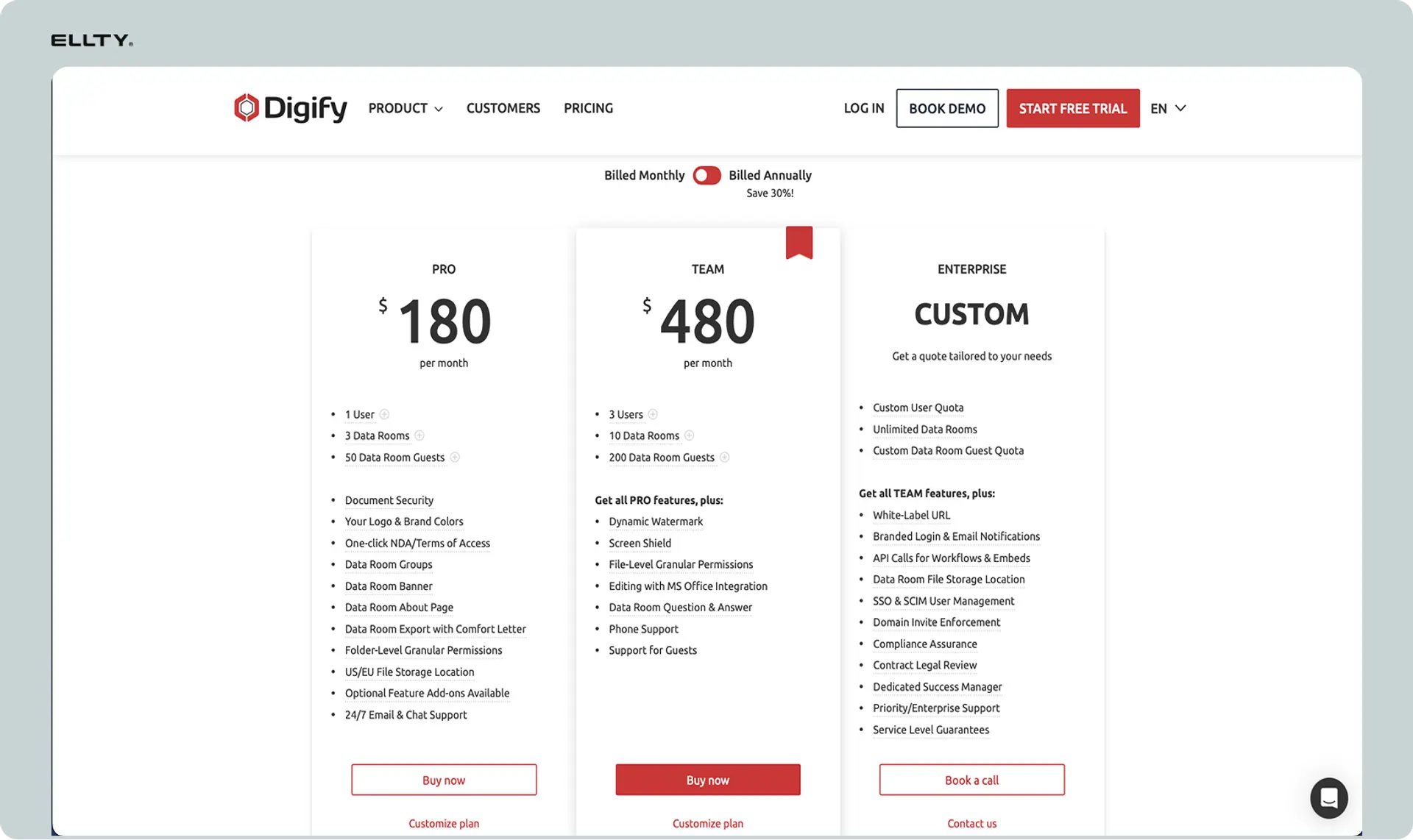
*Digify uses per-user pricing with tiered plans based on features and usage limits.
Quick pricing overview
Plans range from around $49/month for basic features to several hundred dollars monthly for data room capabilities. All pricing is per user, so costs multiply with team size. Annual plans offer discounts over monthly billing.
Detailed plan breakdown
Free trial:
14-day trial with full access to test features before committing. No credit card required to start.
Team plan (~$49/user/month when billed annually):
- Unlimited documents
- Unlimited tracking links
- Email verification
- Basic analytics (views, time spent)
- Email notifications
- Watermarking
- Download blocking
- Link expiration
- Best for: Individual users or small teams sharing pitch decks, proposals, contracts
Business plan (~$89/user/month when billed annually):
Everything in Team plus:
- NDA requirements before viewing
- Custom branding
- CRM integrations (Salesforce, HubSpot)
- Advanced analytics
- Email reminders to viewers
- Bulk sharing
- Best for: Sales teams, founders doing active fundraising, anyone needing integrations
Data room plan (~$150+/user/month):
Everything in Business plus:
- Virtual data room functionality
- Folder-level permissions
- Multi-document organization
- Advanced audit trails
- Team collaboration features
- Dedicated account manager (on higher tiers)
- Best for: M&A advisors, investment bankers, complex due diligence processes
Enterprise (custom pricing):
Custom features, volume discounts, dedicated support, SSO, API access. You need to contact sales for pricing.
Pricing comparison table


Hidden costs
Per-user multiplier: With 5 team members on the Business plan, you're paying around $445/month. With 10 users, it's $890/month. The per-seat model scales costs quickly.
Annual commitment for best pricing: Monthly billing costs significantly more than annual. To get the rates listed above, you typically commit to a full year.
Overage fees: Some plans limit document storage or viewer counts. Exceeding limits can trigger additional charges.
Mandatory upgrades: If you need even one advanced feature (like NDA requirements), you have to upgrade your entire account to the Business plan, even if you only need that single feature occasionally.
Discounts available
Annual billing saves 15-20% compared to monthly. Startups in certain accelerators may get discounts. Nonprofits can sometimes negotiate reduced rates. Volume discounts apply for large team deployments on Enterprise plans.
Cost comparison to alternatives
Digify sits mid-range. Basic document tracking tools cost $10-30/month. Traditional data room providers charge $500-2,000+ per month but include more enterprise features. Tools like PandaDoc or DocSend have similar per-user pricing in the $49-99/month range.
For a solo founder tracking investor interest, $49/month is manageable. For a 15-person sales team, you're looking at $735-1,335/month depending on the plan, which starts competing with more comprehensive sales platforms.
Digify pros and cons
Here's a balanced look at what works and what doesn't.
Pros (Advantages)
Real-time notifications actually work: You get instant emails when someone views your document. Notifications are reliable and include useful details like viewer name and time spent.
Page-by-page analytics provide insights: Unlike basic link trackers, you can see which pages in multi-page documents get attention. This helps you understand what sections matter to viewers.
Security features are solid for most needs: Watermarking, download blocking, email verification, and expiration dates cover the basics. For standard business use cases, the security is adequate.
Easy to use without training: Interface is straightforward. Upload, configure, share. You don't need tutorials or training sessions. New users figure it out in minutes.
Integrations with major CRMs work well: Salesforce and HubSpot integrations let you send tracked documents directly from your CRM and view analytics there. Saves switching between platforms.
Data rooms handle complex deal structures: For M&A or fundraising, the folder organization and granular permissions actually work. Audit trails are detailed enough for compliance needs.
Mobile notifications are reliable: Whether you're at your desk or not, you know when important people view your documents. The mobile notification system doesn't miss views.
Professional-looking viewer experience: Despite limited customization, the document viewer looks clean and works smoothly. Recipients aren't confused or frustrated by the interface.
Good uptime and reliability: Documents load quickly. The platform rarely goes down. When you send a link, it works.
Responsive customer support: On paid plans, support responds within reasonable timeframes and actually helps solve problems rather than just sending boilerplate responses.
Cons (Disadvantages)
Per-user pricing scales poorly: Every additional team member costs $49-89+ monthly. For larger teams, this becomes expensive fast, even if some users only occasionally share documents.
Analytics lack behavioral depth: You see time spent but not scrolling patterns, engagement quality, or interaction heatmaps. The data is useful but not as rich as specialized analytics platforms.
No commenting or collaboration tools: If you need stakeholders to review and provide feedback within the platform, you can't. Digify only tracks viewing, not collaboration.
Mobile viewing inconsistent with complex docs: PowerPoint presentations with animations or custom layouts sometimes render poorly on phones. Your carefully designed deck might look broken.
Limited customization of viewer interface: You can add a logo but can't fully white-label the experience. Recipients see they're using Digify, which some users don't want.
Data room features require expensive plans: Virtual data rooms only come on plans starting around $150/user/month. If you occasionally need this functionality, paying for it year-round is wasteful.
No free plan for ongoing use: After the 14-day trial, you must pay. There's no permanently free tier for light users who share a few documents monthly.
Watermarks are visible and sometimes intrusive: While watermarking helps security, it can make documents harder to read, especially if recipients want to reference specific content.
Limited viewer interaction tracking: You know someone viewed a document but not if they clicked links within it, filled out embedded forms, or engaged with interactive elements.
Reporting could be more flexible: You can't easily create custom reports or export data in all the formats you might want. The analytics dashboard is somewhat rigid.
Digify alternatives to consider
Digify isn't your only option for document tracking and secure sharing.
Ellty - Document tracking without per-user fees


What it is:
Ellty is a document sharing, tracking, and virtual data room platform built for startup founders and investors. Upload documents, create trackable links, see detailed engagement analytics, and manage full due diligence - all without per-user seat charges.
Key features:
Upload unlimited documents and presentations. Create trackable links with granular access controls. Get real-time notifications when someone opens your document. See page-by-page analytics showing where viewers spend their time. Track session duration and return visits. Build virtual data rooms with folder organization, NDA gating, granular permissions, and dynamic watermarking for due diligence. Send and collect eSignatures without a separate tool. Your whole team can collaborate without ballooning per-seat costs.
Pricing:
Starts significantly lower than Digify for teams. You're not charged per user, so adding team members doesn't increase costs. Plans are based on features, starting free forever, with paid plans from $69/month unlocking data rooms, eSignatures, and advanced access controls.
Best for:
Startup founders raising capital who need reliable document tracking and a clean due diligence process. Teams tired of per-user pricing where costs scale with headcount. Anyone who needs document tracking, eSignatures, and a full virtual data room under one roof without paying for multiple tools.
Ellty vs. Digify comparison

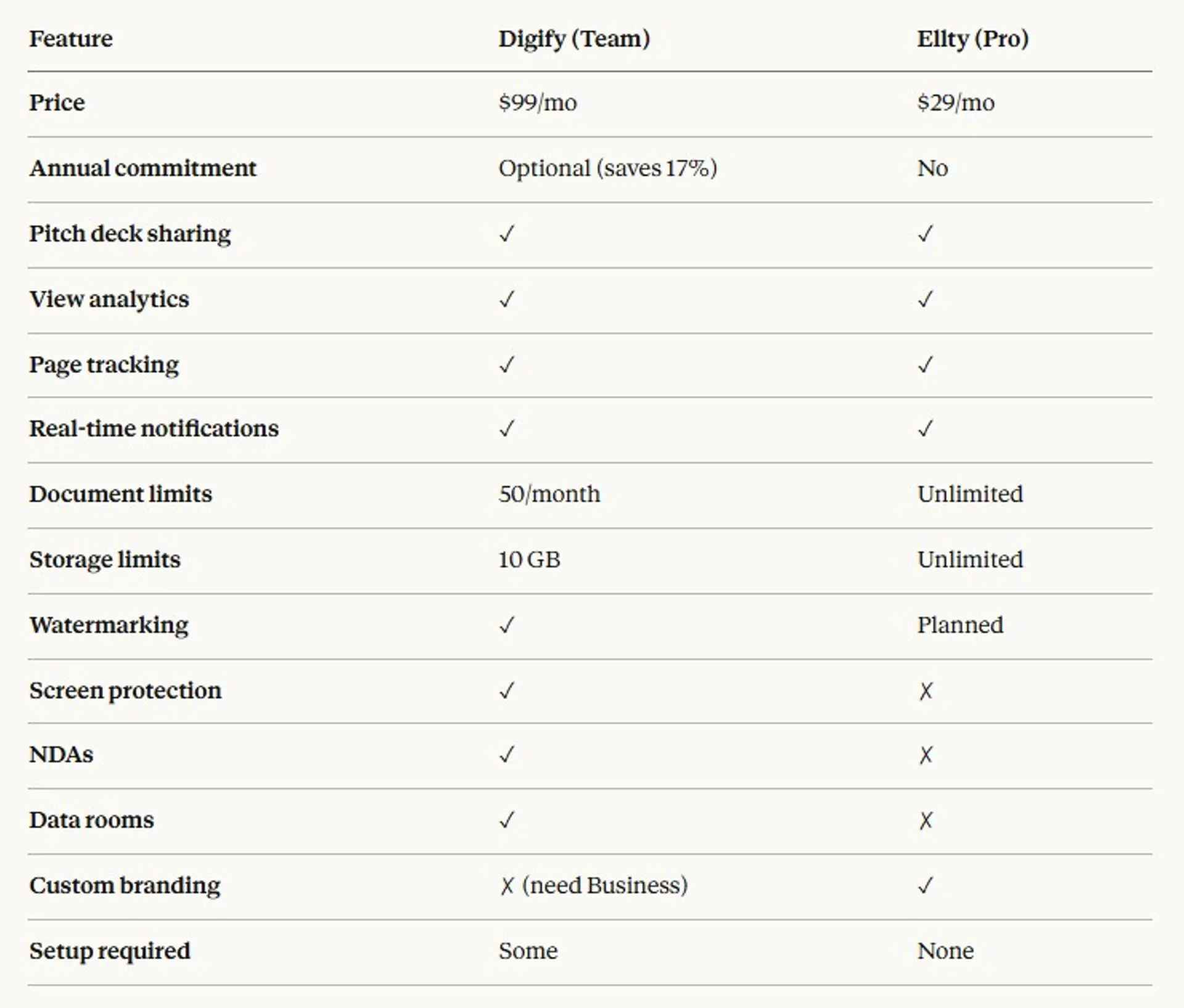
When to choose Ellty:
You're a founder sharing pitch decks and don't want costs to multiply with team size. You want pitch deck analytics and virtual data rooms specifically designed for fundraising. Your team fluctuates and per-user pricing doesn't make sense. Y
When to choose Digify:
You need to track many document types beyond pitch decks (contracts, proposals, reports). You already use Salesforce or HubSpot heavily and want tight integration. You're managing complex M&A transactions requiring enterprise-grade data rooms with extensive audit trails. You prefer a more established platform with longer track record.

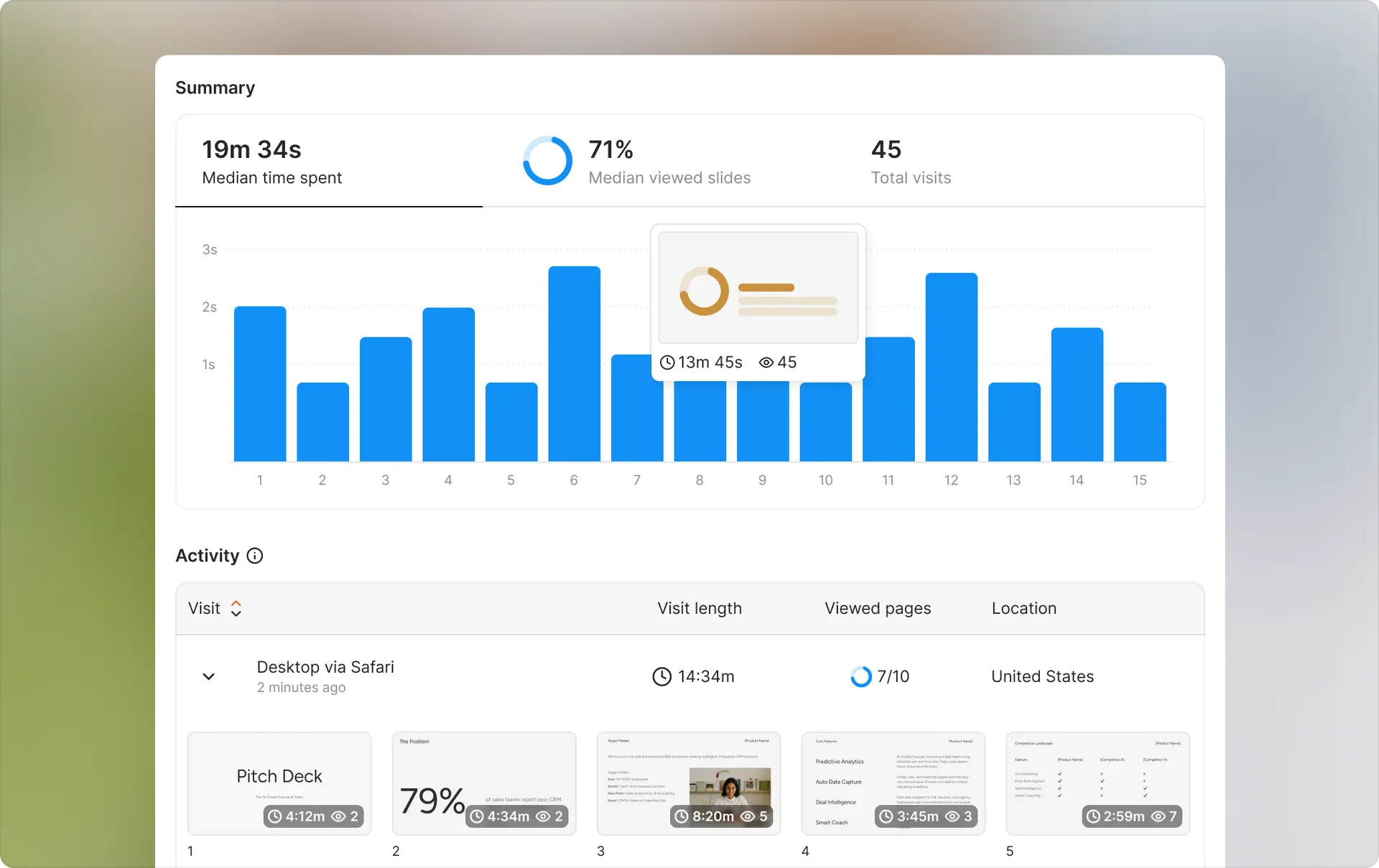
DocSend (Dropbox) - Established document tracking with video support
What it is: Document tracking platform owned by Dropbox that adds analytics to shared files. Popular with fundraisers and sales teams.
Key differentiator: Integrates with Dropbox ecosystem. Supports video tracking in addition to documents. Has one-page link features for quick sharing.
Pricing: Starts around $45/user/month for Personal plan. Advanced features require higher tiers at $150+/user/month.
Best for: Users already in Dropbox ecosystem, teams sharing video content alongside documents, sales teams needing established platform with proven reliability.
vs. Digify: DocSend has stronger brand recognition and Dropbox integration. Pricing is similar per-user model. Both offer comparable core tracking features. DocSend adds video tracking while Digify focuses more on data room features.
PandaDoc - Document tracking with e-signature and workflow
What it is: Document automation platform that combines tracking with e-signatures, templates, and approval workflows.
Key differentiator: All-in-one solution covering document creation, tracking, approvals, and signatures. More comprehensive than pure tracking tools.
Pricing: Starts around $35/user/month for basic features. Advanced plans run $65-$149/user/month.
Best for: Sales teams needing proposals, contracts, and quotes in one platform. Companies wanting to eliminate multiple tools for document workflows. Users who need e-signature integrated with tracking.
vs. Digify: PandaDoc is broader but less focused on pure tracking and security. If you need end-to-end document workflow, PandaDoc wins. If you just need tracking and security, it's overkill and similarly expensive per-user.
Pitch - Presentation tracking focused on team collaboration
What it is: Presentation software with built-in sharing and analytics, focused on teams creating decks together.
Key differentiator: You create presentations within Pitch, not just share existing ones. Collaborative editing is core. Tracking comes as a feature of the presentation tool.
Pricing: Free tier available. Pro plans start around $20/user/month.
Best for: Teams creating presentations collaboratively from scratch. Users who want both creation and tracking in one tool. Companies prioritizing design and collaboration over security features.
vs. Digify: Pitch is a presentation creation tool with tracking added. Digify is a tracking and security tool that accepts any document. Different purposes - Pitch for making decks, Digify for securing and tracking any existing files.
Google Drive with third-party tracking - Budget option
What it is: Use Google Drive for basic sharing and add tools like Better Sheets or tracking scripts for minimal analytics.
Key differentiator: Essentially free if you're already paying for Google Workspace. Basic tracking through access logs and third-party add-ons.
Pricing: Google Workspace starts at $6/user/month, which you're probably paying anyway. Some tracking add-ons are free or very low cost.
Best for: Budget-conscious users who don't need advanced features. Teams already using Google Workspace heavily. Situations where basic "was it viewed" data is enough.
vs. Digify: Google Drive is much cheaper but tracking is minimal. You get access logs but not page-by-page analytics, time tracking, or real-time notifications. Security features like watermarking and download blocking are limited. Works fine for low-stakes sharing but inadequate for fundraising or sensitive deals.
Is Digify safe?
Yes, for standard business document sharing. Digify uses encryption in transit and at rest, secure data centers, and industry-standard security practices. The company has SOC 2 Type II certification and complies with GDPR for European users.
For most use cases - sharing pitch decks with investors, sending proposals to clients, running standard due diligence - Digify's security is adequate. For extremely sensitive transactions involving regulated data or high-value M&A deals, verify that Digify meets your specific compliance requirements.
Is Digify right for you?
Digify works well if you regularly share important documents externally and need to know who views them. The tracking is reliable, security features handle most business needs, and the interface is straightforward.
It doesn't make sense if you're only occasionally sharing documents, need deep collaboration features, want to avoid per-user costs, or require highly customized white-label experiences. The per-user pricing becomes expensive for larger teams, so calculate actual costs before committing.
Getting started with document tracking
Whether you choose Digify or another tool, here's how to start tracking document engagement effectively.
Why start tracking: You make better decisions with data. Knowing which investors actually reviewed your pitch deck helps you prioritize follow-ups. Seeing that prospects spent 15 minutes on your proposal signals real interest. Tracking shows you what content resonates and what gets ignored.
How to begin: Start with your most important external documents - pitch decks for fundraising, proposals for sales, contracts for legal. Don't try to track everything at once. Pick 3-5 document types where engagement data would meaningfully improve your decisions. Upload those first, share tracked links, and review analytics after a week.
Best practices: Send individual tracking links to each recipient rather than one link to everyone, so you can identify who viewed what. Check analytics before follow-up calls to reference what they reviewed. Use time-spent data to gauge interest level, not just whether they opened it. Set up notifications for your most important documents so you can follow up while you're fresh in recipients' minds.
Document tracking becomes more valuable the more you use it. Patterns emerge over time - you learn which deck layouts get more engagement, which sections prospects skip, and how to time your follow-ups based on viewing behavior.
Frequently asked questions
Does Digify work with all file types?
Digify handles PDFs, PowerPoint, Word, Excel, and most common document formats. Images work too. Very specialized formats might need conversion to PDF first.
Can recipients tell they're being tracked?
Recipients view documents in the Digify viewer, so they know they're using a platform. It's not completely invisible, though many won't notice the tracking specifically.
How accurate is the time tracking?
Generally accurate for total time spent. If someone opens a document and leaves the browser tab open without viewing, it might overestimate. Page-level time tracking works well for engaged viewing.
Can I track forwarded links?
Not directly. If a recipient forwards the link to someone else, you'll see the new viewer but might not know it was forwarded unless you require email verification for each viewer.
Does Digify store my documents permanently?
Documents stay in your Digify account until you delete them. They're not automatically removed. Storage limits depend on your plan.
Can I export analytics data?
Yes, you can export view data to CSV. The exact export options depend on your plan tier.
What happens if I downgrade or cancel?
Your existing tracked links stop working if you cancel entirely. If you downgrade, you might lose access to advanced features but basic tracking usually continues for documents already shared.
Is there a mobile app?
There's no dedicated mobile app. You access Digify through a mobile browser, which works but isn't optimized like a native app would be.
How long do tracking links last?
Links last indefinitely unless you set an expiration date or revoke access manually. You control the lifespan.
Can multiple team members see the same analytics?
Yes, team workspaces let everyone with access see analytics for shared documents. You can also restrict analytics to specific users if needed.
Does Digify work in China or regions with internet restrictions?
Some users report access issues in countries with heavy internet filtering. Test during your free trial if this applies to you.
What's the maximum file size I can upload?
Limits vary by plan but generally range from 100MB to several GB. Large files take longer to process but work.
Author

Anika Tabassum Nionta is a Content Manager at Ellty, where she writes about secure document sharing, virtual data rooms, M&A, due diligence, fundraising, and sales enablement. With over 6 years of writing experience, she helps professionals understand how to share confidential documents securely, track engagement, and manage deals more effectively. Anika holds both a BA and MA in English from Dhaka University. Outside of work, she enjoys reading, exploring new cafes in Dhaka, and connecting with entrepreneurs and dealmakers in her community.

