
You're comparing DocSend and Dropbox because both let you share documents, but they serve fundamentally different purposes. Dropbox is a file storage and collaboration platform. DocSend (owned by Dropbox since 2021) is a document tracking and analytics platform.
This comparison covers features, pricing, use cases, analytics capabilities, and when each tool makes sense. We'll also introduce Ellty as a third option that might fit if neither DocSend nor Dropbox matches your needs.
What this comparison covers:
- Core differences between storage and tracking platforms
- Side-by-side feature comparison
- Pricing analysis across team sizes
- When to use Dropbox vs DocSend vs both
- Ellty as a simpler, more affordable alternative for sending confidential documents with tracking
Quick overview
Dropbox
What it is: Dropbox is a cloud storage and file synchronization platform founded in 2007. It stores your files, syncs them across devices, and lets you share them with others. It's designed for file management, backup, and collaboration.
- Founded 2007, publicly traded company
- Core focus: Cloud storage and file synchronization
- Best for: Storing, syncing, and collaborating on files
- Starting price: $11.99/user/month (Plus plan)
- Key strength: Reliable file storage with broad adoption
DocSend
What it is: DocSend is a document tracking and analytics platform owned by Dropbox since 2021. It lets you share documents via trackable links and see who viewed them, for how long, and which pages they spent time on.
- Founded 2013, acquired by Dropbox 2021
- Core focus: Document analytics and engagement tracking
- Best for: Tracking document engagement for sales and fundraising
- Starting price: $50/user/month (Advanced plan)
- Key strength: Deep page-by-page analytics and viewer insights
Quick comparison table:


The key difference: Dropbox stores and shares files. DocSend tracks and analyzes document engagement. They solve different problems and many users need both.
Need document tracking without the Dropbox ecosystem?

Using Dropbox just for DocSend feels excessive. Paying for storage you don't need.
Ellty provides focused document tracking. Upload, share, analyze. No ecosystem lock-in.
Free tier with 50 documents. See who's actually reading your content.
What each does well
Dropbox

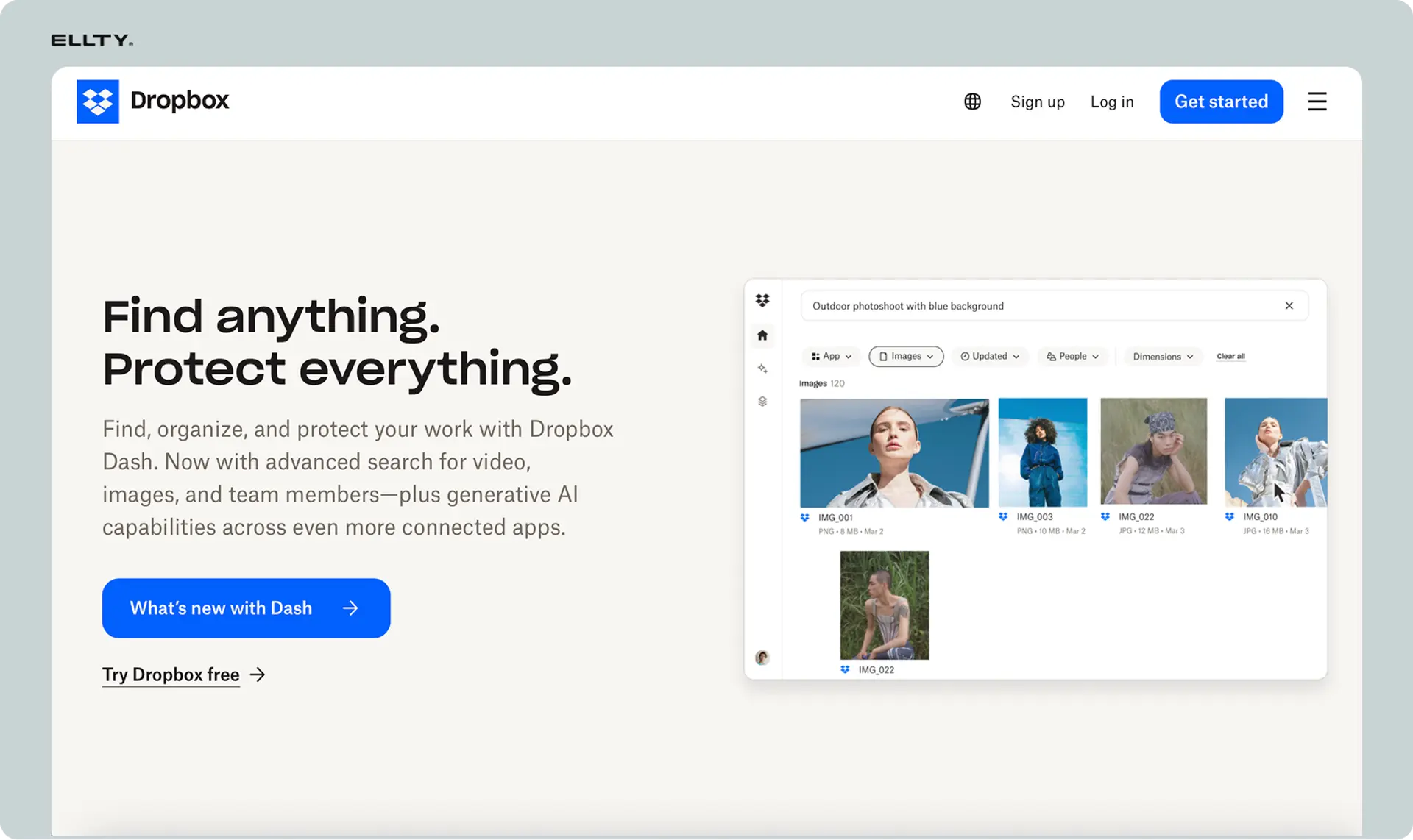
Everyone knows Dropbox. Upload files. Sync across devices. Share folders with teams. Comment on documents. Basic stuff that works.
Recent additions include Dropbox Sign (formerly HelloSign) and Dropbox Replay for video collaboration. Building an ecosystem beyond storage.
Pricing starts at $9.99/month for individuals. Business plans from $15/user/month. Lots of storage. Unlimited devices.
DocSend
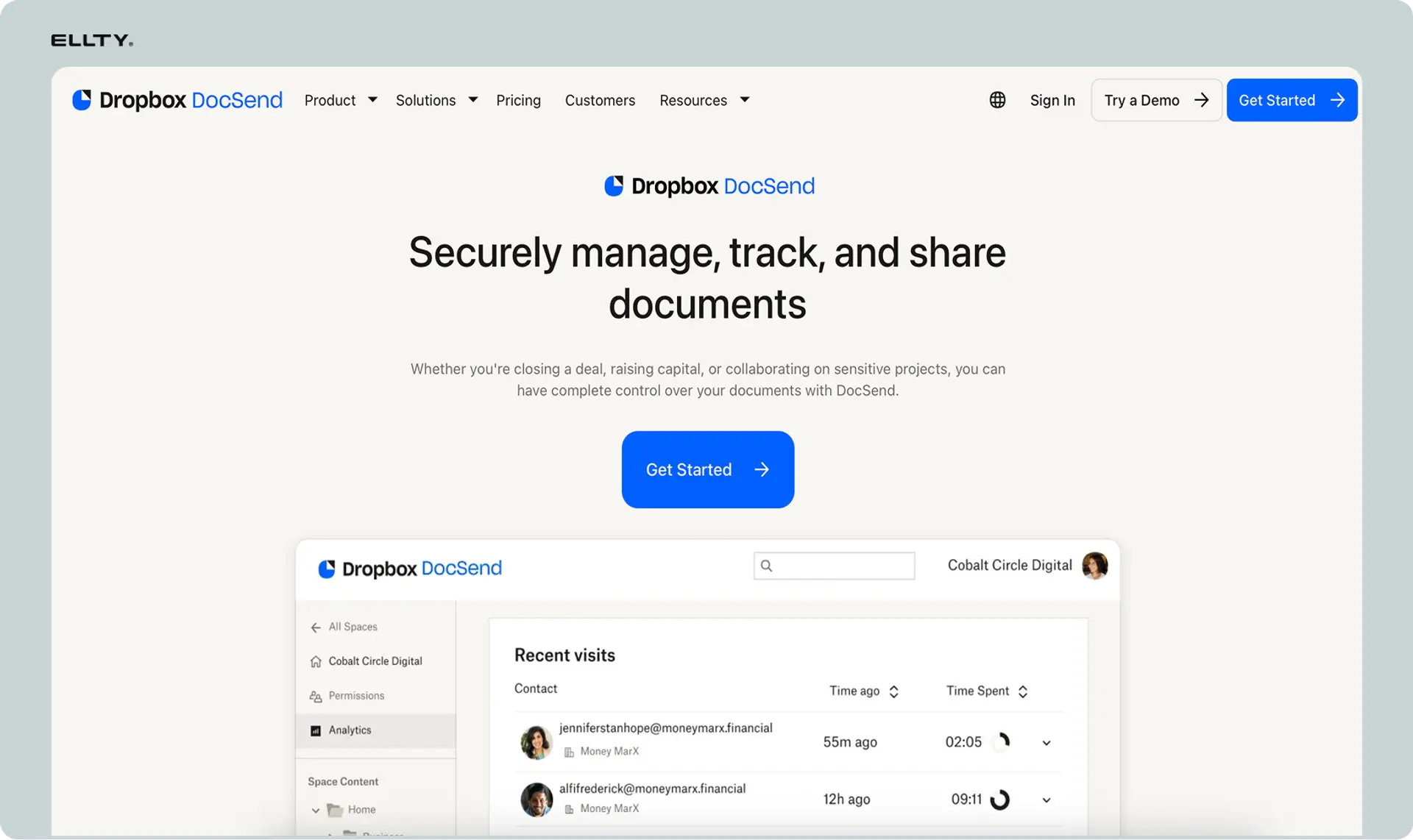
DocSend doesn't store files long-term. You upload documents to share and track. See who opens them. Which pages they read. How long they spend.
Control access with passwords, expiration dates, download restrictions. Update documents after sending. Revoke access anytime.
Pricing starts at $15/user/month. No free tier. Focus on document analytics, not storage volume.
Key differences between DocSend and Dropbox
Here are the most important distinctions that'll drive your decision.
Difference #1: Core purpose and problem solved
Dropbox: Dropbox solves the file storage problem. You upload files, they sync across your devices, and you can access them anywhere. You share files with others, collaborate on documents, and maintain backups. It's infrastructure for file management.
DocSend: DocSend solves the engagement tracking problem. You share documents and want to know who viewed them, when, for how long, and which sections they focused on. It's intelligence about document performance and viewer behavior.
What this means for you: These are different tools for different jobs. Dropbox answers "where should I store my files?" DocSend answers "who's reading my documents and how are they engaging?" You might need both for different purposes.
Difference #2: Analytics and tracking capabilities
Dropbox: Dropbox shows basic file activity: who you shared with, whether they opened the link, and when files were modified. That's it. You won't know how long someone spent viewing a document, which pages they read, or whether they shared it with others.
DocSend: DocSend provides detailed analytics: page-by-page time spent, engagement heatmaps, forwarding detection, visitor identification, engagement scoring, return visits, and performance tracking over time. You see exactly how people interact with your content.
What this means for you: If you just need to share files, Dropbox's basic tracking is fine. If you need to understand document engagement to improve sales, fundraising, or content effectiveness, DocSend's analytics are essential.
Difference #3: Access controls and security
Dropbox: Dropbox offers password protection on shared links, link expiration, view-only access, and folder permissions. Security focuses on controlling who can access and edit files. Anyone with a link can typically view and download unless you restrict it.
DocSend: DocSend provides email verification (viewers must enter email to access), NDA gates (require NDA acceptance before viewing), password protection, link expiration, download controls, dynamic watermarking, and granular permission settings. Security focuses on knowing who accessed content and preventing unauthorized sharing.
What this means for you: Dropbox gives you file-level permissions. DocSend gives you viewer identification and sharing controls. If you need to know exactly who viewed your document, DocSend's email verification is valuable. Dropbox allows more anonymous sharing.
Difference #4: Pricing model and cost structure
Dropbox: Dropbox charges for storage capacity and features. Plus plan is $11.99/user/month (2TB storage). Professional is $19.99/user/month (3TB storage). Business plans start at $18/user/month (5TB+ storage). You're paying for storage space primarily.
DocSend: DocSend charges for analytics and tracking features. Advanced plan is $50/user/month with unlimited document uploads and analytics. You're paying for engagement intelligence, not storage capacity.
What this means for you: Dropbox is cheaper upfront but serves a different purpose. DocSend costs more but provides data Dropbox doesn't. They're not direct substitutes. Many teams use both: Dropbox for file storage, DocSend for important document tracking.
Difference #5: Collaboration and editing
Dropbox: Dropbox integrates with Microsoft Office, Google Workspace, and collaboration tools. You can edit documents directly in Dropbox Paper, comment on files, assign tasks, and work together in real-time. It's built for collaborative workflows.
DocSend: DocSend doesn't support document editing or collaboration. You upload finalized documents to share and track. It's designed for distributing finished content, not creating or editing it.
What this means for you: Dropbox is where you work on files. DocSend is where you share finished documents externally. If you need to collaborate with your team on creating content, use Dropbox. If you need to track how external viewers engage with finished documents, use DocSend.
Difference #6: Integration ecosystem
Dropbox: Dropbox integrates with thousands of tools: Slack, Zoom, Adobe, Microsoft Office, Google Workspace, project management tools, and most business software. It's infrastructure that connects to everything.
DocSend: DocSend integrates with CRM systems (Salesforce, HubSpot, Microsoft Dynamics), Gmail, Slack, and Zoom. Integrations focus on sales workflows and pushing engagement data into CRM systems. The ecosystem is smaller but targeted.
What this means for you: Dropbox connects to your entire workflow because it's core infrastructure. DocSend connects to sales and fundraising tools specifically. If you need broad integration, Dropbox wins. If you need CRM integration for sales analytics, DocSend wins.
Difference #7: Use case specialization
Dropbox: Dropbox is general-purpose file storage. Everyone from individuals to enterprises uses it for backing up files, syncing across devices, sharing documents, and collaborating. It's not specialized for any particular workflow.
DocSend: DocSend is specialized for sales proposals, pitch decks, marketing one-pagers, and content where engagement tracking matters. It's designed for persuasive documents where understanding viewer behavior improves outcomes.
What this means for you: Dropbox is your everyday file management system. DocSend is your specialized tool for high-stakes document sharing where analytics drive strategy. They coexist rather than compete.
Summary of key differences:
In short:
- Dropbox = File storage and sync, collaboration, general-purpose sharing, broad integrations, lower cost
- DocSend = Document tracking and analytics, engagement intelligence, specialized sharing, CRM integrations, higher cost
Your need (storage vs tracking) determines the right choice. Many users need both.
Detailed feature comparison
Here's how DocSend and Dropbox compare across relevant feature categories.

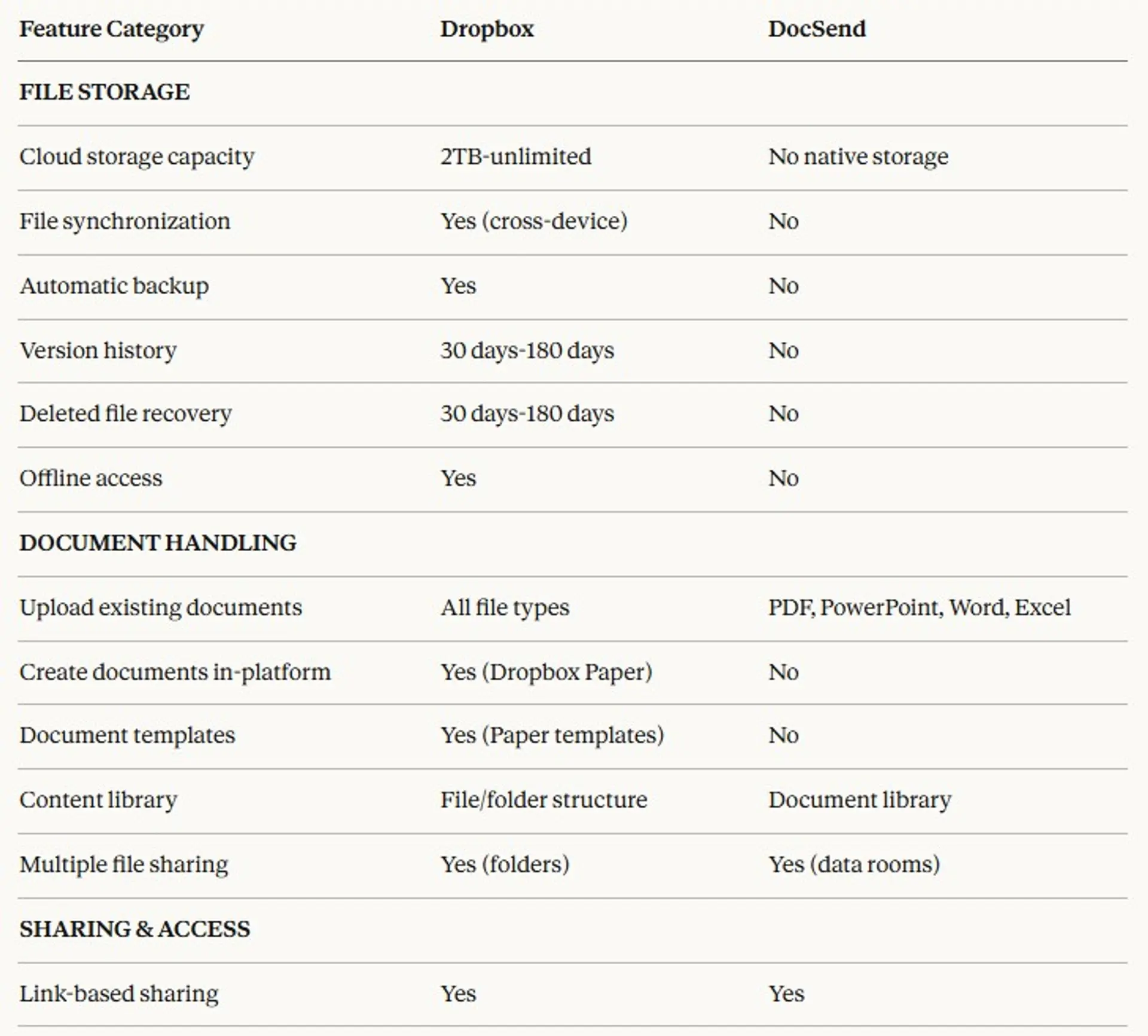


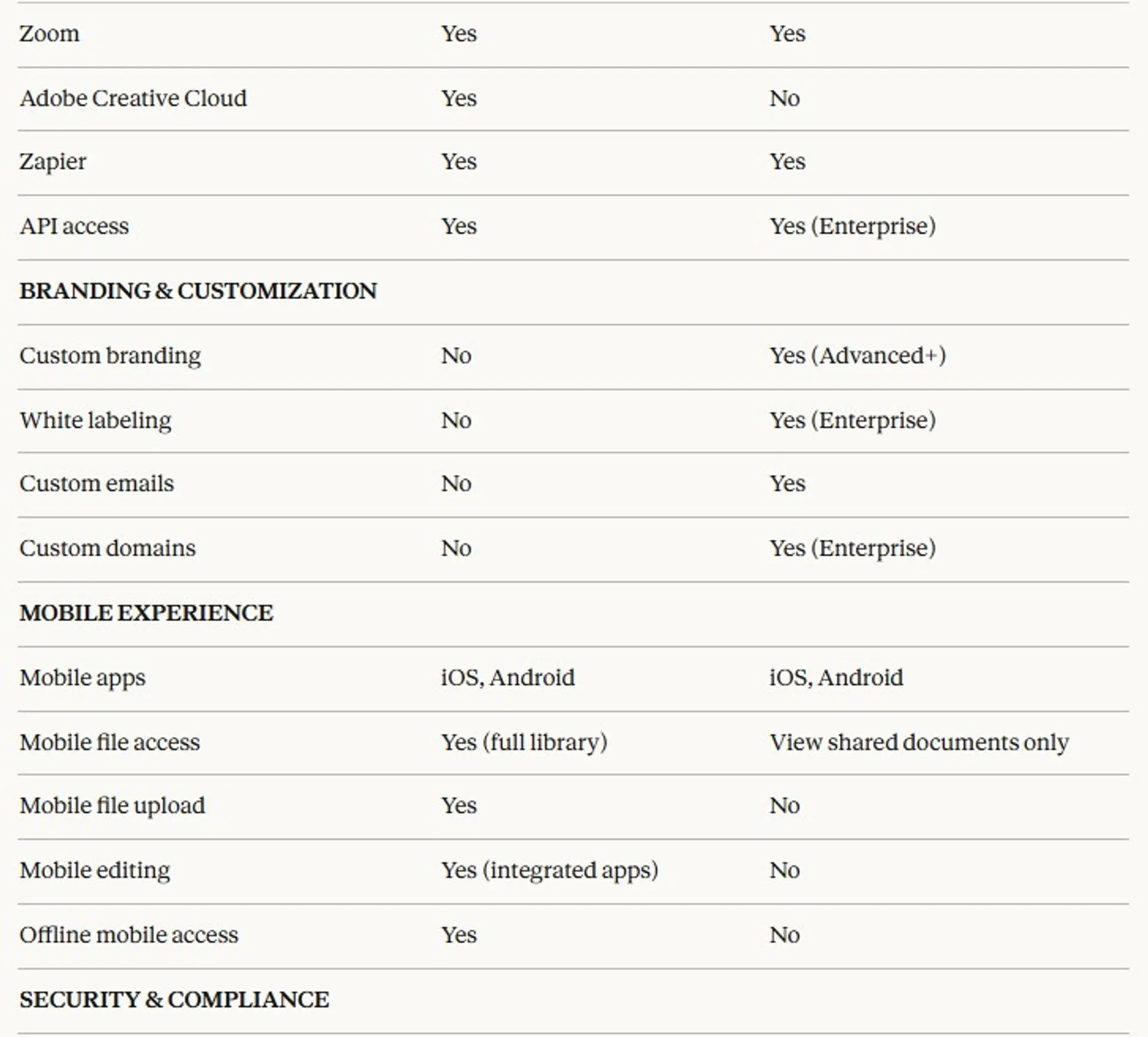


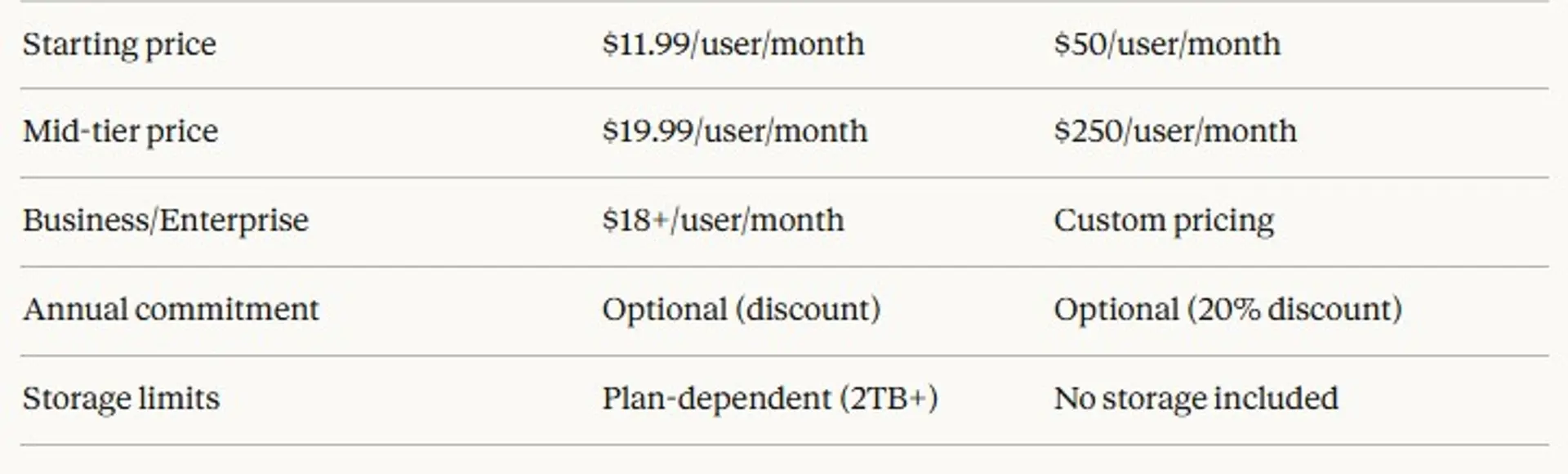
Feature comparison summary:
Where Dropbox wins:
- Actual file storage with terabytes of capacity
- File synchronization across all devices
- Real-time collaboration and editing
- Offline access to files
- Version history and deleted file recovery
- Broader integration ecosystem (thousands of apps)
- Works with all file types
- Mobile file management and upload
- Much lower starting price ($11.99 vs $50/month)
- Free tier with 2GB storage
- General-purpose file management
- Team collaboration features
Where DocSend wins:
- Detailed document analytics (page-by-page tracking)
- Engagement heatmaps showing reader behavior
- Email verification to identify viewers
- NDA gates before document access
- Granular download controls
- Dynamic watermarking
- Forwarding detection
- Engagement scoring
- Native CRM integrations for sales workflows
- Custom branding and white-labeling
- Specialized for tracking high-value documents
- Real-time detailed notifications
Where they're similar:
- Both offer link-based sharing
- Both provide password protection
- Both have mobile apps
- Both offer link expiration
- Both have enterprise security certifications
- Both provide team workspaces
- Both integrate with Slack and Zoom
- Both offer role-based permissions
- Both have comprehensive support documentation
When to choose Dropbox
Dropbox makes sense in these specific scenarios.
You need cloud storage for files
You want to back up files, access them from multiple devices, and not worry about hard drive failures. Dropbox provides 2TB+ storage with automatic syncing. Your files are available on desktop, mobile, and web wherever you are.
You're collaborating with your team on document creation
Your team needs to work together on documents, comment on files, assign tasks, and edit in real-time. Dropbox integrates with Google Workspace and Microsoft Office for seamless collaboration. Multiple people can work on the same file simultaneously.
You need a general-purpose file sharing solution
You share all types of files regularly: images, videos, design files, code, datasets, presentations, and more. Dropbox handles any file type and lets recipients download files easily without special requirements.
Budget is a primary constraint
You can't justify $50+/user/month for document tracking. Dropbox starts at $11.99/month and includes 2TB storage. For basic file sharing needs, it's significantly cheaper than specialized tracking tools.
You don't need detailed analytics
You just need to share files with clients, partners, or team members. Knowing whether someone downloaded the file is sufficient. You don't need to track time spent on each page or optimize based on engagement data.
You want offline access to files
You travel frequently or work in areas with unreliable internet. Dropbox syncs files to your device for offline access. You can work on documents without connectivity and they sync automatically when you're back online.
You need version history and file recovery
You want to revert to previous versions of files or recover accidentally deleted documents. Dropbox keeps version history (30-180 days depending on plan) and lets you restore deleted files.
You're already using Dropbox for storage
Your team already pays for Dropbox for file storage. Using it for basic file sharing makes sense rather than paying for an additional tool. Many teams use Dropbox for general sharing and DocSend only for critical documents requiring analytics.
When to choose DocSend
DocSend makes sense in these specific scenarios.
You're fundraising and need investor engagement insights
You're pitching investors and want to know which ones actually reviewed your deck, how long they spent on each slide, and which sections they focused on. DocSend's analytics help you follow up strategically and understand what resonates with potential investors.
You're tracking sales proposal engagement
Your sales team sends proposals and needs to know when prospects open them, which sections they review, and whether they share internally. This intelligence helps reps time follow-ups and understand buyer interest levels.
You need to identify document viewers
You want to know exactly who viewed your document, not just that someone with the link opened it. DocSend's email verification requires viewers to provide their email address before accessing content.
You're analyzing content effectiveness
You send similar documents repeatedly and want to understand which versions perform better. DocSend's analytics let you A/B test content, see where readers drop off, and refine documents based on engagement data.
Download control matters
You want to share a document for viewing but prevent downloads or printing. DocSend lets you disable downloads while still allowing viewing. Dropbox only offers basic view-only mode without detailed control.
You need NDA acceptance before viewing
You're sharing confidential information and require recipients to accept an NDA before accessing documents. DocSend includes customizable NDA gates. Dropbox doesn't support this workflow.
You need CRM integration
Your workflow depends on document engagement data flowing into Salesforce or HubSpot. DocSend's native integrations sync view data, engagement scores, and activity automatically into your CRM. Dropbox doesn't provide this sales-focused integration.
You're sharing high-stakes documents where intelligence matters
The documents you're sharing are critical to deals, fundraising, or partnerships. Understanding how recipients engage with them provides competitive advantage. The cost of DocSend ($50+/month) is justified by the value of the intelligence it provides.
You want custom branding on shared documents
You need to securely share documents to look professional with your logo and colors, not generic file-sharing interfaces. DocSend provides custom branding and white-labeling. Dropbox shares look like Dropbox.
When to use both Dropbox and DocSend
Many teams use both tools for different purposes. Here's when this makes sense.
Your workflow has distinct stages
You create and collaborate on documents in Dropbox with your team. When documents are finalized and ready to share externally, you upload them to DocSend for tracked sharing. Dropbox is your workspace, DocSend is your external sharing layer.
You need storage plus tracking for critical documents
You store hundreds or thousands of files in Dropbox, but only a few dozen require engagement tracking. Use Dropbox for general file management and DocSend specifically for pitch decks, proposals, and documents where analytics matter.
Different team members have different needs
Your operations team needs file storage and collaboration (Dropbox). Your sales team needs proposal tracking and CRM integration (DocSend). Both tools serve different departments with different requirements.
You're already paying for Dropbox
Your company already subscribes to Dropbox for file storage. Adding DocSend for specific use cases (sales, fundraising) doesn't replace Dropbox but supplements it with tracking capabilities for high-value documents.
Budget allows for specialized tools
You can afford both tools ($30-70/user/month combined) and recognize they solve different problems. The intelligence DocSend provides justifies the additional cost for documents where engagement data matters.
When to choose Ellty (a third option)


Neither Dropbox nor DocSend might be the right fit for document tracking. Ellty sits between them, offering core tracking features for pitch decks at a price point well below DocSend.
What Ellty offers:
Ellty provides:
- Secure document sharing with trackable links
- Engagement analytics (views, time spent, page tracking)
- Access controls (password protection, email verification, NDA gates)
- Virtual data rooms for organized multi-document sharing
- Real-time notifications when documents are viewed
- Simple, fast setup with minimal learning curve
- eSignatures built in — no need for a separate tool
Pricing: $24/month for Pro plan (up to 5 users), $50/month for Business (unlimited users)
What Ellty doesn't try to do:
- Not a file storage platform like Dropbox (no sync or backup)
- Not as detailed analytics as DocSend (no heatmaps or engagement scoring)
- Doesn't offer collaboration or editing features
- No terabytes of storage capacity
Scenarios where Ellty makes sense:
You need tracking without paying DocSend prices
You want to know who viewed your pitch deck and when, but can't justify $600+/year per user for DocSend. Ellty's $69/month flat rate provides essential tracking at 80-90% less cost.
You already use Dropbox for storage but need tracking
You're happy with Dropbox for file storage and collaboration but need analytics for specific documents. Ellty adds tracking without replacing your storage solution. Use Dropbox for file management, Ellty for tracked sharing.
You're a founder sharing pitch decks
You're fundraising and need to track investor engagement with your deck. Ellty is purpose-built for this use case. You'll see who viewed your deck, how long they spent, and which pages they reviewed - without DocSend's complexity or cost.
Budget matters and you don't need heatmaps
You need basic engagement data (views, time spent, page tracking) but don't need DocSend's heatmaps or engagement scoring. Ellty provides core analytics affordably for teams with budget constraints.
You need email verification and NDA gates
You want to know exactly who viewed your documents and require NDA acceptance. Ellty includes these access controls at every price tier without premium pricing.
Setup speed matters
You need to share a tracked document today. Ellty interface is simpler than DocSend and focused specifically on document tracking (unlike Dropbox's general file sharing). Upload, set access controls, share - done in 10-15 minutes.
You're running due diligence on a budget
You need to share multiple documents in an organized data room for investor review. Ellty document sharing feature handles this without DocSend's per-user costs or Dropbox's lack of analytics.
You're solo or a small team
You don't need complex workflows or enterprise features. Flat-rate pricing means you don't pay per user as your team grows. Better economics than DocSend for small teams.
You want real-time notifications
You need instant alerts when someone opens your pitch deck. Ellty sends notifications to Slack, email, or mobile immediately - helping you follow up while you're top of mind.
You don't need CRM integration or file storage
Your workflow doesn't depend on Salesforce integration and you already have file storage sorted (Dropbox, Google Drive, or other). You just need tracking for external document sharing with clients.
Comparison to both competitors:


When Ellty isn't the right choice:
Don't choose Ellty if you need:
- File storage and synchronization (choose Dropbox)
- Deep analytics with heatmaps and engagement scoring (choose DocSend)
- Real-time collaboration and editing (choose Dropbox)
- Native CRM integrations with Salesforce or HubSpot (choose DocSend)
- Enterprise security certifications like HIPAA (choose DocSend or Dropbox Business)
- Phone support or dedicated account managers (choose DocSend or Dropbox Business)
- To store and manage large file libraries (choose Dropbox)
Try Ellty if:
- You already have file storage but need tracking
- You're fundraising and need affordable pitch deck analytics
- You want essential tracking without DocSend's cost
- Budget is important but reliability matters
- You need data rooms for basic due diligence
- Real-time notifications and access controls are must-haves
- You need screenshot protection
Which one is right for you?
Your choice depends on what problem you're actually solving. Here's how to decide.
Start with your primary need:
"I need to store and sync files across devices" → Dropbox
- File backup and synchronization is essential
- You need offline access to files
- Team collaboration on document creation matters
- Version history and file recovery are important
- Worth paying $12-20/month for storage infrastructure
"I need deep insights into document engagement" → DocSend
- Understanding reader behavior drives strategy
- Sales or fundraising success depends on intelligence
- CRM integration is essential for workflow
- Heatmaps and engagement scoring provide value
- Worth paying $50+/month for analytics depth
"I need affordable tracking for pitch decks" → Ellty
- Focused specifically on fundraising documents
- Budget is constrained (under $500/year)
- Basic tracking (views, time, pages) is sufficient
- Don't need file storage or heatmaps
- Want simplicity and fast setup
Consider your budget:
Budget: Under $50/month total
- Dropbox Plus ($11.99/month) for storage
- Ellty free for 50 document tracking
- DocSend not accessible at this budget
- Choose based on whether you need storage or tracking
Budget: $50-200/month (small team)
- Dropbox Professional ($19.99/month) for storage
- DocSend ($50-100/month) for 1-2 users with analytics
- Ellty ($69/month) for affordable tracking
- Many teams use Dropbox + Ellty ($69/month combined)
Budget: $200-500/month (growing team)
- Dropbox Business ($18+/user × team size) for storage
- DocSend ($50/user × team size) for analytics
- Ellty remains $69-149/month for 3 users
- Calculate whether flat-rate or per-user pricing works better
Budget: $500+/month (established team)
- Both Dropbox and DocSend are affordable
- Use Dropbox for storage, DocSend for critical document tracking
- Many teams at this scale use both for different purposes
- Ellty becomes less relevant as budget isn't constraint
Consider your use case:
File storage and backup:
- Dropbox (dedicated storage with backup)
- DocSend: 50 GB per user storage included
- Ellty: 10 GB per user on the free plan, 50 GB per user on paid plans
Team collaboration on document creation:
- Dropbox with Google Workspace or Office integration
- DocSend doesn't support editing
- Ellty doesn't support editing
Fundraising (pitch deck tracking):
- Ellty is purpose-built and affordable
- DocSend if you need maximum intelligence
- Dropbox inadequate (no real analytics)
Sales proposals with CRM integration:
- DocSend for native Salesforce/HubSpot integration
- Dropbox has basic CRM connections but no engagement data
- Ellty lacks CRM integration
General file sharing:
- Dropbox for simplicity and broad file type support
- DocSend overkill for general sharing
- Ellty focused on tracked sharing, not general files
Due diligence and data rooms:
- DocSend or Ellty for organized document sharing with tracking
- Dropbox offers folders but no engagement analytics
- Ellty more affordable than DocSend for basic data rooms
Ask yourself:
About storage:
- Do I need to store files long-term? (Dropbox)
- Do I need file synchronization across devices? (Dropbox)
- Do I already have storage sorted? (Consider tracking tools)
About analytics:
- Do I need to know who viewed my documents? (DocSend or Ellty)
- Do I need page-by-page engagement data? (DocSend)
- Is basic tracking sufficient? (Ellty)
- Do I need to optimize content based on engagement? (DocSend)
About workflow:
- Am I sharing files for download? (Dropbox)
- Am I tracking document engagement? (DocSend or Ellty)
- Do I need CRM integration? (DocSend)
- Do I need NDA gates? (DocSend or Ellty)
About collaboration:
- Does my team need to edit documents together? (Dropbox)
- Am I sharing finalized documents externally? (DocSend or Ellty)
About budget:
- Can I justify $50+/month per user? (DocSend)
- Is cost my primary constraint? (Ellty)
- Do I need storage included in price? (Dropbox)
Quick decision tree:
Need file storage and synchronization? ├─ Yes → Dropbox └─ No ↓
Need to collaborate on document creation? ├─ Yes → Dropbox └─ No ↓
Need deep analytics with heatmaps? ├─ Yes → DocSend └─ No ↓
Need CRM integration? ├─ Yes → DocSend └─ No ↓
Sharing pitch decks primarily? ├─ Yes → Ellty or DocSend └─ No ↓
Budget over $250/month? ├─ Yes → DocSend (if analytics matter) or Dropbox (if storage matters) └─ No → Ellty for tracking, Dropbox for storage
Use both if:
- Budget allows ($30-70/user/month combined)
- You need storage AND tracking
- Different teams have different needs
- Some documents need analytics, others just need sharing
Can't decide? Try multiple:
All three tools offer trials:
- Test Dropbox for file management (free 2GB tier)
- Test DocSend's analytics depth (14-day trial)
- Test Ellty's simplicity (14-day trial)
Use your actual documents with real workflows. See which platform provides the value you actually need. Many teams end up using Dropbox for storage and either DocSend or Ellty for tracked sharing.
Conclusion
Dropbox and DocSend serve fundamentally different purposes. Dropbox stores, syncs, and shares files with collaboration features. DocSend tracks document engagement with detailed analytics. They're complementary tools, not competitors.
Most confusion comes from assuming you must choose one. In reality, many teams use both: Dropbox for file management and collaboration, DocSend (or Ellty) for tracking critical documents where engagement intelligence matters.
Ellty offers a third path for teams needing document tracking without DocSend's cost or Dropbox's lack of analytics. It provides essential tracking features at accessible pricing for startups and small teams.
Choose based on your specific situation:
- File storage, sync, and collaboration → Dropbox
- Deep engagement analytics for sales → DocSend
- Affordable pitch deck tracking → Ellty
- Both storage and tracking → Dropbox + (DocSend or Ellty)
Evaluate based on the actual problem you're solving. File storage and document tracking are different needs. The right tool (or tools) fits your workflow.
Try whichever tool matches your needs best:
Test with your real files and workflows to see what fits.
Frequently asked questions
Can I use Dropbox instead of DocSend?
Not for tracking engagement. Dropbox shares files and shows basic activity (link opened, file downloaded). DocSend provides page-by-page analytics, time spent, engagement scoring, and viewer identification. If you just need to share files, Dropbox works. If you need to understand engagement, DocSend provides data Dropbox doesn't.
Does DocSend include file storage?
No. DocSend is a tracking platform, not a storage platform. You upload documents to DocSend for sharing, but it's not designed to be your long-term file storage solution. Many teams store files in Dropbox and upload specific documents to DocSend when they need tracking.
Can I use both Dropbox and DocSend together?
Yes, and many teams do. Use Dropbox for file storage, synchronization, and team collaboration. When you have a finalized document that needs external sharing with tracking (pitch deck, proposal), upload it to DocSend. They solve different problems and work well together.
Which is cheaper for a team of 5?
Dropbox costs $60-100/month for 5 users ($11.99-19.99 per user). DocSend costs $250/month for 5 users ($50 per user). Ellty costs $69/month flat for 3 users. Dropbox is cheapest, but serves a different purpose. If you need tracking, Ellty is dramatically more affordable than DocSend.
Does Dropbox offer any engagement analytics?
Minimal. Dropbox shows whether someone opened a shared link and basic file activity. You won't see time spent, page-by-page tracking, engagement scores, or the detailed analytics DocSend provides. For basic "did they open it?" questions, Dropbox works. For detailed engagement intelligence, you need DocSend or Ellty.
Can DocSend replace Dropbox?
No. DocSend doesn't provide file storage, synchronization, backup, or collaboration features. It's specifically for tracking engagement on shared documents. If you currently use Dropbox, DocSend supplements it rather than replaces it.
Which tool is better for fundraising?
DocSend or Ellty, not Dropbox. When fundraising, you need to know which investors viewed your deck, how long they spent on it, and which sections they focused on. Dropbox can't provide this intelligence. DocSend offers the most detailed analytics. Ellty offers professional tracking at much lower cost.
Do I need DocSend if I have Dropbox?
Only if you need engagement tracking. Dropbox handles file storage and sharing well. Add DocSend (or Ellty) if you're sending documents where understanding engagement matters: sales proposals, pitch decks, marketing content. Many teams use both for different purposes.
What happens to my Dropbox files if I start using DocSend?
Nothing. They're separate platforms. Your Dropbox files stay in Dropbox. You'd upload specific documents to DocSend when you need tracking. Most teams keep files in Dropbox and only upload finalized, external-facing documents to DocSend.
Can I share Dropbox files through DocSend?
Not directly integrated, but you can download from Dropbox and upload to DocSend when you need tracking. Some teams do this for important documents: store and collaborate in Dropbox, then upload the final version to DocSend for external sharing with analytics.
Which tool has better security?
Both have strong security with encryption, SOC 2 certification, and GDPR compliance. DocSend offers email verification and NDA gates that Dropbox doesn't. Dropbox offers more granular file permissions and broader access controls. Choose based on your specific security requirements.
Is Ellty a good alternative to DocSend?
For basic tracking, yes. Ellty provides view tracking, time spent, page analytics, email verification, and NDA gates at much lower cost ($24-50/month vs $250/month for 5 users). You won't get DocSend's heatmaps or engagement scoring, but core tracking works well for most use cases.
Can Dropbox track document engagement like DocSend?
No. Dropbox shows basic activity (link opened, file downloaded) but doesn't provide time spent, page-by-page tracking, engagement analysis, or detailed viewer behavior. These analytics are DocSend's core value proposition.
Should I use Dropbox for pitch deck sharing?
Only if you don't need tracking. Dropbox shares files easily, but you won't know which investors actually reviewed your deck or how they engaged with it. For pitch decks, DocSend or Ellty provide the intelligence that helps you follow up strategically.
How much storage does DocSend include?
DocSend isn't a storage platform. You can upload unlimited documents for sharing and tracking, but it's not designed for long-term file storage like Dropbox. Think of it as a sharing and analytics layer, not a storage solution.
Author

Anika Tabassum Nionta is a Content Manager at Ellty, where she writes about secure document sharing, virtual data rooms, M&A, due diligence, fundraising, and sales enablement. With over 6 years of writing experience, she helps professionals understand how to share confidential documents securely, track engagement, and manage deals more effectively. Anika holds both a BA and MA in English from Dhaka University. Outside of work, she enjoys reading, exploring new cafes in Dhaka, and connecting with entrepreneurs and dealmakers in her community.

