
You're comparing Digify and DocSend because both let you share documents securely while tracking who views them. DocSend has been the industry standard since 2013, while Digify emerged as a competitor focused on data rooms and security features.
This comparison covers features, pricing, analytics capabilities, security, use cases, and when each tool makes sense. We'll also introduce Ellty as a third option that might fit if neither Digify nor DocSend matches your needs.
What this comparison covers:
- Side-by-side feature comparison
- Pricing breakdown across team sizes
- Analytics depth and tracking capabilities
- Security and compliance differences
- When to choose each tool
- Ellty as a simpler, more affordable alternative
Quick overview
DocSend

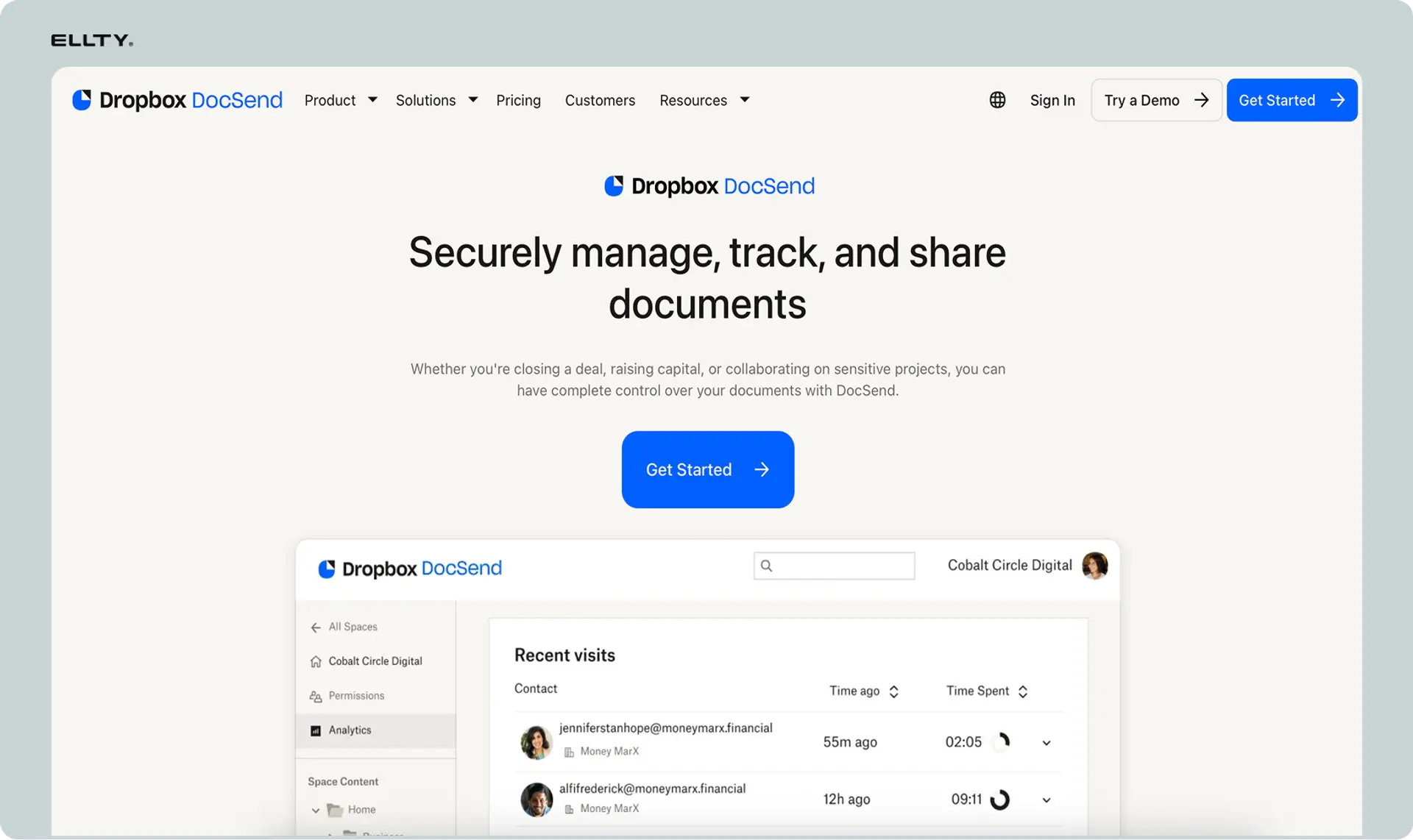
What it is: DocSend is a document tracking and analytics platform owned by Dropbox since 2021. It's been around since 2013 and became the standard for tracking pitch decks and sales documents.
- Founded 2013, acquired by Dropbox 2021
- Core focus: Document analytics for sales and fundraising
- Best for: Teams needing detailed engagement analytics
- Starting price: $50/user/month (Advanced plan)
- Key strength: Deep page-by-page analytics and investor tracking
Digify


What it is: Digify is a document security and data room platform founded in 2014, focused on secure file sharing with an emphasis on compliance and data room functionality.
- Founded 2014, independently owned
- Core focus: Secure data rooms and document protection
- Best for: Due diligence and secure document sharing
- Starting price: $99/month (Team plan, 3 users)
- Key strength: Advanced security features and virtual data rooms
Quick comparison table:


The key difference: DocSend excels at tracking engagement and analyzing document performance, while Digify excels at securing documents and managing structured data rooms for compliance-heavy processes.
Looking for document tracking software?

Both Digify and DocSend can feel overwhelming. One has extensive security features. The other has enterprise analytics.
Ellty keeps it simple. Track documents effectively. Control access easily. Get insights that matter.
Free tier with 50 documents. Professional features from $24/month.
Key differences between Digify and DocSend
Here are the most important distinctions that'll drive your decision.
Difference #1: Core purpose and design philosophy
DocSend: DocSend is built around understanding document engagement. The platform helps you see who viewed your content, how long they spent on each page, and whether they shared it. It's designed for sales teams and founders who need insights into how prospects interact with proposals and pitch decks.
Digify: Digify is built around protecting documents and managing structured data rooms. The platform emphasizes security controls, permission management, and organized file structures for due diligence. It's designed for M&A transactions, legal teams, and situations where document security outweighs analytics.
What this means for you: If your priority is understanding engagement to improve sales or fundraising, DocSend fits better. If your priority is securing sensitive documents and managing complex permission structures, Digify fits better.
Difference #2: Data room functionality
DocSend: DocSend offers basic data rooms where you can organize multiple documents in folders. The focus is still on tracking rather than complex organization. Data rooms are straightforward but not as feature-rich for managing large document collections.
Digify: Digify's entire platform is built around virtual data rooms. You get granular folder structures, document indexing, bulk upload capabilities, Q&A sections, and comprehensive permission controls at the folder and file level. It's designed for managing hundreds or thousands of documents in due diligence processes.
What this means for you: For simple data rooms with a few documents, both work. For complex due diligence with extensive document libraries, Digify's data room features are more robust. DocSend handles basic organization; Digify handles enterprise-grade document management.
Difference #3: Security and access controls
DocSend: DocSend provides password protection, email verification, NDA gates, download controls, link expiration, and dynamic watermarking. Security is solid but focuses on standard protections for sales and marketing documents.
Digify: Digify emphasizes security as its core differentiator. You get all of DocSend's features plus screen capture blocking, print blocking, remote file revocation, detailed audit trails, granular file-level permissions, time-limited access, and IP-based restrictions. Security controls are more granular and extensive.
What this means for you: DocSend's security works for most business use cases. Digify's advanced security matters when handling highly sensitive documents like financial records, legal files, or M&A documentation where preventing leaks is critical.
Difference #4: Analytics depth
DocSend: DocSend provides detailed page-by-page analytics, time spent per page, engagement heatmaps, visitor identification, forwarding detection, engagement scoring, and performance tracking over time. Analytics are comprehensive and actionable for understanding reader behavior.
Digify: Digify tracks document views, downloads, prints, time spent, visitor location, and provides audit trails for compliance. Analytics focus on access tracking and security monitoring rather than engagement optimization. You'll know who accessed what and when, but not detailed behavior patterns.
What this means for you: DocSend wins if you need to optimize content based on engagement data. Digify wins if you need compliance-focused audit trails showing exactly who accessed which files. Different priorities drive different analytics approaches.
Difference #5: Pricing structure
DocSend: DocSend charges per user starting at $50/month. Each team member who needs access to create or view analytics pays separately. Costs scale linearly with team size. No free tier exists.
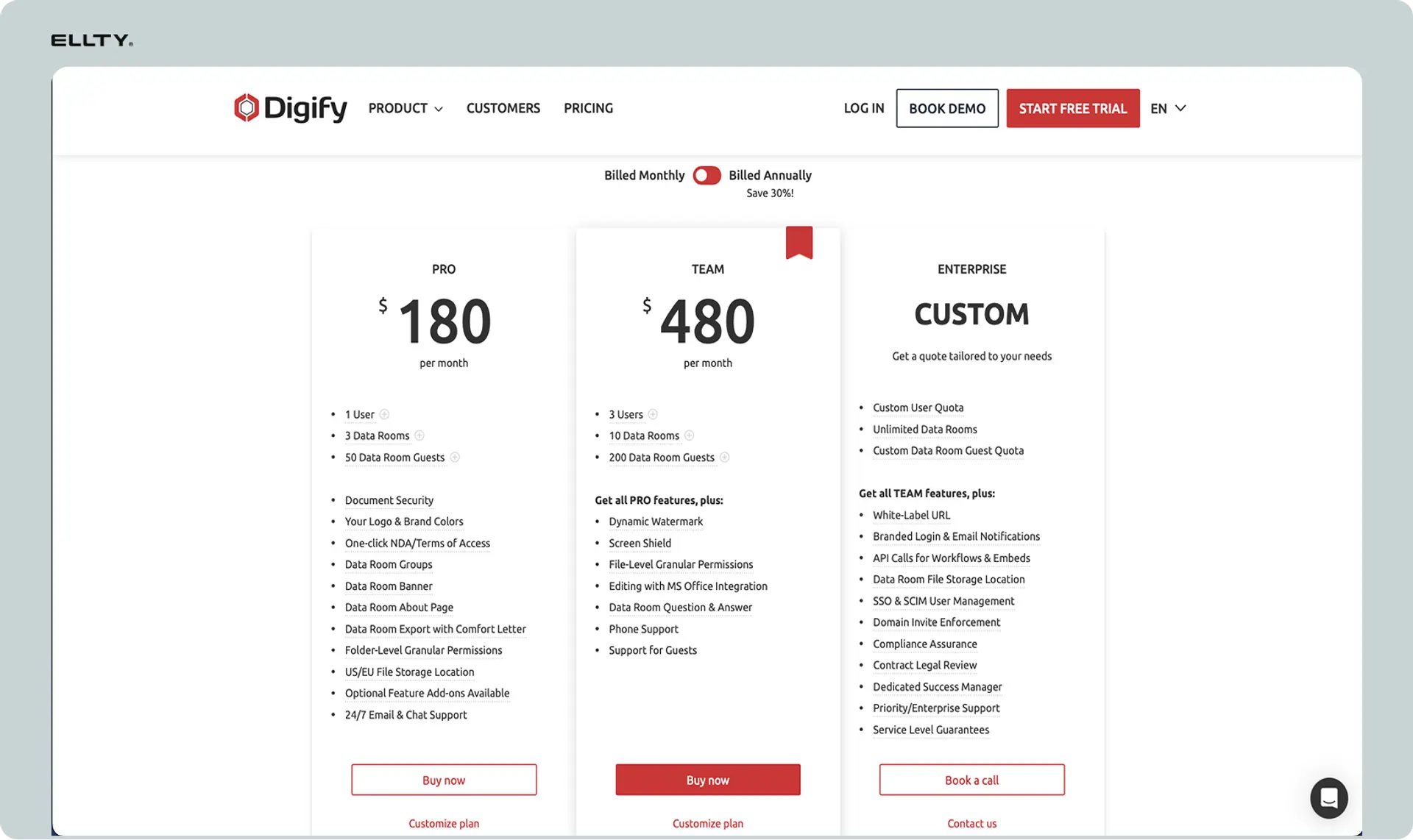
Digify: Digify offers tiered plans starting at $99/month for 3 users, then $179/month for 10 users, and custom pricing for enterprise. Pricing bundles users together rather than charging individually. Storage limits apply to lower tiers.
What this means for you: For solo users or very small teams, DocSend can be cheaper ($50 vs $99). For teams of 3-10 users, Digify can be cheaper ($99 vs $150-500). Calculate based on your actual team size. Both get expensive at scale.
Difference #6: Integration ecosystem
DocSend: DocSend integrates deeply with Salesforce, HubSpot, Gmail, Slack, Zoom, and major sales tools. These are native integrations built over years. Document engagement data syncs automatically into your CRM and triggers workflows.
Digify: Digify integrates with Google Drive, Dropbox, OneDrive, Box, and file storage systems. Focus is on pulling documents from storage into secure data rooms rather than CRM integration. Fewer native integrations overall.
What this means for you: DocSend fits sales-driven workflows where CRM integration matters. Digify fits document-centric workflows where you're pulling files from existing storage into secure environments. Different integration priorities serve different use cases.
Difference #7: Use case specialization
DocSend: DocSend is optimized for pitch decks, sales proposals, marketing one-pagers, and content where engagement tracking improves outcomes. The platform assumes you're trying to persuade someone and want to know how they're reacting.
Digify: Digify is optimized for M&A due diligence, legal document sharing, financial disclosures, and compliance-heavy processes. The platform assumes you're protecting sensitive information and need audit trails for regulatory purposes.
What this means for you: Your use case determines the right tool. Fundraising and sales lean toward DocSend. Legal transactions and compliance processes lean toward Digify. Some users need both for different purposes.
Summary of key differences:
In short:
- DocSend = Engagement analytics, sales focus, per-user pricing, CRM integration, content optimization
- Digify = Advanced security, data room focus, tiered pricing, compliance features, document protection
Your primary need (tracking vs securing) determines the right choice.
Detailed feature comparison
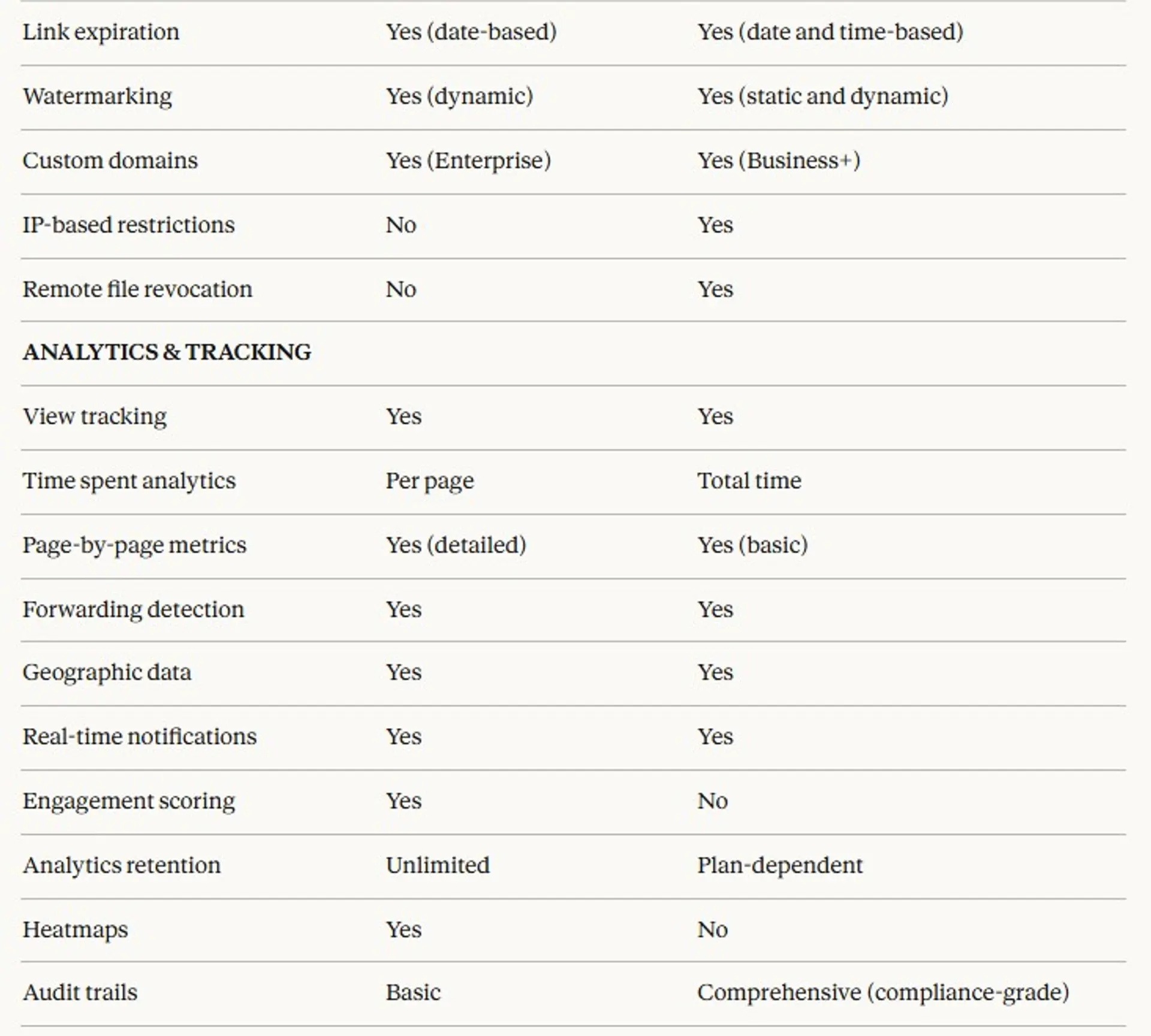
Here's how Digify and DocSend compare across every relevant feature category.




Pricing Comparison
Digify pricing starts higher:
- Basic: $16/user/month
- Standard: $32/user/month
- Premium: $48/user/month
- Enterprise: Custom
DocSend tiers differently:
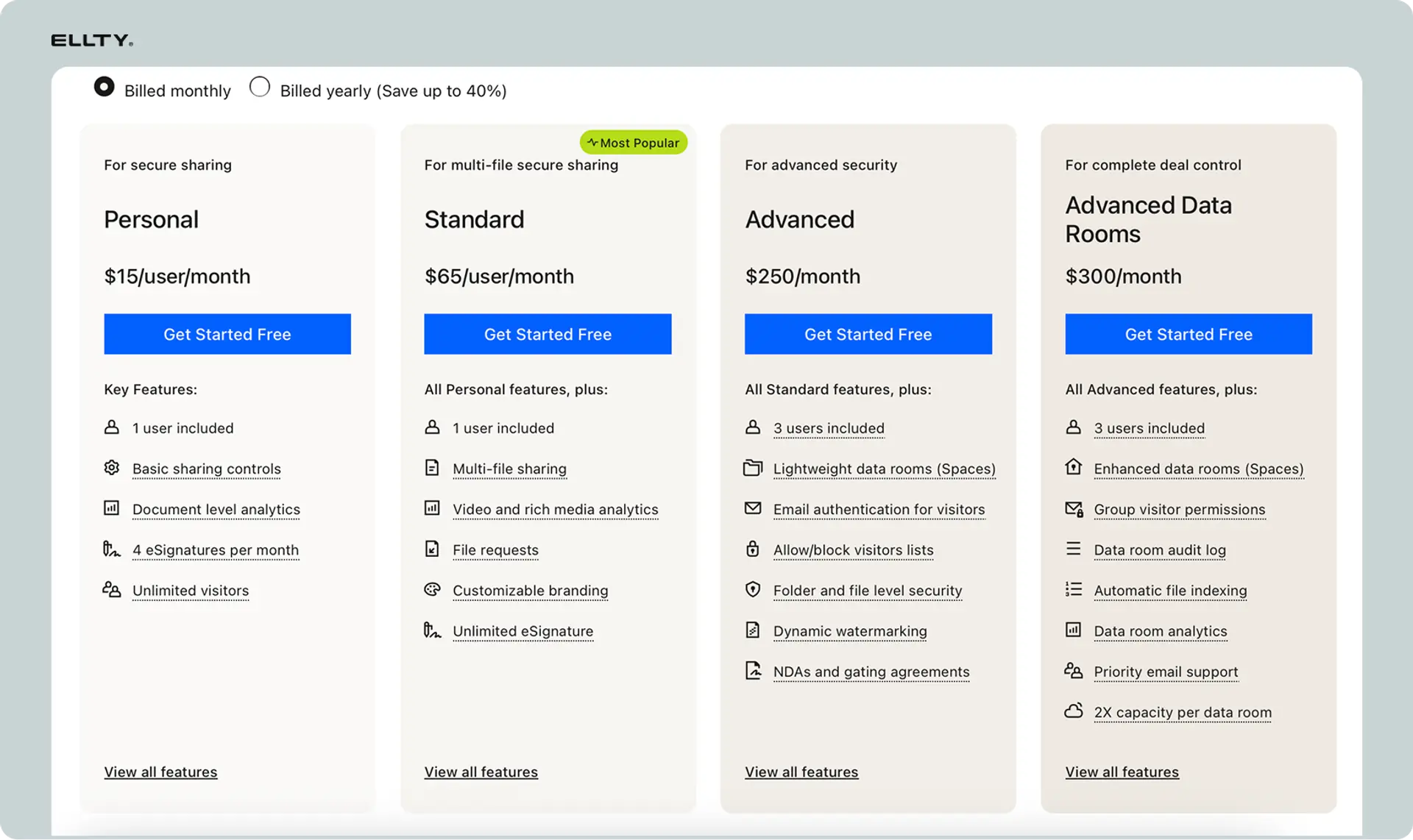
- Personal: $15/user/month
- Standard: $65/user/month
- Advanced: $250/month (3 users minimum)
Digify appears cheaper at mid-tier. But feature sets differ significantly.
Feature comparison summary:
Where DocSend wins:
- Much deeper engagement analytics with heatmaps and scoring
- Native CRM integrations (Salesforce, HubSpot, Dynamics)
- Better for understanding document performance
- Unlimited storage on all plans
- More refined for sales and fundraising workflows
- Longer track record with sales teams
- Better engagement insights for content optimization
- Simpler interface for basic tracking
Where Digify wins:
- Advanced security controls (screen/print blocking, remote revocation)
- More robust virtual data room functionality
- Granular permission controls at file and folder levels
- Compliance-grade audit trails for regulatory purposes
- ISO 27001 certification
- Q&A and commenting features for due diligence
- Approval workflows for document review
- Better bulk upload and document organization
- IP-based access restrictions
- More affordable for teams of 3-10 users
Where they're similar:
- Both handle secure document sharing with investors
- Both provide view tracking and notifications
- Both offer password protection and email verification
- Both include NDA gates and watermarking
- Both have mobile apps
- Both offer link expiration
- Both provide custom branding options
- Both have SOC 2 and GDPR compliance
- Both integrate with cloud storage
When to choose DocSend
DocSend makes sense in these specific scenarios.
You're fundraising and need investor engagement insights
Investors see dozens of pitch decks weekly. DocSend shows you which slides they spent time on, which they skipped, and whether they forwarded your deck. This intelligence helps you follow up strategically and understand what resonates. The heatmaps and engagement scoring are particularly valuable during active fundraising.
Your workflow depends on CRM integration
Your sales team lives in Salesforce or HubSpot and needs document engagement data flowing automatically into your CRM. DocSend's native integrations push view data, engagement scores, and activity directly into your sales system. This triggers automated workflows and helps reps prioritize hot leads without manual data entry.
You need to optimize content based on engagement data
You're A/B testing proposals, analyzing which sections lose reader attention, and refining your documents based on behavior patterns. DocSend's page-by-page analytics and heatmaps show exactly where readers engage or drop off. This feedback loop improves your content over time.
You're sharing sales proposals and marketing content
Your use case is persuasion-focused rather than compliance-focused. You're sending pitch decks, sales proposals, product one-pagers, and marketing materials where understanding engagement drives better outcomes. DocSend is optimized for this workflow.
You have a small team and prefer per-user pricing
You're a solo founder or 2-person team. DocSend costs $50-100/month total. Digify costs $99/month minimum for 3 users. For very small teams, DocSend's per-user pricing can be cheaper.
You need unlimited storage
You share large video files, extensive presentations, or high-resolution documents regularly. DocSend includes unlimited storage on all plans. Digify has storage limits (5GB-1TB depending on plan) that might constrain you.
You value proven sales team workflows
DocSend has been refined for sales teams over 10+ years. The interface, features, and integrations are polished for proposal tracking and deal acceleration. If you're following standard sales processes, DocSend fits naturally.
When to choose Digify
Digify makes sense in these specific scenarios.
You're managing M&A due diligence
You're running a transaction with hundreds or thousands of documents that multiple parties need access to. Digify's data room structure, granular permissions, Q&A sections, and audit trails are built for this process. The platform handles complex document hierarchies and access controls that due diligence requires.
Advanced security controls are mandatory
You're sharing highly sensitive documents where preventing screenshots, prints, and unauthorized access is critical. Digify's screen capture blocking, print blocking, remote file revocation, and IP restrictions provide layers of protection beyond standard tools.
You need compliance-grade audit trails
Your industry requires documented proof of who accessed which files when. Digify's comprehensive audit trails meet regulatory requirements for financial services, legal, healthcare, and other compliance-heavy industries. The tracking focuses on security and access rather than engagement.
You're organizing large document libraries
You have extensive document collections that need structured organization with folder hierarchies, bulk uploads, and systematic indexing. Digify's data room features handle hundreds of files better than DocSend's simpler folder structure.
You have a team of 3-10 users
Digify's tiered pricing bundles users together. For 3 users, you pay $99/month (vs $150/month for DocSend). For 10 users, you pay $179/month (vs $500/month for DocSend). The math favors Digify at these team sizes.
You need Q&A functionality for document review
Your process involves stakeholders asking questions about specific documents and getting answers tracked systematically. Digify's Q&A sections support structured communication within the data room. DocSend doesn't offer this.
You're pulling documents from cloud storage
Your files already live in Google Drive, Dropbox, OneDrive, or Box. Digify's native storage integrations let you pull documents into secure data rooms without re-uploading. DocSend integrates with storage but focuses less on this workflow.
Legal or financial document sharing is your primary use case
You're sharing contracts, financial statements, legal filings, or other documents where protection matters more than engagement tracking. Digify's security-first approach fits legal and financial workflows better than DocSend's analytics-first approach.
You need approval workflows
Documents require review and approval before sharing. Digify supports structured approval processes. DocSend doesn't include workflow management features.
When to choose Ellty (a third option)

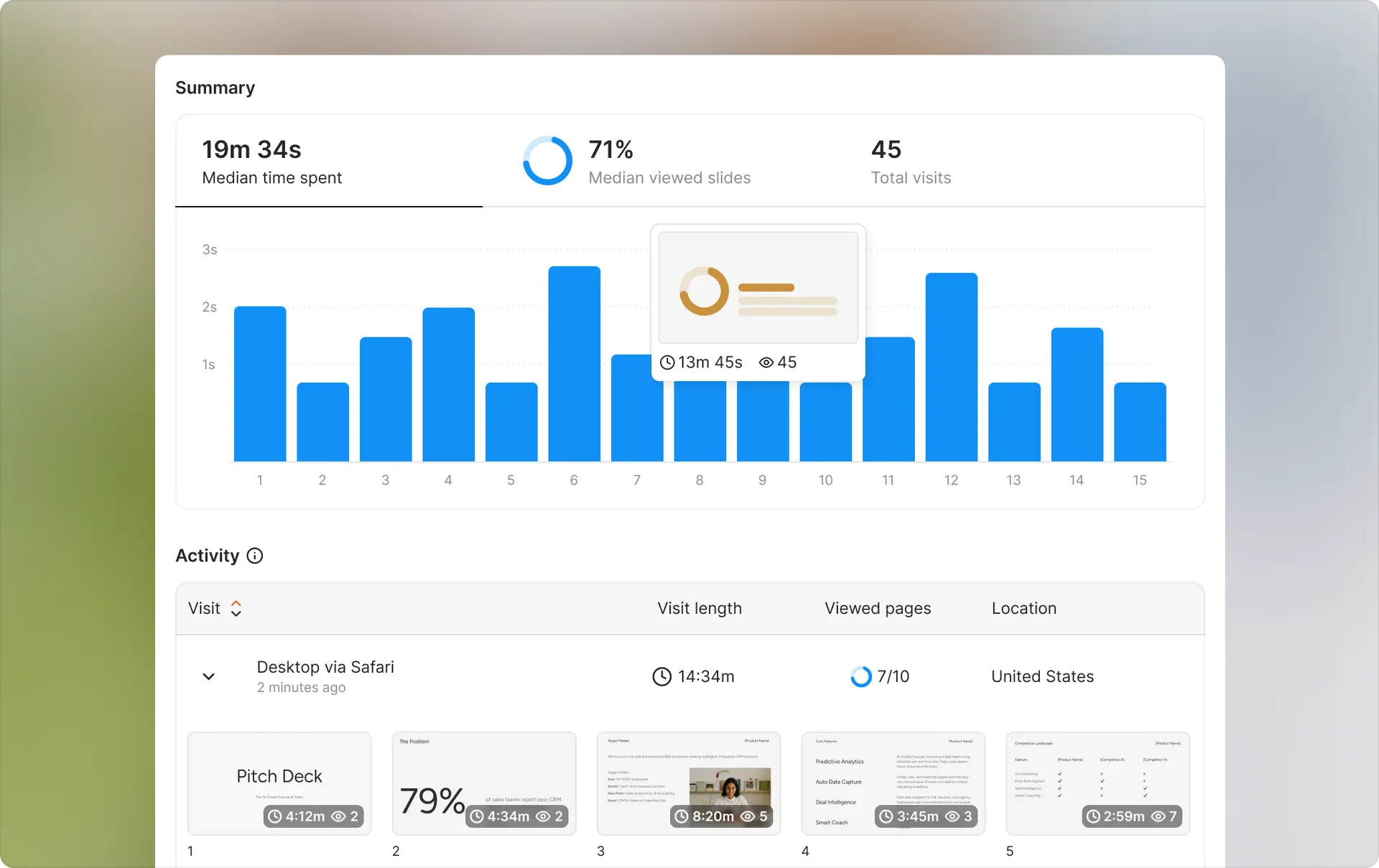
Neither DocSend nor Digify might be the right fit. Ellty sits between them, offering core tracking features for pitch decks at a price point well below both competitors.
What Ellty offers:
Ellty provides:
- Secure document sharing with trackable links
- Engagement analytics (views, time spent, page tracking)
- Access controls (password protection, email verification, NDA gates)
- Virtual data rooms for organized multi-document sharing and investor due diligence
- Real-time notifications when documents are viewed
- Simple, fast setup with minimal learning curve
- eSignatures built in — no need for a separate tool
Pricing: $69/month for Data Room plan (up to 3 users)
What Ellty doesn't try to do:
- Not as detailed analytics as DocSend (no heatmaps or engagement scoring)
- Doesn't offer CRM integrations or extensive third-party connections
- No Q&A sections or approval workflows
- Limited enterprise features compared to either competitor
Scenarios where Ellty makes sense:
You're a founder sharing pitch decks affordably
You need to track which investors viewed your deck and get notified when they open it. Ellty free plan focus gives you relevant analytics without paying $50-99/month. You'll see view counts, time spent, and page tracking - enough to understand engagement without heatmaps.
Budget is a primary constraint
You can't justify $600+/year for DocSend or $1,188/year for Digify. Ellty's $69/month range ($468/year) provides professional tracking at a fraction of competitor prices. For bootstrapped startups, this difference matters significantly.
You need something simpler than both competitors
DocSend feels complex with features you won't use. Digify is built for enterprise security you don't need. Ellty provides straightforward document sharing and essential tracking without overwhelming options.
You're running due diligence on a budget
You need to share multiple documents in an organized data room for investor review. Ellty data room feature handles this cleanly without Digify's enterprise pricing. Works well for seed-stage due diligence where simplicity matters.
You want email verification and access controls
You need to know who's viewing your documents (not anonymous visitors) and require NDA acceptance before viewing. Ellty includes these controls at every price tier without premium pricing.
Setup speed matters more than feature depth
You need to share a tracked document today, not after configuring complex settings. Ellty interface is simpler than DocSend and less technical than Digify. Upload, set basic access controls, share, done.
You're solo or a small team under 10 people
You don't need complex permission structures or enterprise workflows. Flat-rate pricing means you don't pay per user as your team grows from 2 to 5 to 10 people.
Real-time notifications drive your workflow
You want instant alerts when someone opens your pitch deck so you can follow up while you're top of mind. Ellty sends notifications to Slack, email, or mobile immediately.
You're sharing with investors who expect professional presentation
Your links need to look professional with custom branding, not generic file-sharing. Ellty provides clean, branded document viewing without enterprise pricing tiers.
You don't need CRM integration or advanced security
Your workflow doesn't depend on Salesforce integration or screen capture blocking. You're comfortable checking analytics in Ellty dashboard and using standard security controls like passwords and NDAs.
Comparison to both competitors:


When Ellty isn't the right choice:
Don't choose Ellty if you need:
- Deep analytics with heatmaps and engagement scoring (choose DocSend)
- Native CRM integrations with Salesforce or HubSpot (choose DocSend)
- Q&A sections and approval workflows (choose Digify)
- Enterprise compliance certifications like HIPAA (choose DocSend or Digify)
- Phone support or dedicated account managers (choose DocSend or Digify)
Try Ellty if:
- You're fundraising and need affordable pitch deck tracking
- You want essential features without complexity
- Budget is important but reliability matters
- You need data rooms for basic due diligence
- Real-time notifications and access controls are must-haves
- You value setup speed and simplicity
Which one is right for you?
Your choice depends on primary use case, budget, and feature priorities. Here's how to decide.
Start with your primary need:
"I need deep document engagement insights for sales" → DocSend
- Page-by-page heatmaps drive your strategy
- Understanding investor or customer behavior is critical
- CRM integration is essential for your workflow
- You analyze document performance to improve conversion
- Worth paying premium for analytics depth
"I need advanced security for sensitive documents" → Digify
- Protecting confidential information is paramount
- You're managing M&A due diligence or legal processes
- Compliance-grade audit trails are required
- Screen blocking and remote revocation matter
- Security controls justify higher cost
"I need essential pitch deck tracking affordably" → Ellty
- Focused specifically on fundraising and pitch decks
- Budget is constrained (under $500/year)
- Basic tracking (views, time, pages) is sufficient
- Want simplicity and fast setup
- Don't need enterprise features of either competitor
Consider your budget:
Budget: Under $100/month
- Ellty ($69/month flat) only option in this range for 3 users
- DocSend minimum $50/month for one user
- Digify minimum $99/month for three users
- Ellty makes sense for very budget-conscious teams
Budget: $100-300/month (small team)
- DocSend ($50-150/month) for 1-3 users if analytics matter
- Digify ($99/month) for 3 users if security matters
- Ellty ($69/3 users/month) remains much cheaper
- Calculate based on whether premium features justify 2-6x cost
Budget: $300-1000/month (growing team)
- DocSend ($150-500/month) for 3-10 users with sales focus
- Digify ($99-179/month) for 3-10 users with security focus
- Digify becomes more affordable than DocSend at 5+ users
- Ellty still $69/month
Budget: $1000+/month (enterprise)
- DocSend or Digify with enterprise features
- Both offer custom pricing at this level
- Choose based on analytics vs security priority
Consider your team size:
Solo or 2-3 people:
- DocSend costs $50-150/month
- Digify costs $99/month minimum
- Ellty costs $69/month regardless
- DocSend cheapest for solo, Ellty cheapest for 2-3 people
4-10 people:
- DocSend costs $200-500/month
- Digify costs $99-179/month
- Ellty costs $138/month
- Digify cheaper than DocSend, Ellty cheapest overall
11-25 people:
- DocSend costs $550-1250/month
- Digify requires custom pricing
- Flat-rate pricing becomes extremely attractive
25+ people:
- Both DocSend and Digify require enterprise pricing
- Ellty remains flat-rate
- Evaluate support and compliance needs at this scale
Consider your use case:
Fundraising (pitch decks to investors):
- Ellty is purpose-built and affordable for this
- DocSend if you need maximum engagement intelligence
- Digify overkill unless also running formal due diligence
Sales proposals and content:
- DocSend excels with CRM integration and analytics
- Digify less relevant for standard sales workflows
- Ellty works for simple proposal tracking
M&A due diligence:
- Digify built specifically for this process
- DocSend has basic data rooms but lacks Digify's depth
- Ellty insufficient for complex transactions
Legal document sharing:
- Digify with advanced security and compliance features
- DocSend works but security controls less comprehensive
- Ellty insufficient for sensitive legal matters
Financial disclosures:
- Digify for compliance-grade security and audit trails
- DocSend adequate for standard financial documents
- Ellty not suitable for regulated financial sharing
General business document sharing:
- DocSend for tracking engagement
- Digify if security is primary concern
- Ellty for cost-effective basic tracking
Ask yourself:
About features:
- Do I need heatmaps and engagement scoring? (DocSend)
- Do I need screen blocking and advanced security? (Digify)
- Is basic view tracking sufficient? (Ellty)
- Do I need CRM integration? (DocSend)
- Do I need Q&A and approval workflows? (Digify)
About workflow:
- Am I optimizing sales content? (DocSend)
- Am I protecting sensitive documents? (Digify)
- Am I sharing pitch decks simply? (Ellty)
- Do I need compliance documentation? (Digify)
About budget:
- Can I justify $600+/year per user? (DocSend)
- Can I justify $1,188+/year for security features? (Digify)
- Is cost my primary constraint? (Ellty)
- Does team size make per-user pricing impractical? (Consider Ellty)
About support:
- Do I need phone support? (DocSend or Digify at higher tiers)
- Is email support sufficient? (All three)
- Do I need dedicated account managers? (DocSend or Digify enterprise)
Quick decision tree:
Handling M&A or legal due diligence? ├─ Yes → Digify └─ No ↓
Need CRM integration (Salesforce/HubSpot)? ├─ Yes → DocSend └─ No ↓
Need advanced security (screen blocking, ISO 27001)? ├─ Yes → Digify └─ No ↓
Sharing pitch decks primarily? ├─ Yes → Ellty or DocSend └─ No ↓
Budget over $500/month? ├─ Yes → DocSend or Digify (based on analytics vs security need) └─ No → Ellty
Choose based on:
- Primary use case (sales vs security vs fundraising)
- Analytics depth vs security controls priority
- Team size and pricing model
- Integration requirements
- Budget constraints
Can't decide? Try multiple:
All three tools offer trials:
- Test DocSend's analytics depth (14-day trial)
- Test Digify's security controls (7-day trial)
- Test Ellty's simplicity (14-day trial)
Use your actual documents with real workflows. Share with colleagues or test contacts. See which platform feels natural and provides the value you actually need.
Conclusion
DocSend and Digify serve different needs with different strengths. DocSend excels at engagement analytics for sales and fundraising with deep CRM integration. Digify excels at document security and data room management for compliance-heavy processes.
Both are solid platforms. DocSend fits when understanding document engagement drives better outcomes. Digify fits when protecting sensitive information and maintaining audit trails are paramount.
Ellty offers a third path for teams focused on pitch deck sharing without enterprise complexity or cost. It provides essential tracking and data rooms at prices accessible to early-stage startups.
Choose based on your specific situation:
- Deep engagement analytics and CRM integration → DocSend
- Advanced security and M&A data rooms → Digify
- Pitch deck tracking with simplicity → Ellty
Evaluate based on actual use case, budget constraints, and which features drive real value for your workflow. The right tool fits your needs, not the one with most features or biggest brand name.
Try whichever tool matches your needs best:
Test with your real documents and workflows to see what fits.
Frequently asked questions
Is Digify really better than DocSend for security?
Yes, for advanced security needs. Digify offers screen capture blocking, print blocking, remote file revocation, and ISO 27001 certification that DocSend doesn't provide. For standard business security, both are adequate. For highly sensitive documents where preventing leaks is critical, Digify's additional controls matter.
Does DocSend integrate with my CRM?
Likely yes. DocSend has native integrations with Salesforce, HubSpot, Microsoft Dynamics, and Pipedrive. Document engagement data syncs automatically. Digify doesn't offer CRM integrations - it focuses on cloud storage connections instead. If CRM integration is essential, DocSend wins clearly.
Which tool is better for M&A due diligence?
Digify is specifically built for this. The platform offers enterprise-grade data rooms, granular permissions, Q&A sections, comprehensive audit trails, and security controls that M&A processes require. DocSend has basic data rooms but lacks the depth Digify provides for complex transactions.
How much does each tool cost for a team of 5?
DocSend costs $250/month ($50/user × 5). Digify costs $99/month (includes up to 3 users, then $179/month for up to 10 users). Ellty costs $69/month flat. The price difference is significant - Digify is cheapest at this team size, Ellty is dramatically cheaper than both.
Can I try both before deciding?
Yes. DocSend offers 14-day trial, Digify offers 7-day trial, Ellty offers 14-day trial. Test with your actual documents and workflows. Most people know within days which interface feels natural and which features actually matter for their use case.
Does Digify have mobile apps?
Yes. Digify offers iOS and Android apps for viewing documents and checking analytics on mobile. DocSend also has mobile apps. Ellty is web-responsive but doesn't have dedicated native mobile apps.
Which tool has better analytics?
DocSend by far. DocSend provides page-by-page heatmaps, engagement scoring, detailed behavior analysis, and performance tracking designed for optimizing content. Digify's analytics focus on access tracking and compliance audit trails. Different priorities for different use cases.
Can I white-label documents?
Both DocSend and Digify offer white-labeling but at different price points. DocSend requires Enterprise plan. Digify offers white-labeling on Business plan ($179+/month). Ellty includes custom branding at $69/month but full white-labeling at Business tier ($50/month). Accessibility varies by budget.
Do either tools offer e-signature?
No. Neither DocSend nor Digify includes e-signature features. They're document tracking and security platforms, not signature platforms. Use DocuSign, PandaDoc, or HelloSign if signatures are required. You can track signature documents through either platform, but signing happens elsewhere.
Which analytics matter most?
Most founders care about: who viewed the document, when they viewed it, how long they spent, and whether they returned. Both tools provide this. DocSend's additional heatmaps help optimize content over time. Digify's audit trails satisfy compliance requirements. Choose based on your priority.
What happens to my documents if I stop paying?
Both platforms restrict access when subscription ends. Export your data and download documents before canceling. Neither offers offline access after subscription lapses. Plan ahead if switching platforms or reducing costs.
Does Digify block screenshots on all devices?
Digify blocks screen capture on desktop and most mobile devices, but no system is 100% foolproof. Someone could photograph a screen with another device. The blocking significantly reduces casual screenshot risk but doesn't eliminate determined leaks. Understand limitations.
Can I use Digify for regular sales proposals?
Yes, but it's overkill. Digify's security features and data room structure are designed for sensitive documents and complex processes. For standard sales proposals, DocSend or Ellty fit better. Save Digify's advanced features for situations that actually need them.
Which tool is easier to set up?
Ellty is fastest (10-15 minutes to first share). DocSend and Digify both take 1-2 hours to configure properly, understand features, and set up integrations or permissions. If you need to share a tracked document today, Ellty's simplicity wins.
How do storage limits work on Digify?
Digify has plan-based storage limits ranging from 5GB to 1TB depending on tier. Large video files or extensive document libraries might hit limits. DocSend offers unlimited storage on all plans. Consider your typical file sizes when choosing.
Author

Anika Tabassum Nionta is a Content Manager at Ellty, where she writes about secure document sharing, virtual data rooms, M&A, due diligence, fundraising, and sales enablement. With over 6 years of writing experience, she helps professionals understand how to share confidential documents securely, track engagement, and manage deals more effectively. Anika holds both a BA and MA in English from Dhaka University. Outside of work, she enjoys reading, exploring new cafes in Dhaka, and connecting with entrepreneurs and dealmakers in her community.

