
Need a secure data room without the enterprise price tag?
You're evaluating data rooms. Probably for a fundraising round, an M&A deal, or some form of due diligence. And you've landed on Datasite - one of the most recognized names in the space.
Here's the problem: Datasite is built for nine-figure transactions. No public pricing. No free trial. Custom quotes that routinely land between $40,000 and $100,000+ per project. For most startups and smaller teams, that doesn't fit the use case - or the budget.
This guide breaks down exactly what Datasite's data room does, how its pricing actually works, where it falls short, and what alternatives exist. Ellty is one option we cover - a flat-rate data room platform built for startups, with plans starting at $0. But this isn't a sales pitch. It's a comparison.
What is Datasite data room?

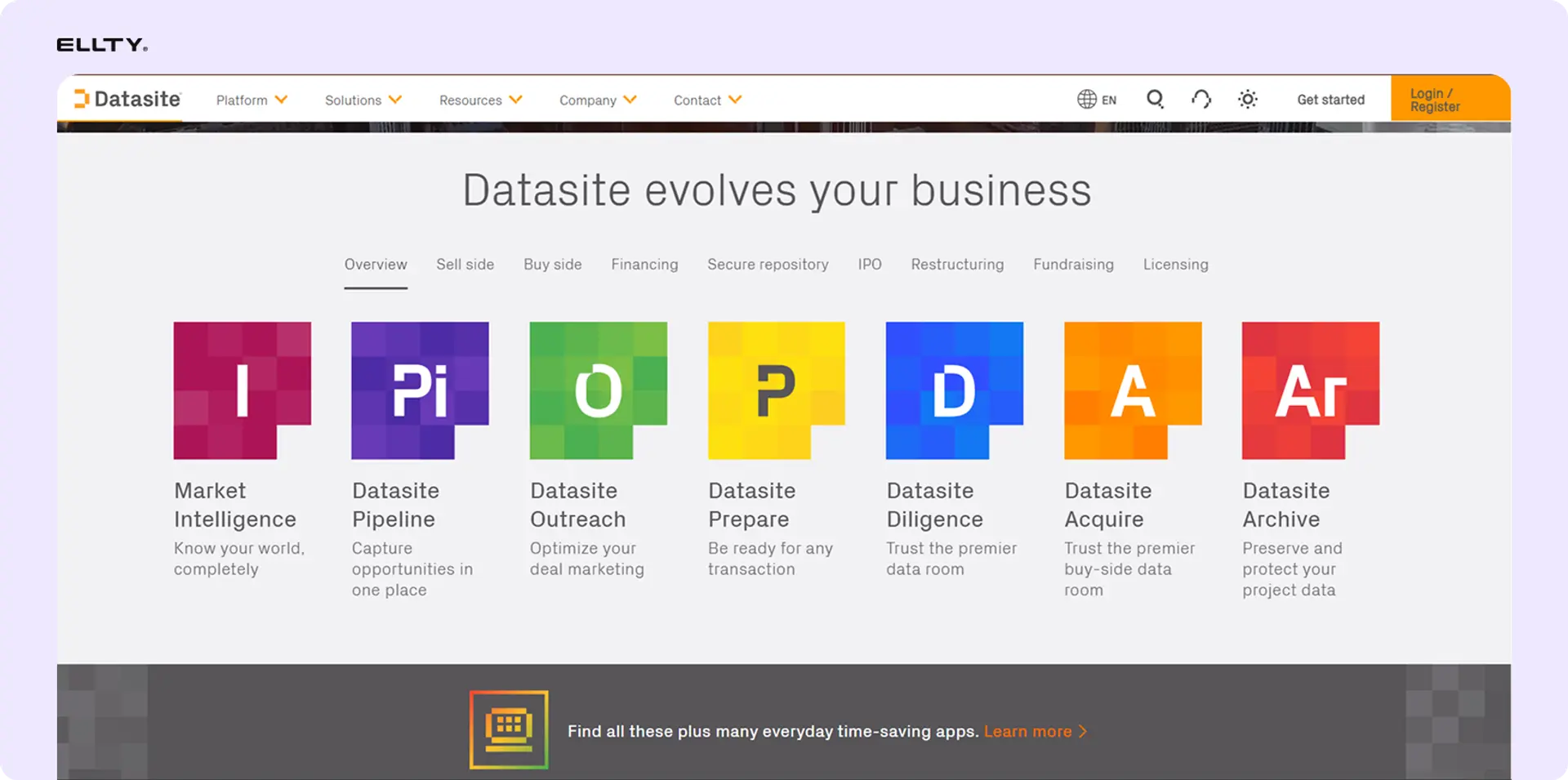
Data rooms explained
A virtual data room (VDR) is a secure online space for sharing sensitive documents with a defined group of people. Think of it as a locked digital folder with detailed controls over who sees what, a full log of every action taken, and analytics showing exactly how engaged each person is.
Data rooms are used when confidentiality matters and document access needs to be controlled and tracked. They replaced physical data rooms - literal rooms full of printed documents that M&A lawyers used to review before the internet existed.
Key things a data room does:
- Stores documents in an organized, folder-based structure
- Controls who can view, download, or print specific files
- Logs every user action in an audit trail
- Shows analytics on document engagement
- Enables secure Q&A between parties
- Restricts access when the deal closes
Datasite's data room feature
Datasite (formerly Merrill DataSite, rebranded in 2020) is one of the oldest and most established VDR providers. The company has roots going back to 1999, when Merrill Corporation built one of the first digital data rooms for M&A transactions.
Today, Datasite Diligence is the flagship product. It's a dedicated VDR platform - not a file storage tool with data room features bolted on. The entire product is built around secure deal management: M&A due diligence, divestitures, IPOs, restructurings, capital raises, and bankruptcy proceedings.
Datasite is used by:
- Investment banks running sell-side M&A processes
- Private equity firms managing portfolio transactions
- Corporate development teams at large enterprises
- Law firms conducting due diligence on behalf of clients
- Large companies managing compliance documentation
It is not designed for startups, small businesses, or teams looking for lightweight document sharing with tracking. Those users tend to find the platform overkill - and the pricing prohibitive.
Datasite data room vs regular file sharing
Datasite isn't a general-purpose file sharing tool. It's purpose-built for deal management. Here's how its VDR compares to standard document sharing approaches like Google Drive or Dropbox.

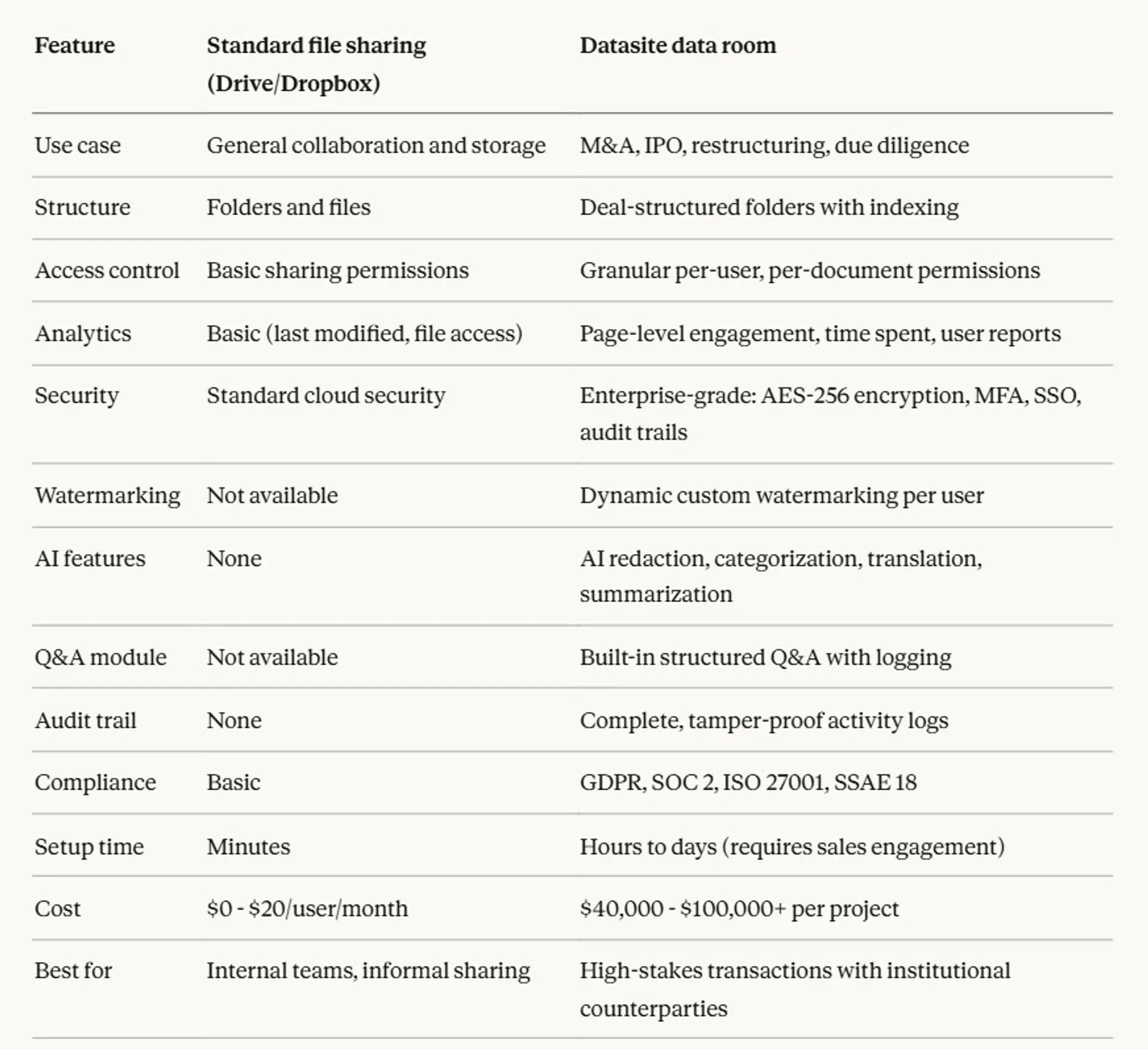
When to use standard file sharing: internal collaboration, sharing documents with your own team, sending materials to a small group where formal tracking isn't needed.
When to use Datasite data room: formal financial transactions, deals with institutional buyers, processes requiring defensible audit trails, multi-party M&A due diligence.
The key difference: standard file sharing is storage. A data room is a controlled transaction environment. Datasite is one of the most sophisticated versions of the latter.
Setting up a Datasite data room
How the process works
You don't sign up and log in to Datasite the way you would with a SaaS product. Setup requires contacting sales, negotiating a quote, and signing a contract. Here's the realistic sequence:
Step 1: Contact sales and scope your project (1-5 business days) Reach out via Datasite's website. A sales rep will contact you to discuss project scope - estimated page count, number of users, expected duration, file types, and required features. This conversation produces your custom quote.
Step 2: Negotiate and sign the contract (2-7 business days) Review the quote. This is your best opportunity to negotiate - push for hard caps on extension fees, clarify per-page rates for different file types, and define what's included in the base price. Once you sign, a project manager is assigned.
Step 3: Platform setup (minutes to a few hours) Datasite's project manager helps configure your environment. The platform itself is fast to stand up technically. You'll set up the folder structure, configure access groups, and establish user permission levels.
Step 4: Document upload and organization (hours to days, depending on volume) Upload your documents. Datasite's AI assists with automatic categorization and indexing - this is one of its genuine strengths. For large data rooms with thousands of documents, the AI saves significant time.
Step 5: Permission configuration (1-3 hours) Assign access levels per user or user group. This is granular - you can control view, download, print, and share permissions at the individual document level.
Step 6: Test with sandbox (1-2 hours) Use Datasite's sandbox feature to test the data room before going live. The "View As" feature lets you see the data room from any user's perspective to verify permissions are correct.
Step 7: Invite users and go live (minutes) Send invitations. Users receive access credentials and can enter the data room.
Total setup time: For a typical mid-market M&A data room, expect 1-3 days from contract signature to live data room, assuming your documents are organized. For large or complex projects, a week is realistic.
Ongoing maintenance: Active deals require ongoing updates - new documents, permission adjustments as the deal progresses, Q&A management, and analytics reviews. Expect several hours per week for active transactions.
Datasite data room pricing
Datasite does not publish pricing. There are no plan tiers, no monthly rates on a pricing page, and no self-serve signup. Every project is a custom quote. Read our blog to know about Datasite pricing.
Here's what we know from industry reports, user reviews, and procurement data:
How pricing is calculated


There are no standard "plans." Datasite sells by project scope, not seat count.
Estimated project costs


Hidden costs beyond the base quote
Users consistently report charges that didn't appear in initial quotes:
- Excel inflation: a 500KB spreadsheet counts as ~50 pages, not 1 document
- Media surcharges: a folder of 300MB of images adds ~$4,500 at $15/MB
- Extension penalties: one delayed month can cost as much as the original monthly rate
- Re-upload costs: revised documents are billed as new pages
- Training and onboarding: $500 - $2,500+ in some contracts
- Premium support: dedicated support beyond standard 24/7 service costs extra, which can be frustrating when the site is down
Real cost examples
Startup raising Series A - 5 users, 10,000 pages, 3 months:
- Base cost: ~$6,000
- Excel files and media: +$2,000 - $5,000
- Potential extension (1 month): +$2,000 - $3,000
- Realistic total: $10,000 - $15,000 minimum, often $20,000 - $40,000
Company in M&A process - 20 users, 75,000 pages, 9 months:
- Base cost: ~$45,000
- Mixed file types and media: +$5,000 - $15,000
- User fees and support: +$2,000 - $5,000
- Realistic total: $55,000 - $80,000+
Cost comparison with alternatives


Use cases for data rooms
Not every document-sharing situation needs a data room. Here's when they genuinely add value - and what that looks like in practice.
1. Fundraising (seed to Series B)
The scenario: You're raising capital. Multiple investors are asking for similar but slightly different materials. Some want full financial detail. Others just want the deck and high-level metrics. You need to track who's engaged and stay organized across 10-20 investor conversations simultaneously.
Why a data room helps:
- Centralize all materials so you're not emailing updated files repeatedly
- Grant different access levels to different investor stages
- See which investors are actually engaging with financials vs. skimming the deck
- Update documents once; everyone with access sees the current version
- Professional presentation signals you're organized
What you'd include:
- Pitch deck and executive summary
- Financial statements and 3-year projections
- Cap table and equity structure
- Product roadmap and technical overview
- Team bios and org chart
- Customer contracts or letters of intent
- Incorporation documents and IP assignments
Example workflow: Start with a public folder containing just the deck. As investor conversations advance, grant access to financial documents. Use analytics to identify which investors are spending serious time reviewing - those are your warm leads.
Datasite features that matter: Granular per-user permissions, document-level analytics, NDA enforcement, easy updates without breaking links.
2. M&A due diligence (sell-side)
The scenario: Your company is being acquired. The buyer's legal and financial teams need access to thousands of documents across every part of your business. Multiple buyer groups may be evaluating simultaneously. Everything needs to be controlled, logged, and defensible.
Why a data room helps:
- Keep multiple buyer groups in separate access environments
- Log every document interaction for legal defensibility
- Control what buyers can download or print
- Track buyer engagement to gauge deal seriousness
- Facilitate Q&A without email chaos
What you'd include:
- Corporate structure and governance documents
- Full financial history and audited statements
- Customer contracts, supplier agreements
- IP documentation and technology architecture
- Employee data and organizational structure
- Regulatory filings and compliance records
- Real estate and asset documentation
Example workflow: Create separate access groups for each buyer. Release high-level materials initially. Expand access to sensitive materials as buyers advance. Use Datasite's Q&A module to manage buyer questions in one place. Close the data room when the deal completes and archive everything automatically.
Datasite features that matter: Separate buyer group permissions, structured Q&A, full audit trail, AI redaction for sensitive data before upload, compliance archiving.
3. IPO preparation
The scenario: Your company is going public. Bankers, lawyers, the SEC, and potential institutional investors all need controlled access to different parts of your documentation. The process runs for months and involves dozens of parties.
Why a data room helps:
- Manage multiple parties with distinct access requirements
- Maintain complete audit trail for regulatory purposes
- Support the due diligence process for underwriters
- Coordinate across legal, finance, and banking teams in one environment
What you'd include:
- S-1 drafts and registration documents
- Financial statements and management accounts
- Board minutes and governance records
- Material contracts and customer agreements
- Risk factors and legal proceedings
Datasite features that matter: Enterprise security certifications (SOC 2, ISO 27001), complete audit trail, multi-language support, dedicated project management.
4. Restructuring and bankruptcy
The scenario: A company is going through restructuring or a bankruptcy proceeding. Creditors, legal teams, financial advisors, and court representatives all need controlled access to sensitive financial documentation under strict legal constraints.
Why a data room helps:
- Legal defensibility requires complete audit trails
- Multiple creditor groups need separate, controlled access
- Timeline and process are legally mandated - reliability is critical
What you'd include:
- Debt documentation and credit agreements
- Cash flow and liquidity analysis
- Asset valuations and inventory records
- Creditor schedules and claims documentation
Datasite features that matter: Tamper-proof audit trail, regulatory compliance certifications, 24/7 dedicated support, enterprise-grade uptime reliability.
5. Real estate transactions
The scenario: Selling or acquiring a commercial property or property portfolio. Buyers need access to leases, environmental reports, title documents, financial performance data, and inspection records.
Why a data room helps:
- Centralize complex multi-document due diligence in one place
- Track buyer engagement across multiple properties
- Manage multiple bidders cleanly
What you'd include:
- Title deeds and ownership records
- Lease agreements and tenant schedules
- Environmental and inspection reports
- Financial performance statements
- Planning permissions and regulatory approvals
6. Private equity portfolio management
The scenario: A PE firm manages multiple portfolio companies simultaneously. Each has its own data room for ongoing compliance, reporting, and eventual exit preparation.
Why a data room helps:
- Standardize how portfolio company data is organized and shared
- Prepare for exit processes faster when the time comes
- Manage LP reporting in a controlled environment
Datasite features that matter: Multi-project management, consistent folder templates across deals, engagement analytics across portfolios.
7. Startup fundraising - early stage (where Datasite is overkill)
The scenario: You're raising a $1M - $3M pre-seed or seed round from angel investors or early-stage funds. You have a deck, some financials, and a few legal docs.
Honest assessment: You don't need Datasite for this. The cost ($15,000+) would be a significant percentage of the round you're raising. The complexity is unnecessary for the number of documents and investors involved. A lighter tool - including Ellty at $0-$69/month - handles this use case at a fraction of the cost.
Datasite data room limitations
Datasite is genuinely strong for large-scale transactions. But there are real limitations worth knowing before you commit.
No public pricing, ever. You can't know your cost without talking to sales. This makes budgeting difficult, and it puts all price leverage in Datasite's hands during negotiation.
Per-page billing is unpredictable. You can estimate your PDF count, but Excel inflation and media surcharges regularly produce invoices 20-40% higher than expected. Users on Capterra specifically call out the per-page model and Excel surcharges as a consistent frustration.
No free trial. You can request a demo, but you can't self-serve your way into testing the platform. You need to talk to a sales rep before touching the product.
Expensive for smaller deals. For any transaction where $15,000+ in VDR costs doesn't make sense relative to deal size, Datasite is the wrong tool. Startups raising seed rounds, small businesses running simple due diligence, and teams doing informal document sharing all pay more than the use case warrants.
Screen capture blocking doesn't work on mobile. A known limitation. On mobile devices, Datasite's screen capture restrictions don't function. For deals where this matters, it's a real gap.
IP restriction not available. You can't restrict data room access by IP address. For deals requiring location-based access controls, this is a limitation.
Setup requires sales engagement. You can't start in minutes. Every project requires a sales conversation, contract negotiation, and onboarding - which adds days to your timeline even before you upload a document.
Complex Q&A module. Despite the overall ease of use, Datasite's Q&A module has a steeper learning curve than the rest of the platform. Multiple reviewers note it as a weak point.
Not designed for pitch deck sharing or investor relations. If your use case is sharing a deck with investors and seeing who opens it, Datasite is massive overkill. It has no native link-based sharing for individual documents with embedded analytics - it's a full data room environment, not a document tracking tool.
Alternatives to Datasite data room
Datasite is the right tool for a specific set of large, complex transactions. For everything else, there are better-fit options.
Ellty - flat-rate data rooms for startups and founders


Ellty is a pitch deck sharing and analytics platform with virtual data room functionality. The approach is different from Datasite: instead of per-page billing and custom enterprise quotes, Ellty offers flat monthly pricing with no per-user fees and no surprise invoices.
What it offers:
- Upload pitch decks and deal documents
- Create trackable shareable links for individual documents
- See exactly who viewed your materials, which pages, and for how long
- Real-time notifications when someone opens your content
- Secure data rooms for due diligence
- Organized folder structure with access controls
Pricing:


Best for: Startup founders sharing pitch decks with investors, early-stage due diligence (seed to Series B), teams that need document analytics without enterprise complexity.
Compared to Datasite:

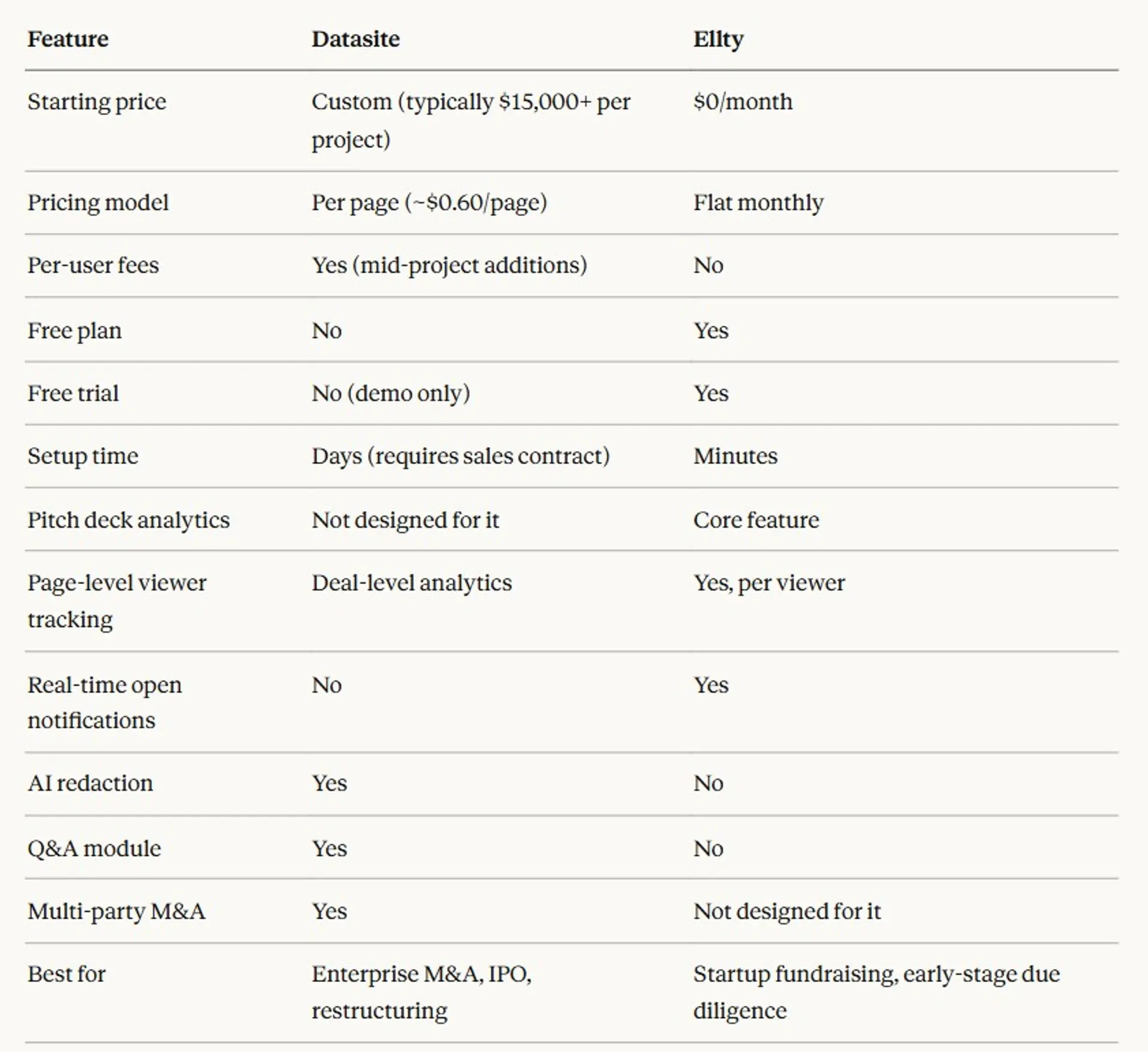
When to choose Ellty:
- You're a founder sharing materials with investors
- You need to know who's engaging with your deck in real time
- Your document volume doesn't require M&A-grade infrastructure
- You want predictable monthly costs, not usage-based billing
- You need something running today, not after a sales cycle
Intralinks
Datasite's most direct competitor. Both use per-page pricing, both target enterprise M&A, and both have similar cost ranges. Often comes down to preference within specific investment banks and law firms - some have institutional relationships with one or the other. No public pricing. No free trial. Custom quotes only.
Best for: Large-scale M&A, same use cases as Datasite. If you're comparing Datasite and Intralinks, the decision factors are usually deal team preference, existing relationships, and specific feature comparisons within enterprise plans.
FirmRoom
Flat-rate pricing starting around $595/month. For a 6-month deal, that's roughly $3,570 vs. Datasite's typical $50,000+ for the same scope. Specifically positions itself as a lower-cost alternative to Datasite and Intralinks. Offers a 14-day free trial.
Best for: Mid-market M&A and due diligence where you need proper VDR features but Datasite pricing is hard to justify. Good for advisory firms running multiple deals per year who want predictable monthly costs.
iDeals VDR
Modern VDR with transparent pricing, a 30-day free trial, and plans ranging from ~$149 - $1,999/month. More feature-rich than tools like Ellty, more affordable than Datasite. ISO 27001 certified.
Best for: Companies needing a proper full-featured VDR at a defined monthly rate. Works for mid-market deals, fundraising rounds, and ongoing compliance use cases.
Papermark
Open-source-based modern VDR at ~€99/month. Unlimited data rooms, unlimited guest access, unlimited storage. SOC 2 Type II and ISO 27001 compliant.
Best for: Teams that want enterprise compliance certifications at a flat, predictable price. Good for startups who've outgrown lightweight tools but don't need M&A-grade enterprise infrastructure.
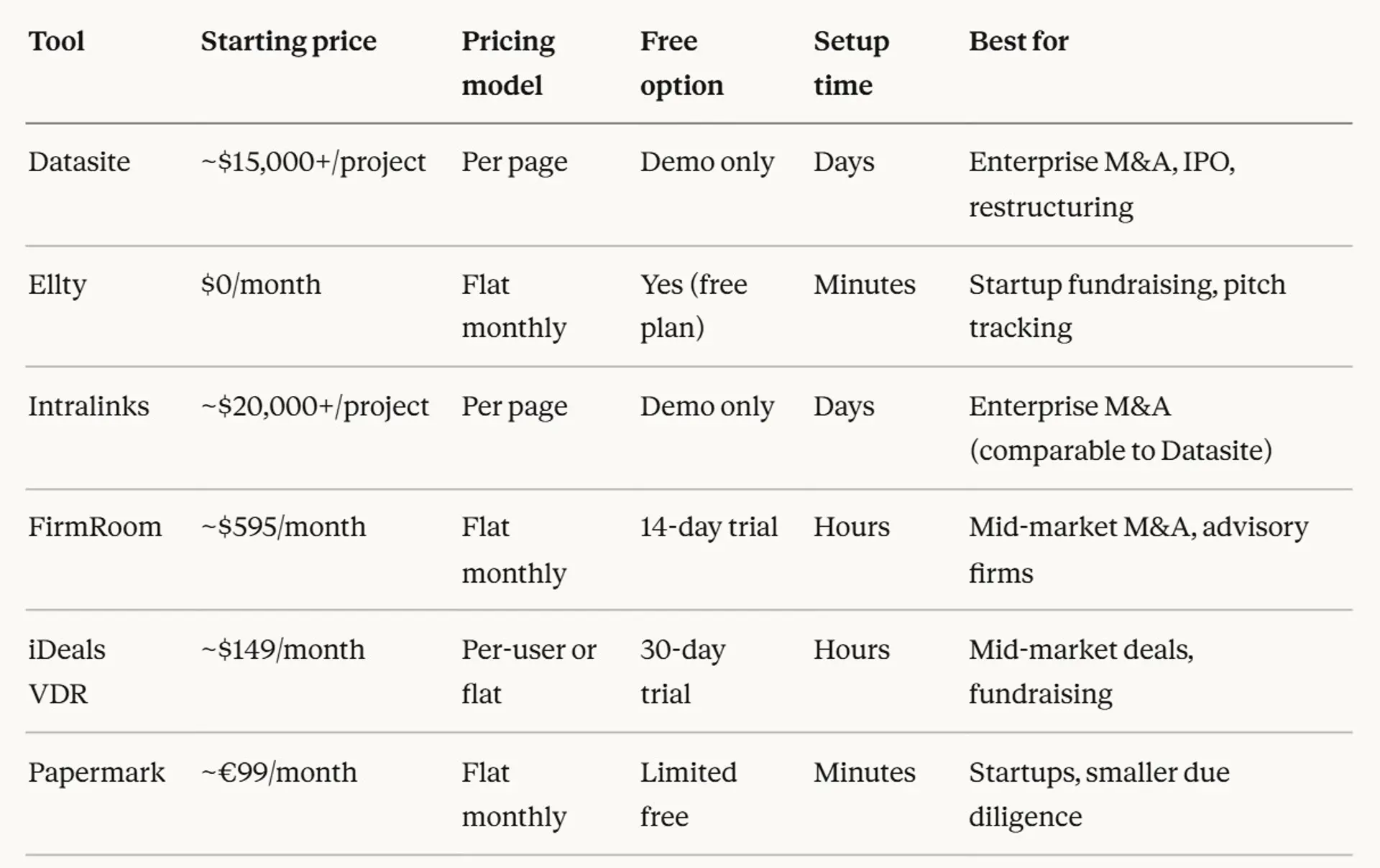
Quick comparison table

Is Datasite data room right for you?
Choose Datasite if:
- You're running a formal M&A, IPO, restructuring, or bankruptcy process
- Institutional counterparties (investment banks, law firms, PE firms) are on the other side of the deal
- Deal size is $50M+ and VDR cost is a legitimate deal expense
- Your deal team has previous Datasite experience and doesn't want to change tools
- You need enterprise certifications: SOC 2, ISO 27001, GDPR compliance with full audit trails
- You need AI redaction across thousands of sensitive documents
- Your deal involves multiple buyer groups that need completely separate access environments
- 24/7 dedicated project support is a non-negotiable requirement
Look at alternatives if:
- You're a startup sharing materials with seed or Series A investors
- Your "due diligence" is a relatively small set of documents, not thousands of files
- VDR cost at $15,000-$40,000+ is material relative to your deal size
- You need something running today without a sales cycle
- Predictable monthly billing matters more than per-page flexibility
- You need real-time notifications when investors open your materials
- You don't have a dedicated team member to manage an enterprise VDR
- Your counterparties don't require institutional-grade infrastructure
Decision framework
About your transaction:
- Is this a formal financial transaction (M&A, IPO, restructuring) or a startup fundraising process?
- What's the deal size? Does a $40,000+ VDR cost make sense proportionally?
- Do your counterparties specifically expect or require Datasite?
About your team:
- Do you have someone who can manage an enterprise VDR on an ongoing basis?
- Have your deal team members used Datasite before and prefer it?
- How many documents are you actually dealing with? Hundreds or thousands?
About your budget:
- Is the VDR cost a deal expense you can pass through, or does it come out of your operating budget?
- Do you need predictable monthly costs, or can you absorb usage-based billing uncertainty?
About timing:
- Do you have time for a sales cycle and contract negotiation, or do you need a data room running this week?
Honest recommendation
Datasite is the right answer for a specific profile: large, formal financial transactions with institutional parties, deal teams experienced in enterprise VDRs, and situations where the cost is justified by deal size and complexity. In those cases, it's one of the best options available and the extra cost buys real value.
For everyone else - most startups, early-stage founders, and teams running smaller or simpler processes - the cost structure and complexity don't match the use case. You'll be paying enterprise prices for features you won't use, after a sales process that takes longer than your actual data room setup. Alternatives including Ellty, FirmRoom, iDeals, and Papermark serve those scenarios better.
Frequently asked questions about Datasite data rooms
What is Datasite used for?
Primarily for M&A due diligence, IPOs, restructurings, and capital raises. It's an enterprise virtual data room built for complex, high-stakes financial transactions. It's not designed for informal document sharing or startup fundraising.
Does Datasite have a free plan?
No. There's no free tier and no self-serve trial. You can request a product demo with a sales rep, but you can't test the platform independently without entering a sales process.
How much does Datasite data room cost?
Custom-quoted per project. Based on industry data and user reports, expect $15,000 - $40,000 for startup-scale use, $40,000 - $100,000 for mid-market M&A, and $100,000+ for large transactions. Costs scale with page count, file types, deal duration, and user count.
Why doesn't Datasite publish pricing?
Because their per-page model means cost varies significantly by project. A 5,000-page project and a 500,000-page project are priced completely differently. Custom quoting also gives them pricing flexibility by client.
Is Datasite hard to set up?
The platform itself is intuitive once you're in. But getting in requires a sales conversation, contract negotiation, and onboarding - which adds several days before you can upload your first document. The setup process is not self-serve.
What's the difference between Datasite Diligence and Datasite Acquire?
Diligence is the sell-side product - for the company or asset being sold, sharing documents with potential buyers. Acquire is the buy-side product - for buyers conducting due diligence on a target. Both are VDRs, but the workflow and feature emphasis differ.
Does Datasite have a mobile app?
Yes. Datasite has iOS and Android apps with full functionality for document review, access management, and analytics.
Is Datasite secure?
Yes - it's one of the most security-certified VDR platforms available. SOC 2 Type II, ISO 27001, SSAE 18, GDPR compliance, 256-bit encryption in transit and at rest, dynamic watermarking, MFA, and SSO. For enterprise transactions, the security is a genuine strength.
Can I use Datasite for a startup fundraising round?
Technically yes. Practically, the cost ($15,000+) is hard to justify for a seed or Series A raise where a platform like Ellty ($0 - $69/month) or iDeals ($149+/month) does what you need.
How does Datasite compare to Intralinks?
They're the two most established enterprise VDR providers, both with per-page pricing and similar cost ranges. Most deal teams have a preference based on prior experience. Feature-for-feature they're comparable at the enterprise level.
Can I cancel a Datasite contract mid-project?
Cancellation terms are governed by your individual contract. Don't assume monthly flexibility - most Datasite engagements are project-based contracts. Confirm cancellation terms before signing.
Does Datasite charge extra for Excel files?
Yes, and this catches many users off guard. Under Datasite's model, 10KB of Excel data = 1 page. A moderately complex spreadsheet can be billed as dozens or hundreds of pages. If your data room has significant Excel content, this can materially increase your total cost.
Author

Anika Tabassum Nionta is a Content Manager at Ellty, where she writes about secure document sharing, virtual data rooms, M&A, due diligence, fundraising, and sales enablement. With over 6 years of writing experience, she helps professionals understand how to share confidential documents securely, track engagement, and manage deals more effectively. Anika holds both a BA and MA in English from Dhaka University. Outside of work, she enjoys reading, exploring new cafes in Dhaka, and connecting with entrepreneurs and dealmakers in her community.

