
Digify not working? You're not alone.
When Digify goes down, deals get delayed. Confidential documents can't be shared. Due diligence stops. Analytics tracking disappears. Time-sensitive materials sit unsent while recipients wait.
This guide shows how to check Digify's status, common issues, and what to do when you need to share documents immediately.
Plus reliable alternatives that maintain better uptime.
Don't let downtime kill your deals
Digify down during crucial due diligence?
- Your pitch deck needs to reach investors today.
- That NDA requires signatures now.
- The data room must be accessible for tomorrow's meeting.
Ellty maintains 99.9% uptime. When others fail, we're still running.
Share documents instantly. Track engagement in real-time. Never miss a deadline because of platform issues.
Is Digify down right now?
Check these sources:
1. Digify Status Page
- Link: status.digify.com (if available) or check their official website
- What it shows: Current issues, planned maintenance, incident history
- Note: Some platforms are slow to update during actual outages
2. DownDetector
- Link: downdetector.com/status/digify
- What it shows: User-reported issues. See outage map and timeline showing when problems started.
3. Social media
- Twitter/X: Search #digifydown or @digify
- Why: Real-time user complaints. Often faster than official updates. Users share workarounds.
4. Reddit
- Subreddit: r/startups or r/datarooms
- Why: Users sharing similar experiences and temporary solutions
5. LinkedIn
- Search "Digify down" or check Digify's company page
- Why: Business users often report issues here first
Common error messages:
- "Service Unavailable" - Server overload or maintenance
- "502 Bad Gateway" - Backend server issues
- "Cannot generate secure link" - Core service failure
- "Document upload failed" - Storage system problems
- Endless loading spinner - Connection or timeout issues
- "Authentication error" - Login system failure
If multiple sources confirm issues, it's not just you.
Common Digify issues
Login failures
Can't access your account. Password correct but won't authenticate. Two-factor authentication timing out or not sending codes.
Usually means authentication servers struggling or email delivery systems down.
Document upload errors
Files won't upload. Upload starts then fails at 90%. "Upload failed" error with no explanation.
Storage system issues. Could be file size limits hit or backend problems. Blocks your entire workflow.
Link generation broken
Upload works. But "Create Secure Link" button does nothing. Or generates links that return 404 errors.
Core functionality failure. Usually system-wide when this happens.
Analytics not updating
Recipients view documents but dashboard shows zero activity. Real-time tracking delays by hours or days. View counts frozen.
Database sync issues. Data usually recovers later but you miss real-time insights when they matter most.
Data room access failures
Recipients can't access the data room. "Access denied" errors despite correct permissions. Invitation emails not sending.
Permission system malfunction or email delivery problems. Catastrophic during active due diligence.
Watermark or security features failing
Dynamic watermarks not appearing. Screen capture blocking not working. Download restrictions ignored.
Security layer failures. Your documents become less protected than intended.
Slow loading times
Documents take forever to load for recipients. Preview generation stuck. Page turns lag badly.
Server overload or CDN problems. Affects recipient experience and reflects poorly on you.
Integration failures
Salesforce sync stops working. Dropbox connection breaks. Webhook notifications stop firing.
API endpoints down. Breaks automated workflows you've built around Digify.
What to do when Digify is down
Immediate steps
1. Verify it's not you
Check internet connection. Try different browser. Clear cache and cookies. Use incognito mode. Try from phone.
Still broken? It's Digify.
2. Check downtime duration
Recent outage? Might resolve quickly. Check status sources for estimated recovery time.
Been hours? Stop waiting. Your deals won't.
3. Contact support
Email [email protected] or use their support portal.
But expect delays. Everyone's contacting them. Response times spike during outages.
If you need to share documents now
Stop refreshing Digify. Stop waiting for it to work.
Your deals won't wait. Your deadlines won't move. Your investors expect materials today. That due diligence can't pause because your software failed.
Switch to Ellty immediately:
- Upload in seconds - drag and drop, no complexity
- Share instantly - generate trackable links immediately
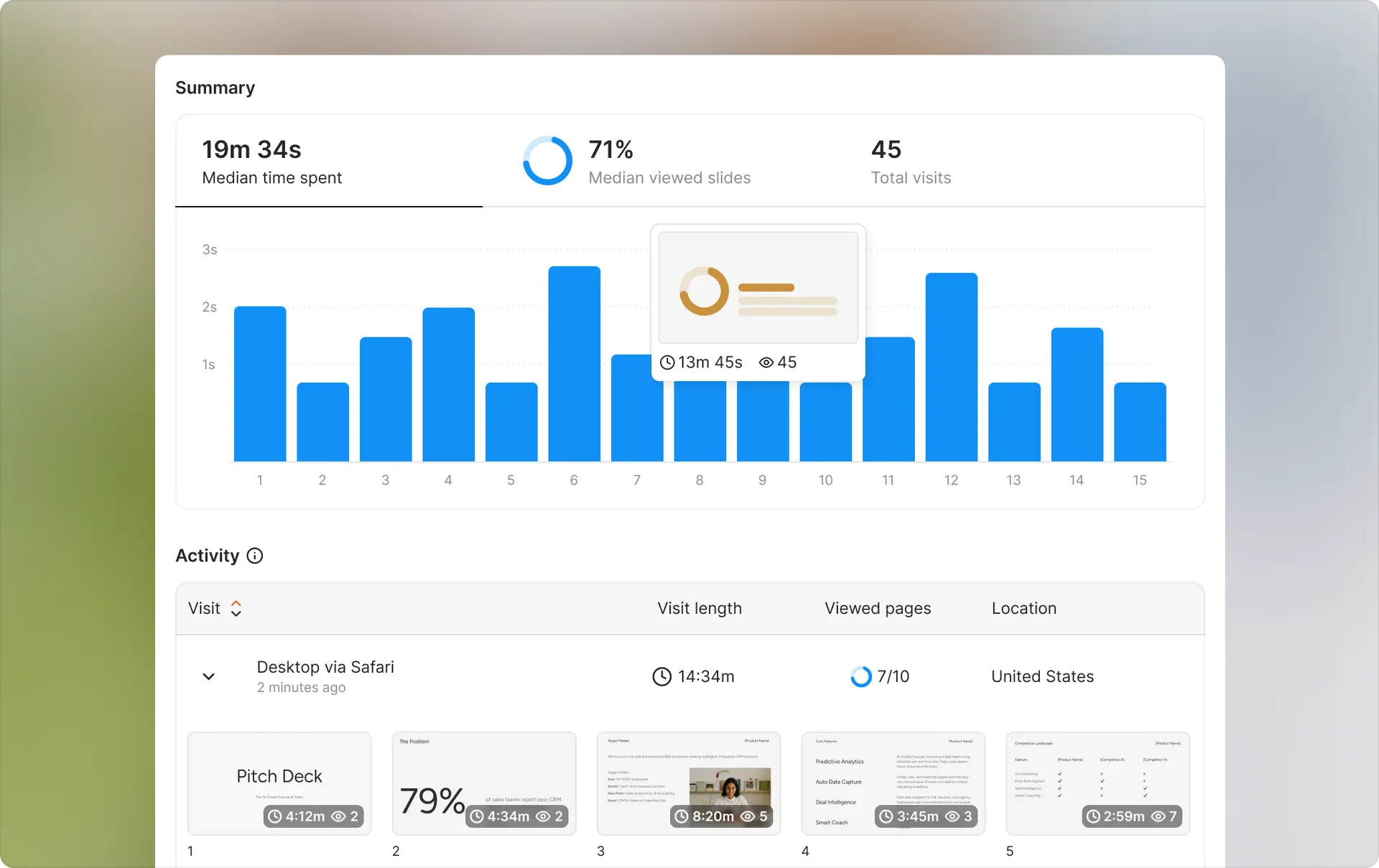
- Same tracking features - see who views, which pages, time spent
- Better analytics actually - real-time notifications, engagement scoring
- 99.9% uptime guaranteed - redundant servers, reliable infrastructure
- No learning curve - same workflow you're used to, better reliability
While Digify users wait for fixes, Ellty users close deals.

Migration takes 5 minutes:
- Sign up free at ellty.com
- Upload your document (pitch deck, files, NDAs)
- Create trackable link with custom permissions
- Share with recipients via email or direct link
- Watch real-time analytics as they engage
Your Digify is down. Your business doesn't have to be.
Don't lose another deal to downtime.
Why Digify goes down
Server overload
Too many users accessing documents simultaneously. Not enough server capacity. Peak times crash the system. Happens during business hours when everyone shares at once.
AWS infrastructure dependencies
Digify runs on Amazon Web Services. When AWS has regional issues, Digify goes down too. You're at the mercy of their infrastructure provider.
Database failures
Analytics data corrupts or database connections drop. System can't read or write tracking information. Recovery requires database restoration which takes hours.
CDN issues
Content delivery network problems. Documents hosted on CDN won't load. Links break. Files become inaccessible even though servers are running.
Maintenance windows
Scheduled maintenance during business hours. Poor timing affects global users. What's midnight for them is your deal-closing time.
Authentication system failures
Login servers separate from document servers. Authentication goes down but storage works. You just can't access anything. Common single point of failure.
Third-party email dependencies
Relies on SendGrid or similar for invitation emails and notifications. That service fails, your recipients never get access. Cascade effect you can't control.
Rate limiting issues
API rate limits hit during high traffic. System throttles requests. Features stop working for some users while others continue normally. Unpredictable behavior.
Reliable alternatives when Digify fails
Ellty - 99.9% uptime


Never down when you need it. Redundant servers across multiple regions. Better infrastructure built specifically for reliable document sharing and pitch deck analytics.
Real-time tracking that actually works. Instant notifications when recipients engage. Advanced analytics including engagement scoring and page-by-page heatmaps. See exactly which slides investors spend time on, when they return to review, and which sections generate the most interest.
Built for founders who can't afford downtime. When you're raising capital or closing deals, every minute matters. Ellty infrastructure prioritizes availability over everything else.
Core reliability features:
- Automatic failover between server regions
- CDN-backed file delivery for consistent load times
- Database replication prevents data loss
- 24/7 monitoring with instant incident response
- Status page updates within minutes of any issue
What makes it different: Upload your pitch deck and share it in under 60 seconds. No complex setup. No permission hierarchies to configure unless you need them. The interface assumes you want to share documents quickly and track engagement accurately.
Analytics update in real-time, not hours later. When an investor opens your deck at 11pm, you know immediately. When they forward it to a partner, you see that too. When they spend six minutes on your financials slide, that matters.
Security features don't compromise on speed. Password protection, email verification, dynamic watermarks, download controls. All work without slowing down document access.
Pricing: Free tier includes 5 documents, full analytics, unlimited recipients. Pro at $29/month removes limits and adds custom branding, advanced security, data room features.
Migration from Digify: Export your documents from Digify when it's back up. Upload to Ellty. Regenerate shareable links. Send to same recipients. Takes 10 minutes per document. Your tracking history starts fresh but you're operational immediately.
DocSend - Established platform with enterprise backing
Owned by Dropbox since 2021. Larger infrastructure means more resources for uptime. Known specifically for investor document sharing and fundraising workflows.
Built its reputation among VCs and startup founders. Many investors already familiar with the platform. That recognition has value when you're sharing pitch materials.
Strengths: Good uptime generally, though tied to Dropbox's infrastructure. When Dropbox has regional issues, DocSend feels it too. But benefits from Dropbox's massive server network and enterprise-grade monitoring.
Strong analytics focused on investor behavior. Shows company-level insights when multiple people from the same firm view your deck. Helpful for understanding which partners are championing your deal internally.
Spaces feature organizes multiple documents into virtual data rooms. Useful during due diligence when you're sharing cap tables, financial models, customer lists, legal documents.
Limitations: More expensive than alternatives. Enterprise features locked behind higher tiers. Interface hasn't evolved much since acquisition.
Email verification required for recipients can create friction. Some investors find it annoying to verify email just to view a pitch deck. You'll hear about it.
Pricing: Starts at $45/month for standard features. Advanced plan at $150/month for data rooms and detailed analytics. Enterprise pricing for larger teams.
Best for: Founders who need the DocSend brand recognition with investors, or teams already using Dropbox infrastructure.
PandaDoc - Document automation focus
Broader document platform beyond just secure sharing. Handles proposals, contracts, quotes, eSignatures. More features but potentially more complexity than specialized tools.
Solid uptime record. Not specifically built for pitch deck sharing, so analytics are less investor-focused. But reliable infrastructure and established platform.
Strengths: All-in-one document workflow. Create proposals, get them approved internally, send for signature, track everything in one place. Reduces tool sprawl if you're handling multiple document types.
Template library for common business documents. NDAs, service agreements, sales proposals. Saves time if you're sending similar documents repeatedly.
CRM integrations work well. Connects with Salesforce, HubSpot, Pipedrive. Automatic logging of document activity to your deal records.
Limitations: Not purpose-built for fundraising or investor relations. Analytics show opens and time spent but miss pitch-specific insights. Which slides resonated? Which sections got skipped? Less clear here.
Overkill if you only need secure document sharing. You're paying for proposal builders, eSignature workflows, approval chains you might not use.
Interface designed for sales teams, not founders pitching investors. Learning curve higher than simpler alternatives.
Pricing: Starts at $19/month for basic features. Business plan at $49/month adds analytics and integrations. Enterprise pricing for advanced security and customization.
Best for: Companies needing document automation across sales, legal, and fundraising. Less ideal if you only need pitch deck sharing.
Pitch.com - Presentation-specific platform
Built specifically for creating and sharing pitch decks. Clean, modern interface. Reliable delivery focused on presentation experience.
Less focused on secure data rooms or due diligence workflows. More about making beautiful pitch decks and sharing them effectively.
Strengths: Presentation creation tools built in. Don't just share decks, build them in the platform. Templates designed by professionals. Collaboration features let your team work on slides together.
Fast loading times for recipients. Optimized specifically for slide-based content. Smooth page transitions, crisp rendering on all devices.
Free tier genuinely useful. Not just a trial period. Actually use it for ongoing pitch deck work without paying.
Limitations: Limited security features compared to data room platforms. Basic password protection and email gates. No dynamic watermarks, screen capture blocking, or advanced permission controls.
Analytics less detailed than specialized tracking tools. Shows views and time spent. Doesn't break down engagement by slide or track scrolling behavior.
Not designed for sharing multiple documents in organized data rooms. Fine for one pitch deck. Awkward when you need to share 20 due diligence documents in structured folders.
Pricing: Free tier available with Pitch.com branding. Pro at $8/month per user removes branding and adds unlimited presentations. Business at $16/month per user adds advanced collaboration.
Best for: Early-stage founders who need to create and share pitch decks on a budget. Less suitable for later-stage due diligence with complex document requirements.
Brieflink - Lightweight and fast
Simple document sharing without complexity. No account required for recipients. Fast setup, minimal features, reliable delivery.
Strengths: Recipients click link and see document immediately. No email verification, no account creation, no friction. Lowest barrier to entry.
Clean analytics dashboard. Not overwhelmed with features. Shows the essentials: who viewed, when, for how long.
Low price point. Good for bootstrapped founders watching every dollar.
Limitations: Basic security features. Password protection exists but limited compared to enterprise data room tools.
No data room organization. Each document gets its own link. Managing 10+ documents during due diligence becomes messy.
Smaller company means less certain long-term stability. Infrastructure adequate but not redundant like larger platforms.
Pricing: Starts at $15/month. Simple pricing, one tier, no upsells.
Best for: Founders who want dead-simple document sharing and don't need advanced security or data room features.
Quick comparison


What actually matters during downtime
When your current platform fails, you need alternatives that solve your immediate problem. Here's what to prioritize:
Speed of setup:
Ellty: 2 minutes from signup to sharing your first link
DocSend: 5-8 minutes including account setup and document upload
PandaDoc: 10-15 minutes due to more complex interface
Pitch.com: 5 minutes if just sharing, longer if creating new deck
Reliability guarantees:
Ellty: 99.9% uptime SLA, status page updates in real-time
DocSend: 99.5% uptime tied to Dropbox infrastructure
PandaDoc: 99.5% uptime for enterprise plans
Pitch.com: No published SLA, generally reliable
Free tier functionality:
Ellty: 5 documents, full analytics, unlimited recipients
DocSend: 14-day trial only PandaDoc: 14-day trial only
Pitch.com: Unlimited presentations with branding
Emergency use case:
If Digify is down and you need to share documents in the next hour, Ellty's free tier is your fastest path. No credit card, no trial period, full features for immediate needs.
For emergency sharing:
Digify is down. Your investor expects your deck in 30 minutes. You don't have time to evaluate five platforms.
Ellty free tier gets you running instantly. No credit card. No waiting. No approval process. No sales call.
Sign up with email. Upload your deck. Generate trackable link. Send to investor. Watch them engage in real-time.
While Digify users refresh error pages and apologize to investors for delays, you're closing deals.
Switching strategies - temporary vs permanent
Temporary backup during outages: Keep Ellty free tier as emergency backup. When Digify goes down, you're ready immediately. Takes 5 minutes to upload documents you might need to share urgently. Better than scrambling during an actual outage.
Permanent migration: If Digify downtime has cost you deals or created embarrassing situations, consider switching. Export all documents and analytics from Digify. Upload to your chosen alternative. Update bookmarks and processes. Send new links to frequent recipients with brief explanation.
Most founders who switch do so after the second or third embarrassing outage, not the first. Don't wait until it costs you funding.
FAQs
How often does Digify go down?
Digify experiences occasional outages like most SaaS platforms. Check DownDetector for historical data. Major outages happen a few times per year based on user reports. Minor issues more frequently.
Will I lose my documents if Digify is down?
No. Your documents are stored and safe. You just can't access or share them during downtime. Once service restores, everything returns.
Can I get a refund for downtime?
Check Digify's SLA terms in your subscription agreement. Some plans offer service credits for extended outages. Contact support with specific downtime periods for refund requests.
How long do Digify outages usually last?
Minor issues: 30 minutes to 2 hours. Major outages: 4-8 hours. Depends on the root cause. Authentication issues resolve faster than database problems.
Should I switch from Digify permanently?
Depends on your risk tolerance. If downtime has cost you deals or created embarrassing situations with investors, consider alternatives with better uptime guarantees. If occasional issues are acceptable, you might stay.
Can I use both Digify and a backup platform?
Yes. Many users maintain accounts on multiple platforms. Use your primary tool normally, keep a backup ready for emergencies. Ellty's free tier works well for this.
What's the most reliable document sharing platform?
Platforms with 99.9% uptime guarantees and redundant infrastructure perform best. Ellty, DocSend, and enterprise platforms generally maintain better uptime than smaller tools. Check independent uptime monitoring services for data.
How do I export my data from Digify?
Log in when service is available. Download analytics reports from dashboard. Save recipient lists and document files locally. No direct "export all" feature exists. Do this proactively before you need to switch.
Author

Anika Tabassum Nionta is a Content Manager at Ellty, where she writes about secure document sharing, virtual data rooms, M&A, due diligence, fundraising, and sales enablement. With over 6 years of writing experience, she helps professionals understand how to share confidential documents securely, track engagement, and manage deals more effectively. Anika holds both a BA and MA in English from Dhaka University. Outside of work, she enjoys reading, exploring new cafes in Dhaka, and connecting with entrepreneurs and dealmakers in her community.

